Our Top Picks
 Marsail Ergonomic Office Chair: Office Desk Chair with46.9" x 24.8" x 24.4"46.9 x 24.8 x 24.4 inches30.42 poundsCheck on Amazon
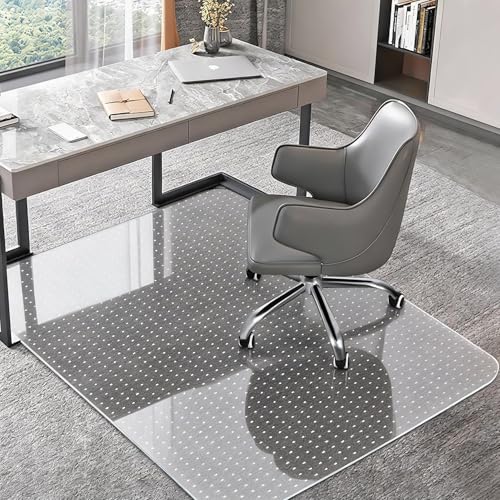 BesWin Office Chair Mat for Carpet48" X 30" Rectangle (for Carpet)48 x 30 x 0.09 inchesCheck on Amazon
 Everlasting Comfort The Original Lumbar Support Pillow forLarge13 x 3.5 x 0.1 inches1.5 poundsCheck on Amazon
As an Amazon Associate we earn from qualifying purchases.
A gaming chair, a mouse, and a keyboard decide how a PC setup feels after the first hour, yet most buyers choose the three pieces separately and only notice the mismatch later. A chair that forces you to reach forward makes a light mouse feel twitchy, while a keyboard that sits too high turns a good seat into a source of shoulder strain. The real decision is not which single item looks best on its own, but how the three work together at your desk.
This guide is for players building a first setup, upgrading one tired piece at a time, and anyone whose wrists, back, or aim feel off after long sessions. It walks through seat fit, mouse shape and sensor behaviour, keyboard layout and switch feel, and the desk arrangement that ties them together, so you can judge each piece by how it fits your body and your games.
How to Choose
Start With the Chair and Your Sitting Height
The chair sets the geometry for everything else. Sit with your feet flat and your knees level with your hips, then check whether your forearms can rest near horizontal when your hands reach the keyboard. A seat that is too high leaves your feet dangling and your shoulders raised, while one that is too low forces your wrists to bend upward. Look for adjustable seat height, a backrest that supports your lower back, and armrests that move up and down rather than sitting fixed. Check the stated weight limit and seat width against your own frame, because a chair that is too narrow squeezes your hips and one that is too wide leaves you sliding sideways during fast flicks.
Match the Mouse to Your Grip and Your Games
Mouse choice starts with how you hold it. Palm grippers rest the whole hand on the shell and usually want a longer, taller body, claw grippers arch their fingers and suit a medium shell with a defined hump, and fingertip grippers control with the fingers alone and often prefer a short, light shape. Tracking consistency matters more than sensor resolution, so look for a sensor that holds its aim during fast flicks without skipping. Extra side buttons help in games with many abilities, but a shape that cramps your ring finger will cost more accuracy than any button layout saves. If you play on a small desk, a lighter mouse with a flexible cable or wireless connection keeps drag low.
Pick a Keyboard Layout and Switch Feel Together
Keyboard layout decides how much desk space your mouse keeps. A full-size board gives you a number pad for work and macros, a tenkeyless board drops it for extra mouse room, and a compact layout frees even more space at the cost of new key combinations. Switch feel matters just as much: linear switches travel smoothly from top to bottom, tactile switches give a small bump as they actuate, and clicky switches add an audible snap. Membrane boards feel softer and quieter, while mechanical boards offer more consistent key travel and replaceable switches on some models. Match switch weight to your typing force: switches that are too heavy tire your fingers, and ones that are too light invite accidental presses.
Plan the Desk Layout Before You Buy Anything
The three pieces share one surface, so measure before ordering. A keyboard and mouse need enough depth for your forearms to rest without your elbows hanging off the edge, and a wide mouse pad keeps the sensor surface consistent across large sweeps. Keep the monitor at arm’s length with the top of the screen near eye level, so your neck stays neutral. Leave room behind the keyboard for the mouse cable or receiver, and route cables so they never tug mid-flick. If the desk is shallow, a tenkeyless keyboard and a chair with adjustable armrests recover space faster than any single accessory purchase. A tidy layout also makes it easier to spot which piece is causing discomfort.
Which One Fits Your Situation
First Setup on a Tight Desk
Choose a compact keyboard layout, a light mouse with a shape that suits your grip, and a chair with adjustable height and armrests. The smaller board frees mouse space, the light mouse forgives a cramped sweep area, and the adjustable chair lets you set a neutral arm angle even when the desk cannot move. Add a large mouse pad before buying any extra accessory, because a consistent surface improves aim more than a fancier sensor on a patchy desk.
Long Sessions and a Sore Back
Put the chair first and treat the peripherals as supporting pieces. A seat with real lumbar support, a backrest that reclines slightly, and armrests that meet your elbows keeps your posture honest through long evenings. Pair it with a keyboard that lets your wrists stay straight and a mouse that fills your palm without forcing your fingers to stretch. Take short standing breaks, since no chair removes the need to move.
Competitive Play and Fast Aim
Prioritise a mouse with consistent tracking and a shape you can control during flicks, then a keyboard with a layout that leaves maximum mouse room. A tenkeyless or compact board is the usual answer, with switches that actuate cleanly under fast repeated presses. The chair matters here too: a stable base and armrests that stay out of the way keep your aim arm free to move, so test the armrest position with your actual mouse hand before settling in.
Shared Desk for Work and Play
Pick pieces that switch roles without a rebuild. A full-size or tenkeyless keyboard with quieter switches suits typing during the day, a mouse with a comfortable all-day shape avoids the fatigue of an aggressive gaming shell, and a chair with adjustable lumbar support carries both uses. Keep the layout simple and the cable routing clean, so the desk shifts from work to play with a single change of lighting rather than a rearrangement.
Common Mistakes
- Buying the chair, mouse, and keyboard as three unrelated bargains, then discovering the seat height and desk depth fight each other.
- Choosing a mouse by its sensor numbers instead of by grip, hand size, and how it feels after an hour of play.
- Picking a full-size keyboard for a shallow desk, leaving no room for the mouse to sweep.
- Ignoring the chair’s weight limit and seat width, which decide comfort more than the shape of the backrest.
- Setting the monitor too high or too far away, so the neck compensates for a layout the hands did not cause.
Top Picks for a PC Gaming Chair Setup
A comfortable seat protects your back and keeps your desk setup usable for longer. These items cover a chair, a floor mat and extra support.
Homall Gaming Chair, Ergonomic, Footrest and Massage Lumbar Support
A high-back chair with a retractable footrest and a lumbar pillow with a massage function. It targets budget buyers.

Homall Gaming Chair, Ergonomic, Footrest & Massage Lumbar Support, White | PU Leather, Massage Lumbar, Slide-out Footrest, 135° Recline, 360° Swivel, 300lbs Capacity, Adjustable Office Computer Chair
One of the home product options compared in this guide.
View on AmazonMarsail Ergonomic Office Chair, High Back Mesh
A mesh-back chair with adjustable support. Mesh breathes better in warm rooms than leatherette.
Marsail Ergonomic Office Chair: Office Desk Chair with High Back Mesh and Adjustable Lumbar Support Rolling Work Swivel Task Chairs with Wheel 3D Armrests and Headrest
One of the home product options compared in this guide.
View on AmazonBesWin Office Chair Mat for Carpet, 30 x 48 Inch
A clear mat that helps a chair roll over carpet. It protects the floor and reduces strain when moving.
BesWin Office Chair Mat for Carpet, 30" x 48", Clear | Heavy Duty Computer Desk Chair Mat for Low Carpeted Floors, Sturdy Carpet Protector, Easy Glide and Flat Without Curling
One of the mattress protector options compared in this guide.
View on AmazonEverlasting Comfort Lumbar Support Pillow for Office Chair
A memory foam pillow that adds support to the lower back. It can improve the fit of any existing chair.
Everlasting Comfort The Original Lumbar Support Pillow for Office Chair - Improves Posture, Promotes Back Pain Relief - Superior Back Support for Gaming and Desk Chairs - Lumbar Pillow for Car, Couch
Chosen because it targets pressure relief / back pain.
View on AmazonA good chair should let your feet rest flat, support the lower back and let your arms rest at the desk height without shrugging. Add a mat if you roll often on carpet, and take short breaks to stand and stretch since no seat replaces regular movement. Check the weight rating and seat dimensions as well, since a chair that fits one person poorly can feel tiring quickly.
Frequently Asked Questions
Should I buy a gaming chair, mouse, and keyboard as one bundle?
No single bundle covers all three pieces well, because chairs are furniture and peripherals are electronics sold through different lines. Keyboard and mouse combos exist and can be good value, but plan the chair separately by seat fit, weight limit, and adjustability. Matching the three pieces by measurements and grip matters more than matching their branding.
What matters most when choosing a gaming chair?
Fit comes first: seat height that lets your feet rest flat, a width that suits your frame, and lumbar support that meets your lower back. Adjustable armrests and a backrest that reclines slightly help more than extra padding. Check the stated weight limit and, where possible, sit in the chair before committing to it.
How do I know which mouse shape suits me?
Watch your natural grip: a palm grip wants a longer shell, a claw grip suits a medium hump, and a fingertip grip works best with a short, light body. Hand length matters too, so compare the shell dimensions with your hand rather than trusting a generic size label. If your ring finger drags or your wrist lifts during flicks, the shape is wrong.
Does keyboard switch type really change gaming?
Yes, because switch feel shapes every press you make. Linear switches suit fast repeated inputs, tactile switches give feedback that helps some players time presses, and clicky switches add noise that others find distracting. Membrane boards can be fine for casual play, while mechanical boards offer more consistent travel. Choose by feel and noise tolerance, not by marketing labels.
FAQ
Should I buy a gaming chair, mouse, and keyboard as one bundle?
What matters most when choosing a gaming chair?
How do I know which mouse shape suits me?
Does keyboard switch type really change gaming?
More from Amazon
Programs that pair well with the guide above. Offers and eligibility are set by Amazon and may change.
Free shipping on eligible items, Prime Video and more. Eligible new members can start with a free trial.
Start a Prime free trialAd-free music streaming. Eligible new subscribers can start with a free trial.
Try Music Unlimited freeA Prime membership for ages 18-24 with a trial period. Eligibility is set by Amazon.
See Prime for Young AdultsAudiobooks and podcasts to listen to on the go. Eligible new members can start with a free trial.
Try Audible freeAs an Amazon Associate we earn from qualifying purchases.