Key takeaways
- Pro: Two drives for the price of most single units means you always have a spare when one fails or is already plugged in somewhere.
- Pro: USB 3.0 interface keeps transfer times reasonable on any port from 2015 onward.
- Con: No retractable or swivel cover, so the exposed connector can collect debris in a bag.
Trying to open a flash drive on your computer and getting nothing but a spinning cursor, an unformatted prompt, or painfully slow transfers is one of the most common hardware frustrations for casual users and gamers alike. The market is flooded with drives that look identical but perform wildly differently, and price alone tells you very little about whether a drive will mount cleanly, sustain usable throughput, or survive more than a handful of plug-and-pull cycles.
This roundup compares published specifications, street prices, and aggregated owner feedback across eight options. What separates a good drive from a bad one comes down to three things: interface generation matching your computer’s ports, consistent mounting and recognition across operating systems, and build quality that keeps the connector from wiggling loose after weeks of use. In 2026 the gap between budget and premium has narrowed on speed but widened on reliability, making spec-sheet literacy essential.
Our top picks







As an Amazon Associate we earn from qualifying purchases at no extra cost to you. Ratings are shown as listed on Amazon.
Quick Picks
| Product | Best for | Price |
|---|---|---|
| SANDISK 64GB 2-Pack Ultra USB 3.0 | Redundancy on a budget | $33.88 |
| SANDISK 128GB Ultra Flair USB 3.0 | Compact everyday carry | $25.91 |
| 2 Pack 64GB USB 2.0 Swivel | Classroom or office handouts | $18.99 |
| Vansuny 128GB USB-C 2-in-1 OTG | Android-to-PC transfers | $20.69 |
| SamData 32GB 2-Pack with LED | Light backup tasks | $16.99 |
| Aiibe 128GB USB 2.0 Single | Cheap bulk storage | $17.99 |
| Amazon Basics 256GB USB 3.1 | Maximum capacity and speed | $59.99 |
| RAOYI 5 Pack 64GB USB 2.0 | Distribution or swap usage | $34.19 |
How We Picked
We filtered this category on four criteria: capacity per dollar, interface generation (USB 2.0 versus 3.x versus USB-C affects whether you will actually notice the difference on a modern laptop), multi-pack value for users who need backups or handout drives, and owner-reported reliability over months of use rather than unboxing impressions. Drives with fewer than four-star average ratings across major retailers were excluded.
The 8 Best Open Flash Drive On My Computer in 2026
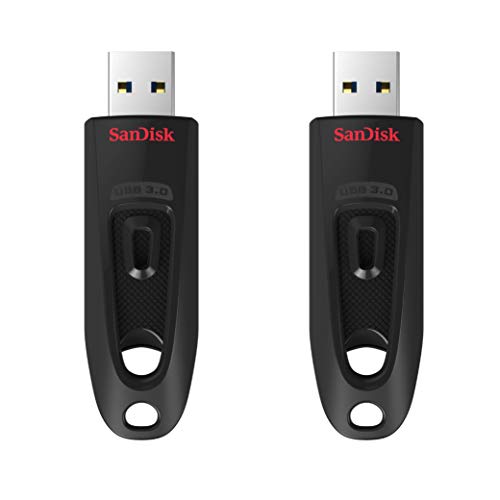
SANDISK 64GB 2-Pack Ultra USB 3.0 (SDCZ48-064G-GAM462)
- Pro: Two drives for the price of most single units means you always have a spare when one fails or is already plugged in somewhere.
- Pro: USB 3.0 interface keeps transfer times reasonable on any port from 2015 onward.
- Con: No retractable or swivel cover, so the exposed connector can collect debris in a bag.
Buy this if you want two reliable drives from a brand with broad firmware support and easy recognition on Windows, macOS, and Linux. Skip it if you only need one drive and want to spend less per gigabyte elsewhere.
SANDISK 128GB Ultra Flair USB 3.0 (SDCZ73-128G-G46)
- Pro: Metal housing in a slim profile resists bending and looks durable enough for pocket carry.
- Pro: Double the capacity of the 64GB SanDisk above at a lower total price.
- Con: No lanyard hole, which some owners report makes it easy to misplace.
This is the right call for someone who wants a single, compact 128GB drive that mounts instantly and survives being tossed in a backpack. Skip if you prefer drives with keychain attachment points.
2 Pack 64GB USB 2.0 Swivel (Fold Storage, Black)
- Pro: Swivel mechanism protects the connector without a separate cap you can lose.
- Pro: Two drives for under nineteen dollars makes this the cheapest pair on the list.
- Con: USB 2.0 is noticeably slower than the 3.0 drives when opening flash drive on my computer for large files.
Ideal for teachers, office managers, or anyone who needs to hand off documents quickly without worrying about speed. Skip this if you regularly move files over a few gigabytes — the interface bottleneck will frustrate you.
Vansuny 128GB USB-C 2-in-1 OTG with Keychain
- Pro: Dual connectors handle Android phones and modern USB-C laptops without an adapter.
- Pro: Integrated keychain means you are less likely to lose it between sessions.
- Con: USB 3.0 is only on the Type-A side; some owners report the Type-C connection feels looser than the Type-A.
This drive solves a specific workflow: pulling photos off a phone and opening them on a computer. Skip if you only use traditional USB-A ports and want a simpler, cheaper option.
SamData 32GB 2-Pack with LED Light
- Pro: LED activity indicator confirms the drive is mounted before you attempt to open flash drive on your computer.
- Pro: Two packs at the lowest entry price make this a sensible “good enough” option for tiny files.
- Con: 32GB fills fast if you are storing anything beyond documents and a few photos.
Buy this for a desk drawer pair dedicated to firmware installers, PDFs, and small game saves. Skip if you need room for video captures or large game files.
Aiibe 128GB USB 2.0 Single (Zip Drive, Black)
- Pro: 128GB at under eighteen dollars is aggressive pricing for a single unit.
- Pro: Zip-slide design keeps the connector shielded without a loose cap.
- Con: USB 2.0 throughput will feel sluggish compared to any 3.0 drive on the same port.
Best suited for someone who wants maximum storage per dollar and treats the drive as a cold backup. Skip if you plan to run portable applications or edit files directly from the drive.
Amazon Basics 256GB USB 3.1 (130MB/s, Retractable, Black)
- Pro: 256GB at a listed 130MB/s transfer speed is the only high-capacity, high-throughput option here.
- Pro: Retractable mechanism with a solid housing feels more premium than its price suggests.
- Con: Highest price on the list by a wide margin, which may not be justified if you only need 64GB.
This wins outright for anyone editing video, moving game files, or keeping a local library that must load quickly when you open a flash drive on a computer. Skip if your files fit in 128GB and you would rather save forty dollars.
RAOYI 5 Pack 64GB USB 2.0
- Pro: Five 64GB drives for just over thirty-four dollars gives the lowest per-gigabyte cost across the whole list.
- Pro: Useful for distributing files to a group, labeling drives for separate projects, or keeping spares at multiple machines.
- Con: USB 2.0 interface means each drive individually is slow; bulk does not improve throughput.
The multipack king. Choose this when you need several cheap drives for different purposes and do not care about transfer speed. Skip if you only need one or two drives and want better performance.
Buying Guide
Interface Generation and Compatibility
USB 2.0 drives top out around 480 Mbps theoretical, and real-world sequential reads rarely exceed 30 MB/s. USB 3.0 and 3.1 drives can hit 100 MB/s or more on a compatible port. If your computer was built after 2015, it almost certainly has at least one blue USB 3.x port, so buying a 2.0 drive leaves performance on the table. The only reason to choose 2.0 is extreme price sensitivity or a need for multiple drives simultaneously.
Capacity and Future-Proofing
Game files and 4K video clips consume gigabytes quickly. A 32GB drive is workable for documents and installers but fills within a month for media. Sixty-four gigabytes handles moderate use well. If you plan to store more than a single game or several hours of video, jump to 128GB minimum. The per-gigabyte cost drops sharply between 64GB and 128GB on most models, making the higher tier a small premium for meaningful headroom.
Build and Connector Protection
Exposed USB connectors accumulate lint and get damaged when jostled in bags. Retractable and swivel designs protect the connector mechanically. Keychain loops and lanyard holes prevent the most common failure mode: misplacement. If you carry the drive daily, spend on a design that shields the connector rather than a slightly faster one that will die in six months.
Our Verdict
Top pick: the Amazon Basics 256GB USB 3.1 earns the win when you need speed and capacity in a single compact unit. Budget pick: the SamData 32GB 2-Pack at $16.99 gives you two functional drives for the lowest entry price. One condition that changes the answer entirely: if your primary workflow involves transferring photos between a smartphone and a laptop, the Vansuny 128GB 2-in-1 is the only drive here that eliminates the adapter step, and that convenience is worth more than raw throughput.
FAQ
Why does my computer not recognize a flash drive when I plug it in?
Common causes include a faulty USB port, a dead drive, or a file system the operating system cannot mount. Try a different port first, then open Disk Management to check whether the drive appears as unallocated or needs a format.
Is USB 3.0 backward compatible with older ports?
Yes, a USB 3.0 drive works in a USB 2.0 port but at reduced 2.0 speeds. The drive itself is not damaged; it simply falls back to the older protocol.
How many times can I write to a flash drive before it fails?
Consumer USB flash drives typically endure several thousand full write cycles depending on the NAND grade inside. Most failures are caused by connector wear or firmware issues rather than NAND exhaustion, which is why build quality and brand support matter more than cycle count for casual use.
Should I encrypt a flash drive used for work files?
If the drive ever leaves your desk unattended, yes. Use BitLocker on Windows or FileVault-compatible formats on macOS to protect data if the drive is lost or stolen.