Key takeaways
- Buying a basic power strip without surge suppression. An outlet multiplier may provide zero surge protection. Verify the device is actually identified as a surge protector, including its appropriate certification and operating-status indicator.
- Assuming the highest joule count makes lightning harmless. Extreme events can overwhelm point-of-use units. Electrical Safety Foundation International advises not to rely on any one surge device to handle a direct lightning strike.
- Stacking strips to gain more outlets. Daisy-chaining can create an overload or installation hazard and does not increase the wall circuit’s capacity. Use one appropriately sized strip on a sound outlet.
- Ignoring the grounded LED. A status light is a warning worth acting on; it is not decorative RGB lighting. Never defeat grounding with an improvised adapter.
- Confusing USB charging with USB connectivity. Built-in USB-A or USB-C charging on a surge strip does not connect your controller, external SSD, or headset to the console as a data device.
- Buying based on cached list prices. Retailer category listings, variants, ZIP-dependent inventory, and manufacturer MSRPs can disagree. Confirm the exact model, price, and stock again at checkout.
- Forgetting replacement after a serious event. Surge components age and can lose protection. Follow manufacturer-specific end-of-life indicators and replacement instructions.
The best PS5 Pro surge protectors add a genuine layer of power-surge defense without turning your entertainment center into a tangle of overloaded outlets. For most US setups, the CyberPower CSB806R1 is our strongest everyday starting point: eight widely spaced AC receptacles, a protection-status indicator, a six-foot cord, and an actively listed purchase option. The CyberPower CSB1206 works better when your PS5 Pro shares a cabinet with a television, soundbar, router, and several chargers. Neither product guarantees protection from every electrical event, and a surge strip cannot keep the console running during an outage.
What matters is not simply the largest joule number. A credible surge protector should have a recognized safety certification for its actual US model, a grounded connection, useful protected-status indicators, enough properly spaced outlets, and a load rating suitable for the devices you connect. We compared seven real products using manufacturer specifications and US seller pages. Prices and inventory are snapshots from October 27, 2026; compatibility here means a standard US AC power connection, not an endorsement by Sony or a PS5 Pro-specific electrical certification.
Quick verdict: the best choice for your setup
Best overall — CyberPower CSB806R1: Eight outlets, 4,800-joule manufacturer rating, wide transformer spacing, and a grounded/protected status indication in a conventional corded strip. It does not have USB charging. Best for a crowded TV cabinet — CyberPower CSB1206: Twelve AC sockets give you more layout flexibility, although the total permissible load does not increase merely because you have more sockets. Best for a charging corner — CyberPower CSP806UC18: Built-in USB-A and USB-C ports support small accessories, while the console itself still plugs into an AC receptacle.
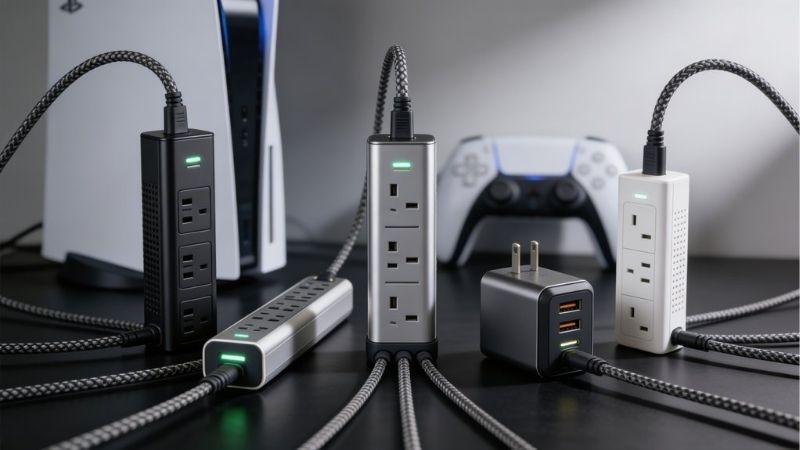
Best for organized desk power — Eaton Tripp Lite TLP606DMUSB: A desk clamp moves the outlets away from the floor and adds two USB-A charging connections, but it costs more and gives you fewer AC outlets. Best minimal wall installation — CyberPower CSP6WSUC: No dangling strip cord; however, the wall outlet must physically support a bulky adapter without strain. Best when phone/coax protection matters — Belkin BE108230-06: One place to connect the older signal lines in a mixed-use entertainment center. Its manufacturer page contains a joule-rating discrepancy that should not be ignored. Specialized long-cord option — CyberPower HT812TC: A 12-foot cord and coax/phone connections are useful when the cabinet sits farther from the wall receptacle; current retailer availability and price need another look.
PS5 Pro surge protector comparison
Retail snapshots were checked October 27, 2026, for US listings. B&H prices are from the specific product pages opened during research, not from manufacturer MSRPs. An “in stock” result is a seller-page status, not a guarantee for every ZIP code. The Belkin direct store was out of stock despite availability at B&H. The HT812TC appeared with conflicting prices and stock status in different indexed B&H category views, so no live price or availability is asserted for it.
| Product | Verified key spec | Best use case | US price (seller, checked Oct. 27, 2026) | Stock status (Oct. 27) | Main drawback |
|---|---|---|---|---|---|
| CyberPower CSB806R1 | 8 AC; 4,800J; 6-ft cord | Best overall | $25.45 (B&H) | In stock | No USB ports; bulky versus wall taps |
| CyberPower CSB1206 | 12 AC; 3,600J; 6-ft cord | Best for many components | $35.95 (B&H) | In stock | Larger strip; 12 outlets still share one circuit |
| Belkin BE108230-06 | 8 AC; 3,390J spec / 3,550J copy; 6-ft cord | Best home-theater alternatives | $28.49 (B&H) | In stock at B&H; not at Belkin | Belkin’s own joule figures conflict |
| CyberPower CSP806UC18 | 8 AC; 2,400J; USB-A + USB-C | Best for USB charging | $35.45 (B&H) | In stock | USB output is for device charging, not PS5 connectivity |
| Eaton Tripp Lite TLP606DMUSB | 6 AC; 2,100J; 6-ft cord; two USB-A | Best clamp-mounted desk strip | $56.99 (B&H) | In stock | High price and only six AC outlets |
| CyberPower CSP6WSUC | 6 AC; 2,400J; USB-A + USB-C | Best wall-tap choice | $24.95 (B&H) | In stock | May block adjacent wall space; no cord to reposition |
| CyberPower HT812TC | 8 AC; 4,350J; 12-ft cord | Best for long-cord home theater | Price not verified (B&H) | Unclear (retailer listings differ) | Current seller price and stock unclear |
How we selected and verified the products
Our editorial selection is based on published evidence, not a claim that Geek Gaming Tricks electrically stress-tested these strips or measured their surge performance. We cross-checked exact model numbers, outlet counts, joule ratings, cord length, protection indicators, and device-charging features against CyberPower, Belkin, and Eaton product information. We then opened US retailer listings to look for the same SKU, a displayed price, and an orderable status. Models with unresolvable specifications or unavailable direct-store stock were not elevated over in-stock choices merely because they have stronger marketing claims.
A surge protector is not specific to a console generation: it protects a compatible AC-powered device through a standard power connection. Sony does not publish a list approving these seven individual surge strips for the PS5 Pro. The recommendation is conditional on your console’s US power cord and local electrical system being in good condition, the receptacle providing the correct voltage and ground, and the connected equipment staying within the strip’s nameplate rating. Check the label on the exact physical unit received before plugging anything in. A connected-equipment guarantee is an additional contractual claim with exclusions and instructions, not evidence that a surge will never reach the console.
We treated UL 1449 and a recognized safety mark as meaningful selection signals because UL 1449 addresses surge protective devices and their safety behavior, including end-of-life conditions. But manufacturer-advertised joules are not a universal score: energy capacity, measured voltage-protection rating, grounding, installation, and the relevant surge waveform all matter. We do not infer PS5 Pro frame-rate improvements, reduced input lag, better HDMI picture quality, or resistance to a direct lightning strike from any of these products.
Seven surge protectors worth considering for PS5 Pro
CyberPower CSB806R1 — best overall for a typical TV or desk setup
The CSB806R1 has a particularly useful mix of features for a PS5 Pro owner who needs reliable ordinary AC connections rather than extra USB gadgets. CyberPower specifies eight grounded NEMA 5-15R outlets, including widely spaced positions for bulkier adapters, a six-foot cord with an offset right-angle plug, a 15-amp circuit breaker, and 4,800 joules of published surge suppression. The company lists cETLus safety certification covering UL 1363 and UL 1449, and its product materials show a limited lifetime warranty plus a connected-equipment guarantee subject to its terms. These are model-specific details, not generic claims copied from the CyberPower brand.
The buyer benefit is usable spacing. Put the console’s AC plug in one receptacle and the television’s plug in another; leave the large blocks for a speaker, network switch, charging dock, or streaming box where the wide-spaced positions can accommodate them. You do not need to occupy every socket. A few spare AC receptacles make it easier to unplug a device during troubleshooting and keep the console cable from running under the TV stand. The strip can be positioned behind the entertainment unit, with its protection and grounding LEDs still visible for periodic checks.
B&H displayed the exact CSB806R1 as $25.45 and In Stock when its US listing was opened. That makes it a practical current purchase candidate, not an out-of-stock “best” pick. Its drawbacks are straightforward: there are no USB charging ports, and its six-foot reach may be too short for wall outlets across the room. CyberPower lists an 800V clamping specification across protection modes; that figure should be compared using consistent test definitions, not treated as directly equivalent to every competing maker’s marketing number. The right choice is the one with the sound installation and sufficient outlets, not the biggest single spec.
Buy it if: your PS5 Pro sits with two to six other AC devices and you want strong published specifications, indicator lights, and spacing at a competitive observed price. Skip it if: you specifically need a 12-foot cord, integrated phone/coax signal protection, or charging-only USB ports. In those scenarios the CSB1206, HT812TC, or CSP806UC18 addresses a different problem. Before ordering, measure the actual route the cord must follow without pinching or passing underneath furniture legs.
CyberPower CSB1206 — best for a full entertainment cabinet
The CSB1206 is designed for the household arrangement where a console is only one piece of a larger audiovisual stack. CyberPower lists twelve grounded AC outlets, 3,600 joules of surge suppression, a six-foot power cord, an offset right-angle input plug, and a 15-amp breaker. The merchant listing also shows a 125V US form factor. In practical terms, you gain more individual plug positions for a PS5 Pro, TV, soundbar, streaming stick supply, router, subwoofer, and one or two controller charger power adapters. You do not gain a new independent electrical circuit.
That last point is important because twelve outlets can encourage the wrong behavior. The combined load must remain below both the surge protector’s printed limit and the wall circuit’s permissible rating. Count powered equipment and use its nameplate amperage or wattage rather than assuming every receptacle can simultaneously deliver a full 15 amps. High-draw household appliances such as portable heaters should not share this entertainment-strip installation. A large gaming television and a home-theater receiver can affect the available margin far more than a small USB phone charger.
B&H’s opened product page showed $35.95, In Stock for CSB1206, while other indexed retailer snapshots showed slightly different prices. We use the directly opened current listing, not those alternate cached figures. CyberPower’s own family descriptions confirm the 12-outlet, 3,600-joule configuration; however, sources for clamping voltage are inconsistent, with the specific B&H listing describing 800V and one indexed CyberPower family result displaying 600V. We do not use either value as an advantage or place it in the comparison table. Buyers who care about the exact voltage-protection rating should confirm the current printed datasheet or physical label before comparing it with another unit.
Buy it if: your cabling problem is too few well-spaced AC receptacles under a cabinet and the outlet is within six feet. Skip it if: you only run a console, TV, and router; an eight-outlet strip will be easier to place and may save money. Unlike the USB-enabled CyberPower model below, this unit provides AC power distribution without built-in USB charging, which may be preferable if you already own certified chargers.
Belkin BE108230-06 — best for phone/coax equipment
Belkin’s BE108230-06 covers a relatively specific home-theater situation: electronics that still use coaxial or telephone wiring in addition to ordinary AC power. The US product has eight surge-protected outlets, a six-foot heavy-duty cord, a right-angle plug, status indicators, and jacks for coaxial and RJ11 signal-line protection. Belkin describes sliding outlet covers and cord-management hardware. A connected-equipment warranty is advertised, but it is not a blanket reimbursement promise; the owner must satisfy installation, registration or claim requirements in the actual policy.
There is a source inconsistency worth flagging prominently. Belkin’s product page describes a 3,550-joule rating in the marketing copy while its technical-specification table gives 3,390 joules for “Circuit Total Joules.” B&H lists 3,550 joules. Because the exact cause of the difference was not established, this article carries both numbers rather than selecting the favorable figure as a verified absolute. The discrepancy does not prevent the strip from being a useful choice for signal-line protection, but it does prevent a precise joule-to-joule ranking against the other picks.
The opened B&H listing displayed $28.49, In Stock for BE108230-06. Belkin’s own US web store simultaneously marked this model out of stock. That is not proof that either listing is wrong; inventory varies between sellers. Anyone choosing it should buy the exact 06 suffix through an available retailer, inspect the return policy, and not mistakenly substitute the similar 08 or 12-foot variant. The store discrepancy is part of the purchase decision, especially if an automatically generated “buy now” button routes to a different merchant or size.
The PS5 Pro itself does not require a phone line or coax cable to deliver its HDMI output. This model makes sense primarily when a cable modem, coax-fed TV accessory, or older home-theater box is physically present and the wiring is routed according to Belkin’s instructions. It does not improve HDMI bandwidth, solve network latency, or remove the need for properly grounded AC service. Buy it if: you genuinely use the extra signal-line ports and want a conventional eight-outlet design. Skip it if: your setup is purely HDMI and Ethernet with no relevant coax or phone wiring; the CSB806R1 is the simpler fit.
CyberPower CSP806UC18 — best for charging small accessories
For a PS5 Pro desk that doubles as a phone- and headset-charging station, the CSP806UC18 reduces the number of wall-charger bricks you need. CyberPower specifies eight AC outlets, 2,400 joules of surge suppression, a six-foot cord, a right-angle plug, one USB-A charge port, and one USB-C charge port. The official model specification describes 18W total USB charging and a USB-C port rated at up to 15W in its product summary; it also notes a 3A shared USB charging limit. These are charging outputs and should not be confused with the console’s USB ports or data-transfer capability.
Put the PS5 Pro power plug and the television on protected AC outlets. The USB ports can then serve low-power compatible accessories such as earbuds or a phone without occupying separate AC sockets. However, do not claim that a USB-C logo means every DualSense charging behavior is supported. Controller charging depends on the device, cable, voltage profile, and charging arrangement; Sony’s own console ports or an officially supported controller charging station remain the more reliable way to satisfy controller-specific requirements. A power strip USB port cannot transfer files to the PS5 Pro and cannot replace a high-speed USB data hub.
B&H showed $35.45 and In Stock for CSP806UC18 when its exact black variant was opened. The official CyberPower page lists cETLus compliance with UL 1363/UL 1449 and a six-foot cable; it also identifies the product as a 15-amp AC strip. The model’s downside is that 2,400 joules are a published capacity figure, not proof of worse protection in every conceivable transient than a 4,800-joule alternative. The choice is primarily about whether integrated USB charging provides enough convenience to justify the observed cost.
Buy it if: your PS5 Pro, display, and a few small charging accessories share one reachable area, and you want a clean plug layout without a separate USB charger. Skip it if: fast 45W or 65W USB-C laptop charging is important, or if you need every socket for conventional AC devices. It is a 15W-class USB-C accessory charging option, not a high-wattage workstation charging dock.
Eaton Tripp Lite TLP606DMUSB — best clamp-on desk option
The TLP606DMUSB earns its place through physical placement rather than outlet count. Eaton identifies the exact product as a Protect It! clamp-mount surge protector with six grounded AC receptacles, a six-foot cord, 2,100 joules of surge suppression, a 15-amp breaker, and two USB-A charging ports rated at 2.1A total in the product title and description. The unit clamps to a desk, workbench, or table. Eaton specifies a clamp range of about 0.39 to 1.38 inches, so the thickness of your furniture edge matters before checkout.
Why would a PS5 Pro buyer choose this over a floor-level power strip? If the console is on an open gaming desk or streaming table, cables can be routed downward from a stable, accessible location. The illuminated status indicator remains in sight, and peripheral power bricks can be added or removed without reaching behind a heavy display. The clamp also reduces the chance of the strip being kicked across the floor. Its six outlets include two positions intended for larger transformer blocks, although the number of usable sockets still depends on the actual footprint of your adapters.
The model is an explicitly US 120V, NEMA 5-15 product, not a travel plug for arbitrary countries. Eaton lists UL 1449 among its certifications and a 400V “let-through” value. Those statements are more useful than treating its 2,100-joule rating as the only signal of quality. B&H displayed $56.99, In Stock for the exact TLP606DMUSB. That is substantially more than the everyday strip choices, so the clamp and access convenience should be benefits you will actually use; otherwise it is difficult to justify the purchase.
Buy it if: you play with the PS5 Pro beside a desk and want accessible, secured AC power, with two low-power USB-A charging connections. Skip it if: you need a hidden TV cabinet installation, more than six AC sockets, or a clamp opening outside the published range. Make sure the furniture edge can support the clamp without damage, avoid trapping cables beneath the desk, and do not clamp the strip into an enclosed fabric-lined compartment.
CyberPower CSP6WSUC — best when floor space is scarce
Sometimes the correct solution is to avoid a dangling strip entirely. CyberPower’s CSP6WSUC plugs directly into a US wall receptacle and expands it to six grounded AC sockets, with one USB-A and one USB-C charging connection. CyberPower lists 2,400 joules of suppression and safety approval covering UL 1449 for this wall-tap model. The layout uses two banks of three swivel outlets, allowing bulky plugs to face different directions rather than fighting over the same flat plane.
This can suit a wall-mounted television area or a small shelf where the PS5 Pro’s power lead already reaches the outlet. It also removes one cable that would otherwise snake across the baseboard. The limitation is mechanical: a heavy wall tap must sit securely in a sound, grounded outlet. Loose receptacle tension, a wall plate that prevents proper seating, and furniture pushed directly against power bricks are reasons not to use the product there. Never compensate for a loose connection with adhesive or an improvised support. Have the receptacle inspected or choose a properly mounted corded strip.
The opened B&H page showed $24.95 and In Stock for the white CSP6WSUC. CyberPower’s site displays a different MSRP, which is a reference figure, not the price B&H offered in the opened listing. The USB-C port is described as a 15W charging output in the model summary, while the shared USB output across both ports has its own limit. The PS5 Pro power supply belongs in an AC receptacle, not a USB charge port. As with every wall tap, the six outlets share the rating of the underlying branch circuit.
Buy it if: the wall outlet is already located in the correct place and there is room to seat the adapter firmly without obstruction. Skip it if: the receptacle sits deep behind a sofa, has worn contacts, or is so low that multiple power bricks may be kicked or knocked. The eight-outlet CSB806R1 is more flexible if the console and TV need to be powered several feet away from the wall.
CyberPower HT812TC — specialized long-cord home-theater alternative
The HT812TC is included for a different wiring geometry: a television wall outlet that is farther away than the usual six- to eight-foot cord can comfortably reach. CyberPower’s HT812TC documentation identifies eight AC receptacles, a 12-foot heavy-duty cord, 4,350 joules of surge suppression, a 15-amp breaker, right-angle input plug, and protection connections for telephone and coaxial lines. The maker also lists a lifetime limited product warranty and a connected-equipment guarantee, subject to the applicable policy. The additional cable reach can prevent temptation to chain a regular extension cord onto a too-short surge strip.
The relevant purchasing limitation is availability. Different B&H category listings retrieved during research showed different prices and different inventory statuses for HT812TC, including in-stock and temporarily unavailable results. Without a stable opened single-SKU offer to reconcile them, its comparison entry is explicitly Price not verified / stock unclear. It is not our best-overall purchase recommendation and should not be presented as immediately orderable everywhere. If the exact HT812TC becomes available through an authorized US merchant, it is worth evaluating for long routes and older coax-connected components.
There are reasons to be cautious even if a low price appears. A 12-foot cord should be routed along a safe path, without staples through insulation, tight bends, floor-covering concealment, trip hazards, or compression behind cabinet feet. Coax protection is useful only if the connected signal equipment and line are handled according to the manufacturer’s instructions. It should not be advertised as an HDMI surge protector, nor as protection from lightning striking the home. If only six feet are required, the extra slack is not a benefit and may increase clutter.
Buy it if: you confirm a current live listing for this exact model, have a safely routable 12-foot path, and can make practical use of the signal-line jacks. Skip it if: your wall outlet is nearby or the listing is unverified at the time you order. In that case, a verified in-stock model with a suitable cord and a clean, grounded installation is the more practical answer.
What PS5 Pro owners should prioritize before buying
Safety certification, grounding, and status indicators beat marketing claims
Check the physical product’s safety marking and the manufacturer’s declared standard, not just an online headline that says “surge protection.” UL 1449 is the recognized surge protective device standard for devices of this kind; a product tested and certified by a recognized laboratory for the appropriate US application provides more meaningful assurance than an unqualified sticker. NEMA’s surge-protection guidance explains why end-of-life safety behavior and the voltage protection rating matter. A unit can still fail to protect equipment if the building wiring or grounding is defective or if a damaging event exceeds its design.
The protected-status light tells you whether the device still claims functional suppression circuitry; the ground indicator warns that the wall outlet may be incorrectly wired. These are different signals. Follow the exact unit’s manual to interpret LED colors and alert states. If protection is lost, unplug attached electronics safely and replace the unit as directed by its maker. If a ground-fault indicator is active, do not treat a three-prong-to-two-prong adapter as a fix. Have a qualified electrician check the receptacle; grounding is part of how many point-of-use surge protectors are designed to operate.
Joules versus voltage protection rating
A joule rating describes a manufacturer’s published energy-handling capacity under stated conditions. It does not predict how many years the strip will last in your house, whether a 4,800J product always allows less voltage through than a 2,100J product, or whether the device survives a direct lightning strike. Two firms may also report clamping values under different conventions. For example, one manufacturer may quote a UL 1449 voltage-protection figure while another uses a marketing “clamping voltage” headline. Compare exact published test definitions, not bare numbers stripped of context.
For a purchasing decision, prioritize a legitimate product with relevant safety certification, a compatible US electrical rating, stable grounding, a status light you can see, and the right physical layout. Higher published joule capacity can be one factor when the remaining characteristics are comparable. It should not justify a poorly seated wall tap or an extension-cord daisy chain. The Belkin BE108230-06 inconsistency between 3,390J technical specs and 3,550J promotional copy is a reminder that even official marketing pages deserve careful reading.
Outlet count, circuit load, and the PS5 Pro power budget
An eight-outlet or twelve-outlet strip does not multiply the amount of power available from a normal household receptacle. Most products in this roundup are 15-amp US devices; the connected load must remain under the device rating and the branch circuit’s actual capacity. Add up the ratings for the equipment you expect to use simultaneously. Modern consoles usually draw less during typical play than their theoretical maximum nameplate rating, but that is not permission to design an installation at the absolute limit. Also consider the TV, AV receiver, subwoofer, charging hardware, modem, and any other powered device.
For scale, Sony’s published energy-efficiency measurements for a particular PS5 Pro model show average active-game values around the low 200-watt range under a specified game and test selection, but your use and console revision can differ. Those are not universal maximum-load values. You should not size the circuit or power protection equipment using one average game-play result alone. Use official nameplate ratings and allow margin. Never plug a space heater, air conditioner, or similarly high-load appliance into the gaming surge strip to “use up” spare sockets.
A surge strip is not a battery backup
A power surge is a brief voltage disturbance; a blackout or sustained undervoltage is a different electrical event. A passive surge protector does not provide stored energy when the grid goes down. If your primary goal is enough time to pause the game and shut down the PS5 Pro during an outage, investigate an appropriately rated uninterruptible power supply with battery backup and a suitable output waveform. Factor in the combined console-and-display load, UPS VA/watt ratings, startup behavior, and a realistic shutdown-time target. A tiny UPS bought only because its label includes “gaming” may not be adequate for both devices.
Do not assume that attaching a surge strip to the battery-backed receptacles of a UPS is permitted. Follow the UPS manufacturer’s instructions; inappropriate downstream strips may violate its usage guidance or interfere with protection and load estimation. Also, Sony warns against disconnecting the PS5 AC cord while its power indicator is lit or blinking because it may cause data loss or hardware damage. A surge protector cannot prevent that consequence once utility power is lost. A UPS may provide shutdown time, but no setup eliminates the need for normal save-and-power-off habits.
USB ports, spacing, cord length, and physical placement
USB charge ports on a strip are convenient for phones, earbuds, small lights, or compatible accessories; they do not add PS5 console USB data ports. If you need extra USB game-storage connections or a high-speed peripheral hub, that is a different shopping decision. Check both per-port and shared USB output before plugging in several charging devices. An advertised “USB-C” socket does not automatically mean full USB Power Delivery at 65W or high-speed data. For the PS5 Pro itself, plug its supplied AC power cable into a protected grounded AC outlet.
Measure the route from wall receptacle to where the strip will be safely placed. Include the bend radius and the distance around shelving; a six-foot cord measured in a straight line rarely delivers a full six feet of practical reach in a cabinet. A low-profile angled plug can help avoid forcing furniture against a cord, but the cable still needs clearance. A wall tap eliminates cord routing but exposes mechanical strain on the receptacle. Clamp models require a compatible desk edge and enough free air around plugs and wiring. Choose the physical design to solve the actual room layout.
How to connect a PS5 Pro to a surge protector safely
- Confirm the surge protector is the exact US model you ordered. Read its input voltage, amperage limit, certification marks, and warning labels. If a listing and printed unit disagree, do not install it until you have checked with the manufacturer or retailer.
- Inspect the wall receptacle, strip casing, cable insulation, plugs, and outlet faces. Do not use damaged parts, loose wall outlets, two-prong grounding adapters, or a device that smells hot. Plug the surge protector directly into a sound, properly grounded wall socket; do not daisy-chain power strips or extension cords.
- Place the strip where it remains dry, accessible, and ventilated. Keep it clear of rugs, curtains, couch cushions, cable bundles that trap heat, and points where furniture may crush the lead. For wall taps, confirm secure mechanical support; for desk clamps, tighten to the maker’s permitted range without damaging furniture.
- Connect the PS5 Pro with its standard AC cord to a surge-protected AC receptacle. Add your TV, router, soundbar, and other necessary gear only after checking their combined rated load against both the strip and wall-circuit limits. Use the wide-spaced outlets for larger adapters; never force a connector into a partially blocked socket.
- Turn on the strip and read its protection and grounding indicators according to the manual. If it signals lost protection, a wiring fault, repeated circuit-breaker trips, crackling, or abnormal heat, stop using it and investigate before reconnecting the console.
- Complete console startup normally. The surge protector does not change Sony’s power-state rules: before disconnecting power for maintenance or storms, shut down the PS5 Pro fully and ensure the power indicator is no longer lit or blinking. Never unplug it mid-update or while powered.
- Review the installation after moving the TV stand, changing plugs, or experiencing a major electrical disturbance. Replace any strip whose maker indicates exhausted protection. For an ongoing grounding fault or unusual heat, consult a qualified electrician rather than repeatedly resetting the breaker.
The goal of these steps is to keep a healthy electrical connection between the console, protection device, and household wiring. You should not have to run the strip at its limit or accept warm, loose plugs to fit an elaborate entertainment center. If the layout cannot be made safe with the chosen model, select a different form factor or have appropriate wiring installed.
Mistakes that can defeat an otherwise sensible purchase
- Buying a basic power strip without surge suppression. An outlet multiplier may provide zero surge protection. Verify the device is actually identified as a surge protector, including its appropriate certification and operating-status indicator.
- Assuming the highest joule count makes lightning harmless. Extreme events can overwhelm point-of-use units. Electrical Safety Foundation International advises not to rely on any one surge device to handle a direct lightning strike.
- Stacking strips to gain more outlets. Daisy-chaining can create an overload or installation hazard and does not increase the wall circuit’s capacity. Use one appropriately sized strip on a sound outlet.
- Ignoring the grounded LED. A status light is a warning worth acting on; it is not decorative RGB lighting. Never defeat grounding with an improvised adapter.
- Confusing USB charging with USB connectivity. Built-in USB-A or USB-C charging on a surge strip does not connect your controller, external SSD, or headset to the console as a data device.
- Buying based on cached list prices. Retailer category listings, variants, ZIP-dependent inventory, and manufacturer MSRPs can disagree. Confirm the exact model, price, and stock again at checkout.
- Forgetting replacement after a serious event. Surge components age and can lose protection. Follow manufacturer-specific end-of-life indicators and replacement instructions.
Frequently asked questions
Does the PS5 Pro need a surge protector?
Sony does not mandate any of these specific third-party surge strips. In a normal US home, a properly selected and installed surge protective device is a sensible additional precaution for valuable electronics, especially in a shared TV setup. It should complement safe household wiring, not substitute for it. If the outlet is ungrounded or damaged, address that first. A surge protector cannot promise protection from every outage, voltage disturbance, or lightning event.
How many joules should a PS5 Pro surge protector have?
There is no Sony-issued minimum joule requirement for the PS5 Pro. In this roundup, the readily orderable choices range from 2,100J to 4,800J according to manufacturers. Rather than invent a universal numerical threshold, choose a certified model with suitable grounded installation, a working protection indicator, realistic load capacity, and enough sockets for your equipment. Higher joule ratings can be useful but do not replace those checks.
Can I plug my PS5 Pro and 4K TV into the same surge protector?
Generally, yes, provided the total rated load is within the strip’s and circuit’s limits and both devices use compatible US AC plugs. Do not assume that unused sockets increase the available power. If an AV receiver or subwoofer is added, include those nameplate loads too. Keep ventilation around the console and strip, and use a corded model with enough reach to avoid crushed cables.
Will a surge protector stop the PS5 Pro from shutting off during storms?
Not if the utility supply is interrupted. A surge protector handles certain short-duration overvoltage events but has no battery reserve. A suitably sized UPS is the relevant product class when you want shutdown time during short outages. Even a UPS must be matched to combined equipment load and the required runtime. For imminent severe storms, follow safety guidance and disconnect equipment only after the console is properly powered down.
Is USB-C on a surge protector the same as a PS5 Pro USB-C port?
No. A surge protector’s USB-C connector is normally a charging-only power output, often with limited shared wattage. It does not add a data interface or USB expansion capability to the console. Use the PS5 Pro’s own USB ports and an explicitly compatible data accessory for gaming peripherals, and verify controller charging requirements separately.
Are coaxial and phone protection useful with a PS5 Pro?
Only for equipment that actually uses those signal lines. The PS5 Pro connects to the display over HDMI and can network over Ethernet or Wi-Fi. Belkin BE108230-06 and CyberPower HT812TC include phone/coax-related protection for relevant external devices, not an HDMI surge-filter feature. If your setup has no coax or RJ11 cables, do not pay extra just because the sockets appear impressive.
Should I replace an old surge protector after a blackout?
A blackout alone does not prove the strip is exhausted, but the return of power or an associated surge can affect protection components. Check the manufacturer’s indicator lights and directions, inspect for heat or physical damage, and replace a unit whose protection indicator fails or whose manual recommends replacement after a particular event. A strip without a working status indicator is hard to evaluate and should not be assumed protective indefinitely.
Is a 12-outlet surge protector safer than an 8-outlet model?
Not inherently. More AC sockets change convenience, not the rated capacity of the wall circuit. A 12-outlet model can reduce the temptation to stack cheap splitters, but only when the attached load remains acceptable and the device is correctly installed. An eight-outlet model with suitable spacing may be the cleaner, safer choice for a smaller setup.
Final thoughts
For most PS5 Pro owners, the CyberPower CSB806R1 offers the best balance of useful outlets, clear manufacturer specifications, status indicators, and an available US retailer listing. Choose the CSB1206 if twelve properly spaced AC positions genuinely help; choose the CSP806UC18 if accessory charging is part of the same desk; and choose the Tripp Lite clamp-mounted model if accessible, organized desk power is the problem you need to solve. Belkin’s BE108230-06 adds value for relevant phone/coax-connected hardware, while a sound wall outlet and compact layout make the CSP6WSUC practical. The HT812TC remains a specialized long-cord option pending a fresh availability check.
Before buying, inspect your wall outlet, count the simultaneous powered devices, measure the required cable path, and confirm the exact unit’s safety and grounded-status markings. Select the strip that fits those conditions, then verify the seller’s current price and inventory. That is a more useful next step than shopping by a single big joule number or assuming surge suppression can stand in for battery backup.