Our Top Picks
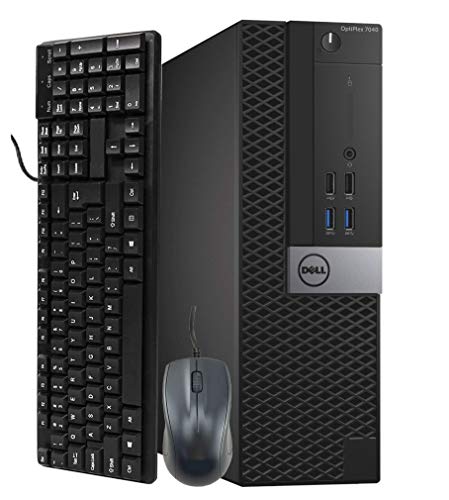 Dell Optiplex 7040 Business SFF Computer Small TowerSmall11.4 x 3.6 x 11.5 inches12 poundsCheck on Amazon
 Dell Pro 2027 Desktop Tower 16GB DDR5 RAM64GB DDR5 RAM, 2TB PCIe SSD11.54 x 6.06 x 12.77 inchesCheck on Amazon
The best desktop computer tower depends on what you will do with it: most people want a recent processor, 16GB of RAM and an SSD, and not every listing here is actually a tower. Several are small-form-factor Dell OptiPlex units, so we label each one. For the newest hardware and a warranty, the two Dell Pro towers lead the list; for the lowest cost and plenty of memory, the renewed OptiPlex 7050 and 3060 stand out. All ten list Windows 11, but older Intel generations may sit outside Microsoft’s supported processor list.
Ten desktops at a glance

Dell Optiplex 7050 SFF Desktop PC Intel i7-7700 4-Cores 3.60GHz 32GB DDR4 1TB SSD WiFi BT HDMI Duel Monitor Support Windows 11 Pro Excellent Condition(Renewed)
One of the home product options compared in this guide.
View on AmazonDell Optiplex 7040 Business SFF Computer Small Tower PC (Intel Core i5-6500, 16GB Ram, 256GB SSD, DVD-ROM, WiFi) Windows 11 Pro (Renewed)
One of the home product options compared in this guide.
View on Amazon
Dell Optiplex 3060 Desktop Computer | Intel i5-8500 (3.2) | 32GB DDR4 RAM | 1TB SSD Solid State | Built in WiFi | Bluetooth | Windows 11 Professional | Home or Office PC (Renewed)
One of the home product options compared in this guide.
View on AmazonDell Pro 2027 Desktop Tower 16GB DDR5 RAM 512GB SSD, Windows 11 Pro | 14th Gen Intel Core, Copilot AI, Wifi 6, Bluetooth, DisplyPort, Type-C, HDMI, for Business, Home & Productivity Computing
One of the home product options compared in this guide.
View on Amazon
STGAubron Gaming PC Desktop,Core I5,RX 550 4G,16G RAM,512G SSD | Gaming Computer Tower for Streaming,Video Editing,Home,School,I5 up to 3.6G,ARGB Fan,WiFi 6,BT 5.0,4K DP,HDMI,Win11 Home
One of the home product options compared in this guide.
View on Amazon
Dell Optiplex 3040 SFF Business Desktop PC, Core i3-6100 3.7GHz, 8GB RAM, 256GB Solid State Drive, HDMI, RJ45, Windows 11 Pro 64bit (Renewed)
One of the home product options compared in this guide.
View on Amazon
OKAMUS Prebuilt Desktop Computer, i7 CPU Up to 3.9GHz, Integrated Graphics Only Tower PC, 16GB RAM, 256GB M.2 SSD, RGB Fans x4,Win11 Home, WiFi 6+BT5.3, 400W PSU
One of the home product options compared in this guide.
View on Amazon
Dell OptiPlex 7050 Desktop Computer PC, Intel Core i5 7500 3.40GHz 16GB DDR4 RAM, 512GB SSD, Built-in Wi-Fi, Bluetooth, Windows 11 Pro, 4K Support HD Graphics 630 (Renewed)
One of the home product options compared in this guide.
View on Amazon
Dell Pro Tower Desktop PC Business Computer, 8GB DDR5, 512GB SSD | 14th Gen Intel i3-14100 4-Core 4.7GHz, Dual Monitor HDMI DisplayPort, WiFi 6, USB-C, Windows 11 Pro
One of the home product options compared in this guide.
View on Amazon- Dell Pro Tower (16GB DDR5) – best for a newer platform with DDR5
- Dell Pro Tower (i3-14100) – best for a new office tower, low on memory
- Dell OptiPlex 7050 SFF (i7-7700, 32GB) – best for memory-heavy use on a small case
- Dell OptiPlex 3060 (32GB, 1TB) – best for storage and RAM on a modest budget
- Dell OptiPlex 5060 – best for a balanced six-core renewed desktop
- Dell OptiPlex 7050 (i5-7500) – best for a mid-spec renewed office PC
- Dell OptiPlex 7040 Small Tower – best for a cheap second PC
- OKAMUS Prebuilt Tower – best for an RGB-lit tower with integrated graphics
- STGAubron Gaming Tower (i5, RX 550) – best for entry-level gaming
- Dell OptiPlex 3040 SFF – best for the lowest price
Comparison table
| Model | Type | Specs from the title | Best for |
|---|---|---|---|
| Dell Pro Tower (16GB DDR5) | New tower | 14th Gen Intel Core, 16GB DDR5, 512GB SSD, Win 11 Pro | Long-term office |
| Dell Pro Tower | New tower | i3-14100, 8GB DDR5, 512GB SSD, Win 11 Pro | Basic office |
| OptiPlex 7050 SFF | Renewed SFF | i7-7700, 32GB DDR4, 1TB SSD | Multitasking |
| OptiPlex 3060 | Renewed (check case) | i5-8500, 32GB DDR4, 1TB SSD | RAM and storage |
| OptiPlex 5060 | Renewed (check case) | i5-8500, 16GB, 500GB SSD + 1TB HDD | All-round |
| OptiPlex 7050 | Renewed (check case) | i5-7500, 16GB, 512GB SSD | Office |
| OptiPlex 7040 | Renewed small tower / SFF | i5-6500, 16GB, 256GB SSD, DVD-ROM | Second PC |
| OKAMUS | Tower | i7 (model unclear), integrated graphics, 16GB, 256GB, 400W PSU | Home use |
| STGAubron | Gaming tower | Core i5, RX 550 4GB, 16GB, 512GB SSD | Entry gaming |
| OptiPlex 3040 SFF | Renewed SFF | i3-6100, 8GB, 256GB SSD | Light tasks |
Every pick, explained
Dell Pro Desktop Tower (16GB DDR5): the newest platform on the list
The title promises 16GB of DDR5, a 512GB SSD, a 14th Gen Intel Core processor, Windows 11 Pro, Wi-Fi 6, Bluetooth, DisplayPort, USB-C and HDMI. It is one of four listings here not marked renewed, so it avoids most of the used-unit questions. The exact CPU model is not given, so check which 14th-generation chip you are getting.
“Copilot AI” in the title is a marketing note for the Windows software feature and says nothing about dedicated AI hardware. Treat the tower label as valid, but ask for the case dimensions and the slot layout if you plan to add a card later. The USB-C and DisplayPort connections are welcome on a business desk, since they let you run a modern monitor with one cable. Because it ships new, it is also the listing most likely to carry a manufacturer warranty, but confirm the term and the seller before relying on that.
Pros
- Newer platform with DDR5
- 16GB RAM and 512GB SSD
- Wide port list including USB-C
Cons
- CPU model not named
- Likely the priciest tier on this list
Who it’s for: office buyers who want a new machine with a longer upgrade runway.
Who should skip it: budget shoppers who are fine with a renewed unit.
Dell Pro Tower (Core i3-14100): modern chip, thin memory
Dell lists a 14th-generation Core i3-14100 with four cores up to 4.7GHz, 8GB of DDR5, a 512GB SSD, dual-monitor HDMI and DisplayPort, Wi-Fi 6, USB-C and Windows 11 Pro. As a business tower, it covers reception, bookkeeping and study tasks cleanly.
The weak spot is memory. Eight gigabytes is the floor for Windows 11 work, and the listing does not say whether a second module is installed. Budget for a RAM upgrade, and check the slot count before you order. One thing in its favor is that a new business tower from a large brand usually has standard parts and a well-documented service path. Check the listing for the number of memory slots, as a single 8GB module leaves an easy upgrade, while two 4GB sticks would mean replacing both.
Pros
- Named modern CPU with Windows 11 support
- 512GB SSD
- Dual-monitor outputs
Cons
- 8GB RAM is tight
- Integrated graphics only, as far as the title says
Who it’s for: small offices and schools that want a new, supported tower.
Who should skip it: anyone who multitasks heavily and does not want to upgrade memory.
Dell OptiPlex 7050 SFF (i7-7700, 32GB): lots of memory, small box
The title lists a quad-core Core i7-7700 at 3.60GHz, 32GB of DDR4, a 1TB SSD, Wi-Fi, Bluetooth, HDMI, support for two monitors and Windows 11 Pro, sold renewed in “excellent condition”. It is a small-form-factor case, so it is not a tower.
That size limits expansion, usually to low-profile cards. The i7-7700 is a seventh-generation chip, which is below Microsoft’s usual Windows 11 line, so expect warnings during install or updates. The memory and storage are the reason to buy. Dual-monitor support is stated, and the combination of 32GB and 1TB is unusual under this price tier. If you later want a graphics card, a small case may need a low-profile model and a supply that can power it, so ask before assuming it will fit.
Pros
- 32GB RAM and 1TB SSD
- Quad-core i7 for general multitasking
Cons
- Small form factor, not a tower
- Seventh-generation CPU outside the usual Windows 11 list
Who it’s for: people who need memory more than upgrade slots and accept the CPU caveat.
Who should skip it: buyers who want a full-size case or an official Windows 11 guarantee.
Dell OptiPlex 3060 (i5-8500, 32GB, 1TB): the strong renewed all-rounder
Dell’s OptiPlex 3060 is listed with an Intel Core i5-8500 at 3.2GHz, 32GB of DDR4, a 1TB SSD, Wi-Fi, Bluetooth and Windows 11 Professional. An eighth-generation chip is where Microsoft’s support generally starts, so it avoids the compatibility problems of the 7th-generation units.
The title does not state the case size, and the OptiPlex 3060 name covers several chassis, so verify tower versus small form factor in the listing. Thirty-two gigabytes is generous at this level and the 1TB SSD is a real asset. Because both memory and storage are already generous, the listing’s main job is to confirm the chassis and condition. If it turns out to be a tower, you gain slots for a card; if it is a small case, you keep the compact footprint and little else.
Pros
- Eighth-generation six-core i5
- 32GB RAM and 1TB SSD
- Windows 11 Pro stated
Cons
- Renewed, with variable condition
- Case size not specified
Who it’s for: home offices that want maximum headroom for the money.
Who should skip it: anyone who needs a graphics card slot confirmed before ordering.
Dell OptiPlex 5060: SSD plus hard drive on a six-core chip
The 5060 listing names an i5-8500 six-core processor, 16GB of DDR4, a 500GB SSD with a 1TB HDD, Wi-Fi and Bluetooth, and a Windows 11 install. The two-drive layout gives a fast boot drive and cheap bulk storage.
Like the 3060, this model number spans multiple case styles, so look for the form factor on the listing. It is almost a twin of the 3060 with less RAM and more mechanical storage, so choose between them based on whether you prefer memory or an extra drive. Both are renewed business machines, so the cleanest comparison is the seller’s return window and the condition grade rather than the specification sheet. If your files are mostly documents and photos, the extra hard drive can be more useful than the extra 16GB of memory.
Pros
- Six-core i5 with 16GB
- SSD plus 1TB hard drive
- Wi-Fi and Bluetooth
Cons
- Case size unstated
- Renewed unit
Who it’s for: families and students who want good value and storage.
Who should skip it: buyers who prefer all-SSD storage.
Dell OptiPlex 7050 (i5-7500, 16GB): the plain mid-range option
Another 7050, this one with an i5-7500 at 3.40GHz, 16GB of DDR4, a 512GB SSD, Wi-Fi, Bluetooth, 4K output through Intel HD Graphics 630 and Windows 11 Pro. It is a different configuration of the same model family as the i7 SFF above, and we treat them as variants rather than separate products.
The i5-7500 sits below Microsoft’s usual Windows 11 line, and the form factor is not stated. The 512GB SSD is a comfortable size. Its title mentions 4K support, which is useful for a high-resolution monitor, but integrated graphics will not handle demanding video or games. If you are choosing between this and the i7 SFF version, decide whether the extra 16GB of memory is worth the smaller chassis.
Pros
- 512GB SSD
- 4K output through integrated graphics
- 16GB RAM
Cons
- Seventh-generation CPU
- Case size unstated
Who it’s for: office users who value price over processor age.
Who should skip it: anyone who needs long-term Windows 11 certainty.
Dell OptiPlex 7040 Small Tower: cheap, with an optical drive
This listing says SFF and Small Tower in the same title, so confirm which it is. The specifications are an i5-6500, 16GB of RAM, a 256GB SSD, a DVD-ROM drive, Wi-Fi and Windows 11 Pro, sold renewed.
The DVD drive is a rare extra and helpful for old media. The sixth-generation processor is the main concern for Windows 11 support, and the 256GB drive will fill quickly. If you need to read old discs or install legacy software, the drive makes it worth a look, but most buyers will rarely use it. Plan on cleaning up space early, or add a larger drive if the case has a free bay, which the title does not confirm.
Pros
- Low entry cost
- DVD-ROM drive included
- 16GB RAM
Cons
- Sixth-generation CPU
- Small SSD; form factor wording is mixed
Who it’s for: second PCs and basic home use.
Who should skip it: anyone planning long-term Windows 11 use.
OKAMUS Prebuilt Desktop Tower: new-looking case, unclear CPU
OKAMUS lists an “i7 CPU up to 3.9GHz” with integrated graphics only, 16GB of RAM, a 256GB M.2 SSD, four RGB fans, Windows 11 Home, Wi-Fi 6, Bluetooth 5.3 and a 400W power supply. A clock speed is not a model, so ask for the exact processor.
The 400W supply might handle a modest low-power graphics card, but check the connector situation before buying one. RGB fans are mostly cosmetic. The 256GB drive is small. The four RGB fans may add noise as well as lighting, and the title does not describe the motherboard, so upgrade planning has to start with questions to the seller. It is the most consumer-styled tower here, and the least documented.
Pros
- 16GB RAM and M.2 SSD
- Wi-Fi 6 and Bluetooth 5.3
- Tower case with 400W PSU
Cons
- CPU model not given
- Integrated graphics only and a small SSD
Who it’s for: home users who like an RGB tower and plan modest upgrades.
Who should skip it: buyers who need verified processor details.
STGAubron Gaming PC (Core i5, RX 550): a gaming label on an entry-level card
The title promises a Core i5 up to 3.6GHz, a Radeon RX 550 with 4GB, 16GB of RAM, a 512GB SSD, ARGB fans, Wi-Fi 6, Bluetooth 5.0, 4K DisplayPort and HDMI, and Windows 11 Home. It is the only tower that ships with a discrete card.
The RX 550 is an entry-level card, so think esports titles and older games, not modern releases. As with its sibling listings, the CPU model is missing. For a deeper gaming comparison, see our gaming computer picks. Ask whether the power supply has the connectors a future card needs, since the title does not name one.
Pros
- Discrete GPU included
- 16GB RAM and 512GB SSD
- Modern wireless
Cons
- Entry-level graphics
- CPU model and PSU details missing
Who it’s for: casual and younger gamers on a limited budget.
Who should skip it: anyone who wants current games at high settings.
Dell OptiPlex 3040 SFF: the lowest price and the lowest specs
The title gives an i3-6100 at 3.7GHz, 8GB of RAM, a 256GB SSD, HDMI, an RJ45 port and Windows 11 Pro 64-bit in a renewed small-form-factor case. It is the cheapest unit here.
It is a sixth-generation chip with only 8GB, so it suits email, web and light documents. Windows 11 support is doubtful. Treat it as a basic terminal. Wired Ethernet and HDMI are stated, which suits a simple desk setup, and a spare unit like this makes sense for a hallway kiosk or a child’s homework station. Do not pay extra for it if you want a PC to keep for several years.
Pros
- Lowest cost
- SSD boot drive
- Wired Ethernet
Cons
- Sixth-generation processor
- Only 8GB of RAM
Who it’s for: kitchen computers and basic terminals.
Who should skip it: anyone who needs smooth multitasking.
How we picked
This ranking is based on the ten listings: stated processor, memory, storage, operating system, case type and condition. Nobody on the team used or measured these units. Where titles blur form factor, we say so, and we group the two OptiPlex 7050 listings as variants. Anything not stated is marked as something to check.
What matters when choosing a tower
Tower or small form factor: the upgrade-slot test
Before choosing, decide whether you will ever add a graphics card or more drives. A tower usually has full-height expansion slots, several drive bays and room for a larger power supply. A small form factor case often offers only low-profile slots and one or two bays, and a mini tower sits between the two. Ask yourself three questions: Will I add a card? Will I add drives? Will I keep this PC for five years?
| Case type | Typical expansion | Best for |
|---|---|---|
| Full or mid tower | Full-height slots, several bays | Gaming and upgrades |
| Small tower | One or two slots | Office with a few upgrades |
| Small form factor | Low-profile slots only | Compact office use |
Processor generation and Windows 11
Windows 11 requires TPM 2.0, Secure Boot and a processor on Microsoft’s supported list, which generally starts at eighth-generation Intel Core. Several listings here use sixth- or seventh-generation chips, such as the i3-6100, i5-6500, i5-7500 and i7-7700. They may run the system through a workaround, but updates are not guaranteed. If you want a clean install, our Windows 11 installation guide walks through the steps, and the newer 14th-generation Dell towers avoid the issue.
Memory and storage
Sixteen gigabytes of RAM and a 512GB SSD make a good baseline. DDR5 appears only on the two Dell Pro towers; the rest use DDR4. A 256GB drive is workable but fills quickly. Check free memory slots and spare M.2 or SATA ports before assuming you can upgrade later.
Graphics, power and cooling
Integrated graphics are enough for office use and streaming. A discrete card needs a suitable slot, power connectors and airflow. A 400W supply, as in the OKAMUS listing, leaves limited headroom, and many small-form-factor cases use proprietary power supplies that cannot take a standard card.
A worked example: reading a listing in 60 seconds
Take the OptiPlex 3060 title. Count what is stated: CPU (i5-8500, eighth generation, yes), RAM (32GB), storage (1TB SSD), OS (Windows 11 Professional), condition (Renewed). Count what is missing: case type, ports, warranty length. Four boxes ticked and three open questions means you should read the product page for those three items before ordering. Do the same for any other listing and compare the open questions.
For a wider overview of good everyday machines, see our good desktop PC guide.
Mistakes buyers make
Assuming every desktop is a tower. Check whether the case is a small form factor.
Ignoring the processor generation. It decides Windows 11 support.
Paying for RAM but skipping storage. A 256GB drive fills quickly.
Expecting a graphics upgrade in a slim case. Slots and power supplies limit it.
Verdict
The Dell OptiPlex 3060 offers the best mix of eighth-generation CPU, 32GB of RAM and a 1TB SSD at a modest tier, while the 16GB DDR5 Dell Pro Tower is the choice for a new machine. The STGAubron is the entry-level gaming option, and the 3040 and 7040 are for basic tasks. Verify case type and warranty before you order.
Related guides
- Which Motherboards Support Rtx 4090 And Rtx 5090
- Affordable Laptop For Small Business
- Nvme Ssd Upgrade For Gaming Laptop
Frequently asked questions
What is the difference between a desktop tower and a small form factor PC?
A tower is a full-height case with room for a graphics card, several drives and a bigger power supply. A small form factor case is a slim box with fewer bays and usually low-profile slots. Both run the same software, but a tower is far easier to upgrade, which matters if you plan to add a card or storage later.
Are renewed Dell OptiPlex desktops worth buying?
They can be, since business-grade desktops are built for long service and parts are plentiful. The risk lies in the seller, so read the condition grade, return window and warranty. Also check the processor generation if you need Windows 11 support, because older chips may fall outside Microsoft’s supported list.
Do I need a graphics card in a desktop tower?
Not for office work, web browsing, streaming video or schoolwork, where integrated graphics are enough. You need a discrete card for modern games, 3D work and some video editing. Only one listing names a separate card, the STGAubron’s RX 550, which is a small entry-level one, so check the power supply before planning an upgrade.
How much RAM and storage should a tower have?
Sixteen gigabytes of RAM and a 512GB SSD form a comfortable baseline for a home or office tower. Eight gigabytes works for light use but feels tight with many browser tabs. If a listing shows 8GB or 256GB, price in an upgrade, and look at whether the board has a free memory slot and a spare M.2 or SATA port.
Is DDR5 worth paying for in a budget tower?
For everyday tasks, the difference between DDR4 and DDR5 is small. DDR5 matters mainly because it sits on newer platforms, which usually means newer processors and a longer upgrade runway. The two Dell Pro towers here use DDR5, but at 8GB and 16GB the capacity is a bigger factor than the memory type.