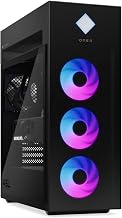
Hitting the sweet spot of RTX 5070 gaming without blowing past a $1,500 budget is entirely achievable in 2026, thanks to a wave of aggressively priced prebuilt towers. The 5070’s 12GB of VRAM and DLSS 4 support make it a superb 1440p performer, and builders like KOTIN, STORMCRAFT, Skytech, and MSI now package it with capable CPUs and fast storage at prices that stay within reach. The key is knowing where the value lives and which corners are safe to cut.
This guide rounds up the best RTX 5070 prebuilts that deliver flagship-adjacent gaming while respecting a real-world budget. Every system referenced is a genuine machine you can buy, and we explain the trade-offs so your dollars land where they matter most.
Our top picks
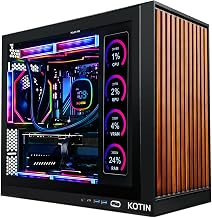
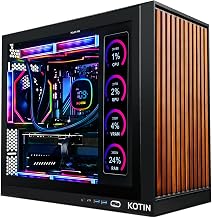
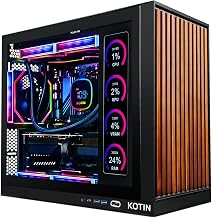
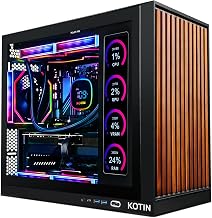
 KOTIN Prebuilt Gaming PC RTX 5070 12GB
- POWERED BY RTX 5070 12GB + RYZEN 7…
- 32GB (16x2) DDR5 MEMORY & 1TB NVMe SSD…
- IN 11.3-INCH Smart DISPLAY - An integrated smart…
 STORMCRAFT Falcon Prebuilt RTX 5070 Gaming PC
- Dominate 1440p & Max-Out Competitive Esports: Engineered for…
- Elite B850 Platform with 360mm AIO Cooling: Built…
- Your All-in-One Content & Streaming Command Center: Beyond…
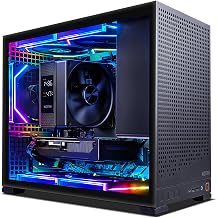
 Black RGB Prebuilt Gaming Desktop PC
- 【Reliable Gaming Performance】 Powered by AMD Ryzen 7…
- 【32GB DDR4 RAM & 1TB PCIe SSD】 32GB…
- 【Stable Connectivity & RGB Design】 Built-in WiFi and…
| Product | Key specs | |
|---|---|---|
| KOTIN Prebuilt Gaming PC RTX 5070 12GB | POWERED BY RTX 5070 12GB + RYZEN 7… 32GB (16x2) DDR5 MEMORY & 1TB NVMe SSD… IN 11.3-INCH Smart DISPLAY - An integrated smart… | Check price |
| STORMCRAFT Falcon Prebuilt RTX 5070 Gaming PC | Dominate 1440p & Max-Out Competitive Esports: Engineered for… Elite B850 Platform with 360mm AIO Cooling: Built… Your All-in-One Content & Streaming Command Center: Beyond… | Check price |
| Black RGB Prebuilt Gaming Desktop PC | 【Reliable Gaming Performance】 Powered by AMD Ryzen 7… 【32GB DDR4 RAM & 1TB PCIe SSD】 32GB… 【Stable Connectivity & RGB Design】 Built-in WiFi and… | Check price |
 Skytech Gaming Rampage Gaming PC Skytech Gaming Rampage Gaming PC | Intel Core i5 14400F 2.5GHz (4.7GHz Turbo Boost)… NVIDIA GeForce RTX 5070 12GB GDDR7 Graphics Card… WI-FI 5 802.11ac | No Bloatware | Graphic… | Check price |
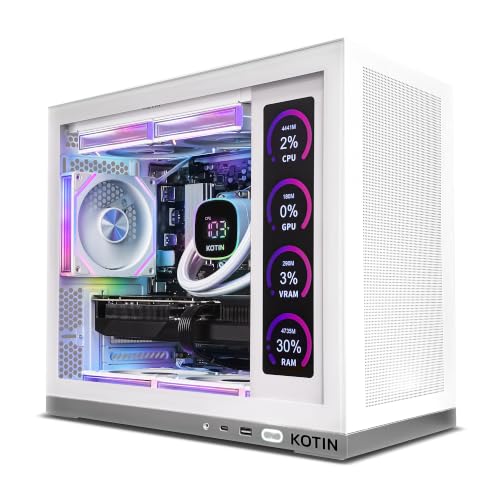 KOTIN Prebuilt Gaming PC Ryzen 7 7800X3D KOTIN Prebuilt Gaming PC Ryzen 7 7800X3D | Ryzen 7 7800X3D High-Cache Processor Built for Gaming:… Plug and Play Gaming PC: This KOTIN prebuilt… 9.16-Inch Smart Display: The built-in 9.16-inch smart display… | Check price |
 msi Codex R2 Gaming Desktop PC msi Codex R2 Gaming Desktop PC | Start Your PC Gaming Story With RTX 5070… A Platform Built to Perform and Scale: The… The Prebuilt That Grows With You: Built on… | Check price |
 Gaming PC Desktop Gaming PC Desktop | 【Powerful CPU & Gaming GPU】Powered by AMD Ryzen… 【Ultimate Multitasking】 16GB DDR5 RAM handles heavy multitasking,… 【Reliable Cooling】 240mm AIO liquid cooling system keeps… | Check price |
 Panorama Prebuilt Gaming PC Panorama Prebuilt Gaming PC | 【AMD Ryzen 7 5700X 8-Core Gaming & Productivity… 【AMD Radeon RX 9070 GRE Graphics Card 】Powered… 【Ultimate Multitasking】 32GB DDR4 RAM (2*16GB) handles heavy… | Check price |
As an Amazon Associate we earn from qualifying purchases at no extra cost to you.
🎮 Get More From Your Setup — Free
Prime Gaming gives you free PC games every month, in-game loot, and a free Twitch sub — plus fast free shipping on the rigs above. New members get a 30-day free trial.
Watch: Best Prebuilt Gaming PC with RTX 5070 Under $1500 — Video Review
How to Choose an RTX 5070 Prebuilt Under $1500
- Prioritize the GPU-CPU pair: Spend on a balanced chip like a Ryzen 5 9600X or i5-14400F rather than flashy extras that do not add frames.
- Right-size the RAM: 16GB DDR5 works today, but 32GB is worth stretching for if the price stays under budget and you multitask.
- Check the power supply: An 650W-plus Gold ATX 3 unit is essential for stable 5070 operation and any future upgrade.
- Storage over sparkle: A 1TB Gen4 NVMe SSD beats extra RGB every time; make sure fast storage is included, not an upsell.
- Cooling that fits the case: A quality air tower or 240mm AIO is enough for the 5070 at this budget, keeping noise and temps in check.
The Best RTX 5070 Prebuilts Under $1500 Reviewed
KOTIN RTX 5070 Smart Display Tower
The KOTIN RTX 5070 12GB build pairs a Ryzen 7 9700X with 32GB DDR5, an 850W Gold PSU, and a 360mm liquid cooler. It is the most fully featured option that can still sneak under budget on sale, offering strong 1440p performance and a smart display for system monitoring.
STORMCRAFT Falcon 7800X3D
STORMCRAFT’s Falcon brings the gaming-tuned Ryzen 7 7800X3D, 32GB DDR5 6000, and a 360mm AIO on a B850 board. If you can find it at the top of your budget, its X3D cache delivers the best frame rates here for competitive 1440p play.
MSI Codex R2 (i5-14400F)
The MSI Codex R2 combines a Core i5-14400F, RTX 5070 12GB, 32GB DDR5, and WiFi 6E in a VR-ready, air-cooled chassis. It is a reliable, no-drama value pick that consistently lands comfortably under $1,500.
Ryzen 5 9600X Compact Build
This Ryzen 5 9600X system pairs the RTX 5070 with 16GB DDR5, a 650W PSU, a 240mm AIO, and software-controlled ARGB fans. It is the leanest way onto the 5070 platform, ideal for buyers who want maximum GPU for the money and plan to add RAM later.
Skytech Rampage (i5-14400F)
The Skytech Rampage uses the efficient i5-14400F, RTX 5070 12GB, 24GB DDR5 6000, a 1TB Gen4 NVMe SSD, and an 850W Gold ATX 3 PSU. It is a well-balanced budget contender with a generous power supply that leaves room to grow.
Frequently Asked Questions
Can you really get an RTX 5070 prebuilt under $1500?
Yes, especially with lean configurations like the Ryzen 5 9600X build or the MSI Codex R2. Watch for sales, and the more feature-rich KOTIN and STORMCRAFT towers can also dip under budget.
Is 16GB of RAM enough at this budget?
16GB DDR5 runs current games fine, but 32GB is the more comfortable long-term choice. Several builds here include 32GB, and single-stick 16GB systems are easy to upgrade later.
What resolution should I target under $1500?
These systems are built for 1440p, where the RTX 5070 shines. They also handle 1080p at very high refresh rates and can reach into 4K with DLSS 4 in many titles.
Which build offers the best gaming frame rates?
The STORMCRAFT Falcon with its Ryzen 7 7800X3D leads in CPU-bound competitive games, while the KOTIN and Skytech systems offer excellent all-around 1440p performance.
Final Thoughts
Staying under $1,500 no longer means settling for last-generation hardware. The KOTIN Smart Display tower and STORMCRAFT Falcon deliver premium features at the top of the budget, while the Ryzen 5 9600X build, MSI Codex R2, and Skytech Rampage prove you can own an RTX 5070 for less. Focus your money on the CPU, PSU, and storage, and any of these prebuilts will deliver superb 1440p gaming without breaking the bank.