
The best Steam Deck anti glare films are not interchangeable simply because their packaging says “Steam Deck.” For a glossy Steam Deck LCD, ivoler’s matte etched-glass two-pack is the most straightforward currently orderable all-around choice, while MagGlass offers a single-glass alternative. For Steam Deck OLED owners who specifically want a matte PET surface, ScreenShield Optic+ Anti-Glare for Steam Deck OLED is the clearest model-specific, in-stock film option found in this review. These finishes scatter reflections but can soften fine detail. If your model already has Valve’s etched glass, adding another textured layer may make the image worse rather than better.
Quick verdict: choose by screen, not by brand
The word film is often used loosely in store search results. Some products here are flexible PET film; others are thicker matte tempered glass; JSAUX Obsidian AR is a comparatively clear glass protector with an anti-reflective coating. These are different optical approaches, and treating them as interchangeable produces misleading recommendations. For a glossy LCD, matte glass is a reasonable starting point if reflections bother you more than fine-text sharpness. For an OLED, confirm the protective layer is genuinely cut for the OLED hardware and decide whether you prefer a textured matte appearance or a clearer anti-reflective finish.
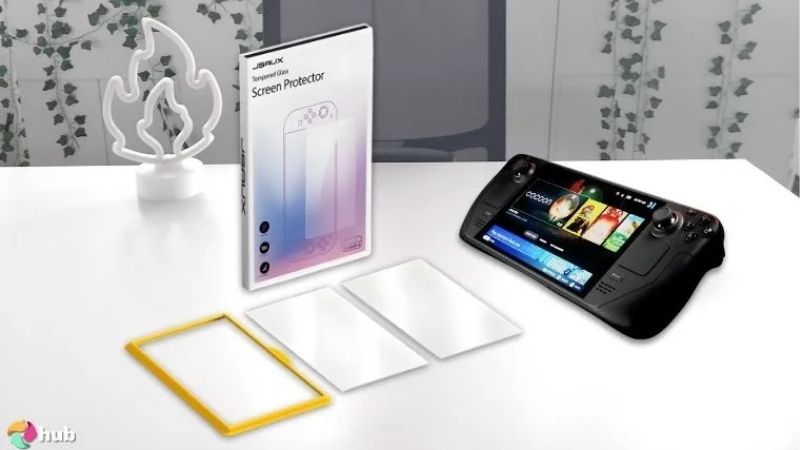
Best overall for glossy Steam Deck LCD: ivoler Matte Anti-Glare Etched Glass, two-pack with alignment frame. Best truly film-based option for Steam Deck OLED: ScreenShield Optic+ Anti-Glare, three-pack. Best single-sheet matte glass alternative: MagGlass MAG188B. Best for in-store LCD pickup: Nyko Anti-Glare Screen Armor, where local Micro Center inventory exists. Best combined glare and side-view reduction: BoxWave ClearTouch Anti-Glare Privacy, for the original Steam Deck. None of these choices has been independently bench-tested by this website; rankings are based on current product evidence and defined buyer needs.
| Product and exact configuration | Film type and verified fit | Displayed US price (seller, checked Oct. 28, 2026) | Stock status (Oct. 28, 2026) | Main trade-off |
|---|---|---|---|---|
| ivoler matte etched-glass two-pack, installation-frame version | Matte tempered glass; product says Steam Deck, original-model fit supported; OLED fit not separately confirmed | $15.99 — ivoler | Orderable: Add to cart | Manufacturer listing lacks a separate explicit OLED fit statement |
| ScreenShield Optic+ Anti-Glare 3-pack for Steam Deck OLED | Matte PET film; explicitly for Valve Steam Deck OLED | $44.90 — ScreenShield US storefront | In stock | Higher upfront price and international fulfillment |
| MagGlass MAG188B single matte guard | Etched tempered glass; specified for 7-inch original Steam Deck | $16.97 — Walmart, sold by Encased Products Inc. | Orderable for shipping to shown ZIP | Single sheet; no verified OLED approval |
| Nyko Anti-Glare Screen Armor 89503 | Matte/anti-glare tempered glass; explicitly for 2022 LCD 64GB and 256GB | $14.99 — Micro Center | In stock at selected Indianapolis store; other locations vary | In-store selection matters; LCD-only recommendation |
| BoxWave ClearTouch Anti-Glare Anti-UV EyeCare two-pack, Valve Steam Deck | Matte film with additional optical filtering; original Steam Deck device selection | $27.95 — BoxWave | In stock; site states 6–10 days to ship | Blue tint / filtering may change screen appearance |
| BoxWave ClearTouch Anti-Glare Privacy two-pack, Valve Steam Deck | Matte privacy film; original Steam Deck device selection | $29.95 — BoxWave | In stock; site states 6–10 days to ship | Narrows useful viewing angles; not a pure glare-only pick |
| JSAUX GP0110 matte tempered-glass two-pack | Matte glass; manufacturer states Steam Deck LCD | $14.99 — JSAUX | Unclear: “Coming Soon” and “Add to cart” both visible | Availability conflict; mixed thickness specifications |
| JSAUX Obsidian AR GP0127 two-pack | Clearer anti-reflective tempered glass; manufacturer explicitly lists LCD and OLED | $21.99 — JSAUX | Unclear: “Coming Soon” and “Add to cart” both visible | AR is not the same as a matte diffusion finish |
These are prices displayed on the named seller pages, not price guarantees. Shipping, tax, stock at a particular ZIP code, or a cart’s ability to complete checkout can differ. For products with conflicting purchase indicators, stock remains unclear even where an Add to cart label appears. No out-of-stock or unclear pick is treated as an immediately available Best Overall recommendation.
Which Steam Deck screen actually needs an anti-glare protector?
Valve’s original Steam Deck LCD has a seven-inch, 1280-by-800 display. Some original configurations include premium anti-glare etched glass, while the glossy LCD configurations do not. The OLED generation uses a larger 7.4-inch HDR OLED panel inside the familiar handheld chassis. Valve specifies premium etched anti-glare glass on the 1TB OLED, while the standard glossy OLED is the more natural candidate for a removable matte layer. Model names and storage upgrades can confuse this distinction: replacing an SSD does not change the screen’s original glass.
That matters because there are two separate ways to reduce annoying reflections. A matte surface disperses a strong mirror-like reflection over a broader area. This may make an overhead light less distracting, but scattered light can create a faint grain or haze over bright UI text. A clear anti-reflective coating seeks to reduce reflection while keeping a smoother optical surface. It may preserve contrast better in some lighting, but a clear coated protector cannot be assumed to erase harsh window reflections like a deliberately textured film. Vendor marketing frequently uses anti-glare and anti-reflective as if they were synonyms; inspect the actual finish before ordering.
An etched Steam Deck OLED 1TB is a special case. A glossy adhesive protector can make the existing etched effect less useful, while stacking matte-on-matte adds another scattering interface. Neither outcome is necessarily a hardware failure; it is an optical change. The practical recommendation is to leave the factory glass alone unless scratches, fingerprints, or a specific lighting problem justify an added layer. If you do add one, accept that the finished result may not resemble either the factory image or marketing photos.
How we selected the protectors
This roundup uses Valve’s model descriptions as the baseline and checks each manufacturer’s product identity, finish, contents, and compatibility language against live US-facing retailer pages where possible. The candidate pool was narrowed to actual reflection-reducing products. Plain crystal-clear glass, despite offering scratch protection, does not answer a shopper who explicitly searches for anti-glare films. One AR-coated glass exception remains to explain the low-haze alternative, clearly labeled as such rather than passed off as matte PET.
We prioritized separately identifiable products instead of inventing eight near-identical generic Amazon listings. Stock labels are included because a technically suitable protector is less useful when it cannot actually be purchased. Where a page does not say OLED, the review does not silently assign OLED compatibility on the basis of a generic “Steam Deck” title. Likewise, a seller’s advertising about drop resistance or 9H hardness is not independent evidence that the entire device survives a drop. No standardized reflection meter, colorimeter, touch-response rig, or controlled drop test was used for this editorial roundup.
A second criterion is whether a protector helps a particular user accomplish something concrete. A removable PET option is attractive to someone who dislikes rigid glass; a framed kit addresses alignment anxiety; local retail stock is relevant if you need the part today; a privacy overlay serves shared spaces but deliberately reduces side viewing. This distinction is more useful than pretending the lowest price automatically delivers the best optical outcome.
Best Steam Deck anti-glare protectors: eight detailed picks
ivoler matte etched glass — best overall for an original glossy LCD
ivoler’s Steam Deck screen-protector page describes a matte, anti-glare etched tempered-glass guard and offers a two-pack with an installation frame. The selected configuration was listed for $15.99, with an Add to cart control visible on the manufacturer storefront on October 28, 2026. The bundle description includes two glass protectors, a placement frame, wet and dry wipes, a squeeze card, and installation guidance. That combination is useful for a first installation because a frame reduces the number of variables you must align by eye.
The practical appeal is a forgiving purchase path. If your original Steam Deck LCD has a glossy screen and you consistently see ceiling lamps reflected across dark game scenes, this kit lets you try a matte conversion with a spare sheet in reserve. Two sheets also protect against a familiar failure: discovering one dust particle after committing the adhesive. The frame helps with centering, but it cannot remove dust, cure a damaged screen, or guarantee a flawless bond on a dirty surface. Build a clean workspace before opening either sheet.
ivoler’s visible page says “Steam Deck,” not a separately named “Steam Deck OLED” in the verified configuration details. Accordingly, this roundup recommends it for the original LCD only unless the seller confirms the exact OLED fit before purchase. The larger OLED panel does not by itself establish whether the exposed cover-glass footprint is identical. There is no reason to risk an uncovered edge, misplaced border, or a return when a specifically labeled OLED option exists.
The main drawback is optical, not mechanical. A textured glass layer can make small text and fine UI outlines appear softer, especially against bright backgrounds. People who spend as much time reading browser pages or strategy-game text as they do playing dark action games should weigh that cost carefully. Buy when: you own the original glossy LCD and want an affordable, framed matte conversion. Skip when: you demand maximum image clarity or cannot confirm the exact device version.
ScreenShield Optic+ Anti-Glare three-pack — best PET film for Steam Deck OLED
ScreenShield’s US-facing storefront lists the 3pk Optic+ Anti-Glare Screen Protectors for Valve Steam Deck OLED at $44.90, explicitly identifies the target device as Steam Deck OLED, and marks the item In stock. The seller specifies matte PET-based film with a surface coating, an oleophobic layer, and a kit containing polishing cloth, wipes, smoothing card, dust stickers, and instructions. Its quoted shipping start is $3.50, and the store says its orders are shipped from Australia with a stated standard transit window. These are seller policies, not a guarantee to every US ZIP code.
This is the clearest film-first answer for someone with a glossy OLED who does not want to use a relatively thick sheet of tempered glass. PET film is flexible and typically less rigid than glass. In exchange, do not expect it to behave like a tempered-glass panel under hard abrasion, nor expect the nominal three-pack to improve scratch resistance beyond the material’s actual design. The most valuable part of the pack may be the extra attempts: applying a large matte film without lint and trapped particles is more difficult than it looks.
The optical trade-off is especially noticeable on an OLED because dark-room contrast and color richness are among the reasons people paid for the screen. Matte PET spreads specular reflections, which can make a sunny room more comfortable while slightly reducing the perceived crispness of fine details. ScreenShield does not publish a verified independent haze, transmittance, and reflected-light comparison against the ivoler or JSAUX candidates in the sources reviewed here. Treat its finish description as a manufacturer claim, not a measured victory.
For an OLED 1TB with factory etched glass, the same stack warning applies: another matte finish may introduce avoidable grain. Buy when: you own the glossy Steam Deck OLED, want real matte PET rather than glass, and value an exact-model, in-stock three-pack. Skip when: your etched display already handles your lighting or you dislike the cost and slower cross-border fulfillment.
MagGlass MAG188B — best single-sheet matte-glass alternative
MagGlass, an Encased brand, supplies a 7-inch Steam Deck matte etched-glass protector under model MAG188B. The direct Walmart listing showed $16.97, an Add to cart option, and shipping availability to the displayed Sacramento ZIP code on the research date; Encased Products Inc. was identified as the seller, with Walmart fulfillment. The item includes a glass guard, microfiber cloth, dust remover, and alcohol pad, but only one protector per package. That makes the effective cost of a failed application higher than for a two-pack.
It is a sensible alternative when you want rigid matte glass but do not want to buy an installation-frame kit. The etched finish aims to turn sharp reflections into more diffuse light; the cleaning accessories make the pre-installation step practical. The company’s advertised impact, touch, and hardness benchmarks are not independently validated for this review. A 9H-style pencil-hardness claim is not a promise that a handheld’s underlying display will survive a drop onto tile.
A distinguishing concern is the product’s exact version wording. Walmart’s listing describes the 7-inch original Steam Deck, not a specifically verified Steam Deck OLED cut. The small difference in active screen diagonal between LCD and OLED can invite assumptions, but the optical window and adhesive fit should be taken from the brand’s actual SKU. This model stays an LCD recommendation until an explicit OLED variant is identified.
The other trade-off is application risk. Without the stated ivoler-style alignment frame, you need to line up the long edges and the top margin before lowering the glass. The first touch of adhesive matters because repeated lifting may collect debris. Buy when: you want an available original-LCD matte-glass option and are comfortable installing a single guard. Skip when: you need two attempts or have an OLED model not expressly confirmed for this SKU.
Nyko Anti-Glare Screen Armor 89503 — best local-store option for LCD
Micro Center lists Nyko Anti-Glare Screen Armor for Steam Deck, manufacturer number 89503, at $14.99 with three new units in stock at its Indianapolis store during the checked page state. The retailer specifically describes its target as the 2022 Steam Deck 64GB and 256GB LCD models, noting that the factory 512GB version already came with an etched finish. It lists a roughly 0.55mm tempered-glass sheet and installation accessories, including a cloth, wet and dry wipes, dust sticker, and alignment stickers.
A stock-verified physical location is a real distinction if you need protection before a trip, but it is not a promise of nationwide availability. At checkout, select your actual Micro Center store. Some store-selection controls default to a location unrelated to where you live; transferring a displayed “in stock” badge to every state would be inaccurate. The model may also appear as shippable or pickup-only depending on the store’s inventory policy. Confirm before driving.
This guard is relatively thick compared with flexible PET options. Thickness alone does not tell you whether the touchscreen will feel slower; those claims require real measurement and, ideally, comparison under the same setup. A larger rigid sheet can also create a lip near the edge of an aggressive snap-on protective case. Before applying, check whether the case bezel sits on the same area where the glass adhesive will go.
The main limitation is compatibility. The manufacturer/retailer wording here supports original LCD configurations, not the OLED, and specifically excludes the value proposition for a factory-etched original 512GB unit. Buy when: you own a compatible glossy 2022 LCD and can verify local pickup. Skip when: you’re shopping for an OLED or the store stock badge does not match your location.
BoxWave ClearTouch Anti-Glare Anti-UV EyeCare — best for matte film plus filtering
BoxWave’s product page for Valve Steam Deck lists a two-pack ClearTouch Anti-Glare Anti-UV EyeCare protector for $27.95. It explicitly says In Stock, with shipping in 6–10 days. The company describes a matte, paper-like surface along with filtering for ultraviolet and blue light and notes a subtle blue tint. The latter is a meaningful trade-off, not a free quality improvement: any deliberate spectral filter may change how game art, bright whites, and UI accents appear.
This should be considered only when the extra filtering is something you knowingly want. It is not established that a blue-tinted film treats eye strain, prevents eye disease, or provides medical benefits from ordinary gaming. If your concern is simple ceiling-light reflection, a neutral matte surface is the cleaner baseline. If you work in shared spaces and prefer a softer surface feel with additional filtering, this is a genuinely different option worth evaluating.
BoxWave’s device selector identifies Valve Steam Deck rather than stating Steam Deck OLED compatibility on this checked product page. In this article it is therefore treated as a classic LCD device listing. Do not infer that its selected cut covers OLED variants, especially where the screen protector may have a different active area. Read the exact cart selection before purchasing, and do not select an unrelated “similar size” product.
One caution about BoxWave’s marketing: the claimed anti-UV and eye-comfort benefits are manufacturer statements. There is no independent head-to-head verification of their magnitude against the alternative matte films in this guide. Buy when: you specifically want a matte film and are comfortable with the possibility of a blue tint. Skip when: faithful color reproduction matters more than additional filtering.
BoxWave ClearTouch Anti-Glare Privacy — best for shared-space viewing
The BoxWave ClearTouch Anti-Glare Privacy two-pack, configured for Valve Steam Deck, was listed for $29.95, In Stock, with the same stated 6–10-day dispatch window. This is not an ordinary neutral matte film. It combines a matte outer treatment with side-angle privacy behavior. BoxWave says off-axis observers are obstructed beyond a certain angle; that is a product claim, and the angle has not been independently measured on a Steam Deck in this review.
Privacy can be desirable on a train, flight, or shared desk if the display sometimes shows accounts or private messages. It also imposes a penalty: friends sitting next to you may see a darker or less consistent image, and slight tilts of the handheld can affect your own visibility. In a handheld gaming context, that is a serious trade-off. Games that depend on bright, wide-angle couch viewing are not its strength; neither are situations where someone else needs to read your screen.
Compared with the EyeCare variant, this film is not bought primarily for a color filter. It is a visibility-control accessory with some glare reduction attached. That is why it earns a separate use-case position rather than being treated as a higher-performance version of the same matte film. The checked selector again names the original Valve Steam Deck, without a verified OLED-specific variant, so compatibility is limited to the original model for this recommendation.
The film can be worthwhile if you would otherwise buy a separate privacy filter, but do not confuse privacy with protection against scratches or theft. Likewise, a narrow viewing angle does not prevent someone from seeing sensitive information while standing directly behind you. Buy when: side-view privacy is an actual need alongside glare management. Skip when: you want the brightest, widest, most color-stable display experience.
JSAUX GP0110 — familiar matte-glass kit, but stock needs confirmation
JSAUX’s GP0110 Anti-Glare Screen Protector for Steam Deck is a two-pack of matte tempered-glass guards with an alignment frame and cleaning accessories. Its manufacturer page explicitly calls out the 7-inch Steam Deck LCD. It was shown at $14.99, with a stated light transmittance above 86% in the manufacturer comparison table. That is an optical transmission specification, not a verified real-world measurement of how much sunlight or an overhead lamp it will block.
The fit and finish make sense for an LCD owner who wants a known model identifier and a guide frame. However, the live manufacturer product page displayed both “COMING SOON” and “Add to cart”. A separate JSAUX collection categorized the item under in-stock protectors. Those indicators are contradictory, so this article conservatively labels stock Unclear and does not rank the item above products whose availability is more straightforward. A buy button is not proof that payment and US delivery succeed.
There is a second documentation inconsistency: JSAUX’s comparison table shows one thickness for the GP0110 while a more detailed specification block describes another. Rather than repeating an uncertain fraction of a millimeter, this guide withholds the exact thickness. The correct manufacturer SKU and the matte LCD-specific wording are more useful for the purchase decision than a dubious precision claim. If the manufacturer corrects the specification or supplies a technical drawing, that can be added at a later editorial update.
JSAUX also warns that placing another protector on factory anti-glare glass may alter the original surface’s optical benefit. That warning is especially relevant if you already have an etched LCD model or OLED 1TB. Buy when: its stock status resolves at checkout and you own a glossy LCD. Skip when: the page remains contradictory or your main concern is preserving factory etched-glass clarity.
JSAUX Obsidian AR GP0127 — best non-matte alternative to evaluate
The JSAUX Obsidian AR GP0127 is included deliberately as a comparison option, not mislabeled as a matte PET film. The manufacturer describes anti-reflective coated tempered glass for both Steam Deck LCD and OLED, sold as a two-pack for $21.99. Its high-transparency positioning aims to reduce reflections without relying on the same diffuse texture as a frosted protector. That is an interesting alternative for players who dislike the milky appearance some matte films introduce to bright text and saturated OLED graphics.
The trade-off is that an AR coating and a matte scattering finish tackle reflections differently. Under a strong, localized lamp, the remaining reflected image may still appear more distinct than on aggressively matte glass. Conversely, a clear coated surface can be preferable in relatively controlled indoor lighting where the highest priority is to preserve fine details. Those are expected optical tendencies, not a measured comparison of these exact SKUs on identical devices.
Like GP0110, the verified JSAUX page shows both “COMING SOON” and “Add to cart”, making stock uncertain even though the listed catalog price is clear. A retailer listing for the Obsidian variant also showed a conflicting availability state, reinforcing the need for checkout verification. It would be wrong to present this as an immediately available top purchase while that contradiction persists. In addition, JSAUX’s own comparison graphics claim dramatic relative optical superiority without a reproducible independent lab report; such ranking stars should not be treated as measured evidence.
For someone who already owns a factory-etched OLED, placing clear AR glass over the native surface can also change the look of the etched layer underneath. Verify whether you’re willing to accept that effect before peeling the adhesive backing. Buy when: you prefer a potentially clearer AR approach and live checkout confirms availability. Skip when: you specifically want a matte PET sheet or the stock state is unresolved.
Matte glass versus PET versus clear AR: what changes in real gaming?
Matte tempered glass is generally the simplest category for people seeking rigid scratch protection and reduced mirror reflections at the same time. It retains a smooth, firm touchscreen feel, but the matte microtexture can soften the visual presentation. If you frequently play dark games near a desk lamp, reducing a sharp bright spot may be worth that compromise. If you mainly play detailed pixel art and text-heavy RPGs, it may not be.
Matte PET film is thinner and more flexible as a category, which can be attractive if you want to avoid a thick glass rim. PET can conform differently during installation and may be less forgiving when you trap dust or apply uneven pressure. A PET guard can still be scratched; the surface is not automatically more durable because it is marketed as “nano” or “premium.” ScreenShield is the best example here because its OLED-specific page makes the material and finish clear.
Clear or minimally hazy AR-coated glass should be treated as a separate purchase decision. The appeal is the possibility of controlling some reflection without spreading light across the whole screen. Real performance depends on coating quality, wavelengths, incidence angle, and how the screen is lit. Without matched independent testing, it is not possible to rank JSAUX Obsidian AR above the matte products for every room. A product that looks wonderful in a dark bedroom may be less satisfying beside a sunny window.
None of these surface layers increases the Steam Deck’s underlying maximum brightness, changes OLED pixel performance, or improves frame rate. If reflections are severe, moving the light source, adjusting the seating position, or using a different room may help more than stacking extra screen protectors. A matte guard is a compromise to manage a specific problem, not a universal display upgrade.
Fit and compatibility checks before you order
Identify the device by generation, not its current SSD size. Valve’s LCD and OLED versions have different active-screen diagonals. Factory-etched glass is also tied to original configurations, and swapping storage does not swap the glass. If the purchase page does not name your generation, request explicit compatibility confirmation before buying. This article’s product-specific cautions are intentional: a broad retail title is weaker evidence than a manufacturer’s direct model designation.
Separate screen protectors from trackpad films and console skins. A listing that says “Steam Deck protection film” might cover the touchpads, faceplate, or back shell. Those products will not manage screen glare. Likewise, an ordinary transparent protector that merely resists fingerprints should not be sold to an anti-glare shopper as equivalent to etched matte glass. Look for the finish language: matte, etched, frosted, anti-glare PET, or AR-coated with a description of the actual optical mechanism.
Account for cases and carry covers. A rigid protector adds a small physical layer to the glass. If a snap-on frame rides directly against its edge, the frame can encourage lifting or chipping. Examine the case’s screen-side lip before installation and avoid forcing a protective shell over the glass. A carry case should not press on the center of the display; the new film is not a substitute for a hard travel cover that protects the sticks and screen from external pressure.
Review the seller’s precise stock signal. “In stock” on a configured product page is stronger than a broad catalog result. A local store badge applies only to the selected location; an e-commerce Add to cart button does not establish successful shipping to all ZIP codes. If a store also says “Coming Soon,” treat availability as unresolved. ScreenShield’s OLED page provides a clearly labeled stock result, but its international fulfillment policy may influence delivery time more than a US-based order.
How to apply a Steam Deck anti-glare protector cleanly
The most reliable installation begins before you peel a backing film. First place the unopened protector over the display and check whether the dimensions leave sensible margins around the screen-side cover glass. Do not guess that an LCD-only product fits an OLED. Next wash and dry your hands, power down the handheld, unplug charging cables, and work in a clean, low-dust room with good lighting. Keep the Deck flat on a stable surface rather than balancing it on your lap.
Use the manufacturer’s included cleaning materials as directed. A dry microfiber cloth is a good first option for ordinary fingerprints. If a kit includes a wet wipe, do not saturate the glass or allow liquid to enter openings; do not substitute harsh household solvents or spray cleaner directly onto the Deck. Finish with a dust-removal sticker and inspect the display under angled light. Even one tiny fiber can make a clear bump under a full-screen guard.
For a kit with a frame, attach the positioning frame according to the package guide, align the protector above the display, and lower it in the specified direction. For a kit without a frame, align the long edge before allowing the adhesive to touch the center; some installers use the provided guide stickers as temporary hinges. Work gently outward with the included smoothing card if the manufacturer instructs you to do so. Do not push hard on the display or repeatedly peel and reapply a contaminated sheet.
When finished, check the entire perimeter. An edge that will not settle may indicate dust, an incorrect cut, a case interference point, or an adhesive defect. If bubbles migrate when gently smoothed, follow the kit’s curing instructions; if a hard particle remains fixed, forcing it down can leave a visible mark. Test touchscreen interactions around the corners and center, and check whether a protective case presses on the new edge. If touch input becomes unreliable, remove the protector according to its instructions and recheck the bare display before assuming a Steam Deck hardware fault.
Finally, use the same game scene at the same brightness and lighting position to judge the outcome. Compare a dark menu, a bright white page, small HUD text, and off-axis reflections. An anti-glare protector that reduces one reflection but makes everything annoyingly grainy may not be the right compromise. There is no need to keep it simply because you already paid for it.
Common buying mistakes and how to avoid them
Buying a clear protector because it says “HD.” HD or high-transparency wording may refer to optical clarity, not glare reduction. For a matte goal, verify a matte or etched surface. JSAUX’s clear GP0107 and Spigen’s clear EZ Fit are useful examples of different product categories, not substitute matte picks just because they fit the Deck.
Assuming the 1TB OLED always needs more matte. Valve’s 1TB OLED already includes etched anti-glare glass. Additional layers can change scattering, perceived contrast, and black-level appearance. Start with the screen you have in your actual room before adding texture.
Equating a 9H sticker with shatterproof hardware. Hardness labels describe a limited material property under a specific test convention; they do not prove that the LCD assembly, bezel, chassis, or OLED stack will survive impact. A protector is inexpensive sacrificial surface protection, not an engineering guarantee against damage.
Ignoring the count per pack. The MagGlass listing is a single item; ivoler and the JSAUX candidates are two-packs; the ScreenShield OLED pick here is a three-pack. The price per usable install changes significantly if the first sheet collects dust. Do not compare pack prices without checking quantity.
Treating product-page stock as a shipping promise. A warehouse can be orderable while a particular US address is excluded, and a local retail “in stock” badge will not transfer to another store. Confirm the selected delivery region and the return policy before spending money. More generally, do not infer that a manufacturer’s current list price is a lasting MSRP or that an advertised sale must be available tomorrow.
Frequently asked questions
Does matte film make the Steam Deck OLED look worse?
It can, depending on your eyes and lighting. Matte finishes scatter reflected light, which can reduce distracting mirror images but introduce visible grain, haze, or a softer appearance around fine text. The trade-off may be more apparent on an OLED because its contrast is otherwise striking. For an OLED with factory etched glass, stacking another matte layer deserves extra caution. If you mainly play in controlled indoor light, compare the stock display first.
Can I use a Steam Deck LCD screen protector on an OLED?
Only when the exact manufacturer’s documentation states compatibility for both. Some makers explicitly do, including JSAUX Obsidian AR GP0127, but other pages reviewed here specify the original Steam Deck or LCD alone. Seven-inch versus 7.4-inch active-screen dimensions are not enough to determine glass-cover cut size; do not extrapolate on that basis.
Is matte glass better than PET for glare?
Neither wins automatically. Glare control depends on the actual surface treatment, not only whether the base is glass or PET. Rigid glass may feel smoother and be easier to position with a frame; flexible PET can have a smaller edge profile. Two materials using different matte textures can produce different amounts of haze. Without matched lab data, use fit, finish description, ease of installation, and return options rather than a universal “better” claim.
Do anti-glare films affect touchscreen sensitivity?
An appropriately fitted protector should allow normal use, but manufacturing quality, thickness, adhesion, trapped particles, and an existing etched surface can change practical results. Check touch in the center and near all four corners after application. If input noticeably fails, review alignment and remove the film as instructed; do not respond by pressing harder or modifying software without evidence.
Are these films suitable for a Steam Deck with factory anti-glare glass?
Sometimes, but not by default. The protective benefit of an added sheet may matter if you often travel, but the original etched appearance can change when covered. JSAUX expressly warns that adding a protector can alter the existing anti-glare effect. For most careful indoor owners, keeping the original glass clean and using a protective carry case may be the simpler choice.
Which is the best available pick for OLED today?
For a specifically matte PET film, the ScreenShield Optic+ three-pack reviewed here was explicitly marked In stock for Valve Steam Deck OLED on October 28, 2026. It is relatively expensive and ships internationally. JSAUX Obsidian AR is specifically labeled for OLED as an alternative optical treatment, but its conflicting availability indicators prevent calling it a confirmed immediately buyable option.
Final thoughts
Choose your anti-glare layer only after you know whether your Steam Deck is glossy LCD, glossy OLED, or factory etched. For an original glossy LCD, ivoler’s two-pack with frame is a practical orderable first choice, with MagGlass as a good single-sheet alternative and Nyko worth considering for verifiable local pickup. For glossy OLED users who specifically want flexible matte film, the model-labeled ScreenShield Optic+ three-pack offers a clearer compatibility and stock trail. If crisp indoor color matters more than scattering reflections, an AR-style glass such as JSAUX Obsidian AR is worth comparing—but only after its stock conflict is resolved. Your next action is simple: identify the exact screen, decide whether glare or fine-detail clarity is the bigger problem, and check the live seller’s device selector and shipping status before purchasing.
