Our Top Picks
Pros & cons
- Four-fan cooling setup keeps temperatures in check under load
- RTX 5070 brings a solid generational leap in ray tracing
- Customizable RGB lighting cycles through multiple presets
- MSI recommends Windows 11 Pro for business use, which isn't included
- 21.3-pound case still needs careful handling when moved
Thinking about playing Sid Meier’s Civilization V on PC and wondering what hardware you actually need? Civilization V is a turn-based 4X strategy game from 2010, and its official system requirements are every bit as modest as you would expect: a 1.8 GHz dual-core processor, 2 GB of RAM and a 256 MB DirectX 9-class graphics card are enough to get it running, with the recommended spec asking for a 1.8 GHz quad-core, 4 GB of RAM and a 512 MB card from the same era. The graphics side of that equation is easy — even modern integrated graphics clear the minimum — while the component that actually decides how pleasant the game feels is the CPU, because late-game turns on a busy map are spent processing AI civilisations rather than drawing pixels. This guide breaks down the realistic PC requirements for Sid Meier’s Civilization V, the best GPU to pair with it at each resolution, and complete build recommendations.
How Demanding Is Sid Meier’s Civilization V?
Sid Meier’s Civilization V is very light on PC hardware. It shipped in 2010 targeting DirectX 9, 10 and 11 hardware of that era, so the official minimum — a 256 MB ATI HD2600 XT, a 256 MB NVIDIA 7900 GS, or Core i3-or-better integrated graphics — is a very low bar by modern standards, and the recommended 512 MB ATI 4800-series or NVIDIA 9800-series is still a class of GPU from 2008. Any current integrated graphics solution will run the game comfortably, and a modern entry-level discrete card is already far beyond what it asks for. Where Civilization V does reward hardware is the processor: as the map fills with cities and units, every turn involves a large amount of AI decision-making, and that work lands on the CPU rather than the GPU. Large maps, many opponents and long games are where an older processor starts to show its age, not in the rendering. Memory and storage are equally undemanding, with 2 GB of RAM as the minimum and only 8 GB of free disk space required. The section below reproduces the game’s published requirements; check the official store page for the exact wording.

msi Codex Z2 Gaming Desktop, AMD R7-8700F, RTX 5070, 32GB DDR5, 2TB SSD | NVIDIA GeForce RTX 5070, USB Type-C, VR-Ready, Windows 11 Home. Model A8NVP-436US
One of the home product options compared in this guide.
View on Amazon
msi Codex R2 Gaming Desktop, Intel i5-14400F, RTX 5060, 16GB DDR5, 1TB SSD | NVIDIA GeForce RTX 5060, 80+ Gold PSU, ARGB Air Cooling, WiFi 6E, VR-Ready. Model A14NVL5-454US
Chosen because it adds cooling or gel-infused layers.
View on Amazonmsi Codex R2 Gaming Desktop PC | NVIDIA GeForce RTX 5070 12GB | Intel Core i5-14400F | 32GB DDR5 RAM | 1TB NVMe SSD | Air Cooling | Wi-Fi 6E | Windows 11 Home | VR Ready | D14NVP5-613US
Chosen because it adds cooling or gel-infused layers.
View on Amazon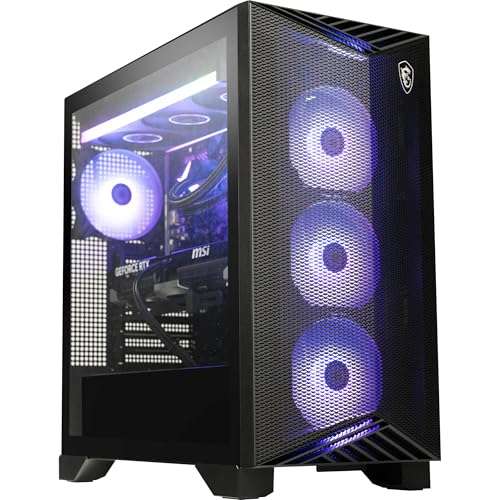
msi Aegis ZS Gaming Desktop, AMD Ryzen 9 9900X, GeForce RTX 5080, 32GB RAM, 2TB SSD, Liquid Cooling, Wi-Fi 7, Keyboard & Mouse Included, DIY Friendly, Windows 11 Pro
Chosen because it adds cooling or gel-infused layers.
View on AmazonSid Meier’s Civilization V Official PC System Requirements
| Component | Minimum (official) | Recommended (official) |
|---|---|---|
| OS | Windows® Vista SP2/ Windows® 7 | Windows® Vista SP2/ Windows® 7 |
| Processor | Intel Core 2 Duo 1.8 GHz or AMD Athlon X2 64 2.0 GHz | 1.8 GHz Quad Core CPU |
| Memory | 2GB RAM | 4 GB RAM |
| Graphics | 256 MB ATI HD2600 XT or better, 256 MB nVidia 7900 GS or better, or Core i3 or better integrated graphics | 512 MB ATI 4800 series or better, 512 MB nVidia 9800 series or better |
Source: the official Sid Meier's Civilization® V Steam store listing (app 8930), checked October 2026. Publishers can update these specs after patches.
Best GPU for Sid Meier’s Civilization V by Resolution
1080p
1080p is well within reach of almost anything. With an official minimum of a 256 MB DirectX 9 card, a modern integrated GPU or a card as old as a GTX 750 Ti will run the game at 1080p with settings turned up. The AMD Radeon RX 7600 is far more graphics card than Civilization V needs — it only makes sense here if you want a single GPU that also covers demanding modern titles.
1440p
1440p changes very little. The game’s rendering load scales gently, and the official recommended card is a 512 MB model from 2008, so the AMD Radeon RX 7600 sits comfortably above that bar and will handle 1440p at high settings with plenty of headroom — as would a mid-range card from several generations back. If you are weighing up where to spend, put the extra money into the CPU rather than the GPU for this game.
4K
4K is less about raw horsepower than about having a modern card with a current display output. Civilization V predates DLSS, FSR and frame generation, so none of those are available and everything is rendered natively. The NVIDIA GeForce RTX 4060 is a sensible modern entry point for 4K and is far beyond what this game alone requires — a card of that class is only justified if 4K gaming across many titles is the goal.
CPU, RAM and Storage for Sid Meier’s Civilization V
The processor is the component that matters most here. The official recommended CPU is a 1.8 GHz quad-core, so virtually any desktop chip from the past decade clears it, but because turn processing scales with the number of cities and units on the map, a faster CPU directly shortens the wait between turns in the late game. The AMD Ryzen 5 7600 is well beyond what the game asks for and is excellent value as a general gaming chip, while the AMD Ryzen 7 7800X3D is one of the fastest mainstream gaming CPUs and pays off most in exactly the kind of CPU-bound, many-entity workload a late-game Civilization V map produces. Intel fans can opt for the Intel Core i5-14600K. Memory is the least of your concerns: the game asks for 2 GB minimum and 4 GB recommended, so 8 GB is already comfortable and 16 GB leaves room for everything else running on the machine. A large kit such as the Corsair Vengeance DDR5 32GB is only worth buying as a long-term purchase for other games. Storage needs are tiny at 8 GB free, but an SSD like the Samsung 990 Pro 2TB NVMe SSD shortens the initial load and the reloads between sessions.
Recommended PC Builds for Sid Meier’s Civilization V
1080p budget build: AMD Radeon RX 7600 + AMD Ryzen 5 7600 + 16 GB DDR5 — hugely in excess of the official spec, and a good all-round modern baseline that runs Civilization V at 1080p with everything enabled while leaving room for newer games.
1440p sweet-spot build: AMD Radeon RX 7600 + AMD Ryzen 7 7800X3D + 32 GB DDR5 + 2TB NVMe SSD — the CPU is the part that earns its keep here, keeping late-game turns quick on large maps.
4K high-end build: NVIDIA GeForce RTX 4060 + AMD Ryzen 7 7800X3D + 32 GB DDR5 + fast NVMe SSD — comfortable native 4K in Civilization V, and a strong foundation for everything else you play.
Is It Worth Upgrading Your PC for Sid Meier’s Civilization V?
If Civilization V is the only game you care about, you rarely need to upgrade at all — its official minimum is a 1.8 GHz dual-core with 2 GB of RAM and a 256 MB graphics card, hardware that is now more than fifteen years old. If you are genuinely still on a machine of that vintage, a modern entry-level CPU, 8 GB of RAM and an SSD will transform how the game feels, and that is a much better use of money than a graphics card. Where an upgrade genuinely helps is the processor, since a faster chip shortens late-game turn times on big maps; adding memory beyond 8 GB will do nothing for this game specifically, and a newer GPU mostly buys you headroom for other titles. Rather than replacing everything at once, target the weakest link in your build.
Can You Play Sid Meier’s Civilization V on a Laptop or Handheld?
Yes, and more easily than for almost any other game in this genre. The official requirements note that Civilization V was optimized for touch-screen Ultrabooks, so thin-and-light laptops with modern integrated graphics meet the minimum, and a gaming laptop with a discrete GPU such as an RTX 4060 mobile is far more than the game needs at 1080p. On handhelds like the Steam Deck and ROG Ally it runs comfortably, and because the game is turn-based it suits short sessions and suspend-and-resume play well. If portability matters, prioritise a device with a decent CPU and pair it with a fast microSD or SSD for storage.
How to Boost FPS in Sid Meier’s Civilization V
Civilization V has no upscaling or frame-generation features, so the usual modern shortcuts are not available — everything is rendered natively. Start by lowering the overall graphics quality preset, then reduce or disable the individually expensive options such as shadows, anti-aliasing, terrain and water detail, and lower the resolution if you are still short. Keep your GPU drivers up to date, close background apps, and make sure the game is installed on an SSD. If what actually bothers you is the pause between turns rather than the frame rate, that is a CPU-bound problem: smaller maps, fewer AI opponents and shorter game speeds all shorten turn processing, and a faster processor is the hardware fix.
Frequently Asked Questions
Can my PC run Sid Meier’s Civilization V?
Almost certainly. The official minimum is a 1.8 GHz Intel Core 2 Duo or 2.0 GHz AMD Athlon X2 64, 2 GB of RAM and a 256 MB DirectX 9 card (or Core i3-or-better integrated graphics), which any PC built in the last decade exceeds. For the recommended experience — a 1.8 GHz quad-core, 4 GB of RAM and a 512 MB card — even a modest modern system qualifies, and the practical difference you will notice comes from CPU speed in the late game.
Is Sid Meier’s Civilization V demanding on PC?
No. It is a very light game by modern standards, with official requirements from 2010 that current integrated graphics already satisfy. The only place it can feel heavy is turn processing on very large maps late in a game, which is a CPU workload rather than a graphics one.
What GPU do I need for Sid Meier’s Civilization V at 1440p 60fps?
Far less than you might expect. The official recommended card is a 512 MB ATI 4800-series or NVIDIA 9800-series from 2008, so a AMD Radeon RX 7600-class graphics card is well above what 1440p requires and gives you headroom for other titles. No upscaling is needed, because the game does not support it.
How much RAM does Sid Meier’s Civilization V need?
Officially, 2 GB is the minimum and 4 GB is recommended. In practice 8 GB is plenty and leaves room for your operating system and browser alongside the game, so 16 GB or more is not something this title requires. Memory speed is not a meaningful factor for a game of this age.
Do I need an SSD for Sid Meier’s Civilization V?
No — the official requirement is simply 8 GB of free disk space, and the game will run from a mechanical drive. An SSD is still worthwhile for faster initial loads and quicker reloads between sessions, and an NVMe drive like the Samsung 990 Pro is a good choice if you are buying storage for a broader library.