Our Top Picks
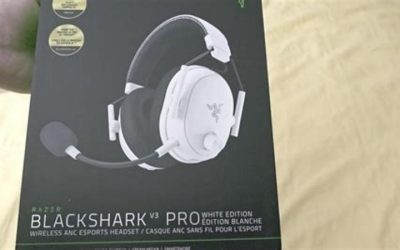
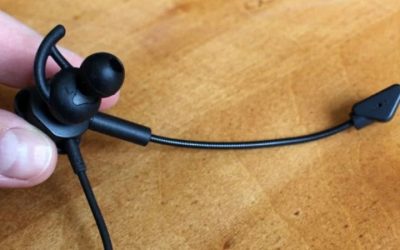
 Razer BlackShark V2 X Gaming Headset: 7.1 Surround3.5 mm7.6 x 6.76 x 3.86 inches0.5 poundsCheck on Amazon
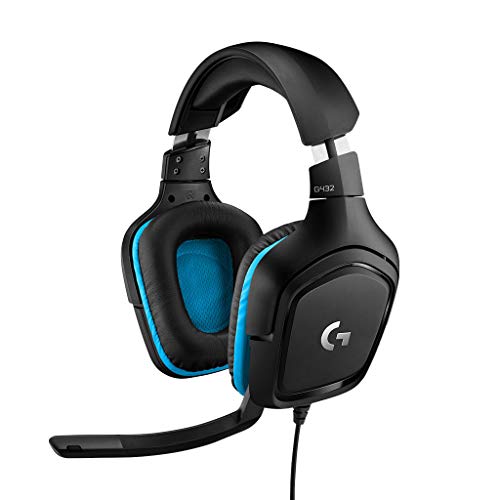 Logitech G432 Wired Gaming Headset7.2 x 3.2 x 6.8 inches7.8 x 4.3 x 9 inches0.7 poundsCheck on Amazon
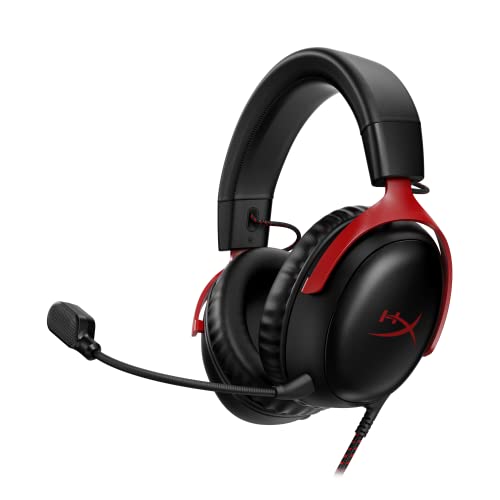 HyperX Cloud III Wired Gaming Headset for PCRegular3.41 x 6.1 x 7.48 inches0.7 poundsCheck on Amazon
The best affordable gaming headsets keep the essentials: a comfortable fit, a mic teammates can understand and a connection that works with your device. For most budget players that means a wired 3.5 mm headset such as the Razer BlackShark V2 X, JBL Quantum 100M2 or Logitech G432, with a low-cost wireless model if you want a cable-free desk. Below is how to choose, plus eight picks.
Picks at a Glance
All details come from store listings and maker descriptions. We did not use these headsets, and where a spec was not listed we say so. Prices are shown as tiers, not figures.
| Headset | Connection (per listing) | Price tier | Best for |
|---|---|---|---|
| Razer BlackShark V2 X | 3.5 mm | Low | All-round wired value |
| JBL Quantum 100M2 | 3.5 mm, detachable mic | Low | Simple, cross-platform wired play |
| Logitech G432 | USB and 3.5 mm | Low | PC players who want USB |
| HyperX Cloud III Wired | USB-C, USB-A, 3.5 mm | Low to mid | Players who want a sturdier frame |
| Ozeino Wireless | 2.4 GHz USB and Type-C | Low | Cheap cable-free play |
| AOC Wireless | Bluetooth 5.4 and 2.4 GHz | Low | Wireless plus phone use |
| Razer BlackShark V3 X HyperSpeed | Wireless, three modes | Mid | Long battery on PC |
| BENGOO G9000 | Wired stereo | Very low | Tightest budget |
How We Chose
This roundup is research-based. We did not use the products. We started from headsets available in our store, then checked the maker’s published specs and listing details. We looked for headsets that cost little, connect to common devices and show clear listing details. We left out any model that lacked a clear description, and we capped the list at two products per brand.
Best Affordable Headsets Compared: The Picks
1. Razer BlackShark V2 X: Best Overall Value
Razer BlackShark V2 X Gaming Headset: 7.1 Surround Sound - 50mm Drivers - Memory Foam Cushion - For PC, PS4, PS5, Switch - 3.5mm Audio Jack - Black
Chosen because it specifies 50mm Drivers and Memory Foam Cushion.
View on AmazonThe listing describes a wired gaming headset with 7.1 surround sound, 50 mm drivers, a memory foam cushion and a 3.5 mm audio jack, for PC, PS4, PS5 and Switch. It is a light, simple design aimed at players who want a bigger driver and a clear mic without a high price.
- Connection: 3.5 mm
- Drivers: 50 mm
- Best for: mixed-platform players who want solid value
- Skip if: you need USB audio or wireless
Pros: large drivers, memory foam, broad platform support, simple plug-in use. Cons: 7.1 surround is a software effect and may need a PC; wired only; no extra tuning options.
2. JBL Quantum 100M2: Best Simple Wired Headset

JBL Quantum 100M2 Wired Gaming Headset, Detachable Mic - Black | Memory Foam Ear Cushions And 3.5 Mm Jack Work With PC, PlayStation, Xbox, Nintendo Switch For Immersive PC Gaming Sessions
Chosen because it specifies Detachable Mic and Black.
View on AmazonA wired headset with a detachable mic, memory foam ear cushions and a 3.5 mm jack that the listing says works with PC, PlayStation, Xbox and Nintendo Switch. Detachable mics are handy if you also want to use the headset as headphones on the go.
- Connection: 3.5 mm
- Mic: detachable
- Best for: console and PC play with minimal setup
- Skip if: you want surround processing or USB
Pros: detachable mic, memory foam, wide compatibility, light feel. Cons: no wireless; limited feature list; the 3.5 mm plug type may need a splitter on some PCs.
3. Logitech G432: Best for PC With USB
Logitech G432 Wired Gaming Headset - Black | DTS Headphone:X 2.0, 50 mm audio drivers, USB and 3.5 mm jack, Flip-to-Mute mic, PC compatible
Chosen because it specifies Black and DTS Headphone:X 2.0.
View on AmazonThe G432 listing names DTS Headphone:X 2.0, 50 mm drivers, USB and 3.5 mm connections and a flip-to-mute mic, and says it is PC compatible. USB makes it easy on a computer, and the 3.5 mm jack gives you a fallback for other devices.
- Connection: USB and 3.5 mm
- Drivers: 50 mm
- Best for: PC gamers who want a plug-and-play USB headset
- Skip if: you only use consoles; check the maker for console details
Pros: USB option, flip-to-mute mic, 50 mm drivers, trusted brand. Cons: DTS processing needs USB on a PC; mostly plastic build; the console mic path varies by device.
4. HyperX Cloud III Wired: Best for a Sturdier Build
HyperX Cloud III Wired Gaming Headset for PC, PS5, PS4, Xbox Series X | S | USB-C + USB-A + 3.5mm Connectivity | Memory Foam | Durable Frame | Ultra-Clear 10mm Mic
Chosen because it specifies PS5 and PS4.
View on AmazonThe listing names PC, PS5, PS4 and Xbox Series X|S support with USB-C, USB-A and 3.5 mm connections, memory foam, a durable frame and an ultra-clear 10 mm mic. It sits at the upper edge of “affordable” and is aimed at players who want a headset that feels solid.
- Connection: USB-C, USB-A, 3.5 mm
- Mic: 10 mm
- Best for: players who value build and flexible connections
- Skip if: your budget is the tightest in the roundup
Pros: three connection types, durable frame, memory foam, clear mic claim. Cons: costs more than the cheapest picks; wired only; features beyond the listing are not confirmed.
5. Ozeino Wireless Gaming Headset: Best Cheap Wireless
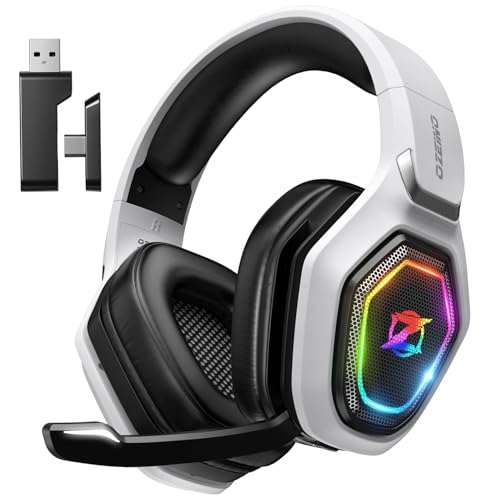
Ozeino Wireless Gaming Headset For PS5, PC, Switch| Lossless Audio-40H Batt | Play & Charge, 2.4GHz USB & Type-C, Flip Mic, Works with PS4, Mac, laptop, mobile, Ideal for FPS, RPG
Chosen because it specifies Switch and Lossless Audio-40H Batt.
View on AmazonThe listing describes a wireless headset for PS5, PC and Switch with lossless audio, a 40-hour battery, play-and-charge, 2.4 GHz USB and Type-C connections and a flip mic. It also lists PS4, Mac, laptops and mobile, and positions it for FPS and RPG play.
- Connection: 2.4 GHz USB and Type-C
- Battery: 40 hours per listing
- Best for: cable-free play on a tight budget
- Skip if: you want a well-known brand with long support history
Pros: wireless at a low tier, long listed battery, play-and-charge, flip mic. Cons: less-known brand; real battery life and mic quality will vary; check platform notes before buying.
6. AOC Wireless Gaming Headset: Best Wireless With Bluetooth

AOC Wireless Gaming Headset for PS5, PS4, Nintendo Switch, PC- Black | Bluetooth 5.4 & 2.4GHz Gaming Headphones with Noise Canceling Mic, RGB, Type-C, 20ms Latency, 45H, 7.1 Virtual Surround
Chosen because it specifies PS4 and Nintendo Switch.
View on AmazonThis listing mentions Bluetooth 5.4 and 2.4 GHz connections, a noise-cancelling mic, RGB lighting, Type-C charging, 20 ms latency, a 45-hour battery and 7.1 virtual surround, for PS5, PS4, Switch and PC. The Bluetooth link also covers a phone.
- Connection: Bluetooth 5.4 and 2.4 GHz
- Battery: 45 hours per listing
- Best for: one headset for a console and a phone
- Skip if: you dislike RGB lighting
Pros: dual wireless modes, long listed battery, Type-C charging, broad platform list. Cons: brand has a shorter headset track record; virtual surround is a software effect; latency figures are the maker’s.
7. Razer BlackShark V3 X HyperSpeed: Best Mid-Tier Wireless

Razer BlackShark V3 X HyperSpeed Wireless Gaming Headset for PC, Black | 70-Hour Battery, HyperClear Mic, 7.1 Surround Sound, TriForce Gen-2 Drivers, 3 Connectivity Modes, 270g Lightweight Design
Chosen because it specifies Black and 70-Hour Battery.
View on AmazonThe listing describes a wireless gaming headset for PC with a 70-hour battery, a HyperClear mic, 7.1 surround sound, TriForce Gen-2 drivers, three connection modes and a 270 g lightweight design. It is the most expensive pick here, but the lightweight build and long battery make it a fit for long sessions.
- Connection: three modes per listing
- Weight: 270 g
- Best for: PC players who want a wireless step up
- Skip if: you need the cheapest possible headset
Pros: long battery, light, three connection modes, noted mic. Cons: mid-tier cost; listing names PC, so check console support; software surround is optional.
8. BENGOO G9000: Best Tightest Budget

BENGOO G9000 Stereo Gaming Headset for PS4 PC Xbox One PS5 Controller, Noise Cancelling Over Ear Headphones with Mic, LED Light, 7.1 Surround Sound, Soft Memory Earmuffs for Nintendo Xbox Series X|S
Chosen because it specifies Noise Cancelling Over Ear Headphones with Mic and LED Light.
View on AmazonA budget stereo headset with a noise-cancelling mic, LED light, 7.1 surround sound and soft memory earmuffs, listed for PS4, PC, Xbox One and PS5 controllers. It is aimed at newcomers and kids’ setups who want a cheap, working headset.
- Connection: wired, listed for controller use
- Best for: the lowest budget, second headsets, spares
- Skip if: you want a premium build or a very clean mic
Pros: very low tier, memory earmuffs, mic, wide platform list. Cons: basic build; sound and mic are entry-level; LED lights do not suit everyone.
Also Consider
Valorise Wireless Gaming Headset
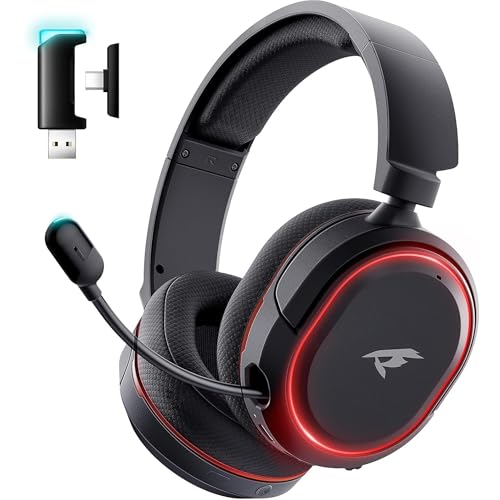
Wireless Gaming Headset for PC PS5 PS4 Mac Switch 7.1 Surround Sound 100-Hr | 2.4Ghz USB Gaming Headphones, Bluetooth 5.4 & Type-C, Noise Canceling Mic, RGB Light, Ideal for FPS, RPG Gamers, Not for Xbox
Chosen because it specifies 2.4Ghz USB Gaming Headphones and Bluetooth 5.4 & Type-C.
View on AmazonA low-tier wireless headset listed for PC, PS5, PS4, Mac and Switch, with 7.1 surround, a 100-hour battery, 2.4 GHz USB, Bluetooth 5.4, Type-C and a noise-cancelling mic. The listing says it is not for Xbox. Choose it for battery life on a budget.
Logitech H390 Wired USB Headset

Logitech H390 Wired USB-A Headset with Noise Cancelling Microphone - Black | Wired Headphones with Mic for PC, Noise Cancelling Microphone for Video Meetings, Music
Chosen because it specifies Black and Wired Headphones with Mic for PC.
View on AmazonA wired USB-A headset with a noise-cancelling microphone, listed for PC, meetings and music. Not a gaming headset, but a cheap option if you also work from home and mostly want clear calls.
BlueParrott B450-XT Bluetooth Headset

BlueParrott B450-XT Bluetooth Headset | 96% noise canceling headset for truck drivers; padded comfort, 24 hr talk time
Chosen because it specifies 24 hr talk time.
View on AmazonListed as a noise-cancelling Bluetooth headset for truck drivers, with padded comfort and 24 hours of talk time. It sits at a premium tier, but is a real choice for the trucker use case below.
Best Trucker Headsets: A Different Set of Needs
Drivers need a headset for calls and navigation, not game audio. Good trucker headsets focus on mic noise rejection, battery life and comfort over long hours. They often use a single earcup so one ear stays free for road sounds. Gaming headsets can work for parked-up hours, but they are rarely the right driving choice.
What to look for
- Noise-cancelling mic: road and cab noise can drown out a voice.
- Mute button: a quick way to cut the mic mid-call.
- Battery or talk time: check the listed hours and whether you can charge while driving.
- Multipoint pairing: lets you connect two devices at once, for example a phone and a tablet.
- Local rules: some regions limit headset use while driving, so check local law.
Trucker Bluetooth Headset With 60-Hour Battery

Trucker Bluetooth Headset, 60-Hour AI Noise-Canceling Mic for Driving | Mute Button, Multipoint Pairing, Single-Ear Design, Over-Ear Comfort, Bluetooth 5.2 Wireless Headphone, Phone/PC, Office/Work
Chosen because it specifies 60-Hour AI Noise-Canceling Mic for Driving and Mute Button.
View on AmazonThe listing names a Bluetooth 5.2 trucker headset with a 60-hour battery, an AI noise-cancelling mic, a mute button, multipoint pairing and a single-ear design for phone and PC. A low-tier option for drivers who want a long battery and a mute button.
Headset Test: How to Check a Headset Before You Commit
You can often judge a headset in minutes once it arrives. Use this quick check list, then return it if something is clearly wrong.
- Fit. Wear it for an hour. If your ears or head hurt, it is not the right fit.
- Mic recording. Record a short clip and listen back for hiss, pops and room noise.
- Direction check. Play a stereo panning clip and confirm left and right are not swapped or weak.
- Volume range. Make sure the headset is loud enough at a sensible setting on your device.
- Controls. Check the mute, volume and cable controls work smoothly.
- Wireless check. For wireless models, walk around the room and check for dropouts.
Buying Guide: What Matters on a Budget
Connection first
Match the connection to your device. A 3.5 mm headset works on most controllers and many PCs. USB is common on PC and some consoles. A 2.4 GHz dongle gives cable-free play but ties you to one USB port. Bluetooth is handy for phones but is rarely a good fit for fast-paced games.
Comfort over specs
Soft cushions, a light frame and a balanced headband matter more than a longer features list. If you wear glasses, look for roomy cups and soft padding.
Mic quality
Look for a mic that is placed close to the mouth, can mute quickly and preferably flips or detaches. Even a budget mic can sound fine in a quiet room.
Thresholds worth remembering
- Under 250 g to 300 g stays comfortable for long play, if the maker lists weight.
- Wireless battery of 30 hours or more means weekly charging for most players.
- Drivers of 40 mm or 50 mm are common at this tier; size alone does not decide sound quality.
- A detachable or flip mic is a plus, not a requirement.
What to skip
Be wary of listings that promise surround that sounds real from a tiny driver, or that lack clear platform details. Real 7.1 sound needs multiple drivers, so on most budget headsets it is a software effect.
Wired vs Wireless on a Budget
Wired headsets are the safer value choice. They never need charging, they do not depend on a battery that will age, and they usually offer the best sound for the money. Wireless headsets are convenient, and cheap ones have improved, but you pay for the convenience with battery management and, at the low end, more variation in quality.
| Question | Wired | Wireless |
|---|---|---|
| Charging | Never | Every few days or weeks |
| Delay | None | Small on 2.4 GHz; more on Bluetooth |
| Sound for the money | Usually better | Varies by model |
| Freedom to move | Cable length only | Room-wide |
| Lifespan | Cable is the weak point | Battery is the weak point |
| Best for | Desk and controller play | Couch play and mixed use |
If you are unsure, choose wired. You can always add a wireless headset later once you know how you play.
Platform Compatibility Cheat Sheet
Platform support is where cheap headsets trip people up. Use this table as a starting point and always read the listing for your exact device.
| Headset | PC | PS5 / PS4 | Xbox | Switch |
|---|---|---|---|---|
| Razer BlackShark V2 X | Yes | Yes | Check the maker | Yes |
| JBL Quantum 100M2 | Yes | Yes | Yes | Yes |
| Logitech G432 | Yes | Check the maker | Check the maker | Check the maker |
| HyperX Cloud III Wired | Yes | Yes | Yes | Check the maker |
| Ozeino Wireless | Yes | Yes | Check the maker | Yes |
| AOC Wireless | Yes | Yes | Not listed | Yes |
| BENGOO G9000 | Yes | Yes | Yes | Check the maker |
“Yes” means the store listing names that platform. “Check the maker” or “not listed” means the listing did not say, not that it fails.
Setting Up a Budget Headset in Five Minutes
On a PC
- Plug in the headset by USB or 3.5 mm.
- Open the sound settings and set the headset as the default playback and recording device.
- Speak and watch the mic meter; raise or lower the input level until it sits in the middle.
- Turn off any enhancement effects that make the mic sound thin.
On a console
- Plug a wired headset into the controller or the USB port, or insert the wireless dongle.
- Open the audio settings and pick the headset as the output device.
- Set chat and game volume so voices are clear without hiding game sound.
On a phone or tablet
Use Bluetooth if the headset lists it, or a USB-C adapter with a 3.5 mm headset. Remember that a 2.4 GHz dongle often does not work with phones, so read the listing first.
Common Mistakes When Buying on a Budget
- Buying on features alone. A long feature list does not make a headset comfortable. Fit and mic come first.
- Ignoring the connector. A 3.5 mm headset with a single 4-pole plug may need a splitter on a desktop with separate jacks.
- Expecting real surround. Most budget surround is processed in software and varies by game.
- Skipping the return window. A cheap headset is only good value if you can return it when the fit is wrong.
- Choosing the loudest RGB. Lights add cost and drain battery without improving sound.
- Using a call headset for gaming. Office and trucker headsets are tuned for voice, so music and games sound thinner.
Keeping a Cheap Headset Going Longer
A little care can extend the useful life of a low-cost headset. Cables and cushions fail first, so look after them.
- Do not wrap the cable tightly around the headband; a loose coil protects the wires.
- Unplug by holding the plug, not by pulling the cable.
- Wipe cushions with a slightly damp cloth, never soaking them.
- Store the headset on a stand or hook, not crushed in a bag.
- Keep wireless models charged between 20 and 80 percent when you can, and avoid leaving them in a hot car.
- Replace worn cushions rather than the whole headset when a model-specific set is available.
Are Gaming Headsets Better Than Regular Headphones?
Not always. A gaming headset bundles headphones with a microphone, which is convenient and cheaper than buying both. But a pair of regular headphones plus a separate microphone can sound better for the same money, especially for music. Gaming headsets win on convenience, and the picks above are good enough for most players who want one device for games and chat.
Best Affordable Headsets: Headset Recommendations by Player Type
| You are… | Choose | Why |
|---|---|---|
| A PC player | Logitech G432 | USB plus 3.5 mm |
| A console player | JBL Quantum 100M2 | Simple wired use on PlayStation, Xbox and Switch per listing |
| On the tightest budget | BENGOO G9000 | Very low tier, memory earmuffs |
| Wanting wireless for little | Ozeino or AOC | Listed 2.4 GHz and long battery |
| Wanting a sturdier build | HyperX Cloud III | Durable frame, three connections |
| A driver or call-heavy user | Trucker headset | Mute button, noise-cancelling mic |
Price Tiers Explained Without the Numbers
Prices change often, so think in tiers instead of figures. Each tier buys you something different, and knowing what changes between them helps you stop at the tier that fits.
| Tier | What you usually get | Typical trade-off |
|---|---|---|
| Very low | Basic stereo, a simple mic, light plastic build | Entry-level sound and mic, short lifespan |
| Low | Bigger drivers, memory foam, a better mic or USB option | Still mostly plastic, few extras |
| Low to mid | Sturdier frames, several connections, clearer mics | Costs noticeably more for modest gains |
| Mid | Longer battery wireless, lighter builds, tuned mics | Approaches mainstream headset territory |
For many players, the low tier is the sweet spot. The jump from very low to low brings the biggest improvement in comfort and mic. The jump from low to mid brings smaller gains unless you specifically want wireless freedom or a long battery.
Reading a Listing Like a Skeptic
- Look for the connection type. If a listing never says 3.5 mm, USB or 2.4 GHz, ask before buying.
- Ignore huge numbers. A listed frequency range or battery figure is a maker claim, not a measurement.
- Notice what is missing. No weight, no mic detail and no platform list suggests a hurried listing.
- Be careful with “noise cancelling” mics. On a budget headset this usually means software noise reduction on the mic, not noise cancelling for your ears.
- Check the return policy before you rely on any claim.
Frequently Asked Questions
What are the best affordable gaming headsets?
For most buyers, the Razer BlackShark V2 X, JBL Quantum 100M2 and Logitech G432 are strong picks because they are wired and simple. Wireless options follow in this guide.
Are cheap wireless gaming headsets any good?
They can be, but battery life, mic quality and range vary. Choose a listing with clear battery and platform details and check reviews for dropouts.
What is the best trucker headset for gaming?
There is no single best option. Trucker headsets prioritise mic noise rejection and talk time, so use a dedicated trucker headset for driving and a gaming headset at the desk.
How can I do a headset test at home?
Record your voice, check left and right balance, wear it for an hour and walk around if it is wireless. Return it if the fit or mic is poor.
Do I need a USB headset or 3.5 mm?
Use 3.5 mm for controllers and many PCs, and USB when you want plug-and-play on a PC. Some headsets offer both, giving you a fallback.
Is 7.1 surround worth it on a budget?
Treat it as a bonus. On most budget headsets it is a software effect and good stereo with comfort matters more.
Can I use these on PS5 or Xbox?
Most listings name PS5 and Xbox support, but connection types differ. Wired 3.5 mm models plug into the controller; some wireless models do not support Xbox.
Which One Should You Buy?
If you want one dependable pick, start with the Razer BlackShark V2 X. If you play on a PC and want USB, the Logitech G432 is a better fit. For wireless on a budget, the Ozeino or AOC options cover cable-free play, and the HyperX Cloud III suits players who want a sturdier build. Drivers should pick a dedicated trucker headset rather than a gaming model.
Whichever you choose, keep the return window in mind. Wear the headset for a full session in the first few days, check the mic by recording yourself, and make sure the fit works with your glasses or hairstyle. A budget headset only earns its place when you reach for it every day, so comfort should break any tie between two similar models. If two picks look equal on paper, take the one with the connection that best matches your main device, because that avoids adapters and extra cost later.
Sources
- Razer product pages
- Logitech G product pages
- HyperX product pages
- JBL product pages
- Maker listings for AOC, Ozeino and BENGOO
Last updated: November 2026
FAQ
Are Gaming Headsets Better Than Regular Headphones?
What are the best affordable gaming headsets?
Are cheap wireless gaming headsets any good?
What is the best trucker headset for gaming?
How can I do a headset test at home?
Do I need a USB headset or 3.5 mm?
Is 7.1 surround worth it on a budget?
Can I use these on PS5 or Xbox?
More from Amazon
Programs that pair well with the guide above. Offers and eligibility are set by Amazon and may change.
Free shipping on eligible items, Prime Video and more. Eligible new members can start with a free trial.
Start a Prime free trialAd-free music streaming. Eligible new subscribers can start with a free trial.
Try Music Unlimited freeA Prime membership for ages 18-24 with a trial period. Eligibility is set by Amazon.
See Prime for Young AdultsAudiobooks and podcasts to listen to on the go. Eligible new members can start with a free trial.
Try Audible freeAs an Amazon Associate we earn from qualifying purchases.