Key takeaways
- Gaming keyboard vs regular keyboard: switches, latency features, build, keycaps, software and typing compared honestly, plus which one fits your desk and games.
As an Amazon Associate we earn from qualifying purchases.
Every gaming keyboard ad implies that a regular keyboard is holding you back, and every office worker typing happily on a bundled board suspects the gaming label is mostly lighting and markup. Both instincts contain some truth. Gaming and regular keyboards differ in real, mechanical ways: how each key registers, how fast the board can respond, how it is built and what its software can do. They also overlap far more than marketing admits, and plenty of regular keyboards are excellent to type on for years.
This comparison separates the genuine differences from the decoration. It walks through switches, latency features, build and keycaps, software, and the everyday experience of typing for work, then matches each keyboard type to the players and workers it actually serves. The goal is not to crown a winner. It is to tell you whether the gaming premium buys anything your games and your desk will use, or whether the regular board already on your desk is the smarter piece of equipment.
At a Glance
| Feature | Gaming Keyboard | Regular Keyboard |
|---|---|---|
| Switch type | Mechanical, optical or magnetic switches, chosen by feel | Usually membrane, sometimes low-profile mechanical |
| Key registration | Anti-ghosting and full key rollover for many simultaneous presses | Rollover often limited; dense key combinations can drop inputs |
| Latency features | High polling rates, sometimes adjustable actuation and rapid trigger | Standard polling, fixed actuation |
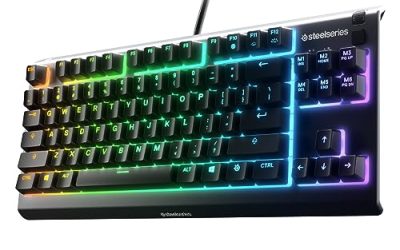
| Backlighting | Per-key RGB or zoned lighting, game-linked effects | None or simple white backlight on some models |
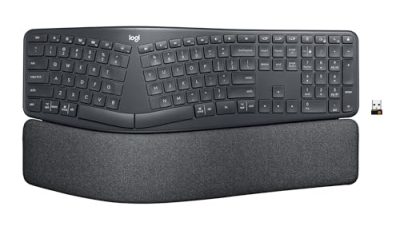
| Build | Metal plates or aluminium cases, gaming-focused layouts including compact sizes | Lightweight plastic, full-size layouts with number pad |
| Keycaps | Often PBT, textured, replaceable with standard stems | Usually ABS, printed legends that wear smooth |
| Software | Remapping, macros, profiles, actuation settings | Basic or none; media keys handled by the operating system |
| Extra keys | Macro keys, media controls, volume wheels on many models | Media and shortcut keys on some models |
| Typical desk role | Play first, often shared with work | Work first, occasional play |
Switches and Feel
The deepest difference sits under the keys. A gaming keyboard almost always gives each key its own mechanical, optical or magnetic switch, so the press has a defined point, a consistent feel across the board and a lifespan measured in tens of millions of presses. Players choose between linear, tactile and clicky variants to match their taste, and enthusiasts swap switches entirely on hot-swappable boards. A regular keyboard usually relies on a membrane sheet: one layer registers all keys, the feel is softer and less precise, and the whole board costs less to make. For gaming, the practical edge is reliability during frantic multi-key moments and a feel that stays consistent over years. For pure typing, many people genuinely prefer a quiet membrane or a slim scissor-switch board, which is why feel alone does not settle this comparison.
Latency Features and Key Registration
Gaming keyboards are built to never miss or delay an input. Anti-ghosting and full key rollover mean the board reports every key even when many are held at once, which matters in games where movement, sprint, crouch and abilities overlap. Regular keyboards often limit how many simultaneous keys register, and certain combinations can fail, a flaw you only discover mid-game. Gaming boards also poll the connection more frequently, and the newest magnetic models add adjustable actuation and rapid trigger, letting keys register and reset with minimal travel. Regular keyboards use standard polling and fixed registration, which is perfectly adequate for typing and slow games. The honest summary: these features are invisible in menus and documents, occasionally decisive in fast games, and the rollover difference is the one most likely to bite a regular board first.
Build and Keycaps
Pick up both types and the difference is immediate. Gaming keyboards favour weight and rigidity: metal top plates, sometimes full aluminium cases, and feet and frames built to stay planted while a player mashes keys at an angle. Regular keyboards favour lightness and cost, with all-plastic shells that flex a little and travel easily. Keycaps widen the gap over time. Gaming boards increasingly ship with PBT caps that resist shine and keep their texture, and the caps pull off for cleaning or replacement. Regular boards usually wear smooth ABS caps with printed legends that fade. None of this changes a spreadsheet. All of it decides how a board feels in its second and third year of nightly use, which is where the gaming premium quietly justifies itself for heavy players.
Software and Macros
A gaming keyboard usually arrives with companion software for remapping keys, recording macros, saving profiles per game and tuning lighting or actuation. Used well, this turns one board into several: a work layout, a shooter layout, a strategy layout with the build order on macro keys. A regular keyboard mostly skips software entirely, relying on the operating system for media keys and shortcuts, which is a genuine virtue for simplicity and for locked-down work machines where installing apps is impossible. The catch with gaming software is bloat and inconsistency; the best boards store profiles onboard so settings live in the keyboard, not the app. If you will never remap a key, this whole category is a tie. If you play several genres seriously, software is one of the strongest reasons to choose the gaming board.
Typing for Work
Gaming keyboards are not bad work keyboards, but they carry work trade-offs. Tall mechanical keys and clicky switches are loud in calls and shared offices, and compact gaming layouts may delete the number pad a spreadsheet user needs daily. Ergonomic shaping, split designs and wrist-friendly low profiles are far more common in the regular and office category than in gaming lines. Regular keyboards, in turn, type quietly, include the full key set by default and cost little to replace across a team. The hybrid answer many people land on is a gaming board with tactile or linear switches and a full or tenkeyless layout: quiet enough for daytime typing, fully capable at night. Judge by your loudest constraint, which is usually the people who can hear you type.
Which Should You Choose?
You Play Fast, Competitive Games
Choose the gaming keyboard. Rollover, consistent switches and, on newer models, rapid trigger address exactly the moments where a regular board can drop or delay an input. A tenkeyless mechanical or magnetic board is the standard competitive answer, and the premium over a regular board buys features your matches will actually exercise every session.
You Play Slow Games and Type All Day
A regular keyboard is enough, and may be better. Strategy, simulation, turn-based and story games never stress rollover or actuation, while your work will appreciate a quiet board with a number pad and a gentle profile. Spend the savings on your chair, monitor or games themselves. If the regular board is a quality one rather than the cheapest bundled model, you are missing nothing.
One Desk for Work and Play
Choose a gaming keyboard chosen carefully: full-size or tenkeyless for the complete key set, linear or tactile switches for acceptable noise, and onboard profiles so work and game layouts switch without software fights. This is the most common real-world answer, and it works because the gaming board’s weaknesses for work are all selectable at purchase, while the regular board’s gaming weaknesses are built in.
You Are Buying for a Child or a First PC
Start with a regular keyboard or an entry gaming combo, and upgrade when the player knows what they like. Young players outgrow tastes quickly, spill drinks occasionally and rarely use macros or remapping. A simple, replaceable board teaches the basics of PC gaming perfectly well, and the later upgrade to a mechanical gaming board becomes an informed, appreciated step rather than a guess.
Common Mistakes
- Assuming the gaming label automatically means better typing; a loud clicky gaming board can be a worse work tool than a good regular keyboard.
- Blaming a regular keyboard’s membrane feel for missed inputs, when the real culprit is usually limited key rollover during multi-key presses.
- Buying a compact gaming board for a desk that does heavy spreadsheet work, then missing the number pad every day.
- Paying for macros, per-key lighting and rapid trigger that your genres never use, while skimping on switch type and keycaps you touch constantly.
- Keeping a worn bundled keyboard for serious gaming because keyboards seem like a minor accessory, when input is the one thing every game passes through.
Frequently Asked Questions
Can you game properly on a regular keyboard?
Yes, for most games and most players. Casual, single-player, strategy and role-playing games play perfectly well on a decent regular keyboard. The limits appear in fast competitive titles, where limited key rollover can drop simultaneous inputs and membrane feel can blur rapid repeated presses. If your regular board has never visibly failed you in a game, it is not holding you back today.
What is the single biggest real difference?
Key registration. A gaming board guarantees that many simultaneous key presses all register, in the order and timing you pressed them. A regular board makes no such promise, and certain key combinations can ghost or drop. Switch feel is a matter of taste and lighting is decoration, but dropped inputs are a functional failure, and they are the strongest technical argument for the gaming board.
Are gaming keyboards too loud for an office or shared home?
Some are, by design. Clicky switches announce every press, and they are a poor choice for calls and shared rooms. Linear and tactile mechanical switches are much quieter, and membrane-style gaming boards exist too. The keyboard category is not the problem; the switch choice is. Pick the switch for the room the board will live in, and a gaming keyboard can be office-quiet.
Is it worth upgrading from a regular keyboard to a gaming one?
It is worth it when your games are fast enough to stress rollover and response, when you play most evenings and will feel better switches and keycaps for years, or when remapping and profiles genuinely simplify your games. It is not worth it for occasional slow-paced play on a desk that mostly does work. The upgrade is real but specific, and this comparison exists to help you tell which side you are on.
FAQ
Can you game properly on a regular keyboard?
What is the single biggest real difference?
Are gaming keyboards too loud for an office or shared home?
Is it worth upgrading from a regular keyboard to a gaming one?
More from Amazon
Programs that pair well with the guide above. Offers and eligibility are set by Amazon and may change.
Free shipping on eligible items, Prime Video and more. Eligible new members can start with a free trial.
Start a Prime free trialAd-free music streaming. Eligible new subscribers can start with a free trial.
Try Music Unlimited freeA Prime membership for ages 18-24 with a trial period. Eligibility is set by Amazon.
See Prime for Young AdultsAudiobooks and podcasts to listen to on the go. Eligible new members can start with a free trial.
Try Audible freeAs an Amazon Associate we earn from qualifying purchases.