Key takeaways
- How to choose a gaming keyboard step by step: size, switch type, actuation and rapid trigger, connection, keycaps, software and budget tier, in the right order.
As an Amazon Associate we earn from qualifying purchases.
Choosing a gaming keyboard goes wrong when it starts with a product page. Shoppers fall for a lighting effect or a headline feature, order the board, and only then discover it is the wrong size for their desk, louder than their household tolerates, or missing the connection their setup needs. The fix is to decide in the right order. Size, switches and connection shape your daily experience; headline features like rapid trigger matter only for certain players and certain games.
This guide walks through seven steps in the order that prevents regrets. Each step explains what the choice actually changes, how to decide it for your own desk and games, and what to ignore. Work through them with your own setup in mind, write down your answer at each step, and the final shortlist of boards that fit becomes very small, which is exactly what you want before comparing individual models.
Step-by-Step
Step 1: Pick the Size Before Anything Else
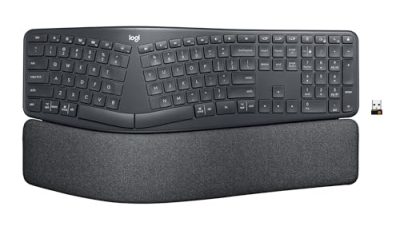
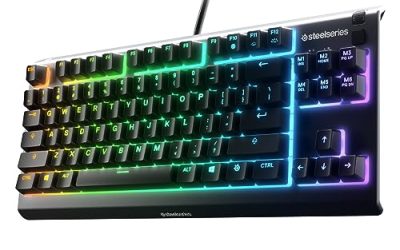
Keyboard size decides how much desk you keep for your mouse, and mouse room is aiming room. Full-size boards include a number pad and suit players who also type data or use the pad in games. Tenkeyless boards drop the number pad and are the most common gaming choice, balancing a complete key set against desk space. Compact layouts, around 65 percent or 60 percent of a full board, remove the function row and sometimes the arrow keys, pushing them onto a function layer. Measure your desk, decide how wide your mouse movements are, and be honest about whether you use the number pad weekly. If you do, full-size; if not, tenkeyless is the safe default, and compact only if mouse space truly demands it.
Step 2: Choose the Switch Type by Feel and Noise
The switch under each key decides how a press feels and sounds. Mechanical switches come in three broad families: linear switches press straight down smoothly and are the most popular for gaming; tactile switches add a small bump you can feel at the press point; clicky switches add both a bump and an audible click. Membrane keyboards use a rubber layer instead, feel softer, and are quieter and cheaper. Then there are newer magnetic and optical switches, covered in the next step. Decide with your ears and your room: a clicky board in a shared flat is a daily problem, while a linear board in a solo room is a pleasure. If you can, judge by the words in the listing, linear for smooth and quiet-ish, tactile for feedback, clicky only if the sound is welcome.
Step 3: Understand Actuation and Rapid Trigger in Plain Terms
Actuation point is how far down a key must travel before the press registers. On a standard mechanical switch that point is fixed by the switch design. Magnetic Hall effect and some optical boards let you set it yourself in software, so a key can trigger with a shallow touch for fast reactions or deeper for deliberate presses. Rapid trigger goes further: the key resets the instant it starts rising, rather than at a fixed point, so repeated taps and quick direction changes in movement-heavy games register faster. These features genuinely help in fast shooters and rhythm-style play. They do nothing for slow strategy or story games. Decide based on your main games: competitive and fast, put adjustable actuation on the list; anything else, treat it as a bonus, not a requirement.
Step 4: Decide Wired, 2.4GHz Wireless or Bluetooth
Connection decides freedom and upkeep. Wired is simplest: no battery, no receiver, no interference, and high polling rates are common. A 2.4GHz wireless connection through a small USB receiver is the gaming-grade wireless option, fast and stable enough for competitive play, and it frees the desk and enables couch setups. Bluetooth is for convenience and multi-device typing, not for reaction-based games. Also check polling rate claims in listings, which describe how often the board reports to the PC; higher is standard on gaming boards and rarely the deciding factor for keyboards. Choose wired for a fixed desk and zero maintenance, 2.4GHz if you will actually move the board or play away from the desk, and treat Bluetooth as an extra, never the main event.
Step 5: Check Keycaps and Build, the Parts Your Hands Live With
After a month, lighting fades into the background and the keycaps are what you feel. PBT keycaps resist shine and keep their texture far longer than basic ABS caps, and listings usually name the material, so check it. A metal top plate or full aluminium case adds weight and a solid, non-flexing feel; plastic cases are lighter and fine for travel. Look for a detachable cable on wired boards, which makes the board easier to move and the cable replaceable. None of these change your score in a game. All of them decide whether the board still feels good in year two, which is why this step comes before software and extras.
Step 6: Look at the Software, Then Decide How Much You Care
Most gaming keyboards offer companion software for remapping keys, recording macros, setting lighting and, on magnetic boards, adjusting actuation. Good software is optional software: the board should work fully when plugged in, with settings saved on the board itself so they travel between computers. Ask two questions. Does the board store profiles onboard, so your settings survive a PC change? And can lighting and basic functions be controlled from the keyboard, without opening an app every time? If you play on several machines or a work laptop where you cannot install apps, onboard memory matters a great deal. If you set things once and never touch them, almost any software will do.
Step 7: Set Your Budget Tier in Words, Then Buy Once
Finally, place yourself in a tier before looking at models. The entry tier covers membrane boards and basic mechanical ones; they play every game and cut corners in keycaps, case materials and extras. The mid tier is where value concentrates: proper mechanical or magnetic switches, PBT keycaps, solid build and useful software. The premium tier buys aluminium cases, refined switches, wireless done well and small luxuries. The step that saves money is skipping the upgrade ladder: many players buy entry, then mid, then premium within two years. If your answers above point to mid-tier features, buying the mid-tier board once is the economical path, even though it feels like the bigger decision today. Keep the tier honest, though: a higher tier cannot rescue a board that failed the earlier steps on size, switch noise or connection, so never let a premium badge talk you out of your own written answers.
Putting Your Answers Together
With seven answers written down, the market shrinks fast. A tenkeyless, linear, wired board with PBT keycaps and onboard profiles is a specific product, and only a handful of models match it exactly. Compare those finalists on the details this guide could not decide for you: the exact switch variant offered, the colour and layout you prefer, and what the listing says about included extras such as a wrist rest or spare keycaps. If two boards still tie, choose the one whose weak point bothers you least, because every board has one. A board that matches your seven answers will feel right within a day; a board bought on a headline feature and wrong on size or switches will annoy you for years, which is why the order of these steps matters more than any single step.
One last check before ordering: re-read the product title and specification list on the Amazon page and confirm each of your seven answers appears there in the listing’s own words, the size, the switch family, the connection type, the keycap material. Titles compress a great deal of information, and the board in the box is the one described on that page, not the one in the advertisement that led you to it.
Common Mistakes
- Choosing the size by looks alone, then discovering the board crowds the mouse or the number pad you use daily is gone.
- Buying clicky switches without considering the room, the microphone and the people within earshot.
- Paying for rapid trigger and adjustable actuation while playing only slow, story-driven or strategy games.
- Treating Bluetooth as a gaming connection because the box says wireless, instead of checking for a 2.4GHz receiver.
- Ignoring keycap material, then wondering why the keys feel slippery and look shiny after a few months.
- Buying the cheapest tier as a temporary step and replacing it within a year, spending more in total than the mid-tier board would have cost.
Frequently Asked Questions
What size gaming keyboard do most players choose?
Tenkeyless is the most common choice, because it keeps the function row and arrow keys that games and guides rely on while freeing real desk space for the mouse. Full-size suits players who use the number pad for work or specific games. Compact boards reward players with small desks and wide mouse movements, at the cost of learning a function layer for missing keys.
Are mechanical keyboards always better than membrane for gaming?
No. Mechanical switches feel crisper, last longer and offer more choice of feel, which is why most gaming boards use them. A membrane board is quieter, lighter on the budget and entirely playable, especially for casual and story-driven gaming. The honest differences are feel, noise and lifespan, not a skill gap. Choose by your room, your budget tier and how long you plan to keep the board.
Do I need rapid trigger and adjustable actuation?
Only if your main games reward the fastest possible repeated key presses, such as competitive shooters where movement keys are tapped constantly. Those features let keys register and reset with minimal travel, which quick players can feel. For strategy, role-playing, simulation and most single-player games, standard switches respond perfectly well, and the money is better spent on size, switches and keycaps you prefer.
Is a higher polling rate important on a keyboard?
Polling rate describes how often the keyboard reports its state to the PC. Gaming boards commonly offer high rates, and the difference between standard and high polling is far less noticeable on a keyboard than on a mouse, because key presses are discrete events. Treat a good polling rate as reassuring background specification, not a reason to choose one board over another with the right size and switches.
FAQ
What size gaming keyboard do most players choose?
Are mechanical keyboards always better than membrane for gaming?
Do I need rapid trigger and adjustable actuation?
Is a higher polling rate important on a keyboard?
More from Amazon
Programs that pair well with the guide above. Offers and eligibility are set by Amazon and may change.
Free shipping on eligible items, Prime Video and more. Eligible new members can start with a free trial.
Start a Prime free trialAd-free music streaming. Eligible new subscribers can start with a free trial.
Try Music Unlimited freeA Prime membership for ages 18-24 with a trial period. Eligibility is set by Amazon.
See Prime for Young AdultsAudiobooks and podcasts to listen to on the go. Eligible new members can start with a free trial.
Try Audible freeAs an Amazon Associate we earn from qualifying purchases.