
Key takeaways
- Squeezing a Tall Heatsink Under a GPU: Many builders purchase a beefy, high-profile heatsink only to find that their graphics card cannot be fully seated in the PCIe slot because it collides with the top of the cooler. Always check if your chosen M.2 slot sits directly underneath your GPU’s path.
- Ignoring Double-Sided SSD Layouts: High-capacity drives (such as 4TB or 8TB models) often feature flash memory chips soldered to both the top and bottom of the printed circuit board. If you buy a heatsink with a rigid backplate designed only for single-sided drives, you may bend or crush the components on a double-sided drive during installation. Look for heatsinks with adjustable screw tracks or flexible clips.
- Stacking Heatsinks: Many modern motherboards come with pre-installed, stylized metal thermal guards. Do not attempt to mount an aftermarket heatsink on top of these motherboard guards. You must choose between using the motherboard’s built-in shield or removing it entirely to install your aftermarket cooler.
- Using the Wrong Thermal Pad Thickness: Using a thermal pad that is too thick (e.g., 2.0 mm instead of 0.5 mm) will apply excessive bending pressure to the M.2 slot connector, which can crack the solder joints on your motherboard over time.
Setting up a modern home office, creative studio, or living room gaming hub requires careful attention to noise, aesthetics, and heat management. High-speed NVMe (Non-Volatile Memory Express) Solid State Drives are the backbone of fast computing, but they generate significant thermal energy. Without proper cooling, these drives will thermally throttle, dropping their transfer speeds to protect their delicate silicon chips.
When upgrading your storage, you will inevitably ask: what size nvme heatsink do i need? Choosing the wrong size can lead to clearance issues with your graphics card, motherboard covers, or console casing. This comprehensive guide breaks down standard physical dimensions, use cases, and measurement steps to ensure you select the perfect cooling solution for your system.
Our top picks
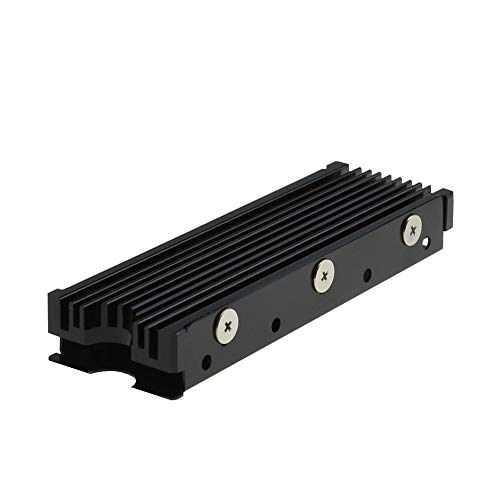 MHQJRH M.2 2280 SSD heatsink for PC
- 【Designed for M.2 SSD】-The heat sink is specially…
- 【Double-sided cooling】- Aluminum alloy-Groove design, greatly increase the…
- 【Easy to Install and Operate】 - With double-sided…
 Atdcoek 5 Pack SSD Heat Sink Cooler
- 【FIT For M.2 2280 SSD】Compatible with Single-sided and…
- 【Fast Heat Dissipation】Our Product Utilizes Aluminum Fin-type Heatsink…
- 【High-quality Thermal Conductive Silicone Pad】Atdcoek M.2 SSD Heatsink…
 be quiet! MC1 Pro M.2 SSD Cooler
- High-Performance Cooling with Integrated Heatpipe: Advanced aluminum heatsink…
- Maintains Maximum Read and Write Speed: Prevents thermal…
- Compatible with Single and Double-Sided M.2 2280 Drives:…
| Product | Key specs | |
|---|---|---|
| MHQJRH M.2 2280 SSD heatsink for PC | 【Designed for M.2 SSD】-The heat sink is specially… 【Double-sided cooling】- Aluminum alloy-Groove design, greatly increase the… 【Easy to Install and Operate】 - With double-sided… | Check price |
| Atdcoek 5 Pack SSD Heat Sink Cooler | 【FIT For M.2 2280 SSD】Compatible with Single-sided and… 【Fast Heat Dissipation】Our Product Utilizes Aluminum Fin-type Heatsink… 【High-quality Thermal Conductive Silicone Pad】Atdcoek M.2 SSD Heatsink… | Check price |
| be quiet! MC1 Pro M.2 SSD Cooler | High-Performance Cooling with Integrated Heatpipe: Advanced aluminum heatsink… Maintains Maximum Read and Write Speed: Prevents thermal… Compatible with Single and Double-Sided M.2 2280 Drives:… | Check price |
 M.2 Heatsink SSD Cooler for PS5 PCIE M.2 Heatsink SSD Cooler for PS5 PCIE | ❤M.2 heat sink 2-pack— Specially designed for desktop… ❤Double-sided cooling—Aluminum alloy-Groove design, greatly increase the heat… ❤Nano Thermal Pad—made from Nano Silicon Grease Material,… | Check price |
As an Amazon Associate we earn from qualifying purchases at no extra cost to you.
The Short Answer
For the vast majority of consumer desktop computers and the PlayStation 5, you need a 2280-size M.2 heatsink. The term “2280” refers to the physical dimensions of the SSD itself: 22 mm wide by 80 mm long.
While the length and width of the heatsink are standardized to match your drive, the most critical dimension you must verify is height (clearance). Desktop PCs can typically accommodate taller heatsinks ranging from 10 mm to over 25 mm high. In contrast, the PlayStation 5 has a strict maximum height limit of 11.25 mm (0.44 inches) total, including the bottom plate and thermal pads. Laptops, due to their ultra-thin profiles, rarely have space for an aftermarket heatsink and must rely on flat 1 mm copper shims or built-in chassis heat spreaders.
Standard Sizes
To find the correct heatsink, you must first identify the form factor of your M.2 drive. Motherboard manufacturers design slots to accommodate several standard lengths. The table below outlines the physical dimensions of these drives and the corresponding heatsinks available on the market.
| M.2 Form Factor | Drive Width & Length (Metric) | Drive Width & Length (Imperial) | Standard Heatsink Height Range | Common Applications |
|---|---|---|---|---|
| 2230 | 22 mm x 30 mm | 0.87 in x 1.18 in | 1.5 mm to 3.0 mm | Steam Deck, ROG Ally, Microsoft Surface, ultra-thin laptops |
| 2242 | 22 mm x 42 mm | 0.87 in x 1.65 in | 2.0 mm to 5.0 mm | Lenovo Legion Go, budget mini-PCs, older laptops |
| 2260 | 22 mm x 60 mm | 0.87 in x 2.36 in | 2.0 mm to 5.0 mm | Legacy motherboards, specialized industrial PCs |
| 2280 | 22 mm x 80 mm | 0.87 in x 3.15 in | 3.0 mm to 25.0+ mm | Standard Desktop PCs, PlayStation 5, high-end workstations |
| 22110 | 22 mm x 110 mm | 0.87 in x 4.33 in | 5.0 mm to 15.0 mm | Enterprise servers, extreme enthusiast motherboards |
How to Measure Your Space
Before buying a heatsink, you must measure the physical clearance inside your computer chassis. Failing to do so can result in a heatsink that collides with your graphics card (GPU) or CPU cooler. Follow these steps to measure your available space:
- Locate the Active M.2 Slot: Open your PC case and identify where the NVMe drive will be installed. Many motherboards feature multiple slots. Primary slots are usually positioned directly between the CPU socket and the top PCIe slot. Secondary slots are often lower down, near the bottom of the motherboard.
- Measure Vertical Clearance (Height): Use a precise ruler or digital caliper to measure the distance from the surface of the motherboard’s M.2 connector up to the nearest obstruction. If your graphics card hangs directly over the M.2 slot, your clearance may be restricted to less than 10 mm (0.39 inches). If the slot is completely open, you may have up to 30 mm (1.18 inches) of vertical space.
- Check Horizontal Clearance (Width and Length): Look for nearby motherboard components such as capacitors, RAM slots, or the massive heatsinks guarding the motherboard’s VRMs (Voltage Regulator Modules). Ensure there is at least 24 mm of lateral clearance so the outer wings of the heatsink do not pinch these components.
- Account for Thermal Pads: Remember that a complete cooling assembly includes the SSD, a bottom tray, the top aluminum heatsink, and one or two thermal silicone pads. These pads typically measure between 0.5 mm and 1.5 mm in thickness and will add to the overall height of your final installation.
By Room or Use Case
The ideal heatsink size depends heavily on where your machine lives and how you intend to use it. As we design modern home offices and gaming spaces in 2026, keeping hardware quiet, unobtrusive, and cool is more important than ever.
The Living Room Console (PlayStation 5)
If you are expanding your console storage, Sony has incredibly strict dimensional requirements for the internal M.2 SSD slot. The entire assembly—consisting of the SSD, thermal interface material, and the heatsink—must not exceed 11.25 mm (0.44 inches) in total thickness.
Furthermore, the height is asymmetric: there can be no more than 8.0 mm (0.31 inches) of clearance above the drive, and no more than 2.45 mm (0.096 inches) of structure below the drive. Standard budget options, such as the MHQJRH M.2 2280 SSD Heatsink (priced around $6.99 to $9.99), are specifically designed to fit perfectly within these tight PS5 parameters while offering robust double-sided aluminum cooling.
The Dedicated Home Office Desktop
For a standard home office computer used for productivity, writing, or light design work, your drives will rarely reach extreme temperatures. In these setups, space is generally open, and you can opt for cost-effective multi-packs.
Products like the Atdcoek 5-Pack SSD Heat Sink Cooler (ranging from $5.99 to $8.99) provide thin, low-profile aluminum plates (approx. 3 mm to 4 mm in height) paired with thermal silicone pads. These are highly versatile, cost pennies per drive, and fit easily under massive CPU air coolers or bulky graphics cards without causing mechanical interference.
The High-Performance Creative Workstation
If your home workstation is dedicated to heavy 4K/8K video editing, large-scale 3D rendering, or constant file transfers, your PCIe Gen 4 or Gen 5 NVMe drive will pull up to 10 to 15 watts of power. In this environment, a heavy-duty heatsink is mandatory to prevent thermal throttling.
For these scenarios, premium options like the be quiet! MC1 Pro (retailing between $15.00 and $25.00) are ideal. Weighing roughly 40 grams and featuring integrated copper heatpipes, this dual-sided compatible cooler provides maximum passive thermal dissipation. Because it stands approximately 12 mm to 15 mm high, you must ensure your motherboard’s layout has sufficient open space around the primary M.2 slot to accommodate the extra bulk.
Common Sizing Mistakes
Avoid these frequent pitfalls when purchasing and installing an NVMe heatsink:
- Squeezing a Tall Heatsink Under a GPU: Many builders purchase a beefy, high-profile heatsink only to find that their graphics card cannot be fully seated in the PCIe slot because it collides with the top of the cooler. Always check if your chosen M.2 slot sits directly underneath your GPU’s path.
- Ignoring Double-Sided SSD Layouts: High-capacity drives (such as 4TB or 8TB models) often feature flash memory chips soldered to both the top and bottom of the printed circuit board. If you buy a heatsink with a rigid backplate designed only for single-sided drives, you may bend or crush the components on a double-sided drive during installation. Look for heatsinks with adjustable screw tracks or flexible clips.
- Stacking Heatsinks: Many modern motherboards come with pre-installed, stylized metal thermal guards. Do not attempt to mount an aftermarket heatsink on top of these motherboard guards. You must choose between using the motherboard’s built-in shield or removing it entirely to install your aftermarket cooler.
- Using the Wrong Thermal Pad Thickness: Using a thermal pad that is too thick (e.g., 2.0 mm instead of 0.5 mm) will apply excessive bending pressure to the M.2 slot connector, which can crack the solder joints on your motherboard over time.
FAQ
Do all NVMe SSDs need a heatsink?
Not necessarily. Older PCIe Gen 3 drives generally run cool enough that standard case airflow is sufficient. However, high-speed PCIe Gen 4 and Gen 5 drives run significantly hotter, easily reaching temperatures above 80°C (176°F) under sustained workloads. For Gen 4 and Gen 5 drives, a heatsink is highly recommended to maintain peak performance and prolong the lifespan of the drive’s controller chip.
Will a 2280 heatsink fit on a 2230 or 2242 SSD?
No. A 2280 heatsink is 80 mm long, whereas 2230 and 2242 drives are 30 mm and 42 mm long, respectively. If you attempt to mount a 2280 heatsink onto a shorter drive, the heatsink will hang over the edge of the drive, preventing you from securing the SSD to the motherboard’s mounting standoff.
How thick should my thermal pads be?
Most standard NVMe heatsink packages include thermal pads ranging from 0.5 mm to 1.5 mm in thickness. As a general rule, use a thinner pad (0.5 mm or 1.0 mm) for double-sided SSDs to prevent the assembly from becoming too thick, and a slightly thicker pad (1.0 mm or 1.5 mm) for single-sided SSDs to bridge any physical gap between the flat chips and the metal heatsink body.
What is the difference between active and passive NVMe heatsinks?
Passive heatsinks rely solely on aluminum fins, copper heatpipes, and natural system airflow to dissipate heat silently. Active heatsinks feature a tiny built-in cooling fan (often drawing 1 to 2 watts of power) to force air directly through the cooling fins. While active heatsinks offer superior cooling for sustained, extreme workloads, they introduce mechanical noise and can be prone to dust buildup over time.








