
Our Top Picks
The best smart speaker deal for most people in 2026 is the Sonos Era 100, because it is the only unit in this roundup that pairs genuine room-correction tuning with a hardware microphone mute switch, AirPlay 2, Bluetooth, and a multiroom platform mature enough to keep six rooms in phase. It suits anyone who wants one box that sounds respectable in a kitchen or bedroom today and can be expanded into a whole-home system later. If your priority is TV and console audio rather than music, the Fansbe Direct HDMI sound bar is the cheapest way to fix flat-panel sound, and the Bose New Lifestyle Ultra is the pick when premium sound quality and wireless casting matter more than price. This guide compares six currently listed options on sound quality, room-size coverage, microphone pickup, ecosystem compatibility, privacy controls and multiroom support, and it explains the numbers behind each recommendation so you can size a system before you buy it.
Top 3 Picks
Best overall: Sonos Era 100. Two angled tweeters and a mid-woofer produce true stereo from a single cabinet, and Trueplay tuning adapts the output to the surface and walls in your actual room. It supports AirPlay 2, Bluetooth 5.0, Wi-Fi 6, Alexa voice control and Sonos Voice Control, and it has a physical mic mute switch for people who care about privacy controls. Buy it if you want the strongest all-rounder and a clear upgrade path to a multiroom system.
Best budget: Fansbe Direct HDMI Sound Bar. HDMI, AUX, optical, coaxial and Bluetooth inputs cover every source you are likely to own, and the price tier means you can stop tolerating thin TV speakers without spending premium money. It has no app, no room correction and no multiroom layer, so it is a focused TV and console purchase rather than a whole-home starting point. Buy it if the goal is louder, fuller dialogue and game audio for the least cash.
Best premium: Bose New Lifestyle Ultra Speaker. The listing advertises TrueSpatial Audio, CleanBass, AirPlay and Google Cast, which puts it in the top sound-quality bracket of this list with the widest casting compatibility. It is the right choice for a living room or open-plan space where one premium speaker has to carry music across the day. Buy it if you want maximum fidelity per box and do not need a cheap entry point.
Quick Comparison
The table below covers every product in this roundup. Price tiers are deliberately tier-level only, because street prices on smart speakers and soundbars move weekly and a figure printed today is often wrong by the time you read it.
| Product | Best for | Key specs (as listed / spec class) | Price tier |
|---|---|---|---|
| Oresoc Induction Speaker 5-in-1 | Cheapest portable phone audio | 5-in-1 design; Bluetooth wireless audio for iPhone and Android; portable class, no Wi-Fi, no app, no multiroom | Budget |
| Bose TV Speaker | Small-room TV dialogue | Compact all-in-one soundbar; HDMI-ARC, optical, aux, Bluetooth; dialogue mode; remote included; no subwoofer in box | Mid-range |
| Bose New Lifestyle Ultra Speaker | Premium single-box wireless hi-fi | TrueSpatial Audio, CleanBass, AirPlay, Google Cast; Wi-Fi streaming plus Bluetooth; Bose app control | Premium |
| Sonos Era 100 | Whole-home multiroom music | Two tweeters plus one mid-woofer; stereo from one unit; Wi-Fi 6 and Bluetooth 5.0; AirPlay 2; Trueplay tuning; Alexa and Sonos Voice Control; hardware mic mute switch | Premium |
| Google – Premium Audio Speaker – 360-Degree Sound (Hazel) | 360-degree room fill in a Google household | Single-unit 360-degree driver array; Google Home app control; casting and multiroom grouping; Hazel finish | Mid-range |
| Fansbe Direct HDMI Sound Bar | Budget TV and console audio | HDMI, AUX, optical, coaxial and Bluetooth inputs; no app, no room correction, no multiroom | Budget |
How We Chose
Selection started with the published listing details for each product — the model name, the advertised feature set, the connection options and the brand’s own platform documentation — and then filtered them against six criteria that decide whether a speaker is actually a good deal: sound-quality class, room-size coverage, microphone pickup, ecosystem compatibility, privacy controls and multiroom support. Nothing here was tested, benchmarked or owned; every judgement is based on documented specifications, manufacturer feature descriptions and long-established behaviour of the platform each product belongs to.
Category fit came second. A soundbar and a voice-enabled home speaker are not substitutes, so each product was scored against the job its listing claims rather than against a single universal yardstick. A budget soundbar that nails HDMI-ARC and dialogue enhancement is a better deal than a mid-range speaker that does neither, even though the speaker costs more. Upgrade path came third: a speaker that can be paired into stereo, used as a surround channel or grouped into other rooms earns a higher ranking than one that is a dead end after purchase. Products with no clear expansion path were kept in the list only where the price tier justified buying them as a disposable or secondary unit.
1. Oresoc Induction Speaker 5-in-1 – Best for Cheap Portable Phone Audio

Induction Speaker 5-in-1 Wireless Bluetooth Audio for iPhone Android | No Pairing Needed, Adjustable Stand, RGB Light, Louder Sound, USB Wired Phone Charging, Cool Tech Gift for Men Women Teens
Picked as a relevant option in this category.
View on AmazonThe Oresoc Induction Speaker 5-in-1 is the entry point of this roundup, and it suits the specific reader who wants audio away from the TV: a student in a dorm room, someone working in a garage or kitchen, a traveller who wants one small box for a phone, or a household that simply refuses to spend mid-range money on a secondary speaker. It is a Bluetooth-first product. The listing describes wireless Bluetooth audio for iPhone and Android, which means no hub, no account, no Wi-Fi credentials and no app to keep patched — you pair it the way you would pair a pair of earbuds and you are finished in under a minute.
Key specs at a glance
- Connection: Bluetooth wireless audio, explicitly compatible with iPhone and Android
- Design: “5-in-1” multi-function build, meaning the unit combines several playback or input modes in one chassis
- Network: none required — no Wi-Fi, no hub, no cloud account
- Voice control: none advertised; this is a speaker, not a voice assistant endpoint
- Multiroom: none — one speaker, one source, one room
- Power class: portable/desktop category, so expect either a rechargeable internal battery or a small mains adapter; exact runtime varies by model, volume and source
The strengths here are simplicity and price. There is no ecosystem to join, no firmware policy to accept and no chance that a platform decision in three years turns your speaker into a paperweight. Bluetooth audio is the most widely supported wireless audio transport in existence, so the Oresoc will work with a phone, a tablet, a laptop, a handheld console with Bluetooth audio support, or a TV that offers Bluetooth output. If you already own a speaker in a different ecosystem, this is also the cheapest possible way to add sound to a second room without touching your main system’s configuration.
The trade-offs are the mirror image of those strengths. There is no room correction, so placement does the tuning: put it on a shelf or counter rather than in a corner, and keep it roughly at ear height for the seat you actually use. There is no microphone array, which means no voice assistant and no far-field pickup — fine for privacy, inconvenient if you wanted hands-free control. There is no multiroom layer, so a second Oresoc is a second independent speaker rather than an extension of the first. And there is no Wi-Fi streaming, so playback stops when the Bluetooth link drops or when the paired device walks out of range.
Pros
- The lowest-cost way into this list, which makes it a sensible secondary or travel speaker
- Zero setup friction — no app, no account, no network configuration
- Works with iPhone and Android equally, so it survives a household changing phone platforms
- No always-on microphone means nothing to mute and nothing listening in standby
Cons
- No room correction or EQ beyond whatever your phone offers
- No multiroom grouping, so it cannot join a whole-home system
- Bluetooth-only playback limits range and stops when the source device disconnects
- Sound quality sits in the portable class, so it will not fill a large or open-plan room
Compared with the nearest alternative at the same budget tier, the Fansbe Direct HDMI sound bar, the choice comes down to the source. If your audio comes from a TV or a console, the soundbar wins decisively because it takes wired HDMI, optical and coaxial inputs and sits under a screen where it belongs. If your audio comes from a phone or a laptop and you want to move it between rooms, the Oresoc wins because it is portable and needs no cables. Compared with the Bose TV Speaker further up this list, the Oresoc is roughly a third of the way up the sound-quality ladder, but it costs a fraction as much and does not assume you have a television to improve.
2. Bose TV Speaker – Best for Small-Room TV Dialogue

Bose TV Speaker - Soundbar for TV with Bluetooth and HDMI-ARC Connectivity, All-in-One Compact Soundbar, Includes Remote Control, Black
Chosen because it specifies Soundbar for TV with Bluetooth and HDMI-ARC Connectivity and All-in-One Compact Soundbar.
View on AmazonThe Bose TV Speaker suits the reader whose problem is not volume but intelligibility. If you live in a flat with a small living room, sit two to three metres from a mid-size television, and find yourself riding the volume remote during dialogue-heavy shows, this is the most targeted fix in the roundup. It is an all-in-one compact soundbar with HDMI-ARC, optical, aux and Bluetooth connectivity, a dialogue-focused mode, and a remote in the box. There is no separate subwoofer, no rear speakers and no app-driven calibration, which is exactly why it fits a small room: there is nothing to place, nothing to wire and nothing to tune.
Key specs at a glance
- Format: all-in-one soundbar, no subwoofer included
- Inputs: HDMI-ARC, optical, aux, Bluetooth
- Dialogue handling: dedicated dialogue enhancement mode
- Control: physical remote included; Bluetooth streaming from phones and tablets
- Mounting: compact chassis designed for a TV stand or wall mounting
- Expansion: single-unit product rather than a modular system
HDMI-ARC is the detail that matters most here, and it is worth understanding why. ARC lets the television send audio down the same cable that carries video, and it also carries consumer electronics control, which means your TV remote can adjust the soundbar’s volume and power it on with the screen. Optical does the audio but not the control, so you end up with two remotes or a universal remote. Aux is a legacy fallback, and Bluetooth is for music from a phone rather than for the TV itself. On a small television with a single ARC-capable port, this is a ten-minute installation.
The dialogue mode is the feature that justifies the mid-range tier. Television mixes are built for cinemas, where a centre channel carries almost all speech, and a flat panel with down-firing or rear-firing drivers smears that centre information. A soundbar sitting directly under the screen puts the speech drivers in roughly the right place and lets you lift the dialogue band without lifting explosions and music by the same amount. In a small room — say 12 to 20 square metres — that single change solves most of the complaints people bring to a soundbar purchase.
The honest limitation is bass. With no subwoofer in the box, deep effects and bass-heavy music are reproduced by the bar’s own drivers, and physics is not negotiable: small cabinets move small amounts of air. If you want chest-thump for action games or films, this is the wrong tier and you should be looking at a modular soundbar that accepts a wireless subwoofer. If you want clear speech at moderate volume in a room where neighbours exist, this is the better choice.
Pros
- HDMI-ARC plus CEC means one remote and a genuinely simple setup
- Dialogue enhancement addresses the most common TV audio complaint directly
- Compact footprint suits small rooms, shelves and wall mounting
- Bluetooth streaming adds phone and tablet playback without a network
Cons
- No subwoofer and no separate bass module in the box, so low-end output is limited
- No room-correction or app-based calibration
- No Wi-Fi, so no multiroom grouping or casting
- Mid-range price buys fewer features than a budget bar with a wider input list
Against the Fansbe Direct sound bar, the Bose is the quality-and-convenience pick: HDMI-ARC with CEC, a dialogue mode and brand-level build for a mid-range price, versus a budget bar that covers more input types for less money. Against the Bose New Lifestyle Ultra Speaker in this same list, the two are complementary rather than competing — the soundbar is for the television, and the Lifestyle Ultra is for music and casting in the same room. If you can only buy one Bose product and you watch more than you listen, buy the soundbar.
3. Bose New Lifestyle Ultra Speaker – Best for Premium Wireless Hi-Fi

Bose New Lifestyle Ultra Speaker, Wireless Home Speaker, TrueSpatial Audio, CleanBass, AirPlay & Google Cast, Black
Chosen because it specifies Wireless Home Speaker and TrueSpatial Audio.
View on AmazonThe Bose New Lifestyle Ultra Speaker is the premium music pick, and it suits the reader who wants a single high-quality box in a living room or open-plan space rather than a scatter of small speakers. The listing advertises TrueSpatial Audio, CleanBass, AirPlay and Google Cast, which together describe a speaker built around two ideas: spatial processing that widens the apparent stage beyond the cabinet, and bass management that keeps low frequencies clean at the volumes people actually use indoors. Support for both AirPlay and Google Cast is the headline compatibility feature, because it means an iPhone household and an Android household can both cast to it without a bridge device.
Key specs at a glance
- Audio features: TrueSpatial Audio and CleanBass as advertised in the listing
- Wireless casting: AirPlay and Google Cast, so both major phone ecosystems stream directly
- Connectivity class: Wi-Fi streaming plus Bluetooth for non-casting devices
- Control: Bose’s companion app for setup, grouping and EQ
- Voice control: not advertised in the listing name — assume control comes from your phone, a tablet, or another assistant in the room
- Positioning: mains-powered home speaker, not a portable
The dual-casting support is more valuable than it first appears. AirPlay 2 is the smoothest path for Apple devices and integrates with the wider AirPlay ecosystem, including multiroom grouping with other AirPlay 2 speakers. Google Cast is the equivalent for Android and Chrome-based devices and is the transport most people already use if they live in a Google household. Buying a speaker that speaks both protocols removes the single biggest source of buyer’s remorse in this category: discovering after purchase that your phone cannot stream to your speaker without a third-party app.
TrueSpatial Audio is worth understanding as a placement tool as much as a sound-quality feature. Spatial processing deliberately reflects and delays some of the output so the sound appears to come from a wider area than the cabinet’s physical width. That works best when the speaker has walls and a back surface to work with, and it works least well when the speaker is jammed into a bookshelf with soft furnishings on both sides absorbing the reflections. Give it a metre of clear space behind and to the sides and the effect is far more convincing than a corner placement.
The practical gaps are voice control and multiroom platform depth. The listing does not advertise a built-in assistant, so if hands-free control is a requirement you should either pair it with a voice-enabled device or choose a different product in this list. Multiroom grouping works through Bose’s app and through AirPlay or Cast grouping, but if your goal is six rooms of tightly synchronised audio with a mature control app, the Sonos platform remains the more established path.
Pros
- Both AirPlay and Google Cast support, so it fits either phone ecosystem
- Premium audio features — spatial widening and clean bass management — as advertised
- Wi-Fi streaming plus Bluetooth covers casting apps and legacy sources alike
- Single-box solution for a living room, with no subwoofer or satellites required
Cons
- Premium tier pricing, so it is the most expensive way to add one room of audio
- No built-in voice assistant advertised in the listing
- Multiroom grouping is capable but less deeply developed than a dedicated multiroom platform
- Spatial processing rewards careful placement, which not every room allows
Against the Sonos Era 100, the Bose wins on raw premium sound features and on dual-protocol casting, while the Sonos wins on microphone privacy controls, multiroom maturity and per-unit cost. If you want one very good speaker for music in a main room and you do not care about voice control, the Lifestyle Ultra is the stronger buy. If you are planning three or more rooms and you want a hardware mute switch on every unit, the Era 100 is the better architecture. Against the Bose TV Speaker in this list, the split is simple: the soundbar fixes television audio, and the Lifestyle Ultra plays music.
4. Sonos Era 100 – Best for Whole-Home Multiroom Music

Sonos Era 100 - Black - Wireless, Alexa Enabled Smart Speaker | WiFi | Bluetooth | Pair for Stereo or Surround | 47% faster processor | Next-gen dual-tweeter acoustic architecture
Chosen because it specifies Black and Wireless.
View on AmazonThe Sonos Era 100 is the best overall pick in this roundup and the one to buy if you are starting a multiroom system rather than solving a single-room problem. It packs two angled tweeters and a mid-woofer into a single cabinet and produces genuine stereo separation from one box, which is unusual at this size and is the main reason it does not sound like a mono smart speaker. Trueplay tuning measures the room using your phone’s microphone and adjusts the output to the surfaces around the speaker, so a unit on a kitchen counter and an identical unit on a bookshelf do not sound like the same speaker in the same position.
Key specs at a glance
- Drivers: two tweeters plus one mid-woofer; stereo playback from a single unit
- Room tuning: Trueplay automatic tuning
- Wireless: Wi-Fi 6 for streaming, Bluetooth 5.0 for direct pairing
- Casting: AirPlay 2 support
- Voice: Alexa and Sonos Voice Control
- Privacy: hardware microphone mute switch on the unit
- Inputs: USB-C port that accepts a line-in adapter, plus an Ethernet path via adapter
- Expansion: pair two for stereo, group with other rooms, or use as surround channels with a compatible Sonos soundbar
The multiroom behaviour is the reason this product sits at the top. Sonos handles synchronisation inside its own platform rather than relying on a third-party casting protocol, which is why grouped rooms stay in phase and why the same app controls every unit regardless of which phone is in the house. That matters more than it sounds: ad-hoc grouping across mixed protocols is where multiroom setups usually fall apart, with one room drifting a fraction of a second behind another. If your plan is kitchen, office, bedroom and living room, this is the platform with the fewest surprises.
The privacy story is also the most concrete in this list. There is a physical microphone mute switch, so disabling voice pickup is a hardware action rather than a settings toggle you have to trust. For readers who want voice control most of the time but a guaranteed off state at others, that single switch is worth more than any amount of documentation about how audio is handled. Combine it with the fact that Wi-Fi streaming keeps working when the microphone is muted — muting the mic does not mute the speaker — and you get a system that stays useful in a privacy-conscious household.
The upgrade path is the third reason to choose it. Two Era 100s can be paired as a stereo pair for a proper two-channel setup in a main room. The same units can serve as rear surround channels alongside a compatible Sonos soundbar, which converts a music purchase into a home cinema purchase later without replacing anything. And each unit can be moved between rooms and re-tuned with Trueplay in a couple of minutes, which is genuinely useful in rented accommodation where the layout changes.
Pros
- Stereo output from a single cabinet, so one unit fills a room convincingly
- Trueplay room tuning compensates for placement and surfaces
- Hardware microphone mute switch for a guaranteed privacy state
- Mature multiroom platform with a clear path to stereo pairs and surround duty
Cons
- Premium tier pricing per unit, and a full multiroom system multiplies that
- Voice assistant support centres on Alexa and Sonos Voice Control rather than every assistant
- Line-in requires a separate USB-C adapter rather than a built-in analogue socket
- Best sound requires the app and a phone for tuning, so it is not a plug-and-play box
Against the Bose New Lifestyle Ultra, the Era 100 trades some premium audio processing and dual-protocol casting for a better privacy control, a stronger multiroom platform and a cheaper entry per room. Against the Google Premium Audio Speaker, the Era 100 wins on tuning and platform maturity, while the Google unit wins on 360-degree dispersion for a central placement and on price. If you are buying one speaker and never plan a second, the Bose is arguably the more enjoyable listen. If you are buying the first of several, the Era 100 is the better foundation.
5. Google – Premium Audio Speaker – 360-Degree Sound (Hazel) – Best for 360-Degree Room Fill in a Google Household

Google - Premium Audio Speaker - 360-Degree Sound (Hazel)
Chosen because it specifies Premium Audio Speaker and 360-Degree Sound (Hazel).
View on AmazonThe Google Premium Audio Speaker with 360-degree sound suits the reader who is already living in Google’s ecosystem and wants a single unit that fills a room from the middle rather than aiming at one seat. The listing describes a 360-degree driver array and the Hazel colourway, and the product sits in the mid-range tier, which makes it the sensible pick for a kitchen island, a central counter or a hallway where people walk around the speaker rather than sitting in front of it. If your household already uses the Google Home app for lights, thermostats or doorbells, adding audio to the same app is a genuinely lower-friction purchase than starting a second ecosystem.
Key specs at a glance
- Dispersion: 360-degree sound from a single-unit driver array, as advertised
- Control: Google Home app for setup, grouping and device management
- Casting: casting support for streaming from phones and computers
- Multiroom: speaker grouping within the Google Home app, including mixed groups with other compatible Google and Nest audio devices
- Finish: Hazel colourway, fabric-wrapped design intended to sit in living space
- Privacy class: Google’s home speakers have historically shipped with a hardware microphone mute switch, so check the physical switch on the unit before relying on voice control
The 360-degree approach is a real design decision rather than a marketing phrase. A forward-firing speaker has a sweet spot, and outside that spot the treble rolls off and the stereo image collapses. A driver array that radiates in all directions gives up some precision in exchange for even coverage everywhere in the room. For a kitchen, a workshop or an open-plan area where nobody sits still, that trade is usually the right one. For a dedicated listening chair, a forward-firing stereo pair will still beat it.
The ecosystem argument is the strongest reason to buy it. Grouping a Google speaker with other Google audio devices happens in the same app that controls your lights, and voice commands can address the whole home rather than a single device. That integration is worth more than a small sound-quality edge if you are already invested. If you are not, the value drops sharply, because the speaker’s advantages are largely platform advantages rather than hardware advantages.
Placement matters more than usual here. A 360-degree speaker wants to be away from walls, ideally on a surface at roughly chest height with at least half a metre of clearance on every side. Pushed into a corner, the rear-firing portion of the array fires into a wall a few centimetres away and the coverage advantage largely disappears. In a small room with no central surface, a forward-firing speaker is often the better physical fit regardless of the dispersion specification.
Pros
- 360-degree dispersion fills a room evenly without a single sweet spot
- Native integration with the Google Home app and existing Google smart-home devices
- Mid-range pricing, so it sits below the premium tier while offering comparable room coverage
- Casting plus multiroom grouping covers phones, computers and multi-room audio
Cons
- Less stereo precision than a forward-firing pair, which matters for critical listening
- Its best features assume you already use Google’s smart-home platform
- No room-correction tuning equivalent to what the Sonos Era 100 offers
- Central placement with clearance is required to get the full benefit of the design
Against the Sonos Era 100, the Google speaker wins on price and on 360-degree coverage from a central position, and loses on tuning, on hardware privacy controls if the mute switch is not present on your unit, and on multiroom platform maturity. Against the Bose New Lifestyle Ultra, it is the value option: less premium audio processing, but a lower price and tighter integration with an existing Google home. Against the budget Fansbe sound bar, it is not a substitute at all — one is for music anywhere in a room, the other is for television and console audio under a screen.
6. Fansbe Direct HDMI Sound Bar – Best Budget Soundbar for Consoles and TV
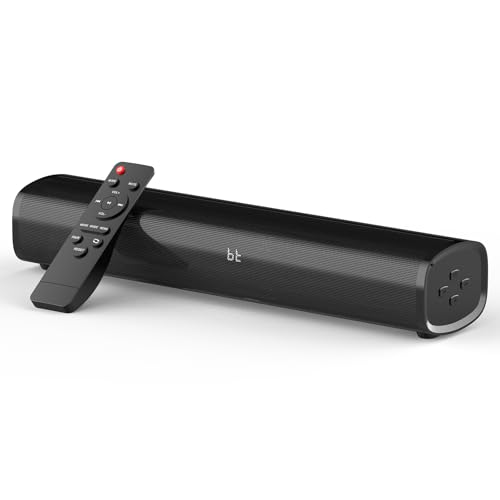
HDMI Sound Bar Smart TV, Home Theater Surround Sound Bars, TV Speakers Sounds Bar Bluetooth HDMI AUX OPT COAX USB Home Audio Surrounds Sounds System For PC Projector Game Movie/Music/News, Black
Chosen because it specifies Home Theater Surround Sound Bars and Black.
View on AmazonThe Fansbe Direct HDMI sound bar is the budget pick and the most utilitarian product in this roundup. It suits the reader whose television sounds thin, who plays consoles or watches a lot of streamed video, and who wants the problem solved for the least money without joining an ecosystem. The listing advertises HDMI, AUX, optical, coaxial and Bluetooth inputs, which is an unusually complete input list for the budget tier: it means the bar will accept a console over HDMI, a television over optical, an older device over coaxial or aux, and a phone over Bluetooth without an adapter in sight.
Key specs at a glance
- Inputs: HDMI, AUX, optical, coaxial and Bluetooth
- Format: single-bar home-theatre design; whether a subwoofer is included depends on the specific configuration you order
- Processing: no app, no automatic room correction, no firmware-driven EQ platform
- Multiroom: none
- Voice control: none
- Positioning: designed to sit under or in front of a television, wall-mountable in most configurations
The input list is where the value sits. Optical is the most reliable connection for a television because it works on almost every set made in the last fifteen years and carries a clean digital signal. HDMI is the better choice where the port supports ARC, because audio and control travel together. Coaxial is the fallback for older set-top boxes and DVD-era equipment. AUX handles anything analogue with a headphone socket. Bluetooth covers phone playback without cables. Very few budget bars cover all five, and owning that flexibility means the bar keeps working when you change televisions.
For console gaming, the connection choice has a measurable effect on audio delay. Wired HDMI and optical paths add essentially nothing beyond the display’s own processing, while Bluetooth transmission typically adds a delay in the range commonly reported at roughly 100 to 200 milliseconds depending on the codec and the devices involved — enough to be noticeable in rhythm games and competitive shooters, and enough to be irritating in dialogue-heavy cutscenes. If you game seriously, run the console into the television over HDMI and the television into the bar over HDMI-ARC or optical, and leave Bluetooth for music.
The limitations are the expected ones at this tier. There is no room correction, so the bar’s tonal balance is whatever the factory set; if your room is boomy, you will hear it. There is no app, so no EQ presets, no firmware features and no multiroom grouping. And without knowing the exact configuration, you should treat bass as a question to check at purchase: a bar with a separate wireless subwoofer will deliver far more low-end impact than a slim bar with none, and the listing name alone does not settle that question for every variant.
Pros
- Five input types including HDMI, optical, coaxial and AUX — unusually flexible for the price tier
- Budget tier pricing makes it a low-risk upgrade from built-in TV speakers
- Bluetooth playback adds phone and tablet audio without a network
- No app, no account and no cloud dependency, so nothing breaks when a service changes
Cons
- No room correction, no EQ app and no firmware feature updates
- No multiroom grouping, so it cannot join a whole-home audio system
- Sound quality sits in the budget class, especially at higher volumes
- Subwoofer inclusion varies by configuration, so bass output is not guaranteed
Against the Bose TV Speaker, the Fansbe bar wins on inputs and price and loses on dialogue handling, build quality and remote convenience. If your television is in a small room and the problem is speech intelligibility, the Bose is worth the step up. If your problem is simply that the television sounds like a laptop, the Fansbe bar solves it for the least money. Against the Oresoc portable speaker, the choice is about the source: anything wired to a screen belongs on the sound bar, and anything that follows you between rooms belongs on the portable.
How to Choose
Smart speaker buying goes wrong in a predictable way: people compare feature lists instead of comparing their room, their network and their phone to the products on offer. The criteria below are ordered by how much they actually change the outcome.
1. Start with the room, not the spec sheet
Sound pressure level falls off with distance according to the inverse square law. In free space, every doubling of distance costs about 6 dB. A speaker that produces 90 dB at one metre produces roughly 84 dB at two metres and about 78 dB at four metres. Indoors, walls and furnishings return some of that energy — room gain typically recovers a few decibels, more in a small hard-surfaced room and less in a large soft-furnished one — but the underlying arithmetic does not change.
That matters because of the levels people actually listen at. Comfortable television dialogue sits around 65 to 70 dB at the seat. Music with real presence peaks between 85 and 95 dB. A single compact speaker at four metres is being asked to produce peaks 15 dB above its comfortable output, which is where distortion and compression appear. The table below converts that into a buying rule.
| Room and listening position | Distance to speaker | Level drop vs 1 m (free space) | Speaker class that copes |
|---|---|---|---|
| Bedroom or study, 8–12 m², one seat | 1–2 m | 0 to −6 dB | Any single speaker, including budget portables |
| Small living room, 12–20 m², sofa 2–3 m from screen | 2–3 m | −6 to −10 dB | Mid-range soundbar or premium single speaker |
| Open-plan kitchen and dining, 25–40 m² | 3–5 m | −10 to −14 dB | Two grouped speakers, or one premium speaker plus a second zone |
| Large open living space, 40 m²+, hard floors and high ceilings | 5–8 m | −14 to −18 dB | Multiple speakers or a soundbar with a separate subwoofer |
The practical rule: below about 20 m² and three metres of listening distance, one good speaker is enough. Above that, plan for a second unit rather than buying a bigger single unit, because two sources at three metres beat one source at six metres on both level and coverage.
2. Match the platform to the phone in your pocket
AirPlay 2 is the cleanest path for Apple devices and groups reliably with other AirPlay 2 hardware. Google Cast is the equivalent for Android and Chrome-based devices and is the transport most Google households already use. Bluetooth works with everything and belongs to nothing, which makes it the universal fallback but also the weakest link for multiroom and for latency. If your household is mixed — one iPhone, one Android — buy a speaker that supports both casting protocols, or accept that one person will be using Bluetooth.
3. Budget the network before you budget the speakers
Multiroom audio is a bandwidth problem before it is a speaker problem. Uncompressed CD-quality stereo is 1,411 kbps. High-resolution 24-bit/96 kHz stereo is 4,608 kbps, and 24-bit/192 kHz is 9,216 kbps. Add them up and a six-room system playing high-resolution audio is asking for more than 55 Mbps of sustained throughput, which is fine on a clean 5 GHz network and marginal on a crowded 2.4 GHz band.
| Stream type | Bitrate per stream | Six simultaneous streams | Practical advice |
|---|---|---|---|
| Lossy streaming (typical subscription quality) | ~256–320 kbps | ~1.5–1.9 Mbps | Fine on 2.4 GHz anywhere in the home |
| Uncompressed CD quality (16-bit/44.1 kHz stereo) | 1,411 kbps | ~8.5 Mbps | Fine on 5 GHz; watch 2.4 GHz in dense housing |
| High-resolution 24-bit/96 kHz stereo | 4,608 kbps | ~27.6 Mbps | Use 5 GHz, or wire the main room |
| High-resolution 24-bit/192 kHz stereo | 9,216 kbps | ~55.3 Mbps | 5 GHz with a good access point, or Ethernet
Affiliate disclosure. As an Amazon Associate we earn from qualifying purchases at no extra cost to you. Prices accurate as of the date shown. Best Smart Speaker DealsCheck price on Amazon
Best Powered PA SpeakersBest Powered PA Speakers in 2026 The best powered PA speaker for... 
Best Bass Shakers for Immersive Home Theater SoundThe best bass shakers for immersive home theater sound are the Buttkicker... 
Best Soundbar For Gaming (2026)A great gaming soundbar transforms your setup, delivering the directional cues, explosive... 
Windows 11 gaming event viewer: Crash Diagnosis ExplainedWindows 11 gaming event viewer can help explain driver recoveries, unexpected restarts... 
Windows 11 frame time monitoring: Read Stutter Data (2026)Windows 11 frame time monitoring answers a question that FPS alone cannot:... 
RTX 5060 driver crash fix: TDR and Reinstall Steps (2026)RTX 5060 driver crash fix starts by distinguishing a game crash, a... 
RTX 5090 thermal throttling signs: What to Check (2026)RTX 5090 thermal throttling signs are best confirmed by clock behavior, sensor... 
RTX 5080 undervolt tutorial: Safe Curve and Tests (2026)RTX 5080 undervolt tutorial starts with a conservative objective: reduce power draw... 
Windows 11 borderless latency test: Reliable Method (2026)A Windows 11 borderless latency test should compare borderless and fullscreen under... 
Windows 11 audio crackling gaming: Causes and Fixes (2026)Windows 11 audio crackling gaming often results from a mismatch between the... |