Our Top Picks
 SteelSeries USB Apex 5 Hybrid Mechanical Gaming KeyboardApex 55.51 x 17.52 x 1.59 inches2.04 poundsCheck on Amazon
Pros & cons
- OLED display shows game info and custom messages
- Hybrid blue switches rated for 20 million keypresses
- Magnetic wrist rest adds full palm support
- Aluminum frame and OLED panel add noticeable weight
- Wired-only connection limits desk flexibility
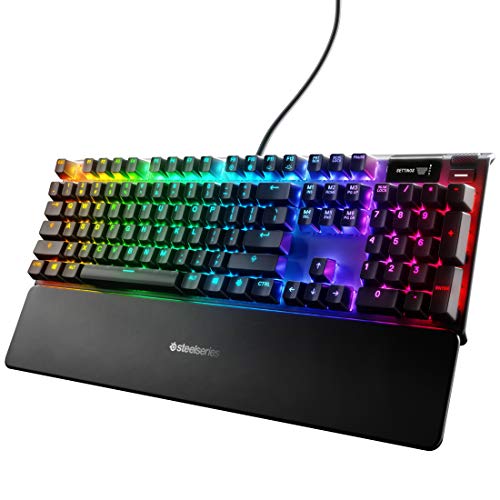 SteelSeries Apex 7 Mechanical Gaming KeyboardFull Length5.5 x 17.2 x 1.6 inches2.1 poundsCheck on Amazon
The best SteelSeries gaming keyboard for most people in 2026 is the SteelSeries Apex Pro TKL Gen 3. Its OmniPoint 3.0 magnetic switches let you set the actuation point anywhere from a hair-trigger 0.1 mm to a deliberate 4.0 mm, and the tenkeyless body hands your mouse arm roughly 8 cm of extra desk width. If you want the same adjustable-switch idea in a full-size frame with a number pad, the original Apex Pro is the closer match. If the budget stops well short of the premium tier, the Apex 3 is the board to buy, with the Apex 5 as the sensible middle step. This guide compares every current SteelSeries board in that lineup, plus the Logitech and Corsair alternatives worth cross-shopping, by switch type and actuation, layout, software, and typing comfort — and covers the things a spec sheet leaves out: what adjustable actuation actually buys you in milliseconds, how much current a fully lit RGB board pulls from a single USB port, and how to pick a layout that fits your desk rather than your wish list.
Top 3 Picks
Best overall: SteelSeries Apex Pro TKL Gen 3. It is the only board here that lets you tune the switch to the task — a shallow, fast setting for competitive shooters and a deeper, safer setting for typing and everyday work — and it does so in a compact frame that leaves room for a low-sensitivity mouse. The trade-off is price and the loss of a number pad.
Best budget: SteelSeries Apex 3. Quiet membrane switches, an IP32 splash rating, a magnetic wrist rest and a volume roller for the price of a mid-range mouse. It is the right first gaming keyboard for a shared room or a desk that occasionally hosts a drink.
Best for switch-speed purists: SteelSeries Apex 9 TKL. Optical switches with two selectable actuation points give you a fast, repeatable trigger without the software depth of the magnetic Pro line, and the TKL layout keeps the footprint honest.
Quick Comparison
Price tiers are deliberately broad because listings move daily. Treat “budget” as the sub-$60 class, “mid-range” as roughly $60–$130, and “premium” as anything above that, with the magnetic-switch flagship sitting at the top of the premium band.
| Product | Best for | Key specs | Price tier |
|---|---|---|---|
| SteelSeries Apex 3 | Quiet budget typing | Membrane switches, fixed actuation, full-size, 10-zone RGB, IP32 splash resistance, magnetic wrist rest, volume roller, wired | Budget |
| SteelSeries Apex 5 | Hybrid mechanical on a mid-range budget | Hybrid mechanical switches, per-key RGB, OLED smart display, aircraft-grade aluminium top plate, media controls, full-size, wired | Mid-range |
| SteelSeries Apex 7 | Full-size mechanical with an OLED display | QX2 mechanical switches (linear, tactile or clicky), per-key RGB, OLED smart display, USB passthrough, magnetic wrist rest, aluminium, full-size, wired | Premium |
| SteelSeries Apex 100 | Lowest-cost spare or office board | Membrane switches, blue LED backlight, splash resistant, media controls, full-size, wired | Budget |
| Logitech G213 Prodigy | Membrane RGB with a built-in wrist rest | Membrane keys, zone RGB, integrated wrist rest, spill resistant, dedicated media keys, full-size, wired | Mid-range |
| Logitech G413 SE | No-frills mechanical typing board | Mechanical tactile switches, single-colour LED backlight, aluminium top case, full-size, wired | Mid-range |
| SteelSeries Apex Pro TKL Gen 3 | Competitive play and mixed use | OmniPoint 3.0 magnetic switches, 0.1–4.0 mm adjustable actuation, Rapid Trigger, per-key RGB, OLED smart display, aluminium, TKL, wired | Premium |
| SteelSeries Apex Pro | Full-size adjustable actuation | OmniPoint magnetic switches, adjustable actuation, per-key RGB, OLED smart display, USB passthrough, magnetic wrist rest, full-size, wired | Premium |
| SteelSeries QcK XXL | The desk space underneath everything | Cloth surface, roughly 900 × 400 × 4 mm, stitched edge, rubber base | Budget |
| SteelSeries Apex 9 TKL | Optical two-point actuation | OptiPoint optical switches, two selectable actuation points, per-key RGB, aluminium, TKL, wired | Premium |
| SteelSeries New Apex 9 Mini | 60% hot-swap optical board | Hot-swappable optical switches, 60% layout, per-key RGB, aluminium top plate, wired | Mid-range |
| Corsair K55 RGB PRO | Macro-heavy budget setups | Membrane switches, RGB backlighting, six dedicated macro keys, dedicated media keys, IP42 resistance, full-size, wired | Budget |
How We Chose
This roundup is built from published specifications, manufacturer documentation and the pattern of findings that recurs across independent reviews — not from lab measurement. The first filter was category fit: a board has to do something defensible within its tier, whether that is a splash rating on a budget membrane model or a genuinely adjustable switch on a flagship. The second was switch architecture, because membrane, hybrid mechanical, optical and magnetic switches behave differently enough that they serve different buyers rather than simply ranking from worse to better.
The third criterion was layout and footprint, which is the one thing software can never change after purchase. We weighed full-size against TKL and 60% by the desk space each frees up and by how much the buyer loses in return — a number pad, dedicated media keys, arrow keys. The fourth was software depth, since SteelSeries GG exposes far more per-key behaviour on the magnetic boards than on the membrane ones, and that gap matters more over three years of ownership than any single feature list. Finally, we considered upgrade path: which boards can be repaired, re-switched or resold, and which simply get replaced.
1. SteelSeries Apex 3 – Best for quiet budget typing

SteelSeries Apex 3 Gaming Keyboard - Black | 10-Zone RGB Illumination – IP32 Water Resistant – Premium Magnetic Wrist Rest (Whisper Quiet Gaming Switch)
Chosen because it specifies Black.
View on AmazonThe Apex 3 is the board to buy when the keyboard is the smallest line item in the build and the room is shared. Its membrane switches are quiet enough for a dorm, a bedroom next to someone else’s, or an open-plan office, and the IP32 rating means a spilled drink is a wipe-down rather than a replacement. It suits students, first-time PC builders, and anyone who types far more than they game but still wants backlighting, media keys and a wrist rest.
Key specs
- Switch type: membrane / rubber dome, non-mechanical
- Actuation: fixed, near the bottom of a full-travel press; no adjustment
- Layout: full-size with number pad
- Backlighting: 10-zone RGB rather than true per-key
- Durability: IP32-rated against splashes and dust ingress
- Extras: magnetic wrist rest, dedicated volume roller and media keys
- Connection: wired USB
Strengths
The typing experience is the surprise. Full-travel membrane keys bottom out softly, which reduces the harshness of long writing sessions, and the included wrist rest actually matches the board’s height rather than floating at an awkward angle. The volume roller is a small thing that becomes hard to give up — you can mute a call without looking, which a function-key shortcut never quite manages.
The IP32 rating is the real differentiator at this price. Most budget boards simply say “keep liquids away.” A splash-rated board with a membrane sheet underneath is far more forgiving of the coffee incident that ends cheaper keyboards. Ten-zone lighting also looks better than the count suggests, because the zones map to physical clusters rather than arbitrary blocks.
Pros
- Very quiet — the best option here for shared rooms and late-night use
- Splash and dust resistant, which is rare in the budget tier
- Magnetic wrist rest and a dedicated volume roller included
- Comfortable, low-fatigue feel for long typing sessions
- Simple setup with no driver requirement for basic use
Cons
- No adjustable actuation and no mechanical switch feel
- Zone lighting, not per-key RGB
- Membrane sheets can stiffen over years of heavy use
- Rapid double-taps feel mushy compared with optical or magnetic switches
- Not hot-swappable, so there is no repair path for a failed key
How it compares
Against the Apex 5, the Apex 3 gives up per-key RGB, the OLED display, the aluminium top plate and the mechanical-style switch feel. What it keeps is quietness and water resistance — two things the Apex 5 does not offer. If you share a room or your desk is a multi-purpose surface, that trade is worth making. Against the Apex 100, the Apex 3 is the better board: the Apex 100 has a single-colour backlight and no wrist rest, so the Apex 3 wins on features for a small step up. If mechanical feel is non-negotiable, skip both and go straight to the Apex 7.
2. SteelSeries Apex 5 – Best for hybrid mechanical on a mid-range budget
SteelSeries USB Apex 5 Hybrid Mechanical Gaming Keyboard – Per-Key RGB Illumination – Aircraft Grade Aluminum Alloy Frame – OLED Smart Display (Hybrid Blue Switch)
Chosen because it specifies Per-Key RGB Illumination and Aircraft Grade Aluminum Alloy Frame.
View on AmazonThe Apex 5 exists to answer a specific complaint: “I want the feel of a mechanical keyboard without paying mechanical prices.” It uses hybrid mechanical switches — a mechanical-style key mechanism over a membrane sheet — which deliver a crisper, more defined press than a pure rubber dome while keeping the cost down. It suits buyers who want per-key RGB, an OLED display and a metal top plate but who are not ready to commit to the premium tier.
Key specs
- Switch type: hybrid mechanical (mechanical feel, membrane actuation layer)
- Actuation: fixed, no adjustment
- Layout: full-size with number pad
- Backlighting: per-key RGB
- Display: OLED smart display for notifications, profiles and media info
- Build: aircraft-grade aluminium top plate
- Connection: wired USB
Strengths
The OLED smart display is the feature that punches above its price. It can show the current profile, Discord notifications, media playback or in-game information, and once you have used it you notice its absence on cheaper boards. Per-key RGB also means lighting effects map to individual keys, so reactive typing effects and game-integrated highlights actually work rather than approximating.
The aluminium top plate changes the feel more than the spec sheet implies. A metal plate reduces the hollow resonance that plastic-cased membrane boards develop, so the Apex 5 sounds and feels more substantial than its switch architecture suggests. The hybrid mechanism also gives a more defined tactile bump than a rubber dome, which helps when you are typing fast and want confirmation that a key registered without pressing all the way to the floor.
Pros
- OLED smart display at a mid-range price
- Per-key RGB with software-driven effects
- Aluminium top plate adds rigidity and reduces hollow noise
- Crisper press than a pure membrane board
- Full-size layout with a number pad for work use
Cons
- Still not a true mechanical switch — no hot-swap, no adjustable actuation
- No splash rating, unlike the cheaper Apex 3
- Louder than the Apex 3 in a shared room
- The hybrid mechanism cannot be repaired or swapped if a key fails
- Software is needed to get the most out of the display and lighting
How it compares
The Apex 7 is the natural upgrade: true mechanical switches, a USB passthrough port, and the option to choose a linear, tactile or clicky feel rather than accepting one. The gap is real but not enormous in daily use — the Apex 5 gets you the display, the metal plate and per-key lighting, which are three of the four things people actually notice. Where the Apex 7 pulls ahead is long-term feel and the ability to match the switch to your preference. If you type in a shared space, the Apex 3 is the quieter choice and cheaper, but you lose the display and the per-key lighting entirely.
3. SteelSeries Apex 7 – Best for full-size mechanical with an OLED display
SteelSeries Apex 7 Mechanical Gaming Keyboard – OLED Smart Display – USB Passthrough and Media Controls – Linear , Quiet – RGB Backlit (Red Switch)
Chosen because it specifies OLED Smart Display and USB Passthrough and Media Controls.
View on AmazonThe Apex 7 is the board for someone who wants a conventional mechanical typing experience in a full-size frame, with the extras that make a desk feel finished. Its QX2 mechanical switches come in linear, tactile and clicky variants, so you can match the feel to the room you are in. It suits writers, hybrid workers and gamers who want a number pad and are willing to pay for a genuine mechanical action rather than a hybrid approximation.
Key specs
- Switch type: QX2 mechanical, available in linear, tactile and clicky versions
- Actuation: fixed per switch variant; not software-adjustable
- Layout: full-size with number pad
- Backlighting: per-key RGB
- Display: OLED smart display
- Extras: USB passthrough port, magnetic wrist rest, dedicated media controls
- Build: aluminium frame; cable is attached rather than detachable
Strengths
Switch choice is the headline. Linear switches give a smooth, consistent press with no bump, which suits fast repeated inputs. Tactile switches add a noticeable bump at the actuation point, which most typists find helps them avoid bottoming out. Clicky switches add an audible click on top of the bump, which is satisfying in a private room and unpopular in a shared one. Having all three in the same chassis is unusual and useful.
The USB passthrough port is more valuable than it sounds on a full-size board. It gives you a place to plug a mouse dongle, a headset or a flash drive without reaching around the back of the case, and it keeps a low-profile device off the front panel. The OLED display and magnetic wrist rest round out a package that feels deliberate rather than assembled from a parts bin. Per-key RGB means the lighting is genuinely customisable rather than decorative.
Pros
- Three switch variants, so you can pick your preferred feel
- USB passthrough for peripherals and dongles
- OLED smart display plus dedicated media controls
- Aluminium frame with a magnetic wrist rest included
- Full-size layout suited to spreadsheet and code work
Cons
- Actuation is fixed — no adjustable or dual-point options
- Attached cable makes transport and cable replacement awkward
- Full-size footprint eats desk width compared with a TKL board
- No hot-swap sockets, so a failed switch means board-level repair
- Clicky variants are genuinely loud in a shared space
How it compares
Versus the Apex 5, the Apex 7 buys you real mechanical switches and the USB passthrough port, and it lets you choose your switch character. Versus the Apex Pro, it gives up adjustable actuation entirely — the Pro’s magnetic switches can be tuned per key, which is the single biggest functional difference in the whole SteelSeries lineup. If you never intend to change actuation and you want a known, fixed mechanical feel, the Apex 7 is the more predictable purchase. If you play competitive shooters and want to experiment, save for the Pro.
4. SteelSeries Apex 100 – Best for the lowest-cost spare or office board

SteelSeries Apex 100 Gaming Keyboard - Tactile & Silent - Blue LED Backlit - Splash Resistant - Media Controls
Chosen because it specifies Tactile & Silent and Blue LED Backlit.
View on AmazonThe Apex 100 is the board you buy when the requirement is simply “a keyboard, now.” It is a membrane board with a blue LED backlight, a splash-resistant build and dedicated media controls, and it costs about as little as a branded gaming keyboard can. It suits a second PC, a LAN bag, a workshop desk, or an office machine that needs something more pleasant than the stock keyboard it shipped with.
Key specs
- Switch type: membrane, tactile and quiet
- Actuation: fixed full travel
- Layout: full-size with number pad
- Backlighting: single-colour blue LED
- Durability: splash resistant
- Extras: dedicated media controls
- Connection: wired USB
Strengths
The Apex 100’s appeal is honesty. It does not pretend to be mechanical, and it does not carry a feature you will never use. The blue backlight is legible in a dark room without being distracting, the media controls are physical keys rather than function-layer shortcuts, and the membrane action is quiet enough that nobody in the next room will know you are working late.
Splash resistance matters more than the price suggests. Cheap keyboards die from small liquid events far more often than from electrical failure, and a board that shrugs off a splash will outlast a fancier one that does not. For a spare or a machine that lives in a garage, a workshop or a kitchen-adjacent desk, that is the whole argument.
Pros
- Among the least expensive branded gaming keyboards available
- Quiet, tactile membrane action
- Splash resistant, which is rare at this price
- Dedicated media controls rather than a function layer
- Plug-and-play with no software required
Cons
- Single-colour backlight — no RGB, no per-key effects
- No wrist rest, no USB passthrough, no display
- Fixed actuation with a soft, indistinct bottom-out
- Not suitable for rapid-fire competitive input
- No hot-swap or repair path
How it compares
Against the Apex 3, the Apex 100 loses RGB zones, the magnetic wrist rest, the volume roller and the IP32 rating, keeping only the splash resistance and the media keys. The Apex 3 is the better board for a primary desk and the Apex 100 is the better board for a secondary one — the difference in outlay is small enough that buying the Apex 3 as your main and the Apex 100 as a spare is a reasonable two-board strategy. Against the Corsair K55 RGB PRO, the Apex 100 gives up RGB lighting and macro keys but costs less and is quieter.
5. Logitech G213 Prodigy – Best for membrane RGB with a built-in wrist rest

Logitech G213 Prodigy Wired RGB Gaming Keyboard - Black | Mech-Dome Keys, Palm Rest, Adjustable Feet, Media Controls, LIGHTSYNC RGB, USB, Compatible with Windows
Chosen because it specifies Black.
View on AmazonThe G213 Prodigy is the strongest argument in this roundup for a membrane keyboard that is not merely a compromise. It pairs Logitech’s tuned membrane keys with zone RGB, an integrated wrist rest that is part of the chassis rather than an accessory, spill resistance and dedicated media keys. It suits people who want a comfortable, quiet board for mixed work and play, and who would rather have a built-in rest than a magnetic one that can go missing.
Key specs
- Switch type: membrane, tuned for a defined press
- Actuation: fixed
- Layout: full-size with number pad
- Backlighting: multi-zone RGB
- Durability: spill resistant
- Extras: integrated wrist rest, dedicated media keys
- Connection: wired USB
Strengths
The integrated wrist rest is the feature that separates it from the SteelSeries budget boards. Because it is moulded into the chassis, the angle and height are consistent and it cannot be knocked out of position mid-session. For anyone who spends eight hours a day typing, that ergonomic consistency is worth more than an extra lighting zone.
The key feel is also a cut above generic membrane. Logitech tunes the dome and the keycap stem so the press has a defined point rather than a vague mush, which makes fast typing more accurate and reduces the number of missed characters. Zone RGB with software effects gives enough customisation for most people, and the spill resistance covers the accident that actually happens.
Pros
- Integrated wrist rest that cannot be misplaced
- Spill resistant with dedicated media keys
- Better-defined key press than most membrane boards
- Zone RGB with software-driven effects
- Comfortable for long typing sessions
Cons
- No mechanical switches and no adjustable actuation
- Zone lighting rather than per-key RGB
- No USB passthrough
- Full-size footprint with no compact option
- Membrane feel is still softer than any mechanical board here
How it compares
Versus the SteelSeries Apex 3, the G213 wins on key definition and loses on water resistance — the Apex 3 carries an IP rating while the G213 is described as spill resistant without a formal ingress figure. If you want a specific rating, the Apex 3 is the safer claim. Versus the Logitech G413 SE, the G213 trades mechanical switches for quietness, a wrist rest and RGB. If you type in a shared room, the G213 is the better neighbour; if you want mechanical feel at a similar price, the G413 SE is the one to take.
6. Logitech G413 SE – Best for a no-frills mechanical typing board

Logitech G413 SE Full-Size Mechanical Gaming Keyboard - Black | Backlit, anti-ghosting, compatible with Windows and macOS, aluminum material
Chosen because it specifies Black.
View on AmazonThe G413 SE is a mechanical keyboard that strips out almost everything optional and spends the money on the parts you touch. It has tactile mechanical switches, an aluminium top case, a full-size layout and single-colour backlighting — no RGB, no display, no passthrough. It suits buyers who want mechanical feel and a metal chassis at a mid-range price and who genuinely do not care about lighting effects.
Key specs
- Switch type: mechanical, tactile
- Actuation: fixed
- Layout: full-size with number pad
- Backlighting: single-colour LED, not per-key RGB
- Build: aluminium top case
- Connection: wired USB
Strengths
The tactile switch is the reason to buy it. A tactile bump at the actuation point tells your fingers when the keystroke has registered, which improves typing accuracy and lets you avoid bottoming out — the main cause of typing fatigue on mechanical boards. That feedback loop is exactly what membrane keyboards cannot provide, and it is why the G413 SE feels more purposeful than its stripped-down feature list suggests.
The aluminium top case also does more work than the marketing implies. A metal plate stiffens the whole assembly, which reduces flex during fast typing and makes the board feel planted. It is also easier to wipe clean than a textured plastic shell. For someone who wants mechanical feel and long-term durability without paying for lighting they will set once and forget, the G413 SE is a rational purchase rather than a compromise.
Pros
- Tactile mechanical switches with clear actuation feedback
- Aluminium top case adds rigidity and easy cleaning
- Full-size layout suited to typing and number work
- Simpler build means fewer points of failure
- Mechanical feel at a mid-range price
Cons
- Single-colour backlight with no per-key effects
- No USB passthrough, no display, no wrist rest
- No adjustable actuation and no hot-swap
- Tactile-only — no linear or clicky option
- Fewer software features than the SteelSeries boards
How it compares
Against the Apex 5, the G413 SE gives up the OLED display, per-key RGB and media controls in exchange for genuine mechanical switches and a metal case. If you want switches over software, it wins; if you want the display and lighting, the Apex 5 wins. Against the Apex 7, the G413 SE is the cheaper mechanical board with fewer features — no passthrough, no OLED, no switch choice. It is the right pick when the mechanical press is the entire point and everything else is noise.
7. SteelSeries Apex Pro TKL Gen 3 – Best for competitive play and mixed use

SteelSeries Apex Pro TKL Gen 3 - HyperMagnetic Gaming Keyboard - OmniPoint 3.0 Switches - Adjustable Response - Rapid Trigger - Rapid Tap/SOCD - OLED - PBT Keycaps - USB-C - US Layout QWERTY
Chosen because it specifies HyperMagnetic Gaming Keyboard and OmniPoint 3.0 Switches.
View on AmazonThe Apex Pro TKL Gen 3 is the most capable keyboard in this roundup and the one most people should buy if the budget allows it. Its OmniPoint 3.0 magnetic switches support adjustable actuation across a very wide range, from a hair-trigger setting to a deep one, and the tenkeyless layout keeps the footprint small enough for a low-sensitivity mouse setup. It suits competitive players, hybrid workers who want one board for everything, and anyone who dislikes committing to a single switch feel.
Key specs
- Switch type: OmniPoint 3.0 magnetic (Hall effect), adjustable
- Actuation: adjustable per key, from a very shallow setting up to roughly 4.0 mm
- Features: Rapid Trigger and related fast-reset behaviours, configurable in software
- Layout: tenkeyless (TKL) with arrow keys and function row, no number pad
- Backlighting: per-key RGB
- Display: OLED smart display
- Build: aluminium top plate; wired USB
Strengths
Adjustable actuation is the feature that justifies the premium. Magnetic switches measure key position rather than relying on a physical contact point, so the actuation depth is a software value. Set it shallow and keys register with almost no travel; set it deep and you avoid the accidental keypresses that plague hair-trigger setups. Crucially, you can set it per key: shallow on WASD, deeper on the keys you type with. No fixed-switch board can do that.
Rapid Trigger-style behaviour is the second differentiator. Instead of waiting for a key to return past a fixed reset point before it can fire again, the board resets as soon as the key starts moving back up. For counter-strafing in tactical shooters, where you tap opposite directions to stop instantly, that reset behaviour is more useful than raw actuation depth. The TKL layout frees roughly 8 cm of horizontal desk space versus a full-size board, which matters when your mouse sensitivity is low.
Pros
- Per-key adjustable actuation across a very wide range
- Rapid Trigger and fast-reset behaviours for competitive play
- TKL layout frees desk width for mouse movement
- OLED smart display and per-key RGB
- Magnetic switches avoid the mechanical wear that affects contact-based switches
Cons
- Premium price — the most expensive board in this list
- No number pad, which some work tasks genuinely need
- Software is required to unlock the headline features
- Shallow actuation settings can cause accidental presses until you adjust
- Overkill for anyone who only types
How it compares
Against the original Apex Pro, the Gen 3 is the more refined board: a wider actuation range, newer switch hardware and the TKL layout. The original Apex Pro keeps the number pad, the USB passthrough port and the magnetic wrist rest, so it remains the better choice for someone who does heavy spreadsheet work and wants adjustable switches. Against the Apex 9 TKL, the Gen 3 wins on adjustability — the optical board gives you two actuation points, while the magnetic board gives you a continuous range.
8. SteelSeries Apex Pro – Best for full-size adjustable actuation

SteelSeries Apex Pro HyperMagnetic Gaming Keyboard - Black | Adjustable Actuation — OLED Screen — RGB – USB Passthrough
Chosen because it specifies Black.
View on AmazonThe original Apex Pro is the board to choose if you want magnetic, adjustable switches but cannot give up the number pad. It pairs OmniPoint switches with a full-size layout, per-key RGB, an OLED smart display, a USB passthrough port and a magnetic wrist rest. It suits players who also do serious number work — accounting, data entry, engineering, 3D modelling — and who want one board that handles both.
Key specs
- Switch type: OmniPoint magnetic (Hall effect), adjustable
- Actuation: adjustable per key across a broad range, from a shallow setting to several millimetres
- Layout: full-size with number pad
- Backlighting: per-key RGB
- Display:
Related Guides