The best split keyboards for gaming have two physically separate typing halves. A one-handed macro pad and a compact conventional board cannot deliver the same independent shoulder-width positioning, regardless of their marketing language. The advantage is adjustable hand spacing: players can place a mouse between the halves or change wrist angles without forcing both arms toward one center point. But spacing is only one part of fit. Check whether the halves support tenting, how long the interconnect cable is, and whether layers make frequently used game keys awkward. Standard mechanical switches do not become analog or Rapid Trigger switches merely because the keyboard is ergonomic. Choose a true split design for positioning first, then compare its gaming and configuration compromises.
Quick verdict: split layouts and real gaming trade-offs
The best split layout for gaming depends on how far apart you want your hands and how easily you can reach in-game commands. Separate halves can free space for mouse movement and allow a more natural shoulder position, but tenting, thumb controls and remapping vary considerably. These options reflect those practical differences rather than grouping one-handed keypads with true split keyboards.
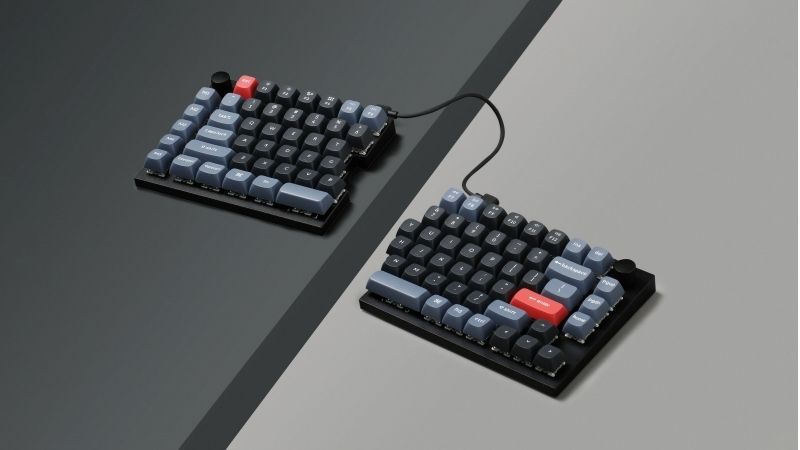
The Kinesis Freestyle Edge RGB Plus and Dygma Raise 2 are genuine physical split keyboards. Neither a one-handed Tartarus keypad nor an ordinary 75% slab should be marketed as a split keyboard.
The right choice depends on the exact split keyboards for gaming, the required software or hardware compatibility and verified seller terms. Compare the configuration in the table against your actual use rather than treating a family name as a tested recommendation. Where current U.S. pricing or stock was not independently confirmed, the pick remains a candidate, not a buy-now deal.
Comparison table: keyboards, features, and trade-offs
| Buyer use | Configuration gate | Reject when |
|---|---|---|
| Wider mouse space for low-sensitivity FPS | Physically separate two halves so mouse can sit between them | Fixed-size board simply markets an ergonomic angle with no independent halves |
| Portable wireless workstation | Choose the Raise 2 wireless add-on and confirm its RF/BT modes | Cart says base wired; cannot infer wireless from product-family photography |
| Tenting without additional accessory surprises | Verify Kinesis RGB+ lift kit or a paid Dygma integrated tenting selection | Photos show optional legs that are absent from your exact SKU |
| Simple macro editing with no background agent | Kinesis onboard SmartSet, Keychron wired Launcher, Dygma Bazecor where supported | Your OS or restricted PC cannot run the required configuration workflow |
Additional comparisons and purchase considerations
| Product / exact family | Verified feature or evidence boundary | Best fit | Major caveat | US price — exact variant, checked Oct 31, 2026 | Stock status — exact variant, checked Oct 31, 2026 |
|---|---|---|---|---|---|
| Kinesis Freestyle Edge RGB Plus | Wired physically split TKL; 20-inch link; 1,000Hz | FPS and traditional staggered-layout gamers | Cable limits separation | $199.00 (Kinesis MSRP) | Retail price/stock not independently verified |
| Dygma Raise 2 | Two removable halves; wired/wireless versions; RGB; hot-swap MX switches | Gamers who want tenting, remapping and wireless optionality | Different versions and configuration learning curve | $369.00 (Dygma base, wired) | In stock (base; options vary) |
| Keychron Q11 | 75% physically split USB-C wired keyboard; QMK/VIA and hot-swap | Two adjustable halves without paid RF options | No documented native wireless; requires desk cable route | $204.99 (Keychron USA Q11-M1A fully assembled) | Backordered for selected red switch / Carbon Black A |
US price and inventory observations are tied to the named seller, selected SKU, color or memory configuration where specified. “Buy Now” and “Add to Cart” describe purchase buttons, not a completed checkout or guaranteed warehouse stock. Family-level pricing, obsolete variants, and conflicting source badges are explicitly qualified. Unresolved rows are not assumed purchasable.
| Situation | Recommended evaluation or next action |
|---|---|
| Seeking two independent typing halves | Dygma Raise 2 or verified split layout |
| Only need MMO movement keys | Compare dedicated one-handed keypad |
| No desk space or travel priority | Measure deployed footprint and cable arrangement first |
Shortlisted keyboards and the differences that matter
Kinesis Freestyle Edge RGB Plus — fit and limitations
Kinesis Freestyle Edge RGB Plus is relevant because wired physically split TKL; 20-inch link; 1,000Hz. That hardware is a reasonable match when fps and traditional staggered-layout gamers. Layout and switch technology affect desk space, finger travel, and typing feel in different ways. A knob or gaming mode is useful only when the software and physical controls support your own workflow.
The limiting consideration is cable limits separation. Verify the layout, switch compatibility, wired/wireless mode, and profile storage on the exact revision before deciding. This is not a claim of detailed research or current retailer stock.
Dygma Raise 2 — fit and limitations
Dygma Raise 2 is relevant because two removable halves; wired/wireless versions; RGB; hot-swap MX switches. That hardware is a reasonable match when gamers who want tenting, remapping and wireless optionality. Layout and switch technology affect desk space, finger travel, and typing feel in different ways. A knob or gaming mode is useful only when the software and physical controls support your own workflow.
The limiting consideration is different versions and configuration learning curve. Verify the layout, switch compatibility, wired/wireless mode, and profile storage on the exact revision before deciding. This is not a claim of detailed research or current retailer stock.
Buying guide: fit, switches, and software checks
Model eligibility and buying decisions
Choose for the tasks between games: Gaming sessions are not all one-handed FPS. For writing or programming, both halves should support natural shoulder-width typing; for FPS, moving the right half away makes more room for a low-sensitivity mouse. Decide whether you need traditional staggered rows or are willing to retrain a different layout.
Compatibility means more than plug-and-play: Kinesis works as a USB keyboard on Linux, but its Windows/macOS SmartSet software handles advanced lighting customization. Dygma describes Windows, Linux, macOS and mobile compatibility, with the Bazecor configuration workflow needing separate confirmation for your OS and revision.
The first 30 minutes after unboxing: Start both halves flat with conservative distance, then increase separation and tilt in small increments. Test modifier combinations, space, Enter, aim movement and desk alignment; resist changing switch choice and layout at the same time because you will not know what improved comfort.
A true split keyboard has two independently positionable halves: A genuine split layout permits the left and right key clusters to move apart, angle individually and sometimes tent. That helps some players align wrists with forearms, especially when they mouse on the right side or move the right half away for more desk space. A one-handed gaming keypad does not replace both sides of a split keyboard, and a curved one-piece ergonomic keyboard is not a physically split unit. The Dygma Raise 2 documents wireless and wired connection options along with hot-swappable switches; buyers must confirm the purchased configuration and available tenting or palm accessories before assuming they are standard.
Costed split comparison: included tenting versus paid upgrades: For best split keyboards for gaming , a complete decision requires the real configuration price, not just the keyboard’s entry price. On the U.S. Freestyle Edge RGB Plus product page , Kinesis explicitly includes a Lift Kit, removable palm rests, programmable SmartSet controls and hot-swappable Gateron Pro v1 switches. Its halves are connected by a 20-inch interconnect , so desk separation is adjustable but not unlimited; it remains a USB-wired keyboard. Kinesis clarifies that the Lift Kit is already installed on RGB Plus units, and requires the palm supports to be attached. Do not add that accessory’s separate replacement price to a new RGB Plus purchase or treat it as an option available on every older Freestyle revision.
Dygma’s Raise 2 configurator quotes wireless +$90 , built-in tenting +$80 , or a combined wireless+tenting choice at +$170 relative to the base configuration shown. Those are option surcharges from the observed configurator, not a final U.S. tax-and-shipping checkout. Its per-key RGBW backlight is standard, while underglow is an extra feature with configuration dependencies. A promotional photo showing tenting and wireless does not prove those are in the baseline wired box.
Keychron’s Q11 is a separate 75% split wired USB-C option with a metal chassis, QMK/VIA customization, hot-swap sockets and 1,000Hz polling. Keychron says you can use the left half alone. It is not a 2.4GHz/BT wireless purchase. Its independent positioning is useful for keyboard-heavy games, but a narrow desk, middle cable route and the absence of integrated tenting from the standard spec should be considered.
| Exact family | Gaming configuration supported | Tenting / wireless bill | Reject when |
|---|---|---|---|
| Kinesis Freestyle Edge RGB Plus | Wired; independent halves; SmartSet; hot-swap | Lift Kit included on Plus; no native wireless | 20-inch link cannot cover your required separation |
| Dygma Raise 2 | Split wired base; RGBW backlight | Wireless and tenting separately priced as configured | Configured total exceeds your budget or accessory delivery window |
| Keychron Q11 | 75% wired; QMK/VIA; hot-swap | No integrated wireless in listed Q11 spec | You need RF gaming connectivity or guaranteed ergonomic tenting |
Fit test before parting with money: Measure your shoulder-to-shoulder resting keyboard distance, palm-rest height and where the mouse or HOTAS belongs. Sketch that footprint on paper, including center cables, then confirm your most-used in-game number row, modifier keys, macros and anti-ghosting behavior on the exact revision. The ergonomic advantage is independent half positioning, not larger key pitch. The U.S. item page and actual checkout cart must establish final availability, tax, return windows and add-on totals.
Two real split designs with different trade-offs
Kinesis physical separation versus Q11 compact layout: The official Kinesis store lists Freestyle Edge RGB Plus at $199; it is genuinely separable and intended for gaming. Keychron Q11 is split wired 75% with knob, but the manufacturer exact selected fully assembled option is marked backordered.
US buying evidence at this checkpoint: Kinesis gaming store $199 Edge RGB Plus; Keychron Q11 $204.99 listed but selected configuration backordered. This is a page observation, not completed checkout, and must not be presented as universal stock or delivery availability.
Mouse spacing and shoulder-width fit trial: A “split” space bar or Alice-style unibody keyboard does not give two independently placed modules. Real split adjustment determines shoulder spacing, mouse positioning and tenting possibilities.
Fit and design trade-offs
Real split costs: two hardware packages, not a generic ergonomic label: The newer Kinesis Freestyle Edge RGB Plus ships with its Lift Kit already included, a 20-inch inter-half link, hot-swappable mechanical switches, and built-in programmable profiles. Do not charge for the Lift Kit a second time. PC Gamer’s November 2025 hands-on review liked the ergonomic comfort but identified stiff USB cables and the absence of magnetic-switch Rapid Trigger. A split keyboard changes hand placement; it does not automatically provide fast-reset FPS behavior or guarantee that someone’s pain will improve.
On Dygma’s US ANSI Raise 2 configurator, the displayed $369 base is wired without tenting . The page lists tenting at +$80, wireless at +$90, and wireless plus tenting at +$170, before tax or shipping. Thus the illustrative base totals are $369 wired flat, $449 wired tented, $459 wireless flat, and $539 wireless tented. These are maker-page calculations, not paid cart totals; recheck exact US layout and promotions. Dygma’s low-latency RF is part of the wireless option, not an intrinsic feature of the wired base package.
| Requirement | Choose | Do not assume |
|---|---|---|
| Split + tenting without paid upgrade | Kinesis Edge RGB Plus with included Lift Kit | True cordless halves or Rapid Trigger |
| Configurable RF wireless and tenting | Dygma Raise 2 wireless + tenting configuration | That $369 includes both upgrades |
| Low-cost introduction to split keys | Compare verified Keychron Q11 wired layout and support | Same palm rests, tent angle or game latency |
Before keeping either device, set the halves at natural shoulder width, measure keyboard-to-mouse reach, test a long typing session and an FPS game, and check whether cable stiffness or tenting hardware dislodges the half when you flick the mouse. Return policies matter more than ergonomic marketing, and no clinical reduction in pain is claimed here.
Why two physical halves matter: A genuine split layout lets you set left/right hand distance and angle. With Kinesis, the fixed 20-inch linking cable limits separation but provides straightforward wired gaming. With Dygma Raise 2, the different wired and wireless kits alter connection setup and charging behavior.
How to size the desk and discover your comfortable stance: Measure shoulder width, wrist posture and mousepad space before browsing. Place two halves approximately shoulder-width apart, then adjust slowly rather than forcing an extreme tent angle on day one. Set up frequent keys for movement, communication and modifiers where they can be reached without an awkward thumb stretch. For competitive play, check the layout’s handling of numbers, function-row commands and hold-to-talk. A split board offers more configurability but can create travel inconvenience, extra cables and a learning curve. Test it for more than five minutes; typing accuracy and in-game comfort change over the first several sessions.
Performance limits and real-world implications
Split-keyboard trade-off: wired competitive stability versus wireless convenience: The most useful new independent distinction is RTINGS’ hands-on review of Dygma Raise 2, updated in September 2026. RTINGS bought the wireless-plus-tenting configuration , finding outstanding, consistent wired response, but occasional large latency spikes over its 2.4GHz link. This means a seller’s ‘wireless gaming split keyboard’ label alone does not justify promising identical wired-level performance. For fast-paced competitive games, wired Raise 2 is the evidence-based low-variance route; wireless may still be convenient for normal work or casual play. Do not transfer the wireless finding to a base model that has no wireless upgrade.
PC Gamer independently researched the Kinesis Freestyle Edge RGB Plus and confirmed the Lift Kit is already in the box, not an additional accessory purchase. It also noted relatively stiff connecting cables and no magnetic rapid-trigger switches. Kinesis’ U.S.-only maker store confirms the Plus model with an included Lift Kit and a selectable switch option. Dygma’s U.S. ANSI configurator shows an illustrative $369 wired base, $449 with tenting, $459 wireless without tenting and $539 with both, before verifying taxes, shipping or any promotional changes. Never mix an older Freestyle Edge RGB review that required a paid Lift Kit with the current Plus package.
| Decision | Correct complete hardware choice | Return-window acceptance test |
|---|---|---|
| Competitive FPS, cable acceptable | Dygma Raise 2 wired base; add tenting only if it improves comfort | Test simultaneous WASD + modifiers, no wireless battery or spike assumption |
| Included low-cost tenting | Kinesis Freestyle Edge RGB Plus, Lift Kit already bundled | Confirm 20-inch inter-half cable can reach actual desk setup |
| Move between desks/devices | Raise 2 wireless option; choose it for convenience, not assumed e-sports latency | Switch between wire and radio in a repeatable game scene and keep only if stable |
Measure wrist positions and side-to-side spacing before purchasing, and check whether the desk has room for mouse movement after the halves are separated. A split layout may aid positioning; neither product is a medical treatment. The manufacturer configuration pages are offer snapshots, not committed U.S. ZIP checkout or a long-term hardware reliability study.
Compatibility, setup and verification
Wireless split does not mean simple pairing: A two-part keyboard can use two microcontrollers, a central wireless receiver and proprietary links between halves. Ask which pieces require charging and what happens if the receiver is lost. Confirm Linux/macOS/Windows software availability separately from basic USB or Bluetooth typing. Wireless stability should be assessed with the included receiver at the recommended distance and without a metal desk obstructing the radio. A split device also occupies the desk differently from a standard 75% board: a mounting tent or thumb cluster may be more valuable than a theoretical top polling number for the intended buyer.
Price and availability checks
Split-keyboard purchase check: three genuinely separate halves, three different bills: Do not pay for a feature the base box does not include. The Dygma Raise 2 configurator distinguishes the wired base keyboard from upgrades. At the observed US-facing page, wireless adds $90 and integrated tenting adds $80, while both add $170; the figures describe selected add-ons rather than a universal final checkout total. The configurator also specifies 0–60-degree adjustable tenting for the option and separate ergonomic choices. A headline mentioning wireless does not mean an inexpensive wired cart selection has Bluetooth or RF.
Kinesis versus Keychron is not only a price comparison: the Freestyle Edge RGB+ ships with the Lift Kit, palm supports and on-board SmartSet programmability on the current ‘+’ revision. The Keychron Q11 is a wired-only 75% mechanical split with a knob option, hot-swappable conventional mechanical sockets and QMK/Launcher configuration. It is not wireless and does not add adjustable tenting merely because its halves separate. A Keychron Q11 selected US variant was displayed as backordered at the time of this research; this is a variant-specific storefront snapshot, not a permanent state of the whole model line.
Thirty-minute gaming and typing trial: Start with both halves about shoulder-width apart, then adjust by comfort rather than copying a product photo. Check whether the keyboard cables can reach the positions you want; measure cable run with the mouse and wrist rest in place. Enter movement keys, hold combinations, type a work paragraph and verify macros at your game’s permitted settings. Ergonomic positioning is individual; split boards are not proven treatments for injury. Compare complete USD delivered totals including switches, tenting, wireless, and return shipping; no same-day final checkout was performed in this editorial pass.
How we selected these options and checked evidence
We compared genuine split halves, control layouts, key remapping and realistic gaming compromises. Comfort depends on where the halves can be placed; no keyboard is an ergonomic cure for every user.
The comparison is based on the exact configuration and technical limitations recorded in this draft, with model identities, connection requirements, and purchase conditions treated separately. Published manufacturer specifications are not substitutes for independent long-duration measurements. Prices and stock are seller-, date-, and region-specific; where no current U.S. checkout was verified, that uncertainty remains visible instead of being presented as a live offer. The recommendations are therefore shortlists for further verification, not accounts of our own hands-on lab tests.
Frequently asked questions
Is a one-handed keypad a split gaming keyboard?
No. It can substitute for the movement half in some games but does not provide two independent halves of a complete keyboard.
Will splitting a keyboard automatically prevent wrist pain?
No. Ergonomic benefits vary and depend on placement, posture and time spent. Discomfort that persists should be evaluated rather than treated through an unverified product claim.
Final thoughts
Prefer Kinesis for broad physical separation and an established gaming-focused layout; Q11 is interesting if its smaller 75% footprint and knob matter more than maximum separation. Neither is automatically best for every hand size.
Measure shoulder width; place mouse between halves; check linking-cable length, tenting hardware, return window and Kinesis app OS support before ordering. Trial 15-minute intervals for wrist and shoulder comfort.
Do not list a backordered Q11 as ready to ship, or count ergonomically curved unibody boards as a physical split.