
The best handheld gaming kickstands solve a deceptively specific problem: keeping a portable console stable at a usable angle without making it awkward to hold, charge, cool, or dock. For Steam Deck LCD and OLED owners who also want a protective shell, the dbrand Project Killswitch is our premium choice. The JSAUX ModCase offers a less expensive, modular alternative, although its live stock messaging needs checking at checkout. ROG Ally X owners should start with the model-specific JSAUX ModCase or dbrand Killswitch. If you simply want tabletop play on a Nintendo Switch, the HORI Compact PlayStand avoids adding a permanent case.
This guide covers seven identifiable accessories, including case-mounted kickstands and portable tabletop stands. They are not interchangeable: a case sculpted for the Steam Deck will not automatically fit a ROG Ally, and a freestanding cradle does not provide drop protection. We reviewed maker specifications, current US-facing purchase pages, compatibility notes, and selected independent coverage. Geek Gaming Tricks has not physically tested hinge durability, drop protection, or wobble under gaming loads. Price and availability are snapshots, not promises about your ZIP code or the version selected at checkout.
Quick verdict: the best pick for each handheld
Best overall for Steam Deck LCD/OLED — dbrand Project Killswitch: A fitted protective shell with an included kickstand in the Essential configuration. Its principal benefit is one integrated setup for portable and tabletop use. Its downside is cost, especially if you later add the Travel kit. Check the exact dock adapter requirements before deciding that any dock will work with the case attached.
Best slim Steam Deck option — Spigen Thin Fit Pro, ACS06040: A thinner protective shell with a built-in kickstand, explicitly listed by Spigen for both Steam Deck LCD and OLED. Its simple design suits players who dislike modular rails and bulky travel covers. It lacks the fuller travel-focused package of Killswitch; availability on Spigen’s US product page could not be confirmed independently of the displayed price.
Best lower-cost modular Steam Deck case — JSAUX ModCase PC0104 Basic Set: The back shell, removable metal stand, silicone strap, and front travel cover make a flexible package. It can be a strong value if the Basic Set is actually orderable. JSAUX’s product page simultaneously displays an Add to cart control and a Coming soon message, so we treat the stock position as unclear rather than declaring it in stock.
Best value for ROG Ally X — JSAUX ModCase PC0111 Basic Set: Choose the separate ROG Ally X variant, not the original ROG Ally version. Its removable stand and travel cover suit an Ally X that alternates between a desk, a bag, and handheld use. Buyers should verify that the correct variant remains selected in the cart.
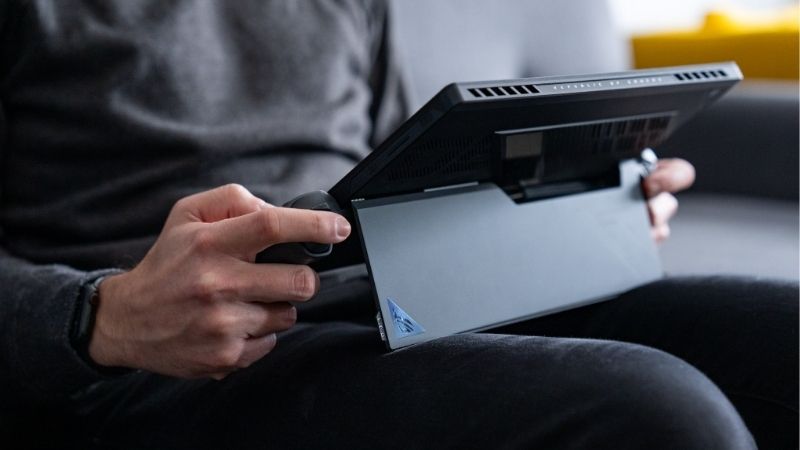
Best premium option for ROG Ally X — dbrand Project Killswitch for ROG Ally X: A tailored case with a built-in stand and optional travel accessories. It makes sense if case texture and protective construction matter as much as support angle. It costs materially more than the JSAUX alternative, and neither maker’s promotional impact claims substitute for a comparable independent drop test.
Best inexpensive Switch tabletop stand — HORI Compact PlayStand, NSW-029U: Officially licensed for the original Nintendo Switch, foldable, adjustable, and designed to keep a charging-cable path accessible. Its value is simplicity rather than protective coverage. Do not assume that the original accessory has been verified for the newer Switch 2 just because both systems have similar-looking tabletop modes.
Best portable multi-console stand to investigate — JSAUX Anti-Slip Holder SG0103: A freestanding aluminum-and-silicone stand advertised for Steam Deck, ROG Ally, Switch, Switch 2, and several other handhelds. It keeps the handheld itself bare and can serve several devices, but JSAUX’s page combines an Add to cart button with a Coming soon flag. Treat it as a comparison option until stock is established; it is specifically not listed for ROG Xbox Ally or ROG Xbox Ally X.
Comparison: seven kickstands and portable holders
Prices below were read from the identified seller’s US-facing product page on October 28, 2026. A working Add to cart button is evidence that a seller offers checkout, not proof that inventory is available for every US delivery ZIP code. Unclear means the page does not establish reliable live stock, or presents contradictory messaging. Figures exclude tax, shipping, and optional kits. The full device or kit name matters more than a brand’s broad claims of universal compatibility.
| Product and primary use | Verified distinguishing detail | Compatibility boundary | Price (seller; checked Oct. 28, 2026) | Stock status (Oct. 28) | Main trade-off |
|---|---|---|---|---|---|
| dbrand Project Killswitch — premium Steam Deck case | Essential kit includes case and kickstand | Steam Deck LCD/OLED product family; confirm dock accessories | $59.95 — dbrand, Essential | In stock / orderable page | High upfront cost |
| Spigen Thin Fit Pro ACS06040 — slim Steam Deck shell | Built-in stand; listed product weight 3.8 oz | Steam Deck LCD 2022 / OLED 2023 | $39.99 — Spigen US | Unclear | No matching front travel cover shown |
| JSAUX ModCase PC0104 Basic Set — modular Steam Deck case | Removable metal bracket, travel cover, strap | Steam Deck LCD/OLED; Valve dock does not directly fit | $29.99 — JSAUX | Unclear: Coming soon and Add to cart both appear | Stand/case must be managed around docks |
| JSAUX ModCase PC0111 Basic Set — ROG Ally X | Detachable stand and front cover | ROG Ally X (2024) only; original Ally uses PC0109 | $26.99 — JSAUX | In stock / orderable page | Select exact device variant |
| dbrand Killswitch for ROG Ally X — premium Ally X | Built-in stand and optional travel kit | ROG Ally X; not the same case as original Ally | $59.95 — dbrand, Essential | In stock / orderable page | Price and added shell bulk |
| HORI Compact PlayStand NSW-029U — Switch tabletop | Foldable adjustable stand, rubber grips, cable opening | Original Nintendo Switch; do not presume Switch 2 fit | $12.79 — PopMarket US | In stock / orderable page | Not a protective case |
| JSAUX Anti-Slip Holder SG0103 — portable universal tabletop | Aluminum/silicone stand; angle adjustment | Steam Deck, Ally, Switch family; excludes ROG Xbox Ally/X | $15.99 — JSAUX | Unclear: Coming soon and Add to cart both appear | Separate item to carry; fit may change with bulky shells |
What makes a kickstand useful instead of frustrating?
A good kickstand does more than prevent a console from falling backward. First, its supporting foot needs a wide enough contact area for the console’s center of gravity. Steam Deck and Ally-class handheld PCs weigh more than a phone, and their controller grips extend far beyond the screen. A narrow foot can appear stable while you watch a video yet rock when you tap the touchscreen or tug a charging cable. Judge the full setup rather than admiring the stand mechanism in a product photo.
Second, the viewing angle has to match how you play. For controller-based tabletop gaming, the screen often sits farther away than in ordinary handheld mode, so a low angle can produce neck flexion and reflections. A stand with a choice of angles is more accommodating than a fixed-angle backplate, but adjustability is not inherently better if every position except one allows the device to slip. A firm hinge and reliable contact points matter more than the highest advertised number of settings.
Third, a case-mounted stand changes how the handheld travels. An integrated mechanism is convenient because you cannot leave a separate holder at home. The trade-off is a thicker rear surface, a hinge or bracket that can catch on fabric, and possible interference with a dock’s support groove. A desktop holder leaves a bare device’s grip unchanged but adds another item to pack and does not protect the device when carried. Neither type is universally superior.
Finally, cooling clearance must remain a non-negotiable. Stand feet, case walls, fabric surfaces, detachable battery mounts, and charging cables should never block the manufacturer’s air intake or exhaust. A foldable holder on a rigid tabletop is preferable to propping a gaming PC in a soft blanket. None of these accessories has verified temperature improvements in our own testing; treat cooling claims as claims, not measured performance results.
Detailed reviews and buying trade-offs
dbrand Project Killswitch for Steam Deck: best overall
The Steam Deck version of Project Killswitch is the most complete premium choice in this comparison for someone who regularly uses the same handheld in bed, on a desk, and on trips. dbrand’s Steam Deck and OLED selector is important: you should choose the Steam Deck family, rather than assuming that an Ally-branded shell or a Switch 2 configuration could be stretched onto it. The Essential kit shows the case and kickstand as included. Its current dbrand-listed starting price is $59.95 for Essential; the Travel kit is a separate, more expensive option, so the lowest price should not be described as including the whole accessory catalog.
The central advantage is that the support is attached to a protective shell engineered around the device. You can leave the shell on for ordinary gameplay and deploy the stand when you switch to a Bluetooth controller, watch a walkthrough, or use a desktop keyboard. That makes more sense than buying a separate tabletop cradle if your primary goal is minimizing accessories in a bag. The textured grips may also appeal to people who find bare plastic slippery, though comfort and fit are individual and we have not compared them by hand.
Where Killswitch becomes complicated is docking and carrying. A correctly fitted shell still changes the console’s outer shape, and a travel cover is an optional purchase rather than automatic protection in the lowest kit. dbrand lists a separate dock adapter accessory for the Steam Deck version. Before ordering, identify whether you use Valve’s dock, another branded dock, or a separate HDMI adapter. If your routine requires daily docking, confirm the precise combination rather than relying on broad ‘dock support’ wording.
Buy it if you want protection, an always-available kickstand, and a premium integrated setup. Skip it if your Steam Deck normally stays in a fixed dock or your budget is closer to that of a simple, removable tabletop stand. The main regret risk is paying for an elaborate shell when you rarely deploy the support.
Spigen Thin Fit Pro ACS06040: best simple Steam Deck shell
Spigen takes a different approach: the Thin Fit Pro is a fitted shell with a built-in kickstand but without the prominently advertised modular accessory rail and front-armor ecosystem associated with the more expensive cases. Spigen’s US listing specifically identifies SKU ACS06040, Steam Deck LCD (2022) and OLED (2023) compatibility, product weight of 3.8 ounces, and a $39.99 displayed price. Those exact identifiers are more useful for shopping than a generic listing saying ‘Spigen Steam Deck case,’ because not every Spigen shell includes a kickstand.
This is the sensible middle ground for players who want to set the Deck upright at a cafe or beside a laptop but do not want to install or remove extra modules. The integrated foot is there when needed, and the shell keeps ordinary access to the top controls and charging port in the maker’s product images. The practical appeal is fewer moving accessory pieces; the drawback is fewer ways to upgrade the setup if you later want a front travel cover or a mounted battery.
The listed weight is the case’s product weight, not a promise about how light the full handheld will feel. Compare how much protection you need, where the hinge sits when you grip the rear, and whether your existing zippered carry case has room for an extra fitted shell. Spigen’s page lists LCD/OLED support, but that does not establish compatibility with every third-party dock or case insert. Also, although a US price is visible, we could not confirm stock from an unambiguous purchase-state label on the page, so its status remains unclear rather than ‘available now.’
Buy it if you value straightforward protection and an integrated foot over a larger kit. Skip it if a travel cover is essential or you want specific, documented support for multiple rear-mounted accessories. Confirm orderability and return eligibility before treating it as a ready-to-buy recommendation.
JSAUX ModCase PC0104: best modular value for Steam Deck
The Basic Set of JSAUX’s ModCase PC0104 is meaningfully different from Spigen’s shell. JSAUX lists a protective case, metal bracket, silicone strap, and travel cover in that kit, with a direct-page Basic Set price of $29.99. The removable stand is a benefit if you want to change how the back of the Deck is configured, or use the brand’s optional accessory modules at other times. The maker explicitly identifies compatibility with both Steam Deck LCD and OLED, so this is not a case that should be sold as LCD-only without checking the variant.
The most consequential fact, however, comes from JSAUX’s own FAQ: PC0104 does not fit the official Valve docking station in the ordinary groove, even though JSAUX says it supports its own docks when the travel cover is removed. This is precisely the kind of difference that gets lost when a product roundup simply says ‘dock compatible.’ The accessory is attractive for users who play handheld and tabletop more often than they dock, or already own a verified compatible JSAUX dock. For a player committed to the original Valve dock, the case is a less straightforward purchase.
Its detachable stand is also less of a convenience than a built-in hinge in one respect: removable hardware can be left behind. Place the metal bracket in the same pocket of your travel bag or reattach it after charging rather than assuming it will always be present. If you plan to add a battery, compare the weight and balance of the complete mounted setup, not just the shell, and keep any rear vents fully open.
We are not calling this pick in stock. JSAUX’s page displays both ‘Coming soon’ and ‘Add to cart,’ creating a contradictory availability signal even though other brand collection pages categorize the model among stocked products. That disagreement should be resolved at checkout. Buy it if the Basic Set is orderable and modular attachments matter. Avoid it if daily Valve-dock insertion is central to your routine or you need a confirmed immediate delivery option.
JSAUX ModCase PC0111: best-value ROG Ally X kickstand case
The ROG Ally X has its own physical housing, so model-specific fit is mandatory. JSAUX distinguishes the original ROG Ally version PC0109 from the ROG Ally X version PC0111, and its broader storefront also lists a separate model for the newer ROG Xbox Ally family. The current product selector shows the ROG Ally X Basic Set at $26.99. That is the price of that named variant, not a universal price for every Ally case or bundle on the page.
For an Ally X owner, this is an economical way to get a case-mounted detachable stand and a front cover while preserving the device’s core tabletop functionality. The protective shell gives users a more grippy surface while the metal bracket supports the unit during controller play or short desktop sessions. The removable nature is helpful for packing and reconfiguring the case, but it means that long-term hinge and bracket wear still deserves attention; our research did not measure those properties.
The most serious buying mistake is selecting the wrong version. JSAUX explicitly says the ROG Ally and ROG Ally X require different case versions, while newer ROG Xbox Ally devices use yet another selection. Confirm the model name in your handheld’s purchase record, then verify ‘ROG Ally X | Basic Set’ appears in the checkout description. A product image showing an Ally-style console is insufficient evidence that the cutouts, triggers, or vents match your machine.
Also examine how you charge while the case and stand are attached. A right-angle adapter, dock cable, or magnetic accessory can conflict with a metal bracket even when the USB-C opening itself is accessible. Do not assume support for a specific eGPU or dock based on the case’s general compatibility claims. Buy it if you own the 2024 ROG Ally X and want a value-focused stand-plus-cover system. Skip it if you have the original Ally or the newer Xbox Ally family and are not willing to select the correct separate version.
dbrand Killswitch for ROG Ally X: best premium Ally X case
The ROG Ally X version of Killswitch follows the same broad philosophy as the Steam Deck model, but it is a different product designed around a different device. dbrand’s ROG Ally X product page lists an Essential kit at $59.95 and shows the case and kickstand included. The Travel kit costs more and brings different accessories, so compare like-for-like when looking at JSAUX’s Basic Set. An upgrade that sounds inexpensive in a comparison table can be much more expensive when optional parts are included.
This model’s appeal lies in the integrated design: a grippy, device-specific case that can stay on during handheld play and open into a tabletop support when you put the Ally X down. The textured handle regions may help players who move between couch, desk, and travel use. But marketing claims about ‘ultimate grip’ or impact resistance cannot be treated as objective rankings against JSAUX unless the products were tested using the same procedures. We have not performed such a test.
The added structure could also be a drawback if you are sensitive to grip thickness, have a very snug carrying case, or use a stand that was designed around the bare Ally X. Assess your existing accessories before ordering: a charging dock with a narrow front lip, a molded travel sleeve, and a mounted external battery may each require separate fit confirmation. The presence of a kickstand also does not mean the device is safe to balance on a tilted bed surface or under a blanket.
Buy it if premium shell construction, a permanently accessible stand, and case texture justify the price to you. Skip it if you mainly want an inexpensive way to position your Ally X on a table; the JSAUX version or a properly sized freestanding holder may better match that narrow requirement.
HORI Compact PlayStand NSW-029U: best Switch tabletop alternative
HORI’s officially licensed Compact PlayStand is a different kind of recommendation. It is not a fitted case and does not rely on a rear-mounted foot. Instead, the original Nintendo Switch rests in a fold-out cradle with angle adjustment, rubberized contact points, and an opening for a charging cable. HORI USA identifies it as NSW-029U; a US retailer, PopMarket, lists that same numbered product at $12.79 and shows an Add to cart control. Checking the SKU avoids mistaking it for a different HORI stand that includes USB ports or a newer-console variant.
This makes sense for occasional tabletop play, especially when you need the console closer to eye level or want charging-cable clearance while detached Joy-Cons or another controller handle input. It also avoids adding a shell that might interfere with taking the Switch in and out of its TV dock. If you keep your console bare and already use a case only for transportation, a separate stand can be easier to live with than a permanent attachment.
However, Switch owners must consider what they already have. The Nintendo Switch OLED includes a wide adjustable stand, and Nintendo Switch 2 has a built-in adjustable stand as well. If the built-in mechanism is stable on your table, an extra cradle may not improve much. Conversely, the original Switch’s narrower built-in leg can be less versatile for some positions. Nintendo Switch Lite has no built-in stand, but HORI’s NSW-029U page is framed around Nintendo Switch, so we are not treating Lite or Switch 2 support as verified for this exact SKU.
Buy it if you own the original Switch and want a cheap, foldable tabletop accessory that stays out of the way of the device’s normal dock. Skip it if you expect drop protection, need verified Switch 2 compatibility, or already like the stand integrated into your OLED or Switch 2.
JSAUX Anti-Slip Holder SG0103: best universal stand concept
Not everyone wants to wear a case. JSAUX’s SG0103 is a compact, freestanding aluminum-alloy and silicone holder with an adjustable viewing position. The manufacturer’s current listing shows $15.99, a 135 × 83 × 11 mm dimensions entry, and a product weight of 135 g. It is advertised for Steam Deck LCD and OLED, ROG Ally and Ally X, Nintendo Switch variants, Switch 2, and certain Legion Go models. JSAUX specifically says it does not work with ROG Xbox Ally or ROG Xbox Ally X; do not overlook that exception in a product advertised for many handhelds.
The strongest reason to consider this holder is a household with more than one portable system. The same stand can hold a bare Steam Deck one day and an original Switch the next, without changing the grip profile of either handheld. It can also be useful when you pair a handheld PC with a keyboard, use an external controller, or want to park the console upright during a break. Because the stand remains separate, it does not offer carry protection, and an accessory must be retrieved and unfolded at every location.
There are practical limits to the word ‘universal.’ Thick protective shells can alter contact points and push a console outward, where it is easier to tip forward. Very stiff charging cables can pull a lightweight stand off-center. The brand’s listed angle range describes the holder’s adjustment mechanism, not a guarantee that every large handheld is stable at every extreme. Start near the middle of the range and perform a hands-off stability check before leaving the setup on a crowded desk.
We have retained SG0103 as a comparison pick, not an immediately available top pick, because its live page shows both ‘Coming soon’ and an Add to cart control. Buy it when stock is genuinely confirmed if you need cross-device flexibility and are comfortable carrying a separate holder. Skip it if you want a protective shell or own a model JSAUX explicitly excludes.
Match the kickstand to the handheld you actually own
Steam Deck LCD and OLED
Start by deciding whether you want a support mechanism attached while you grip the device. For an integrated case, the dbrand Killswitch is the strongest premium candidate; Spigen Thin Fit Pro is simpler, and JSAUX ModCase is the more modular and budget-oriented alternative. The key trap is docking compatibility. A manufacturer can accurately describe a case as Steam Deck-compatible yet still have that case fail to seat in Valve’s dock. JSAUX’s explicit warning about PC0104 is more useful than assumptions drawn from a photograph.
If the Steam Deck mostly stays in its original protective carrying case and only occasionally sits upright, a detachable tabletop holder may be sufficient. In that setup, evaluate whether it supports the device securely without touching the rear air intake. Do not rest the machine on a comforter to test a stand. Use a firm desk, tray, or table, and keep enough space for warm exhaust air to escape.
Original ROG Ally versus ROG Ally X
The difference is not merely the letter X in a search result. These two designs require distinct device-specific cases, and buying the wrong version can obstruct a vent, control, or charging connection. For the Ally X, JSAUX PC0111 is the best value-focused choice in this roundup, while dbrand’s ROG Ally X Killswitch offers a more premium integrated option. Original Ally owners must instead choose the original Ally variation offered by the maker; they should not order the Ally X SKU hoping a flexible shell will stretch correctly.
ROG Xbox Ally-branded systems add a further naming hazard. JSAUX now presents versions for the newer ROG Xbox Ally family alongside older ROG Ally and Ally X options. Verify the exact device name on its box or system information before ordering. Any recommendation for an old Ally X should not be silently extended to an Xbox Ally X20 or another newer device that appears in a modern accessory selector.
Original Switch, Switch OLED, Switch Lite, and Switch 2
For the original Nintendo Switch, a portable cradle such as the HORI NSW-029U is useful if its built-in leg is insufficient for your viewing position. Nintendo Switch OLED already has a wide adjustable stand, and Nintendo Switch 2 also has a sizable integrated adjustable stand; for those models, first try the included hardware. Paying for a new plastic stand is not inherently an upgrade when the console already provides the angle you need.
Switch Lite presents a separate problem: its integrated controls and lack of an included stand make tabletop use possible only with appropriate support and a separate controller if you want to operate it from a distance. HORI’s portable USB stand NSW-820U is explicitly documented for Switch Lite by HORI, but that is a different, more complex product from the inexpensive NSW-029U covered above. Buy based on documented model support, not on the assumption that every Nintendo-labeled stand has the same fit.
Installation and safety checklist before your first tabletop session
First, confirm the exact handheld generation and accessory SKU. On a product page, look for ‘Steam Deck OLED,’ ‘ROG Ally X (2024),’ or ‘Nintendo Switch’ in an explicit compatibility statement; do not rely on broad text such as ‘handheld PC.’ If you own a case already, verify whether a freestanding stand supports the console with that case installed. If a case has its own detachable rear foot, confirm that the locking mechanism is fully engaged rather than just touching the housing.
Next, use a level, hard surface and angle the device gently. Deploy a built-in kickstand until the hinge or latch reaches its supported position. For a multi-angle holder, test the lower or middle angles before moving to a more upright position. Set the console down carefully and then release both hands; if it rocks, slides, or starts to tip when you touch the screen, stop. Reposition it or choose another stand. Do not use a stack of game boxes, a loose object, or a folded cushion as a support wedge.
Then check the rear and top ventilation openings. On handheld PCs, the case must follow the air paths built into the console; a stand that keeps it standing but seals a cooling intake is not an acceptable solution. Avoid keeping a handheld switched on in a fully enclosed bag or against bedding. The fact that a vendor calls a stand ‘cooling friendly’ does not mean the assembled setup has been tested for thermal performance.
Route the charging cable with slack and no sharp bend at the USB-C connector. A taut cable can pull on a lightweight portable stand and shift the center of gravity. Make sure the cable runs free of the stand’s hinge and does not force the handheld upward. If you plug into an external display or a USB-C dock, verify that the cable does not put lateral stress on the port and that your dock supports the console independently of the stand.
Finally, pack the unit correctly. A kickstand protruding behind a protective shell should be fully folded or removed as its maker specifies before you slide it into a padded sleeve. A tabletop holder should be folded separately. Do not assume that a rigid front cover protects buttons against all baggage pressure or that a product’s marketing promises meaningful impact resistance under every fall. For travel, protection and support are related purchases, not interchangeable guarantees.
How we selected these handheld gaming kickstands
We prioritized accessories that clearly specify the target device, a recognizable manufacturer identifier, and a practical stand design. For integrated cases, we weighed the stand mechanism against case thickness, back-button and vent clearance, travel protection, and docking concerns. For freestanding stands, we prioritized contact stability, adjustability, charging access, and the ability to share one holder across more than one model. We also separated products that are actively orderable from ones with ambiguous stock messaging, because a nominal ‘best’ pick that cannot be bought is of limited value to a US shopper.
We did not score hinge life, crash protection, exact stand angle under load, or temperature reductions as though Geek Gaming Tricks had measured them. Manufacturer descriptions tell us what a product claims to do, and independent editorial coverage can provide useful context, but neither establishes our own hands-on result. When a manufacturer explicitly limits compatibility—such as the Valve dock restriction with JSAUX PC0104 or the ROG Xbox Ally exclusion for SG0103—that limit receives more weight than generic promotional language.
The selection also deliberately includes different categories rather than pretending seven nearly identical shells are seven different answers. A Steam Deck fitted case, an Ally X-specific fitted case, and a portable Switch cradle solve different tasks. This is why we do not rank the Nintendo model against an Ally X shell as though they could be fitted to the same device. Stock and price assessments refer only to the named seller on the checked date, not to aggregated marketplace listings or estimates from earlier reviews.
Buying checklist: six questions to answer before paying
Does the exact SKU fit your device? Check the generation, model suffix, year where provided, and any compatibility exclusions. A correct brand name is not enough. If a seller groups three consoles on one product page, reselect your model at checkout and review the cart label.
Do you need an attached kickstand or a separate tabletop cradle? Choose attached support if portability and an always-present stand are priorities. Choose separate support if you want to keep the handheld’s grip and dock behavior unchanged or share a stand between different consoles.
Will the assembled setup clear the vents, buttons, and USB-C port? Inspect the actual rear shell, not just the front glamour photograph. Add your particular charging adapter and dock to the fit calculation. Stands with elaborate rear mounts can conflict with other accessories even when the shell alone fits.
Does it work with your exact dock? Ask specifically about the official Valve dock or your third-party model. General compatibility between a handheld and its shell does not prove the shell will seat in a dock with a narrow cradle groove.
Will it remain stable where you play? A flat kitchen table, a standing desk, a lap tray, and a soft mattress place different demands on the stand. Use rigid, level surfaces for heavier gaming PCs. If you need to play on the couch, a stable lap platform and a properly supported handheld may be safer than an unsupported kickstand on bedding.
Is the named seller actually accepting orders for your variant? An Add to cart button does not settle every inventory question. Where a page also says ‘Coming soon,’ verify the cart and delivery ZIP code before calling a product available. Compare prices for the same configuration; do not confuse an entry-level case kit with a bundle that adds covers, power banks, or other modules.
Frequently asked questions
Do Steam Deck LCD and OLED use the same kickstand case?
Some do, but you must check the specific manufacturer listing. Spigen names both LCD and OLED for the Thin Fit Pro ACS06040, and JSAUX lists both systems for PC0104. dbrand provides a combined Steam Deck & OLED product family. That does not guarantee every old accessory, dock, or third-party carrying sleeve works with every case. Treat console compatibility, dock fit, and storage fit as separate checks.
Can a Steam Deck kickstand case stay on inside the official dock?
Not always. JSAUX explicitly states that its PC0104 ModCase does not fit the official Valve dock’s groove, even though the case is made for Steam Deck. Other case makers may sell adapters or provide conditional instructions. If docking is a daily habit, start with your actual dock model and then narrow the case choices rather than buying a case first and discovering the problem afterward.
Is a magnetic stick-on kickstand a good budget alternative?
For a relatively heavy handheld gaming PC, improvised phone-sized magnetic or adhesive stands raise questions about retention force, adhesive compatibility, rear vent coverage, and surface damage. They may also interfere with a carrying case. Without verified load and attachment guidance for the exact handheld, a purpose-built fitted shell or a stable freestanding cradle is the more defensible choice. Avoid attaching plates over intake vents or removable access panels.
Do I need to buy a stand for Nintendo Switch OLED or Switch 2?
Probably not if the built-in adjustable stand already meets your needs. Nintendo’s official product documentation confirms a wide adjustable stand on Switch OLED and a large built-in adjustable stand on Switch 2. A separate accessory can still help if you need extra elevation, a different charging path, or more desk clearance. But it is an optional improvement, not a requirement for tabletop play.
Can I use the same case on a ROG Ally and ROG Ally X?
Do not assume so. JSAUX explicitly provides distinct versions for the original ROG Ally and ROG Ally X. dbrand also has separate model pages. The exterior shape, controls, vents, and attachments must line up on the exact device. Shared naming does not make one fitted case universal. A separate stand may work across both if the maker identifies both in its compatibility list.
Will a kickstand improve gaming performance or reduce fan noise?
A stand can make it easier to keep the handheld on a hard surface with ventilation openings free, but it is not a measured performance upgrade by itself. Game frame rates, fan behavior, and thermals depend on workload, ambient conditions, device power profile, and airflow. We have not run controlled before-and-after testing on any of these accessories. Buy for stability and viewing angle, not for unverified FPS or temperature promises.
Should I buy a kickstand case or a docking station?
Choose a kickstand if your goal is to prop up the handheld’s own display and play with an external controller or keyboard. Choose a dock if you need ports, video output, charging passthrough, or wired networking. Some docks also hold the handheld upright, but that does not mean their USB-C features or fit are compatible with every device or fitted case. Decide which task you need first, and confirm power and display requirements separately.
Final thoughts
For a Steam Deck LCD or OLED that regularly moves between handheld and tabletop play, the dbrand Project Killswitch is the most compelling premium stand-equipped shell in this group; choose Spigen Thin Fit Pro if a simpler shell fits your priorities, or JSAUX ModCase PC0104 if modular value matters and stock and dock compatibility check out. For ROG Ally X, the model-specific JSAUX ModCase is the clearest value choice, while Killswitch serves buyers who want a more elaborate protective setup. For an original Switch, the inexpensive HORI Compact PlayStand is the relevant tabletop alternative; Switch OLED and Switch 2 owners should try their built-in stands before buying anything.
Your next step is to identify the exact handheld model and existing dock, choose attached versus freestanding support, and verify that the selected seller can ship the named SKU to your ZIP code. That three-part check will prevent more purchasing mistakes than any vague ‘universal gaming kickstand’ label.
