
Key takeaways
- The manufacturer listing names Nintendo Switch 2 rather than relying on an ambiguous “Switch compatible” description.
- A dedicated repair guide explains what a correct installation entails.
- The stand-and-hinge configuration is relevant when the problem is more than a cosmetic scratch.
- The listing provides an identifiable part number, useful when checking the exact condition variant.
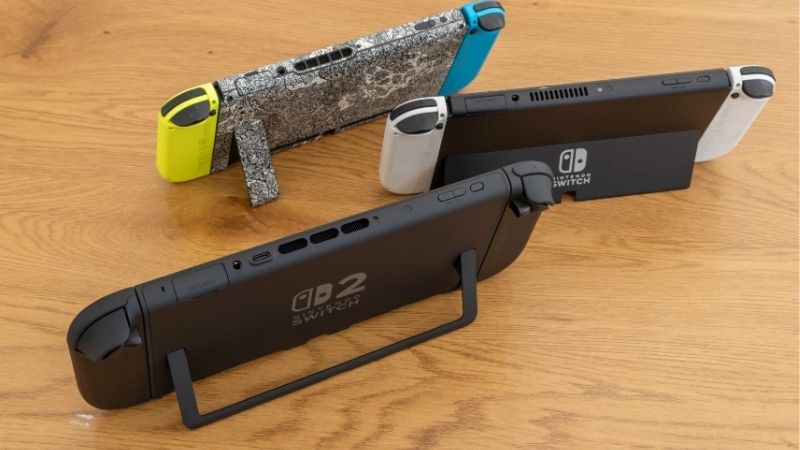
If the built-in stand on your Nintendo Switch 2 is cracked, loose, or no longer supports the console, finding the best Switch 2 kickstand replacements requires an important distinction: a replacement part is not the same thing as a tabletop stand. A genuine repair restores the mechanism attached to the console; an external stand simply supports the system from underneath. For a broken kickstand or hinge, the clearest verified part option is iFixit’s Switch 2 Console Kickstand and Hinges. Nintendo’s service process is the safer starting point for many owners, while an external stand can keep tabletop gaming practical without opening the device.
Quick verdict: What should you choose?
Best identifiable replacement part: iFixit Nintendo Switch 2 Console Kickstand and Hinges, provided the correct condition and stock are available. Its compatibility listing names Nintendo Switch 2 specifically, and iFixit publishes a dedicated replacement procedure. The trade-off is substantial disassembly rather than a quick snap-in installation.
Best choice if you do not repair electronics: Nintendo’s official service process. It avoids choosing parts and tools yourself, although the final repair options, costs, and turnaround must be confirmed through Nintendo.
Best budget-conscious possibility: The used-condition variant of the same iFixit kickstand-and-hinge assembly, if one becomes available and passes the seller’s condition checks. It is not a second manufacturer or a fundamentally different design.
Best non-repair workaround: A stable external tabletop stand marketed for Switch 2, after checking the exact model’s fit and clearance. It does not restore a broken built-in kickstand.
The evidence supports one identifiable family of replacement hardware, not a trustworthy list of six unrelated kickstand brands. Products for the original Nintendo Switch, Switch OLED, and generic desk holders should not be presented as interchangeable repair parts.
Switch 2 kickstand replacement options at a glance
| Option | What it actually does | Compatibility evidence | Main limitation | Best for |
|---|---|---|---|---|
| iFixit Switch 2 Console Kickstand and Hinges, new condition | Replaces the built-in kickstand-and-hinge assembly | iFixit explicitly lists Nintendo Switch 2 | Console opening, tools, and careful reassembly are required | Experienced DIY repairers with a damaged stand or hinge |
| iFixit Switch 2 Console Kickstand and Hinges, used condition | Provides the same type of replacement assembly in a used condition | Same Switch 2-specific part family, condition-dependent listing | Availability and cosmetic condition must be checked | Repairers willing to evaluate a used component |
| Nintendo service | Offers an official path to assess physical damage and arrange service | Nintendo’s Switch 2 physical-damage support process | The quote and repair scope are determined through service | Owners who prefer not to open their console |
| Qualified local repair shop | May install an appropriately sourced replacement assembly | Depends on technician and verified part | Skills, pricing, and parts quality vary | Owners with access to a reputable console technician |
| External Switch 2 tabletop stand | Props up the console without replacing its built-in hardware | Must be checked on the individual stand listing | Does not fix the hinge or back panel | Temporary use while arranging a proper repair |
The iFixit new and used options are condition variants, not two independent product designs. Prices and stock can change, so confirm them before purchasing.
Best actual replacement part: iFixit Nintendo Switch 2 Console Kickstand and Hinges
This is the first place to look when the U-shaped built-in stand itself, or one of its hinges, is damaged. iFixit identifies the part as compatible with Nintendo Switch 2 and provides a purpose-built replacement guide. Unlike a generic phone stand or a first-generation Switch kickstand, it addresses the hardware actually attached to the Switch 2.
Who should buy it
Choose this route when a careful inspection shows that the stand or hinge assembly is the failed component, the surrounding rear housing appears sound, and you or your technician are comfortable with moderate console disassembly. A replacement part is especially relevant if the stand has a visible crack, a missing section, or damage concentrated around its hinge hardware.
What makes it different
The listing is specific to Nintendo Switch 2. It also identifies the assembly as a kickstand and hinges, avoiding the common ambiguity in listings that say only “Switch kickstand.” iFixit pairs the hardware with its own repair documentation. That is more helpful than a seller photo that does not identify the supported console generation.
According to iFixit’s guide, installing the assembly involves opening the back cover, handling small internal fasteners, and working around hinge covers. The guide rates the repair as moderate. It lists a 30–45 minute estimate, which should be treated as the publisher’s estimate rather than a guaranteed time for a first attempt.
Reasons to consider it
- The manufacturer listing names Nintendo Switch 2 rather than relying on an ambiguous “Switch compatible” description.
- A dedicated repair guide explains what a correct installation entails.
- The stand-and-hinge configuration is relevant when the problem is more than a cosmetic scratch.
- The listing provides an identifiable part number, useful when checking the exact condition variant.
Reasons to hesitate
- This is not a tool-free clip-on accessory. Opening the console introduces risks to screws, exterior stickers, plastic clips, and nearby components.
- A damaged rear housing can make replacing the kickstand alone insufficient.
- Stock may be limited, and the part’s condition matters.
- A casual player may get a better overall outcome from a technician or Nintendo service than from a first-time repair.
Buying decision: If your failure is clearly within the stand-and-hinge assembly, it is the most concrete hardware option identified for this guide. If the back shell is cracked or the console has other damage, diagnose the housing before ordering anything.
Best condition-based alternative: The used iFixit assembly
A used-condition iFixit Switch 2 kickstand-and-hinge assembly is worth considering when the new-condition listing is unavailable or the total repair budget is tight. It remains the same category of component, however, so do not count it as evidence of a competitive marketplace full of distinct designs.
Who it suits
This option is for owners who prioritize restoring normal operation over receiving a pristine-looking part and who can confirm the condition and return policy at checkout. It is most reasonable when the console’s own rear panel remains intact and a technician can assess whether the used hinges have the resistance and alignment required for stable tabletop use.
What to inspect before paying
Confirm that the listing explicitly names Nintendo Switch 2 and includes the appropriate hinge pieces. Ask whether the photos show the exact item or are representative. Look for bent metal, obvious cracks at the hinge mounting points, irregular friction, and missing fasteners. The seller’s condition label alone cannot prove how a hinge will feel after installation.
The potential savings must also be weighed against the labor required to open the Switch 2. If the replacement turns out to be defective, repeating the repair could eliminate the benefit of a lower part price.
Buying decision: Consider used only when the listing provides sufficient condition information, a workable returns process, and a credible path to installation. Otherwise, wait for a new component or seek a service quote.
Best no-DIY route: Nintendo Switch 2 service
Nintendo’s U.S. support material directs owners whose Switch 2 console has physical damage toward its service-request process. If the stand failed after a fall, the rear casing is distorted, or you are unsure whether the hinge mount is broken, asking Nintendo to evaluate the device before opening it is a sensible approach.
When official service makes the most sense
- The console is relatively new and you want warranty coverage assessed before a repair attempt.
- The kickstand does not sit flush, but you cannot identify whether the stand, hinge, or rear shell is at fault.
- The damage extends beyond the kickstand, such as a cracked back panel or misaligned casing.
- You would rather pay a service provider than work around small fasteners and adhesive-backed exterior pieces.
Nintendo distinguishes physical damage from manufacturer-defect warranty service. Its support information says physical damage is not covered by the standard warranty, and service terms explain that some repairs can involve a fee. Do not assume that a broken stand will be repaired free of charge or that Nintendo will replace only that component.
Before submitting the system, document the issue, ask what the service process requires, and review Nintendo’s guidance about saved data. Nintendo says it attempts to preserve saved data during service, but loss can occur. If a supported backup option applies to your data, use it before sending the console away.
Buying decision: Choose official service if you are unwilling to accept DIY repair risk or if the damage may involve more than the kickstand assembly.
Best hands-off local option: A qualified console repair shop
An experienced repair technician can be an attractive middle path when the official service timeline or quote does not suit your situation. The key is to purchase a repair outcome, not simply a generic accessory marked “fits Switch 2.”
Ask the shop which part it intends to install, whether its supplier explicitly confirms Switch 2 compatibility, and whether the repair includes checking both hinges and the rear case mounting points. Request a total quote that separates parts, labor, diagnostics, and any return visit if the stand feels loose afterward.
A credible technician should be comfortable explaining the disassembly procedure, the risks of damaged clips or screws, and any warranty that the shop provides for its own work. Be cautious if a shop says that a Switch 2 stand can be repaired exactly like a first-generation Switch stand without checking the construction.
Buying decision: This route makes sense when you can verify the technician’s Switch 2 experience and obtain a clear quote. The shop’s competence matters more than a low headline parts price.
Best temporary workaround: An external tabletop stand
A separate tabletop stand can make the Switch 2 usable in tabletop mode even when the built-in kickstand no longer holds the console. But this is a workaround, not a replacement for the damaged hinge or internal mounting hardware. Readers looking specifically for tabletop stands should compare those products separately instead of mixing them into a kickstand repair ranking.
For a temporary solution, check that the stand’s contact points safely support the Switch 2 chassis without pressing awkwardly against the Joy-Con 2 connectors, controls, or ventilation areas. A wide, nonslip base is more important than a long list of unverified “universal” compatibility claims. If you plan to charge while playing, confirm that the arrangement leaves usable access to a charging port. Nintendo documents a second USB-C port on top of the Switch 2 that supports charging during tabletop play with the included adapter.
Do not use an external stand to hide damage that also causes the console’s housing to separate or its internal components to become exposed. In that situation, stop using the damaged device and seek repair guidance first.
Buying decision: Buy an external support only if you need tabletop mode before the repair is completed and can verify the chosen stand’s physical fit.
Identify the failure before buying any part
The most effective purchase starts with a symptom, not a product name. A kickstand that has simply become uncomfortable to position may require a different solution from one that has snapped off at the hinge.
| What you notice | Possible problem | Better next step |
|---|---|---|
| Stand is visibly cracked, but the rear case looks intact | Damaged kickstand component | Compare the iFixit assembly with a professional repair quote |
| Stand moves without holding its chosen angle | Worn or damaged hinge mechanism | Have the hinge and its mounts assessed before ordering |
| Stand is intact but rear shell is fractured | Damaged housing or mounting area | Get a broader housing inspection; stand-only replacement may not work |
| Console tips over only on a soft or uneven table | Surface instability rather than a broken part | Try a stable, flat surface or suitable external support first |
| Stand will not close flush after impact | Bent stand, hinge, or adjacent housing | Stop forcing it closed and request inspection |
| The stand works, but the screen is too low to see comfortably | Viewing-angle or height preference | Shop for a tabletop stand, not a replacement kickstand |
This table is a diagnosis guide, not a declaration that any single symptom proves a particular internal failure. If you see a swollen battery, damaged charging port, exposed circuitry, or serious structural damage, do not proceed with a cosmetic repair.
How to choose a replacement without buying the wrong part
Confirm the exact console generation
The replacement must explicitly support Nintendo Switch 2. An original Nintendo Switch rear kickstand is a different design, and the Switch OLED’s built-in stand is also not interchangeable merely because both products are Nintendo handhelds. Nintendo’s older instruction page describing a stand that pops off is labeled for the original Switch, not for Switch 2. Do not follow it as a shortcut for repairing the newer console.
Check whether hinges come with the part
A listing that includes the visible stand alone is not necessarily complete for a repair involving a damaged hinge. Confirm exactly which hinge components, covers, and fasteners are included. If the part arrives without preinstalled hinges, iFixit has a separate hinge replacement guide that illustrates the extra work required. Do not assume every replacement package has the same contents.
Inspect the rear casing before ordering
The rear housing is part of the structural area supporting the kickstand. If the mount is cracked or bent, a new stand may still wobble. Photographs of the damage, taken with the system powered off, can help a repair shop determine whether a kickstand assembly or a more extensive repair is appropriate.
Compare the entire repair cost
A parts listing may seem inexpensive until tools, shipping, technician labor, and the possibility of a second attempt are considered. Compare the completed repair quote against the DIY option. If you have no small-electronics repair experience, assign real value to the time and risk involved rather than considering the part price alone.
Verify seller conditions and availability
Treat “new,” “used,” “refurbished,” “OEM,” and “compatible” as different claims. Check the actual listing for condition, returns, supplier reputation, and the precise part number. A marketplace seller describing an accessory simply as “Nintendo Switch kickstand” has not established Switch 2 compatibility.
What a DIY kickstand replacement involves
The important safety point is that the Switch 2’s integrated stand is not replaced using the quick pop-off method shown in support instructions for the original Nintendo Switch. iFixit’s Switch 2-specific guide involves opening the console, removing exterior fasteners and stickers, lifting the back cover, and accessing the hinge assembly.
It calls for precision drivers suitable for Nintendo’s screw heads, including JIS and tri-point work. A driver that appears to fit can still strip a screw if the tip profile is wrong. The repair also involves plastic clips and small screws that must return to the correct locations. These details are reasons to consult the full illustrated guide rather than improvising from an abbreviated checklist.
Before any DIY attempt, power down the system completely, disconnect accessories, remove cards as directed by the guide, and work in a clean, organized area. iFixit’s preparation specifically advises reducing battery charge below 25% before opening the console to reduce fire risk if the battery is accidentally damaged. Do not continue if the battery appears swollen or otherwise compromised.
During reassembly, inspect the stand’s motion without forcing it, make sure the back cover sits correctly, and verify the console’s normal operation. If resistance feels unusual or the case does not close properly, stop and revisit the manufacturer’s or repair guide’s sequence rather than applying more force.
For most first-time repairers, the reasonable choice may be to use the iFixit guide to understand the work and then hire an experienced technician to perform it.
Warranty, repair risk, and long-term value
The decision to open a Switch 2 should take account of warranty coverage and the possibility of additional damage. Nintendo’s U.S. service terms permit paid service in some cases and may refuse service for products damaged by unauthorized modifications or tampering. However, U.S. consumer-warranty principles also matter: Federal Trade Commission guidance says a company cannot automatically void warranty coverage solely because a consumer used a third-party part or an independent repairer; damage caused by that work may be treated differently.
Practical takeaway: do not assume every DIY repair automatically cancels all warranty rights, and do not assume the manufacturer must cover damage introduced during the repair. Keep purchase records, document the existing defect, and check the applicable warranty and service policy before disassembly.
For long-term value, a correctly functioning hinge and sound mounting area matter more than a cosmetic match. A replacement that looks new but will not hold the console at a usable angle is not a successful repair. Conversely, a verified used part that functions correctly may be reasonable when installed competently and supported by a suitable return policy.
Frequently asked questions
Can I replace the Nintendo Switch 2 kickstand myself?
Yes, iFixit publishes a Switch 2-specific replacement procedure, but it is a moderate repair that involves opening the console. If you have not worked with small electronic assemblies, compare the cost of professional installation before attempting it yourself.
Is a Switch 1 kickstand compatible with Switch 2?
Do not assume so. The original Switch’s removable rear stand uses a different construction and its Nintendo support instructions apply to that model. Buy only a part explicitly listed for Nintendo Switch 2, or have a repair technician verify fit.
Does a replacement need new hinges?
It depends on what failed. A broken stand panel and an intact hinge are not necessarily the same repair as a seized or damaged hinge. The iFixit listing covers a stand-and-hinge assembly, while its separate hinge instructions show why the included components must be checked before purchase.
Can I play in tabletop mode with a broken built-in stand?
A suitable external stand may support the console on a stable surface while you arrange repair, provided there is no unsafe structural or electrical damage. It will not repair the integrated kickstand, and it should not press on vents or connectors.
Is Nintendo service better than buying a replacement part?
Nintendo service is generally the more straightforward choice for owners who do not want to open the console or who suspect housing damage. Buying a repair part can be more appealing to experienced technicians, but compare the total cost and risk of the finished repair.
Does a used kickstand work as well as a new one?
Possibly, but used-part condition is not guaranteed by the word “used.” Hinge smoothness, structural integrity, and available return protection matter. Inspect the actual listing and do not expect the same cosmetic finish or service life without condition evidence.
Final thoughts
For shoppers searching for the best Switch 2 kickstand replacements, the clearest verified hardware choice is the iFixit Nintendo Switch 2 Console Kickstand and Hinges assembly, subject to availability and condition. It addresses the actual integrated stand, unlike products marketed as external play stands or parts for the original Switch.
If you are not comfortable disassembling the console, start with Nintendo service or a reputable repair technician. If the built-in stand is damaged but the rest of the system is sound, an external tabletop stand can be a useful interim accessory, not a substitute for fixing the mechanism. The best purchase is the option that matches the exact damage and restores stable tabletop use without introducing a larger problem.
