
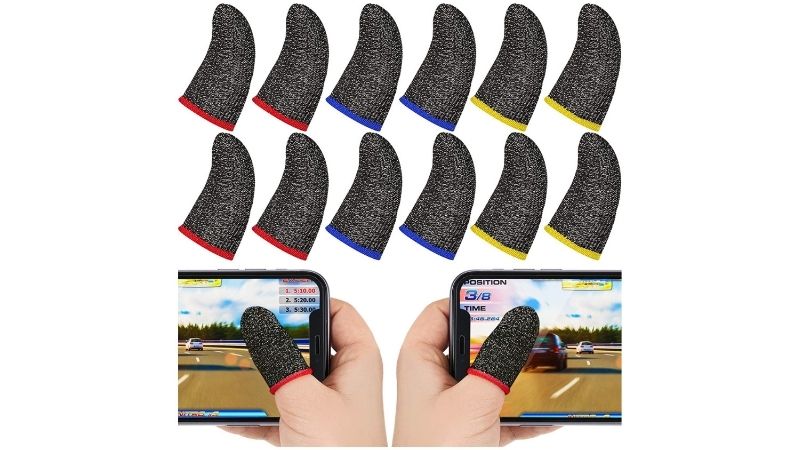
The best handheld gaming finger sleeves are useful when your game actually depends on touchscreen taps and swipes—not when you spend the whole session on analog sticks and shoulder buttons. For buyers in the United States, the PuK Mobile Gaming Thumb Sleeves 10-Pack is the most practical all-around starting point because it offers ten replaceable sleeves, a current Walmart listing, and a clear mobile-touch use case. SXC Aberrant V1 and V2 suit players who care more about choosing a tighter or more relaxed fingertip fit. MGC ClawSocks Blood & Skulls offers a carbon-fiber alternative, while Kitcheniva and Uxcell provide bulk options. Before ordering for a Steam Deck, ROG Ally, or Switch 2, check that your game accepts touch input and that the sleeve responds properly through your screen protector.
Quick verdict: which finger sleeves should you buy?
Best overall for regular touchscreen play: PuK Mobile Gaming Thumb Sleeves (10-Pack). The pack provides enough replacements to rotate when a sleeve gets sweaty or dirty, and Walmart showed a purchase option at the time of our October 28, 2026 check. It is a sensible first purchase if you play touch-heavy games on a phone, tablet, or supported handheld touchscreen. The trade-off is that a ten-pack is unnecessary for someone who only taps a handheld’s on-screen keyboard once in a while.
Best if sleeves slip off your fingers: SXC Aberrant V1. SXC’s August 2026 manufacturer comparison describes V1 as the tighter-fitting version. If regular sleeves roll or creep during rapid swipes, V1 is worth examining—provided its fit is not uncomfortable. Best if a tight sleeve bothers you: SXC Aberrant V2. Its more relaxed finger fit is the relevant distinction, not a claim that the V2 makes a touchscreen faster. The SXC collection displays purchase controls, but individual product availability signals are inconsistent; confirm checkout rather than treating either version as guaranteed in stock.
Best carbon-fiber six-pack: MGC ClawSocks Blood & Skulls. Its maker identifies an 18-needle carbon-fiber knit and six sleeves, making it a recognizable alternative to silver-fiber blends. Best easily recognizable US retailer listing: Kitcheniva Mobile Gaming Finger Sleeves, 5 Pairs. The Best Buy marketplace product page identifies exactly ten sleeves and a $14.99 displayed price. Best large replacement supply: Uxcell Black 40-Pack. The Walmart listing states 40 pieces and dimensions of 50 x 24 mm, but verify fit and seller terms before buying a bulk pack.
The Sarafox V8 with Storage Tin is a tidy travel option for players who lose loose sleeves in a bag. Razer Gaming Finger Sleeve has a particularly well-documented fabric specification but no directly verified US purchase price or available-to-ship status from its official product page during this review. Do not buy it solely because it carries a familiar logo.
None of these picks comes with an independently established reduction in game input latency. Our recommendations come from official specifications, seller listings, manufacturer fit descriptions, and a practical analysis of how touchscreen sleeves are used. Geek Gaming Tricks did not perform hands-on wear, latency, abrasion, or multi-device swipe tests.
Comparison: eight real touchscreen gaming finger sleeves
| Product and best fit | Verified pack / defining feature | Price (seller, checked Oct. 28, 2026) | Stock status (checked Oct. 28, 2026) | Main drawback |
|---|---|---|---|---|
| PuK Mobile Gaming Thumb Sleeves — best overall | 10 sleeves; marketed for mobile touchscreen games; breathable, low-friction fabric | $11.99, Walmart US | In stock signal: Add to cart; ZIP-level checkout not tested | Larger pack than occasional handheld users need |
| SXC Aberrant V1 — snug fit | 1 pair per retail pack; tighter fit; 16-needle construction according to SXC comparison | $3.49, SXC collection listing | Unclear: collection shows Add to cart; related product pages display conflicting sold-out labels | May feel too compressive on larger fingers |
| SXC Aberrant V2 — more relaxed fit | 1 pair per retail pack; 18-needle, higher-carbon direction per SXC | $3.99, SXC collection listing | Unclear: collection has Add to cart; product-page signals conflict | Less secure fit for some narrower fingers |
| MGC ClawSocks Blood & Skulls — carbon-fiber six-pack | Six sleeves; carbon-fiber knit; 18-needle weave; flexible graphics | $12.99, MGC Gaming Store | In stock signal: direct page Add to cart, collection not marked sold out | Carbon-fiber screen feel may not suit users who want an especially slick glide |
| Kitcheniva Mobile Gaming Finger Sleeves — retailer-accessible 5 pairs | 10 sleeves (5 pairs); conductive-fiber, stretch fit marketed for capacitive screens | $14.99, Best Buy marketplace | In stock signal: Add to Cart; shipment depends on ZIP and third-party seller | Material percentages and detailed size chart not published on checked listing |
| Uxcell Black Mobile Gaming Finger Sleeves — bulk supply | 40 sleeves; listed 50 x 24 mm; carbon-fiber construction on Walmart product sheet | $10.49, Walmart marketplace | In stock signal: Add to cart; ZIP-level checkout not tested | Large quantity magnifies a poor fit; no review history on checked listing |
| Sarafox V8 with Storage Tin — travel organization | Two pairs (4 sleeves) and metal storage tin on SXC listing | $8.99, SXC collection listing | Unclear: collection shows Add to cart; exact variant checkout not verified | No independently verified long-term durability data |
| Razer Gaming Finger Sleeve — documented fabric specification | 2 sleeves; 35% silver-fiber fabric, 60% nylon, 5% spandex; about 0.8 mm thick | Price not verified on Razer US official page | Unclear: official specifications accessible but no confirmed US cart/stock | Not an immediate-purchase top pick without a current seller listing |
Price and stock methodology: Each price above is taken from the named seller’s displayed page, not transferred from another merchant or inferred from a discount banner. These are US-dollar page snapshots on October 28, 2026. SXC’s product template and collection cards present inconsistent availability cues, so those models are not counted among the four immediate-buy candidates. Prices can change, and an Add to cart button is not proof of successful payment or shipping to every US ZIP code. For PuK, we use the Walmart US price rather than converting the pound-denominated price shown on the manufacturer’s UK storefront. Razer’s price is deliberately left unverified rather than borrowed from an unrelated or untrusted storefront.
Do handheld consoles benefit from finger sleeves?
It depends much more on control method than on the logo printed on the device. Valve lists a touch-enabled screen on the Steam Deck OLED. ASUS specifies a 10-point multitouch screen on the ROG Ally X. Nintendo lists a capacitive touchscreen for the Switch 2. These official specifications establish the existence of touch inputs; they do not establish that every installed game supports touch-based aiming or that a sleeve will improve it. A finger sleeve is relevant to the touch layer, not the controls on the other side of the device.
A Steam Deck owner might use a sleeve for touchscreen-driven indie games, desktop navigation, a virtual keyboard, a touch-compatible game interface, or a remote-play app where touch overlays are present. A player who uses Steam Input to map everything to the physical controls may get little benefit. On a Windows handheld, the same distinction applies: tapping in a launcher, dragging a desktop window, or interacting with a software keyboard is possible, but most PC games still expect controller, keyboard, or mouse input unless their specific design says otherwise. Do not buy a finger sleeve to solve stick drift, dropped controller inputs, or a badly configured controller layout.
Nintendo Switch 2 adds another twist. Its built-in touchscreen is capacitive, so a conductive sleeve could work for supported handheld touch interactions. But a game played primarily with Joy-Con controls does not become a touch game just because the hardware has a touch panel. Likewise, a sleeve does nothing for an external television in docked mode. Check the software’s actual input options before deciding that this accessory is needed.
Touchscreen play is most clearly aligned with phone and tablet games, especially those with persistent on-screen movement and camera controls. That is why many finger-sleeve brands describe their products using mobile shooter or battle-royale use cases. Handheld-PC buyers should interpret that marketing as evidence of the product’s intended input surface, not an endorsement for every Steam Deck, Ally, or Switch game. A realistic use case beats a vague promise of better accuracy.
Finger sleeves versus thumbstick grips
These categories are easy to confuse. A conductive finger sleeve is a small fabric tube that covers a fingertip and makes contact with glass. A thumbstick grip is usually a cap or other material fitted to an analog joystick. The latter can change the friction and texture of the physical stick, not the touchscreen. Using a fabric sleeve while manipulating an analog stick may even feel less secure if the textile slips against a smooth cap. That is a personal friction issue, not a measured universal defect.
If your complaint is that a cursor or camera moves without your touching a joystick, examine controller calibration and deadzone settings. If your complaint is that sweaty fingers drag on a glass screen during long swipes, a breathable conductive sleeve is a more relevant accessory. Keeping those jobs separate prevents buying the wrong product to address a real frustration.
How we selected these eight picks
Our first requirement was a traceable product identity. We used live product pages from PuK, SXC, MGC, and Razer where available, alongside US retailer listings that name a clear SKU or pack count. We excluded generic marketplace listings whose branding, material, and quantity were too ambiguous to compare responsibly. A catalog entry with impressive performance adjectives but no genuine product identity is not helpful to a reader deciding what to order.
The next filter was a concrete decision advantage. We wanted packs that solve different buying problems: a sensible replacement supply, a tighter fit, a less compressive fit, a carbon-fiber alternative, a recognizable retailer checkout, a large bulk option, and a travel-friendly storage arrangement. Two colorways of the same fabric do not earn separate recommendations merely to fill a list. The Razer entry is included as a clearly documented alternative, but its price and current US availability remain unverified, so it is not presented as an immediate-purchase winner.
Stock status matters as much as material descriptions. We checked seller pages on October 28, 2026 and marked a listing as having an in-stock signal only if it offered an Add to cart action without a clearly contradictory sold-out notice on the reviewed source. SXC’s collections and product-detail templates did not line up consistently, so we mark the affected variants unclear. For third-party Walmart and Best Buy marketplace sellers, the page can be open for purchase while shipping and the seller’s fulfillment behavior still vary by destination. We did not enter a shipping address or place an order.
Finally, we separated manufacturer claims from verifiable facts. A pack count, fiber percentage stated by Razer, and named 16- versus 18-needle SXC constructions are product specifications. A promise of improved aim, faster reactions, or reduced lag is a marketing claim until controlled, independent testing demonstrates a difference under relevant conditions. We found no evidence that justifies giving any product a precise millisecond latency benefit or claiming that our publication performed laboratory measurements.
PuK Mobile Gaming Thumb Sleeves 10-Pack: best overall for touch players
PuK is the most straightforward starting point for readers who actually want to use sleeves regularly. The manufacturer’s product page identifies a ten-sleeve package, says the fabric is designed for reduced friction and sweat management, and explicitly addresses mobile touchscreen gaming. The US Walmart listing displays $11.99 and an Add to cart option. That combination provides an identifiable product, a useful replacement supply, and a currently orderable US seller path without needing to invent a specification or force a currency conversion.
The appeal of ten individual sleeves is practical. A player using two thumbs has five pairs before accounting for replacements, while someone using a thumb and index finger on one hand can rotate clean sleeves when one gets damp. Replacements are not only about holes: some users notice that fabric feels less consistent after repeated wear, oil accumulation, or washing. You can start with a clean pair and put the used pair aside rather than relying on one sleeve indefinitely. That is a plausible convenience benefit, not an independently measured durability claim.
PuK is not uniquely suited to the Steam Deck because of a special device fit. It is a conductive touchscreen accessory marketed primarily for mobile use. What matters on a handheld is whether the particular touchscreen, installed screen protector, and game are receptive to covered-finger gestures. On a Steam Deck OLED or ROG Ally X, test ordinary taps and drag gestures before a full gaming session. If one sleeve intermittently misses inputs through your protector, the fact that the packet contains nine more is not a compatibility solution.
A common purchasing mistake is treating a pack of ten as evidence of better value without considering actual frequency. If you rarely use touch controls, a smaller SXC or Sarafox package could make more sense. PuK’s strongest case is the regular touch player who expects to rotate sleeves or share them with another person, and who wants to purchase through a US-facing listing rather than a page that only shows a foreign-currency price.
Pros: named ten-piece pack; Walmart US purchase signal; manufacturer details the intended touchscreen role; enough spares to test comfort and replace worn pieces. Cons: no published fit chart for every finger; fabric feel is subjective; primarily a mobile-game design, not a fix for handheld controller input. Who should buy it: an active touchscreen player who wants a reasonable supply before investigating premium niche options.
SXC Aberrant V1: best for a snugger finger fit
The reason to consider Aberrant V1 is not a generic claim that it wins games. SXC published an August 31, 2026 comparison of its V1 and V2 designs and explicitly described V1 as the closer-fitting, tighter option. The same explanation identifies V1 as a 16-needle construction and notes its visibly pinker fabric compared with the darker V2. For a sleeve that slides down a narrow thumb or bunches during a rapid drag, changing fit is a meaningful buying variable.
The tighter fit can reduce the distracting need to pull a sleeve back into position, but more compression is not automatically more comfortable. If your fingertips are wide, you dislike pressure near the nail, or you spend hours on touch controls, V1 may be less appealing than V2. A sleeve should stay put without producing tingling, numbness, or marked discomfort. Remove it if those occur and choose a different size or style. Product fabric is an accessory, not medical support.
SXC’s collection showed the V1 retail pair at $3.49 and marked the design restocked, while other linked product pages showed inconsistent sold-out text for some package configurations. This is a real uncertainty. Treat the displayed collection price as a seller-page snapshot and verify the one-pair retail option at checkout; do not assume that the ten-pack variant is available merely because a collection card says Add to cart. The pair format also means a low displayed unit price can be less economical once shipping is included.
V1 has no special electronics, firmware, or per-device configuration to make it work with a Steam Deck or Ally. Its touchscreen compatibility is ultimately something the device and glass coating must confirm in use. For a Switch 2 buyer, start by testing a system touch gesture or a game with documented touch support. For a Steam Deck owner, an on-screen keyboard or simple touchscreen drag is a useful quick check; a game’s joystick camera control is not.
Pros: a clear, manufacturer-described snug-fit purpose; a single-pair trial option listed; distinct construction from V2. Cons: pressure may be excessive for some fingers; seller availability cues conflict; shipping can outweigh a small pair price. Who should buy it: someone who already knows ordinary sleeves are loose and wants to try a closer fit without buying a large pack.
SXC Aberrant V2: best for less finger compression
Aberrant V2 serves the person who wants the opposite of V1’s defining feature. SXC’s own V1-versus-V2 guide describes the V2 as more relaxed around the finger, with an 18-needle knit and a higher-carbon direction intended to create a more planted screen-contact feel. Notice that finger tightness and touchscreen glide are independent variables: a sleeve can be relaxed on your thumb while still exhibiting some drag on glass. The manufacturer’s description does not establish a universally superior touch response or longer lifespan.
That distinction matters in long sessions. A tight sleeve may stay in place but leave an uncomfortable pressure line; a relaxed sleeve can feel easier to wear yet shift more on a narrow finger. V2 is a reasonable trial when your main complaint is compression rather than slipping. It is not a safe assumption that everyone will prefer its feel on anti-glare film, tempered glass, or an untreated glossy screen. Those surfaces vary in coating, cleanliness, texture, and friction.
SXC’s collection displayed $3.99 for the V2 pair and an Add to cart control. Its associated product pages contained conflicting availability language, so we mark stock status unclear rather than claiming an unambiguous in-stock SKU. If you encounter both a one-pair item and a ten-pack set, compare the exact pack quantity and final shipping cost. Do not confuse SXC’s $19.99 multi-pack information with the $3.99 single-pair collection offer.
The V2 is especially useful as a fit alternative within one brand because SXC has explained the difference directly. Compare a pair against V1 only if you are seriously trying to solve a fit problem; buying both without knowing whether your game uses touchscreen controls is unlikely to be good value. A clean bare fingertip is a valid baseline, and either sleeve should justify itself by making your gestures feel more consistent without losing taps.
Pros: documented relaxed fit versus V1; disclosed 18-needle design; low listed pair price. Cons: unverified real-world lifetime advantage; purchase status needs direct confirmation; not automatically faster or more accurate. Who should buy it: a touchscreen user whose main issue with fabric sleeves is tightness rather than lack of grip.
MGC ClawSocks Blood & Skulls: best carbon-fiber six-pack
MGC ClawSocks Blood & Skulls is a more distinct choice than a generic six-pack because its manufacturer publishes a named carbon-fiber construction, 18-needle weave, seamless finish, and six-sleeve pack count. The direct MGC page showed $12.99 with Add to cart, and the current collection did not mark this named edition sold out. The styling is deliberately conspicuous, but the practical reason to buy it is the carbon-fiber fabric and a middling replacement quantity rather than the graphics.
Carbon-fiber touchscreen sleeves are sometimes marketed as providing a different balance of drag and control from silver-fiber blends. That is a reasonable product-category distinction to investigate, but not a guarantee that carbon fiber is smoother on every surface or that it improves aim. MGC describes its carbon approach as having a more controlled amount of touch resistance. For a player who finds very slick sleeves hard to stop accurately, a fabric that feels a little more planted could be preferable. For someone who values the lightest possible glide, that same characteristic may be unwelcome.
The published 18-needle weave is evidence of how the maker identifies the material construction, not an independent precision score. Higher numbers do not translate directly into lower latency or higher frame rates. More relevant questions are how the fabric behaves after 20 minutes of sweaty play, whether it bunches near the nail, and whether the screen still registers small taps. We have not measured those outcomes on a Steam Deck, Ally, Switch 2, or phone and will not disguise maker claims as field testing.
Six sleeves provide three pairs if worn two at a time. That is enough to keep backups in a case, but less generous than PuK’s ten pieces or Uxcell’s forty. The very specific design is also a matter of taste. If you prefer subtle accessories, an alternative colorway may exist, but its exact stock needs a fresh check rather than assuming all ClawSocks are equally available. On the day of research, several other MGC designs were explicitly marked sold out in the collection.
Pros: traceable official six-pack; carbon-fiber option; named weave and seller price; Add to cart signal on the maker’s page. Cons: tactile claims are not independently researched; bold pattern; only one published general fit rather than a device-specific guarantee. Who should buy it: a frequent touch player who wants to compare carbon-fiber feel with a silver-fiber blend and prefers a smaller replacement pack.
Kitcheniva five-pair sleeves: best for buying through Best Buy
Kitcheniva’s listing is easy to understand: Best Buy identifies it as Mobile Gaming Finger Sleeves, 5 Pairs, Black, with SKU 10143145. The product description states ten sleeves made from touch-responsive, breathable, stretchable material for capacitive screens. Best Buy displayed $14.99, an Add to Cart control, and shipping through a marketplace seller. This is a purchase path familiar to US shoppers, although it is a third-party listing and should not be confused with a product manufactured by Best Buy.
The advantage here is neither exotic material nor a claimed esports pedigree. It is a plain, identifiable option for someone who does not want to navigate specialist accessory sites. Ten pieces are convenient when multiple people in a household share them or when you want a fresh pair in a handheld carrying case and another at home. Because the retailer’s page does not provide a rigorous finger-size chart or precise fiber percentages, it would be misleading to claim a more breathable or more conductive composition than a named competitor.
Before ordering, look at the offer details rather than just the familiar retailer logo. The page lists Kitcheniva LLC as the seller, with shipping availability dependent on destination. Marketplace return conditions and delivery timelines can differ from items sold and fulfilled directly by the retailer. This matters more on a relatively low-cost item because shipping fees, returns, or replacement effort can quickly outweigh a small price difference. The $14.99 snapshot does not guarantee the same price after a change of seller or ZIP code.
For a Steam Deck or ROG handheld owner, one basic test matters far more than the phrase “universal compatibility.” Put the sleeve on, open a touchscreen interaction, and confirm a short tap, a slow drag, and a quick repeated swipe. If all three work, you have established basic functionality in your own environment. If the device misses input through a particular textured protector, the retailer’s universal label is not sufficient evidence that the combination must work.
Pros: ten-piece package; identifiable Best Buy SKU; direct dollar price and purchase signal; accessible US retail ecosystem. Cons: marketplace seller; no detailed material-composition breakdown; no published controlled comparisons. Who should buy it: a buyer who values a straightforward retail listing and a small replacement supply over niche construction details.
Uxcell black 40-pack: best for bulk replacements
Uxcell’s Walmart product page lists a black forty-piece package with dimensions of 50 x 24 mm and carbon-fiber material. At the October 28, 2026 check, the page displayed $10.49 and an Add to cart option. This is the strongest simple quantity proposition among the eight picks, but it is also a useful illustration of why buying by unit count alone can backfire. If the width, fabric, or seam feels wrong, forty identically uncomfortable sleeves are not better than two that fit.
The listed 50 x 24 mm dimensions give buyers at least a starting point for comparison, although Walmart’s text is seller-supplied and does not provide a measured stretched range around different thumb circumferences. A fingertip sleeve is elastic, and flat width is not the same as comfortably wearable diameter. If you have very narrow or broad fingers, an inexpensive pair from a more clearly differentiated fit line may be a wiser first trial than a bulk purchase.
Forty pieces can be practical for a school club, a shared device station, a household with several touchscreen gamers, or a player who likes leaving spare sleeves in several bags. It is less compelling for an individual who plays with physical gamepad controls every evening. The listing includes seller-supplied statements about sensitivity and sweat resistance, but they are not supported by independent testing on the retailer page. The product also had no meaningful verified review history in the checked listing, which increases uncertainty about batch-to-batch consistency.
Walmart’s marketplace conditions deserve attention. The seller is not necessarily Walmart itself, and the exact delivery promise depends on location. If a specific set is time-sensitive, check who ships it, whether the item can actually be delivered to your ZIP code, and what returns will cost. Keep the packaging until you have tried a pair with the touchscreen and screen protector you use most. Do not open or wash all forty pieces before checking the return terms.
Pros: named 40-piece count; published flat dimensions; modest displayed US price; page offered purchase. Cons: bulk amplifies fit risk; limited review evidence; third-party seller terms; no measured device-specific responsiveness. Who should buy it: someone who already knows they like this sleeve style or who needs spares for multiple regular touchscreen users.
Sarafox V8 with storage tin: best for travel organization
Sarafox V8 is included because it solves a small but familiar travel problem: a loose finger sleeve can disappear into the lining of a backpack or get crushed under cables and charging gear. SXC’s collection identifies the Sarafox V8 bundle as two pairs with a storage tin and displays a $8.99 US-dollar price. That makes it an interesting compact kit for a player who actually uses touch controls while commuting or traveling. The tin is the distinguishing feature, not an unverified performance advantage over other conductive fabrics.
Four sleeves are a more restrained supply than the ten-piece and forty-piece packs. That suits the person who wants one active pair and one backup pair in the same place. If you already carry a Steam Deck or Ally inside a sling or dedicated case, a small metal container helps keep accessories separated from lint, keys, and spare cables. Avoid letting the tin slide against an unprotected handheld screen; it belongs in a secondary pocket or organizer, not loose against the display.
The SXC collection showed an Add to cart action for the V8, but we did not establish a successful exact-variant checkout, so the stock row remains unclear. We also did not find sufficiently detailed independent information about the V8’s long-term wear rate, screen friction, or how its fit compares quantitatively with the SXC Aberrant family. It would be inappropriate to claim that the V8 is thicker, more conductive, or better for a specific handheld without a published source or an actual controlled test.
Consider this bundle only if the storage arrangement solves an actual problem for you. If you sit at a desk and always leave your accessories in one drawer, the metal tin contributes little. If you take short breaks to play a touch-based game on a portable screen, the convenience is more credible. Remember that the relevant question is still whether the fabric registers gestures on your exact screen protector.
Pros: two-pair quantity; included storage tin; recognizable seller listing and displayed price. Cons: current purchase status not fully confirmed; insufficient published detail to rank touch performance; storage case does not protect a handheld itself. Who should buy it: a mobile touchscreen player who values simple, organized spares over maximizing piece count.
Razer Gaming Finger Sleeve: best documented fabric, not a confirmed buy
Razer provides unusually specific published material details for a finger sleeve: 35% silver-fiber fabric, 60% nylon, and 5% spandex, with a listed flat size of 2.1 x 4.5 cm plus or minus 1 cm and an approximate 0.8 mm thickness. Razer describes the sleeves as lightweight, breathable, and washable. The two-piece quantity is also corroborated by a US retailer listing, although that retailer marked the product no longer carried. These facts make the product straightforward to describe without inventing dimensions or performance measurements.
The caveat is purchasing. The official Razer US specifications page we reviewed did not expose a verified US-dollar price and reliable add-to-cart availability for this exact product in the captured page content. A separate Micro Center listing identified the SKU but said it was no longer carried. We therefore list the price as not verified and stock as unclear. That is not a statement that the product has been discontinued everywhere, only that the evidence available here is insufficient to recommend it as an immediately orderable purchase.
The silver-fiber specification can still be useful for readers trying to understand fabric categories. It tells you what Razer says its product is made from, not that it will outperform all carbon-fiber competitors. Likewise, 0.8 mm describes the published sleeve thickness, not a known touch-delay figure. Neither measurement by itself predicts how the sleeve will behave with an anti-glare film, a cracked protector, a damp finger, or a specific game engine’s touch handling. Treat it as a clearly documented reference model rather than a default winner.
If you find a US seller carrying the exact RC81-03970100-R3M1 model, verify its current price, number of sleeves, return policy, and seller identity. Do not confuse an unrelated website that resembles Razer’s branding with Razer’s real official store. When the intended input is a physical handheld controller, buying this branded finger sleeve will not replace a more appropriate thumbstick grip or calibration fix.
Pros: official material percentages; published dimensions and thickness; recognizable hardware brand. Cons: current US price and stock unverified; only two sleeves; no independent evidence of a gaming-performance improvement. Who should buy it: a user who specifically wants a documented silver-fiber blend and can independently confirm a legitimate seller and current availability.
Buying guide: how to choose finger sleeves for your handheld
Choose the control surface before choosing the sleeve
Start by naming the game and the exact action you want to improve. Are you dragging an on-screen camera, selecting items on a touch-driven board, playing a rhythm game, typing on a virtual keyboard, or trying to grip an analog stick? Only the first four put a sleeve’s conductive touchscreen behavior to work. If you mainly hold the hardware by its molded grips and press gamepad buttons, spending money on finger sleeves may not change your gaming experience at all.
A practical test costs nothing: start the game you actually play and deliberately try the same action with an uncovered fingertip. If the game ignores touches, a conductive sleeve cannot add touch controls where the software does not support them. If a bare finger works but sticks or drags unpredictably when your skin becomes damp, the sleeve has a clearer purpose. This step is particularly important for Steam Deck and Windows handhelds, where touch-enabled hardware and controller-first software commonly coexist.
Consider the screen protector, not just the device model
A sleeve works through a capacitive touch surface. A clean, intact glossy protector may feel different from a matte or textured protector. Some users choose matte film for glare reduction but then notice different swipe friction. A thicker glass protector, residue on the surface, or a badly installed protector can also complicate touch registration. That does not mean any named sleeve is incompatible with the whole console family; it means the complete contact path needs testing in your own configuration.
Before buying a replacement set, clean your screen according to its manufacturer’s instructions, and check that ordinary finger taps work at all corners. If bare-finger taps already miss, do not assume a fabric sleeve is a remedy. If only a sleeve causes missed touches, remove it and verify the same action again. The comparison should involve identical software screens and gestures, not two different games with unrelated input schemes.
Choose fit and fabric for comfort, not marketing claims
The meaningful fit trade-off in this list is SXC Aberrant V1 versus V2. Its maker explicitly calls V1 tighter and V2 less compressive. Beyond those descriptions, broad one-size-fits-most claims are only a starting point. You should be able to move your thumb through its usual range without the sleeve falling off or concentrating uncomfortable pressure at the nail edge. A small gap in the knitted fabric or bunching at the tip can change contact feel more than a brand name can.
Silver-fiber and carbon-fiber are material descriptions, not simple rankings. Each construction combines fiber composition, knit density, elasticity, and finish. Even two products that both say carbon fiber can feel different. Treat phrases such as ultra-responsive and esports precision as maker marketing unless the seller publishes a credible controlled method. A product can feel smoother to a particular player without reducing actual electronic touch latency.
Compare the total order, not only the displayed pack price
Pack quantities vary sharply: Razer provides two sleeves, SXC’s standard single retail packs supply one pair, Sarafox V8 provides two pairs, MGC provides six pieces, PuK and Kitcheniva provide ten, and Uxcell provides forty. The correct comparison is how many sleeves you expect to use and replace, together with checkout shipping and return terms. A $3.49 pair with shipping could cost more delivered than a $11.99 ten-pack. We cannot make an exact savings claim without verified same-day checkout totals from both sellers.
If you have never worn this kind of accessory, begin with a smaller pack unless the larger one is clearly inexpensive enough to justify possible waste. If you already know the fabric and fit you prefer, a bulk package may reduce the number of reorders. If you travel, a small storage tin could be worth more to you than extra duplicates. There is no universal best unit price because replacement cadence and use cases differ.
Check stock, seller identity, and return conditions
For this roundup, the strongest live purchase signals were from Walmart’s PuK and Uxcell listings, Best Buy’s Kitcheniva listing, and MGC’s direct ClawSocks listing. These form at least four distinct orderable options, but each still requires a buyer-specific checkout review. Seller data may change within hours. SXC’s collection and individual pages showed conflicting signals, while Razer’s official page did not establish an available US listing in the captured content; those limitations are part of the recommendation, not footnotes to ignore.
When buying from a marketplace, check whether the item is sold by the platform or a third party, whether the selected quantity actually matches the title, and whether returns are accepted after opening the package. For low-cost fabric accessories, paying return postage can be disproportionate to the price. If a product page changes its pack contents or seller, redo the comparison instead of assuming this snapshot remains true.
How to test a new finger sleeve in five minutes
- Verify the bare-finger baseline. Open a known touchscreen interaction on your actual handheld, such as its on-screen keyboard, system interface, or a game with documented touch controls. Make five slow taps and several continuous swipes. If the device fails even without a sleeve, address the touchscreen or protector first.
- Check the fit before playing. Put one sleeve on a clean, dry fingertip and make a normal range-of-motion movement. It should stay in position without numbness, obvious bunching, or a seam pressing against the nail edge. A poor fit is a valid reason to stop using it.
- Repeat the same gestures. Use the same app screen and perform the same taps, short drags, long swipes, and repeated touches. Watch for missed presses, accidental double touches, or a sleeve that slips during a direction change. This is a personal usability check, not a latency benchmark.
- Test through your real protector. If you normally use anti-glare film or tempered glass, keep it installed. Comparing a bare display with a protected display would mix up two variables. You want to know whether the sleeve works on the setup you will actually use.
- Check comfort after a normal session. Notice heat, moisture, fabric movement, and fingertip pressure. Replace or wash the sleeve using the manufacturer’s guidance when it gets dirty. Remove it if it causes irritation. If you cannot perceive a repeatable benefit, your bare fingertip may already be the better option.
This process provides a useful purchasing decision without implying that five minutes of casual play measures input lag in milliseconds. If you need a reliable performance measurement, a specialized test setup and repeatable methodology would be required; those data are not supplied by the marketing descriptions in this roundup.
Care, hygiene, and common mistakes
Finger sleeves contact skin, sweat, and screen coatings. Keep them clean, and follow the product maker’s washing instructions when provided. Razer states its sleeves can be hand-washed; do not assume that an identical cleaning method or temperature applies to every carbon-fiber graphic sleeve. Let washed fabric dry fully before returning it to a closed travel case. A damp sleeve stored in a sealed tin can develop odor or discomfort over time, regardless of what the package says about moisture management.
Avoid using a sleeve to scrape grit across a screen. If you notice sand, dust, or particles caught in the fabric, remove and clean the sleeve first. Fabric can be soft while trapped abrasive debris remains a problem. Do not treat a gaming sleeve as a screen protector, a waterproof accessory, or a medical compression aid. It serves a narrow interaction purpose and should not be trusted to protect fingers against cuts or extreme heat.
A second common mistake is changing several things at once. A player may install a matte protector, increase touch sensitivity in software, start using a new sleeve, and switch games, then conclude that the new sleeve alone improved control. That is not a reliable comparison. Make one change, repeat the same action, and note the result. If inputs become less reliable, restore the previous setup and retest. Your goal is consistent, comfortable use, not finding a reason to justify a recent purchase.
Frequently asked questions
Do gaming finger sleeves work on Steam Deck OLED?
The Steam Deck OLED has a touch-enabled display according to Valve. A conductive gaming sleeve is intended to interact with touchscreens, but actual response can vary by fabric, fingertip fit, screen cleanliness, installed protector, and software. The most relevant test is the exact touch-driven app or game you use. If you primarily play with the Deck’s sticks, trackpads, and physical buttons, a sleeve is unlikely to provide a meaningful advantage for those controls.
Are finger sleeves useful for ROG Ally or Ally X?
The ROG Ally X’s official specifications include a 10-point multitouch screen, so touch interaction is an available hardware function. A sleeve can be worth trying for the touchscreen parts of Windows navigation or a touch-compatible game, especially if moisture makes long swipes inconsistent. It will not improve the Ally’s physical joystick accuracy, repair drift, or increase frame rate. Check compatibility with your screen protector and the specific application.
Can I use these on Nintendo Switch 2?
Nintendo confirms the Switch 2 has a capacitive touchscreen. A compatible conductive sleeve may register ordinary touch input in supported handheld interactions, but not every Switch 2 game uses touch as a control scheme. Verify the game’s touch functionality first. The sleeve has no special role for Joy-Con buttons or when the console is used with a TV.
Do silver-fiber sleeves reduce input latency compared with carbon-fiber sleeves?
The available manufacturer and retailer pages do not establish an independent, controlled latency comparison between those material categories. Both types are marketed for conductive touchscreen use, and feel can differ with the knit and surface. Do not interpret a published fiber percentage, weave count, or thickness as proof of a measurable millisecond advantage. Choose primarily by consistent registration, comfort, and the degree of drag you prefer.
Is it better to buy two sleeves or a large pack?
Buy a small set first if you are uncertain about fit or whether your game needs touch controls. Consider PuK’s ten-pack or Kitcheniva’s five pairs if you know you will use replacements regularly; the Uxcell 40-pack makes more sense for repeat use across several people or devices. A large pack is not automatically better when you have not tried that exact fabric and fit.
Can finger sleeves prevent sweaty fingerprints and smudges?
They can reduce direct skin contact with glass while in use, and many sellers describe them as helping manage moisture and oils. That does not mean they make a screen permanently fingerprint-free, clean themselves, or guarantee better performance. Keep both sleeve and screen clean, and replace heavily worn or dirty fabric when necessary.
Are gaming finger sleeves the same as medical finger supports?
No. The products reviewed here are lightweight conductive fabric accessories for touchscreen contact, not braces, splints, compression devices, or treatments for pain. If gaming causes persistent numbness, pain, or weakness, stop and address the ergonomic or health concern rather than treating a finger sleeve as a remedy.
Final thoughts
For people who actually play touchscreen-heavy games, the PuK 10-Pack is the clearest first stop among the currently orderable choices: it has a named ten-sleeve package, a US Walmart listing, and a relevant use case. Choose MGC ClawSocks if you specifically want to explore a named carbon-fiber construction; Kitcheniva if you prefer a Best Buy marketplace listing; and Uxcell only if bulk supply genuinely matters. SXC V1 and V2 offer useful fit distinctions but need checkout verification, while Razer is a documented material reference rather than a confirmed immediate purchase.
The next decision is simple: open the game you play most, confirm that the action you want to improve truly responds to touch, and try it with a bare fingertip. If inconsistent glass friction is the problem, choose a small or manageable pack whose fit and US checkout terms you can verify. If the game relies on physical sticks and buttons, keep your money for an accessory that addresses those controls instead.
