
Key takeaways
- Pros: convincing integrated protection, textured handles, removable Joy-Con 2 grip pieces, dock adapter in the base configuration, optional hard travel cover and cartridge storage.
- Cons: materially more expensive than most alternatives, larger than the bare console, adapter alignment requires care, and older grips may need replacement.
The best Switch 2 grip cases solve a specific problem: Nintendo’s slim handheld is portable, but its nearly flat Joy-Con 2 edges do not offer the deep palm support of a dedicated controller. For most owners who want substantial protection and easy transitions to TV mode, the updated dbrand Killswitch 2 is our premium pick. Genki Attack Vector is the strongest choice for trying different handle shapes, while Skull & Co. NeoGrip balances customizable ergonomics with a lower manufacturer-listed price. If you dock frequently, pay particular attention to the difference between a case that fits Nintendo’s dock directly and one that works only with a separate adapter.
Quick verdict: Which Switch 2 grip case should you buy?
Best premium protection: dbrand Killswitch 2, provided you receive the revised Joy-Lock grips and use the supplied dock adapter. Best adjustable feel: Genki Attack Vector, with three interchangeable grip styles. Best customizable budget option: Skull & Co. NeoGrip, with three slide-on handle styles and direct-dock claims. Best for an asymmetrical controller-like hold: Satisfye ZenGrip 2. Best simple dock-friendly case: Spigen Dual Grip. These labels reflect verified design, features, and independently reported experience, not unperformed lab or long-term testing by Geek Gaming Tricks.
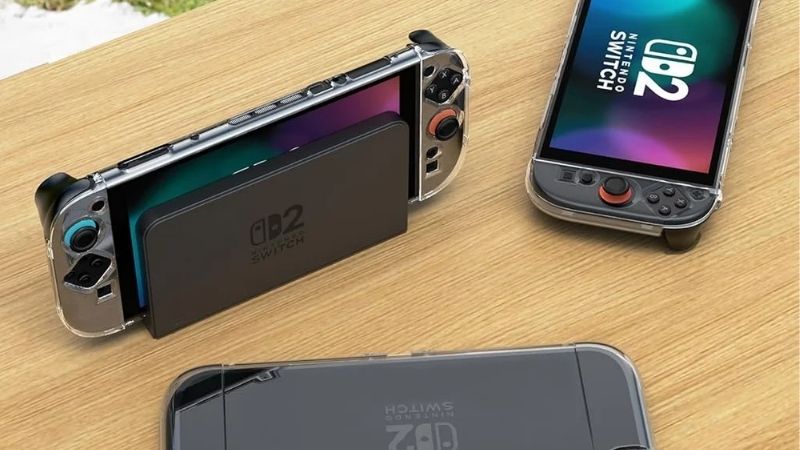
Some options emphasize comfortable handles rather than comprehensive impact protection. Others protect the rear housing and Joy-Con 2 controllers yet become bulky in a slim travel pouch. There is no universally correct grip size: larger hands, small hands, thumb reach, button access, and the frequency with which you remove Joy-Con 2 all change the answer.
Best Switch 2 grip cases compared
| Grip case | Standout feature | Dock and Joy-Con 2 notes | Manufacturer price reference | Important drawback |
|---|---|---|---|---|
| dbrand Killswitch 2 | Protective multi-piece shell and textured ergonomic Joy-Lock handles | Uses included adapter for the official dock; Joy-Con covers detach with controllers | From $59.95 | High cost and a dock adapter to align |
| Genki Attack Vector | Feather, Balance, and Anchor grip sets | Manufacturer says shell fits official dock; controllers stay individually covered | $29.99 standalone | Multiple loose grip pieces to manage |
| Skull & Co. NeoGrip | Three interchangeable ergonomic handle profiles | Manufacturer describes direct docking and kickstand access | $29.99 listed sale; varies by bundle | Hard-shell fit and hand feel need personal checking |
| Satisfye ZenGrip 2 | Asymmetrical rubberized hand positioning and two card slots | Manufacturer says dockable; grip is primarily a handheld frame | $49.99 standalone | Less wraparound protection than a segmented shell |
| JSAUX Split Protective Case PC0114 | Detachable Joy-Con covers and thickened handles | Manufacturer describes docking with precise installation and vertical alignment | $29.99 listed; availability to verify | Careful installation and fit verification essential |
| Spigen Dual Grip ACS09310 | Simple protective case with integrated handles | Manufacturer claims dock and original kickstand access | $39.99 | Fixed grip geometry cannot be tuned |
| JSAUX ModCase PC0121 | Modular kickstand, strap, cover, and accessory ecosystem | Basic Kit does not work with official dock; adapter kit required | $23.99 Basic; $31.99 dock kit; $44.99 Ultimate | Bulk and extra adapter complexity |
| Belkin Gaming Grip ENA021 | Non-powered ergonomic grip with flexible use modes | Manufacturer confirms dock, kickstand, and controller removal | US price not verified | Not a battery grip; less armor-like coverage |
Prices are displayed manufacturer-page references checked for this guide on October 22, 2026, not guarantees of stock, taxes, shipping, discounts, or completed U.S. checkout prices. Accessories and bundles can significantly change the final cost.
Our recommended grip cases for Nintendo Switch 2
dbrand Killswitch 2: Best premium grip-and-protection system
The Killswitch 2 makes sense for a Switch 2 owner who wants the console to stay protected while being used, not merely when stored. Its system includes a central protective case, separate textured Joy-Con 2 grip shells, a cosmetic skin, and a USB-C dock adapter. That last component matters: the protected console cannot be treated like a naked Switch 2 when using Nintendo’s dock. The adapter extends the connection so the thicker assembly can be used for TV mode without taking the shell off.
The defining ergonomic advantage is in the sculpted, grippy surface around the controllers. Those shapes provide a fuller hold than the console’s flat edges. WIRED and The Verge have independently described the Killswitch as a particularly effective grip, while TechRadar’s September 2026 review praised its protective construction and everyday comfort. Those observations are those publications’ experiences, not claims that our site tested the case.
Critical revision check: the original 2025 Joy-Con grip design had a detachment issue under certain handling conditions. dbrand redesigned the attachment into Joy-Lock, states that units purchased after August 2025 use the updated design, and offers eligible earlier buyers free replacements. Do not dismiss this as purely cosmetic. Check your installed grip version and use the manufacturer’s replacement process if applicable.
- Pros: convincing integrated protection, textured handles, removable Joy-Con 2 grip pieces, dock adapter in the base configuration, optional hard travel cover and cartridge storage.
- Cons: materially more expensive than most alternatives, larger than the bare console, adapter alignment requires care, and older grips may need replacement.
Who should buy it: frequent handheld players who also dock and prefer one protective system. Who should skip it: anyone wanting the thinnest possible case or an inexpensive grip with no special docking hardware. The manufacturer’s $59.95 starting point covers a base configuration, not the fully upgraded bundle.
Genki Attack Vector: Best grip case for adjustable hand sizes
Genki’s Attack Vector takes a different route. Instead of assuming one handle shape fits everyone, its three-piece case ships with three styles of interchangeable grips: Feather for a slimmer hold, Balance for rounded everyday ergonomics, and Anchor for a more substantial controller-like feel. The manufacturer explicitly lists the console shell, separate controller shells, and all three grip sets in the standalone package.
This gives the Attack Vector a meaningful advantage for households with different hand sizes or for players who cannot tell from photographs whether they need a compact or deep grip. It also means experimentation is possible without buying an entirely new case. Genki says the console shell slides into the dock, the Joy-Con 2 side covers remain on the detached controllers, and the Switch 2 kickstand remains usable. A magnetic mounting ring supports optional Genki accessories, but an energy pack is not included with the grip case.
That flexibility comes with a trade-off. The extra handle pieces must be stored somewhere and swapped when your preferred setup changes. A claimed dockable fit is not a reason to force the console into an unusually tight dock, especially if you also use aftermarket skins, screen protectors, or a third-party dock shell. Confirm natural alignment and stop if insertion requires force.
- Pros: three distinct grip shapes, modular shell, detachable Joy-Con 2 covers, manufacturer-stated dock and kickstand access, affordable standalone reference price.
- Cons: more separate components, accessory ecosystem can increase total cost, and handle preference remains subjective.
Best fit: players sharing one system, gamers unsure about palm depth, or buyers who want adjustment before committing to a fixed grip shape. Genki lists the standalone Attack Vector at $29.99.
Skull & Co. NeoGrip: Best affordable interchangeable grip
Skull & Co.’s NeoGrip is a particularly practical middle ground: a hard polycarbonate grip frame for Switch 2 with three interchangeable handle designs. The grips slide into the frame, allowing a player to choose a flatter or fuller profile depending on palm size and thumb reach. The company advertises access to the original kickstand, buttons, vents, and game-card slot and states that the frame is dock-friendly.
The biggest purchase reason is not simply that it has three sets of grips. It is that you can alter the contact points between your palms and the console without relying on an entire second case. A compact handle can make short sessions and packing easier, while a deeper shape can better support an extended handheld session. Independent reporting from Nintendo Everything has also described NeoGrip’s dock-friendly design, though comfort conclusions depend on the reviewer and should not be considered a fit guarantee.
NeoGrip is closer to a rigid ergonomic frame than a completely sealed bumper system. It may reduce contact damage on covered surfaces, but it does not make the display or exposed corners immune to impacts. Watch the selected variant: the manufacturer’s current page includes different colors and bundles with a Maxcarry Case. Choose the NeoGrip itself if you already own a carrying solution; the carrying bundle belongs to a different purchase question.
- Pros: interchangeable handle sizes, usable kickstand, straightforward sliding grip changes, manufacturer-claimed direct docking.
- Cons: rigid frame provides limited cushioning compared with thicker TPU designs; travel-case fit varies by selected handle size; variant and bundle pricing differ.
Best fit: a cost-conscious owner who prioritizes handheld comfort and wants an alternative to one-size-fits-all handles. The manufacturer’s observed sale listing was $29.99, but stock and actual variant selection need checking at checkout.
Satisfye ZenGrip 2: Best for asymmetrical thumb reach
Not everyone wants a case with separate Joy-Con shells. Satisfye’s ZenGrip 2 is best understood as a full-width ergonomic support frame, with shaped and textured handles that change how the hands sit relative to Nintendo’s controls. Its deliberately asymmetrical geometry compensates for the lower location of the right analog stick. That is a concrete design difference from products whose left and right handles mirror each other.
The company lists a weight of 5.9 ounces (167 grams), two onboard game-card slots, an upright stand function with charging clearance, airflow channels, and its Free Float contact system designed to cradle the console. Its product page says the frame can be docked without removal. These are published specifications and design claims; they do not establish measured improvements in wrist comfort, cooling, or scratch prevention for every owner.
Buyers should distinguish the standalone ZenGrip 2, which the manufacturer lists at $49.99, from the $69.99 standard bundle that adds a separate carrying solution. A supportive grip frame does not itself replace a complete hard travel case or protect the front display while packed next to keys and chargers. This design is best when handheld ergonomics take precedence over all-around armor.
- Pros: asymmetrical ergonomics, textured contact surfaces, integrated cartridge storage, manufacturer-stated docking support, upright standing feature.
- Cons: sizeable frame added to console, fixed grip shape, less all-around coverage than protective Joy-Con shells, compatible travel solution may cost more.
Best fit: handheld-first gamers who find the low right thumbstick uncomfortable and prefer a controller-like hand position. If both users have very different hand sizes, consider Genki or NeoGrip instead of assuming Satisfye’s fixed geometry will suit both.
JSAUX Split Protective Case PC0114: Best detachable split-shell value
The JSAUX PC0114 pairs a hard-and-soft protective construction with separate Joy-Con 2 covers and thicker contoured grips. Its body combines polycarbonate and flexible cushioning materials, while an optional front cover in the listed full-set package shields the display during storage and incorporates ten game-card slots. Unlike a simple protective shell, the grips are intentionally sculpted for handheld use.
The split construction lets owners detach controllers without first removing the whole case. JSAUX also leaves a U-shaped opening for the Switch 2’s built-in kickstand. These are useful conveniences if you routinely switch between handheld and tabletop sessions with two controllers. The manufacturer describes the case as dock-friendly with specific installation and alignment instructions; that should not be read as a promise of a loose, friction-free dock fit under every combination of accessories.
Installation deserves more attention than with a one-piece grip. JSAUX instructs owners to follow its video guide, fit the middle frame fully, and insert the device vertically into the dock. Our recommendation is to stop and reassess if the case pinches the controllers, covers a vent, or makes docking feel unsafe. Its listing has also displayed a ‘Coming Soon’ banner despite showing a price, so availability should be checked rather than assumed.
- Pros: split detachable grip pieces, physical protection, built-in kickstand access, optional front cover with ten cartridge slots, $29.99 listed full-set reference.
- Cons: more detailed installation, tight-fit and alignment considerations, stated availability may not correspond to immediate stock.
Best fit: gamers who want some of the modular protection associated with premium systems without the premium price. For minimal bulk or a completely straightforward dock routine, the Spigen or Belkin design may be easier to live with.
Spigen Dual Grip ACS09310: Best simple case for everyday docking
Spigen’s Dual Grip is the uncomplicated alternative in this roundup. It combines a protective case with two fixed ergonomic handle areas, rather than offering swappable profiles or a collection of accessory mounts. The manufacturer lists Switch 2-specific SKU ACS09310, a product weight of 3.1 ounces, and polycarbonate/TPU construction. It also explicitly states that the Nintendo kickstand and docking station remain accessible while the case is installed.
Because the handles are integrated, there are fewer pieces to misplace. This makes sense for a console regularly carried between a desk and a sofa, where the user wants to keep a case installed without building an accessory system around it. At the manufacturer’s listed $39.99, it costs more than several modular value models but less than a base Killswitch.
The compromise is control over handle geometry. If the fixed rounded areas are too small for your palms or place your thumbs at an awkward angle, there is no second grip set to try. Likewise, manufacturer-described compatibility with the official dock does not automatically establish compatibility with every third-party dock sleeve or tight-fitting travel bag. Check opening clearance, especially if using an additional front protector.
- Pros: tidy integrated design, known SKU and listed weight, intended direct docking, access to original kickstand, no extra parts required.
- Cons: nonadjustable handle contours, fewer modular features, case compatibility with travel bags must be checked.
Best fit: buyers who switch from handheld play to TV mode several times per week and value simplicity more than interchangeable grips, cartridge storage, or accessory expansion.
JSAUX ModCase PC0121: Best for power-bank and kickstand customization
The ModCase PC0121 prioritizes accessories and configurable protection rather than the most natural grip shape. Its hybrid PC and TPU body adds textured side areas, a protective front cover, a removable metal kickstand module, and a strap system that can hold external equipment such as a compatible power bank. The front cover provides space for eight game cartridges. A larger bundle adds further mounting accessories, which explains the difference between its inexpensive starting price and costlier configurations.
The key compatibility warning is straightforward: the $23.99 Basic Kit is not compatible with inserting the cased Switch 2 directly into Nintendo’s official dock. JSAUX says the Dock Adapter Stand Kit ($31.99 listed) or Ultimate Kit ($44.99 listed) adds the adapter stand needed for docking. It is easy to miss this distinction when comparing headlines or assuming all JSAUX Switch 2 cases behave the same way.
Choose the ModCase if you actually intend to use its external strap or the removable stand. A player who simply wants better hand comfort may resent the added material, front cover, and accessories. The manufacturer’s reported kit weight is also not identical to the weight you hold during play; check the individual parts before making comparisons with a lightweight grip frame.
- Pros: configurable stand and strap, protective travel cover, eight card slots, multiple clearly defined bundles, optional dock adapter stand.
- Cons: Basic Kit lacks official-dock compatibility, extra hardware and bulk, potential complexity when moving between tabletop and TV modes.
Best fit: buyers who need a configurable accessory platform. The $23.99 starting number should never be presented as the full price of a dock-compatible ModCase setup.
Belkin Gaming Grip ENA021: Best non-powered everyday grip
Belkin’s ENA021 is an ergonomic, battery-free grip specifically designed for Nintendo Switch 2. Belkin says Joy-Con 2 controllers can be detached while the grip remains installed, and that the case preserves the console’s original kickstand and dock functions. It comes in black, lilac, and olive and has a stated two-year warranty. Unlike Belkin’s charging-grip products, this particular ENA021 does not include a battery, charging ports, or an included power bank.
That distinction is important. A buyer searching for a grip case often wants comfort, not extra electronics that add weight. Belkin provides a straightforward fit with a defined accessories ecosystem and support documentation, rather than offering multiple handle sizes or a thick armored shell. It can be appealing for users who already own a protective travel case and simply want a more secure handheld hold.
Belkin’s support guidance says owners should hold the grip by the handles rather than lift the console by an add-on attachment. Optional compatible battery accessories are separate purchases, and no purchase should assume such accessories are bundled with ENA021. We did not verify a dependable U.S. checkout price for this exact model and color, so its price status is intentionally left unverified.
- Pros: non-powered construction, detachable Joy-Con 2 support, dock and kickstand compatibility stated by Belkin, multiple colors, documented support and warranty.
- Cons: no included battery, no interchangeable hand shapes, U.S. checkout price requires verification.
Best fit: owners who prefer a standard brand-backed grip with straightforward everyday functionality and no separate charging system.
How we selected these Switch 2 grip cases
Our shortlist is based on product pages for exact Switch 2 variants, official fit and bundle documentation, and independent reviews when available. We did not physically test the products, measure their drop resistance, weigh assembled consoles, or benchmark thermal behavior. A manufacturer’s promise of ‘ergonomic,’ ‘shockproof,’ or ‘dock-friendly’ performance is treated as a design claim; an independent review’s experience is attributed to its publisher rather than presented as ours.
We prioritized five factors: genuinely contoured handholds rather than ordinary flat shells; documented compatibility with Nintendo Switch 2 rather than the original Switch or Switch OLED; clear statements about docking; the ability to detach Joy-Con 2 or use the built-in kickstand; and pricing that can be traced to an identifiable SKU or package. The eight selections cover different jobs rather than eight near-identical plastic covers.
For that reason, a slip-on thumbstick cap alone, a Joy-Con-only holder for two-player TV gaming, an enclosing travel bag, or a decorative snap-on backplate was excluded. Those belong to different buying guides. No grip case on this list is presented as a certified medical solution for pain, a guarantee against drops, or a replacement for sensible storage.
How to choose the right grip case
Match the handle profile to your hands and favorite games
Hand size matters, but it is not the whole story. For games that require constant right-stick aiming, look closely at whether a grip supports the right palm while allowing your thumb to reach the lower analog stick without bending uncomfortably. For platformers and racing games, shoulder-button access and how securely the triggers fall under your fingers may matter more. A wide, deep grip can feel natural on a couch but awkward when you play lying down with elbows tucked in.
If possible, choose a store with a clear return policy and assess the grip during a normal 20- to 30-minute session. Pay attention to pressure in your palms, wrist angle, and whether you can reach face buttons without readjusting your whole hand. That is a personal comfort assessment, not a medical test.
Understand the three types of docking support
Direct docking means the manufacturer designed the cased console to fit the original Nintendo dock without removing the grip or using an extension. Examples here include Spigen Dual Grip, Skull & Co. NeoGrip, and manufacturer-described Genki Attack Vector and ZenGrip 2. Adapter-based docking means the case stays on but the dock connection requires included or separately purchased hardware; the Killswitch and some ModCase bundles follow this approach. Non-dockable configurations must be removed or upgraded before dock use, as with the Basic ModCase.
Do not force a Switch 2 into any dock that resists. Inspect the USB-C connector and surrounding shell, align the console squarely, and consult the accessory maker’s current installation guide. The case’s advertised dock compatibility also does not establish 4K output specifications or universal support for third-party docks. Treat those as independent claims that need verification for your exact setup.
Check Joy-Con removal and mouse-mode access
The Switch 2’s detachable Joy-Con 2 are central to how the console switches play styles. A good grip case should tell you whether controllers detach with their own covers, whether the full case must be removed, and whether exposed buttons and sensors remain usable. Not every large ergonomic grip is convenient for Joy-Con 2 mouse-style play, where physical clearance and tabletop contact can become relevant. If you use that input mode, check the accessory maker’s product-specific guidance rather than assuming compatibility from the phrase ‘Joy-Con friendly.’
Separate comfort from actual travel protection
An ergonomic frame may keep hands comfortable but leave the screen uncovered. A protective shell may buffer surface scuffs without being drop-rated. A front cover may protect the sticks and display during transport while adding considerable thickness. When carrying the Switch 2 in a loaded backpack, a suitable rigid carrying case is often still appropriate; confirm that it accommodates the console with your preferred handles attached.
Do not confuse the ‘case’ in grip case with a padded travel case. This article ranks accessories you wear on the console during play. A separate travel-case roundup should compare compartments, fit, compression, zippers, and storage rather than repeat the same ergonomics rankings.
Budget for the exact variant you need
Compare the price of the configuration that supports your real routine. A cheap grip that you must remove each time you dock can be a poor purchase for a TV-heavy owner. Conversely, a costly dock-adapter and front-cover package may be unnecessary for someone playing only in handheld mode. Make sure the selected listing says Nintendo Switch 2; older Switch and OLED models have different dimensions and controllers.
Check what is included: detachable grip modules, kickstand replacements, game-card holders, hard travel covers, adapters, or power banks are not automatically part of every kit. Compare return policies and shipping costs at U.S. checkout as well. Manufacturer prices quoted above are dated references, not immutable retail prices.
Installation and compatibility checklist
- Confirm the package specifically names Nintendo Switch 2, not Nintendo Switch, Switch Lite, or Switch OLED. Match the model or SKU when one is published.
- Clean and inspect the console and detachable controllers before installation. Remove loose debris that could become trapped between a rigid case and the housing.
- Follow the maker’s installation order for its exact model. Attach removable Joy-Con 2 sections only as instructed; never lever against the controller release mechanism.
- Verify button travel, trigger movement, both USB-C connections, the card slot, cooling openings, and the power/volume controls. Stop if anything binds or is covered unexpectedly.
- Detach and reattach both Joy-Con 2 at low risk over a soft surface, checking that each seats securely. Killswitch owners should verify that their grips use the revised Joy-Lock design.
- Open the original kickstand, if supported, and inspect it for obstruction. Do not bend it against a rigid cutout or force it against an adhesive-backed cosmetic piece.
- Test docking with the specified adapter or approved direct-fit configuration. Align visually and stop at unusual resistance instead of pressing harder.
- Check your usual carrying case with the installed handles. A case that closes only under pressure on the sticks or display is not suitable.
After installation, play a familiar game for a short session and see whether your palms rest naturally and all shoulder controls remain easy to reach. If discomfort increases, remove the grip and consider a different geometry. If a case leaves marks, interferes with hardware, or fails to attach securely, consult the manufacturer or use the retailer’s return process rather than modifying the console.
Frequently asked questions
Are Switch 2 grip cases compatible with the original Nintendo Switch?
Do not assume so. Products discussed here are presented as Switch 2-specific versions. The original Switch, OLED model, and Switch 2 differ in physical design, and Joy-Con 2 use a different controller attachment system. Always confirm exact model compatibility on the manufacturer’s listing.
Can I leave a grip case on when using Nintendo’s dock?
Sometimes. Several products are marketed for direct docking, while dbrand Killswitch 2 uses a supplied adapter. JSAUX ModCase Basic does not support direct use with the official dock; the adapter kits are different purchases. Use the manufacturer-recommended method and never force a tight connection.
Which design is best for smaller hands?
There is no reliable universal winner from specifications alone. Smaller hands may favor Genki Attack Vector’s Feather handles or a lighter NeoGrip profile, but the correct choice also depends on thumb reach and preferred wrist angle. A fixed deep handle can make reaching controls harder even if it initially feels secure.
Do grip cases prevent hand pain or numbness?
They may improve comfort for some people, but their shapes are not a medical treatment and a manufacturer’s ergonomic claim does not establish clinical benefit. Change position, take breaks, and stop playing if pain or numbness develops. Persistent symptoms warrant advice from a qualified clinician.
Will a grip case protect my Switch 2 screen?
Most grips do not cover the display during play. Some higher-coverage kits offer removable front covers for storage, but those are not substitutes for verifying fit and handling the console carefully. A dedicated correctly sized screen protector addresses a different kind of scratch exposure.
Should I buy a grip case or a separate controller?
Choose a grip case if your goal is to make handheld play more comfortable while retaining the console’s attached controllers. Choose a dedicated controller if you mostly play on a TV or in tabletop mode. A standalone controller does not make the Switch 2 itself easier to hold, while a grip case cannot recreate every feature of a premium controller.
Final thoughts
For a buyer who wants one high-coverage system and accepts the expense, the revised dbrand Killswitch 2 is the most complete premium option here. Genki Attack Vector is easier to recommend when handle fit is uncertain; Skull & Co. NeoGrip is an attractive lower-priced path to interchangeable ergonomics. Satisfye ZenGrip 2 is particularly relevant if an offset right-hand position is your main priority, while Spigen Dual Grip and Belkin ENA021 keep the everyday routine simpler. Choose the JSAUX Split Protective Case for detachable protection on a tighter budget, or the ModCase only if you need its modular extras and understand its docking-kit differences.
The best purchase is the one that matches how often you play handheld, how your hands reach the controls, and whether you dock daily—not necessarily the one with the thickest shell or the most accessories. Recheck the exact bundle, Joy-Con attachment design, docking method, and U.S. checkout price before ordering.
