
The best Switch 2 thumb grips are small, removable caps that change how the Joy-Con 2 analog sticks feel beneath your thumbs. For most players, the JSAUX Multi-Mode Joystick Cap and Thumb Grip Set is the most useful starting point because it includes multiple profiles instead of making you guess which height you like. The KontrolFreek Galaxy Edition No-Slip Thumb Grips are a simpler textured option, while Savage Raven by Skull & Co. gives you three alternative designs in a dedicated Switch 2 set. If you want a noticeably raised stick, PlayVital makes more specialized choices. Fit matters: a cap sold for the original Switch Joy-Con is not automatically correct for Joy-Con 2.
These recommendations concern stick-top caps for Nintendo Switch 2 Joy-Con 2 controllers, not handles, full-system grip cases, replacement joystick mechanisms, or a cure for electronic stick drift. Product construction and compatibility are drawn from manufacturer listings; we have not personally measured installation force, tested aim accuracy, or verified every carrying-case clearance. Listed U.S. prices are manufacturer-page reference prices checked October 23, 2026, not guaranteed checkout totals. Several listings show a price while also displaying a sold-out notice; availability must be checked again before buying.
Quick verdict: Which Switch 2 thumb grips should you buy?
Best overall for finding your preferred height — JSAUX Multi-Mode GP0404. Its three-profile silicone set gives you a reasonable experiment: start with the flattest cap, then try greater elevation only if your thumb wants more leverage. It is a stronger recommendation than buying an untested high-rise pair immediately. Trade-off: more pieces to store and keep clean, and you still have to check the carrying case after installation.
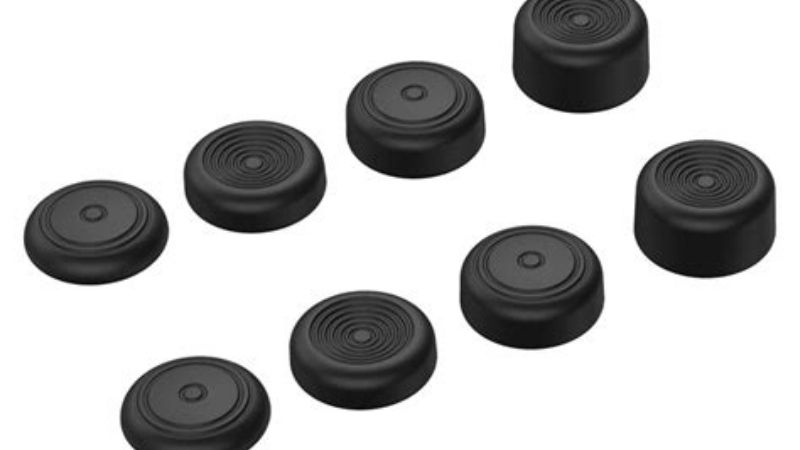
Best all-around surface traction — KontrolFreek Galaxy Edition No-Slip. This four-pack uses the company’s GripTek material and is expressly offered in a Switch 2 variant. It suits players who primarily want a different stick surface rather than an elaborate height system. Trade-off: one basic profile cannot recreate a full multi-height kit.
Best three-design alternative — Savage Raven by Skull & Co. Switch 2 Thumb Grip Set. The maker offers three designs and Switch 2-specific colors, making it a sensible choice when you prefer experimenting with shape and surface contact. Trade-off: the page does not give us independent measurements of real-world aiming gains or cap-retention force.
Best configurable performance-style set — PlayVital QUANTUM Pro. Three heights plus concave and convex contours give this the broadest shape experiment among the featured PlayVital designs. Trade-off: more elevated caps can alter thumb ergonomics, and the manufacturer’s purple product listing displayed a sold-out status during research.
Best comfort-focused padded feel — PlayVital Thumbs Cushion Caps. The maker’s dual-layer air-cushion design targets users who dislike the bare stick’s hard contact point. Trade-off: cushioning may feel too soft to players who like an immediately defined stick edge.
Best pronounced raised texture — PlayVital Raindrop Texture Cushion Caps. Its raindrop surface and published height increase make it a distinct candidate for users who deliberately want substantial elevation. Trade-off: height increases the chance of a tight carrying-case lid pressing on the analog stick.
Best playful appearance — GeekShare Cat Paw Thumb Grip Caps. The Switch 2-specific option combines soft silicone and a sculpted paw motif without promising competitive gains. Trade-off: a decorative raised motif will not feel like a plain circular cap to everyone.
Switch 2 thumb grips compared
| Product | Verified configuration | Best use | Compatibility stated by maker | Price reference and principal drawback |
|---|---|---|---|---|
| JSAUX Multi-Mode GP0404 | Silicone; three cap/guard/grip profiles | Testing low, medium and taller stick feel | Nintendo Switch 2 | From $9.99 for selected colors; multiple pieces require organization |
| KontrolFreek Galaxy Edition No-Slip | Four-piece GripTek set, Galaxy pattern | Everyday traction with minimal fuss | Joy-Con 2; Switch 1 and 2 Pro controllers | $9.99 promotional listing, $12.99 crossed-out reference; not a multi-height set |
| Savage Raven by Skull & Co. Thumb Grip Set | Three designs; several color options | Shape variety and stick-surface protection | Nintendo Switch 2 | $9.99 displayed sale, $15.99 crossed-out reference; delivery varies by variant |
| PlayVital QUANTUM Pro | Three heights; concave/convex, two surface styles | Comparing raised stick geometry | Joy-Con 2 only | $13.99; selected purple variant marked sold out |
| PlayVital Thumbs Cushion Caps | Four pieces; dual-layer cushioned construction | Softer thumb contact | Joy-Con 2 only | $13.99; soft feel is subjective, listing shows sold-out text |
| PlayVital Raindrop Texture Caps | Four pieces; raindrop texture; maker claims 7.5 mm raise | Higher tactile stick surface | Joy-Con 2 only | $13.99; high profile needs case-fit check |
| GeekShare Cat Paw Caps | Soft silicone; molded paw pattern; Switch 2 style | Colorful customization | Nintendo Switch 2 Joy-Con when Switch 2 style selected | $9.99; decorative contours may not suit precision-focused users |
Price note: These are observed listing references, not price comparisons across final U.S. retailer carts. Taxes, shipping, discounts, stock, and the selected color/variant can change the amount. An in-stock product at checkout is a better purchase than a theoretically cheaper but unavailable colorway. Do not interpret a crossed-out list price as a measured historical discount.
How we selected these thumb grips
The shortlist begins with manufacturer-stated Joy-Con 2 compatibility, not with the appearance of a Nintendo Switch in a third-party product photo. We prioritized physical thumbstick caps, identifiable product pages, named variants or SKUs where available, and an understandable reason to choose one set over another. The comparison then considers cap height, top geometry, texture, pack flexibility, practical fit, maintenance and total buying friction. Manufacturer claims about precision, fatigue, or competitive advantage are treated as claims, not as results from a controlled performance study.
We also checked that the editorial angle differs from the related site topics. A thumb grip changes the contact surface on top of an analog stick. An ergonomic grip case adds handles around the system. A protective shell covers the chassis. A charging stand, replacement kickstand or travel case solves a different problem. Bundles that primarily sell those items are not counted as independent thumb-grip products merely to make this roundup longer. Seven clearly differentiated picks are enough here; adding cosmetic duplicates would weaken the comparison.
What a thumb grip can realistically change
A textured cap changes friction between skin and the stick. A taller cap increases the effective radius at which your thumb pushes, which can make smaller thumb movements feel easier to modulate for some players. A concave face cradles the thumb; a convex one can feel easier to reposition across. A cushioned cap may spread pressure over a softer surface. These effects are plausible mechanical differences, but none proves an increase in in-game accuracy, speed or wins for every person.
The cap does not replace a faulty sensor, expand a game’s analog-input resolution, eliminate stick drift, or remove a joystick’s internal dead zone. Likewise, a low-profile cap will not change your hand position as much as a full ergonomic grip case. Buy caps to improve contact and comfort, and evaluate their usefulness with your own games and hand position.
Best Switch 2 thumb grips: Seven products worth comparing
JSAUX Multi-Mode Joystick Cap and Thumb Grip with Lever Guard Set — Best overall
Who should buy it: A Joy-Con 2 owner who does not yet know whether a flush, medium or taller cap will feel better in handheld games. The product, identifiable as JSAUX GP0404 in the company’s Switch 2 accessory kits, is a silicone multi-mode set specifically marketed for Nintendo Switch 2. The manufacturer presents three grip sizes and includes joystick guards in the accessory family. Some product listings also mention Steam Controller compatibility; that does not imply every Nintendo, Xbox or PlayStation controller takes the same cap.
The advantage of a multi-profile set is not that one preset must improve accuracy. It is that you can conduct a controlled personal comparison without buying several unrelated sets. Start on both sticks with the lowest-profile pieces, play a familiar game at unchanged sensitivity, then compare one change at a time. If camera aiming benefits from a taller right stick but movement feels awkward with one, an asymmetric setup may be more comfortable. Nothing requires matching heights left and right.
JSAUX lists a number of silicone component dimensions, including 7.06 × 5.97 mm for a joystick cap, 6.09 × 5.30 mm for a joystick guard and 6.09 × 8.32 mm for a thumb grip. These numbers describe listed accessory pieces; do not interpret them as the Joy-Con 2 stick diameter or as a verified number of millimeters added above the factory thumbstick. Color variants on the official page showed roughly $9.99 for single-color choices and $13.99 for a combined-color option when checked. Confirm the exact cart selection before quoting a price publicly.
Pros: Switch 2-targeted listing; three styles that encourage trial and error; useful low-profile baseline; silicone material that can be removed for cleaning. Cons: The many small components are easy to misplace; package wording varies with kit or color; manufacturer precision claims are not independently verified performance results. This is the first set to try if customization matters more than decoration.
KontrolFreek Galaxy Edition No-Slip — Best for everyday traction
Who should buy it: Someone who is generally happy with the Joy-Con 2 stick height but wants a grippier surface and a compact four-piece package. KontrolFreek’s U.S. Galaxy Edition product page provides a specific Switch 2 option and says the GripTek material and Galaxy pattern are designed for grip and comfort. It also lists compatibility with Joy-Con 2 and Switch 1/2 Pro controllers; select the Switch 2 variant rather than assuming a different console’s Performance Thumbsticks fit.
Unlike a height-adjustment kit, this product is about maintaining contact on an everyday stick. That makes sense for Mario Kart World, action-adventure games and platformers when your thumb slips on the factory rubber during longer sessions. A surface with an obvious pattern can help you find the middle of the stick by feel. But grip texture is personal: players who dislike prominent ridges or a rubbery tack may prefer a smoother alternative.
The manufacturer’s listing identifies a four-pack, red/blue styling and U.S. manufacture. The U.S. storefront showed a $9.99 promotion beside a $12.99 reference at the research check. Neither number guarantees future availability, shipping, taxes or the price on another channel. The official page emphasizes no-slip behavior, but we have not measured whether the cap rotates under a repeated maximum-angle thumb load or how its material ages after months of sweat and cleaning.
Pros: Verified Switch 2 option; four caps; traction-first design; also useful for the supported Nintendo Pro controllers. Cons: It is not a set of several different heights; the Galaxy surface may feel too pronounced for sensitive thumbs; slip-resistance claims come from the brand. Choose it when the native control feel is close to right and you want a straightforward surface upgrade.
Savage Raven by Skull & Co. Thumb Grip Set — Best for experimenting with shape
Who should buy it: Someone who wants a set from an accessory maker offering several cap contours and multiple color choices for Switch 2. Skull & Co. markets this Switch 2-specific Thumb Grip Set under its Savage Raven label. Its official product page says the collection contains three designs, uses a grippy surface, protects the underlying joystick from wear and adds height and active radius. Those are product-design statements, not evidence of measured skill improvement.
The three-design approach helps answer a real buying question: do you prefer the feel of a flatter contact surface, a more supportive rim or a taller configuration? Exact shapes and package details should be verified for the variant being ordered. The seller lists Jet Black, Neon Blue + Red, Blue + Light Yellow, Light Purple + Light Green and other editions, so the product family is broader than one fixed color. Limited-edition designs can have separate shipping schedules; do not assume a theme variant that appears on the page can ship immediately.
We particularly like this as an alternative to permanently increasing thumbstick height. If the first cap makes button transitions harder, you can change design rather than forcing yourself to adapt to it. One caution: a tightly cut handheld travel case might rest directly on a taller cap. Before routine travel, close an empty case gently and confirm that internal padding does not load the sticks. The brand’s published warranty section lists thumb grips in its three-month category and notes normal wear and tear, an important distinction from an unconditional durability promise.
Pros: Three design choices; clearly targeted at Switch 2; numerous colorways; manufacturer-published warranty conditions. Cons: Limited editions can have separate stock dates; no independent retention or wear data cited; design labels do not replace personal fitting. Choose it if experimenting with shape and color is more attractive than the simplest textured four-pack.
PlayVital QUANTUM Pro — Best for adjustable height and face shape
Who should buy it: A player who wants to try multiple thumbstick geometries, including higher profiles, instead of selecting only a textured cap. The QUANTUM Pro listing specifically identifies Nintendo Switch 2 Joy-Con compatibility and says older Switch Joy-Con, Switch Lite and Switch OLED are not supported. The featured purple Diamond Grain & Crack Bomb listing identifies SKU WWYNTM032 and describes three heights with convex and concave shapes.
There is a genuine functional reason to consider several geometries. A concave face may keep a centered thumb planted during a steady camera pan. A convex face may feel freer when making quick directional corrections. Extra height increases the travel arc at your thumb for the same angular deflection of the original stick; whether that feels more precise depends on sensitivity, how far your thumb reaches and the game itself. A set with three heights lets you discover if the improvement is real for you instead of merely theoretical.
The higher the add-on, the more attention you should pay to storage clearance and unintended leverage. A tall grip catching against a case panel can push the Joy-Con 2 stick while it is packed. It is sensible to use the lowest comfortable cap when commuting and to reserve taller ones for sessions at home if your carry case is shallow. Check the manufacturer’s color and shape option carefully: one QUANTUM Pro variation is not necessarily the same as all other PlayVital caps. The featured purple product page showed $13.99 and a sold-out indicator during review; we cannot call it immediately purchasable.
Pros: Multiple heights; convex/concave selection; verified Joy-Con 2-only compatibility statement; named SKU. Cons: Selected variant’s availability was uncertain; taller caps may crowd a case; individual height preferences require experimentation. This is the performance-oriented shape experiment for people who already know a basic textured cap is not enough.
PlayVital Thumbs Cushion Caps — Best for softer contact
Who should buy it: Someone who feels localized thumb pressure during long handheld sessions and wants to see whether a more padded contact surface is comfortable. PlayVital’s dedicated Switch 2 Thumbs Cushion Caps are sold as four thumbstick caps, with blue/orange, black and other color listings. The company describes a dual-layer, air-cushion design and soft rubber material and states that these caps are designed exclusively for Joy-Con 2, not original Switch, Lite or OLED controllers.
The important distinction is cushioning rather than a promise to make a player’s hands medically less fatigued. A softer surface may feel pleasant when you tend to press hard on a stick, but it may also reduce the crisp edge feedback that another person wants. The manufacturer says its design changes movement radius and comfort; there is no independent measurement here of pressure distribution, sustained grip fatigue or improved game performance. Treat the description as a guide to potential feel.
PlayVital provides two installation approaches: rolling the cap’s edge back over the joystick rim, or aligning one edge and rotating the material into position. Both require patience and a supported stick size. Stop if the cap appears to need force beyond gentle stretching; avoid prying with a hard tool. After fitting, confirm that every edge is seated and the stick can return freely to center. The page showed a $13.99 U.S. price and a sold-out message for the selected blue/orange listing, so order availability must be checked separately.
Pros: Padded construction; four pieces; clear installation instructions; explicit Joy-Con 2 exclusivity. Cons: Softness may not suit everyone; manufacturer fatigue claims lack independent testing; listed variant showed limited availability. Start here if touch comfort is your priority and you do not specifically need a sharply textured or aggressively elevated cap.
PlayVital Raindrop Texture Cushion Caps — Best for a noticeably raised, textured stick
Who should buy it: A Switch 2 owner who actively wants to raise the contact point and keep an anti-slip pattern under the thumb. PlayVital’s Raindrop Texture Cushion Caps are a different physical concept from its simpler soft cushion line: the company publishes a claimed 7.5 mm height increase and 11.4 mm total installed height for the raised, dual-layer design. That figure is the seller’s measurement, not our caliper result, and the page does not establish a like-for-like measurement method against competing caps.
Those numbers matter for a practical reason. A taller contact point may make small analog corrections feel less abrupt, but it also changes where your thumb sits relative to the A/B/X/Y buttons. If you often roll your thumb directly from the right stick to a nearby face button, test that transition before deciding that extra height is an upgrade. Players with smaller hands may find the additional reach less desirable. The raised raindrop pattern also feels very different from a flat circular silicone cap.
The official listing shows a four-pack, a silicone construction, Switch 2 Joy-Con-only compatibility, and a $13.99 manufacturer reference. The maker says the caps can be cleaned with water, but the sensible procedure is to remove them and dry fully before reinstalling rather than wetting the controller. To protect the console, test storage with the grips installed only if the case’s lid and inner flap close without touching the sticks. If you feel resistance, remove the elevated caps before travel.
Pros: Explicit published profile dimensions; textured silicone; four caps; clear compatibility statement. Cons: Higher physical profile may interfere with shallow travel cases; increased height is a preference, not an accuracy guarantee; no controlled comparison of aim was available. Buy it for deliberate elevation and texture, not merely because the name implies a measurable competitive advantage.
GeekShare Cat Paw Thumb Grip Caps — Best for distinctive styling
Who should buy it: Someone who enjoys themed Switch accessories and wants their sticks to feel noticeably different without selecting a tall, precision-marketed grip. GeekShare sells Cat Paw Thumb Grip Caps with a specifically selectable Nintendo Switch 2 style. The company describes soft silicone, raised paw-pad texture, easy installation and a protective layer over the original stick. The themed pads are the selling point; this is not an engineering substitute for a high-rise aiming accessory.
A decorative cap can still serve a functional need. Its sculpted surface may be easier to recognize by touch during casual gaming and may keep bare stick rubber from direct contact with skin. On the other hand, pronounced paw-shaped contours may annoy players who want a perfectly symmetric thumb-contact surface, especially in games that demand frequent circular motions. You cannot establish one universal comfort ranking from a product photo.
The site lists a $9.99 reference for the Switch 2 style and describes separate shipping costs or free-shipping thresholds. Be careful about platform variants when shopping GeekShare: several of its product families show a choice between original Nintendo Switch and Nintendo Switch 2, and images for one variant should not be treated as proof the other fits. The Cat Paw page explicitly provides the Switch 2 style, which is why this product is included rather than an unverified generic cat-paw listing.
Pros: Clearly offered for Joy-Con 2; soft silicone; characteristic appearance; accessible listed price. Cons: Decorative bumps change contact geometry; color/style variants must be selected carefully; no independent performance or longevity data cited. Choose it for design and everyday thumb feel, not for an unsupported promise of better competitive rankings.
Buying guide: What matters more than the brand name?
Check Joy-Con 2 fit before choosing a color
Nintendo Switch 2 uses Joy-Con 2 controllers that differ physically from the original Switch Joy-Con. Nintendo’s own accessory-compatibility guide establishes that several original Joy-Con accessories do not carry over. Thumb caps are not the same product as a Joy-Con charging grip or wrist strap, but the lesson applies: do not guess physical fit from the word “Switch.” A seller should explicitly identify Joy-Con 2, Nintendo Switch 2 thumbsticks or a named Switch 2 version. If it only lists Switch OLED or Switch Lite, leave it off your order until the manufacturer provides a compatibility confirmation.
Separate Joy-Con 2, Switch 2 Pro Controller, and original Switch Pro Controller versions if the seller offers them. KontrolFreek expressly identifies more than one supported controller on its Galaxy page, but PlayVital explicitly excludes other controller families for several products. Those statements are not contradictory; each applies only to that exact product. A product’s country of sale, a seller-written marketplace title or a convenient photograph cannot replace correct model labeling.
Pick cap height for reach, not marketing claims
Low-profile caps are an appropriate first purchase when your thumb position is basically comfortable and you only want more texture. Medium-height caps may make analog movement feel easier to modulate while preserving reasonably quick button access. High-rise caps are a more substantial ergonomic change. They increase leverage and require your thumb to operate higher above the control body, which can be helpful or inconvenient depending on the player.
For the first three sessions after installing a new height, avoid changing in-game sensitivity at the same time. Try a repeatable activity such as panning a camera around a stationary object, steering the same Mario Kart course or moving through a familiar platforming sequence. Compare comfort, easy recentering and accidental overcorrections—not a single good score. If the factory stick feels better, removing the cap is a valid result.
Choose the top shape by how you position your thumb
Concave caps provide a shallow dish; they are usually worth trying when you prefer a centered thumb. Convex caps emphasize freer repositioning across a rounded top. Textured raised patterns aim to resist sliding, but the strongest texture is not automatically the most comfortable for bare skin. A cushion surface can be welcome if you press hard during longer sessions, yet another person might prefer firmer feedback. None of these shapes should scratch, pinch or jam the joystick when installed correctly.
Look beyond material labels such as “premium silicone.” The more useful questions are whether the lip stays seated, whether the cap rotates during long sessions, whether it attracts lint, and whether you can clean it without damaging the controller. Product pages rarely provide standardized results for these variables. Reviews can show anecdotal patterns, but they should not be presented as laboratory retention or hygiene tests.
Check carrying-case clearance and docking workflow
Thumb grips are small, but their added height can make a big difference to a fitted travel case. The critical situation is not the TV dock’s USB-C interface; it is a carrying case or protective flap that presses against analog sticks when closed. To evaluate a case, install the grips, seat the console without accessories piled on top, and lower the case lid slowly without zipping it. If the lid pushes a stick off center or leaves an obvious imprint, the pair is not a safe combination. Switch to a lower cap or remove it during transport.
A thumb cap can usually remain fitted when the Joy-Con 2 detaches, but that does not prove a particular third-party controller holder, protective shell or charging grip has enough physical clearance. Treat combinations as separate fit questions. The existence of a Switch 2-compatible case and Switch 2-compatible caps does not automatically certify them together.
Calculate actual value per usable pair
A four-pack includes two pairs for one pair of Joy-Con 2 sticks, assuming the caps are intended to be used as left/right pairs. Three-profile kits might contain multiple shapes rather than duplicate pairs of the same height. Count how many configurations you would genuinely use, not the number of individual plastic pieces printed on the box. Shipping charges can dominate a low-cost online order; one brand’s $9.99 listing may cost more delivered than a $12.99 listing from a retailer with local pickup.
Warranty and replacement terms also differ. Skull & Co.’s site places thumb grips in a three-month warranty category, while GeekShare posts a separate returns policy. These policies may be subject to exclusions and updated terms. Check the checkout country, shipping date, stock and return rules before ordering, especially for limited-edition variations.
How to install thumb grips without stressing the Joy-Con 2 sticks
- Power down or put the console in sleep mode. Work over a clean, well-lit table so a dropped cap can be found, and remove an attached full-system case if it blocks access.
- Inspect and clean the stick surface. Use a dry, soft, lint-free cloth. Avoid solvents or flooding the controller with liquid; keep moisture out of the stick opening.
- Confirm the cap is made for Joy-Con 2. Check the exact packaging or maker’s product page, particularly when a bag also contains original Switch or Pro Controller parts.
- Roll the cap edge back gently if the manufacturer recommends it. Align one part of the lip over the stick top, then carefully work the remaining edge around the circumference. Avoid metal tools and unnecessary sideways force.
- Seat the lip evenly. Rotate gently or smooth the cap until all edges are under the rim. Do not pull upward on the stick shaft or force a visibly undersized cap.
- Test the full range of motion. Slowly move the stick in all directions and release it from several positions. It should recenter normally, with no rubbing against the controller housing.
- Test in a familiar game. Verify camera or movement behavior, then check the console’s stick-calibration or input-test guidance through Nintendo Support if the response seems abnormal. Do not assume the new cap fixes underlying controller faults.
- Test storage clearance separately. Before you zip up a bag, ensure the travel-case lining cannot press on the newly raised stick tops.
If the cap keeps popping off, first make sure its entire rim is seated and that you have the Joy-Con 2 variant. If it still slips, remove it and ask the seller about size or replacement; avoid glue. To take a cap off, peel one flexible edge back and roll the cap away with the smallest reasonable amount of pressure. Do not tug the entire analog stick upward, scrape the rim with a tool, or use heat.
Troubleshooting common thumb grip problems
A grip rotates or slips during gameplay
The most likely first checks are whether the cap is fully wrapped around the stick and whether the right controller variant was purchased. A skin-oil buildup may also change friction. Remove the cap, clean the cap according to the maker’s material guidance, dry it completely and reseat it. If repeated reseating fails, replace the cap rather than attaching adhesives that could migrate toward the joystick mechanism.
The analog stick feels harder to move
First remove the new cap and test the unmodified stick. If movement immediately feels normal, inspect whether the cap’s lower rim is rubbing the joystick housing or another accessory. A high-profile design should not require the controller’s stick to be bent or pried. If stiffness persists without the grip, consult Nintendo’s controller troubleshooting rather than blaming the accessory by default.
The cap keeps coming off inside a carrying case
A tight case lid or internal strap may catch the cap during packing. Remove it during transport, switch to a lower-profile pair, or use a travel case with confirmed clearance. Repeatedly compressing a raised cap is not a sensible way to force compatibility. Store loose caps where children and pets cannot easily swallow them.
My aim is still inconsistent
A thumb grip cannot change the game’s target-assist behavior, joystick sensor electronics or built-in dead zones. Return to a comfortable cap height, verify controller functionality, and then examine the game’s sensitivity and camera settings. Change one variable at a time. If movement drifts when your thumb is not touching the stick, follow Nintendo’s official diagnosis for Joy-Con 2 rather than buying increasingly tall caps.
Frequently asked questions
Do original Nintendo Switch thumb grips fit the Switch 2?
Not reliably as a general rule. Cap dimensions vary by manufacturer, and Joy-Con 2 is a different controller generation. Some specific multi-device grips are explicitly advertised for Joy-Con 2 and other controllers, while other sets exclude the original Switch entirely. Buy an explicitly Switch 2-compatible variant rather than stretching a random old cap.
Are thumb grips the same as Joy-Con 2 grip cases?
No. A thumb grip is a small cover that sits on an analog stick. A grip case changes the way your hands hold the entire console or controller. For soreness caused by how you hold the console body, a large ergonomic case may address a different issue than a thumb cap. Our separate grip-case roundup addresses handles and shell geometry instead of stick-top friction.
Which cap height is best for Mario Kart World?
There is no universal winning height. Many players can start with low-profile, textured caps because they preserve the familiar feel for fast steering and button transitions. If you prefer more leverage for fine steering, compare a medium-height cap using identical settings and the same track. Tall caps are optional, not essential racing equipment.
Will high-rise caps damage my Joy-Con 2 sticks?
A correctly sized cap installed gently should not require modifying the stick, but an elevated cap can be caught or compressed by a tight protective case. The main avoidable risks are forcing installation, excessive sideways pressure and poor storage clearance. Test that the stick recenters and remove any cap that scrapes or obstructs travel.
Can thumb grips fix Joy-Con 2 drift?
No. A cap changes the external surface; it does not repair a sensor or internal mechanism. If your game character moves or the camera drifts when the stick is untouched, use Nintendo’s Joy-Con 2 stick troubleshooting. A cap might make an otherwise healthy stick feel easier to control, but it is not a hardware repair.
Should I buy a two-pack, four-pack or multi-height kit?
Buy a two-pack if you know the exact surface you want and have one Joy-Con 2 pair. Choose a four-pack if you want spares or to share between supported controllers. Choose a multi-height kit when you are uncertain which shape and elevation is comfortable; the ability to compare profiles may be worth more than additional identical caps. Check included pieces carefully, because “six pieces” does not always mean three matching pairs.
Do these thumb grips improve competitive accuracy?
A change in stick height, friction or contact geometry can affect how precisely some players make physical thumb movements. That does not establish a verified improvement in accuracy, latency or tournament results. We have not conducted a controlled benchmark, and manufacturer terms such as “pro-level accuracy” should not be read as independent test data. Comfort and consistency in familiar games are better criteria for a purchase of this kind.
Final thoughts
For most Nintendo Switch 2 owners, the JSAUX GP0404 is the most sensible first experiment because its different profiles help you find a comfortable stick feel. KontrolFreek Galaxy is a more direct choice when traction matters more than height. Savage Raven by Skull & Co. offers a different shape-focused approach, while PlayVital QUANTUM Pro and Raindrop suit people deliberately exploring a raised profile. For cushioning, look at PlayVital’s softer Thumbs Cushion Caps; for a playful everyday setup, GeekShare Cat Paw makes sense. Whatever you pick, verify the exact Joy-Con 2 version, check current U.S. stock and checkout costs, install without force, and make sure the cap does not jam against your travel case. The best thumb grip is the one that stays securely seated and feels better to you—not the one with the biggest unsupported precision claim.
