Key takeaways
- The exact model and its supported microphone/receiver connection, not just the manufacturer’s product family name.
- For Sony INZONE H9 II and H6 Air, the detachable boom fitted and unmuted; for H5, the boom lowered.
- For Nova 5 Wireless on PC, the supported SteelSeries GG Engine installation and the correct model selected.
- A short recorded voice sample from your real streaming application to judge outgoing audio separately from the local self-monitor signal.
- An OBS monitoring plan: decide whether headset sidetone or an OBS return is needed for a given mic, rather than running both without a reason.
If you are comparing the best sidetone headsets for streaming, the important distinction is between hearing your own voice directly through the headset and hearing an OBS or Windows software-monitoring return after it has been processed. The first can make speech feel natural while you are wearing isolating earcups; the second can create a distracting echo if its return is delayed. This guide focuses on four model-specific gaming headsets with documented microphone sidetone behavior and U.S. retail listings. It does not rank unmeasured latency or pretend that sidetone sounds identical across platforms.
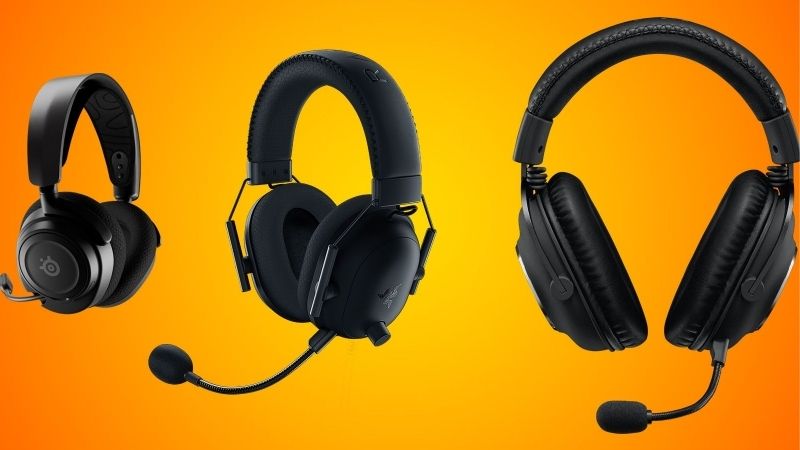
The selected hardware is Sony INZONE H9 II, Sony INZONE H6 Air, Sony INZONE H5 and SteelSeries Arctis Nova 5 Wireless. These are four separate products, not black/white variants counted twice. Public U.S. seller offers observed on October 30, 2026 are listed below. They are not final ZIP-code checkout totals. Console microphone paths, boom position, noise canceling and saved PC settings are the important conditions to check before purchase.
Quick comparison: model, price and sidetone control
These four headsets offer different ways to hear your own microphone while streaming. Compare how sidetone is enabled, whether its controls are available on your PC or console, and how boom-mic position affects monitoring. An OBS or Windows playback loop is not a substitute for checking the built-in headset sidetone function.
| Headset / model | Observed U.S. seller offer, Oct. 30, 2026 | How sidetone is supported | Most important limitation |
|---|---|---|---|
| Sony INZONE H9 II Black, WHG910NB | B&H $258, In Stock / Add to Cart | Sony lists sidetone with detachable boom attached and microphone on | Sidetone may reduce apparent ANC effectiveness; do not assume zero-delay OBS monitor |
| Sony INZONE H6 Air, MDRG600/B | B&H $168, In Stock / Add to Cart | Sony lists sidetone with detachable boom attached and microphone on | Wired, open-back design leaks sound into a shared room |
| Sony INZONE H5 Black, WHG500/B | B&H $128, In Stock / Add to Cart | Sony lists sidetone with boom microphone lowered | Boom-up is mute; PC and PlayStation controls are not identical |
| SteelSeries Arctis Nova 5 Wireless Black, 61670 | Best Buy $129.99, Add to Cart | SteelSeries documents GG Engine Audio > Mic Sidetone and Save | PC-software control does not prove identical access on PS5 or Bluetooth |
These are observed seller-page examples, not a verified nationwide stock guarantee. A retailer can change inventory or a promotional figure before the buyer supplies an address; the same model may carry a different manufacturer list price. The Sony H9 II price here is the selected B&H listing, not Sony’s suggested retail price, and the Nova 5’s older promotions have had different end dates. The purpose is an honest model-specific starting point.
What sidetone actually does for a streamer
When you speak into an attached headset boom, the headset can route some of that microphone signal back into the earcups. This local feedback is commonly called sidetone, mic monitoring or self-monitoring. It can help you avoid shouting when closed earcups isolate you from your own voice. It does not mean your teammates hear a better microphone, that OBS automatically records a clean track, or that you have an independent broadcast monitor mix.
OBS monitoring is a separate software path. If you enable Monitor and Output in OBS, microphone audio may travel through an interface, driver, application, processing filters and an output device before returning to your ears. The result can sound like an echo depending on the routing and latency. You normally do not need both direct headset sidetone and OBS microphone monitoring while talking; using both may create a doubled-voice sensation. A sensible starting configuration is headset sidetone for self-voice and OBS output capture for the stream, with software monitor off for that microphone unless you have a specific reason to hear its processed signal.
Microphone sidetone can also pick up room noises. Sony warns that its INZONE sidetone may make active noise canceling feel weaker, because the mic signal intentionally reintroduces external sound. That is not necessarily an ANC malfunction. For an open-back headset, even without sidetone you already hear more room sound; the reason to enable it may therefore be different from a sealed ANC headset.
Sony INZONE H9 II: self-voice in a wireless ANC headset
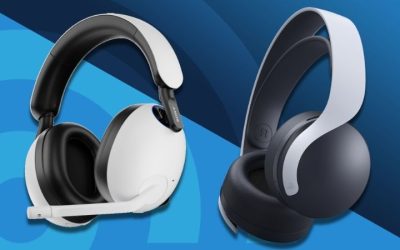
The INZONE H9 II is the premium wireless choice here for someone who wants noise canceling but also expects to hear their own speech when the microphone is active. B&H publicly listed the black WHG910NB for $258 with In Stock and Add to Cart. The listed connection options include 2.4GHz, Bluetooth, USB and 3.5mm; you still need to choose the supported mode for each platform rather than assume every microphone function is available everywhere.
Sony’s support article is unusually precise about sidetone. On H9 II, the detachable boom must be attached and switched on. If the boom is removed or microphone is switched off, voice chat is muted and sidetone is disabled. That matters for streaming: when you troubleshoot missing self-voice, first check the physical mic state before changing OBS filters or Windows devices. The same support article notes that a perceived ANC reduction can be normal with sidetone active.
The H9 II could appeal to a streamer recording in a room with fans, but the value of ANC depends on the room, headset seal, audio settings and how loudly the person monitors. Do not claim measurable speech improvement or latency superiority without independent testing. This is a functionality-based selection supported by the manufacturer, not a hands-on broadcast microphone ranking.
Buy it when: you want premium wireless options plus an explicit self-monitoring behavior and are willing to manage ANC versus sidetone. Skip it when: you only need an inexpensive microphone check or your room makes open-back headphones acceptable. At the time of ordering, confirm the exact black model/edition, connection mode, final price and seller delivery availability.
Sony INZONE H6 Air: wired open-back alternative
The INZONE H6 Air is substantially different from H9 II. B&H lists black MDRG600/B at $168 in stock; Sony describes it as a wired open-back gaming headset with a detachable cardioid boom microphone. Open-back construction lets more room sound through, which can make a speaker feel less sealed off than an ANC headset. It also leaks game audio into the room, potentially into a separate nearby microphone. For a streamer sharing an apartment or gaming near a sensitive desk mic, that tradeoff matters more than brand labels.
Sony’s microphone-sidetone condition for H6 Air is the same basic physical rule as H9 II: the detachable boom needs to be attached, and the microphone must be on. Unlike a wireless model, H6 Air must be connected by its supported wired path, and whether its local controls work in a particular console/controller setup must be checked using the device’s own documentation. Do not assume a console exposes the same INZONE Hub options as a Windows gaming PC.
Open-backed earcups are not inherently a better sidetone circuit. They simply change how much natural room voice reaches the ear. Some people may want less electronic self-voice with open backs; others still prefer a controlled amount of monitor return. The ideal setting cannot be prescribed without listening on the actual head and microphone in the actual room. Start low and increase it only enough to speak comfortably.
Buy it when: you stream at a quiet desk, appreciate an open-back design and want a documented boom-dependent sidetone function. Skip it when: room isolation or avoiding leakage into an external mic is the priority. Check the correct cable, PC/console socket and microphone input before assuming voice chat will work.
Sony INZONE H5: straightforward wireless chat with boom-down sidetone
The INZONE H5 sits at a lower observed price than the two Sony models above: B&H lists black WHG500/B at $128 in stock. It uses 2.4GHz wireless and a flip-to-mute boom. Sony distinguishes its sidetone behavior from that of the H9 II and H6 Air: H5 sidetone is active when the boom is lowered. Raising the boom mutes the microphone and disables the sidetone path. That simple mechanical relationship is useful during a stream because one obvious physical position controls both voice transmission and self-voice.
For this model, sidetone is not a substitute for hearing the exact sound your audience receives after compression, noise suppression, gate thresholds or an OBS filter chain. You should make a short recording to verify intelligibility separately. If you do not hear yourself after lowering the boom, check volume and sidetone configuration supported for the selected mode, not just OBS’s monitoring menu.
H5 is a sensible value-oriented contender when the user’s setup is straightforward and no advanced ANC feature is needed. Still, a headset’s boom design does not establish microphone quality relative to another product without controlled recordings. Head size, ear-pad seal and loudness also affect whether sidetone is comfortable. Treat this as a supported feature comparison, not a lab test.
Buy it when: you want a physical mute/monitor cue and a simpler wireless gaming headset at a moderate public seller price. Skip it when: you require open-back airflow, sophisticated independent mixes or documented cross-platform control parity. Confirm that the USB transmitter and mic chat mode suit your exact device.
SteelSeries Arctis Nova 5 Wireless: PC sidetone software control
The Arctis Nova 5 Wireless is the non-Sony entry in the comparison. Best Buy identifies the black model as 61670, SKU 6576706, and showed a $129.99 Add to Cart offer. The black and white editions are the same headset family and must not inflate the number of choices. It offers a 2.4GHz gaming receiver and Bluetooth switching; switching does not automatically mean both sources mix at once.
SteelSeries documents a specific PC configuration path: in its GG/Engine software, go to the headset’s audio controls, adjust Mic Sidetone, then save the setting. This is a useful distinction from a blanket claim that every wireless mode carries the same accessible controls. A saved headset setting may persist in supported use, but application access, firmware support and mobile or console UI behavior can differ. Check the official support instructions for the actual Nova 5 model, and do not assume an Xbox-only or console-only sidetone slider when the source names GG Engine on PC.
The Nova 5 is attractive when a streamer already uses SteelSeries software on a Windows PC and wants to deliberately adjust self-voice. But if the entire stream runs from a PlayStation without a configuration PC, verify what level and control can be set before buying. The companion game’s EQ presets do not establish microphone sidetone performance or mic recording quality.
Buy it when: you want clearly documented PC software sidetone adjustment and a mainstream wireless gaming headset. Skip it when: you cannot use the documented setup software or you need a precisely guaranteed direct-monitor configuration on an unsupported platform.
What you need to set up sidetone without an echo
- The exact model and its supported microphone/receiver connection, not just the manufacturer’s product family name.
- For Sony INZONE H9 II and H6 Air, the detachable boom fitted and unmuted; for H5, the boom lowered.
- For Nova 5 Wireless on PC, the supported SteelSeries GG Engine installation and the correct model selected.
- A short recorded voice sample from your real streaming application to judge outgoing audio separately from the local self-monitor signal.
- An OBS monitoring plan: decide whether headset sidetone or an OBS return is needed for a given mic, rather than running both without a reason.
On Windows, confirm the intended headset microphone is selected under the system’s input settings and in your streaming app. Set the microphone input so normal speech does not clip. Enable a modest amount of headset sidetone using the product’s supported control. Speak normally, then switch OBS microphone monitoring off while leaving output capture active. Record a short local file and listen after stopping to assess the audience-facing track. If you need to audition processing in real time, temporarily reduce local sidetone and turn on the relevant OBS monitor, then switch back before regular live commentary.
On PS5, the console’s microphone level and audio output path can be managed from the platform audio settings, but this does not imply it exposes the same manufacturer’s Windows-only sidetone knob. Sony’s own boom rules still govern INZONE microphone availability. Confirm game-chat routing and whether the headset stores a chosen self-monitor level rather than promising a menu that may not exist for your model.
Troubleshooting common sidetone problems
I hear my voice twice. First check whether the headset’s local sidetone is enabled while OBS monitoring or another software loopback is also active. Disable one path, then make a recording to ensure your outgoing mic is still present. Also check Windows “Listen to this device” settings and voice-chat applications that may mirror the microphone.
I cannot hear my own voice. Verify the physical boom condition for the exact Sony model, or the saved GG sidetone configuration for Nova 5. Confirm the correct audio device is selected. If the mic is muted, no headset-specific adjustment is likely to restore monitoring until the microphone is active.
ANC feels weaker with sidetone on. Sony explicitly describes this as possible because microphone sound is intentionally sent to your ear. Compare both conditions at moderate volume, then choose whether environmental isolation or self-voice monitoring matters more during speech.
The stream audience says the mic sounds poor. Sidetone does not establish audience mic quality. Make a raw test recording with the exact mic and application, check gain, microphone placement and processing. A direct self-monitor sound may bypass filters that appear in the encoded stream.
The headset works on PC but not through console chat. Read the exact model’s compatibility details. Bluetooth pairing, USB receivers, TRRS analog cabling and proprietary console wireless licensing are different audio paths. Do not transfer the capabilities of one mode to another.
FAQ
Is sidetone the same as microphone monitoring in OBS?
No. Sidetone usually provides a headset-directed path for hearing your own microphone while speaking, whereas OBS monitoring is an application output that may include processing and extra routing delay. A streamer can use one for comfort and the other selectively to audit the captured signal.
Does the INZONE H9 II need the boom mic installed for sidetone?
Sony says yes: the H9 II and H6 Air need the detachable boom attached with the microphone on. H5 instead relies on the boom being lowered. Turning the microphone off also turns off the corresponding sidetone behavior in those stated conditions.
Does active noise canceling work normally when sidetone is enabled?
The perceived noise-canceling effect may be weaker with sidetone on. Sony documents that behavior as expected, not necessarily a defect. It does not prove that the electronics have failed or that mic sidetone is working incorrectly.
Can I adjust Nova 5 Wireless sidetone without a PC?
SteelSeries documents its adjustment through GG Engine on a supported PC. Do not assume identical controls appear on every console or Bluetooth connection. Check the exact manual and firmware behavior before making a purchase around that requirement.
Which is the best headset here for an OBS streamer?
For PC software control, Nova 5 gives an explicit GG Engine path. For ANC with boom-dependent monitoring, H9 II offers a different feature mix. H5 is simpler and lower-priced in the observed listing, while H6 Air is an open-back wired alternative. There is no independently verified lowest-delay winner in this guide.
The sidetone test a streamer should perform
Sidetone is the local microphone signal you hear inside your headset; it is not proof that your audience hears the same sound. Test it independently of OBS or other delayed software monitoring. Start with the boom physically attached or lowered as required by the exact Sony model, then find the model-specific sidetone control. On a SteelSeries set, the GG Engine setting can require a Windows computer and does not establish that the console exposes the same control.
Make two short local recordings with the headset mic while listening at a safe volume: one with sidetone enabled and one without. Compare whether your own speaking level changed, whether ANC behavior changed, and whether the recorded voice itself changed. If you need a physical sidetone knob during a live broadcast, do not infer one from the mere existence of app-based settings.
Bottom line
Choose sidetone for the ability to speak naturally, not because a specification promises your audience will hear better sound. The INZONE H9 II, H6 Air and H5 have clear Sony-documented boom requirements; SteelSeries documents Nova 5 adjustment in GG Engine. Verify the exact model, U.S. seller offer and microphone route, then record a short sample to separate self-voice comfort from outgoing stream quality. None of these four products has been tested by this guide for sidetone latency or microphone accuracy, so final publication requires independent editorial review.
Sidetone is a headset monitoring path, not an OBS mic-monitoring preset
Sony’s April 2026 support guide explicitly distinguishes two headset groups: INZONE H9 II and H6 Air require their detachable booms attached and turned on for sidetone; INZONE H5, H7 and original H9 use the lowered boom condition. Sony also warns that hearing more ambient sound or less effective noise canceling while sidetone is active is expected behavior, not necessarily a fault. A streaming buyer should test with the boom in the documented position before returning the headset.
SteelSeries tells Nova 5 owners to set MIC SIDETONE in GG Engine under Audio and save the change. GG runs on Windows and macOS within the maker’s stated limitations, not Linux. A setting configured on a PC is not proof of the same control in a console user interface. If streaming through OBS, distinguish low-delay local sidetone from OBS audio monitoring; routing both at once may make your own voice sound doubled.
The safest evaluation uses three recordings: mic-only voice, game audio playing through the headset, and sidetone enabled while speaking naturally. Keep sidetone low enough not to force a louder voice. Do not infer that a comfortable self-voice monitor proves external boom-mic clarity in a noisy room; listeners hear the recorded microphone signal, not your internal sidetone mix.
Buyer-specific decision matrix
| Buyer situation | Recommended action | Must-verify requirement |
|---|---|---|
| Wireless headset with ANC and self-voice awareness | INZONE H9 II, after attaching and enabling its boom | Expect ANC perception to change when sidetone is active |
| Wired open-back stream desk | INZONE H6 Air, after checking microphone and room leakage | Check whether an open cup spills game sound into mic |
| Windows PC with configurable software sidetone | Arctis Nova 5 with GG Engine | Save the control and verify it survives reconnection |
Verification update (October 30, 2026): Maker and independently published source material used for the model-specific distinctions above is recorded with exact URLs and claim boundaries in the revised Evidence Log. This check does not certify live item-level US inventory or a buyer-specific ZIP checkout.
Sidetone versus delayed monitoring: verify the actual voice route before purchase
Sony USA explicitly limits INZONE sidetone by microphone state. For H9 II and H6 Air, the detachable boom must be attached and the microphone switched on. For H5, the flip-up boom must be lowered. Raising/removing or muting the boom also ends sidetone. Hearing more ambient sound when sidetone operates alongside noise canceling is documented by Sony as an expected trade-off, not necessarily a fault.
The H9 II INZONE Hub help guide says the software can adjust sidetone while using the USB transceiver on a computer. The same guide states that the INZONE Hub cannot be used in headphone-cable mode. Do not promise the exact PC-slider workflow on a PS5 or an analog 3.5 mm connection. SteelSeries documents Arctis sidetone adjustment in SteelSeries Engine on PC/Mac; buyers should set and save a supported device profile before testing a console route.
A headset sidetone circuit returns your voice locally. OBS microphone monitoring and a Windows “Listen to this device” input can return the same signal with audible processing delay and create an echo. Selecting the correct USB mic versus headset mic and disabling duplicate software monitoring are essential before judging whether a headset lacks sidetone.
| Exact product | Verified fact | What to check before ordering |
|---|---|---|
| Sony H9 II / H6 Air | Boom attached AND mic on | Sidetone ends with removed/muted boom; app route may be PC-only |
| Sony H5 | Boom down to talk | Raising boom mutes mic and sidetone |
| SteelSeries Arctis Nova 5 Wireless | PC/Mac SteelSeries Engine sidetone setting | Check whether saved setting persists in the chosen console route |
| OBS / Windows software monitor | Not a headset feature | May introduce delay or feedback; disable for local-voice check |
Test sequence: disable OBS monitor and Windows Listen, set headset mic as the selected chat input, talk a short fixed phrase, mute/unmute the physical boom, then enable the headset sidetone control on its supported software/receiver path. If a delayed duplicate voice remains, troubleshoot the return signal rather than replacing the headset. This is a reader protocol and not a claim of hands-on test by GeekGamingTricks.
Evidence boundary: product manuals, US-facing maker pages and retailer pages are not hands-on GeekGamingTricks product tests, verified ZIP checkout or independent editorial certification.