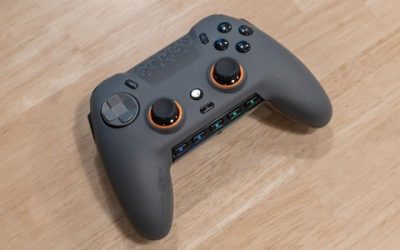
Players looking for best controllers with rear paddles usually want to jump, crouch, reload or switch tools without lifting a thumb off the right stick. These four in-stock U.S. options solve that job in different ways: Razer Wolverine V3 Pro for wireless Xbox/PC, Wolverine V3 Tournament Edition for a wired value, SCUF Envision Pro v2 for Windows-only power users, and 8BitDo Pro 3 for two rear controls at a lower price. Count the actual rear inputs first. A “back button” is not always a detachable paddle, and a controller with a wireless product name may still use a PC-only receiver.
Rear-paddle controllers: four-paddle Xbox options versus PC-only remapping
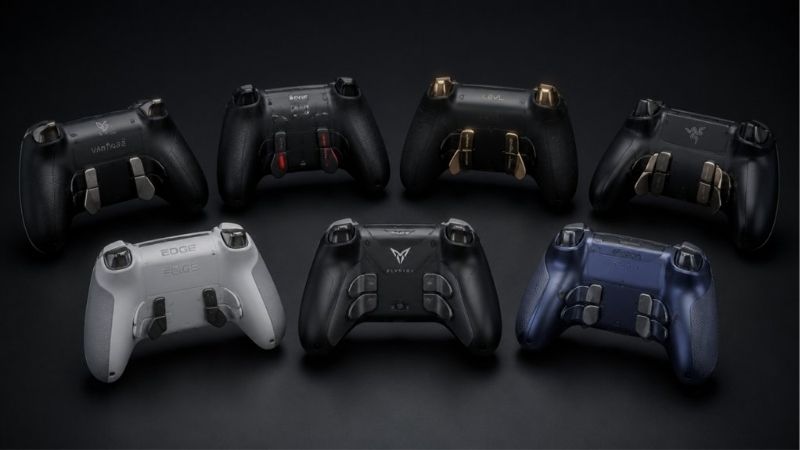
Buy the wired Razer Wolverine V3 Tournament Edition White if you prioritize four physical rear paddles for Xbox or PC without a $180 price. The wireless V3 Pro White makes sense when cable-free Xbox gaming matters. SCUF Envision Pro v2 offers extensive Windows remapping and two additional side controls, but it is not an Xbox controller. Pro 3 is a cheaper two-paddle choice for Windows through its dongle or USB; it is not the right substitute for someone who requires four distinct rear paddles. The important distinction is how many independent rear inputs you actually need and where each controller works. A pair of programmable back buttons is not the same as four paddles that let you keep both thumbs on the sticks. Compare the Wolverine models according to wired versus wireless Xbox use, the Envision Pro v2 for Windows software-dependent mapping, and Pro 3 for a lower-cost two-paddle arrangement. Check whether reassignment lives on the controller or requires a PC app and whether the assigned functions carry into your game. If you rarely use rear inputs, paying extra for four paddles has little practical value.
At-a-glance comparison
| Product | Relevant feature | USD price / seller / checked | Public status | Main drawback |
|---|---|---|---|---|
| Razer Wolverine V3 Pro Wireless (White) | Wireless 2.4 GHz Xbox/PC design | $179.99 · MaxGaming US · October 29, 2026 | In stock (5+ shown) | The Xbox/PC V3 Pro is not the newer PC-only Wolverine V3 Pro 8K, and not the wired Tournament Edition. |
| Razer Wolverine V3 Tournament Edition (White) | Wired Xbox/Windows controller, four rear paddles and two extra shoulder controls | $99.99 · MaxGaming US · October 29, 2026 | In stock (2 shown) | Black V3 Tournament product page showed OOS even while categories differed; White exact SKU is the selected product. |
| SCUF Envision Pro v2 (Breach) | Symmetrical sticks | $179.99 · Best Buy US · October 29, 2026 | Add to cart shown | PC-only product—not PlayStation 5 or Xbox compatible just because of the parallel-stick layout. |
| 8BitDo Pro 3 (G Classic) | Symmetrical sticks | $59.99 · MaxGaming US · October 29, 2026 | In stock (5+ shown) | Its Bluetooth capability on Apple does NOT mean native Windows Bluetooth support; manufacturer lists Windows via 2. |
Rear-paddle model prices and public order signals come from selected U.S. SKU pages on October 29, 2026. They do not verify delivery to a particular ZIP; inspect the actual paddle count, color and wireless edition at checkout.
Detailed picks and real trade-offs
Best wireless rear-paddle option for Xbox and PC — Razer Wolverine V3 Pro Wireless (White)
The Xbox/PC Wolverine V3 Pro has four rear paddles and two additional top controls. With a 2.4 GHz wireless system, it addresses the buyer who wants to hold a standard couch distance from a console or PC without dragging a cable through a desk setup. The manufacturer positions its remappable controls for competitive play, but the number of inputs matters more than promotional latency language when choosing between products.
Choose the White version shown as in stock on its direct U.S. listing. The product must not be confused with the Wolverine V3 Pro 8K, which is a separate PC-focused model; the latter is not automatically an Xbox controller. Users with smaller hands should also examine where the paddles fall under their fingers because four rear controls can be crowded.
Advantage: four rear paddles with Xbox/PC wireless support. Limitation: high cost and possible accidental presses until the layout is learned.
Selected rear-input offer: MaxGaming US lists Razer Wolverine V3 Pro Wireless (White) for $179.99 with status ‘In stock (5+ shown)’ (October 29, 2026). Selected model/part: Wolverine V3 Pro Xbox/PC White. Core compatibility: Wireless 2.4 GHz Xbox/PC design; four rear mouse-click paddles and two top extra buttons; asymmetrical sticks. Source note: The Xbox/PC V3 Pro is not the newer PC-only Wolverine V3 Pro 8K, and not the wired Tournament Edition.
Best four-paddle wired value — Razer Wolverine V3 Tournament Edition (White)
The wired White Tournament Edition provides four rear paddles and two extra shoulder controls while avoiding the expense of the Pro wireless radio. Its three-meter cable is long enough for many desk setups and can be routed away from a monitor stand, although the best length depends on room layout. The RZ06-05210200-R3M1 identifier is important: the Black version had an out-of-stock direct page during research, so the selected White offer is intentional.
For a player who sits at a PC desk and already routes cables for a headset or capture device, wired operation is not much of a penalty. For someone who walks between sofa and console, cable reach and trip hazards are a more substantial issue. Do not describe this $99.99 wired design as identical to the wireless V3 Pro merely because the rear-control theme is shared.
Advantage: four distinct back paddles for a lower price. Limitation: permanently tethered use and possible cable management.
Selected rear-input offer: MaxGaming US lists Razer Wolverine V3 Tournament Edition (White) for $99.99 with status ‘In stock (2 shown)’ (October 29, 2026). Selected model/part: RZ06-05210200-R3M1. Core compatibility: Wired Xbox/Windows controller, four rear paddles and two extra shoulder controls; 3 m USB cable; asymmetrical sticks. Source note: Black V3 Tournament product page showed OOS even while categories differed; White exact SKU is the selected product.
Best for Windows profiles and complex remapping — SCUF Envision Pro v2 (Breach)
The Envision Pro v2 Breach pairs four rear remappable paddles with two SAX side buttons and a bank of five G-keys. That is useful in a PC game where users want bindings beyond ordinary face buttons or want to cycle profiles for different genres. The design is explicitly a Windows PC product and integrates with iCUE; it does not become an Xbox peripheral because other SCUF product lines support consoles.
Buy it only if you are willing to spend time managing profiles, software, and the relationship between a game’s own binds and controller binds. In a title that restricts macros, keep remaps to allowed one-to-one controls rather than assuming every automated shortcut is permitted. Verify current terms for the individual game and competitive league.
Advantage: four paddles plus extra PC-oriented buttons. Limitation: Windows-only footprint, complex configuration, and premium price.
Selected rear-input offer: Best Buy US lists SCUF Envision Pro v2 (Breach) for $179.99 with status ‘Add to cart shown’ (October 29, 2026). Selected model/part: 601-178-04-025-281 / SKU 6632854. Core compatibility: Symmetrical sticks; four remappable rear paddles, two side SAX buttons, five G-keys; Windows-only PC; wireless via CORSAIR Slipstream and iCUE configuration. Source note: PC-only product—not PlayStation 5 or Xbox compatible just because of the parallel-stick layout.
Best compact two-paddle alternative — 8BitDo Pro 3 (G Classic)
8BitDo calls its two rear controls Pro back paddle buttons. That is a legitimate rear-input solution, but it has only two of them, not the four found on either Razer V3 or the SCUF model. The Pro 3 adds L4/R4 extra bumpers and a tactile D-pad for players who split time between platformers and action games. Its included receiver supports Windows via 2.4 GHz; USB is also an official Windows path.
This is the sensible purchase when the goal is mapping jump and crouch, not building a full six-input competitive command scheme. It also offers a symmetric stick layout unlike the two Razer controllers, a point that may matter to PlayStation-trained PC users. Do not count the extra shoulder L4/R4 as additional physical REAR paddles.
Advantage: two rear paddles at a comparatively modest price. Limitation: only two rear paddles and different host modes.
Selected rear-input offer: MaxGaming US lists 8BitDo Pro 3 (G Classic) for $59.99 with status ‘In stock (5+ shown)’ (October 29, 2026). Selected model/part: RET00855. Core compatibility: Symmetrical sticks; tactile D-pad; TMR sticks; two rear paddle buttons and extra L4/R4; Windows wired USB or supplied 2.4 GHz adapter; Apple Bluetooth requires iPadOS 26+. Source note: Its Bluetooth capability on Apple does NOT mean native Windows Bluetooth support; manufacturer lists Windows via 2.4 GHz or USB.
Rear paddles versus buttons and extra shoulders
A detachable lever on the back, a built-in button near a finger, and an extra shoulder bumper can all add shortcuts but they are not identical touch targets. Before comparing counts, find the precise location on the shell and inspect whether you can press each input without gripping harder. Razer lists four rear paddles and two extra top controls; the SCUF lists four rear paddles plus side SAX and G-keys; the 8BitDo Pro 3 has two rear controls and additional shoulders. A marketing claim of six extra buttons should not be presented as six rear paddles.
Players often benefit more from two confidently placed inputs than from six that cause accidental activations. Start by mapping a movement action and one routine gameplay action. Avoid stacking all available paddles with macros before learning whether the game accepts remapped controller inputs.
PC and Xbox support are not interchangeable
The Razer V3 Pro White and V3 Tournament White selected here target Xbox and PC, but use different connection methods. SCUF Envision Pro v2 is for Windows PC, not Xbox consoles. Pro 3 targets Windows via its 2.4 GHz receiver or wired USB and offers other systems through different supported modes, but that is not an Xbox licensed controller. If you are buying to share one pad between an Xbox console and a Windows computer, this distinction should decide the shortlist before rear-control count.
Some retailer category pages mix Xbox-compatible and PC-only models under the same gaming-controller category. Read the selected item’s compatibility field and model part number rather than treating a brand family as one interchangeable product. Xbox “Series” also does not automatically imply PlayStation or Nintendo Switch support.
How to map the rear controls without fighting the game
In games with native controller binds, assign one rear control to an existing face-button action rather than a keyboard macro. For example, a player who keeps the right thumb on aiming can duplicate jump or crouch; a racing player may prefer a shift function. The action selected should reduce thumb movement, not simply add buttons for their own sake. Test one change at a time and document your layout for reversal.
Vendor customization applications vary. A saved onboard profile may continue working without a software window, while a complex PC-only action may depend on the installed driver or mapper. Read the exact controller manual to identify which settings persist on hardware. For online games, verify the game’s automation policy before using sequences or rapid-fire assignments.
Wired, wireless and power costs
A wired pad can be the less expensive way to get four rear paddles, but make sure its cable routing suits the room. A wireless model trades the tether for charging, radio placement and perhaps a receiver. The selected $99.99 Tournament controller is not inherently more accurate just because it is wired; no independent comparative latency rig was used here. For a console on a media unit, evaluate distance and available USB ports before choosing either.
Price alone does not indicate how well rear controls suit a person’s hands. At $59.99 the Pro 3 sacrifices rear-input count but has a distinct versatile layout. At $179.99 the Razer Pro and SCUF focus on different platforms. Make the platform decision first, then count controls, and only then use price to break a tie.
The remapping test that exposes a bad paddle fit
Pick one familiar game and map jump to a rear input while keeping its normal face-button binding. Walk, look around and jump repeatedly without thinking about the new control. If a rear paddle triggers when you tighten your grip, adjust or remove the mapping; additional rear buttons are counterproductive if they produce unintended commands. Next repeat the test with crouch or an inventory action. This evaluates the user’s finger position and game mapping rather than assuming that a manufacturer’s “ergonomic paddle” language establishes comfort. If a model includes detachable paddles, inspect what is actually supplied in the chosen retail package.
Why the Xbox Elite Series 2 does not appear as a current pick
The full Xbox Elite Wireless Controller Series 2 is a relevant reference design, but its selected MaxGaming direct product page reports out of stock despite category pages showing in stock. Under this article’s buying rules an out-of-stock direct SKU cannot be named Best Overall or counted among the four currently purchasable models. Do not substitute the Elite Series 2 Core without checking its paddle accessories, since Core package contents differ. A retailer’s family-level card or an old price screenshot is not proof of an immediately purchasable full retail package. If the exact full model becomes available again, an editor can reassess it in a future update.
Inputs beyond paddles need an explicit purpose
The SCUF’s side-mounted SAX controls and G-keys may help players move commands away from the keyboard, while Razer’s extra top controls can duplicate shoulder-heavy actions. These are meaningfully different from rear paddles, even though they can be remapped. A game with only four face buttons may gain nothing from extra input density. In a rhythm-sensitive platformer, accidental commands might be more damaging than the ability to create elaborate profiles. Compare a small map of necessary actions against each model’s documented controls and treat the remainder as optional rather than equating higher input counts with higher skill or faster reactions.
How to choose and verify a controller
Try one paddle assignment at a time; these steps distinguish rear-paddle hardware from side buttons and PC/Xbox software restrictions.
- Verify the host: Decide whether the device must work on Xbox hardware, Windows PC, or both. Exclude SCUF if Xbox is mandatory.
- Check physical rear count: Four Razer or SCUF paddles are not the same as two Pro 3 rear paddles plus other shoulder buttons.
- Create one test mapping: Choose jump, crouch or another basic supported action and verify that one rear input triggers it reliably.
- Test in a noncompetitive game mode: Check for accidental activation while aiming and reaching the triggers; move or remove the mapping if the grip becomes tiring.
- Check the exact SKU and return rights: Reopen the selected US product page and verify price, in-stock offer, color, edition, packaging and seller policy.
How we selected these products
This shortlist required meaningful rear-paddle functionality and four nonduplicated models with a relevant U.S. public sale signal. We independently distinguished two rear buttons from four physical paddles, and differentiated the Razer wired Xbox SKU from its wireless counterpart. No real-world reaction-time test was performed.
An Xbox Elite Series 2 direct page reported out of stock while a catalog tile appeared available, so it was excluded from these four buys. Separate colors and PC-only 8K models are not hidden substitutes for the selected white Razer SKUs.
Frequently asked questions
Are two back buttons equivalent to four paddles?
No. Two rear controls permit two actions at once without lifting a thumb; a four-paddle controller offers more rear mappings and a different finger layout.
Can I use SCUF Envision Pro v2 on Xbox Series X?
Not as a supported Xbox gamepad. The chosen Envision Pro v2 is listed for Windows PC; choose an Xbox/PC Razer model for console use.
Is the wired Razer V3 Tournament the same as wireless V3 Pro?
No. The two have distinct SKUs, connection systems and prices. Keep their accessories and software paths separate.
Are macros always legal in online games?
No. Competitive titles and leagues can restrict automation. Prefer allowed one-to-one binds and check the specific title’s rules.
Final recommendation
For four physical rear paddles and Xbox access, take the Razer Wolverine V3 Tournament Edition if you can use a cable or V3 Pro if wireless is important. For Windows-only multi-command setups, SCUF Envision Pro v2 offers the deepest control set. For a player who needs only two rear actions at a lower budget, Pro 3 is easier to justify. Confirm the exact selected U.S. SKU and game policy before committing.
Rear paddles: a working remap plan
Before buying a controller with rear buttons, decide which two face-button actions you need to press without taking a thumb off the stick. Check whether remapping works onboard, through Windows software, or only in supported console apps. A rear paddle that merely duplicates an existing face button is useful but different from adding an independent game input.
After configuring, test the layout in a training mode with accidental grips, then save or export a profile if supported. Inspect replacement paddle availability and stick/service warranties: a cheaper product can be a poor value if the rear mechanism cannot be serviced. Avoid promising that hardware profiles or hall-effect triggers are identical across platform editions.
Rear controls are not equal: map every physical button before paying for it
Razer documents four actual rear mouse-click paddles, labeled M3–M6, on the Wolverine V3 Pro, plus two separate claw-grip shoulder bumpers M1 and M2. This distinction matters: six auxiliary controls do not mean six rear paddles. Buyers who deliberately move jump, crouch, interact and reload off the face buttons need to count the reachable back switches rather than relying on a product title that says “pro.” The V3 Pro’s official platform requirement is Xbox or a supported Windows PC, with a dongle or wired connection; do not assume Bluetooth or generic iPad operation.
A back button only improves control if its assignment is accessible to the game in the chosen connection mode. On Windows, verify the controller is recognized, assign one low-risk action first and inspect the remapping software’s supported profiles. Games already using Steam Input can apply a second layer of mapping; document which layer owns each action to avoid double triggers. Treat advertised high polling rates as device-and-mode specifications, not measured game-end latency.
Before accepting a premium price, compare trigger-stop behavior, replaceable stick modules, and whether the device saves mappings on the controller. A wired Tournament Edition can remove wireless charging as a concern without necessarily losing the four back-paddle layout. If only two back controls are really needed, an inexpensive model with a simpler physical layout may be easier to use consistently.
Buyer-specific decision matrix
| Buyer situation | Recommended action | Must-verify requirement |
|---|---|---|
| Four dedicated rear actions plus shoulder extras | Wolverine V3 Pro exact Xbox/PC edition | Confirm M3–M6 and M1/M2, not a seller count of “six rear paddles” |
| Stationary tournament desk | Wired Tournament Edition, if the cable route is acceptable | Inspect its exact product revision and mapping software |
| Portable PC play and fewer remaps | Prefer a lighter controller with two accessible rear controls | Check which remaps remain saved after disconnecting |
Verification update (October 30, 2026): Maker and independently published source material used for the model-specific distinctions above is recorded with exact URLs and claim boundaries in the revised Evidence Log. This check does not certify live item-level US inventory or a buyer-specific ZIP checkout.
Rear controls and host compatibility: four Wolverine V3 editions are not interchangeable
Razer’s Wolverine V3 Pro (RZ06-0520) supports Xbox and Windows and provides four rear paddle controls plus two additional top bumpers. The original Xbox-compatible Wolverine V3 Tournament Edition (RZ06-0521) is wired and also supports Xbox and PC. By contrast, the Wolverine V3 Tournament Edition 8K PC (RZ06-05550) is a different PC-only controller with TMR sticks and 8,000 Hz wired polling. The almost identical names create a real US shopping risk: buying the 8K PC edition when an Xbox is the intended host will not meet the requirement.
SCUF’s official Envision support article identifies that controller family as Windows-only and notes its iCUE-driver requirement. This matters if the reader wants to share one rear-paddle controller across an Xbox and a PC; Envision is not a general Xbox alternative. The 8BitDo Pro 3 has two rear buttons rather than the four rear paddles on the Wolverine models, and the advertised two extra bumpers should not be counted as rear paddles. The correct count is physical rear inputs in the hand position the buyer actually uses.
Choose by the actual platform and control count: Xbox/PC with four rear paddles calls for the Xbox-compatible Wolverine V3 Pro or Tournament Edition; Windows-only users can evaluate Envision or a PC-only edition if they explicitly want its feature set; readers satisfied with two rear controls can compare Pro 3. Verify printed model code, cable/dongle in the box and remapping software before purchase. These are documented specification differences, not independent latency or ergonomic test results from GeekGamingTricks.