Our Top Picks
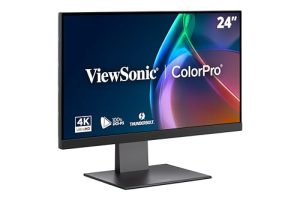
 ViewSonic VP2488-4K 24 Inch 4K UHD IPS Monitor24-Inch 4K8.33 x 21.27 x 20.42 inches13.7 poundsCheck on Amazon
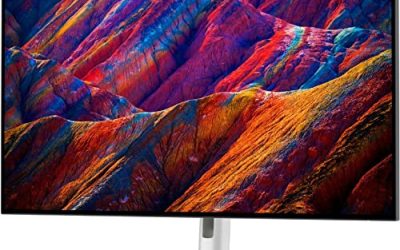
 Dell Ultra HD 4K Monitor P2415Q 24-Inch Screen24 inches22.31 x 19.67 x 8.07 inches12.4 poundsCheck on Amazon
The hard part of buying a 24-inch 4K monitor is that the size class barely exists. Most 4K panels jump straight to 27 inches, and many listings that surface under a 24-inch search are quietly QHD models or larger screens wearing a smaller name. The real decision is whether a listing is a genuine 24-inch class panel, roughly 23.8 to 24.5 inches, running the full 3840×2160 resolution, because that combination is what produces the unusually sharp pixel density this size is bought for.
This shortlist is for readers with compact desks, dual-monitor setups where two 27-inch screens will not fit, and anyone who wants retina-style text clarity without scaling headaches. Every pick below was checked against the screen size and resolution printed on its Amazon listing, and anything that fell outside the 24-inch class or below 3840×2160 was excluded.
Quick Picks
As an Amazon Associate we earn from qualifying purchases.
| Product | Best for | Key spec from title |
|---|---|---|
| ViewSonic VP2488-4K | Color work and a one-cable laptop desk | 24-inch 4K IPS with Thunderbolt 4 and 100W USB-C |
| AG Neovo EM2451 | A height-adjustable stand on a small desk | 23.8-inch UHD IPS with USB-C 65W and dual HDMI 2.1 |
| Dell P2415Q | A proven 4K panel with a full USB hub | 23.8-inch 4K IPS with DisplayPort out and 4 USB 3.0 ports |
How to Choose
Confirm the panel is truly 24-inch class and truly 4K
Start with the two numbers that define this category, because listings blur both. The diagonal should sit between 23.8 and 24.5 inches; a 23.6-inch viewable panel is a different, older class, and anything at 27 inches defeats the purpose. The resolution must read 3840×2160 exactly. Screens described as QHD, 2K or WQHD run 2560×1440, which at this size looks noticeably softer. If a listing’s specification table contradicts its headline, trust the table and walk away.
Understand why pixel density is the whole point
A 3840×2160 panel stretched across 24 inches packs pixels far more tightly than the same resolution on a 27-inch screen, and tighter than 1080p on any common desk size. Text edges, fine spreadsheet lines and small interface elements render without the stair-stepping that makes long reading sessions tiring. The trade-off is that operating systems need display scaling to keep text readable, so expect to run Windows or macOS scaling rather than native one-to-one sizing.
Match the ports to how the monitor will be fed
A single-cable desk depends on USB-C with power delivery, and the wattage matters: listings here range from 65W to 100W, which is the difference between charging a thin laptop and merely connecting it. Thunderbolt models add a built-in USB hub for a keyboard, mouse and webcam. If the monitor will serve a desktop PC and a console as well, count the HDMI and DisplayPort inputs on the listing instead of assuming a standard set.
Check the stand before you check the panel extras
At this size the monitor usually sits close, so height adjustment and pivot decide whether your neck or the screen does the adapting. Listings state tilt, swivel, pivot and height ranges separately, and cheaper models quietly drop height adjustment entirely. VESA 100mm compatibility is the fallback that lets a monitor arm fix a weak stand later. Color certifications and factory calibration are worth having for photo work, but they cannot rescue a screen fixed at the wrong height.
The 3 Best Options
ViewSonic VP2488-4K
ViewSonic’s VP2488-4K is the most complete package in this small category, aimed at people who split time between documents, photo editing and a laptop that lives on the same desk. The listing pairs the 24-inch 3840×2160 IPS panel with Pantone Validated color and wide gamut coverage, then adds Thunderbolt connectivity with enough power delivery to run a laptop from the monitor. For a desk where the screen is also the docking station, nothing else in the 24-inch 4K class matches that combination.
Specs
- Screen size: 24 inches (24-inch class)
- Resolution: 3840×2160 4K UHD, IPS panel
- Refresh rate: 60Hz
- Response time: 5ms GtG
- Color: 100 percent sRGB and 98 percent DCI-P3 coverage, Pantone Validated
- Connectivity: Thunderbolt 4 with 100W USB-C power delivery, USB hub, HDMI, DisplayPort
Best for: Laptop users who want one cable for video, data and charging, plus color-accurate work.
Watch out for: One marketplace source lists the viewable diagonal slightly under the 24 inches stated on the Amazon listing, so treat it as 24-inch class rather than an exact measurement.
ASIN: B0FD2Y4DBK
AG Neovo EM2451

The EM2451 is the straightforward desk monitor of the three, built around a 23.8-inch UHD IPS panel and a stand that adjusts the way office screens should. Its listing leads with ergonomics, height adjustment and pivot, alongside USB-C power delivery for a laptop and two HDMI 2.1 inputs for a PC and console. Color coverage is a step behind the ViewSonic on paper, but for mixed work, browsing and gaming at 60Hz it covers the essentials without paying for a professional color badge.
Specs
- Screen size: 23.8 inches
- Resolution: 3840×2160 UHD, IPS panel
- Pixel density: 185 PPI
- Refresh rate: 60Hz
- Color: 100 percent sRGB and 93 percent DCI-P3 coverage
- Connectivity: USB-C with 65W power delivery, 2 x HDMI 2.1, DisplayPort 1.4
- Stand: height adjustable with pivot
Best for: A single-screen desk that needs proper height adjustment and both a laptop and a console attached.
Watch out for: The 65W USB-C power delivery suits thin laptops; a large gaming laptop may still need its own charger under load.
ASIN: B0DVSRJYYT
Dell P2415Q
Dell’s P2415Q is the veteran of this category, a 23.8-inch 4K IPS monitor that has been sold for years and still circulates through third-party sellers in new condition. The listing’s strength is its port selection: DisplayPort output for daisy-chaining a second screen and four USB 3.0 ports make it a small hub as well as a display. It lacks USB-C entirely, so modern laptops need an adapter, but for a desktop PC setup that wants 4K sharpness in a small footprint it remains a rational buy.
Specs
- Screen size: 23.8 inches
- Resolution: 3840×2160 at 60Hz, IPS panel
- Brightness: 300 cd/m2
- Color: 99 percent sRGB coverage, 1.07 billion colors
- Connectivity: HDMI (MHL), DisplayPort, mini DisplayPort, DisplayPort out (MST), 4 x USB 3.0
- Stand: tilt, swivel, pivot and height adjustment, VESA 100mm mount
Best for: Desktop users who want daisy-chaining and a built-in USB hub in a 24-inch 4K screen.
Watch out for: This model is discontinued by Dell and current stock is third-party new, so check the seller and return terms on the listing before ordering.
ASIN: B00PC9HFNY
Which One Fits Your Situation
You dock a laptop and want one cable on the desk
Take the ViewSonic VP2488-4K. Its Thunderbolt connection carries the picture while the 100W power delivery charges the laptop and the built-in hub handles peripherals, so the desk stays clear. The Pantone Validated panel also means the same screen handles photo or design work without a second monitor.
Your desk is shallow and the screen sits close
Choose the AG Neovo EM2451. The 23.8-inch panel keeps the footprint small, and the height-adjustable, pivoting stand lets you drop the screen low or turn it vertical for documents. Dual HDMI 2.1 inputs mean a console can share the screen without swapping cables.
You run two screens from a desktop PC
The Dell P2415Q fits best, because its DisplayPort output supports daisy-chaining a second monitor from one PC output. The four USB 3.0 ports also centralize a keyboard, mouse and webcam. Accept the older design and the lack of USB-C as the price of that connectivity.
You mostly read, write and browse all day
Any of the three will serve, so decide by stand and ports. The tight pixel density at this size makes text the standout use case, and all three listings use IPS panels with full sRGB coverage. Pick the EM2451 if height adjustment matters most, or the VP2488-4K if a laptop shares the desk.
Common Mistakes
- Buying a 27-inch 4K monitor because a search page grouped it with 24-inch results, then finding it overwhelms the desk.
- Accepting a QHD 2560×1440 panel after reading a headline that said 4K in the marketing text but not in the specification table.
- Assuming USB-C on the listing means the monitor charges a laptop, when the port may carry video only or too few watts.
- Ignoring stand adjustment and discovering the screen sits too low, with no VESA mount as a fallback.
- Chasing a discontinued model from an unfamiliar seller without checking whether the listing is new, refurbished or a different regional variant.
Frequently Asked Questions
Is 4K on a 24-inch monitor actually sharper than on a 27-inch?
Yes. Both screens hold the same 3840×2160 pixels, so the smaller panel packs them more densely, around 185 PPI on the 23.8-inch models here. Text and fine detail render smoother, which is why this size class exists. The trade-off is that you will use operating system scaling to keep interface text at a comfortable size.
Will a 24-inch 4K monitor work for gaming?
It works well for slower-paced and strategy titles, and console play at 60Hz is fine on all three listings here. Fast competitive players usually prefer higher refresh rates, which this size class does not offer. If gaming is the priority over text clarity, a larger high-refresh screen is the better trade; if gaming shares a work desk, these are comfortable all-rounders.
Why are there so few 24-inch 4K monitors?
Panel makers concentrated 4K production on 27-inch and larger sizes, where the resolution jump is easier to market, so the 24-inch class was left with a handful of models, several now discontinued. That scarcity is exactly why listings need checking: many products tagged for this search are QHD screens or bigger panels that do not meet the size and resolution pairing.
Do I need Thunderbolt, or is regular USB-C enough?
Regular USB-C with power delivery is enough for a single laptop connection, as the AG Neovo shows with its 65W output. Thunderbolt on the ViewSonic adds a faster hub and stronger charging in the same cable, which matters if you attach storage or several peripherals through the monitor. For a desktop PC using DisplayPort or HDMI, neither is required.
FAQ
Is 4K on a 24-inch monitor actually sharper than on a 27-inch?
Will a 24-inch 4K monitor work for gaming?
Why are there so few 24-inch 4K monitors?
Do I need Thunderbolt, or is regular USB-C enough?
More from Amazon
Programs that pair well with the guide above. Offers and eligibility are set by Amazon and may change.
Free shipping on eligible items, Prime Video and more. Eligible new members can start with a free trial.
Start a Prime free trialAd-free music streaming. Eligible new subscribers can start with a free trial.
Try Music Unlimited freeA Prime membership for ages 18-24 with a trial period. Eligibility is set by Amazon.
See Prime for Young AdultsAudiobooks and podcasts to listen to on the go. Eligible new members can start with a free trial.
Try Audible freeAs an Amazon Associate we earn from qualifying purchases.