Our Top Picks
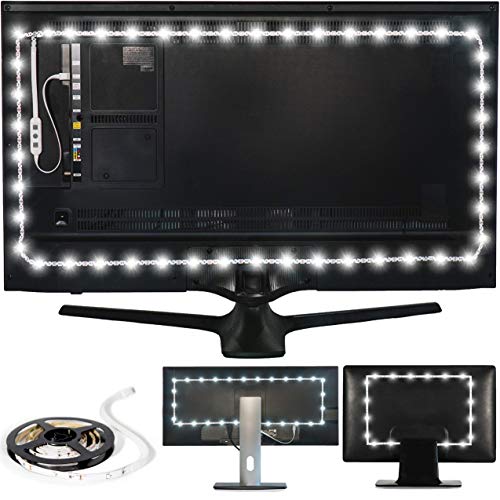 Power Practical USB Bias LightingWhite: X-Large (41-59 in TV)6.61 x 5.83 x 0.51 inchesCheck on Amazon
- Power Practical LED Lights for TV BacklightWhite: Medium (24-29 in TV)4.5 x 0.5 x 4.5 inches0.1 poundsCheck on Amazon


Bias lighting is a soft glow mounted behind a TV or monitor that washes the wall with light while the screen stays the brightest object in the room. The best bias lighting for most gaming setups is the Govee Envisual TV Backlight T2, because its dual cameras read the colors at the edges of the screen and extend them onto the wall in real time, which turns a flat panel into a wider field of color during play. Players who want accurate white light instead of color effects should look at the Luminoodle white kits, which use a fixed neutral white that matches the white point televisions are calibrated to. Budget shoppers who only need a simple glow behind a smaller screen can start with the Luminoodle Color kit for screens under 24 inches, while the Govee TV Backlight 3 Lite gives mid-range buyers camera-based screen sync without the dual-camera hardware of the T2.
As an Amazon Associate, we earn from qualifying purchases.
Table of Contents
- Quick Answer
- What Bias Lighting Does for a Gaming Setup
- White Glow or Screen Sync: Picking the Right Type
- How to Choose Bias Lighting for Your Screen Size
- The 5 Best Bias Lighting Kits
- Govee Envisual TV Backlight T2
- Govee TV Backlight 3 Lite
- Luminoodle USB Bias Lighting, White, X-Large
- Luminoodle USB Bias Lighting, True White, 24 to 29 Inch
- Luminoodle Color Bias Lighting, Under 24 Inch
- Bias Lighting Compared at a Glance
- How to Install Bias Lighting Behind a TV or Monitor
- Common Bias Lighting Mistakes to Avoid
- Frequently Asked Questions
- Conclusion
- Product and ASIN Reference
Quick Answer
The Govee Envisual TV Backlight T2 is the best bias lighting kit for most gaming TVs because it pairs a dual-camera color reader with a dense RGBIC strip, so the glow behind the screen follows explosions, skies, and neon streets as they happen. The Govee TV Backlight 3 Lite is the best mid-range screen-sync option, using a single camera with fish-eye correction to deliver the same kind of color extension at a lower tier. The Luminoodle White X-Large kit is the best accurate-white choice for larger TVs, giving a steady neutral glow that reduces eye fatigue without pulling attention away from the game. The Luminoodle True White kit for 24 to 29 inch screens is the best accurate-white choice for smaller monitors and desktop setups. The Luminoodle Color kit for screens under 24 inches is the best budget pick, offering fifteen ambient colors and ten brightness modes with a wireless remote for players who want a simple, colorful glow.
What Bias Lighting Does for a Gaming Setup
A television or monitor in a dark room is a bright rectangle floating in blackness. The eyes work harder in that setup because they keep adjusting between the bright screen and the dark wall around it, and long sessions can leave them feeling tired even when the game itself is comfortable to play. Bias lighting changes the balance by raising the brightness of the wall behind the screen, so the jump from screen to surroundings becomes smaller. The screen still looks just as bright and just as colorful, but the room around it stops feeling like a cave.
The effect also changes how contrast looks. A bright object on a dark background looks more intense when the background is truly black, and that intensity can make dark scenes in a game look crushed, with shadow detail disappearing into the murk. A soft glow behind the screen lifts the perceived black level of the room without lifting the black level of the panel itself, which helps dark corners of a game world stay readable. Horror games, night driving stages, and stealth missions all benefit, because the player can still see the shape of a doorway or the edge of a ledge in a dim scene.
There is a visual payoff too. A gaming room with a glowing halo behind the display looks finished in a way that a bare screen on a dark wall does not. The glow frames the setup, separates the desk or media unit from the wall, and gives the whole station a focal point that photographs well for streams and social posts.
Bias lighting is not the same as room lighting, and it is not the same as a desk lamp. A lamp in front of the screen throws light onto the panel and creates reflections, while a ceiling light overhead can glare on a glossy display. Bias lighting sits behind the screen and faces the wall, so none of its light reaches the panel directly. That placement is the whole trick, and it is why a strip stuck to the back of a TV does a job that no lamp in front of it can do.
The best kits in this guide all run from a USB port, which means most players can power them from the USB socket on the back of the television or monitor itself. When the screen powers on, the light powers on with it, and when the screen powers off, the light goes dark. That automatic behavior matters more than it sounds, because a bias light that needs a separate switch gets forgotten, left on overnight, or left off during the sessions when it would help most.
White Glow or Screen Sync: Picking the Right Type
Bias lighting kits fall into two families, and the choice between them decides most of the buying decision. Accurate-white kits produce one fixed color temperature, a neutral white that matches the standard white point used to calibrate televisions. Screen-sync kits use a camera, or a software link, to read the colors at the edges of the picture and reproduce them on the wall behind the screen, so the glow changes with the game.
Accurate-white kits are the quieter choice. They do one thing and they do it consistently: a steady, neutral halo that never distracts, never clashes with the picture, and never needs adjusting. Players who care about picture accuracy prefer this type, because a colored glow behind the screen can shift how colors on the panel appear to the eye. A warm orange halo can make a cool blue scene look warmer than the developers intended, while a white halo keeps the perception of color honest. Competitive players also tend to prefer white, because a changing glow in the peripheral vision can pull attention during a tense match.
Screen-sync kits are the showier choice. The glow becomes part of the game, spilling the color of a sunset, a muzzle flash, or a health bar warning onto the wall. In a dark room the effect makes the screen feel larger than it is, because the color field extends past the bezel. Open-world games with strong color palettes benefit most, since the wall behind the television shifts from teal ocean to amber desert as the player travels. The trade-off is that the effect is always visible, and some players find it distracting during dialogue-heavy or menu-heavy sessions. Most sync kits let the player switch to a fixed color or a plain white mode, which solves that problem at the cost of the feature that justified the kit in the first place.
A third, smaller family mixes the two ideas: color kits with a fixed palette and a remote, but no camera and no screen reading. The Luminoodle Color kit in this guide belongs to that family. It gives fifteen ambient colors and ten brightness modes, so the player can pick a color that matches the room or the mood, but the color stays put until the player changes it. That middle ground suits players who want a colorful room without the cost or the camera hardware of a sync kit.
The right type depends on how the room is used. A dedicated gaming room with a large television and dark walls rewards a screen-sync kit, because the wall has room to show the effect and the darkness makes it vivid. A shared living room where the television also shows movies, sports, and news rewards an accurate-white kit, because the glow stays neutral for every kind of content. A desktop monitor setup with a smaller screen rewards a compact white kit or a small color kit, because the wall space behind a monitor is limited and the viewer sits close enough that a changing glow can feel overwhelming.
Color temperature deserves a note here. Accurate-white bias lights aim for 6500K, the daylight white point that video standards use. Cheaper white strips often drift toward blue or purple, which looks cold and clinical, or toward yellow, which looks dingy against a calibrated screen. The Luminoodle white kits are built around a true white output, and that is the main reason they appear in this guide rather than a generic strip. A bias light that cannot hold a neutral white is not doing the job it was bought for, no matter how bright it is.
How to Choose Bias Lighting for Your Screen Size
Screen size is the first specification to check, because a bias lighting strip is cut to a length that fits a range of screen sizes, and a strip that is too short leaves dark corners while a strip that is too long bunches up or hangs past the edge. The kits in this guide are named by the screen sizes they fit, and that naming is worth trusting over a generic length figure. A strip sold for 55 to 65 inch televisions is shaped to run around three sides of a panel in that range, with corner turns built into the layout, while a strip sold for screens under 24 inches is a short run meant for a small monitor.
Measure the television or monitor before ordering, and measure the back rather than the front. The diagonal size printed on the box is the starting point, but the strip has to follow the actual back panel, and ultra-thin televisions, curved monitors, and displays with a central stand can change how much flat surface is available for mounting. A strip that runs along the top and sides of the back panel needs a clear path, and a protruding stand mount or a recessed port cluster can force a detour.
Power is the second check. Most bias lighting kits draw power from a USB port, and most modern televisions have at least one USB socket on the back. Check that the socket stays powered when the television is on and cuts power when it is off, because some sockets stay live in standby and would leave the light glowing all night. Monitors are less consistent: some have a USB port that only works when the monitor is awake, some have none at all, and in that case the strip needs a separate USB adapter plugged into a wall outlet or a powered hub. The Govee kits in this guide use an adapter rather than a plain USB cable, because their camera and Wi-Fi hardware draw more power than a television USB port reliably supplies, so plan for a nearby outlet for those two.
Control is the third check. Accurate-white kits usually use a small inline controller or a simple remote, and the Luminoodle kits in this guide use a wireless remote with brightness steps. Screen-sync kits use an app, and the Govee kits add voice control through common smart home assistants. App control brings scenes, schedules, and music sync, but it also brings setup steps: a Wi-Fi connection, an account, and a calibration routine for the camera. Players who want the light to simply turn on with the television should weigh that setup cost against the effect.
Camera placement is the fourth check, and it applies only to the sync kits. The camera mounts on top of the television or monitor and looks down at the screen, reading the colors at the edges. It needs a clear view, which means no soundbar blocking the bottom edge, no shelf overhanging the top, and no bright lamp shining directly into the lens. The Govee T2 uses two cameras to cover the screen more evenly, while the 3 Lite uses a single camera with fish-eye correction. Both need a short calibration step in the app, where the player drags the corner markers to match the screen edges, and that calibration is what makes the color matching accurate rather than approximate.
Wall color is the fifth check, and it is the one buyers forget most often. Bias lighting works best on a light, neutral wall, because the wall reflects the glow evenly. A dark wall absorbs the light and dulls the effect, while a strongly colored wall tints it: a red wall turns a white glow pink, and a blue wall turns it cold. Players with dark or colored walls should choose a brighter kit and a wider strip, or accept that the halo will be subtler than the product photos suggest.
The 5 Best Bias Lighting Kits
The five kits below cover the full range of the category, from a simple color strip for a small monitor to a dual-camera sync system for a large gaming television. Each one was chosen because it does its specific job well, and because its published specifications and listing details give a clear picture of what a buyer will actually receive. The comparison favors kits that fit the screen size they claim, control cleanly, and mount securely, because a bias light that peels off the back of the television after a week is worse than no bias light at all.
Govee Envisual TV Backlight T2

The Govee Envisual TV Backlight T2 is the best bias lighting kit for most gaming televisions because it combines the most complete screen-sync hardware in this guide with a strip dense enough to show smooth color gradients. Two cameras sit on top of the television and read the picture together, which gives the system a wider and more even view of the screen than a single camera can manage. The strip itself carries double the light beads of the earlier single-camera design, so a sunset that fades from orange to pink shows as a smooth blend on the wall instead of a stepped band of color. For a player sitting in a dark room with a large television, the effect is the closest thing to the screen growing beyond its bezel.
The T2 is built for televisions from 55 to 65 inches in the version picked here, with an 11.8 foot strip that runs around the back of the panel. The strip uses RGBIC technology, which means individual segments of the strip can show different colors at the same time, and that is what lets the left side of the wall glow blue while the right side glows orange when the game scene splits that way. A single-color strip cannot do that, and the difference is visible the first time a game cuts from a desert to an ocean. The cameras use a gravity-stabilized mount, which matters for ultra-thin televisions where a top-mounted camera can tilt or slip, and the dual-camera layout also helps when the television sits low and the viewing angle is steep.
Control runs through the Govee Home app over Wi-Fi, with voice control through common smart home assistants and a music sync mode that lets the strip react to sound through a built-in microphone. The app holds the calibration routine, where the player aligns the camera view to the corners of the screen, and it holds scene presets for movie nights, parties, and plain white bias lighting when the sync effect is not wanted. That white mode matters: it turns the most expensive kit in this guide into a capable accurate-white bias light at the tap of a button, which means the T2 can serve both roles rather than forcing the player to choose between them permanently.
Installation takes longer than a simple strip because the cameras need mounting and calibration, and the strip needs to be laid out around the back of the television before it is stuck down. Govee supplies the adhesive and the clips, and the strip is flexible enough to follow the corners of the panel, but the player should dry-fit the whole run first, with the television face down on a soft surface or with a second person holding it steady. The calibration step takes a few minutes in the app, and it is worth doing carefully, because a misaligned camera reads the wall instead of the screen edge and the colors drift.
The T2 suits a dedicated gaming room or a living room television that sees heavy gaming use, where the wall behind the screen is light enough to show the effect and the room can go dark. It is the most capable kit here, and it is also the one with the most setup, so players who want a light that simply turns on and stays white should look at the Luminoodle kits instead.
Specs
- Type: Camera-based screen-sync bias lighting kit with dual cameras
- Fit: 55 to 65 inch televisions
- Strip length: 11.8 ft
- Light beads: Double-density RGBIC strip with independently controlled segments
- Camera: Dual cameras with gravity-stabilized mounting
- Control: Govee Home app over Wi-Fi, voice control, music sync mode
- Power: Adapter powered
- Best for: Immersive screen-sync glow on large gaming televisions
Govee TV Backlight 3 Lite
The Govee TV Backlight 3 Lite is the best mid-range screen-sync bias light because it keeps the camera-based color matching of the T2 while trimming the hardware to a single camera and a simpler strip. A single fish-eye camera sits on top of the television and reads the whole screen, with correction built into the software to straighten the wide-angle view. The result is a glow that follows the game closely enough for most players to notice the difference from a fixed-color strip, without the dual-camera hardware that pushes the T2 into the premium tier.
The 3 Lite version picked here fits televisions from 55 to 65 inches, with an 11.8 foot RGBICW strip. The W in that name matters: each lamp bead carries four colors in one, including a dedicated white, which means the strip can show a clean white when the player switches to bias lighting mode, and can show richer mixed colors when it is syncing to the game. Older RGB strips without a white channel tend to produce a muddy white that leans blue or pink, and the dedicated white bead is the fix. The strip runs on Wi-Fi through the Govee Home app, with voice control and the same scene presets as the T2, including a music mode that pulses the glow with sound.
Fish-eye correction is the feature that makes a single camera workable. A wide-angle lens sees more of the screen from a short distance, but it bends the edges of the image, and uncorrected bending would make the strip read the wrong part of the picture. The 3 Lite corrects that bend in software before it maps colors to the strip, so the left edge of the wall matches the left edge of the screen and the right edge matches the right. Calibration in the app still matters, and the player should take the time to drag the corner markers to the true corners of the panel, because the correction assumes the camera is looking at the full screen.
The 3 Lite suits players who want the screen-sync effect but do not need the smoothest gradients or the widest camera coverage. In a typical living room with a 55 or 65 inch television, the difference between the 3 Lite and the T2 is visible side by side but easy to miss in normal play, especially when the room is dark and the game is fast. The 3 Lite is also the simpler install of the two Govee kits, with one camera to mount instead of two.
One practical note: the 3 Lite uses an adapter for power, like the T2, so the player needs a free outlet near the television. The strip itself sticks to the back of the panel with adhesive, and the camera mounts on the top edge. Once installed, the light follows the television power state through the app settings, and the player can switch between sync, fixed color, and white modes without touching the hardware.
Specs
- Type: Camera-based screen-sync bias lighting kit with single fish-eye camera
- Fit: 55 to 65 inch televisions
- Strip length: 11.8 ft
- Light beads: RGBICW strip with four colors in one lamp bead, including dedicated white
- Camera: Single camera with fish-eye correction
- Control: Govee Home app over Wi-Fi, voice control, music sync mode
- Power: Adapter powered
- Best for: Mid-range screen-sync glow without dual-camera hardware
Luminoodle USB Bias Lighting, White, X-Large
The Luminoodle USB Bias Lighting kit in white, sized X-Large for televisions from 41 to 59 inches, is the best accurate-white bias light for larger screens because it does the simplest version of the job with the least fuss. The strip produces a fixed true white glow, runs from a USB port, and is controlled by a small inline controller or remote, with no app, no camera, and no calibration. For a player who wants the eye-comfort benefit of bias lighting without any color effects, that simplicity is the point, and the kit delivers it at a tier below the camera-based systems.
True white is the key specification here. Many inexpensive strips advertise white but produce a cold blue or a warm yellow that shifts how the picture looks, and the eye notices the mismatch even when it cannot name it. The Luminoodle white strip is built to produce a neutral white that sits comfortably behind a calibrated television, so the glow reads as clean light rather than as a color. That neutrality matters most during long sessions, when the eyes are already working hard and a tinted glow adds a subtle strain that builds over hours.
The X-Large size fits televisions from 41 to 59 inches, which covers the most common living room gaming televisions short of the largest panels. The strip is a single run that mounts to the back of the television with adhesive, and it draws power from the television USB port, so it turns on and off with the screen in most setups. That automatic behavior is the feature that makes a simple kit feel polished: there is nothing to remember, nothing to charge, and nothing to connect to Wi-Fi. The player sticks the strip on, plugs it in, and the glow is there every time the television turns on.
Installation is the easiest in this guide. Clean the back of the television, lay the strip along the top and sides, press it into place, and plug the USB connector into the television. The strip is flexible enough to follow the panel edges, and the adhesive is strong enough to hold on the smooth plastic or metal back of a modern television. Players with a wall-mounted television should check the gap behind the panel first, because a strip pressed flat against the wall has nowhere to throw its light, and a gap of a few inches gives the glow room to spread.
The white X-Large kit suits a shared living room television, a player who watches as much as they game, and anyone who finds changing colors distracting. It also suits a second television or a bedroom setup where an app-controlled kit would be unnecessary. Its limitation is also its strength: it will never sync to the game, never change color, and never surprise the player, which is exactly what a large part of the audience wants from bias lighting.
Specs
- Type: Fixed true white USB bias lighting strip
- Fit: 41 to 59 inch televisions
- Light color: True white, neutral tone for reduced eye fatigue
- Control: Inline controller with brightness adjustment
- Power: USB powered from the television port
- Mounting: Adhesive strip for the back of the television
- Best for: Accurate-white glow on larger living room televisions
Luminoodle USB Bias Lighting, True White, 24 to 29 Inch
The Luminoodle USB Bias Lighting kit in true white, sized for screens from 24 to 29 inches, is the best accurate-white bias light for smaller monitors and desktop gaming setups. It takes the same neutral white approach as the X-Large kit and scales it down to the size of a desktop monitor, where the viewer sits close and the wall behind the screen is only a short distance away. At that range a bright or tinted glow would be overwhelming, so the smaller strip and the steady white output are matched to the space.
Desktop gaming has its own lighting problem. The monitor sits on a desk against a wall, the room light is often a single overhead fixture, and the contrast between the bright panel and the dark wall behind it is sharper than in a living room because the viewer is closer. A bias light behind the monitor softens that contrast at exactly the distance where the eyes feel it most, and the effect is noticeable during long work or play sessions that stretch past midnight.
Power comes from a USB port, and most monitors in this size range have a USB port on the back or the side that can drive the strip. If the monitor has no USB port, a powered hub or a small wall adapter covers the need, and the strip draws little enough power that almost any USB source works. The strip mounts with adhesive to the back of the monitor, and because the run is short, installation takes minutes: clean the surface, press the strip along the top and sides, plug it in, and the glow is live.
The fixed white output is the right choice for a desk. A color-changing glow behind a monitor competes with the game for attention at close range, and a white glow simply frames the screen and eases the eyes. Players who stream from a desk get a second benefit, because the soft light behind the monitor reduces the contrast that makes a webcam image look harsh, and the neutral white does not tint the player face on camera the way a colored glow would.
This kit also suits a bedroom television in the same size range, a dorm room setup, or a second monitor on a dual-display desk. Its limits are honest: it will not sync to the game, it will not change color, and it will not impress anyone looking for a light show. What it will do is sit behind the screen, turn on with it, and quietly make long sessions easier on the eyes, which is the job most bias lighting is bought to do.
Specs
- Type: Fixed true white USB bias lighting strip
- Fit: 24 to 29 inch televisions and monitors
- Light color: True white, neutral tone for reduced eye fatigue
- Control: Inline controller with brightness adjustment
- Power: USB powered from the screen USB port
- Mounting: Adhesive strip for the back of the screen
- Best for: Accurate-white glow on desktop monitors and small screens
Luminoodle Color Bias Lighting, Under 24 Inch
The Luminoodle Color Bias Lighting kit for screens under 24 inches is the best budget bias light in this guide because it gives a small setup a colorful glow with a remote control and no app, no camera, and no setup beyond sticking the strip on. Fifteen ambient colors and ten brightness modes cover the range from a calm blue to a warm amber, and the wireless remote lets the player change the mood without reaching behind the monitor. For a compact desk, a dorm room, or a younger player first setup, that is enough.
Small screens need small kits, and the Color kit is cut for televisions and monitors under 24 inches, which covers compact desktop displays, small bedroom televisions, and portable monitors used as a second screen. The strip is a short USB-powered run with a built-in controller, and the remote handles color and brightness from across the room. Ten brightness steps give finer control than the single on-off switch of the cheapest strips, so the player can dim the glow for a late-night session or brighten it when the room light is on.
Color choice is a matter of taste and a matter of use. A soft blue or green glow suits a relaxed evening, a warm amber suits a cozy room, and a red glow suits a player who wants the room to feel like a cockpit. The kit holds the chosen color until the remote changes it, so there is no surprise shift mid-game and no app notification pulling attention away. That steadiness is the difference between a color kit and a sync kit: the Color kit sets a mood, while the Govee kits follow the game.
Installation matches the other Luminoodle kits: clean the back of the screen, press the adhesive strip along the top and sides, plug the USB connector into the screen or a nearby USB source, and use the remote to pick a color and a brightness. The strip is light and flexible, and the short run means there is little excess to manage. Players should check the USB port on a small monitor before ordering, because some compact displays have no USB output, and in that case a small wall adapter or a powered hub is the fix.
The Color kit suits a budget desk, a first gaming setup, or a room where the bias light is as much decoration as eye comfort. It is the least expensive way in this guide to get a glow behind the screen, and it is the only kit here that treats color as the main feature rather than as an extra. Players who later want screen sync can step up to a Govee kit, but many small-desk players never feel the need, because the fixed color does the job they bought it for.
Specs
- Type: Color USB bias lighting strip with wireless remote
- Fit: Screens under 24 inches
- Light colors: 15 ambient color options
- Brightness: 10 brightness modes
- Control: Wireless remote with built-in controller
- Power: USB powered
- Mounting: Adhesive strip for the back of the screen
- Best for: Budget colorful glow on small monitors and compact setups
Bias Lighting Compared at a Glance
| Product | Type | Screen fit | Control | Tier |
|---|---|---|---|---|
| Govee Envisual TV Backlight T2 | Camera screen sync, dual cameras | 55 to 65 inch | App, voice, music sync | Premium |
| Govee TV Backlight 3 Lite | Camera screen sync, single camera | 55 to 65 inch | App, voice, music sync | Mid-range |
| Luminoodle USB Bias Lighting, White, X-Large | Fixed true white | 41 to 59 inch | Inline controller | Mid-range |
| Luminoodle USB Bias Lighting, True White, 24 to 29 Inch | Fixed true white | 24 to 29 inch | Inline controller | Budget |
| Luminoodle Color Bias Lighting, Under 24 Inch | Fixed color, remote | Under 24 inch | Wireless remote | Budget |
How to Install Bias Lighting Behind a TV or Monitor
Start by cleaning the back of the television or monitor with a dry cloth, because dust and grease are the main reason adhesive strips peel off after a few weeks. Lay the strip out on a table first and check the length against the back of the screen, marking where the corners will fall. Most strips are designed to run along the top edge and down both sides, leaving the bottom edge open so the glow does not spill onto the stand or the media unit. Follow the layout in the instructions for the specific kit, because the camera kits need the strip to sit a set distance from the edge for the color matching to work.
Stick the strip down slowly, pressing each section firmly for a few seconds before moving on. Corners need extra care: bend the strip gently rather than creasing it, and use the supplied clips where the instructions call for them. A creased strip can damage the light beads inside, and a strip that is only lightly pressed will peel when the television warms up during a long session. If the television is wall-mounted, install the strip before hanging the panel, because reaching behind a mounted screen to press adhesive is awkward and the result is rarely neat.
Power is the next step. For the Luminoodle kits, plug the USB connector into the television or monitor USB port and check that the light turns on with the screen and off with it. If the port stays live in standby, switch the strip to a port that follows the power state, or use a small switched adapter. For the Govee kits, plug the adapter into a wall outlet and route the cable so it does not dangle in front of the screen or pull on the camera mount. Cable management matters here, because a loose cable behind a television is easy to snag when the panel is moved for cleaning.
Camera kits need calibration after the hardware is mounted. Open the app, place the camera on the top edge of the television, and follow the calibration routine to align the corner markers with the corners of the screen. Do this with the room light on and the screen showing a bright, colorful image, because the camera needs to see the edges clearly. Repeat the calibration if the television is moved, the camera is bumped, or the color matching starts to drift, because a small shift in the camera angle shows up as a large shift in the glow.
Test the result at night with the room dark and a game running. The glow should be even around the screen, with no bright hot spots and no dark corners. If one side looks brighter than the other, check that the strip is pressed flat and that nothing is blocking the wall behind the television. Dim the strip until the glow is noticeable but not distracting, because a bias light that is too bright becomes a lamp, and a lamp behind the screen defeats the purpose.
Common Bias Lighting Mistakes to Avoid
The most common mistake is buying the wrong size. A strip made for a 65 inch television will not fit a 32 inch monitor, and a strip made for a small monitor will leave a large television with dark corners and an uneven halo. Check the screen fit range on the listing, not just the strip length, because the fit range accounts for the corner turns and the mounting layout. When in doubt between two sizes, choose the one whose range centers on the screen size rather than the one that barely covers it.
The second mistake is mounting the strip on the front edge of the screen or on the bezel where it can be seen. Bias lighting is meant to be hidden, with only the glow visible, and a strip that peeks out from behind the panel looks unfinished and throws direct light into the room. Keep the strip a short distance in from the edge of the back panel, so the panel itself blocks the direct view of the beads.
The third mistake is choosing a color that fights the game. A red glow behind a horror game can look dramatic, but a red glow behind a bright cartoon platformer looks wrong, and a blue glow behind a desert scene looks cold. Fixed-color kits should be set to a color that suits the room rather than the game, or to white when the game changes often. Screen-sync kits solve this by following the picture, but they need calibration to do it well, and an uncalibrated camera produces colors that lag or mismatch the scene.
The fourth mistake is ignoring the wall. A bias light behind a television that sits flush against a dark wood panel will barely show, while the same light behind a television on a white wall will glow brightly. Players with dark walls should choose a brighter kit, a wider strip, or a white backing board, and players with glossy walls should expect a hot spot where the light is strongest. The wall is half the product, and a kit that looks great in a product photo can look dim in a room with the wrong wall.
Frequently Asked Questions
What is bias lighting and why do gamers use it?
Bias lighting is a soft light mounted behind a television or monitor that washes the wall with a gentle glow while the screen stays the brightest object in the room. Gamers use it because it reduces the contrast between a bright screen and a dark room, which eases eye fatigue during long sessions, and because it makes dark scenes easier to read by lifting the perceived black level of the surroundings without changing the picture itself.
Is bias lighting better in white or in color?
White is better for picture accuracy and for long sessions, because a neutral white glow does not shift how colors on the screen appear to the eye. Color is better for atmosphere and for rooms where the glow is part of the decoration, and screen-sync kits offer the best of both by following the game when that effect is wanted and switching to white when it is not. Players who share the television with family or who watch movies on the same screen usually prefer white, while players with a dedicated gaming room often prefer color or sync.
Do I need a camera-based bias lighting kit for gaming?
A camera-based kit is not required, and many players are happy with a fixed white or fixed color strip. Camera kits earn their place when the player wants the glow to follow the game, because no fixed kit can do that, and the effect is most impressive on a large television in a dark room. Players who sit close to a monitor, who play mostly competitive games, or who find moving light distracting should choose a fixed kit instead and save the difference.
How do I pick the right size bias lighting kit for my TV?
Match the kit to the screen size range printed on the listing, not just to the strip length, because the range accounts for the corner turns and the mounting layout. Measure the diagonal size of the television or monitor, check that the back panel has a clear path for the strip, and choose the size whose range centers on the screen rather than one that barely covers it. A strip that is too short leaves dark corners, while a strip that is too long bunches up and peels.
Conclusion
Bias lighting is one of the simplest upgrades a gaming setup can get, and it is one of the few that helps both comfort and looks at the same time. A soft glow behind the screen eases the eyes, makes dark scenes easier to read, and turns a bare panel on a dark wall into a finished station. The kits in this guide cover every way to get there: the Govee Envisual TV Backlight T2 for players who want the most immersive screen-sync glow on a large television, the Govee TV Backlight 3 Lite for players who want the same effect at a mid-range tier, the Luminoodle white kits for players who want a steady, accurate glow on a large television or a desktop monitor, and the Luminoodle Color kit for players who want a simple, colorful glow on a small screen. Measure the screen, check the wall, pick the type that matches how the room is used, and install the strip carefully, and the glow will be there every time the screen turns on.
Product and ASIN Reference
| Product | ASIN |
|---|---|
| Govee Envisual TV Backlight T2, 55 to 65 Inch | B0BCQ9YQYW |
| Govee TV Backlight 3 Lite, 55 to 65 Inch | B0CHS2BGHY |
| Luminoodle USB Bias Lighting, White, X-Large, 41 to 59 Inch | B076X89GRW |
| Luminoodle USB Bias Lighting, True White, 24 to 29 Inch | B01BKU7B7I |
| Luminoodle Color Bias Lighting, Under 24 Inch | B01LG99O0K |
More from Amazon
Programs that pair well with the guide above. Offers and eligibility are set by Amazon and may change.
Free shipping on eligible items, Prime Video and more. Eligible new members can start with a free trial.
Start a Prime free trialAd-free music streaming. Eligible new subscribers can start with a free trial.
Try Music Unlimited freeA Prime membership for ages 18-24 with a trial period. Eligibility is set by Amazon.
See Prime for Young AdultsAudiobooks and podcasts to listen to on the go. Eligible new members can start with a free trial.
Try Audible freeAs an Amazon Associate we earn from qualifying purchases.