
Our Top Picks
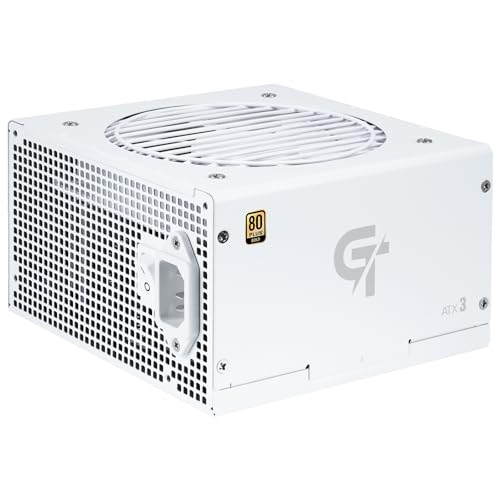 SAMA GT850 ATX 3.1 Fully Modular Standard GamingGold GT850 White5.5 x 5.9 x 3.3 inches3.7 PoundsCheck on Amazon
The CORSAIR RM850e (2025) is the best fully modular power supply on this page for most builders: 850 watts is enough for a high-end gaming PC, the unit is ATX 3.1 certified with a native 12V-2×6 cable, and every cable detaches so you only install the ones your build needs. The RM1000e is the same design for larger systems. “Fully modular” means that even the 24-pin motherboard cable and the CPU cables unplug from the unit, which makes neat routing far easier than with a fixed-cable supply.
Quick List
- CORSAIR RM850e (2025) – best overall for a high-end gaming build with a modern graphics card
- CORSAIR RM1000e (2025) – best for a power-hungry build or room to add a bigger GPU later
- AIJS Velasy 8-pin CPU cable, black – accessory for tidying CPU power routing in a dark build (not a power supply)
- Apevia Galaxy 650W 80+ Gold – best for a mainstream build that wants a fully modular supply at a lower wattage
- AIJS Velasy 8-pin CPU cable, white – accessory for a white-themed build (not a power supply)
- SAMA GT850 850W, white – best for a white case that needs 850 watts and a matching finish
Which One Is Right for You?
| If you… | Choose |
|---|---|
| run a top-tier GPU and CPU and want proven features | CORSAIR RM1000e (2025) |
| want the best balance of wattage and features for gaming | CORSAIR RM850e (2025) |
| are building a white PC with 850 watts of capacity | SAMA GT850 White |
| have a mid-range GPU and a modest CPU | Apevia Galaxy 650W 80+ Gold |
| already own a compatible power supply and want a cleaner CPU cable in black | AIJS Velasy 8-pin cable, black |
| want the same CPU cable upgrade for a white build | AIJS Velasy 8-pin cable, white |
| need a native 12V-2×6 cable for a current graphics card | CORSAIR RM850e or RM1000e |
Read the table as two separate decisions. The first is the supply itself: wattage, standard and finish. The second is whether you want to replace any cables for looks, which only matters after the first is settled. A neat build comes mostly from picking a fully modular unit and routing carefully, not from adding accessories. Four of these six products are power supplies. The two AIJS items are replacement CPU power cables, so they only make sense if you already own a supply with a matching modular connector. If you are choosing a new unit, pick the wattage first, then decide between the black Corsair units and the white SAMA.

CORSAIR RM850e (2025) ATX 3.1 PCIe 5.1 Ready 850W Power Supply – Black | Native 12V-2x6 Cable Included, Low-Noise, Fully Modular, Cybenetics Gold, Modern Standby Mode, NA
Chosen because it specifies Black and Native 12V-2x6 Cable Included.
View on Amazon
CORSAIR RM1000e (2025) ATX 3.1 PCIe 5.1 Ready 1000W Power Supply – Black | Native 12V-2x6 Cable Included, Low-Noise, Fully Modular, Cybenetics Gold, Modern Standby Mode, NA
Chosen because it specifies Black and Native 12V-2x6 Cable Included.
View on Amazon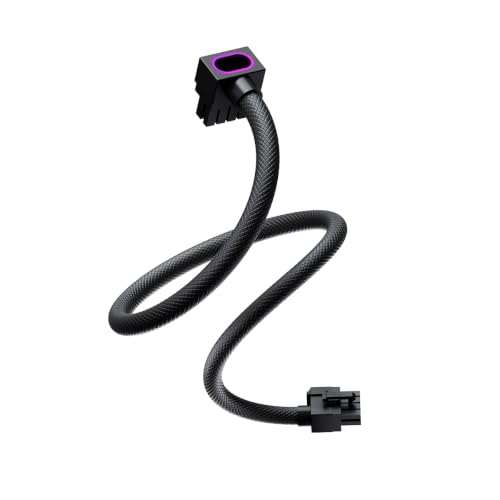
AIJS Velasy-8PIN CPU Modular Cable, 90°ARGB 8 Pin EPS Cable,70CM,Black | 18AWG for MSI,Corsair,Lian-Li,A-SUS,Thermaltake,NZXT,CoolerMaster,Seasonic and More Fully Modular PSUs.Not Extension Cable
Chosen because it specifies 90°ARGB 8 Pin EPS Cable and 70CM.
View on Amazon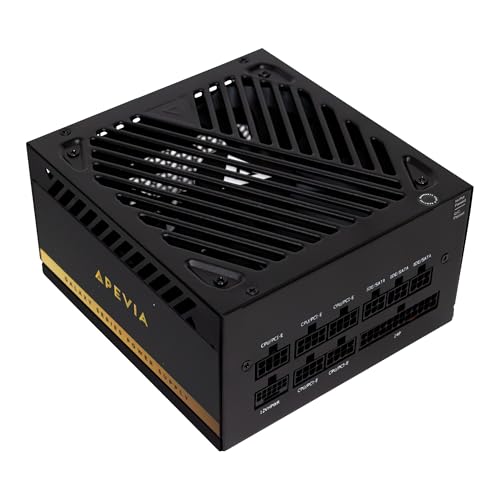
Apevia Galaxy 650W 80+ Gold ATX 3.1 Fully Modular Gaming PSU, PCIe 5.1 Ready 12VHPWR Cable, 135mm Silent FDB Fan, Japanese Capacitors, Reliable Power Supply for RTX 40/50 Series
Chosen because it specifies PCIe 5.1 Ready 12VHPWR Cable and 135mm Silent FDB Fan.
View on Amazon
AIJS Velasy-8PIN CPU Modular Cable, 90°ARGB 8 Pin EPS Cable,70CM,White | 18AWG for MSI,Corsair,Lian-Li,A-SUS,Thermaltake,NZXT,CoolerMaster,Seasonic and More Fully Modular PSUs.Not Extension Cable
Chosen because it specifies 90°ARGB 8 Pin EPS Cable and 70CM.
View on AmazonSAMA GT850 ATX 3.1 Fully Modular Standard Gaming 850W Power Supply White | 80+ Cybenetics Gold Rated PSU, Native 450W PCIe 5.1 12V-2x6, Japanese Capacitors, 120mm FDB ECO Silent Fan, 5 Year Warranty
Picked as a relevant option in this category.
View on AmazonAll 6 Picks in Detail
1. CORSAIR RM850e (2025) – Best Overall for a High-End Gaming Build
As an Amazon Associate we earn from qualifying purchases at no extra cost to you.

The RM850e sits in the middle of what most enthusiast builds need, and the listing hits every modern requirement: 850 watts, ATX 3.1 and PCIe 5.1 readiness, a native 12V-2×6 cable in the box and fully modular cabling. The fan is a 120mm rifle-bearing design with a fan curve tuned to stay quiet under load, and the listing mentions 105°C-rated capacitors and Modern Standby compatibility. It also lists a Cybenetics efficiency certification, so confirm the exact tier on the product page.
- 850W, ATX 3.1, PCIe 5.1 ready
- Fully modular cables
- Native 12V-2×6 cable included
- 120mm rifle bearing fan
- 105°C-rated capacitors
- Black finish; about 5.91 x 5.51 x 3.35 inches per the listing
Pros
- Native 12V-2×6 cable avoids adapters
- Quiet fan curve and a compact body
Cons
- Black finish only, so it does not suit a white build
- Efficiency tier is not stated in the listing name
Choose it over the RM1000e unless your build truly needs more than 850 watts, since the extra headroom is wasted on most gaming systems.
2. CORSAIR RM1000e (2025) – Best for High-Wattage Systems and Future Upgrades

The RM1000e uses the same platform as its smaller sibling, scaled up to 1000 watts. It lists ATX 3.1, PCIe 5.1 readiness, a native 12V-2×6 cable, fully modular cabling, a 120mm rifle-bearing fan and 105°C capacitors. The 1000W rating is aimed at systems with a top-end graphics card, a high-power processor and plenty of drives and fans, or at buyers who want headroom so the supply rarely works near its limit.
- 1000W, ATX 3.1, PCIe 5.1 ready
- Fully modular cables
- Native 12V-2×6 cable included
- 120mm rifle bearing fan
- 105°C-rated capacitors
- Black finish; about 5.91 x 5.51 x 3.35 inches per the listing, slightly heavier than the 850W unit
Pros
- Plenty of capacity for the largest single-GPU builds
- Same compact size and quiet-fan design as the 850W model
Cons
- More capacity than most builds will use
- Black finish only
Next to the SAMA GT850, it offers a higher ceiling and a recognizable brand, but not the white styling.
3. AIJS Velasy 8-Pin CPU Modular Cable, Black – Accessory for Cleaner CPU Routing

This is not a power supply. It is a 70 centimeter, 90-degree, 8-pin EPS cable with ARGB lighting, and it appears in the set because it speaks to the page topic of clean cable management. It only works if its modular end matches your supply’s pinout, and that is where the risk lies: modular connectors look alike between brands but are wired differently, and a wrong cable can damage components. The listing text claims compatibility with several brands, so confirm your exact power supply model before ordering. The product name does not state how the lighting is controlled, so confirm that on the listing too.
- 8-pin EPS CPU power cable, not a standalone power supply
- 70 cm length with a 90-degree connector
- ARGB lighting; control method: confirm on listing
- Black finish
- Compatibility depends on your exact power supply model
- Wire gauge, per the white variant’s listing: 18AWG; confirm on this listing
Pros
- Right-angle connector can tuck neatly behind the motherboard
- Adds lighting without replacing the power supply
Cons
- Only useful with a compatible modular supply
- Third-party cables carry a safety risk if the pinout is wrong
It appears to be the same cable as the white AIJS version in a different color, so choose between them on case color alone.
4. Apevia Galaxy 650W 80+ Gold – Best for a Mainstream Fully Modular Build
The Galaxy 650W is the most modest power supply in the set, and for many gaming PCs that is the point. The listing names a 650W rating, 80 PLUS Gold efficiency, ATX 3.1, PCIe 5.1 readiness with a 12VHPWR cable, a 135mm silent fluid-dynamic-bearing fan and Japanese capacitors. It is fully modular, which is what this page is about. It suits a system with a mid-range graphics card and a mainstream processor, but not one built around a high-wattage GPU.
- 650W, 80 PLUS Gold
- ATX 3.1, PCIe 5.1 ready
- Fully modular cables
- 12VHPWR cable listed; connector naming may differ from 12V-2×6, so confirm on the listing
- 135mm FDB fan
- Japanese capacitors per the listing
Pros
- Gold efficiency and a modern ATX 3.1 platform at a lower wattage
- Larger 135mm fan for quiet operation
Cons
- 650 watts leaves little room for a high-end GPU
- Apevia is a less established name than Corsair
Compared with the CORSAIR RM850e, it covers lower-power builds and gives up a native 12V-2×6 cable and the extra capacity.
5. AIJS Velasy 8-Pin CPU Modular Cable, White – Accessory for White Builds

This is the white version of the cable above and, again, not a power supply. The listing names a 90-degree ARGB 8-pin EPS cable at 70 centimeters, 18AWG wire, and compatibility with several case and power supply brands including MSI, Corsair, Lian Li, ASUS, Thermaltake, NZXT and Cooler Master. That brand list is a marketing claim, not a guarantee for your model. The CPU cable is a high-current connection, so before using it, check the pinout of your supply’s modular socket and do not guess.
- 8-pin EPS CPU power cable, not a standalone power supply
- 70 cm, 90-degree connector
- 18AWG wire per the listing
- ARGB lighting; control method: confirm on listing
- White finish
- Check pinout for your exact supply model before use
Pros
- White styling for light-colored cases
- 18AWG wire gauge stated on the listing
Cons
- Compatibility is the buyer’s responsibility
- Does nothing for a build that lacks a matching modular supply
Pair it with the SAMA GT850 White only after confirming that SAMA’s modular pinout matches the cable, because that is not stated in the listing.
6. SAMA GT850 850W White – Best for a White Build With 850 Watts

The GT850 is the white-finished option in the group and the only 850W unit that is not black. The listing names it as ATX 3.1, fully modular, standard-size, 850 watts and white. The listing name does not state its efficiency rating, fan size, capacitor grade or connector type for the graphics card, so confirm those details on the product page before buying. SAMA is a less familiar brand than Corsair, so also check the warranty terms.
- 850W, ATX 3.1
- Fully modular cables
- Standard ATX size
- White finish
- Efficiency tier: confirm on listing
- Fan size and 12V-2×6 cable: confirm on listing
Pros
- White finish with 850W of capacity
- ATX 3.1 platform with fully modular cabling
Cons
- Key specifications are not in the listing name
- Less brand history than the Corsair units
It competes with the CORSAIR RM850e on wattage, so the decision comes down to white styling versus Corsair’s better-documented feature set.
Specs Compared
| Product | Type | Wattage | Standard | Modularity | Efficiency / fan |
|---|---|---|---|---|---|
| CORSAIR RM850e (2025) | Power supply | 850W | ATX 3.1, PCIe 5.1 | Fully modular | Cybenetics-certified (tier: confirm on listing); 120mm rifle bearing fan |
| CORSAIR RM1000e (2025) | Power supply | 1000W | ATX 3.1, PCIe 5.1 | Fully modular | Cybenetics-certified (tier: confirm on listing); 120mm rifle bearing fan |
| AIJS Velasy 8-pin cable, black | CPU power cable | Not applicable | 8-pin EPS | Modular cable, 70 cm | ARGB; confirm control method on listing |
| Apevia Galaxy 650W | Power supply | 650W | ATX 3.1, PCIe 5.1 | Fully modular | 80 PLUS Gold; 135mm FDB fan |
| AIJS Velasy 8-pin cable, white | CPU power cable | Not applicable | 8-pin EPS | Modular cable, 70 cm, 18AWG | ARGB; confirm control method on listing |
| SAMA GT850 White | Power supply | 850W | ATX 3.1 | Fully modular | Confirm on listing |
Where the table shows “confirm on listing,” the product name does not state the value, and a power supply is not the place to guess. The two Corsair units are the best documented, the Apevia lists its efficiency tier and fan size, and the SAMA leaves the most blanks. That is not a mark against the SAMA unit, but it does mean a buyer should read the full product page for its efficiency certification, protection features and warranty before committing, especially since the unit will sit in the PC for years.
How We Chose These
This page works from the six listings supplied and compares them using each listing’s own name and, where available, the manufacturer’s specification fields. We looked at wattage, ATX version, modularity, the type of graphics cable included, the fan design and any stated efficiency rating, plus how each product contributes to tidy cable routing. Two listings are cables rather than power supplies, so they are labeled as accessories. Because power supplies are safety-critical, we describe only what listings state and mark everything else for confirmation. The guide is research-based and does not rely on any physical trials.
What to Look For
Sizing the wattage
Start with the two biggest consumers: the graphics card and the processor. Add the graphics card’s rated board power, the processor’s maximum power and roughly 100 to 150 watts for the motherboard, memory, drives and fans, then leave 20 to 30 percent headroom. Example: a 250W graphics card, a 140W processor and 120W of other parts totals about 510W, so a 650W unit is comfortable and an 850W unit has room to grow. Higher-wattage supplies also tend to run quieter at typical loads because the fan works less hard.
Fully modular versus semi-modular
A fully modular supply has no permanently attached cables, not even the 24-pin motherboard connector. That makes it simpler to route cables behind the motherboard tray, leaves less clutter in the case, and lets you buy shorter or sleeved replacements. The trade-off is slightly higher resistance at each connection and a risk of using the wrong cable, so always use the cables supplied with that exact unit.
ATX 3.1, PCIe 5.1 and 12V-2×6
ATX 3.1 is Intel’s current power supply standard. It pairs with PCIe 5.1 and the 12V-2×6 connector, which replaced the older 12VHPWR design on current graphics cards. A native 12V-2×6 cable avoids adapters, which is good for both tidiness and reliability. Whatever the connector, push it in until it is fully seated, and avoid sharp bends near the plug. Bending the cable tightly right at the connector is a known cause of poor contact and heat.
Standby and Modern Standby behavior
The Corsair listings mention Modern Standby compatibility, which refers to how quickly a PC wakes from sleep and how efficiently it behaves at very low loads. It will not change gaming performance, but it matters for a system that spends most of its day idle or asleep. For a home office or media PC, an efficient unit at low load can save a little energy over a year, though the savings are small next to the other factors here.
Warranty and protections
A power supply feeds every other part in the PC, so look for a clear warranty period and a list of protections such as over-voltage, under-voltage, over-current, over-power, short-circuit and over-temperature protection. Established brands tend to publish these in full, while smaller brands sometimes list only a few. Treat missing information as a prompt to check the manufacturer’s page, not as proof either way.
Efficiency and noise
80 PLUS and Cybenetics certifications describe how much of the power drawn from the wall reaches your components. An 80 PLUS Gold unit is at least about 90 percent efficient at half load on 115V power, which means less wasted heat. Fan design affects noise more than certification does, and larger fans can turn more slowly for the same airflow. Look for fluid-dynamic or rifle bearings and a stated quiet curve.
Connector counts and cable lengths
Before settling on a unit, count what your build needs: one 24-pin motherboard cable, one or two 8-pin CPU cables, one to three PCIe graphics cables depending on the card, and SATA or Molex leads for any drives and accessories. A fully modular supply usually ships with more cables than a typical build will use, so the useful check is length. A full-size tower with the power supply in a bottom shroud needs longer 24-pin and CPU cables than a compact case, and a tight run that stretches a cable puts strain on the connector at both ends. If the supplied cables are a little short or long, the answer is a spare set from the same manufacturer, never a mismatched one.
Tips for genuinely clean cable routing
Plan the routes before you plug anything in. Run the 24-pin and CPU cables through the grommeted cutouts closest to their sockets, bundle cables with reusable hook-and-loop straps rather than tight zip ties, and leave slight slack at every connector so nothing pulls on a pin. Keep the graphics cable away from the card’s fans, and avoid folding any cable sharply, especially the 12V-2×6 plug, which should leave the connector straight for a short distance before it curves. A right-angle CPU connector, like the one on the AIJS cables, helps when the socket sits close to the top of the motherboard, but only when it matches your supply’s pinout.
Case fit and supply depth
Standard ATX power supplies share a width and height, but length varies, and a modular unit still needs room behind the connectors for cable bends. Check your case’s stated maximum power supply length, and remember that a bottom shroud can hide cable clutter but also limits how much slack you can store behind it. The Corsair units here list a body of about 5.9 by 5.5 by 3.4 inches, which is compact for 850W to 1000W; confirm the dimensions of any other unit against your case before buying.
Safety with third-party cables
Modular connectors on the supply side are not standardized between brands, even when the plugs look identical. A cable from a different brand can send the wrong voltage to the wrong pin and damage the motherboard or graphics card. Only use cables made for your exact power supply model, and treat any third-party cable as a compatibility risk until you have matched the pinout from the manufacturer’s documentation.
Questions
What does fully modular mean on a power supply?
It means every cable plugs into the unit, including the 24-pin and CPU cables. You attach only what your build uses, which cuts clutter and improves airflow.
How many watts do I need for a gaming PC?
Add the graphics card and processor power figures, include about 100 to 150 watts for the rest, and leave around 25 percent headroom. For most single-GPU gaming builds, 650W to 850W covers it.
Can I use cables from another power supply?
Not safely unless the manufacturer says they are compatible. Pinouts differ between brands and even between product lines, so a wrong cable can damage components.
Is the 12V-2×6 connector different from 12VHPWR?
It is a revised version of the same connector with shorter sense pins, designed to improve contact reliability. Make sure it is fully seated and avoid bending the cable right at the plug.
Do I need an ATX 3.1 power supply?
It is not required for older graphics cards, but it is the right choice for a new build because it matches the current standard for graphics power. It also gives you the native cable for newer cards.
Are the AIJS cables power supplies?
No. They are CPU power cables and have no effect unless you already own a compatible modular power supply. Confirm the pinout for your unit before installing one.
Update History
- October 20, 2026 – Initial publication; product set drawn from current catalog listings.
- Check the product page for current specifications and availability before buying.
Sources
- Manufacturer product and specification pages for Corsair power supplies
- Retailer listing titles and specification fields for each product
- 80 PLUS and Cybenetics efficiency certification descriptions, as referenced in the listings
