Our Top Picks
The CORSAIR RS120 ARGB White triple pack is the best RGB case fan set for most white builds: its frame is white, the fans daisy-chain to a single header, and Corsair publishes a clear 420 to 2,100 RPM range with up to about 72.8 CFM of airflow. For a larger case on a tighter allowance, the Thermalright TL-C12CW-S packs and the UTLGAMENG seven-pack give more fans per purchase. “RGB” here means addressable lighting (ARGB) on a 5V header, which lets every fan show its own colors and effects.
Quick List
- CORSAIR RS120 ARGB White, 3-pack – best overall for a polished white build with clear published specifications
- Thermalright TL-C12CW-S, 5-pack – best for filling a full case with white ARGB fans in one purchase
- AsiaHorse COSMIQ 120mm – best for an infinity-mirror lighting effect (confirm frame color and pack size)
- Thermalright TL-C12CW-S X3, white – best for a three-fan front intake
- UTLGAMENG 7-pack, white – best for large cases that want a matching set including reverse-blade fans
- Thermalright TL-C12CW-S X3, color not stated – best as a three-fan option once you confirm the frame color on the listing
Which One Is Right for You?
| If you… | Choose |
|---|---|
| want a polished all-white look from a known brand | CORSAIR RS120 ARGB White |
| need seven fans to fill a large case in one set | UTLGAMENG 7-pack |
| want five fans for front, top and rear without a huge order | Thermalright TL-C12CW-S 5-pack |
| need just three matching white fans | Thermalright TL-C12CW-S X3 (white) |
| like an infinity-mirror light effect | AsiaHorse COSMIQ 120mm |
| want fans that face the lighting out of the case on both intake and exhaust | UTLGAMENG 7-pack, with its reverse-blade fans |
| will check the listing for frame color before ordering | Thermalright TL-C12CW-S X3, color not stated |
Fan count drives most of the decision. Three fans fill a standard front intake, five handle a front plus top or rear combination, and seven suit a large case with a full set of mounts. Buying a pack that matches your layout avoids mixing different fan families, which can leave lighting colors and speeds slightly out of step. All six are 120mm fans with ARGB lighting, so the real choices are how many fans you need, how the lighting connects, and whether the frame is genuinely white. Two listings leave the frame color unstated, which matters in a white build where a black frame would stand out.

CORSAIR RS120 ARGB 120mm PWM Fans – Triple Pack – White | Daisy-Chain Connection, Low-Noise, Magnetic Dome Bearing
Chosen because it specifies Triple Pack and White.
View on Amazon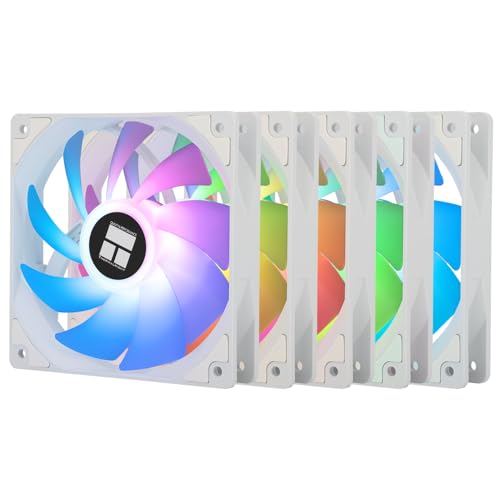
Thermalright 5 Pack TL-C12CW-S CPU Fan 120mm White ARGB Case Cooler Fan, 4pin PWM Silent Computer Fan with S-FDB Bearing Included, up to 1550RPM Cooling Fan(5 Quantities)
Chosen because it specifies 4pin PWM Silent Computer Fan with S-FDB Bearing Included and up to 1550RPM Cooling Fan(5 Quantities).
View on Amazon
AsiaHorse COSMIQ 120mm PC Case Fan, Infinity Mirror FDB 2000 RPM with 5V 3-PIN Connector and Small Controller, Daisy Chain PWM PC RGB Fans for Cases CPU Liquid Coolers, White, Reverse Fan
Chosen because it specifies Daisy Chain PWM PC RGB Fans for Cases CPU Liquid Coolers and White.
View on Amazon
Thermalright TL-C12CW-S X3 CPU Fan 120mm White ARGB Case Cooler, 4pin PWM Silent Computer Cooling Fan with S-FDB Bearing Included, up to 1550RPM(3 Quantities)
Chosen because it specifies up to 1550RPM(3 Quantities).
View on Amazon
UTLGAMENG 7 Pack 120mm ARGB PC Fans, 4 Forward+3 Reverse, PWM, 28 LED-White | 4 Forward & 3 Reverse Fans for PC Case, 4Pin PWM, 1550 RPM, 28 ARGB LED, Infinity Mirror Lighting, Ideal for Gaming & Cooling
Chosen because it specifies 4 Forward+3 Reverse and PWM.
View on Amazon
Thermalright TL-C12CW-S X3 CPU Fan 120mm ARGB Case Cooler Fan, 4pin PWM Silent Computer with S-FDB Bearing Included, up to 1550RPM Cooling Fan(3 Quantities) (TL-C12CW-S X3)
Chosen because it specifies 4pin PWM Silent Computer with S-FDB Bearing Included and up to 1550RPM Cooling Fan(3 Quantities) (TL-C12CW-S X3).
View on AmazonAll 6 Picks in Detail
1. CORSAIR RS120 ARGB White Triple Pack – Best Overall for a Polished White Build
As an Amazon Associate we earn from qualifying purchases at no extra cost to you.

The RS120 ARGB is the best documented fan set in the group. The listing names a white triple pack of 120mm PWM fans with daisy-chain connection, low noise and a magnetic dome bearing. Corsair’s specification page gives a speed range of 420 to 2,100 RPM, airflow from 13.3 to 72.8 CFM, noise of 10 to 36 dBA, static pressure up to 4.15 mm H2O, eight LEDs per fan and a five-year warranty. One PWM connector and one 5V ARGB connector control all three fans.
- Three 120mm fans, white, 25mm thick
- 420 to 2,100 RPM with PWM control
- 13.3 to 72.8 CFM and 10 to 36 dBA per Corsair
- Magnetic dome bearing
- Eight ARGB LEDs per fan, daisy-chained to a single cable
- Five-year warranty per Corsair
Pros
- Wide speed range for quiet idle and strong cooling under load
- Single-cable daisy chain keeps wiring tidy
Cons
- Only three fans per pack, so a full case needs two sets
- Highest speeds are audible at 2,100 RPM
Compared with the Thermalright TL-C12CW-S X3, it adds a higher speed ceiling and a stronger warranty, while the Thermalright options give more value per fan.
2. Thermalright TL-C12CW-S 5-Pack – Best for Filling a Case in One Purchase

The five-pack suits a mid-tower with three fans at the front and two elsewhere. The listing names a white 120mm ARGB fan with 4-pin PWM control, an S-FDB bearing and speeds up to about 1,550 RPM. Thermalright’s own page for the TL-C12CW-S gives up to 66.17 CFM, 25.6 dBA, 1.53 mm H2O of static pressure, 0.20A current draw, and 4-pin PWM and 3-pin 5V ARGB connectors. The listing name says “CPU fan,” but these are standard 120mm case fans that also fit radiators and tower coolers.
- Five 120mm fans, white, 25mm thick
- Up to about 1,550 RPM, 4-pin PWM
- Up to 66.17 CFM and 25.6 dBA per Thermalright
- S-FDB bearing
- 5V ARGB 3-pin connector per fan
- Controller or hub included: confirm on listing
Pros
- Five fans in one set covers most mid-tower layouts
- Quiet maximum noise level and low current draw
Cons
- Each fan needs its own ARGB connection unless a hub is included
- Lower static pressure than the Corsair fans for restrictive radiators
It sits between the three-pack Thermalright and the UTLGAMENG seven-pack, so choose it when your case wants five fans exactly.
3. AsiaHorse COSMIQ 120mm – Best for an Infinity-Mirror Light Effect

The COSMIQ is the style choice. The listing names a 120mm PC case fan with an infinity-mirror lighting effect, a fluid-dynamic bearing, a speed of 2,000 RPM, and a 5V 3-pin connector with a small controller, plus daisy-chain PWM. The infinity mirror produces a look of repeating light rings that suits a showpiece build. The listing name does not state the frame color or the number of fans in the pack, so confirm both before buying for a white case.
- 120mm case fan with infinity-mirror ARGB effect
- FDB bearing, up to 2,000 RPM
- 5V 3-pin ARGB connector with a small controller
- Daisy-chain PWM connection
- Frame color: confirm on listing
- Pack size: confirm on listing
Pros
- Distinctive lighting effect
- Small controller included for lighting modes
Cons
- Frame color and pack size not stated in the listing name
- Specification details such as airflow and noise are not in the listing name
Pick it over the Corsair set only if the infinity-mirror look matters more than documented airflow and noise figures.
4. Thermalright TL-C12CW-S X3 (White) – Best for a Three-Fan Front Intake

This three-pack is the straightforward way to fill the front of a case. The listing names a white 120mm ARGB fan with 4-pin PWM control, an S-FDB bearing and speeds up to 1,550 RPM, and it shares the Thermalright specifications of 66.17 CFM and 25.6 dBA. Three fans cover a standard front intake or a top radiator mount, and the pack is the easy match for the TL-C12CW-S family if you later want a rear exhaust fan to match.
- Three 120mm fans, white
- Up to about 1,550 RPM, 4-pin PWM
- Up to 66.17 CFM and 25.6 dBA per Thermalright
- S-FDB bearing
- 5V ARGB 3-pin connector per fan
- Daisy-chain cable or hub: confirm on listing
Pros
- Right-sized for a front intake
- Same low noise ceiling as the 5-pack
Cons
- Static pressure is moderate for dense radiators
- Needs several lighting connections unless a hub is included
It is nearly identical to the 5-pack except for quantity, so the choice comes down to how many fans your case holds.
5. UTLGAMENG 7-Pack ARGB Fans (White) – Best for Large Cases With Reverse-Blade Fans

The seven-pack includes four standard fans and three reverse-blade fans, which lets the lighting face the same direction on both intake and exhaust. The listing names white fans, 120mm size, 4-pin PWM control, a speed of about 1,550 RPM and 28 LEDs per fan. Seven fans cover a three-fan front, three-fan top and one rear fan in a large case. Because the listing does not state CFM, noise or bearing type, confirm those on the product page.
- Seven 120mm fans: four standard and three reverse-blade
- White finish per the listing
- 4-pin PWM, about 1,550 RPM
- 28 LEDs per fan
- Bearing type, CFM and noise: confirm on listing
- Controller or hub: confirm on listing
Pros
- Covers a full large case in one set
- Reverse-blade fans keep the lighting facing outward
Cons
- Key performance numbers are not in the listing name
- Seven fans draw a lot of lighting power on one header
Compared with the Thermalright 5-pack, it offers two more fans and the reverse-blade styling, in exchange for less published detail.
6. Thermalright TL-C12CW-S X3 (Color Not Stated) – Best as a Three-Fan Option After Confirming Color

This listing reads almost the same as the white three-pack above, with 120mm ARGB fans, 4-pin PWM control, an S-FDB bearing and speeds up to 1,550 RPM, but its name does not say “White.” Thermalright sells black and white versions of this fan family, so the color matters. If the frame is black, it will look out of place in a white build. Treat this as an alternative three-pack, and confirm the frame color in the listing images before ordering.
- Three 120mm ARGB fans
- Up to about 1,550 RPM, 4-pin PWM
- S-FDB bearing
- 5V ARGB connector
- Frame color: confirm on listing
- Cable or hub: confirm on listing
Pros
- Same fan family, noise and airflow ceiling as the white three-pack
- A useful alternative if the white pack is unavailable
Cons
- Frame color is not stated in the listing name
- Easy to mix up with the white version
It duplicates the white TL-C12CW-S X3 in most respects, so only buy it if the listing confirms a white frame.
Specs Compared
| Product | Fans in pack | Size / speed | Control | Bearing | Frame color |
|---|---|---|---|---|---|
| CORSAIR RS120 ARGB White | 3 | 120mm, 420 to 2,100 RPM | 4-pin PWM, 5V ARGB, daisy-chain | Magnetic dome | White |
| Thermalright TL-C12CW-S 5-pack | 5 | 120mm, up to 1,550 RPM | 4-pin PWM, 5V ARGB | S-FDB | White |
| AsiaHorse COSMIQ | Confirm on listing | 120mm, 2,000 RPM | 5V 3-pin ARGB with controller, daisy-chain PWM | FDB | Confirm on listing |
| Thermalright TL-C12CW-S X3 (white) | 3 | 120mm, up to 1,550 RPM | 4-pin PWM, 5V ARGB | S-FDB | White |
| UTLGAMENG 7-pack | 7 (4 standard, 3 reverse) | 120mm, about 1,550 RPM | 4-pin PWM, ARGB (28 LEDs) | Confirm on listing | White |
| Thermalright TL-C12CW-S X3 (color not stated) | 3 | 120mm, up to 1,550 RPM | 4-pin PWM, 5V ARGB | S-FDB | Confirm on listing |
The table shows why the Corsair set stands apart: it is the only one that publishes a full speed range, airflow, noise and warranty on its manufacturer page, and it is also the only one with a magnetic dome bearing. The Thermalright fans share one set of published numbers across three listings, which makes the packs easy to compare by quantity. The AsiaHorse and UTLGAMENG listings leave more blanks, so treat them as products to verify on the full product page, especially for frame color, bearing type and what is included in the box, such as a controller, hub or splitter cable.
How We Chose These
We started from the six fan listings supplied and compared them using their own names, the manufacturers’ published specification pages where available, and retailer specification fields. The comparison focused on the factors a white build cares about: frame color, number of fans, lighting connection type, speed range, bearing design and published airflow and noise. When a listing did not state a value, such as frame color or pack size, we marked it for confirmation rather than guessing. This is a research-based guide built on published specifications, not on physical trials.
What to Look For
Frame, blades and lighting for a white build
A true white build needs more than white blades. Check that the frame is white, that the fan hub looks right with the lights off, and that the LEDs can produce a clean white or a color that suits the rest of your parts. Some fans have a translucent frame that lets the light spread, while others use a solid frame with light only from the hub. Reverse-blade models face the lit side outward on both intake and exhaust, which is why large cases sometimes mix them.
5V ARGB versus 12V RGB: a safety point
Addressable RGB uses a 3-pin 5V connector, while older RGB uses a 4-pin 12V connector. They look similar but are not interchangeable, and plugging a 5V ARGB fan into a 12V RGB header can destroy the LEDs and sometimes the header. Match the connector to the header marked “ARGB” or “5V” on the motherboard, and never force a plug that does not fit. A fan listing that mentions a 5V 3-pin connector is safe to use only on a 5V ARGB header or a controller made for it.
Airflow, static pressure and noise
CFM measures how much air a fan moves in open air, while static pressure in mm H2O shows how well it pushes air through resistance such as a dust filter, radiator or mesh. Case fans mounted behind a filter benefit from higher static pressure, and the Corsair’s 4.15 mm H2O figure is stronger than the Thermalright’s 1.53. Noise is measured in dBA; 25 dBA is quiet, while 36 dBA at full speed is audible. Run fans at a fraction of their top speed with a PWM curve, and they will stay quiet in daily use.
Daisy chains, hubs and power limits
Daisy-chaining lets several fans share one header, but each header has a power limit. A typical 5V ARGB header supplies about 3 amps. As a worst-case estimate, an addressable LED can draw up to about 60 milliamps at full white, so a seven-fan set with 28 LEDs per fan has 196 LEDs and could draw far more than one header can supply if every LED is full white. In practice the lighting runs at lower brightness, but for large sets use a controller or hub with its own SATA power, and check the fan’s stated current.
Keeping the build quiet
Fan noise comes from two sources: the motor and bearing, and the air itself. Fluid-dynamic and magnetic dome bearings tend to stay smoother over time than basic sleeve designs, and a fan running at 800 to 1,000 RPM is usually much quieter than the same fan at full speed. Set a fan curve in the BIOS that keeps case fans low at idle and ramps up only when the processor or graphics card gets warm. If you hear a fast tick, check that the blades are not touching a cable, and avoid bundling multiple fans into the same vibrating panel without rubber mounts or pads.
Wiring and syncing the lighting
Plan the wiring before you mount anything. Each fan usually has a 4-pin PWM lead for speed and a 3-pin ARGB lead for lighting, and daisy-chained sets pass both through a single connector chain so only one pair of cables reaches the motherboard. Connect the PWM lead to a chassis fan header, and the ARGB lead to a 5V ARGB header or the included controller. Most motherboards sync lighting through their own software, while a standalone controller usually offers a handful of modes and a remote or button. If you want the fans to match other components, check that your motherboard has an ARGB header at all, since a few budget boards do not.
Mixing fan families
It is tempting to combine a three-pack from one brand with a pack from another to fill a case. The airflow will work, but the lighting often will not match: LED counts, brightness and effect timing differ between families, and the speed curves may not line up. If appearance matters, stick to one family per airflow path, such as all front intake fans from one pack and exhaust fans from another, and let your motherboard software handle synchronization.
Intake, exhaust and dust
In most cases, front fans pull air in and rear and top fans push it out. Dust enters wherever the case has more intake than exhaust, so a filter on every intake fan is worth having. White fan frames show dust more than black ones, and a pale build will look dull quickly if filters are skipped, so plan to wipe the blades and filters every few months. When you install, check the arrow markings on the frame, which show airflow direction and rotation, because a fan mounted backwards pushes air the wrong way while still looking correct.
How many fans does your case need
A common layout is three intake fans at the front, one exhaust at the rear, and up to three at the top. Slightly more intake than exhaust creates positive pressure, which helps keep dust out. A 5-pack and a 3-pack together can cover this, while a 7-pack covers everything in a large case. Also check the mount size: 120mm fans are the most common, but some cases and radiators use 140mm.
Questions
What does ARGB mean for case fans?
ARGB stands for addressable RGB, which lets each LED or fan show its own color and effect. It uses a 3-pin 5V connector and a controller or motherboard header.
Can I plug these fans into any fan header?
The fan motor uses a 4-pin PWM connector, which fits standard fan headers. The lighting uses a separate ARGB connector that must go on a 5V ARGB header or a compatible controller.
Are reverse-blade fans worth it?
They are a style choice. They let lit sides face outward on both intake and exhaust fans so the build looks consistent from the front, and they do not need to perform better or worse.
How do I know the frame is actually white?
Check the product name and the listing images, and confirm with the manufacturer if the color is not stated. A listing without the word “white” may be a black version.
How many fans can I connect to one header?
That depends on the fan’s stated current draw and the header’s limit, typically about 3 amps on a 5V ARGB header. Use a hub or controller with its own power for large sets.
Do RGB fans cool better than plain fans?
No. Cooling depends on blade design, speed, bearing and static pressure, not the lights. Choose on airflow and noise numbers first and treat the lighting as a bonus.
Update History
- October 20, 2026 – Initial publication; product set drawn from current catalog listings.
- Check the product page for current specifications and availability before buying.
Sources
- Manufacturer product and specification pages for Corsair and Thermalright case fans
- Retailer listing titles and specification fields for each product
- Published retailer specification summaries used to cross-check airflow, noise and connector details