The best 280mm AIO coolers for ITX are the ones that clear your case rails, memory, motherboard heatsinks, and tube bends—not simply the models with the thickest radiator. A 280 mm label means two 140 mm fans, but assembled thickness and length vary significantly. For a flexible, comparatively slim radiator, the Fractal Design Lumen S28 v2 is a sensible starting point; the be quiet! Pure Loop 3 280mm emphasizes straightforward PWM control, while the ARCTIC Liquid Freezer III Pro 280 suits roomier cases that actually accept a 38 mm radiator. Check the complete fit before buying.
Quick verdict for small-form-factor builders
Best balanced ITX fit candidate: Fractal Design Lumen S28 v2. Its manufacturer-listed 313 x 140 x 27 mm radiator, 400 mm tubing, and AM5 bracket make it attractive where a conventional 27 mm radiator is workable; you still need room for its fans and fittings. Best understated choice: be quiet! Pure Loop 3 280mm. It uses a 27 mm radiator and motherboard PWM controls without prioritizing an LCD. Best thicker-radiator option: ARCTIC Liquid Freezer III Pro 280. Its 38 mm radiator means substantially more clearance demand, so consider it only after verifying the full assembly.
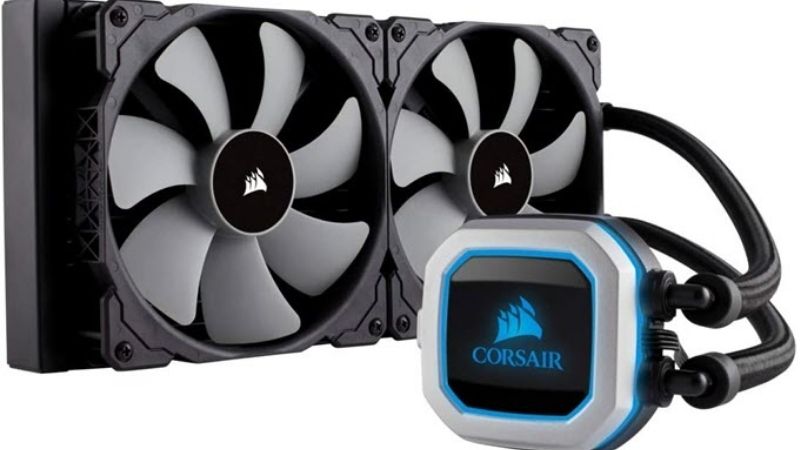
These selections are based on current product specifications, mounting layouts, and independently published cooling context rather than our own laboratory testing. A 280 mm AIO is not automatically compatible with an ITX case because it is advertised as supporting liquid cooling. U.S. store-level price and availability are not verified consistently across these specific models; each table entry flags that limitation rather than implying a live deal.
280 mm AIO comparison table
| Exact model | Verified radiator size | Where it makes sense | U.S. price / stock | Fit or ownership concern |
|---|---|---|---|---|
| Fractal Design Lumen S28 v2 | 313 x 140 x 27 mm | ITX builds wanting a standard-thickness radiator | Not independently verified | Check tube path and pump placement |
| be quiet! Pure Loop 3 280mm | 317 x 140 x 27 mm; 52 mm with fans | Clean no-display, PWM-focused setup | Not independently verified | 317 mm length and refill-port access |
| ARCTIC Liquid Freezer III Pro 280 | 317 x 138 x 38 mm; fans add 27 mm | Roomy ITX cases with thick-radiator space | Not independently verified | 65 mm nominal stack is bulky |
| NZXT Kraken 280 (2023) | 315 x 143 x 30 mm | Compact LCD setup with room for a USB lead | Not independently verified | Wide radiator, tall cap, CAM dependency for display |
| Lian Li Galahad II LCD 280 | 319.5 x 140 x 30 mm | Display-first build with generous ITX radiator space | Not independently verified | Long radiator and software/display overhead |
| Thermaltake TH280 V2 ARGB Sync | 317 x 139 x 27 mm | ARGB-focused build with standard radiator thickness | Not independently verified | Requires compatible 5 V ARGB header for lighting |
Detailed product recommendations
Fractal Design Lumen S28 v2 — best standard-thickness ITX starting point
Fractal’s Lumen S28 v2 uses a 313 x 140 x 27 mm radiator and two Aspect 14 PWM fans. Its published AM5 mounting support and 400 mm sleeved tubing cover the common practical requirements for an AMD Mini-ITX gaming build. The official package emphasizes a rotatable top cover, articulating 90-degree block fittings, and a reasonably uncomplicated lighting approach instead of a large LCD that must be turned toward a case window. For someone who has verified that a 140 mm-wide radiator clears the mounting rail, the standard-thickness core is an attractive compromise.
Fit remains the question. The radiator is 27 mm by itself, not including the fans; in a top-mounted SFF configuration, the combined depth can approach components that project above the motherboard. There may also be bends near the radiator end tanks that need more room than the listed metal rectangle. The S28 v2’s pump layout is not interchangeable with every competing AIO, so follow the Fractal installation diagram before deciding its orientation. A top mount that clears at one end may conflict with the EPS cable at the other.
Pros: moderate radiator thickness, AM5 support, relatively understated styling, and useful block-fitting articulation. Cons: still requires a broad 140 mm mounting lane, lacks the oversized-display appeal of premium models, and is not a safe purchase without checking the case’s radiator brackets. Best for: an ITX owner with documented 280 mm support who wants a less complicated aesthetic and fit-oriented geometry rather than the largest possible radiator core.
be quiet! Pure Loop 3 280mm — best low-clutter PWM choice
The Pure Loop 3 280mm combines a 317 x 140 x 27 mm radiator with two 140 mm Pure Wings 3 PWM high-speed fans, yielding a listed 52 mm thickness including fans. The cooling unit also has an adjustable PWM pump and a refill port. Its daisy-chain fan arrangement reduces the number of separate PWM connections, which matters on Mini-ITX motherboards that may offer only a few fan headers. be quiet! documents AM5/AM4 mounting and a 400 mm tube length; the U.S. unit is identified by its BW028US part number.
The attraction is control simplicity rather than a universal guarantee of silence. A quieter CPU loop is a product of pump duty, fan curve, chassis restriction, and workload. The published sound-pressure figures are manufacturer measurements and do not make it directly comparable to figures from a different company. The refill port is a feature, but its location could become inaccessible in a tightly packed SFF chassis; users should not treat the loop as a casual maintenance project or open it without the product’s instructions.
Pros: 27 mm radiator, clearly specified fan stack, motherboard PWM integration, and less lighting wiring. Cons: 317 mm length is meaningful in compact layouts, the refill port may be difficult to reach, and a three-year warranty is shorter than some rivals’ published coverage. Best for: a builder who wants a discreet 280 mm cooler without extra software for an animated display.
ARCTIC Liquid Freezer III Pro 280 — best for an ITX case with extra depth
The Liquid Freezer III Pro 280 is the dimensional outlier here. ARCTIC specifies a 317 x 138 x 38 mm radiator, two 27 mm-thick P14 Pro fans, AM5 support, a 450 mm tube length, and a six-year manufacturer warranty. On paper, 38 plus 27 mm makes a 65 mm nominal core-and-fan stack, before allowing for fasteners, nearby cable routing, or any case-specific offsets. That stack can collide with tall VRM sinks, the upper edge of a graphics card, or a thick motherboard power cable in an ITX layout even when a case advertises “280 mm radiator support.”
The reason to consider the ARCTIC is its substantial radiator depth and focused CPU/pump/VRM cooling package, not a fabricated temperature lead. A thicker core can offer more fin volume but is also more demanding to place and to push air through. ARCTIC’s split-connector and all-in-one PWM options allow different wiring strategies; choose the one the case and motherboard can safely support. Do not force the tubing to make the rad fit or use a motherboard mounting orientation that violates ARCTIC’s official instructions.
Pros: high-capacity radiator construction, extended tubing, documented AM5 kit, and clear PWM wiring options. Cons: 65 mm nominal radiator/fan stack, larger routing burden, and more opportunities for physical conflicts. Best for: an ITX case that explicitly provides thick-radiator space, not a generic 280 mm slot. Skip it: if the case gives only roughly 52–57 mm of usable stack depth.
NZXT Kraken 280 (2023) — best modest LCD approach
The 2023 Kraken 280 combines a 315 x 143 x 30 mm radiator with an Asetek seventh-generation pump and a 1.54-inch LCD. NZXT’s support specification lists AM5, 400 mm tubing, a pump-cap height of 55.97 mm, SATA power, and an internal USB 2.0 connection. For a builder who wants CPU information on the block without installing a very large screen, this is a coherent option—provided the motherboard has a free USB header or an appropriately supported internal splitter.
The relevant ITX concern is not only the radiator’s 143 mm width, which exceeds the nominal 140 mm width of some competitors. The pump cap must clear a glass panel or GPU riser, the breakout cable needs a safe path, and NZXT CAM functionality may be required for advanced LCD customization. Do not assume that a newer Kraken Elite, Kraken RGB, or a different year’s model shares every cable or block dimension. This recommendation refers to the exact 2023 Kraken 280 family in NZXT’s support documentation.
Pros: integrated small LCD, explicitly documented AM5 kit, mainstream 280 mm loop architecture. Cons: 143 mm radiator width, USB/SATA connection overhead, and potentially greater dependence on NZXT’s software for display features. Best for: an ITX case with a visible CPU block and known space for the 55.97 mm cap.
Lian Li Galahad II LCD 280 — best display-focused premium build
Lian Li’s Galahad II LCD 280 is aimed at buyers who value the water block’s display as part of the build. The manufacturer lists a 2.88-inch 480 x 480 IPS LCD, an Asetek eighth-generation pump solution for the 280 mm version, a 319.5 x 140 x 30 mm radiator, and 385 mm tubing. The standard 280 model number family includes GA2ALCD28B and GA2ALCD28W. The radiator’s length is more than six millimeters greater than Fractal’s S28 v2, and on a densely packed SFF mount that difference may determine whether the fittings clear the front panel.
This is also the product most likely to disappoint someone buying on cooling dimensions alone. The block’s display, 61.98 mm listed height, extra cables, and L-Connect 3 software functions create integration work. Different Galahad II LCD fan packages—standard RGB and TL Wireless, for example—are not geometrically identical; the TL Wireless 280 version uses a different fan thickness and radiator specification. A listing that says only “Galahad II LCD” is not precise enough for an ITX compatibility decision.
Pros: large detailed display, AM5 support, premium visual presentation, and published per-variant specifications. Cons: long radiator, prominent block, software complexity, and generally greater cable-management burden. Best for: a display-centric ITX build with enough room for the specific radiator/fan variant and its electronics.
Thermaltake TH280 V2 ARGB Sync — best motherboard-ARGB presentation
The TH280 V2 ARGB Sync offers a 317 x 139 x 27 mm radiator, two 140 x 25 mm fans, 460 mm tubing, and explicit AM5 support. Thermaltake uses 5 V three-pin addressable RGB synchronization and includes a fan cabling scheme designed to reduce wires between the two radiator fans. The defining point for ITX buyers is the relatively conventional radiator thickness paired with an RGB-heavy appearance rather than an oversized LCD block.
The biggest caveat is the ARGB header. A three-pin 5 V connector cannot be substituted for a four-pin 12 V RGB header, and many tiny motherboards do not have spare lighting headers after case fans are attached. Confirm both header type and position, and verify that the 317 mm radiator and tubing bends can be installed without compressing cables. Thermaltake’s listed acoustic and airflow figures are product specifications, not independent measurements versus the other five coolers.
Pros: standard 27 mm radiator, long 460 mm tubes, motherboard-oriented ARGB, and AMD socket compatibility. Cons: lighting header dependency and extra wiring that may not benefit a closed-panel ITX case. Best for: an open or windowed 280 mm-capable ITX enclosure where aesthetics matter and the board has the right 5 V ARGB connection.
How we selected these 280 mm AIOs
We began with products that have a verifiable 280 mm SKU, official radiator dimensions, and published AM5 support. That eliminates 240 and 360 mm cousins that frequently appear under the same marketing name and do not fit the intended two-140 mm mounting pattern. Next we weighted radiator thickness, overall length and width, CPU-block projection, tube length, wiring, and fan setup. A model can be excellent in thermal testing yet a poor ITX recommendation if it cannot clear the rail or forces severe tubing kinks. We therefore separated “standard-thickness” candidates from the unusually thick ARCTIC unit instead of claiming all six fit the same case.
For thermal expectations, independent test outlets such as Tom’s Hardware provide useful context for what modern AIOs can achieve, but results from different labs, ambient temperatures, processor loads, and fan-speed settings were not merged into invented performance rankings. No detailed research was performed specifically for this article. Price and checkout availability are deliberately unresolved when the identical U.S. variant could not be confirmed at a seller; the buyer should verify the exact model number, not substitute a related size or color.
ITX buying guide: radiator fit is a three-dimensional problem
Confirm the mounting pattern and usable radiator length
A case may accept two 140 mm fans but lack mounting holes or end-tank clearance for a 280 mm liquid radiator. Read the manufacturer’s case chart for the specific location—top, side, front, or bottom—and cross-check the radiator’s complete length, not just the nominal 280 mm fan span. An end tank near a power-supply bracket can be the reason a 313 mm radiator fits while a 319.5 mm one does not. Before ordering, draw or measure the available length and include cable exits and tube fittings.
Calculate thickness with fans installed
A nominal 27 mm radiator typically becomes approximately 52 mm with common 25 mm fans; the ARCTIC Pro example reaches a nominal 65 mm because its radiator is 38 mm and its fans are 27 mm thick. This is a geometric sum, not a clearance guarantee. A top rail also needs enough room for screw heads and components beneath it. Confirm the gap to the motherboard’s EPS connector and VRM heatsink with both the radiator and the fans present.
Check the pump block, riser cable, and graphics card path
ITX layouts differ sharply. In a sandwich case, the CPU-block cap may sit close to the side panel or PCIe riser; in a vertical case, the radiator tubes may need to wrap around the GPU. Measure the installed block height and look for fittings that protrude beyond the block’s nominal footprint. For a display-equipped unit, determine whether the screen is even visible before paying for it, and whether the display’s USB cable can be routed without running across a fan.
Keep the loop orientation safe
A closed-loop system contains some air over time. Follow the cooler and case makers’ installation instructions so the pump is not persistently the high point where air collects; do not force a particular tube-up or tube-down orientation when the product’s actual pump location differs. With radiator-mounted-pump designs or specialized layouts, generic rules may not apply. Do not crimp a tube to save a few millimeters, and never fasten the radiator in a way that presses tubing hard against sharp metal.
Compare connection complexity, not just lighting effects
The cleanest ITX wiring plan is often a PWM pump connector and a fan chain to the motherboard, provided the board’s header ratings are respected. LCD designs may also need internal USB 2.0 and SATA power; ARGB models require the correct voltage and connector. Internal USB splitters and fan hubs add size, cost, and more cable routes, so inventory your headers before checkout. A product page describing a compatible operating system for its display software does not automatically imply identical functionality on Linux.
Consider service and replacement risk
Unlike air coolers, AIOs have pumps, tubing, and liquid seals. Warranty duration, pump failure signals, and support for a failed fan or display deserve attention. A silent build should not be designed by stopping the pump or hiding its alarm. Use appropriate BIOS failure warnings and monitor coolant or CPU temperatures through supported tools. When a cooler has a refill port, follow its documented service process rather than treating the loop as a generic open water-cooling kit.
Pre-purchase and installation checklist
- Identify the exact case and revision; confirm that its documentation explicitly supports a 280 mm radiator in your intended mount.
- Compare the radiator’s length, width, and thickness against the usable internal space, then add the installed fan thickness.
- Verify the AM5 or Intel socket bracket shipped with the specific retail package.
- Measure block height, tubing bend radius, graphics-card clearance, and EPS connector access before removing protective films.
- Check PWM, pump, USB 2.0, SATA, and 5 V ARGB header requirements; never force a 5 V ARGB plug into 12 V RGB.
- Install with the PC disconnected from power and use the manufacturer-recommended screw lengths and tightening sequence.
- On first boot, confirm pump operation and fan spin, then watch CPU temperatures under a controlled representative load before fully closing the chassis.
Frequently asked questions
Will every ITX case with two 140 mm fan mounts accept a 280 mm AIO?
No. The fan mounting holes do not prove that the longer radiator end tanks, tube fittings, and fan stack will clear the case structure. Consult the case’s official radiator specification for your exact mounting position, then compare the cooler’s full published measurements. If the case vendor names only 240 mm support, do not assume that two 140 mm fans imply a usable 280 mm radiator bay.
Does a 38 mm radiator always beat a 27 mm model?
Not automatically. Radiator surface area, fin restriction, fan capability, pump behavior, coolant temperature, and fan speed all affect results. A thick radiator in a poorly ventilated ITX chassis may perform worse than a thinner one with better intake and exhaust conditions. Use same-test-platform independent reviews for thermal comparisons, and treat geometry as the first pass/fail condition.
Should the radiator be above the CPU block?
Often a top radiator is convenient for keeping air away from the pump area, but the correct answer depends on pump location and the cooler’s official mounting instructions. Some liquid coolers position components differently. Avoid any arrangement that traps air at the pump, stresses the tubes, or contradicts the manufacturer’s case-specific guidance.
Are 280 mm AIOs significantly quieter than 240 mm AIOs?
A larger radiator with two 140 mm fans can offer a useful operating point, but there is no universal noise advantage without controlling fan curves and load. Fan blade design, radiator restriction, pump noise, and case panel distance can all change perceived sound. Prioritize a curve appropriate for your processor and protect the pump from unsafe low speeds.
Can I install a 280 mm AIO on an AM5 Mini-ITX board?
The listed products advertise AM5 support, but that only establishes a socket-level mounting path. You still need clearance around tall VRM heatsinks, I/O shields, RAM, and the CPU-block fittings. Check the case and motherboard combination before ordering, especially when using a tall LCD block or routing tubes beside a graphics card.
Final thoughts
For most compact layouts with real 280 mm support, start with the Fractal Lumen S28 v2 or be quiet! Pure Loop 3 280mm because their 27 mm radiators are comparatively straightforward to package. Choose the ARCTIC Liquid Freezer III Pro 280 only after verifying space for its thicker 65 mm nominal radiator-and-fan stack. The NZXT, Lian Li, and Thermaltake alternatives serve buyers who want different display or RGB experiences. A verifiable fit and a safe tube route matter more than a broad “best cooling” claim.