
Key takeaways
- Confirm “original Legion Go 2023,” “8APU1,” or “83E1.” Avoid listings that only say Legion Go 2, Gen 2 or Legion Go S.
- Check the selected variant. Spigen AGL07615, MagGlass ESP402A and ESP402B, and Lenovo GXJ1N45009 each refer to distinct products; similar photos are not proof they are interchangeable.
- Choose finish for your environment. Clear glass favors image crispness; matte glass and film diffuse reflections with possible grain or softness.
- Compare pack count, not only price. A two-pack can have a lower per-install cost; a tray and cleaning tools also have value.
- Inspect your protective case. Large edge-to-edge glass or added thickness may interfere with certain molded cases. Verify the seller’s case-compatibility language.
- Check live price and address-specific fulfillment. Select the exact item, view seller and shipping rules, add one unit if permitted, and check your own U.S. ZIP before payment. This article did not complete that process.
- Keep the return policy in view. Installation errors, peeling the liner, and using the wrong model can affect the ability to return an item. Verify before removing any seal.
The best Legion Go screen guards for the original 2023 Lenovo Legion Go (8APU1) fit its 8.8-inch touchscreen without confusing it with the Legion Go S or Legion Go 2. For straightforward installation, the Spigen GLAS.tR EZ Fit is the easiest manufacturer-documented starting point thanks to its alignment tray. If you want two clear glass protectors, compare dbrand and Supershieldz; if glare is your main problem, consider MagGlass Matte or ArmorSuit’s matte film. These are editorial comparisons of published product specifications, U.S. listings, and compatibility claims—not firsthand scratch, impact, or touch-latency tests.
Scope and price check: This guide is for the original 2023 Legion Go, model 8APU1 / machine type 83E1. Lenovo identifies its display as 8.8 inches, 2560 x 1600, 144Hz, IPS with 10-point touch and Gorilla Glass 5. U.S. prices shown below were observed on manufacturer and retailer pages during research on October 29, 2026, in Vietnam time; seller pages may change and we did not complete a ZIP-specific checkout. “In stock” is used only where the seller explicitly displayed it. The same 8.8-inch diagonal on a Legion Go 2 does not establish matching glass shape, edge radius or cutouts.
Quick verdict: which screen guard should you buy?
Best for alignment confidence: Spigen GLAS.tR EZ Fit AGL07615. The exact original-Legion-Go product page names SKU AGL07615, includes an installation alignment tray, and displays $34.99. Its maker describes 9H-rated tempered glass and an oleophobic coating. That makes it the most convenient first comparison for someone worried about dust and crooked placement. The Add to Cart control is visible, but stock at your U.S. address is not checkout-verified.
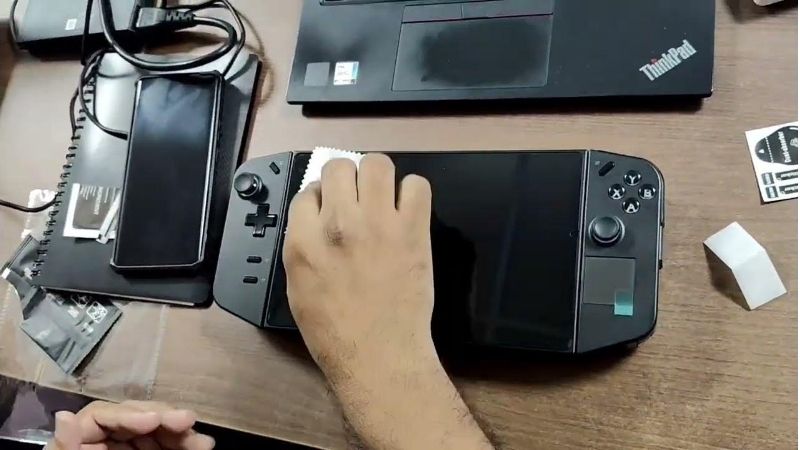
Best premium clear two-pack: dbrand Legion Go Tempered Glass. The product page identifies the original Legion Go and lists two pieces of tempered glass for $24.95, with an Add to Cart action. You get a spare panel for a first-install mistake or a later replacement. dbrand’s optical-clarity and edge-fit claims are manufacturer claims, not independent lab results supplied by this article.
Best lower-priced glass two-pack: Supershieldz Legion Go Handheld 2023. At its displayed $12.99, this maker’s 2-pack is the lowest listed tempered-glass pair in our primary manufacturer shortlist. It advertises rounded 2.5D edges, 9H surface-hardness rating, and fingerprint-resistant coating. Confirm the product is orderable at checkout, as we did not complete that step.
Best for glare reduction: MagGlass Matte ESP402B. Encased shows a dedicated Legion Go matte tempered-glass product at $25.00, marked In stock with free U.S. shipping on the page. Matte finishes diffuse bright reflections but can make fine text and dark scenes look less crisp than clear glass. It is a trade-off, not a universally superior screen.
Best flexible film alternative: ArmorSuit MilitaryShield 2-pack. ArmorSuit’s original-Legion-Go page displays $11.55 and In stock for its Clear selection, while also offering Matte. This is protective film with a different installation method from dry-applied tempered glass. Check the selected style’s exact price and availability before paying. The wet-application kit requires care around ports, vents and buttons.
Eight Legion Go screen guards compared
Prices are displayed U.S. seller amounts checked October 29, 2026 (Vietnam time). Taxes, shipping and promotions can change at checkout. Product counts and stock signals are page observations; not a guarantee of completed fulfillment. “Verified fit” means the manufacturer or U.S. product listing explicitly names the original Legion Go, not that we physically installed the item.
| Product | Verified type and model fit | U.S. listing price (Oct. 29 check) | Stock signal observed | Main drawback |
|---|---|---|---|---|
| Spigen GLAS.tR EZ Fit AGL07615 | Single tempered glass; original Lenovo Legion Go; alignment tray | Spigen $34.99 | Add to Cart; checkout unverified | Highest listed glass-pack price here |
| dbrand Legion Go Glass two-pack | Two clear tempered-glass pieces; original Legion Go page | dbrand $24.95 | Add to Cart; checkout unverified | No alignment tray stated in reviewed listing |
| Supershieldz BC-TG-LNV-Legion Go Handheld 2023-2P | Two clear 9H-rated tempered-glass panels; 2023 model named | Supershieldz $12.99 | Listed; exact checkout not tested | Installation alignment accessory not confirmed |
| MagGlass Matte ESP402B | Matte tempered glass; original Legion Go | Encased $25.00 | In stock; checkout unverified | Matte texture reduces apparent sharpness |
| MagGlass UHD ESP402A | Clear tempered glass; original Legion Go | Encased $25.00 | In stock; checkout unverified | Glare reduction is not the main feature |
| ArmorSuit MilitaryShield two-pack | Flexible film; clear and matte selectable; original Legion Go | ArmorSuit $11.55 shown for Clear | In stock on reviewed style; variants must be selected | Liquid-assisted installation needs extra caution |
| Photodon 2778-01 for Lenovo Legion Go | Custom-cut PET film; multiple clear and anti-glare finishes | Photodon from $30.70 each with basic kit | Configurable Add to Cart; must pick material | Not tempered glass; final variant price changes |
| amFilm Lenovo Legion Go 2-pack LLG-GLSV2 | Two 0.3mm clear tempered-glass panels; original 2023 model | TechMatte $13.99; Walmart $13.99 observed | TechMatte says insufficient stock; Walmart Add to cart | Retailer-specific stock discrepancy |
The comparison intentionally includes two separate MagGlass SKUs because the finishes create materially different viewing experiences. It also includes amFilm as a retailer-dependent alternative, not as a confirmed manufacturer-direct purchase. An item showing Add to Cart was not order-verified, and a manufacturer’s “in stock” label can still fail at address validation or payment. Do not treat this article as a live inventory feed.
Spigen GLAS.tR EZ Fit AGL07615: best guided installation
The Spigen GLAS.tR EZ Fit is the first product to evaluate if installation accuracy matters more than the cheapest cost per pane. On Spigen’s U.S. listing, the original Lenovo Legion Go variant is identified as AGL07615 at $34.99. Its key selling point is the EZ Fit alignment tray, which is designed to place the glass on the display consistently rather than requiring you to position the pane freehand. Spigen also lists a 9H surface-hardness rating and a coating intended to resist visible fingerprints.
Why it earns the lead: the original Legion Go’s wide display gives dust particles and angled alignment more room to become noticeable. If you have ruined phone protectors by peeling them back repeatedly, a purpose-built tray reduces one common source of frustration. It does not eliminate dust, trapped hair, or errors caused by a dirty screen. Work in bright, still air and follow the actual included instructions; do not assume every Spigen package has the same installation mechanism.
Specific buying trap: Spigen also sells a newer GLAS.tR Slim with variants for Legion Go S and Legion Go Gen 2. On a shared storefront, a photo or default selection may switch to the newer AGL10952, which Spigen specifically shows as compatible with Legion Go 2 (2025), not the 2023 Legion Go. Search for AGL07615 and the original model name in the selected order, not simply an 8.8-inch number. A $34.99 product listing with an Add to Cart button does not by itself verify final shipping availability.
Choose Spigen when the small extra cost buys a documented alignment accessory you will use. Skip it if your priority is getting a spare panel at a lower price or you intentionally want matte diffusion for bright trains and cafes. No independent fingerprint resistance or breakage testing was performed for this roundup.
dbrand Legion Go Glass two-pack: best clear premium value
dbrand’s product page clearly titles the item Legion Go Screen Protectors and selects Legion Go, with a $24.95 displayed price for two pieces of tempered glass. This is different from its separate Legion Go 2 glass page; always confirm which handheld is shown in the cart summary. dbrand describes its glass as precision-cut with polished edges and an oleophobic coating. Those are brand-published features, not measured results from our own test equipment.
For most users who keep the Legion Go in the original carrying case, clear glass is a practical default. It allows the display’s original glossy character to remain broadly intact and provides a replaceable sacrificial surface for routine bag scuffs. A second pane means a speck of dust under your first application does not force a new order. It can also provide long-term value if you choose to replace an otherwise functional but heavily scratched panel later.
Trade-offs: clear glass will not remove strong reflections from a window behind you; an oleophobic coating is not the same as a matte anti-glare layer. If your main problem is seeing yourself reflected in a dark game scene, a glossy clear protector may not solve it. Read dbrand’s installation guidance rather than treating “easy installation” as evidence that bubbles cannot form. The page showed a purchase action during research, but we did not place a U.S. delivery order.
Supershieldz Legion Go 2023 two-pack: budget clear glass
Supershieldz publishes a product explicitly named for the Lenovo Legion Go Handheld 2023 and identifies the pack as BC-TG-LNV-Legion Go Handheld 2023-2P. Its U.S. listing displayed $12.99 for two pieces of tempered glass. The maker advertises 2.5D rounded edges, a 9H hardness rating, a clear finish and hydrophobic/oleophobic treatment. These specifications explain its role as a less expensive clear-glass comparison without implying it performs identically to every premium pane.
The main attraction is simple economics: for a price below several single-panel products, you get an extra attempt. That is particularly useful for someone installing their first 8.8-inch glass protector. The rounded-edge feature is intended to make the transition at the finger-contact edge more comfortable, but the exact relationship to your specific protective case or adhesive layout needs checking.
What the listing does not establish: an included rigid alignment tray was not confirmed from the reviewed description, so do not assume this kit has Spigen’s placement system. “99.99% HD clarity” on a product page is a marketing specification, not our independently measured optical transmission. Likewise, a 9H rating is a surface scratch-resistance convention, not a promise that a dropped handheld’s display cannot crack. Verify the 2023 model in the selected pack and check current stock before buying.
MagGlass Matte ESP402B: best for distracting reflections
Encased lists MagGlass Matte Tempered Glass for Lenovo Legion Go under SKU ESP402B. Its page showed $25.00, explicitly said In stock, and advertised free U.S. shipping. The listing calls it a matte-finish glass protector made for the Legion Go, with cleaning accessories. That combination gives it a distinct use case: play in a room where overhead lights, windows or frequent bright backgrounds make the standard glossy display hard to see.
Matte coatings work by scattering light, so a bright reflection becomes broader and less mirror-like. The same principle can soften fine edges, make text look slightly grainier, or change how saturated colors feel. This is a visible trade-off, not a defect you can always fix through settings. The original Legion Go has a high-resolution 2560 x 1600 IPS panel; choose matte because your actual lighting makes reflections distracting, not because you expect it to raise brightness or make dark scenes sharper.
The vendor mentions its own testing framework for scratch resistance, sensitivity and coverage. We report those as vendor descriptions only; no independent impact rig, touch-latency test or controlled glare measurements were conducted here. If you play primarily in a dim bedroom and enjoy crisp small text, consider MagGlass UHD or dbrand instead. As with every listing, In stock is a page signal, not a completed ZIP-specific checkout.
MagGlass UHD ESP402A: clear finish with manufacturer stock signal
The clear sibling is a separate Encased item: MagGlass UHD Screen Protector for Lenovo Legion Go, SKU ESP402A. The seller displayed $25.00, In stock and an Add to cart control. Its purpose is to give people who prefer clear glass a manufacturer-listed alternative to the matte ESP402B with an explicit availability label on the U.S. storefront. Do not confuse the two SKUs when viewing mixed product images on Encased pages.
This product competes less on a unique laboratory feature and more on finish choice, supplier preference and purchase visibility. If you want the original Legion Go’s glossy appearance without matte diffusion, the UHD label is relevant. It does not mean a guaranteed zero-reflection view, and the maker’s claims about sensitivity and durability should not be reported as independently reproduced test results.
At the same listed $25 as the matte variant, ask yourself which problem you are fixing. For scuffs in a normal backpack, clear glass is the more straightforward baseline. For harsh indoor lighting or play near a window, the matte sibling is more targeted. Both were listed for the original Legion Go, unlike Encased’s separate Legion Go 2 products. Inspect the SKU immediately before checkout and again in your order confirmation.
ArmorSuit MilitaryShield two-pack: flexible clear or matte film
ArmorSuit offers a MilitaryShield Screen Protector for Lenovo Legion Go with a two-pack format and selectable Clear or Matte style. The manufacturer page showed $11.55 while the Clear style was displayed, plus an In stock label and Add to cart. The product is a protective film, not tempered glass. That material distinction is the reason to include it even though a glass two-pack can also be inexpensive.
A flexible film can sit close to a device surface without adding the same rigid glass thickness. The brand calls its material self-healing, meaning minor cosmetic marks on the film may become less noticeable over time. Do not read that as a claim that deep cuts disappear, a cracked LCD heals itself, or the film absorbs any impact. ArmorSuit’s advertised lifetime warranty is governed by its own terms and may not cover damage to your actual handheld.
Installation needs more care than glass: the kit lists a spray solution and squeegee. ArmorSuit warns against using excessive moisture on electronics and specifically instructs users to turn the device off during installation. Follow the exact maker’s guide; do not spray directly into the Legion Go’s USB-C ports, speaker openings, air intakes, detachable-controller connectors or seams. Remove the controller pieces only if the applicable guide explicitly calls for it. If liquid application makes you uncomfortable, a dry-applied glass option is simpler.
On a shared product page, selecting Matte may change the price or status. Our observed $11.55 reflects the reviewed Clear display and is not a verified price for every possible selected style. For glare control, compare a properly selected matte film with MagGlass Matte and think about the trade between softness, application process and return options.
Photodon 2778-01: best choice of PET finishes
Photodon has a specific product titled Lenovo Legion Go 8.8-inch Gaming Device Screen Protector, part 2778-01. Unlike a fixed two-piece glass bundle, the manufacturer offers a selection of PET materials including clear, anti-glare and anti-reflective finishes. Its U.S. page states starting at $30.70 per piece with a kit, but the material, quantity and installation-supply selections can change the final product total. The site requires a material choice before adding the finished configuration to cart.
This is a niche but worthwhile pick for someone who knows exactly why a standard glossy pane is unsuitable. Photodon offers several anti-glare levels; the more aggressive the diffusion, the more carefully you should consider text sharpness and color contrast. It also lists clear options intended for users who prioritize image fidelity. This broad selection can be valuable for people using the Legion Go for productivity or tabletop play, not just fast-moving games.
Critical distinction: Photodon’s line is PET plastic-based film, not a sheet of tempered glass. Its advertised scratch or shock properties vary by selected material, so do not assign a glass hardness rating to the entire catalog. The pricing grid can show different amounts for one-unit and bulk orders; the article uses the seller’s stated starting single-piece rate only, not a bulk discount. Photodon includes installation supplies and a test piece, but we did not choose a final material configuration or test its fit ourselves.
amFilm LLG-GLSV2 two-pack: good specs, mixed stock signals
TechMatte’s official amFilm product page for Lenovo Legion Go Glass Screen Protector (2-Pack), identifier LLG-GLSV2, specifically names the 2023 Legion Go 8.8-inch model. It lists 0.3mm tempered glass, a 9H hardness claim, an oleophobic coating and two glass panels with cleaning accessories. At the check, TechMatte displayed $13.99 but also the warning “We don’t have enough stock.” That is not a confirmed manufacturer-direct buy-now option.
A Walmart U.S. listing for the original 2023 amFilm two-pack displayed $13.99 and an Add to cart action. This is a meaningful alternative source, but it is not proof that the TechMatte maker store has been replenished, or that all Walmart locations have the same inventory. Compare the marketplace seller, exact original-model title, quantity and return rules. Because the manufacturer and retailer signals differ, this pick is labeled retailer-dependent and not ranked as the overall recommendation.
For someone who prefers 0.3mm clear glass and values a spare at a low list price, amFilm is worth comparing when a trusted U.S. retailer can confirm delivery. If the specific retailer cannot deliver to your ZIP, choose a product with a clearer purchase path rather than relying on another site’s Add to cart button. We did not independently measure touch response, screen transmission or adhesion.
How we selected these Legion Go guards
First, exact device identity: the original model is Lenovo Legion Go 8APU1, machine type 83E1, with an 8.8-inch 2560 x 1600 IPS touch display. Lenovo’s support entry describes its own original-Legion-Go protector, part GXJ1N45009, as a 204 x 125 x 0.45mm aluminosilicate-glass accessory with a 9H hardness claim. That official part is a useful model and dimensions reference, but we did not find a verified current U.S. buy-now price and stock to place it among the eight ranked listings.
Second, product identity and material: we compared manufacturer or U.S. retailer descriptions that explicitly said original Legion Go (or 2023 Legion Go). Tempered glass, PET and wet-applied flexible film are not interchangeable even if each listing uses the word “protector.” A product showing “9H” may describe pencil hardness of its outer coating rather than impact survivability. We treat clarity percentages, hardness claims, “self-healing” language and anti-glare claims as seller assertions, not as results of our own laboratory tests.
Third, purchase reality: the product price must be tied to a named U.S. seller and an observed check. We prioritized explicit stock labels or visible commerce controls, then recorded contradictory messages rather than hiding them. A visible Add to Cart button is not ZIP-level order confirmation, and a manufacturer page saying out of stock cannot be overridden by an unrelated retailer’s page. We did not test third-party seller authenticity, delivery dates, or whether a coupon applies to a specific ZIP code.
Fourth, meaningful use-case differences: a tray helps placement, a spare glass panel helps first-timers, matte glass and matte film help with reflections, clear glass favors natural sharpness, and Photodon offers uncommon selectable PET finishes. We did not award a “best” label from paid star ratings, editorial sponsorship, or unverified benchmark claims. There are no hands-on photographs, test-rig measurements or affiliate commissions involved in this assessment.
Legion Go versus Legion Go S versus Legion Go 2
The names are deceptively similar. The 2023 Legion Go has an 8.8-inch touch display. The Legion Go S has an 8-inch panel according to Lenovo, and Lenovo provides a separate Legion Go S screen-protector entry, part GXJ1R20663. These are not dimensions you can swap by simply stretching a film. A rigid Go S tempered-glass sheet for an 8-inch panel should never be pressed onto the original 8.8-inch screen.
The newer Legion Go 2 / Gen 2 again carries an 8.8-inch family name, but the glass geometry and mounting may differ. Spigen expressly advertises its newer AGL10952 glass for Legion Go 2 (2025) and labels that configuration as incompatible with the 2023 Legion Go. JSAUX’s currently visible GP0131/GP0125 clear-glass listing and GP0132/GP0126 anti-glare listing are specified for Legion Go 2 and Go S, not the original 2023 machine. Therefore, we did not sneak any of these newer-only options into the roundup to make a longer list.
When a storefront menu combines multiple devices, identify the selected SKU, generation and the device pictured after you have chosen a variant. Do not use only diagonal size, thumbnail photo, 9H label or “Legion” branding as proof. If you have already bought glass for the wrong generation, stop before peeling its protective liner so the seller’s return process remains possible. Never trim a tempered-glass protector with household scissors or force a mismatched edge around the housing.
Choose clear, matte glass or flexible film
Clear tempered glass is the default choice if the main problem is cosmetic wear from dust, commuting and frequent touchscreen contact. Spigen, dbrand, Supershieldz, MagGlass UHD and amFilm all offer a clear glass pathway for the original model. Most aim to preserve the existing high-resolution display’s perceived detail. They do not make the Legion Go’s glossy face nonreflective, and even a hard cover can crack under the wrong impact.
Matte tempered glass is the targeted choice if your regular play area has direct reflections from office lights, windows or outdoor shade. MagGlass Matte is the clearest direct match from this shortlist. The texture scatters incident light and reduces mirror-like glare, but users may also notice softer small text or a grainy effect on bright flat colors. If sharp text is your highest priority, test your tolerance for matte finishes before installing permanently.
Flexible film makes sense if you prefer a thinner, more compliant layer or a particular surface finish. ArmorSuit’s MilitaryShield and Photodon’s PET choices are material alternatives, not cheaper forms of tempered glass. Read the application instructions and watch for wet methods that may pose a moisture risk near vents and connectors. Do not double-stack film onto glass or glass onto film unless the specific manufacturers permit the combination; extra thickness can undermine adhesion and edge clearance.
Buying checklist for U.S. shoppers
- Confirm “original Legion Go 2023,” “8APU1,” or “83E1.” Avoid listings that only say Legion Go 2, Gen 2 or Legion Go S.
- Check the selected variant. Spigen AGL07615, MagGlass ESP402A and ESP402B, and Lenovo GXJ1N45009 each refer to distinct products; similar photos are not proof they are interchangeable.
- Choose finish for your environment. Clear glass favors image crispness; matte glass and film diffuse reflections with possible grain or softness.
- Compare pack count, not only price. A two-pack can have a lower per-install cost; a tray and cleaning tools also have value.
- Inspect your protective case. Large edge-to-edge glass or added thickness may interfere with certain molded cases. Verify the seller’s case-compatibility language.
- Check live price and address-specific fulfillment. Select the exact item, view seller and shipping rules, add one unit if permitted, and check your own U.S. ZIP before payment. This article did not complete that process.
- Keep the return policy in view. Installation errors, peeling the liner, and using the wrong model can affect the ability to return an item. Verify before removing any seal.
Install a screen protector without trapping dust
- Power down and unplug. Shut down the Legion Go, disconnect power and set it on a stable, clean surface. Do not install while the console is charging or while fans are running.
- Read the instructions for your actual kit. A rigid Spigen alignment tray, freehand glass, dry PET sheet and liquid-assisted ArmorSuit film require different application steps. Do not substitute a tutorial for another material.
- Clean the display completely. Use the maker-supplied cloth, cleaning wipe or sticker as instructed. Confirm the glass is dry before a dry application, especially around screen edges and seams.
- Preview alignment before peeling the liner. Check the protector clears visible bezel edges and does not overlap buttons or vents. Make sure it is for the original 2023 Legion Go.
- Apply with gentle, even pressure. With glass, follow any alignment-frame process and avoid bending the sheet. With film, follow its specified application and squeegee sequence; do not pour or spray excess liquid onto the handheld.
- Inspect edges and touch operation. Once the adhesive has settled as directed, check for lifted corners, persistent dust and normal swiping across the touchscreen. If the panel feels unresponsive or the case pushes up the film, remove the problematic protector according to the vendor’s guidance rather than forcing it down.
- Return to normal packing. Let all cleaning or installation moisture fully clear before putting the handheld in a closed travel case. The protector is an added surface layer, not a substitute for cushioning against heavy objects.
Use no knives or metal blades to pop a glass protector off the screen. If an installed protector is cracked, protect your fingers and follow the seller’s safe removal instructions; avoid prying against the LCD with sharp tools. A screen guard cannot fix an already broken display or make a handheld waterproof.
Frequently asked questions
What is the best Legion Go screen protector for the original 2023 model?
For a buyer who prioritizes easier placement, start with Spigen GLAS.tR EZ Fit AGL07615, which explicitly lists the original Legion Go and includes an alignment tray. For a less expensive two-pack, compare dbrand at $24.95 or Supershieldz at $12.99 as displayed during our check. These are feature-based choices without detailed research or ZIP checkout.
Will a Legion Go 2 screen protector fit my 2023 Legion Go?
Do not assume so. Spigen’s Gen 2 AGL10952 listing explicitly identifies the 2025 Legion Go 2 and warns that it is not compatible with the 2023 original. Matching screen diagonals do not verify matching cuts or curved edges. Select an item naming the original machine.
Is the Legion Go S screen protector interchangeable with the Legion Go?
No. Lenovo lists the Legion Go S with an 8-inch display, versus the original Legion Go’s 8.8-inch panel, and publishes separate screen-protector part numbers. Buying based on the shared Legion branding risks incorrect coverage and unusable glass.
Is matte tempered glass better than clear glass for gaming?
Only if reflections are your main problem. Matte glass scatters glare, which can help when overhead lights or windows are visible in the screen, but it can soften text and fine textures. Clear glass preserves the glossy look more closely. Neither finish independently increases the screen’s brightness or refresh rate.
Does 9H tempered glass stop the Legion Go display from cracking?
No. A 9H rating in a product description usually concerns surface hardness, not guaranteed survival in a drop or pressure test. Use a padded case, avoid compressing the screen in a bag, and treat the protector as a replaceable scratch barrier rather than impact insurance.
Why is amFilm available at Walmart but not TechMatte?
At the research check, TechMatte displayed $13.99 and an explicit insufficient-stock message, while Walmart listed the original 2023 two-pack at $13.99 with Add to cart. Those are separate seller inventories. We did not complete a cart or checkout in either location, so confirm your own ZIP availability before purchase.
Can I put ArmorSuit film over an existing glass protector?
We do not recommend stacking protectors without explicit manufacturer approval. Layering can change fit, adhesive performance, optical clarity and case clearance. Remove a worn layer safely and apply the new protector directly to the cleaned screen following the relevant maker’s instructions.
Is Lenovo’s own official screen protector included in this roundup?
Lenovo publishes the original Legion Go screen protector GXJ1N45009, with aluminosilicate glass and a 204 x 125 x 0.45mm specification. It is cited as an official compatibility reference, but no verified currently purchasable U.S. listing price and stock were established for the ranked table.
Does a screen protector affect touchscreen responsiveness?
Most manufacturers advertise preserved touch function, but individual experience depends on material thickness, installation and device settings. This article did not measure input latency or touchscreen accuracy. After installation, test taps, swipes and edge gestures in normal Windows and game usage; if performance changes, recheck adhesion and fit.
Final thoughts
For the original 2023 handheld, Spigen GLAS.tR EZ Fit AGL07615 is the practical first comparison if correct alignment is your main concern. dbrand Legion Go Glass and Supershieldz 2023 two-pack make sense if you want clear glass plus a spare. For reflective environments, compare MagGlass Matte ESP402B with ArmorSuit’s carefully selected matte film; for a clear Encased option choose ESP402A. Photodon 2778-01 suits a buyer choosing specific PET finishes, while amFilm LLG-GLSV2 requires retailer-specific inventory verification because TechMatte reports low stock. Verify the original 8APU1 model, the selected SKU and the ZIP-level final purchase details before ordering. No hands-on durability claims or checkout guarantees are implied.
