Our Top Picks
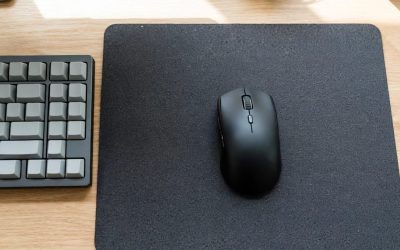
 SteelSeries QcK XXL Gaming Mouse Pad16L x 35W inches15.75 x 35.43 x 0.08 inches1.1 poundsCheck on Amazon
 SteelSeries Apex 3 TKL RGB Gaming KeyboardApex 3 TKL5.9 x 14.3 x 1.57 inches1.4 poundsCheck on Amazon
As an Amazon Associate we earn from qualifying purchases.
The best PC layout for gaming keyboard and mouse is not about buying more gear; it is about where the keyboard, the mouse, and the hands sit in relation to each other. A good layout gives the mouse a wide, clear sweep area, puts the keyboard at an angle the left hand can reach without twisting the wrist, and keeps the monitor at a distance where the eyes can take in the whole screen without turning the head. A poor layout does the opposite: the mouse bumps into the keyboard, the wrist bends at a sharp angle, and the shoulders creep up toward the ears within an hour.
Every player is shaped differently, so there is no single layout that fits everyone, but the principles are the same. The mouse needs space to move with the arm, the keyboard needs to sit where the left hand falls naturally, and the monitor needs to sit straight ahead at eye level. Small changes matter more than big ones: moving the keyboard a few centimetres to the left, lowering the chair, or widening the mouse area can change how a long session feels.
This guide walks through the layout step by step, from desk zones and keyboard angles to mouse space, monitor position, and cable routing. It is a guide rather than a product shortlist, because the layout depends on the desk, the chair, and the player rather than on any single keyboard or mouse, and the right setup is the one that fits the body using it.
The layout should be checked with the body, not just the eyes. Sit in the chair, close the eyes, and let the hands fall where they naturally rest: that is where the keyboard and the mouse belong. If the hands land on empty desk, the layout is too spread out; if they land on top of each other, it is too cramped. A tape measure helps too: measure the mouse sweep, the distance to the monitor, and the desk depth, and compare them with the numbers in this guide. A layout that measures well and feels natural will serve for years without further thought.
How to Choose
Desk zones
Divide the desk into zones: the monitor zone at the back, the keyboard zone in the middle, and the mouse zone on the right. The mouse zone is the one players underestimate: it should be at least as wide as the forearm sweep, with no objects in the way. Clear the desk of anything that does not belong in its zone, and the layout will already feel better.
Keyboard angle and position
Most players angle the keyboard slightly, with the left side closer to the body than the right, so the left hand rests naturally on the movement keys. The exact angle depends on the game and the hand: a steeper angle suits players who use the left hand for many keys, while a straighter angle suits players who keep the hand in one place. The keyboard should sit close enough that the elbow stays near the body, not stretched forward.
Mouse space and sensitivity
The mouse area should be wide enough for the full sweep of the arm at the chosen sensitivity. Low-sensitivity players need more space, sometimes the full width of an extended mouse pad, while high-sensitivity players can work in a smaller area. Measure the sweep by moving the mouse from one edge of the screen to the other and checking how far the hand travels; the desk should allow that travel plus a margin.
Monitor distance and height
The monitor should sit directly ahead, at a distance where the whole screen is visible without turning the head, and with the top of the screen at or just below eye level. A monitor that is too close forces the eyes to scan constantly; a monitor that is too low forces the neck to bend. A monitor arm or a stack of books under the stand can fix the height without buying new furniture.
Chair and arm position
The chair height should let the forearms rest roughly level with the desk, with the elbows at about ninety degrees. If the chair is too low, the shoulders rise; if it is too high, the wrists bend upward. Armrests should support the elbows without pushing them forward, and the feet should rest flat on the floor or on a footrest.
Cable routing
Cables are part of the layout, not an afterthought. A mouse cable that drags on the desk edge changes the feel of every movement, so route it with a bungee or a clip that lifts it off the desk. Keyboard and monitor cables should run behind the desk, out of the mouse zone, and a cable tray under the desk keeps them off the floor and out of the way.
Lighting and glare
The desk should be lit well enough to see the keys without glare on the screen. A light source behind the monitor or to the side works better than a light directly behind the player, which reflects on the screen. Bias lighting behind the monitor can reduce eye strain in a dark room, but it is a comfort feature rather than a necessity.
A Layout That Works for Most Players
Start with the monitor centred on the desk, about an arm’s length away, with the top of the screen at eye level. Place the keyboard in front of the monitor, angled slightly so the left side sits closer to the body. Put the mouse to the right of the keyboard, with a clear area at least as wide as the forearm sweep. Sit in the chair, rest the hands in place, and check three things: the elbows sit near the body, the wrists stay straight, and the mouse can travel its full sweep without hitting the keyboard or the desk edge. Adjust the keyboard angle and the chair height first, since those two changes fix most discomfort, then fine-tune the monitor distance.
Layouts by Game Type
Competitive shooter players usually need the widest mouse area, with the keyboard angled steeply to the left to make room for broad arm movements. Strategy and simulation players need less mouse space and more keyboard access, so the keyboard can sit straighter and closer. MMO players often want the keyboard centred and the mouse close, since the hand moves between the keyboard and the mouse often. There is no single correct layout: the game decides how much the mouse moves, and the layout should give the mouse exactly that much room, no more and no less.
Common Layout Mistakes
The most common mistake is pushing the keyboard too far to the right, which squeezes the mouse area and forces the wrist into a bent position. The second is placing the monitor too close, which makes the eyes work harder than they need to. The third is ignoring the chair: a chair that is too low or too high undoes a good desk layout, since the arms follow the chair, not the desk. Fix these three and most layouts feel dramatically better without any new purchases.
Desk Gear That Makes a Good Layout Easier
Once the layout is right, a few accessories help keep it that way: more mouse space, a cleaner desk and a compact keyboard that leaves room to swing the arm.
SteelSeries QcK XXL Mouse Pad
A large cloth pad that covers both keyboard and mouse area, giving low-sensitivity players plenty of room to move.
SteelSeries QcK XXL Gaming Mouse Pad - Black | XXL Cloth - Peak Tracking and Stability - Esports Mousepad - Never-Slip - Full Desk Coverage
One of the home product options compared in this guide.
View on AmazonSteelSeries Apex 3 TKL Keyboard
A tenkeyless layout removes the number pad, so the mouse can sit closer to the center of the body.
SteelSeries Apex 3 TKL RGB Gaming Keyboard – Black | Tenkeyless Compact Form Factor - 8-Zone RGB Illumination – IP32 Water & Dust Resistant – Whisper Quiet Gaming Switch
One of the home product options compared in this guide.
View on AmazonWALI Single Monitor Arm
A desk-clamp arm that frees up space and lets you set screen height and distance precisely.

WALI Adjustable Single Monitor Arm for 13-34 inch Screens, up to 26.4 lbs | Single Monitor Desk Mount, Full Motion with Tilt, Swivel, Rotation, C-Clamp & Grommet Base, VESA 75/100mm (GSMP001N), Black
Chosen because it lists an explicit depth/thickness.
View on AmazonVIVO Clamp-On Keyboard and Mouse Tray
A tray that adds a lower, roomier platform for the keyboard and mouse when the desk surface is too tall.

VIVO Clamp-on Keyboard and Mouse Tray, 27" x 11" Black Platform | Holds 11 lbs, Universal Large Under Desk Keyboard & Mouse Tray for Typing, Slide Out Platform, Black Clamps, MOUNT-KB05E
One of the home product options compared in this guide.
View on AmazonComparison Table
| Layout element | Good position | Watch out for | Fix |
|---|---|---|---|
| Keyboard | Angled slightly, left side closer | Too far right, squeezing the mouse | Shift left, increase the angle |
| Mouse area | Wide, clear, full arm sweep | Clutter, desk edge, cable drag | Clear the zone, use a bungee |
| Monitor | Straight ahead, top at eye level | Too close or too low | Move back, raise the stand |
| Chair | Forearms level with desk | Too low or too high | Adjust height, check elbow angle |
| Cables | Routed behind the desk | Crossing the mouse zone | Tray under desk, clips |
Before You Buy
Measure the desk before buying anything for it: the width, the depth, and the height all shape the layout. Check the chair as well, since a chair without height adjustment cannot be tuned to the desk, and a good layout needs both to work together. If a monitor arm, a mouse bungee, or an extended mouse pad is on the shopping list, confirm the desk thickness and the available space first, since a clamp that does not fit the desk is useless. Try the layout with the existing gear before ordering new pieces: move the keyboard, clear the mouse area, and adjust the chair, then play for an evening and note what still feels wrong. The fixes that remain after that evening are the ones worth spending on.
Which One Is Right for You?
For a competitive shooter setup, prioritise mouse space: angle the keyboard steeply, clear a wide area on the right, and keep the monitor at arm’s length. For a strategy or MMO setup, prioritise keyboard access: keep the keyboard straighter and closer, with the mouse within easy reach. For a mixed setup that does everything, use the standard layout described above and adjust the keyboard angle to taste. In every case, the layout that fits the body is the right one, and it is worth spending twenty minutes adjusting the chair, the keyboard angle, and the monitor height before buying anything new.
Frequently Asked Questions
Should the keyboard be straight or angled?
Slightly angled suits most players, with the left side closer to the body, because it lines the left hand up with the movement keys. The exact angle is personal: try a few positions and keep the one where the wrist stays straight.
How much mouse space do I need?
Enough for the full sweep of the arm at the chosen sensitivity, plus a margin. Low-sensitivity players need a wide area, often the full width of an extended mouse pad, while high-sensitivity players can work in a smaller space.
Does a monitor arm help the layout?
Yes, when desk space is tight. A monitor arm frees the desk surface, lets the screen sit at the right height, and makes it easy to move the monitor between landscape and portrait. It is one of the most useful layout upgrades for a crowded desk.
Why do my shoulders ache after long sessions?
The usual cause is a chair that is too low or a keyboard that is too far away, which makes the shoulders rise and the arms stretch. Raise the chair until the forearms sit level with the desk, bring the keyboard closer, and check that the elbows stay near the body.
FAQ
Which One Is Right for You?
Should the keyboard be straight or angled?
How much mouse space do I need?
Does a monitor arm help the layout?
Why do my shoulders ache after long sessions?
More from Amazon
Programs that pair well with the guide above. Offers and eligibility are set by Amazon and may change.
Free shipping on eligible items, Prime Video and more. Eligible new members can start with a free trial.
Start a Prime free trialAd-free music streaming. Eligible new subscribers can start with a free trial.
Try Music Unlimited freeA Prime membership for ages 18-24 with a trial period. Eligibility is set by Amazon.
See Prime for Young AdultsAudiobooks and podcasts to listen to on the go. Eligible new members can start with a free trial.
Try Audible freeAs an Amazon Associate we earn from qualifying purchases.