
Finding the best PS5 Pro wall mounts is not simply a matter of choosing the cheapest metal bracket. The mount must fit the larger Pro chassis, hold the console positively rather than merely balancing it on a lip, leave the disc drive and cables accessible, and attach securely to your particular wall. Our best overall bracket to consider is the HIDEit PS5 + PS5 Pro Mount because its manufacturer explicitly confirms PS5 Pro fit, documents the mounting hardware, and explains the separate orientation considerations when a disc drive is installed. The VIVO MOUNT-PS5B is the stronger value choice if you also need two controller holders. However, there is one significant caution before buying any flush-fit bracket: Sony’s PS5 Pro safety guide calls for at least four inches of distance from a wall. Many compact mounts do not demonstrate that clearance. These are conditional accessory picks, not a declaration that wall mounting overrides Sony’s instructions.
Quick verdict: Which PS5 Pro wall mount should you buy?
Best overall for documented PS5 Pro fit: HIDEit PS5 + PS5 Pro Mount. At the manufacturer’s US storefront, the basic mount was listed for $31.00 with an Add to Cart option when checked. Its 12-gauge steel construction, top hook, and M3 retaining screw provide a more clearly described retention arrangement than vague shelf-style listings. The manufacturer expressly names the PS5 Pro, including configurations with an attached disc drive. You must still verify wall strength, mounting-hole placement, disc-drive orientation, and Sony’s clearance recommendation. It is not the correct HIDEit part for a PS5 Slim.
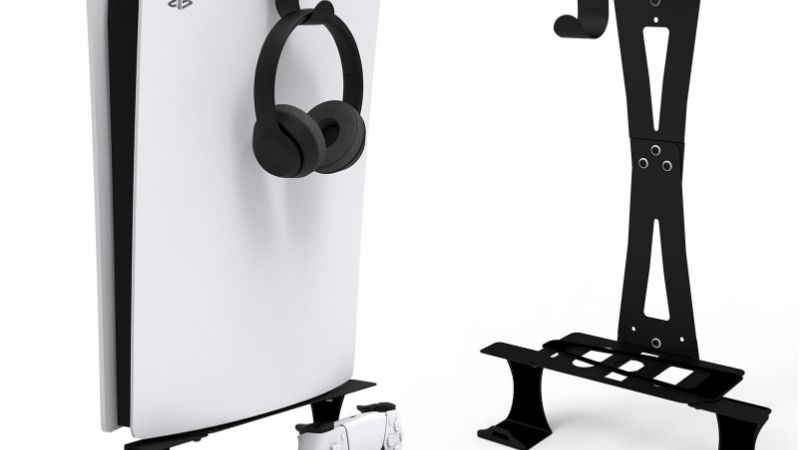
Best value with controller storage: VIVO MOUNT-PS5B. The manufacturer listed the black kit for $24.99 on sale, marked it in stock, and included two controller holders. Its steel bracket supports vertical installation and has a security bolt and support brackets. It explicitly lists PS5 Pro among its compatible systems. The limitation is that a low price and two extra holders do not prove safe vent-to-wall spacing or temperature performance.
Best compact lower-support design: HIDEit 5S PS5 Shelf Mount. This is a distinct HIDEit product, not another color of the first pick. Its smaller supporting shelf and M3 retention approach appeal to buyers who prefer less visible metal beneath the console. The US manufacturer page displayed $27.00 and Add to Cart. HIDEit states that it accommodates all PS5 editions; its PS5 Pro compatibility explanation provides the extra confidence missing from generic listings. Still, assess how the drive projects toward the wall and how much rear access remains in your actual installation.
Best modular fit across PS5 generations: Glistco Steel Wall Mount, PS5-WM-U1. Glistco lists this $28.99 wall mount as in stock and expressly includes the original PS5, PS5 Slim, and PS5 Pro. It uses interchangeable top plates and a direct retention screw. It is a sensible choice for households that may move accessories between different-generation PS5 consoles, provided all supplied parts are present and installed according to the selected console variant.
Best for a matched black or white setup: ViMount PS5 Fat & PS5 Pro Wall Mount, vim-106. The manufacturer lists both matte black and matte white, describes a 1.5 mm steel bracket, and offers optional controller or charging accessories. The inspected base listing showed $39.99 and an In Stock status. Its published copy mentions both vertical and horizontal installation, but that claim deserves confirmation for the PS5 Pro and especially for a Pro with the optional disc drive, rather than assuming every supported orientation of an original PS5 also applies.
The critical decision: If you cannot maintain the clearance Sony specifies for your PS5 Pro, the best mount for your setup may be no wall mount. A spacious console shelf or cabinet top that respects the ventilation guidance is the safer choice than a close-fitting bracket with impressive marketing photographs.
PS5 Pro wall mount comparison
These are five identifiable products with a direct seller or manufacturer listing inspected on October 27, 2026. Prices apply to the exact base option identified, in US dollars. ‘In stock’ indicates that the page either explicitly says so or offered an Add to Cart control; it does not guarantee checkout availability by ZIP code. Dimensions are bracket dimensions where specified, not verified distances between console vents and a wall. No item here has independently demonstrated that its standard wall installation provides Sony’s full four-inch clearance.
| Product | Verified differentiator and fit | Mount orientation | Price (seller, checked Oct. 27, 2026) | Stock status (Oct. 27, 2026) | Main drawback |
|---|---|---|---|---|---|
| HIDEit PS5 + PS5 Pro Mount | 12-gauge steel, top hook plus M3 retention; PS5 Pro explicitly supported | Vertical only | $31.00, HIDEit | In stock / Add to Cart | Pro-specific disc-drive placement rules; check clearance |
| VIVO MOUNT-PS5B, black | Steel bracket, security bolt, two controller holders; lists PS5 Pro | Vertical only | $24.99 sale, VIVO US | In stock, ready to ship | Discount may end; wall offset not specified |
| HIDEit 5S PS5 Shelf Mount | Compact steel shelf, M3 screw; manufacturer says all PS5 editions | Vertical only | $27.00, HIDEit | In stock / Add to Cart | Small support platform demands careful alignment |
| Glistco Steel Wall Mount PS5-WM-U1 | Interchangeable top plates, direct retaining screw; PS5 Pro and Slim supported | Console-specific vertical fitting | $28.99, Glistco | In stock, ready to ship | Must use the correct plate and verify full kit contents |
| ViMount PS5 Fat & PS5 Pro Wall Mount vim-106 | 1.5 mm steel, matte black/white, accessory add-ons | Vertical; maker also claims horizontal | $39.99, ViMount | In stock | Confirm Pro-specific horizontal orientation and drive access |
The VIVO sale listing also displayed a regular $29.99 price. Do not treat the $24.99 price as permanent. The HIDEit and Glistco listings were manufacturer-direct base products, while ViMount’s price excluded its separately selectable $10 controller-mount and charging-mount add-ons. Shipping, sales tax, destination-specific stock, and installation labor are not part of the numbers above.
The ventilation issue most wall mount roundups miss
Sony’s PlayStation 5 Pro safety guide for the CFI-70XX family does not simply tell owners to avoid covering a fan. Under its vents section, it instructs them to keep the console at least 10 centimeters (four inches) away from a wall surface, avoid narrow or cramped spaces, keep vents unobstructed, and prevent dust buildup. The manual also documents the console’s approximate mass of 3.1 kilograms (6.9 pounds) without implying that any third-party wall bracket is an approved installation method. These are safety and operating instructions, not optional marketing preferences.
A bracket can be made from thick steel and still leave the PlayStation much closer to the wall than Sony recommends. A base listed as three inches deep is not automatically a three-inch air gap, and neither figure establishes the distance from the nearest vent or panel to the wall. Likewise, a manufacturer photograph of blue airflow arrows is not independent evidence that the console runs cooler. None of the five inspected product pages supplied a PS5 Pro temperature test with a controlled comparison to an open, Sony-compliant installation.
What should you do? Measure the actual mounting offset in the planned orientation, check the nearest wall-facing surface, and compare that distance with Sony’s four-inch guideline. If the product and installation cannot meet it, favor an open stand or shelf instead. Do not invent clearance by stacking random spacers behind a supplied bracket: altering standoff length changes leverage on mounting screws and anchors, and the bracket maker may not approve that configuration. Contact the manufacturer for a designed, rated spacing solution if a wall installation is essential.
Mounting on the side of a television does not resolve the problem automatically. A recessed TV cavity can trap heat, a cabinet door can enclose the console, and wall-mounted entertainment units can leave little room for front or rear cables. Keep the entire console accessible for cleaning and emergency disconnection. Plan how you will reach the power button, USB ports, optional disc drive, and AC plug without pulling the console against a short cable. For a strict interpretation of Sony’s stated spacing, ordinary flush-style console mounts are a poor fit; that limitation governs our recommendations throughout.
Best PS5 Pro wall mounts by use case
HIDEit PS5 + PS5 Pro Mount — Best documented console-specific fit
HIDEit’s original PS5 bracket is a leading candidate because the company has published an unusually clear PS5 Pro compatibility explanation rather than relying only on a retailer’s combined PS5/PS5 Slim/PS5 Pro search title. The product page identifies the original PS5 and PS5 Pro as compatible, specifically excludes the PS5 Slim, and describes a top hook combined with an M3 screw that secures the console to the bracket. The listed main bracket dimensions are 15.71 by 5.00 by 3.01 inches. The manufacturer supplies four drywall screws, four matching anchors, and an M3 screw with the bracket.
Those details matter for a device that costs much more than its support bracket. A screw-based connection helps address upward or lateral movement that can happen when a pet brushes the console or someone catches a cable. A top hook helps hold the body in its intended upright orientation. Still, an included drywall anchor rating is not permission to screw the kit into any hollow surface. The capacity of the completed installation depends on wall material, screw installation, bracket geometry, and the load’s offset from the wall. We recommend locating structural support whenever practical and consulting a qualified installer when wall construction is uncertain.
The most important model-specific distinction arises when you add Sony’s optional disc drive to a PS5 Pro. HIDEit’s PS5 Pro compatibility notice says the drive should face outward, away from the wall, and recommends positioning the console to the left of the TV for that illustrated mounting arrangement. That is a manufacturer’s installation condition, not a generic promise that every drive orientation will work. Before drilling, hold the empty bracket in its proposed position and imagine the disc insertion path, the rear-cable bend, and how you would remove the drive cover for service.
Advantages: Explicit PS5 Pro support, identifiable 12-gauge steel construction, a documented retaining screw, and brand guidance for the disc-drive configuration. Trade-offs: The bracket is not intended for PS5 Slim, is manufacturer-limited to upright installation, and cannot be assumed to achieve Sony’s specified wall spacing. This is the best first product to evaluate if your top concern is verifiable fit, but do not order until you can resolve the clearance issue in your room.
VIVO MOUNT-PS5B — Best value for a shared gaming space
VIVO’s MOUNT-PS5B offers a different proposition: a single wall-mounted organizer that holds the console and two controllers. The inspected US storefront specifically calls out PS5 Pro compatibility, wood-stud or drywall mounting options, steel construction, and vertical orientation. Its bracket measures 15.7 by 5.9 by 3 inches, while the controller mounts are separate, smaller cradles. VIVO also describes a security bolt and support brackets. The black base package was advertised at $24.99 on sale against $29.99 regular price, and the page said the selected item was in stock and ready to ship.
For a household where two DualSense controllers repeatedly end up on the TV stand, the extra holders add real utility. One person can place a controller back after a session while another can use the other cradle, and you avoid sticking unrelated hooks to painted drywall. This is more convenient than buying a console mount and improvising controller storage later. It is not a charging solution, though. Separate holders neither charge the controllers nor prove that a cable will reach a nearby outlet, so plan USB-C charging access independently.
There are also reasons not to pick VIVO. The bracket is still a vertical-only system, despite marketing language about airflow. The published 3-inch dimension is the bracket’s depth, not a demonstrated four-inch console-to-wall clearance. The US listing shows black and white selectable colors, so the verified $24.99 applies to the checked black option, not necessarily every finish at checkout. Its manufacturer’s assembly PDF should govern which holes and anchors you use; do not assume every supplied drywall anchor is appropriate for a hollow door, brittle plaster, or damaged gypsum board.
Advantages: Verified budget price on the checked date, included controller holders, explicit PS5 Pro compatibility, and an official assembly manual. Trade-offs: The sale may disappear, the controller mounts do not charge, and ventilation clearance remains to be established. Choose it when controller organization is central to your setup and the wall environment allows a properly engineered, compliant placement—not because the listing calls the design ‘cooling.’
HIDEit 5S PS5 Shelf Mount — Best low-profile bracket concept
The HIDEit 5S shelf differs visibly and mechanically from HIDEit’s original tall PS5 bracket. Instead of a longer shaped frame, the 5S product is a compact support shelf with an M3 securing screw. The manufacturer lists a 5.20-by-5.00-by-2.76-inch footprint and describes 12-gauge steel with a powder-coated finish. It advertises support for all PS5 editions, and HIDEit’s PS5 Pro compatibility announcement specifically confirms the shelf approach for the Pro. At the inspected US product page, the basic bracket cost $27.00 and displayed an Add to Cart control.
Its reason to exist is appearance. Some owners dislike seeing a tall metal silhouette extend up the side of a white console. A small shelf offers a tidier visual line, and the compact format can suit a clean television wall where the console is intended to be the main object in view. It can also simplify access to the console’s upper body compared with a bracket whose arms run along a long section of the chassis. That said, visual minimalism does not increase load capacity or solve an inadequately supported wall.
Pay special attention to installation alignment. The 5S support has less visible framing than the original HIDEit PS5 product, making precise seating and use of the correct M3 retention point even more important. The company says that the 5S is vertical-only, not a VESA attachment and not an under-desk mounting solution. Its PS5 Pro compatibility guidance also distinguishes disc-drive positioning, so a model change from digital Pro to Pro-with-drive is not just a matter of moving the same cables to the other side.
Advantages: Less visible hardware, a distinct compact construction, a lower checked base price than the original HIDEit bracket, and directly documented PS5 family compatibility. Trade-offs: It requires more careful seating, only supports upright positioning, and does not independently establish Sony’s wall spacing. Pick it over the tall HIDEit mount for appearance and support geometry—not under the mistaken assumption that its small size makes it safer or cooler.
Glistco Steel Wall Mount PS5-WM-U1 — Best modular fit
Glistco’s PS5-WM-U1 addresses a common shopping problem: third-party PS5 mounts are frequently mislabeled across the original PS5, the smaller PS5 Slim, and PS5 Pro. The manufacturer’s current product page plainly lists all three model families, including PS5 Pro, and illustrates interchangeable top plates. It describes a direct screw mounting system, an accessible cable/port arrangement, and an adjustable fit that is selected by using the correct top plate. The inspected US-facing listing was $28.99 and explicitly said ‘In stock, ready to ship.’
This product is attractive to a buyer who wants a reusable accessory strategy rather than a mount that becomes obsolete when someone in the household replaces the console. Interchangeable plates are a more understandable engineering approach than saying a single fixed cutout happens to fit everything. They also create a responsibility: you must use the plate intended for the console in front of you, not the one that seems close enough. Before fastening the console, identify the current plate, the retaining screw, the wall hardware, and any model-specific adjustments shown in the included instructions.
The direct screw connection is another positive, since relying on gravity alone is undesirable in a high-traffic gaming area. Glistco’s manufacturer photographs show a 12-gauge steel body, but its storefront claims of stability and full ventilation are not independently measured here. The same four-inch clearance question applies. If the PS5 Pro is pressed very close to the wall, the fact that the mount has airflow slots does not override Sony’s placement directions. Any plan that changes the bracket with custom blocks or longer bolts should go back to the manufacturer for support rather than being treated as an easy DIY fix.
Advantages: Identifiable SKU, manufacturer-described plate system, screw retention, and clear stock status. Trade-offs: More pieces mean more opportunities to select the wrong configuration; the manufacturer does not document a measured four-inch gap for every PS5 Pro setup. Choose this model when correct parts management and adaptability to the PS5 family matter more than matching one console’s contours exactly.
ViMount PS5 Fat & PS5 Pro Wall Mount vim-106 — Best finish matching
ViMount’s model vim-106 is a more decorative solution for people building a coordinated media wall. Its direct listing names the original PS5 and PS5 Pro, offers matte black and matte white, and describes a powder-coated 1.5 mm steel bracket. The base item showed a $39.99 sale price and an In Stock status, with optional controller holders or a controller-charger holder at additional cost. That structure gives buyers some choice about whether to keep the area visually simple or add a small accessory station without shopping across multiple stores.
The key reason to compare ViMount with VIVO is not basic affordability: the checked ViMount base price was higher and did not automatically include the extras that come with the VIVO kit. It is the styling and the option to assemble a more curated wall layout. A white mount against a light gaming room may draw less attention than a dark frame, while matte black can disappear against a dark television wall. This is an aesthetic trade-off, not an acoustic or thermal benchmark.
ViMount’s sales description claims that its bracket can be used vertically or horizontally, which is unusual enough to require close reading. The same page’s lower specification block lists ‘Playstation 5 Digital’ and ‘Playstation 5 Disc’ without explicitly restating the Pro. Those sections are not fully consistent about every Pro-specific installation configuration. For a PS5 Pro—particularly one with the optional disc drive—ask ViMount to confirm the exact horizontal orientation, retention method, and supported model configuration in writing before buying for that purpose. Until then, regard the horizontal claim as an unverified purchasing advantage, not a recommendation to rotate the console.
Advantages: Named PS5 Pro compatibility in the main product description, two matte finishes, optional accessory matching, and manufacturer-direct availability. Trade-offs: Highest listed base price of the five, add-on costs, and unresolved Pro-specific detail about claimed horizontal mounting. Treat it as a style-first option only if the maker can validate your intended geometry, the wall can take the load, and you have a ventilation plan compatible with Sony’s directions.
How we selected and ranked the mounts
This is a research-based buying guide, not a hands-on mounting test. We looked for a real product name or SKU, first-party PS5 Pro fit statements, a visible US-market purchase option, disclosed bracket materials and retention methods, explicit mounting orientation, and enough installation documentation to spot meaningful limitations. We prefer manufacturer pages over broad marketplace labels that group ‘PS5/Slim/Pro’ without identifying the exact support hardware. We also compared the sellers’ claims against Sony’s PS5 Pro safety guide instead of accepting ‘better cooling’ language at face value.
Our rankings emphasize documentation and use case, not a laboratory score. None of the five mounts was weighed, flex-tested, pull-tested, or thermally benchmarked by Geek Gaming Tricks. We have not measured drywall anchor pull-out strength, dropped a console onto a mounted bracket, evaluated paint wear after months of removal, or confirmed that an attached disc drive fits every wall orientation. A manufacturer’s statement that its bracket is made from 12-gauge steel supports a materials comparison; it does not replace structural installation evidence or tell you whether a specific hollow wall is safe.
Availability also matters. All five products had active US-facing manufacturer listings with a stock statement or purchase control in the checked session. We did not elevate the FLOATING GRIP PS5 Slim/Pro rope-style mount into the table because its direct storefront marked it ‘Unavailable’ and described backordered fulfillment. It is a relevant design alternative, but not a dependable immediate-purchase pick as of this check. A product that is unique but backordered should not displace an available option when a reader wants to complete a setup soon.
Finally, the word ‘best’ is conditional. HIDEit earns the top editorial placement for explicitly documented fit, but that does not amount to an endorsement of installing it flush against a wall contrary to Sony’s safety recommendation. For an owner who cannot confirm sufficient spacing or secure wall support, our actual recommendation is a free-standing, properly ventilated location rather than any product in the comparison table.
PS5 Pro compatibility checklist before ordering
Identify the console and whether a disc drive is installed
The PS5 Pro is not interchangeable with the PS5 Slim or the original PS5 for purposes of shell shape and accessory mounting. The Pro can be used in its base digital configuration or with Sony’s optional disc drive attached, and that attachment changes one side of the physical profile. Do not rely on a marketplace phrase such as ‘fits PS5’ without a specific Pro claim. Check your console’s model information and, if relevant, read the mount manufacturer’s instructions for the drive-bearing orientation. The drive should remain accessible for inserting and ejecting discs without twisting the console in its bracket.
When comparing HIDEit products, remember that ‘HIDEit PS5’, ‘HIDEit PS5S’, and ‘HIDEit 5S’ are not the same SKU. The first supports the original PS5 and Pro, the PS5S is the company’s Slim-specific option, and the 5S shelf is advertised as spanning the broader PS5 family. Selecting the wrong product because the names differ by one letter could waste money or create an insecure fit. Similar caution applies to Glistco’s interchangeable plates and ViMount’s original-PS5 versus Pro compatibility language.
Decide whether vertical-only is acceptable
Most of the clearly documented console wall brackets in this group are vertical-only. HIDEit explicitly rules out horizontal, under-desk, and VESA use for its PS5/Pro bracket. VIVO lists vertical orientation. If your wall has a low shelf above it or a television so close that an upright Pro cannot fit comfortably, do not flip a vertical-only bracket sideways. Rotating an accessory changes how gravity loads its retention hardware and can defeat the intended support. ViMount’s horizontal claim should be confirmed for the exact Pro configuration before you treat it as an alternative.
Inspect the actual wall and anchoring method
The purchase decision starts with the wall, not the console. Wood studs, appropriately prepared masonry, and hollow drywall require different fasteners and installation practices. A box of universal plastic anchors is not a universal assurance of strength. Consider the weight of the console, bracket, connected cords, and the leverage caused by any offset; then follow the bracket maker’s specific instructions for that substrate. A wall with water damage, loose plaster, crumbling brick, or thin paneling needs expert assessment or an alternate location.
In a rented home, check permitted drilling and patching rules before making holes. In a household with children, avoid placing a heavy object at face height or where cords can be pulled. Do not locate a bracket where opening a cabinet door could strike the console. A professionally installed shelf may be the better answer when stud placement does not line up with the clean-looking location you envisioned.
Check four-inch clearance, cord routing, and service access
Measure the location with the actual console or a dimensional mock-up, not only the bracket. The Sony safety guide’s four-inch wall-spacing instruction is a more meaningful reference than a seller’s phrases ‘airflow optimized’ or ‘open metal design.’ Check space around all exterior vents and any wall-facing side. Also leave enough room to unplug the AC lead without yanking it, to replace HDMI cables, and to remove the console for cleaning without loosening structural screws every time.
If your television is already mounted flush against the wall, a PS5 Pro hidden behind it may be convenient but difficult to inspect. It can also be hard to reach the power indicator and may trap heat in a narrow cavity. Avoid using an unapproved extension of the mount just to hide cables. A short cable that stays under tension can transfer pulling forces to the console or connector. Prefer a route with strain relief and no sharp folds.
How to install a PS5 Pro wall mount more safely
This checklist outlines the decision points; the exact drill diameter, screw order, anchor method, and console retention step must come from the manual supplied with your selected SKU. Do not swap the procedure from a HIDEit bracket onto a VIVO or Glistco bracket simply because both hold a PS5.
- Confirm the model and package contents. Match the package label to the manufacturer product page and locate every bracket plate, model insert, retaining screw, and prescribed wall fastener. Do not continue if an essential retaining part is absent or if the manual does not identify your PS5 Pro configuration.
- Choose a location that can meet Sony’s ventilation guidance. Measure the nearest console-to-wall distance in the intended position and ensure there will be no blocked vents or enclosed hot-air pocket. If the design cannot provide the recommended spacing, stop and select an open shelf or another installation plan.
- Identify the wall substrate and structural support. Use a stud finder when applicable and check for hidden electrical or plumbing runs before drilling. Match fasteners to the exact wall type and the bracket manufacturer’s instructions. Ask a professional to assess unfamiliar or weakened walls.
- Mark and level the mounting points. Use the actual bracket as a template or follow its drilling diagram. Verify height, cable routes, television clearance, and disc-drive access before creating holes. Two people can help when one person needs to hold a large template level while the other marks.
- Install the bracket without improvising its hardware. Tighten and seat wall screws as the manufacturer directs; do not overtighten into fragile material. Confirm the empty bracket is flush where specified, does not rock, and has no visibly loose anchors before bringing the console near it.
- Power the PS5 Pro off completely, unplug it, and let it cool. Remove cables before lifting the console, and keep both hands on the console’s main body rather than gripping a detachable cover. Install the correct retaining screw or support plate using the manufacturer’s procedure. Avoid pressing on the disc drive or vent openings.
- Have another adult support the console while fastening it. Do not release the console until its intended retaining mechanism is fully engaged. Examine cable bend radius and drive access, then recheck the final spacing from the wall. If the mount sags, creaks, shifts, or blocks a vent, remove the console and correct the installation rather than powering it on to ‘see if it works.’
- Reconnect cables without loading the connectors. Route power and HDMI cables so that the wall bracket—not the connector—is carrying the console’s weight. Keep the outlet or disconnection point accessible. Monitor the installation periodically for loosened screws, panel movement, and dust buildup.
A wall mount is a piece of support hardware. It is not a thermal upgrade, power-supply accessory, or security lock unless the manufacturer expressly provides and documents that additional function. Never drill into the PS5 Pro itself, remove protective panels to make an incompatible bracket fit, or use adhesive strips as the only restraint for a heavy console.
Common mistakes to avoid
Buying a PS5 Slim-only model for a Pro. This is the easiest avoidable error. Product titles often mention multiple PlayStation variants for search visibility, but the compatible body shapes, retention points, and drive clearances can differ. Always read the exact model list—not just the headline—and ask the seller for a PS5 Pro photo or written confirmation when evidence is ambiguous.
Mistaking thin steel for inadequate strength or thick steel for guaranteed safety. Gauge and sheet thickness help identify materials, but secure fastening and the wall substrate are equally important. A thick bracket installed in unsuitable drywall with the wrong anchors can still fail. Conversely, an open frame made from a different thickness may perform adequately when the engineer’s fastening and load requirements are followed. Do not rank real-world load safety on gauge alone.
Confusing bracket dimensions with ventilation clearance. A 3-inch bracket depth and a four-inch Sony wall-distance guideline are different measurements. Neither a fan added nearby nor an ‘open airflow’ label proves a mount maintains that spacing. This is especially important behind a TV or beside a heat-generating receiver where ambient airflow may be poor.
Turning an upright wall mount into a horizontal shelf. Vertical-only accessories may use gravity, lips, and retaining hardware in specific directions. Rotating the assembly can place a pull load where the part was designed for compression. Only follow horizontal instructions published for your exact bracket and PS5 Pro configuration.
Ignoring the disc drive and cable access. A digital Pro can appear to fit neatly while the same model fitted with a disc drive projects farther toward a wall, bracket arm, or television. Leave room for inserting discs and ensure the drive faces the side the maker specifies. Route cables so no connector is pinched between the Pro and the wall.
Treating the wall mount as a reason to stop cleaning. Keeping a console off a dusty floor can help with accidental bumps and housekeeping access, but it does not stop dust settling on the vents. Sony calls for keeping vents clear and recommends careful dust removal with a handheld vacuum as described in the safety guide. Power off and unplug the system first; follow Sony’s console-specific cleaning instructions rather than spraying cleaner into an installed machine.
Frequently asked questions
Are PS5 Pro wall mounts the same as PS5 Slim wall mounts?
Not necessarily. HIDEit’s original PS5 + PS5 Pro Mount explicitly excludes the PS5 Slim, while the HIDEit 5S shelf and Glistco’s modular model advertise coverage across more PS5 editions. A retailer’s claim that one bracket fits ‘every PS5’ should lead you to inspect the attachment plates and retaining mechanism, not assume that similarly named consoles are physically identical. Verify Pro fit separately if your unit has the optional disc drive installed.
Can a PS5 Pro be mounted on the wall horizontally?
Some third-party sellers advertise it, but the strongest documented picks here are vertical-only. ViMount describes horizontal mounting on its product page while its lower specifications do not fully clarify Pro-specific configurations. Ask for the maker’s exact PS5 Pro horizontal installation instructions and confirmation of disc-drive support before attempting it. Never rotate HIDEit or VIVO’s vertical-only brackets into a horizontal position.
Will a PS5 Pro wall mount make the console run cooler?
There is no verified temperature result supporting that blanket claim for these five products. An open wall location may avoid some obstructions, but the actual effect depends on spacing, nearby surfaces, air movement, and heat sources. Sony says to keep the PS5 Pro at least four inches from a wall surface and not block vents. If a bracket cannot meet that recommendation, do not assume its metal cutouts or advertised ‘cooling’ design compensates for reduced clearance.
Do I need the separate Sony vertical stand when using a wall mount?
Sony’s guidance for conventional upright surface placement refers to the official vertical stand, but a third-party wall mount uses its own support and retention method. Whether an official stand is used simultaneously depends on the wall-mount manufacturer’s documented installation design. Do not combine stand and bracket components arbitrarily. Use the fasteners and parts the chosen bracket actually specifies, and do not infer that Sony approves a third-party wall installation merely because it supports vertical positioning.
Can I hide the PS5 Pro behind a wall-mounted TV?
Only if the resulting location remains accessible, safely supported, and meets ventilation and cable requirements. Hiding the system is a common design goal, but the TV, wall cavity, and console may collectively restrict airflow. Account for Sony’s wall clearance, television heat, cable reach, and access to the optional disc drive. A side-of-TV installation or open shelf may be easier to maintain even if it looks less concealed.
Is it safe to use drywall anchors for a PS5 Pro mount?
A manufacturer may include anchors and specify drywall installation, but their presence is not a universal approval for every wall. Anchor strength depends on the material condition, correct hole size, installation technique, bracket leverage, and the total system load. Fastening to structural framing where feasible is generally a more reassuring plan, but follow the SKU’s exact instructions and seek a professional opinion for questionable walls. Never rely on generic adhesive as the sole support.
What if I buy a bracket and later add the PS5 Pro disc drive?
Recheck the entire fit. The added drive changes the Pro’s profile, can shift which side should face outward, and may obstruct disc access near a television or wall. HIDEit explicitly provides a separate mounting orientation recommendation for its original and 5S products when the Pro has a disc drive. If your bracket’s manufacturer has no drive-specific guidance, contact them before reusing the previous layout.
Final thoughts
For a PS5 Pro owner who can verify an appropriately spaced and structurally sound installation, HIDEit PS5 + PS5 Pro Mount is the best starting point because its exact compatibility and retention design are unusually well documented. Choose VIVO MOUNT-PS5B if you also need two controller holders and the checked budget price remains available. The HIDEit 5S offers a more compact shelf concept, Glistco PS5-WM-U1 adds model-specific modular plates, and ViMount vim-106 prioritizes finish matching with caveats about Pro-specific horizontal mounting. Before ordering any of them, check Sony’s four-inch wall-spacing instruction against the actual installed geometry. If you cannot meet that clearance—or cannot anchor the bracket confidently—choose an open shelf instead. The best PS5 Pro wall mount is one you can install without compromising the console’s safety instructions, not merely one that looks impressive beside your TV.
