Key takeaways
- Motorized 360-degree rotation with through-base cable routing to prevent tangling for tethered PC VR headsets
- Integrated Roto Head Tracker module that can override stick-turn for head-directed rotation
- Built-in rumble/haptic unit in the seat base that translates low-frequency audio into vibration
- Modular design with optional accessories such as a desk/table attachment and HOTAS/wheel mounting points
- Companion app (Roto VR app on mobile/PC) for calibrating rotation speed, sensitivity, and rumble intensity
- Power draw from a standard mains adapter, usually rated in the 60-90W range, with idle draw under 10W
What's inside
The Roto VR Explorer is a motorized VR chair that physically rotates your body to match in-game turning, which reduces the need for artificial stick-turning and can significantly improve comfort and immersion for seated VR games, but it is not a replacement for room-scale or standing experiences.
What the Roto VR Explorer Actually Does
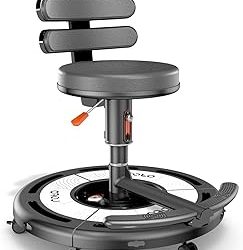
The Explorer is not a treadmill or a full motion rig. It is a powered, low-profile swivel platform with a built-in seat, footrest, and cable management system. A motorized base rotates the entire chair in sync with your head or controller input, so when you turn in the game, you turn in real life. The goal is to solve one of VR’s oldest comfort problems: yaw rotation without vestibular mismatch.
When you push the thumbstick to turn in a traditional seated setup, your eyes see movement but your inner ear does not. That sensory conflict is a primary trigger for VR motion sickness. By physically rotating you, the Roto aligns vestibular input with visual input for that axis of movement. It does not simulate pitch, roll, acceleration, or elevation – it is strictly a 360-degree yaw solution.
Key hardware features include:
- Motorized 360-degree rotation with through-base cable routing to prevent tangling for tethered PC VR headsets
- Integrated Roto Head Tracker module that can override stick-turn for head-directed rotation
- Built-in rumble/haptic unit in the seat base that translates low-frequency audio into vibration
- Modular design with optional accessories such as a desk/table attachment and HOTAS/wheel mounting points
- Companion app (Roto VR app on mobile/PC) for calibrating rotation speed, sensitivity, and rumble intensity
- Power draw from a standard mains adapter, usually rated in the 60-90W range, with idle draw under 10W
How the Rotation Improves Comfort and Immersion
The immersion benefit is most obvious in cockpit and seated exploration games. Instead of snapping or smoothly dragging the view with a stick, you look where you want to go and your body follows. For comfort, the benefit is measurable but conditional. It effectively eliminates discomfort from artificial yaw, which studies consistently rank as one of the most sickness-inducing locomotion types. It does not eliminate discomfort from forward artificial locomotion (pushing forward on the stick while seated), strafing, or vertical movement.
In practice, this means:
- Best case: Games where you primarily rotate in place, like seated shooters, puzzle adventures, or cockpit games where forward motion is handled by the vehicle. Comfort improvement is substantial.
- Moderate case: Standard first-person games with full stick locomotion. The Roto fixes half the problem (turning) but forward movement can still cause discomfort if you are sensitive.
- No benefit: Standing room-scale games like Beat Saber or Half-Life: Alyx played standing. The Roto is designed for seated use only.
Latency and Speed: Why Settings Matter
The motor needs to be fast enough to feel connected to your view, but not so fast that it is jarring. The Roto system aims for sub-100ms motion-to-rotation latency when using the head tracker. In the companion app, you control three critical values:
- Rotation Gain/Sensitivity: How much physical rotation is applied for a given head turn. Start at 1.0 (1:1) for head-tracked mode and reduce to 0.7-0.8 if you feel overshooting.
- Max Rotation Speed: Usually adjustable from 30 to 90 degrees per second. 45-60 deg/s is a good starting point for most users. Faster than 90 deg/s can feel aggressive and increases power draw and noise.
- Deadzone (degrees): Prevents micro-rotations from small head movements. Set to 10-15 degrees so looking slightly off-center to inspect a cockpit panel does not spin the chair.
- Rumble Intensity: Controls haptics. Keep at 30-50% for long sessions; 100% can become distracting and masks directional audio cues.
Reasoning: A smaller deadzone increases responsiveness but causes constant micro-corrections that are fatiguing. A lower max speed is more comfortable but will feel laggy in fast-paced shooters where you expect a quick 180-degree turn.
Compatibility: Headsets and Games
The Roto VR Explorer does not require a specific headset. It works as a Bluetooth and USB peripheral that interfaces with the PC or via its tracker, not directly with the headset’s OS. However, official support and ease of use vary by platform.
| Headset / Platform | Connection Type | Support Level in 2026 | Notes |
|---|---|---|---|
| Meta Quest 3 / Quest 3S | Standalone + PC Link (USB / Wi-Fi) | Full Support | Market leader. Use head-tracker mode for standalone, or Roto PC app when using Link/Air Link. |
| Meta Quest 2 | Standalone + PC Link | Full Support | Same integration as Quest 3, lower refresh rate makes rotation feel slightly smoother. |
| Pico 4 / Pico 4 Ultra | Standalone + PC via Streaming Assistant | Full Support | Good alternative for PC VR. Requires Pico’s PC streaming app. |
| Valve Index / HTC Vive Pro 2 / Bigscreen Beyond | Tethered PC VR (DisplayPort/USB) | Full Support + Cable Management Benefit | Biggest practical gain. The integrated cable channel prevents tether wrap during 360-degree rotation. |
| PlayStation VR2 | PS5 (USB-C) | Limited / Not Officially Supported | No native Roto integration on PS5. Rotation mirroring is not available without a PC. |
| Apple Vision Pro | Standalone | Not Supported | No supported VR gaming input pipeline for Roto to interface with. |
Game Compatibility Matrix
The Explorer supports over 400 titles through the Roto app’s profile library, but support falls into distinct tiers. This matrix helps map your library to the expected experience.
| If You Mainly Play… | Example Genres / Titles | Roto Mode Used | Is It Worth It? |
|---|---|---|---|
| Cockpit Simulations | Elite Dangerous, Star Wars: Squadrons, Microsoft Flight Simulator, Project CARS 2, Assetto Corsa | Head-tracked yaw + integrated haptics | Yes. This is the strongest use case. 1:1 rotation is natural and highly immersive. |
| Seated Narrative / Puzzle | Moss Series, Red Matter 2, The Room VR, I Expect You To Die 2 | Head-tracker or controller-pass-through | Yes. Excellent for comfort, low physical demand. |
| First-Person Shooters (Seated) | Half-Life: Alyx (seated), BoneLab, Into The Radius | Controller rotation remapped to physical rotation | Conditional. Fixes turning sickness, but forward stick movement remains. |
| Room-Scale / Standing Action | Beat Saber, Blade & Sorcery, Pavlov (standing) | Not recommended | No. The product is not designed for standing or large arm swings. |
Space, Power, and Setup Requirements
Unlike a static chair, the Roto needs clearance to spin and access to power. Plan for this before buying.
- Footprint: The base is roughly 70-75cm in diameter. You need a clear circle of at least 120-130cm to allow full 360-degree rotation without hitting walls or desks. Add 20cm if using the optional table accessory.
- Floor type: Works best on hard floors or low-pile carpet. Thick carpet can increase friction and motor load, causing slower rotation and higher power consumption.
- Power: Requires a mains wall outlet. It is not battery powered. The included adapter is typically 24V DC, with a cable length of around 2.5-3 meters.
- Weight capacity: Officially rated for users up to approximately 120-130 kg, including the seat and accessories.
- Assembly: Usually 30-45 minutes with two people. Calibration is done once in the app via a 360-degree auto-spin test to detect floor resistance.
Worked Calculation: Why Tethered Users Gain the Most
The value proposition is easiest to justify for tethered PC VR users who suffer from cable twist. Consider the data and power bandwidth involved:
A tethered headset like the Valve Index running at 1440 x 1600 per eye (2880 x 1600 combined) at 120Hz with 24-bit color requires a raw bandwidth of:
2880 x 1600 x 24 bits x 120 Hz = ~13.27 Gigabits per second before Display Stream Compression. Even with compression over DisplayPort 1.4, this requires a stable wired link. If you physically spin 180 degrees 20 times in a 60-minute session without cable management, you introduce 20 full twists into a cable carrying that data. Over time, this stresses the tether at the headset connector, which is a common failure point costing usually $100-$150 to replace. The Roto’s hollow-base cable routing passes the tether through the axis of rotation, reducing torsional strain to near zero regardless of how many rotations you perform. For wireless Quest users, this benefit is zero, so the purchase decision rests purely on comfort and immersion.
Who the Roto VR Explorer Is For (and Who Should Skip It)
Buy It If You Are:
- A sim or cockpit gamer who plays primarily seated and already owns a HOTAS or racing wheel. The combination of physical yaw and haptics adds more presence than rumble alone.
- Highly sensitive to smooth-turn stick locomotion but not to forward movement. If stick-turning is what makes you nauseous within 10 minutes, the Roto directly addresses that trigger.
- A tethered PC VR user who wants to play 360-degree seated games without managing cable wrap or buying a ceiling pulley system.
- Someone with limited standing mobility who prefers a dedicated, comfortable seated VR station and has the permanent floor space for it.
Skip It If You Are:
- Primarily a standing, room-scale player. The Explorer restricts you to a seated position and you will not use its core feature.
- Extremely sensitive to all artificial locomotion, including forward movement. You will still need comfort options like teleport or vignetting, so the improvement will be partial.
- Short on space. If you cannot dedicate a permanent 1.3-meter circle, the setup and teardown friction will kill daily use.
- On a tight budget and expecting a general performance boost. In 2026, the Explorer typically sells in the general market range of usually $700-$900 before accessories. For that price, a headset upgrade often delivers more overall value unless seated rotation is your specific bottleneck.
Final Verdict
The Roto VR Explorer does exactly what it claims: it makes seated yaw rotation comfortable and more immersive by making it physical. It is not a general-purpose VR locomotion solution and it cannot fix all forms of motion sickness. For the right user – a seated PC VR or Quest Link user focused on cockpit, exploration, and story-driven VR – it is a meaningful ergonomic and comfort upgrade. For everyone else who plays standing or needs full-body movement, it is an expensive specialist chair that will sit unused.