Key takeaways
- Micro-OLED panel per eye: Usually 1920×1080 or 1920×1200 per eye
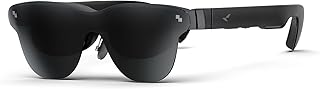
- Optical FOV: 46 degrees to 52 degrees diagonal for models like XREAL Air 2 Pro, Viture Pro, RayNeo Air 2s, and Rokid Max. A few newer spec classes advertise 55 to 58 degrees but still stay well below VR headsets.
- Virtual image: Marketed as a 120-inch to 201-inch screen at 4 to 6 meters away. This sounds huge, but it is still a flat virtual rectangle floating in front of you, not a wraparound view.
What's inside
- What FOV Do XR Glasses Actually Give You in FPS Games?
- How Narrow FOV Affects FPS Gameplay
- Bandwidth and Latency: The Real Dealbreakers for FPS
- When XR Glasses Are Too Narrow and When They Are Not
- Settings to Make XR Glasses More Competitive for FPS
- Decision Matrix: Should You Use XR Glasses for Your FPS Library?
- Bottom Line for 2026 Buyers
No, XR glasses do not have too thin a FOV for FPS gaming for most players, but the 46 to 52-degree diagonal FOV on most 2026 consumer models does reduce peripheral threat detection compared to an ultrawide monitor or VR headset, making them excellent for focused aim and immersion and less ideal for competitive play where seeing the edges of the screen matters most.
- What FOV Do XR Glasses Actually Give You in FPS Games?
- How Narrow FOV Affects FPS Gameplay
- Bandwidth and Latency: The Real Dealbreakers for FPS
- When XR Glasses Are Too Narrow and When They Are Not
- Settings to Make XR Glasses More Competitive for FPS
- Decision Matrix: Should You Use XR Glasses for Your FPS Library?
- Bottom Line for 2026 Buyers
What FOV Do XR Glasses Actually Give You in FPS Games?
When people ask “do xr glasses have too thin a fov for fps gaming” they are usually conflating two different specs: the optical field of view of the glasses and the perceived screen size at a virtual distance.
Most birdbath-optics XR glasses sold in 2026 use the same core approach:
- Micro-OLED panel per eye: Usually 1920×1080 or 1920×1200 per eye
- Optical FOV: 46 degrees to 52 degrees diagonal for models like XREAL Air 2 Pro, Viture Pro, RayNeo Air 2s, and Rokid Max. A few newer spec classes advertise 55 to 58 degrees but still stay well below VR headsets.
- Virtual image: Marketed as a 120-inch to 201-inch screen at 4 to 6 meters away. This sounds huge, but it is still a flat virtual rectangle floating in front of you, not a wraparound view.
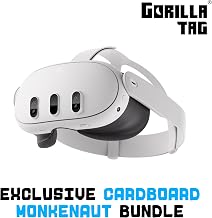
For comparison, a 27-inch monitor at 70cm viewing distance fills about 33 degrees of your horizontal vision. A 34-inch ultrawide at the same distance fills about 45 degrees horizontal. The XR glasses fill a similar or slightly larger rectangle, but they do not extend into your peripheral vision. A VR headset like Meta Quest 3 pushes 96 to 110 degrees horizontal, which is why it feels surrounding and XR glasses feel like a large private monitor.
How Narrow FOV Affects FPS Gameplay
In an FPS, your effective gameplay FOV is also set by the game engine. Most competitive shooters default to 90 to 103 degrees horizontal (103 in Call of Duty, 90 in Valorant, 103 to 110 in Apex Legends). That game FOV is then rendered onto whatever display you use.
On XR glasses, the entire game frame is compressed into that 46 to 52-degree optical window. You see the whole HUD, minimap, and crosshair sharply in the center, but three things change:
1. Peripheral Threat Visibility Is Cropped, Not Warped
On a monitor, you use parafoveal vision to catch movement at the screen edges – an enemy peeking on the extreme right side of your monitor is still detectable without moving your eyes much. On XR glasses, those edge pixels are physically closer to the center of your retina because the virtual screen is smaller in angular terms than a close-up ultrawide. You have to make a larger eye movement to check the minimap or ammo count, and enemies at the very edge of the game’s 103-degree render are squeezed into a smaller angular space, making them harder to notice in your passive vision.
This matters most in fast, close-quarters FPS titles like Call of Duty, Overwatch 2, and Counter-Strike 2. It matters less in slower tactical shooters or single-player campaigns like Cyberpunk 2077 or Halo Infinite where immersion and contrast matter more than instant edge detection.
2. Edge Distortion and Clarity Drop-Off
Birdbath optics are sharpest in the center 60% to 70% of the image. Outside that, you get slight blur, color fringing, and a drop in brightness. For FPS gaming, that means text at the corners, killfeed, and edge-located enemies are never as crisp as the center. Most users naturally adapt by moving their head slightly rather than just their eyes, which adds a few milliseconds to target acquisition.
3. No True Peripheral Surround
XR glasses are intentionally semi-transparent or dimmed with electrochromic film. You still see your room peripherally. That reduces motion sickness but also reminds your brain that the game is a window, not a world. You will not get the wraparound awareness that a 90+ degree VR-style view or a 32:9 monitor provides.
Bandwidth and Latency: The Real Dealbreakers for FPS
FOV gets the headlines, but latency and refresh rate decide whether XR glasses are viable for shooters.
Most 2026 XR glasses support 1080p per eye at 60Hz natively, with 90Hz and 120Hz over DisplayPort Alt-Mode via USB-C. Micro-OLED panels themselves can switch in under 0.01ms, so the panel is not the bottleneck. The bottleneck is the video link and any adapter you add.
Worked Calculation: Bandwidth Needed for Dual 1080p 120Hz
If you drive XR glasses at 1920×1080 per eye, 120Hz, 8-bit color, RGB:
Bandwidth per eye = Horizontal pixels x Vertical pixels x Refresh rate x Color depth x 3 channels
Bandwidth per eye = 1920 x 1080 x 120 x 8 x 3 = 5,971,968,000 bits per second = ~5.97 Gbps
For two eyes side-by-side over one cable with no compression: ~11.94 Gbps before blanking intervals. With typical CVT-RB blanking overhead of about 15% to 20%, you need roughly 13.7 to 14.3 Gbps.
That means:
- USB-C DisplayPort Alt-Mode 1.4 (HBR3, 4 lanes, ~25.92 Gbps effective) handles it with headroom. This is the direct connection mode used when you plug XREAL Air 2 Pro or Viture Pro straight into a PC, Steam Deck, or ROG Ally.
- USB-C DP 1.2 or an HDMI 1.4 adapter with converter caps you at 1080p 60Hz, which adds visible stutter in FPS games.
- Wireless adapters or hubs that compress to H.265 add 18 to 35ms of encode/decode latency, which is noticeable in shooters. Wired DP Alt-Mode typically adds only 2 to 8ms over a native monitor.
For competitive FPS, keep the chain fully wired: GPU -> USB-C DP Alt-Mode -> glasses, set glasses to 120Hz in display settings, enable electrochromic dimming to max opacity, and disable any image smoothing on the adapter.
| Display Type | Optical / Viewing FOV (Diagonal) | Perceived Image | Typical Added Latency (Wired) | Best FPS Use Case |
|---|---|---|---|---|
| XR Glasses (XREAL Air 2 Pro, Viture Pro, RayNeo Air 2s, Rokid Max class) | 46° – 52° | ~46° virtual screen, 1080p per eye, 120Hz | 2 – 8 ms | Immersive single-player, travel/bedroom gaming, low-light play |
| 27″ 16:9 Monitor at 70cm | ~38° – 42° | 1080p to 4K, 144Hz to 240Hz | 1 – 4 ms | Balanced competitive and casual |
| 34″ 21:9 Ultrawide at 70cm | ~56° – 62° | 3440×1440, 144Hz to 240Hz | 1 – 4 ms | Maximum peripheral vision for competitive FPS |
| VR Headset (Passthrough / Virtual Desktop mode) | 96° – 110° | Virtual screen can fill 80°+ but with screen-door and compression | 12 – 28 ms | Sim/immersion, not competitive FPS |
When XR Glasses Are Too Narrow and When They Are Not
The answer depends on what you value more: focus or awareness.
XR Glasses Are a Good Fit If:
- You play single-player or cooperative FPS games where atmosphere and contrast beat pure reaction time.
- You play on handhelds like Steam Deck, ROG Ally, or Legion Go and want a larger, private OLED image without buying a monitor. The glasses usually cost $350 to $650 for this class, comparable to a good monitor.
- You are sensitive to monitor glare or play in the dark. Micro-OLED at 400 to 600 nits with 100,000:1 contrast makes shadowed enemies easier to see than on a budget IPS.
- You can tolerate a centered playstyle and check the minimap with deliberate eye movements.
A Monitor or Ultrawide Is Better If:
- You play ranked competitive shooters and rely on edge-of-screen motion cues. The narrow optical window forces more scanning and you will lose a fraction of a second on wide flanks.
- You use very high FOV settings (110°+) to see more. On XR glasses that wide game FOV is squeezed into a small window, making distant enemies smaller and harder to identify.
- You need 240Hz+ and variable refresh rate. Most XR glasses top out at 120Hz and do not support adaptive sync, so tearing is more likely if your frame rate fluctuates.
Settings to Make XR Glasses More Competitive for FPS
If you decide to use XR glasses, these settings reduce the disadvantages of the narrow FOV:
- In-game FOV: 90 to 100, not max. Lowering game FOV makes enemies larger at center screen and reduces fisheye distortion at the edges, which compensates for the small optical window. You see less at the sides in-game, but what you see is larger and clearer, which helps when the optics already compress the image.
- Enable centered HUD layouts where available. Games like Fortnite and Apex Legends allow you to move minimap and health closer to center. This keeps critical info out of the blurry edge zone.
- Set refresh to 120Hz in Windows / SteamOS display settings. Confirm the glasses report 120Hz, not 60Hz. At 60Hz, frame persistence is 16.6ms vs 8.3ms at 120Hz, which directly affects motion clarity when tracking moving targets.
- Use wired DP Alt-Mode, disable wireless casting. Each wireless hop adds latency that stacks with game latency. For FPS, wired is mandatory.
- Dimming to 95% to 99% opacity and turn off ambient light. Higher opacity increases perceived contrast and prevents your room bleeding through and distracting peripheral vision, making the narrow window feel more like a monitor.
- Calibrate IPD and fit. If the image is not centered on your pupils, the sweet spot shrinks and edges blur faster. Adjust nose pads so the center crosshair is razor sharp without tilting your head.
Decision Matrix: Should You Use XR Glasses for Your FPS Library?
| Your Situation | Recommendation | Why |
|---|---|---|
| Mainly story FPS / casual multiplayer, want OLED immersion on a handheld or laptop | Yes, XR glasses are ideal | Narrow FOV is not a penalty; large virtual OLED and low latency matter more |
| Competitive ranked play (Valorant, CS2, Rainbow Six) with ultrawide already | No, stick to monitor | Peripheral detection and 144Hz+ VRR outweigh privacy/contrast benefits |
| Mixed library, one display for travel and home | Yes, as secondary display | Use glasses for travel/single-player, monitor for competitive sessions |
| Sensitive to motion sickness, want a big screen in a small room | Yes, with 90-100 game FOV | Fixed virtual screen is more comfortable than VR and less fatiguing than close monitor |
| Need wireless or console via HDMI adapter without DP Alt-Mode | Caution | Adapters often limit to 60Hz and add latency that hurts FPS more than FOV does |
Bottom Line for 2026 Buyers
XR glasses do have a thinner optical FOV than VR and less peripheral coverage than an ultrawide, and you will notice it when an enemy appears at the extreme edge of the frame. That is the trade-off for a lightweight, high-contrast, private 120Hz OLED that you can power from a single USB-C cable with near-monitor latency.
If your FPS time is 70% or more competitive, treat XR glasses as a complement to your monitor, not a replacement. If your FPS time is mostly immersive, single-player, or handheld-based, the narrow FOV is not too narrow in practice, it simply feels like a very good, very close monitor that you can take anywhere.