Our Top Picks
 Corsair HS35 Surround v2 Multiplatform Wired Gaming HeadsetOne Size (Pack of 1)8.66 x 7.24 x 3.19 inches0.56 poundsCheck on Amazon
For nearly every gaming headset, a well-tuned stereo headset is the better foundation, and “surround” on a headset is usually software that simulates directional sound from two speakers, one per ear. Virtual surround can help or hurt depending on the game and the processing, so treat it as an optional feature you can switch off, not a reason to buy.
Short Answer
A stereo headset has one driver per ear and carries two audio channels. Surround formats such as 5.1 and 7.1 were designed for speaker layouts. Reference material describes 5.1 as six speakers (center, left, right, two surrounds and a subwoofer) and 7.1 as adding two more rear speakers for a fuller 360-degree field. A headset has only two drivers, so any surround on it is simulated by digital processing that tries to make your brain place sounds around you. Some headsets instead use multiple drivers per cup, but this is a minority design and results vary.

BENGOO G9000 Stereo Gaming Headset for PS4 PC Xbox One PS5 Controller, Noise Cancelling Over Ear Headphones with Mic, LED Light, 7.1 Surround Sound, Soft Memory Earmuffs for Nintendo Xbox Series X|S
Chosen because it specifies Noise Cancelling Over Ear Headphones with Mic and LED Light.
View on Amazon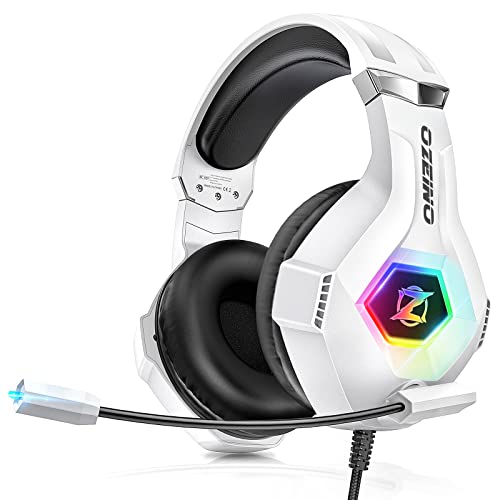
Ozeino Gaming Headset for PC, Ps4, Ps5, Xbox Headset with 7.1 Surround Sound Gaming Headphones with Noise Canceling Mic, LED Light Over Ear Headphones for Switch, Xbox Series X/S, Laptop, Mobile White
Chosen because it specifies Ps4 and Ps5.
View on Amazon
Jimonyer Gaming Headset with Microphone, 7.1 Surround Sound and Noise Canceling Over Ear Headphones for PC/PS4/PS5/Xbox Series/Switch, RGB Light and Soft Imitation Protein Earmuffs(Black)
Chosen because it specifies RGB Light and Soft Imitation Protein Earmuffs(Black).
View on AmazonCorsair HS35 Surround v2 Multiplatform Wired Gaming Headset – Dolby 7.1 – Flexible Omni-Directional Microphone – Universal 3.5mm Connection – PC, Mac, PS5, PS4, Xbox, Nintendo Switch, Mobile – Carbon
Chosen because it specifies Dolby 7.1 and Flexible Omni-Directional Microphone.
View on AmazonHow Headset Surround Actually Works
There are three common approaches:
- Virtual surround in software: the game or operating system sends multichannel audio, and a processor converts it to two channels using a head-related transfer function, a model of how sound reaches your ears from different directions. Windows includes spatial audio options, and headset makers add their own.
- Object-based spatial audio: formats such as Dolby Atmos can describe sounds as positions in space and render them for headphones using a head-related transfer function. Game and platform support is needed.
- Multi-driver hardware: some headsets place more than one driver in each cup. Reviewers differ on whether this gives clearer direction than good stereo.
Comparison Table
| Aspect | Stereo | Virtual surround / spatial |
|---|---|---|
| Channels delivered | Two, as the game mixed them | Multichannel or object audio converted to two |
| Directional cues | Left-right strong; front-back relies on game mix and ear cues | Aims to add front-back and height; effect varies |
| Tonal accuracy | Usually more natural | Can sound reverberant or colored |
| Music and voice | Best, as intended | Often worse; many people turn it off |
| Setup | None | Needs software, correct game output settings |
| Compatibility | Universal | Depends on game and platform support |
Does Surround Help in Games?
Positional cues such as footsteps, reloads and distant gunfire are the usual argument for surround. Many modern games already mix a headphone-friendly stereo or binaural signal, which means extra processing on top can duplicate or distort the effect. Some games offer their own headphone modes or spatial settings, and in those cases the built-in option is often the cleaner choice.
Opinions differ. Some players find a good virtual surround helps them judge direction; others say it blurs timing and changes tone. Because head shape and ear shape affect how convincing the simulation is, results are personal. Try the option for a few sessions per game and keep the one that feels clearer.
Avoiding Double Processing
A common mistake is stacking effects. If the game applies a headphone mode, the headset software applies 7.1, and Windows applies spatial sound, the signal is processed three times. Pick one layer only:
- Set Windows sound output to plain stereo for the headset.
- If the game has a headphone or binaural mode, use it and turn off headset surround.
- If not, enable one spatial option, either in Windows or in the headset software, but not both.
- Keep equalizer and bass-boost effects modest, since they change direction cues too.
Pick X If
| Pick | If you |
|---|---|
| Stereo headset with good tuning | Play mixed content, music and chat and want natural sound |
| Stereo plus a game’s own headphone mode | Play titles that include built-in spatial audio |
| Headset with virtual surround software | Want to experiment with directional cues in titles that lack built-in options |
| Headset with spatial audio support such as Dolby Atmos | Play games or platforms that support it, and are willing to set it up |
| Multi-driver headset | Are curious about the approach and can return or test the fit; reports vary |
Common Mistakes
- Believing a “7.1” label means seven physical speakers. On most headsets it is simulated from two drivers.
- Leaving surround on for music and video calls. It can color voices and instruments; switch profiles.
- Stacking processing layers. Use only one spatial effect at a time.
- Setting the wrong format in Windows. A 7.1 output set on a stereo headset can make some titles mix oddly.
- Ignoring the stereo tuning. A headset with poor stereo balance will not be rescued by processing.
- Buying on channel count. Comfort, microphone and tuning matter more than a number on the box.
Alternatives
- Stereo headset with a good equalizer profile: reviewers often suggest light adjustment instead of heavy virtual surround.
- Open-back headphones: often described as having a wider natural sense of space without processing.
- Real surround speakers: if you game in a room where speakers are practical, a true 5.1 or 7.1 speaker layout delivers physical directions.
Quick Setup Checklist
- Start with stereo and play a familiar game for comparison.
- Switch on one spatial option and replay the same scene.
- Pay attention to whether you can tell front from back and whether voices still sound natural.
- Keep the setting that is clearer, and use different profiles for music or calls.
Frequently Asked Questions
Is 7.1 surround on a gaming headset real?
On most headsets it is virtual. Processing simulates additional speaker positions using only two drivers, so the effect depends on the algorithm and on your own hearing. A few headsets use extra drivers, though independent reviewers report mixed results.
Is stereo or surround better for competitive shooters?
Many competitive players use plain stereo because it is consistent and natural, while others prefer a spatial mode. If a game offers its own headphone setting, try it before adding headset software.
Does virtual surround work for music?
Music is mixed for stereo, so virtual surround usually changes the tone and stereo image in ways many listeners dislike. Use a stereo profile for music and calls.
Do I need a USB headset for surround?
Not necessarily. Windows spatial audio and game-level options work with many headsets, including 3.5 mm models. Some surround software ships with USB headsets or sound cards, so check the maker’s product page for requirements.
Why does sound seem to come from inside my head?
Headphones deliver sound directly to each ear without the room’s reflections, which is a common cause of in-head imaging. Spatial processing tries to reduce this, and open-back designs often feel more spacious, but individual results differ.
Should I turn off all Windows audio enhancements?
Turning them off is a sensible starting point for diagnosing sound problems or double processing. You can enable one spatial option afterwards and judge whether it helps.
FAQ
Does Surround Help in Games?
Is 7.1 surround on a gaming headset real?
Is stereo or surround better for competitive shooters?
Does virtual surround work for music?
Do I need a USB headset for surround?
Why does sound seem to come from inside my head?
Should I turn off all Windows audio enhancements?
More from Amazon
Programs that pair well with the guide above. Offers and eligibility are set by Amazon and may change.
Free shipping on eligible items, Prime Video and more. Eligible new members can start with a free trial.
Start a Prime free trialAd-free music streaming. Eligible new subscribers can start with a free trial.
Try Music Unlimited freeA Prime membership for ages 18-24 with a trial period. Eligibility is set by Amazon.
See Prime for Young AdultsAudiobooks and podcasts to listen to on the go. Eligible new members can start with a free trial.
Try Audible freeAs an Amazon Associate we earn from qualifying purchases.