Our Top Picks
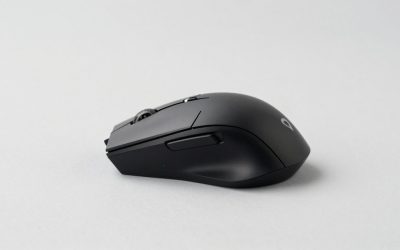
 Redragon M612 Wireless RGB Optical Gaming Mouse 8000126x75x40 mm4.84 x 2.95 x 1.57 inches0.24 poundsCheck on Amazon
The Logitech MX518 Legendary is a wired, right-handed gaming mouse that revives the classic MX518 shape with a Hero 16K sensor, 100 to 16,000 DPI, 8 programmable buttons and 5 onboard profiles. It is a good pick if you love the original contour and want a modern sensor. The Logitech G302 Daedalus Prime is a lighter, simpler, older MOBA mouse with a 4,000 DPI ceiling.
Verdict: MX518 Legendary and G302 in One Minute
- MX518 Legendary: best for nostalgic shapes, palm and claw grips and anyone who wants high DPI and onboard profiles in a familiar body. Skip it if you want a very light mouse, since it weighs about 101 g without the cable.
- G302 Daedalus Prime: best for light, quick movement in MOBA and general play. It has 6 buttons and a 4,000 DPI cap, so skip it if you want macros or a modern sensor.
- Modern alternatives: a light wireless option such as the Logitech G305 Lightspeed, or an inexpensive wireless pick such as the Redragon M612, cover buyers who want a cable-free setup.
Logitech MX518 Legendary Specs
These figures come from Logitech-aligned spec listings and independent reviews. When sources disagreed, we note it.
| Spec | MX518 Legendary |
|---|---|
| Connection | Wired USB |
| Sensor | Hero optical |
| DPI range | 100 to 16,000 |
| Tracking speed | 400+ IPS across the DPI range |
| Polling rates | 125, 250, 500 or 1,000 Hz |
| Buttons | 8 programmable |
| Onboard memory | Up to 5 profiles |
| Default DPI steps | 400, 800, 1,600, 3,200, 6,400 |
| Weight | About 101 g without cable |
| Size | About 131 x 73 x 43 mm |
Logitech G302 Daedalus Prime Specs
| Spec | G302 Daedalus Prime |
|---|---|
| Connection | Wired USB |
| Sensor | Optical; one source lists AM010, another lists a PixArt part, so check the maker |
| DPI range | 240 to 4,000 |
| Polling rate | 1,000 Hz |
| Buttons | 6 programmable |
| Processor | 32-bit ARM, 1 onboard profile |
| Weight | About 87 g without cable; listings vary near 122 to 127 g with cable |
| Lighting | Single-zone logo |
MX518 Legendary: What Is It?
The Logitech MX518 Legendary is a 2018 remake of the old MX518, a mouse many shooter players used in the early 2000s. Logitech kept the recognisable shape and placed a modern Hero sensor inside it, so you get a familiar feel with current tracking.
The original was prized for a comfortable arch, a relaxed palm fit and thumb buttons that fell naturally under the thumb. The remake keeps that idea but adds tuning software, onboard memory and a high DPI range.
MX518 Legendary versus the original MX518
The plain MX518 and the Legendary share a family resemblance but differ in internals. The Legendary adds a modern sensor, more DPI steps and five stored profiles. Older MX518 units may still be sold in used form; verify the full model name “Legendary” and the Hero sensor in the listing.
Design and Comfort
The Legendary is a right-handed mouse with a long, gently arched back. The side panels are textured and the thumb has a shelf to rest on.
- Palm grip: the strongest fit. The long back supports the whole hand, which many people find relaxing in long sessions.
- Claw grip: good if your hand is medium or larger. The arch sits high enough to anchor the palm.
- Fingertip grip: workable, but the 101 g weight is not light enough for fast flick styles.
- Small hands: may find the body long. A compact mouse like the G302 may feel more balanced.
Performance by Use
Shooters
The Hero sensor handles fast movement without trouble, and a 1,000 Hz poll rate is available. Many shooter players will run between 400 and 1,600 DPI, so the 16,000 ceiling is mostly headroom.
MOBA and strategy
Eight programmable buttons give room for camera, ability and ping binds. The G302 also suits this use because it was marketed as a MOBA mouse, though with six buttons.
Office and creative work
The high DPI ceiling helps on large or multi-monitor desks. Five onboard profiles let you keep a gaming profile and an office profile stored on the mouse.
Competitive play
Both mice are wired, which keeps latency consistent. If you want very low weight, look at newer ultralight designs.
Logitech G302 Daedalus Prime: Is It Still Useful?
The G302 Daedalus Prime came out around 2015 and targeted MOBA players. Logitech designed the body for quick, rapid-click movement, with a low profile and a lighter weight than many contemporaries.
It has a Delta Zero optical sensor family (per Logitech’s spec page) with 240 to 4,000 DPI, a 32-bit ARM processor and 20 million click-rated main buttons. The mouse stores a single profile onboard.
- Strengths: light body, comfortable low arch, simple to use.
- Weaknesses: only 6 buttons, a modest DPI ceiling, and an older sensor.
- Best match: players who value quick, low-weight movement and do not need macros.
MX518 Legendary vs G302: Which One Should You Pick?
| Question | MX518 Legendary | G302 Daedalus Prime |
|---|---|---|
| Max DPI | 16,000 | 4,000 |
| Buttons | 8 | 6 |
| Onboard profiles | 5 | 1 |
| Weight (no cable) | About 101 g | About 87 g |
| Feel | Long, arched, palm-friendly | Lower, lighter, MOBA-oriented |
| Best for | Classic shape with modern tracking | Light, simple, quick movement |
If you want one mouse for everything, the Legendary is the more capable choice. If you value a lighter hand feel and are on a small budget, the G302 is still reasonable.
Real Queries: Short Answers
Is the Logitech MX518 Legendary good for gaming?
Yes. A Hero sensor, up to 16,000 DPI, 8 buttons and a comfortable shape make it a solid wired gaming mouse for most genres.
What is the difference between MX518 and MX518 Legendary?
The Legendary uses a modern Hero sensor and adds profiles and software tuning, while the older MX518 uses an older sensor and fewer features.
Is the Logitech G302 a good mouse?
It is a decent light MOBA mouse with 6 buttons and a 4,000 DPI cap, but it is an older design and newer models offer more.
Is the MX518 Legendary wireless?
No. It is a wired USB mouse, and Logitech’s spec listings show no wireless version of this model.
Modern Alternatives Worth a Look
These are items in the shop that suit the same buyers. Descriptions follow the listing details.
Logitech G302 Daedalus Prime MOBA Gaming Mouse

Logitech G302 Daedalus Prime MOBA Gaming Mouse
Picked as a relevant option in this category.
View on AmazonThe listing is the Logitech G302 Daedalus Prime MOBA gaming mouse. It is the lighter companion to the MX518 Legendary, with a low-profile body, six programmable buttons and up to 4,000 DPI. It stores a single onboard profile and has a single-zone lit logo. Because this is an older model, confirm the condition and seller details in the listing before you order, and look for a new unit rather than a used one.
Best for: light MOBA play. Skip if: you want more buttons or a modern sensor.
Logitech G203 Wired Gaming Mouse

Logitech G203 Wired Gaming Mouse for Laptop & Computer, 8,000 DPI - Black | Rainbow Optical Effect, 6 Programmable Buttons, On-Board Memory, Screen Mapping, PC/Mac Computer and Laptop Compatible
Chosen because it specifies 000 DPI and Black.
View on AmazonThe Logitech G203 is a wired gaming mouse with an 8,000 DPI sensor and six programmable buttons, plus an RGB lighting effect, per its listing. It is a simple, light option for newer players who want a decent sensor in a compact shape. It does not have the MX518’s arch or profile memory, but it is easy to set up and suits small to medium hands.
Best for: beginners and small hands. Skip if: you want a larger palm-grip body.
Redragon M612 Wireless RGB Gaming Mouse
Redragon M612 Wireless RGB Optical Gaming Mouse 8000 DPI Remapping Keys | Cable-Free 0 Delay, Redefine Keybinding Macro, Vibing Backlight, Ergonomic Grip Body Comfort
Chosen because it specifies Cable-Free 0 Delay and Redefine Keybinding Macro.
View on AmazonThe Redragon M612 is a wireless RGB optical gaming mouse with an 8,000 DPI sensor and remappable keys, according to the listing. It targets buyers who want to drop the cable without paying for a premium brand. Expect simple software and mid-range build quality. It is a reasonable second mouse for a laptop setup or a casual gaming desk.
Best for: wireless on a budget. Skip if: you want proven durability and tight QA.
Also Consider
- Logitech G305 Lightspeed: wireless, Hero 12K sensor, 6 buttons. Good if you want the light feel without a cable.
- Logitech G403 Hero: a Hero-sensor mouse with a similar overall feel to older G-series shapes. Check the listing for the variant.
- Logitech G502 Hero: a heavier, feature-rich mouse with adjustable weights.
MX518 Legendary Pros and Cons
Pros
- Familiar, comfortable shape that many players already know.
- Hero sensor with DPI up to 16,000 and 400+ IPS tracking.
- Eight programmable buttons and five onboard profiles.
- Adjustable polling rate from 125 to 1,000 Hz.
- Wired connection with no battery to manage.
Cons
- At about 101 g, it is not a lightweight mouse.
- Right-handed only.
- Long body can feel large for small hands.
G302 Daedalus Prime Pros and Cons
Pros
- Light at about 87 g without cable.
- Low, comfortable profile for MOBA-style claw and fingertip use.
- Simple six-button layout that is easy to learn.
- Main buttons rated for 20 million clicks.
Cons
- DPI ceiling of 4,000 is modest.
- One onboard profile and a basic lit logo.
- Older design; sources disagree on the sensor name and cable weight.
Which Grip Fits Which Mouse
| Grip style | How you hold it | Better fit |
|---|---|---|
| Palm | Whole hand rests on the mouse | MX518 Legendary |
| Claw | Palm on the back, fingers arched | Either; MX518 for large hands, G302 for small to medium |
| Fingertip | Only fingertips touch the mouse | G302 or G203, due to lower weight |
If you are unsure of your grip, rest your hand on a desk for a moment and notice whether your palm touches the surface fully. If it does, you probably use a palm grip.
Surface and Pad Advice
Both Logitech mice use optical sensors, which work on most cloth and hard pads. For quick flicks, a smooth speed pad suits the lighter G302. For steadier aim with the heavier MX518 Legendary, a slightly rougher control pad can add useful friction. Avoid glass or very glossy desks, as they can cause tracking issues on any optical mouse.
Who Should Skip Both Mice
- You want an ultralight mouse well under 70 g for fast competitive play.
- You need wireless and do not want a cable on your desk.
- You use a left-handed grip.
- You want to run a sensor at very high polling rates beyond 1,000 Hz.
In those cases, a modern lightweight wireless model fits better, and the G305 is a sensible entry point.
Common Problems and Fixes
Cursor feels too fast or too slow
Check the active DPI step first. The MX518 Legendary cycles through five defaults, so you may have landed on 3,200 or 6,400 by accident.
Settings are not saved
Save your preferences to onboard memory in Logitech’s software. The MX518 Legendary holds up to five profiles, while the G302 holds one.
Scroll wheel feels loose
Dust under the wheel is a common cause. Use compressed air briefly around the opening, and check the maker’s warranty if the issue persists.
Mouse feet are worn
Replacement feet sets for Logitech G-series mice are widely listed, but match your exact model before ordering.
Setting Up the MX518 Legendary
- Install Logitech’s software and update the firmware if prompted.
- Set your main DPI (many players choose between 800 and 1,600).
- Use the default step list of 400, 800, 1,600, 3,200 and 6,400, or trim it to the values you will really use.
- Set the polling rate. Pick 1,000 Hz for the best response, or a lower rate if your PC struggles.
- Save one profile for gaming and one for work to the onboard memory.
- Turn off pointer acceleration in the operating system for consistent aim.
Starting Sensitivity Settings
| Use | Starting DPI | Reason |
|---|---|---|
| Tactical shooter, 1080p | 400 to 800 | Slow, controlled aim |
| Arena shooter, 1440p | 800 to 1,600 | More travel per swipe |
| MOBA and strategy | 1,600 to 3,200 | Quick cursor across the map |
| Office on a large monitor | 1,600 to 3,200 | Short wrist movement |
With a 16,000 DPI ceiling the MX518 Legendary has headroom for all of these. The G302 tops out at 4,000 DPI, which still covers every row of the table.
Why the MX518 Name Still Matters
The original MX518 gained a loyal following because of its comfortable shape and dependable tracking for its era. Many players kept using it for years after better sensors appeared. Logitech’s 2018 return of the Legendary edition tapped into that affection while modernising the internals. If you used the original, expect the hand feel to be close; if you did not, treat the name as a shape and comfort reference rather than a promise of anything else.
It is worth noting that older MX518 units on the market may be used or very old. If you want the modern features listed in this review, make sure the listing says Legendary and mentions the Hero sensor.
Performance Notes on Sensors
Hero sensor on the Legendary
The Hero optical sensor is rated up to 16,000 DPI and over 400 IPS. In practice, that means smooth tracking across normal gaming speeds. It is also frugal on power, though that matters little for a wired mouse.
Older optical sensor on the G302
The G302 uses an optical sensor with a 4,000 DPI ceiling. It tracks well at sensible settings. One source lists a maximum speed of 120 IPS, so very fast swipes at low DPI could exceed it. Check the maker if tracking speed matters to you.
How We Chose These Picks
This review is based on research. We did not use these mice ourselves. We read Logitech’s support pages, retailer listings and independent reviews, then compared specifications and where sources agreed. For items that vary between sources, such as the G302 sensor name and weight with cable, we flag the difference. The alternatives were chosen to cover three buyers: a light wired player, a beginner, and a wireless budget buyer.
Buying Guide: Choosing Between Classic and Modern Mice
- Weight: under about 90 g is light; around 100 g is mid; over 120 g is heavy. Choose based on how fast you flick.
- Grip: palm grip favours long arched bodies like the MX518. Claw and fingertip grips favour lower, lighter shapes.
- DPI ceiling: 4,000 DPI is adequate for most; choose 12,000 or higher if you use big, high-resolution monitors.
- Buttons: 6 buttons suit most MOBA play; 8 or more suit macros and shooters with many binds.
- Wired or wireless: wired is consistent and never needs charging; modern wireless mice are fast enough for most games.
- Condition: for older models, check that the listing is for a new item and not marked used or refurbished.
Frequently Asked Questions
Is the MX518 Legendary good for palm grip?
Yes. Its long, arched body is built for palm and relaxed claw grips, and many users value that comfort.
Does the Logitech MX518 Legendary have RGB?
Our sources do not highlight lighting as a feature, so check the maker’s page if RGB matters to you.
How many DPI steps does the MX518 Legendary have by default?
Five steps: 400, 800, 1,600, 3,200 and 6,400, and you can change them in Logitech’s software.
Is the G302 Daedalus Prime wireless?
No. It is a corded USB mouse with a 1,000 Hz report rate.
Which is lighter, the MX518 Legendary or the G302?
The G302, at about 87 g without cable, is lighter than the MX518 Legendary at about 101 g.
Can I use either mouse on a Mac?
We did not verify full software support on macOS for these models, so check the maker’s support page before buying.
Can I use the MX518 Legendary for left-handed play?
The body is shaped for the right hand, and the thumb buttons are on the left side. Left-handed players should choose an ambidextrous mouse.
How do I choose between the G302 and the G203?
The G302 is a MOBA-style mouse with a 4,000 DPI ceiling. The G203 offers an 8,000 DPI sensor in a simple, light body. Many beginners find the G203 easier to start with.
Do I need Logitech software for these mice?
Basic movement works without it. You need Logitech’s software to change DPI steps, assign buttons and store profiles to onboard memory.
Final Checklist Before You Order
- Confirm the exact model name, especially the word “Legendary” for the MX518.
- Check that the listing is new and not used or refurbished.
- Decide if you need 8 buttons or whether 6 are enough.
- Think about weight. If you want light, the G302 or G203 fits better than the MX518.
- Check your desk surface and pad. A smooth, matte surface works best.
- Plan for the cable. A small bungee can improve the feel during long sessions.
Closing Thoughts
Both Logitech mice are older designs, and the right choice depends on grip and weight preferences more than on raw spec. Read the exact model name on any listing, confirm the condition, and compare against a modern light or wireless option before you commit.
Which One Should You Buy?
- Want the classic shape with modern tracking: the Logitech MX518 Legendary.
- Want a light, simple wired mouse: the Logitech G302 Daedalus Prime or the G203.
- Want wireless on a budget: the Redragon M612 or the Logitech G305.
Sources
- Logitech support: G302 Daedalus Prime MOBA Gaming Mouse Technical Specifications
- WePC, Logitech MX518 Legendary review
- KitGuru, Logitech G302 Daedalus Prime review
- WhatMouse, Logitech G302 specifications
Last updated: November 2026
FAQ
MX518 Legendary: What Is It?
Logitech G302 Daedalus Prime: Is It Still Useful?
Is the Logitech MX518 Legendary good for gaming?
What is the difference between MX518 and MX518 Legendary?
Is the Logitech G302 a good mouse?
Is the MX518 Legendary wireless?
Is the MX518 Legendary good for palm grip?
Does the Logitech MX518 Legendary have RGB?
More from Amazon
Programs that pair well with the guide above. Offers and eligibility are set by Amazon and may change.
Free shipping on eligible items, Prime Video and more. Eligible new members can start with a free trial.
Start a Prime free trialAd-free music streaming. Eligible new subscribers can start with a free trial.
Try Music Unlimited freeA Prime membership for ages 18-24 with a trial period. Eligibility is set by Amazon.
See Prime for Young AdultsAudiobooks and podcasts to listen to on the go. Eligible new members can start with a free trial.
Try Audible freeAs an Amazon Associate we earn from qualifying purchases.