Our Top Picks
 Razer BlackShark V2 X Wired Gaming Headset with3.5 mm7.6 x 6.76 x 3.86 inches0.5 poundsCheck on Amazon
For gaming, “enough” microphone quality means your teammates understand every word clearly with little background noise, and a decent boom mic on a gaming headset reaches that bar for most players. You do not need studio-grade audio, because voice chat apps compress your voice and many games run through them. Placement and room noise usually matter more than the price class of the microphone.
What “enough” means in practice
Team voice chat is about intelligibility: callouts must be understood the first time, even when you are excited or the game is loud. A good-enough microphone does four things.
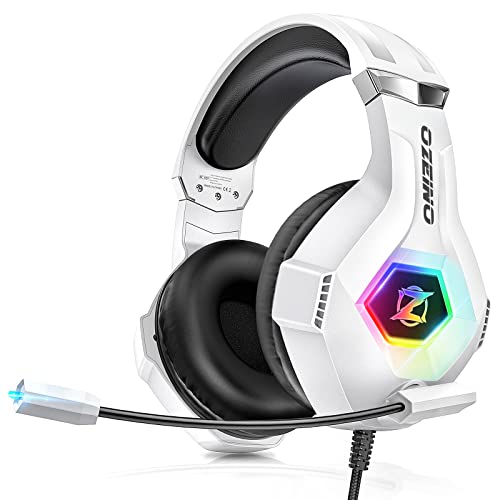
Ozeino Gaming Headset for PC, Ps4, Ps5, Xbox Headset with 7.1 Surround Sound Gaming Headphones with Noise Canceling Mic, LED Light Over Ear Headphones for Switch, Xbox Series X/S, Laptop, Mobile White
Chosen because it specifies Ps4 and Ps5.
View on AmazonRazer BlackShark V2 X Wired Gaming Headset with Mic for PC and PS5, Black | TriForce Titanium 50 mm Drivers, HyperClear Cardioid Mic, 240 g Lightweight, Noise-Isolating Earcups, 3.5 mm, PS4, Switch
Chosen because it specifies Black and TriForce Titanium 50 mm Drivers.
View on Amazon
EKSA E1000 USB PC Gaming Headset with Mic, 7.1 Surround Sound | Computer Headphones with Microphone Noise Cancelling, RGB Light, Wired Headphones for PS4, PS5 Console, Laptop, Call Center
Chosen because it specifies 7.1 Surround Sound and Computer Headphones with Microphone Noise Cancelling.
View on Amazon
AOC 2.4GHz Wireless Gaming Headset for PS5, PS4, PC, Switch, 45Hr, Black | Bluetooth 6.0 Gaming Headphones with Noise Canceling Mic, 7.1 Virtual Surround, Great for Fortnite & Call of Duty/FPS Gamers
Chosen because it specifies PS4 and Switch.
View on Amazon- Picks up your voice at a steady level without clipping when you shout.
- Rejects the clatter of a keyboard and the hum of a fan reasonably well.
- Does not add hiss, popping or an obvious metallic tone.
- Stays in a consistent position near your mouth during long sessions.
If your headset does these, spending more on the microphone brings small gains for chat, though it matters more if you stream or record.
Quick reference: what level suits what use
| Use case | Mic level that is enough | Main thing to look for |
|---|---|---|
| Casual team chat | Built-in boom on a mainstream gaming headset | Positionable boom, mute indicator |
| Ranked or competitive play | Good boom with noise handling | Clear voice, low background pickup |
| Noisy room or shared space | Directional mic or software noise suppression | Narrow pickup pattern |
| Streaming, recording, podcasts | Separate USB or XLR microphone | Fuller tone, stand placement |
| Wireless play on the move | Headset with a detachable or flip-up boom | Battery life, reliable link |
The factors that matter more than the spec sheet
Distance and position
The closest a microphone sits to your mouth, the better the voice-to-noise ratio. A boom mic placed to the side of your mouth, a couple of finger widths away, typically sounds better than a more expensive microphone far away. Keep it out of the direct line of your breath to reduce popping.
Pickup pattern
Most headset boom microphones are directional, which means they favor sound arriving in front of the capsule. That helps reject some room noise. Tiny microphones built into the earcups or the headband pick up more of the room and are usually a step down for voice clarity.
Connection type
USB headsets process the mic signal inside the headset, which avoids electrical noise from the computer’s analog circuits. A 3.5 mm headset runs through the motherboard or controller input, whose quality varies by device. Reviewers who measure headset microphones commonly report that the processing and the capsule differ more between models than the connection alone.
Noise handling
Some headsets and apps include noise suppression. Some processing happens on the headset, and some in the voice chat or driver software. Software suppression can remove a steady fan hum, but it can also clip the start of words or make loud sounds pass through unpredictably. Try it with a friend before relying on it.
Wired, wireless and Bluetooth differences
Bluetooth headsets often switch to a narrow voice profile when the microphone is active, which can lower the quality of both the microphone and the headphone audio. Headsets that use a dedicated wireless dongle from the maker generally avoid that limit. The maker’s product page and manual state which modes support the microphone and at what quality, so check that before buying if voice chat matters to you.
Common mistakes
- Judging by the box: Phrases like “noise-cancelling mic” describe a feature, not a guaranteed result. Compare independent recordings from reviewers where they exist.
- Placing the boom too far away: The easiest improvement is moving the boom closer.
- Setting the input gain too high: This makes the mic pick up the room and clips loud moments. Lower the gain until normal speech sits comfortably in the middle of the meter.
- Leaving sidetone off: Without hearing yourself, people talk louder. A small amount of sidetone, if the headset offers it, helps.
- Using speakers with an open mic: Echo is almost always a speaker-to-microphone loop and has nothing to do with microphone quality.
- Ignoring Windows privacy and input settings: Wrong default input device is a very common cause of a “bad mic”.
Simple setup checklist
- Set the headset as the default input device in your system sound settings.
- Speak normally and watch the input meter. Aim for steady mid-range peaks.
- Record a short clip using the voice recorder on your system and listen back on speakers or another headset.
- Check for popping, hiss and keyboard noise. Move the boom and try again.
- Enable noise suppression in your voice chat app only if needed, and recheck how it sounds.
Decision table: pick by what you do
| Pick this if … | Choose |
|---|---|
| You mostly play with friends and want one device | A mainstream wired or wireless gaming headset with a boom |
| Your room is loud (fans, family, a mechanical keyboard) | A headset with a close, directional boom and noise suppression in software |
| You stream or record videos | A standalone USB or XLR microphone on a stand or boom arm |
| You want to keep your hair and glasses free of a boom | A headset with a detachable boom, or a small desk microphone |
| You use a console and chat through the controller | A wired headset that plugs into the controller, or a USB-based headset supported by the console |
Alternatives to the built-in mic
- Clip-on lavalier microphone: Sits close to the mouth without a headset boom.
- USB desk microphone: A fuller sound but picks up more room noise, so it suits a quiet room.
- Dynamic microphone on an arm: Rejects more room sound than most condenser designs, popular with streamers.
When to spend more
If viewers or teammates tell you that you sound muffled, distant or noisy, fix position and settings first. If problems continue, upgrade the microphone. Streamers who want a more natural tone usually move to a separate microphone, while players who only need clear callouts rarely benefit from going beyond a good boom.
Frequently Asked Questions
Is a headset mic good enough for ranked games?
Yes, a decent boom mic is enough for callouts. Clear speech and a position close to your mouth matter more than expensive hardware. If teammates struggle to hear you, adjust position and gain before replacing it.
Do I need a USB microphone for gaming?
Not for chat. A separate USB microphone helps when you stream or record, since it generally gives a fuller voice. For team voice, a headset boom is enough.
Does a wireless headset have a worse mic?
It depends on the wireless type. Headsets using a maker’s own dongle commonly support clearer voice than headsets on a plain Bluetooth connection, which may use a lower-quality voice mode.
Is noise cancellation on the microphone worth it?
It can help with steady background noise such as fans. It cannot fix a poorly placed boom, and aggressive suppression can cut off words, so try it in a test call first.
Why do I sound muffled on voice chat?
Common causes are the boom pointing away from your mouth, the wrong default input device, or low input gain. Check each in that order before blaming the headset.
Should I use my headset mic or a webcam mic?
The headset mic usually wins because it sits closer to your mouth. Webcam microphones are farther away and pick up more room sound, so they are better kept as a backup.
FAQ
Is a headset mic good enough for ranked games?
Do I need a USB microphone for gaming?
Does a wireless headset have a worse mic?
Is noise cancellation on the microphone worth it?
Why do I sound muffled on voice chat?
Should I use my headset mic or a webcam mic?
More from Amazon
Programs that pair well with the guide above. Offers and eligibility are set by Amazon and may change.
Free shipping on eligible items, Prime Video and more. Eligible new members can start with a free trial.
Start a Prime free trialAd-free music streaming. Eligible new subscribers can start with a free trial.
Try Music Unlimited freeA Prime membership for ages 18-24 with a trial period. Eligibility is set by Amazon.
See Prime for Young AdultsAudiobooks and podcasts to listen to on the go. Eligible new members can start with a free trial.
Try Audible freeAs an Amazon Associate we earn from qualifying purchases.