Our Top Picks
 UBIQUITI UNIFI Dream Machine PRO1.7" x 17.4" x 11.2"11.2 x 17.4 x 1.7 inches0.7 poundsCheck on Amazon
A wired-only router suits a home where every device that matters connects by Ethernet cable. The real decision is not between brands but between a simple gateway that hands out addresses and manages one internet line, and a managed gateway that handles several lines, VPN tunnels, and traffic rules. Gamers chasing steady latency, home-lab owners running servers, and households that want no radio signals in the house all land on the same question: how much control do you need over a network that never touches the air?
These five routers fit wired homes, small offices, and home labs that run on Ethernet alone. Each one has no Wi-Fi radio, so wireless coverage comes from separate access points if you ever want it. The picks below were chosen from names and specs on Amazon pages, covering a compact VPN gateway, a rack-mount console, a hobbyist favorite, and two multi-WAN gateways for faster plans and busier networks.
Quick Picks
As an Amazon Associate we earn from qualifying purchases
| Product | Best for | Key spec from title |
|---|---|---|
| TP-Link ER605 V2 | A small wired home or office | 5 gigabit ports, up to 3 WAN |
| Ubiquiti UniFi Dream Machine Pro | A rack setup with cameras | 10G SFP+ ports, 8-port switch |
| MikroTik hEX RB750Gr3 | A hobbyist home lab | 5 gigabit ports, RouterOS |
| TP-Link ER7206 | Several internet lines at once | SFP plus 5 gigabit ports, up to 4 WAN |
| TP-Link ER707-M2 | Internet plans above one gigabit | Dual 2.5G ports, 7 wired ports |
How to Choose
Count the Ports You Actually Need
Start by listing every device that will plug in: the modem, a switch, a gaming PC, a console, a network drive, and any access points. A five-port gateway covers a small home when a switch handles the rest, but a rack setup with cameras and several wired rooms wants more. Check how many ports can act as WAN, because a second internet line needs a WAN-capable port. SFP ports matter only if your modem or switch uses fiber. Count the ports on the box, then add one spare for the device you will buy next year.
Match the Router to Your Internet Speed
A gigabit router caps every wired link at one gigabit, which suits most cable and fiber plans today. If your plan runs faster than one gigabit, look for 2.5G ports or a 10G SFP+ port, or the router becomes the bottleneck. Read the NAT throughput figure on the spec sheet, not the port speed alone, because VPN encryption cuts throughput sharply on small boxes. A gateway rated for multi-gigabit NAT keeps a fast plan fast, while a compact box still handles a standard gigabit line with room to spare.
Decide How Much Control You Want
Some wired routers work alone with a web page for settings, and that is enough for a home that wants a stable connection with little fuss. Others join a controller system, such as Omada or UniFi, where one dashboard manages the gateway, switches, and access points together. RouterOS on MikroTik gives the deepest control of all, with firewall rules, VLANs, and queues, but it expects the owner to learn its interface. Pick the management style that matches how much time you want to spend tuning the network.
Plan Your Wi-Fi Separately
None of these routers broadcasts Wi-Fi, so a wireless device needs an access point wired back to the router. That separation is the point for many buyers: the access point sits where coverage is best, while the router stays near the modem. A single access point covers a flat, while a larger house wants one per floor, ideally wired back over Ethernet. Check whether the router or a switch can power the access point over Ethernet, or plan a power outlet at each mounting spot.
The 5 Best Options
TP-Link ER605 V2 Wired Gigabit VPN Router

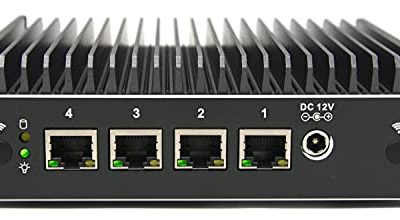
The ER605 V2 is the smallest gateway here, and the natural pick for a wired home that wants VPN and multi-WAN without a rack. Five gigabit ports cover one WAN, two WAN/LAN ports, and two LAN ports, so a second internet line or a backup 4G modem on the USB port fits without a bigger box. It supports up to 20 IPsec tunnels plus OpenVPN, L2TP, and PPTP, with an SPI firewall and DoS defense. Amazon’s listing metadata wrongly shows Wi-Fi fields, but the router has no Wi-Fi radio, and it works alone or inside an Omada controller setup.
Specs
- 5 gigabit Ethernet ports: 1 WAN, 2 WAN/LAN, 2 LAN
- Up to 3 WAN Ethernet ports plus 1 USB WAN port
- Up to 20 LAN-to-LAN IPsec, 16 OpenVPN, 16 L2TP, and 16 PPTP VPN connections
- SPI firewall and DoS defense, 4 kV lightning protection
- 5-year manufacturer warranty; 6.22 x 3.98 x 0.98 inches, 0.79 pounds
- No Wi-Fi radio; Omada SDN integrated
Best for: A small wired home or office that wants VPN and a backup internet line without a rack.
Watch out for: OpenVPN needs an Omada SDN controller, and the 4G modem on the USB port is for backup only.
Ubiquiti UniFi Dream Machine Pro
The Dream Machine Pro is a 1U rack-mount console that combines a wired router, an 8-port gigabit switch, and the UniFi controller in one chassis. Two 10G SFP+ ports cover a fast WAN link and a fast link to the rest of the network, while a 3.5-inch drive bay records UniFi Protect cameras. A quad-core processor runs the built-in Network and Protect applications, so no separate controller box is needed. It has no Wi-Fi radio; the Bluetooth entry in the listing covers setup from a phone, not wireless networking.
Specs
- 1U rack-mount enterprise security gateway and network appliance
- 8-port gigabit switch plus 10G SFP+ WAN and LAN ports
- 3.5-inch HDD bay for UniFi Protect camera recording
- Quad-core processor; UniFi Network and UniFi Protect controller built in
- No Wi-Fi radio; Bluetooth is for setup only
- Is Discontinued By Manufacturer: No; Date First Available January 29, 2020
Best for: A rack setup that also records security cameras and runs the UniFi controller on the same box.
Watch out for: It needs a rack or a sturdy shelf, and camera storage needs a drive bought separately.
MikroTik hEX RB750Gr3

The hEX is the hobbyist pick: a five-port gigabit router that runs RouterOS and costs little for the control it offers. A dual-core 880MHz processor with 256MB of RAM handles firewall rules, VLANs, queues, and hardware IPsec encryption, while a full-size USB port and a microSD slot add storage and extras. Its maker describes it plainly as a router for places where wireless connectivity is not required, so there is no radio to disable. The trade-off is the learning curve, since RouterOS expects the owner to configure it by hand.
Specs
- 5 gigabit Ethernet ports; wired only, no wireless radio
- Dual-core 880MHz CPU (MediaTek MT7621A), 256MB RAM, 16MB flash
- Full-size USB port, microSD slot, passive PoE-in
- RouterOS licence level 4 with hardware IPsec encryption
- 113 x 89 x 28 mm compact case
Best for: A home lab or hobbyist network where full control matters more than a guided setup.
Watch out for: RouterOS takes learning, and the 16MB flash limits extra packages.
TP-Link ER7206 Multi-WAN Wired VPN Router

The ER7206 steps up from the ER605 with more WAN capacity and a fiber-ready SFP port. Its port set covers one gigabit SFP WAN port, one gigabit WAN port, two WAN/LAN ports, and two LAN ports, with load balancing across up to four WAN links on the first hardware version. VPN capacity grows to 100 IPsec tunnels plus OpenVPN, L2TP, and PPTP, and a 512MB memory with a dual-core ARM processor keeps more sessions moving. Confirm the hardware version before ordering, since the newer V2.30 revision changes the port count and adds WireGuard.
Specs
- 1 gigabit SFP WAN port, 1 gigabit RJ45 WAN port, 2 gigabit WAN/LAN ports, 2 gigabit LAN ports
- Load balancing across up to 4 WAN ports; 1 USB 3.0 port for LTE backup or storage
- Up to 100 LAN-to-LAN IPsec, 50 OpenVPN, 50 L2TP, and 50 PPTP VPN connections
- Dual-core ARM Cortex-A53 processor, 512MB DDR4 memory
- 8.9 x 5.2 x 1.4 inches; Omada SDN integrated; 4 kV lightning protection
- No Wi-Fi radio
Best for: A busy wired network that runs several internet lines and many VPN tunnels at once.
Watch out for: The older SafeStream revision is marked End of Life, so confirm the listing is the current Omada version.
TP-Link ER707-M2 Multi-Gigabit VPN Router

The ER707-M2 is the pick for internet plans that run past one gigabit. Two 2.5G RJ45 ports take a fast WAN line and a fast link onward, while four gigabit RJ45 WAN/LAN ports and one gigabit SFP WAN/LAN port cover the rest of the network. It handles up to 100 IPsec tunnels plus WireGuard, OpenVPN, SSL, and GRE VPNs, with intrusion prevention and deep packet inspection on top of the usual firewall. A 1GB memory and 500,000 concurrent sessions keep a large wired household moving, and it mounts on a desk, a wall, or a rack.
Specs
- 2 x 2.5G RJ45 ports (1 WAN, 1 WAN/LAN), 4 x gigabit RJ45 WAN/LAN ports, 1 x gigabit SFP WAN/LAN port
- 1 x USB 2.0 port for USB storage or LTE backup
- Up to 100 IPsec VPN tunnels; SSL, IPSec, GRE, WireGuard, PPTP, L2TP, and OpenVPN
- Dual-core ARMv8 processor, 1GB DDR4 memory; 500,000 concurrent sessions
- 226 x 131 x 35 mm; desktop, wall, or rack mounting; Omada SDN integrated
- No Wi-Fi radio
Best for: A wired home on a multi-gigabit plan that needs fast ports and strong VPN options.
Watch out for: The 2.5G ports help only if the modem, switch, and cables support the faster link.
Which One Fits Your Situation
A Small Wired Home That Just Needs Stable Internet
Pick the ER605 V2. Five gigabit ports and a USB backup port cover a modem, a switch, and a second line, while the VPN and firewall run quietly in the background. It costs the least attention of the five, works alone without a controller, and leaves room to add access points later if a wireless device ever joins the house.
A Home Lab or Rack Setup
Pick the UniFi Dream Machine Pro. The rack chassis holds the router, the switch, and the controller together, and the drive bay records cameras without a separate recorder. The 10G ports suit a fast link to a server or a fiber modem. Budget a rack shelf and a hard drive, and plan the access points as a separate job.
A Tinkerer Who Wants Full Control
Pick the MikroTik hEX. RouterOS gives firewall rules, VLANs, and queues that the other boxes hide, and the hardware encryption keeps VPN traffic moving. It suits a home lab where the owner enjoys configuring the network by hand. Skip it if a guided setup matters more than control, and choose the ER605 instead.
A Fast Internet Plan Above One Gigabit
Pick the ER707-M2. Its 2.5G ports carry a multi-gigabit plan past the router without a bottleneck, and the SFP port takes a fiber module directly. The 100-tunnel VPN capacity and intrusion prevention suit a household that works from home over VPN. Check that the modem and the switch both support the faster link first.
Common Mistakes
- Buying a router with Wi-Fi and paying for radios you plan to switch off, instead of choosing a wired-only gateway built for the job.
- Counting ports on the router but forgetting the modem, the switch, and the access points that also need one.
- Assuming every gigabit port can act as a WAN port; only the ports marked WAN or WAN/LAN take an internet line.
- Skipping the controller question: Omada and UniFi gateways gain their full feature set only with a controller, while RouterOS expects manual setup.
- Placing the router far from the modem and running long cable runs, when the router belongs beside the modem with short, tidy links.
Frequently Asked Questions
Do non-wireless routers have Wi-Fi at all?
No. A non-wireless router has no Wi-Fi radio, so it cannot broadcast a network name or connect a phone on its own. Wireless devices reach the network through access points wired back to the router. That separation lets you place the radio where coverage is best while the router stays beside the modem.
Can I add Wi-Fi to a wired-only router later?
Yes. Add one or more access points and wire each back to the router or a switch with an Ethernet cable. A single access point covers a small home, while a larger house benefits from one per floor. Choose access points that match the router’s system when you want one dashboard, or any standalone unit when you do not.
Is a wired VPN gateway overkill for a home?
Not when the household works from home, runs a home lab, or keeps several internet lines. A VPN gateway adds encrypted tunnels for remote work, load balancing across lines, and firewall rules a basic router lacks. A simple home with one line and no remote access does fine with the smallest gateway here, and can grow into the bigger ones later.
Do I need a controller for Omada or UniFi gear?
Not for basic routing. Each gateway works alone through its web interface, with core routing, firewall, and VPN features available. A controller adds central management, guest portals, and coordinated updates across gateways, switches, and access points. Buy the controller only when the network grows past a gateway and a switch, or when remote management matters.
FAQ
Do non-wireless routers have Wi-Fi at all?
Can I add Wi-Fi to a wired-only router later?
Is a wired VPN gateway overkill for a home?
Do I need a controller for Omada or UniFi gear?
More from Amazon
Programs that pair well with the guide above. Offers and eligibility are set by Amazon and may change.
Free shipping on eligible items, Prime Video and more. Eligible new members can start with a free trial.
Start a Prime free trialAd-free music streaming. Eligible new subscribers can start with a free trial.
Try Music Unlimited freeA Prime membership for ages 18-24 with a trial period. Eligibility is set by Amazon.
See Prime for Young AdultsAudiobooks and podcasts to listen to on the go. Eligible new members can start with a free trial.
Try Audible freeAs an Amazon Associate we earn from qualifying purchases.