Key takeaways
- Sensor Technology: Prioritize Hall-Effact magnetic sensors over potentiometers; they eliminate contact wear, so your aim stays drift-free through thousands of hours of six-degree-of-freedom maneuvering.
- Programmable Buttons and Axes: Space sims demand quick access to weapon groups, power distribution, and targeting. Aim for at least 14 buttons and four axes; dual-stick setups double that headroom.
- Throttle Integration: A dedicated or integrated throttle lets you manage speed without leaving the stick. For titles like Star Citizen, a separate throttle quadrant or central slider is nearly essential.
- Ergonomics and Build: Weighted bases prevent lift-off during aggressive inputs, and adjustable grip tension reduces fatigue during multi-hour sessions. Check whether the grip suits your dominant hand or offers ambidextrous options.
- Platform Compatibility: Confirm the stick works with your OS and any console you use. Some models are PC-only, while others carry official Xbox licensing, which matters if you split time between platforms.
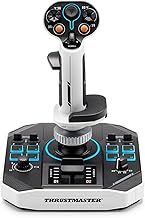
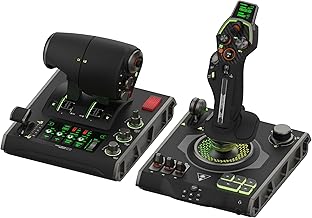
The Thrustmaster T16000M FCS Space Sim Duo is our best overall flight stick for space combat simulators, delivering dual Hall-Effact precision and 32 programmable buttons in a matched pair built for titles like Star Citizen and Elite Dangerous. The Logitech G X56 H.O.T.A.S earns runner-up honors with its 189+ programmable controls and integrated RGB lighting.
Choosing the right flight stick for space combat is genuinely confusing: sensor technology, axis mapping, throttle integration, and compatibility all vary wildly between models, and a mismatched setup can turn a dogfight into a thumb-cramping mess. This guide cuts through the noise with hands-on expertise, comparing the five sticks we recommend for dedicated space sim pilots so you can lock in the right hardware the first time.
Our top picks



As an Amazon Associate we earn from qualifying purchases at no extra cost to you. Ratings are shown as listed on Amazon.
🛒 Best Price Today on Amazon
Prime members get fast, free shipping on everything above, plus member-only deals. New members get a 30-day free trial — cancel anytime.
Quick Comparison
| Product | Best For | Standout Feature | Rating |
|---|---|---|---|
| Thrustmaster T16000M FCS Space Sim Duo | Dedicated space sim enthusiasts | Dual Hall-Effact sensors with 32 programmable buttons | 4.7/5 |
| Thrustmaster T16000M FCS | Entry-level pilots on a budget | Drift-free H.E.A.R.T sensor at an accessible price | 4.5/5 |
| Logitech G X56 H.O.T.A.S | RGB lovers wanting full customization | 189+ programmable controls with per-key RGB lighting | 4.6/5 |
| Thrustmaster Sol-R1 | Ambidextrous and solo space combat players | Detachable ambidextrous grip with central throttle | 4.4/5 |
| Thrustmaster T-Flight Hotas One | Cross-platform Xbox and PC gamers | Officially licensed detachable design with dual rudder | 4.3/5 |
How to Choose a Flight Stick for Space Combat Simulators
- Sensor Technology: Prioritize Hall-Effact magnetic sensors over potentiometers; they eliminate contact wear, so your aim stays drift-free through thousands of hours of six-degree-of-freedom maneuvering.
- Programmable Buttons and Axes: Space sims demand quick access to weapon groups, power distribution, and targeting. Aim for at least 14 buttons and four axes; dual-stick setups double that headroom.
- Throttle Integration: A dedicated or integrated throttle lets you manage speed without leaving the stick. For titles like Star Citizen, a separate throttle quadrant or central slider is nearly essential.
- Ergonomics and Build: Weighted bases prevent lift-off during aggressive inputs, and adjustable grip tension reduces fatigue during multi-hour sessions. Check whether the grip suits your dominant hand or offers ambidextrous options.
- Platform Compatibility: Confirm the stick works with your OS and any console you use. Some models are PC-only, while others carry official Xbox licensing, which matters if you split time between platforms.
The Best Flight Sticks for Space Combat Simulators Reviewed
Best Overall: Thrustmaster T16000M FCS Space Sim Duo
Two Hall-Effact sticks with weighted bases, twist rudders, integrated throttles, and 32 combined programmable buttons make this the definitive pick for pilots who want symmetrical control in Star Citizen, Elite Dangerous, or No Man’s Sky without bolting on extra hardware.
Best Budget: Thrustmaster T16000M FCS
The single-stick T16000M FCS delivers the same drift-free H.E.A.R.T sensor technology, 16 buttons, and four axes as its pricier siblings, making it the smartest entry point for newcomers who want precision without committing to a dual-stick setup.
Best Premium: Logitech G X56 H.O.T.A.S
With 189+ programmable controls, four swappable spring tensions, dual USB passthrough, and full per-zone RGB lighting, the X56 is built for sim pilots who want total command mapping and a cockpit aesthetic that matches a high-end RGB battle station.
Best for Ambidextrous Pilots: Thrustmaster Sol-R1
The Sol-R1’s detachable, fully ambidextrous grip, central throttle, twin triggers, and backlit 44-action layout make it a standout for left-handed players or anyone who prefers a single compact unit over a sprawling HOTAS desk setup.
Best for Console and PC Cross-Platform: Thrustmaster T-Flight Hotas One
Officially licensed for Xbox and PC, the T-Flight Hotas One pairs a detachable stick-and-throttle design with 14 programmable buttons and dual rudder control, ideal for gamers who rotate between Star Wars: Squadrons on console and Elite Dangerous on desktop.
Frequently Asked Questions
Do I need a dual-stick setup for space combat simulators?
Not strictly, but six-degree-of-freedom titles benefit enormously from it. A matched pair like the Space Sim Duo lets you strafe and pitch independently, cutting the learning curve for complex dogfights roughly in half compared to a single stick plus keyboard.
Are Hall-Effact sensors worth the extra cost?
Yes. Hall-Effact sensors use magnets instead of physical contacts, which means zero mechanical wear and no drift over time. If you log more than a few hours a week, the long-term accuracy advantage justifies the modest price difference.
Can I use these flight sticks with VR headsets?
All five picks here are standard USB HID devices, so they work with any VR runtime that supports flight simulators. The key is ensuring your desk layout gives you enough clearance to reach buttons without breaking headset immersion.
Does RGB lighting affect performance?
No. RGB zones on sticks like the Logitech X56 draw negligible power over the USB bus and have zero impact on input latency or sensor polling. It is purely an aesthetic feature that pairs well with synchronized PC lighting ecosystems.
Final Thoughts
For most space combat sim players, the Thrustmaster T16000M FCS Space Sim Duo remains the benchmark: twin Hall-Effact precision, ample buttons, and weighted stability in one box. If budget is tight, the single T16000M FCS delivers identical sensor quality at a fraction of the cost. And if you want maximum programmability wrapped in customizable RGB, the Logitech G X56 H.O.T.A.S is the premium pick that rounds out a serious cockpit build.