The best gaming laptops for flight simulators need more than an impressive graphics-card name. Microsoft Flight Simulator 2024 can be demanding on the CPU, memory, GPU and internet connection, while DCS World adds substantial storage and, in VR, graphics-memory requirements. For a serious single-screen setup, prioritize a high-performance CPU, 32GB RAM and an RTX 5070 Ti or better; for demanding VR or multiple displays, consider 16GB or 24GB VRAM and 64GB RAM. These are shopping recommendations based on published specifications and software requirements—not measured frame rates for these exact laptop configurations. Flight-sim hardware should also be judged as part of the cockpit: check USB connections for yokes, throttles and pedals, video outputs for external displays, and cooling during long flights. A laptop GPU bearing a desktop-style product name does not imply matching performance. Before buying for VR, verify the headset’s connection requirements and study performance in your specific simulator, scenery and aircraft rather than relying on a generic gaming score.
Quick verdict: match a laptop to your flight simulator
Best balanced choice: Lenovo Legion Pro 7i Gen 10 with RTX 5080, provided the US configuration has sufficient RAM and is available. Best high-end VR candidate: ASUS ROG Strix SCAR 18 with RTX 5090. Best 1440p value candidate: Acer Nitro 16S AI with RTX 5070 Ti, ideally upgraded to 32GB RAM. For a smaller travel machine, consider the Acer Predator Helios Neo 14 AI, but accept lower GPU memory headroom. None is a confirmed in-stock best buy until a US retailer listing is checked.
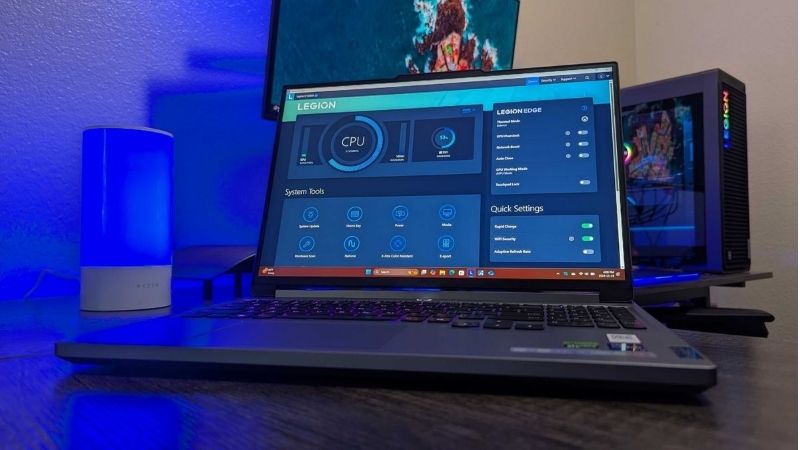
For the primary use case: Lenovo Legion Pro 7i Gen 10. The shortlist describes it as single-screen MSFS, balanced enthusiast use. Its distinguishing evidence is RTX 5080 / 16GB. The limiting check is heavy; check exact RAM and US SKU. These are model-specific factors, not a promise of independent testing or verified U.S. checkout.
Comparison table: laptop configurations and buying risks
| Configuration | GPU / VRAM | Best fit | Trade-off | US price — exact variant, checked Oct 31, 2026 | Stock status — exact variant, checked Oct 31, 2026 |
|---|---|---|---|---|---|
| Lenovo Legion Pro 7i Gen 10 | RTX 5080 / 16GB | Single-screen MSFS, balanced enthusiast use | Heavy; check exact RAM and US SKU | $3,598.99 (Lenovo US selected 83F50080US RTX5080) | Add to Cart; family has other variants |
| ASUS ROG Strix SCAR 18 | RTX 5090 / 24GB | Large scenes, demanding VR, desktop replacement | Large and costly; no FPS guarantee | $4,999.99 (ASUS US G835LXG-DB96) | Notify Me / Coming Soon (2026 selected SKU) |
| Acer Nitro 16S AI | RTX 5070 Ti / 12GB | 1440p value, moderate scenery loads | 16GB RAM variants should be upgraded | $1,849.99 (Acer US AN16S-61-R5FY) | In stock (Acer US exact selected SKU) |
| Acer Predator Helios 18 AI | RTX 5080 / 16GB | VR-oriented, large-screen cockpit | Bulky; verify 64GB configuration | $3,899.99 (Newegg US marketplace selected 5080/32GB/1TB) | Add to Cart (third-party marketplace seller); seller stock not independently confirmed |
| Acer Predator Helios Neo 14 AI | RTX 5070 / 8GB | Portable sim sessions and lighter settings | VRAM limits demanding DCS VR | Price varies by Acer US promotion | In stock (Acer US selected SKU) |
| Lenovo Legion Pro 7i Gen 10 | RTX 5090 / 24GB | High-end 16-inch VR alternative | Premium price; verify GPU power limit | $4,914.99 (Lenovo US 83F50019US RTX5090) | Add to Cart; checkout not confirmed |
US price and inventory observations are tied to the named seller, selected SKU, color or memory configuration where specified. “Buy Now” and “Add to Cart” describe purchase buttons, not a completed checkout or guaranteed warehouse stock. Family-level pricing, obsolete variants, and conflicting source badges are explicitly qualified. Unresolved rows are not assumed purchasable.
The shortlisted laptops and their real-world trade-offs
Acer Nitro 16S AI RTX 5070 Ti — sensible 1440p value candidate
Acer describes a Nitro 16S AI configuration using RTX 5070 Ti graphics with 12GB dedicated memory. That meets the VRAM number in Microsoft’s ideal MSFS 2024 tier, but laptop GPU performance still depends on cooling and power. Some published configurations include only 16GB system RAM, below Microsoft’s 32GB recommended tier; check upgrade options and budget for 32GB or more. Do not assume its 12GB memory is adequate for the 16GB+ VRAM recommendation for DCS VR.
Buy if: you fly mostly on a single 1440p display and can confirm a 32GB configuration. Skip if: high-resolution DCS VR is the primary use case.
Acer Predator Helios 18 AI RTX 5080 — big-screen alternative
Acer identifies a Predator Helios 18 AI configuration pairing RTX 5080 graphics and 64GB RAM. That combination is appealing for memory-hungry scenery and cockpit multitasking. Its 16GB VRAM matches the DCS VR recommended threshold, though meeting that number alone does not guarantee fluid VR. Compare real sustained performance and acoustic testing of the exact configuration before paying more for the large chassis.
Buy if: the laptop will stay near a desk and you value a large built-in display. Skip if: compactness matters more than the integrated screen.
Lenovo Legion Pro 7i Gen 10 RTX 5090 — compact flagship alternative
Lenovo also lists a Legion Pro 7i Gen 10 with RTX 5090 Laptop graphics and 24GB GDDR7, with up to 175W including boost. Compared with an 18-inch alternative, its 16-inch chassis may be easier to accommodate in a small cockpit area. It remains a premium option: verify memory, power adapter, warranty and sustained performance before treating the GPU tier as a justification for the price.
Buy if: you want 24GB VRAM without moving to an 18-inch display. Skip if: an RTX 5080 already fits your scene complexity and headset plans.
Lenovo Legion Pro 7i Gen 10 RTX 5080 — balanced enthusiast pick
Lenovo lists the RTX 5080 Laptop GPU with 16GB GDDR7 and up to 175W including Dynamic Boost for the Legion Pro 7i Gen 10 family. The manufacturer also lists up to 64GB DDR5 RAM, an RJ45 Ethernet port, HDMI 2.1 and USB-C/Thunderbolt display connectivity. Those ports make it a particularly sensible starting point for an external monitor and a wired home cockpit. Verify the exact SKU: listings vary by CPU, RAM, SSD and GPU. The OLED panel is attractive for normal use, but long stationary cockpit UI elements deserve sensible brightness and screen-care practices.
Buy if: you want one laptop for MSFS, DCS and ordinary gaming. Skip if: your rig requires several native video outputs without a dock or your priority is a lightweight commuter device. Manufacturer specifications do not establish sustained FPS at a specific airport.
ASUS ROG Strix SCAR 18 RTX 5090 — high-end VR candidate
A 24GB RTX 5090 Laptop configuration offers the largest GPU-memory tier in this roundup. That makes it attractive for texture-heavy DCS missions and demanding VR settings, but headset resolution, refresh target and runtime also affect the outcome. An 18-inch chassis and screen suit desk-based pilots; neither automatically proves cooler operation or better FPS. Check the exact G835-series US configuration, RAM, power profile and headset connection before purchase.
Buy if: 16GB VRAM feels restrictive for your planned headset and mission complexity. Skip if: you mainly fly on one 1080p screen or travel frequently.
Acer Predator Helios Neo 14 AI RTX 5070 — portability first
Acer lists a Helios Neo 14 AI with RTX 5070 graphics and 32GB RAM. The compact size is helpful for travel or occasional simulator use, but 8GB VRAM is below DCS’s published 16GB+ VR recommendation. Lower texture quality, render resolution and traffic settings may be necessary in demanding scenarios. Its value is portability, not an assurance of high-end VR performance.
Buy if: you primarily use a single display and need a mobile laptop. Skip if: your main goal is DCS VR with detailed missions.
Buying guide: verify the laptop for your workload
What the simulators actually require
Microsoft’s official Flight Simulator 2024 table lists 32GB RAM, 8GB VRAM and 50GB storage for its recommended tier; its ideal tier lists 64GB RAM and 12GB VRAM. These are desktop-oriented component references, not promises that similarly named laptop GPUs deliver the same performance. Its bandwidth guidance rises from 50 Mbps recommended to 100 Mbps ideal. DCS World’s official high-settings recommendation includes 32GB+ RAM, 8GB+ VRAM and 500GB SSD space; its VR recommendation calls for 16GB+ VRAM and 32GB+ RAM. Treat the DCS figures as a practical warning against choosing an 8GB laptop GPU for demanding VR.
Flight-sim buying checklist: what matters beyond GPU tier
CPU and main-thread limits: airports, aircraft systems, traffic and simulation logic can stress the processor. Seek CPU-limited benchmark scenes, not only GPU synthetic tests.
Memory: target at least 32GB for MSFS 2024; 64GB provides headroom for large add-on collections, DCS missions and background tools. Confirm whether memory is replaceable.
VRAM: 12GB is a useful MSFS ideal-tier reference; DCS publishes 16GB+ for VR. Higher VRAM does not guarantee higher FPS.
Storage: DCS recommends 500GB SSD free space plus extra for paid content. A 1TB system drive can fill quickly when two simulators and scenery libraries coexist.
Cockpit connectivity: count USB-A ports for stick, throttle, rudder pedals and button panels. Check USB hub power requirements and physical cable routing.
External screens: verify how many displays the laptop can drive simultaneously, each output’s resolution and refresh support, and whether USB-C routes video from the discrete GPU.
VR compatibility: verify the specific headset’s official PC requirements and required DisplayPort, USB or streaming path. HDMI alone is not a substitute for a required DisplayPort connection.
Thermals and noise: seek extended independent tests at realistic ambient temperature and performance mode, not one short benchmark.
Internet and setup: wired Ethernet helps consistency for downloads and online features; the official MSFS 2024 table includes 50 Mbps recommended and 100 Mbps ideal bandwidth.
Which laptop should you choose for your setup?
For a single 1080p or 1440p monitor, begin with the Nitro 16S AI RTX 5070 Ti and 32GB RAM if the exact US model and price are compelling. For a higher-end single-screen cockpit and more external I/O, compare the Legion Pro 7i RTX 5080 against the Predator Helios 18 AI RTX 5080. For DCS VR, start your shortlist at 16GB VRAM, then confirm headset compatibility; RTX 5090/24GB models are worth considering when memory headroom matters. For a portable machine, choose the Helios Neo 14 AI only after accepting its 8GB VRAM trade-off.
Separate single-screen flying from headset workloads
Simulator settings interact with screen pixel count, terrain density, weather, aircraft systems and traffic. A laptop that handles a single 1440p display may behave differently in a high-resolution headset or on multiple external panels. Microsoft Flight Simulator also streams data, so a stable internet connection affects the experience even when graphics hardware is adequate. For DCS VR, compare the published VRAM guidance and a realistic mission workload before expecting a 12GB laptop GPU to remain comfortable. Avoid copying desktop card benchmarks onto similarly named mobile GPUs.
Treat cockpit ports and upgrades as buying requirements
Flight sticks, throttles, rudder pedals, head tracking and an external cockpit display can use many ports simultaneously. Inventory the actual USB, video and Ethernet requirements before choosing a slim chassis. Check powered-hub needs and cabling to avoid intermittent disconnects. RAM and SSD expansion are also important: scenery packs, large installations and map caches can consume significant capacity. A heavier 18-inch laptop may be practical as a desk-based cockpit, while a 14-inch configuration is better reserved for travel and lighter settings. Validate headset routing and long-session fan noise if you fly in VR.
How we selected these options and checked evidence
We compared published simulator requirements with laptop VRAM, RAM and connection options. These are candidates by workload and cockpit fit, not verified FPS results from identical airports, weather, missions or headsets.
The comparison is based on the exact configuration and technical limitations recorded in this draft, with model identities, connection requirements, and purchase conditions treated separately. Published manufacturer specifications are not substitutes for independent long-duration measurements. Prices and stock are seller-, date-, and region-specific; where no current U.S. checkout was verified, that uncertainty remains visible instead of being presented as a live offer. The recommendations are therefore shortlists for further verification, not accounts of our own hands-on lab tests.
Frequently asked questions
Is an RTX 5070 Ti laptop enough for Microsoft Flight Simulator 2024?
It can be a reasonable candidate, especially for a single display, but performance depends on CPU, GPU power limit, scenery, aircraft and settings. Do not equate a laptop RTX 5070 Ti with a desktop GPU from Microsoft’s table.
Do I need 64GB RAM for flight simulators?
Not universally. Microsoft lists 32GB recommended and 64GB ideal for MSFS 2024. DCS lists 32GB+ for high settings and VR. Choose 64GB for extra headroom, not as a guarantee of smooth FPS.
How much VRAM should a DCS VR laptop have?
DCS officially recommends 16GB+ VRAM for VR graphics settings. Verify the particular headset and mission workload; even a 16GB GPU may require tuning.
Can I use flight sticks and pedals with a gaming laptop?
Usually, provided the devices support your Windows version and you have enough suitable USB connections. Check each peripheral’s driver, hub and power requirements.
Is a 240Hz laptop display essential for flight simulation?
No. Sustained frame pacing, CPU performance, clarity and monitor or headset compatibility usually matter more than the maximum built-in display refresh rate.
Should I choose an 18-inch laptop?
Choose one if the built-in screen and desk-oriented form factor are valuable. For a permanent cockpit with external monitors, ports, noise and sustained performance matter more than built-in screen size.
Final thoughts
Start with your actual simulator, display resolution and VR headset—not the most expensive GPU. Check your largest aircraft/scenery workload, choose 32GB or 64GB RAM accordingly, and match VRAM to the simulator’s published requirements. Before purchasing, open a US retailer page for the exact SKU and confirm price, stock, returns, GPU power, ports and headset compatibility. Until those checks are complete, these are candidates rather than verified buy-now deals.