The best gaming laptops for music production are not necessarily the models with the fastest graphics cards. A reliable studio-and-gaming machine needs strong sustained CPU performance, enough memory for instruments and samples, fast storage, usable ports, and a cooling profile that does not interrupt microphone recordings. These six laptop families offer different ways to balance a digital audio workstation (DAW) with modern PC games. A music project with many virtual instruments may hit RAM or CPU limits long before the dedicated GPU matters. Recording vocals adds another consideration: cooling noise near the microphone, stable audio drivers and access to a suitable interface. Look at how many USB devices you must connect, whether storage can grow with sample libraries, and how the laptop behaves when plugged in for extended sessions. The best all-rounder is not necessarily the quietest machine for tracking audio, so balance those requirements before comparing prices.
Quick verdict: gaming laptops for DAW workloads
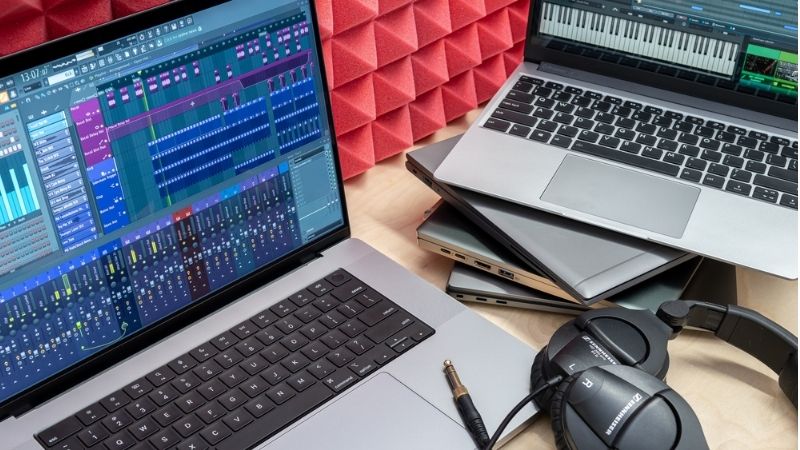
A music-production laptop has two very different workloads to satisfy: low-latency recording sessions and heavier mixing or virtual-instrument projects. CPU consistency, memory capacity, storage and audio-interface compatibility may outweigh a faster graphics card, particularly when microphone recording makes fan noise noticeable. Use the shortlist to match each machine to how and where your DAW sessions actually run.
Configurations differ by country and retailer. This is a research shortlist, not a claim that six exact US SKUs are currently in stock. No prices are published because live US seller checks were not completed.
Start with the Lenovo Legion 5 for a practical desktop-replacement studio, the ASUS ROG Zephyrus G14 for travel, or the ASUS ProArt P16 for creators who also edit video. A gaming GPU is valuable for games and visual production, but it does not replace a good audio interface or a well-tuned Windows audio setup.
The right choice depends on the exact gaming laptops for music production, the required software or hardware compatibility and verified seller terms. Compare the configuration in the table against your actual use rather than treating a family name as a tested recommendation. Where current U.S. pricing or stock was not independently confirmed, the pick remains a candidate, not a buy-now deal.
Comparison table: laptop configurations and buying risks
| Laptop family | Best role | Important buying check | US price — exact variant, checked Oct 31, 2026 | Stock status — exact variant, checked Oct 31, 2026 |
|---|---|---|---|---|
| Lenovo Legion 5 (15AHP10) | Practical all-rounder | Upgradeable-memory configurations; verify exact SKU | $2,062.99 (Lenovo US 83M00002US RTX5060) | Add to Cart; no final checkout stock confirmed |
| ASUS ROG Zephyrus G14 (GA403) | Portable producer | Compact OLED-class design; check soldered RAM | $2,299.99 (Best Buy exact GA403UM-G14.R9HX4) | Add to Cart; seller-specific variant only |
| ASUS ProArt P16 (H7606) | Hybrid creative studio | Creator-focused display and I/O; check regional spec | $5,499.99 (Best Buy selected H7606WX-XH99T RTX5090) | Best Buy listing/price; configuration stock requires checkout |
| ASUS TUF Gaming A14 (FA401) | Travel and value | Lightweight class; memory can be onboard | $2,120.20 (Neutron US FA401KM-DS74 RTX5060) | Neutron US Sep21 shows 7 units, but Best Buy discontinued new offers |
| Lenovo Legion Pro 7i Gen 10 | Large project workstation | High-end cooling and CPU options; heavy and audible under load | $3,598.99 (Lenovo US selected 83F50080US RTX5080) | Add to Cart; family has other variants |
| ASUS ROG Strix G16 (G615) | Desk-first gaming studio | Larger gaming chassis; test acoustics before recording | $1,899.99 (ASUS US selected G615LM-DS94 RTX5060) | ASUS Buy; Best Buy no longer sells same selected model new |
US price and inventory observations are tied to the named seller, selected SKU, color or memory configuration where specified. “Buy Now” and “Add to Cart” describe purchase buttons, not a completed checkout or guaranteed warehouse stock. Family-level pricing, obsolete variants, and conflicting source badges are explicitly qualified. Unresolved rows are not assumed purchasable.
The shortlisted laptops and their real-world trade-offs
Lenovo Legion 5 (15AHP10) — best balanced studio and gaming pick
The Legion 5 is the starting point for a producer who keeps the laptop on a desk most days but also wants to play demanding games. Selected configurations offer accessible memory slots, which is more useful for long-term sample-library growth than spending the entire budget on a top-tier GPU. Check Lenovo PSREF for the exact machine type before purchase: panel, GPU, storage, RAM population, and ports vary.
The larger chassis makes room for practical cooling, but that does not mean silent recording. Set a quiet power profile when tracking vocals, keep the microphone away from exhaust vents, and audition latency at your intended buffer size. A balanced GPU configuration is usually enough if music is the primary task.
ASUS ROG Zephyrus G14 (GA403) — best compact choice
A 14-inch Zephyrus is attractive for producers moving between home, rehearsal rooms, and classrooms. The compact footprint makes it easier to carry a MIDI controller and interface in the same bag. The trade-off is limited space for cooling and potentially soldered memory, depending on model year and SKU.
Choose the RAM amount you expect to need over the life of the laptop rather than assuming a future upgrade. A high-resolution OLED display can make arranging comfortable, but check glare, scaling, and static-interface care. For recording, test the quiet mode with your actual plugins rather than relying on gaming review noise figures.
ASUS ProArt P16 (H7606) — best for music plus video production
The ProArt P16 targets broader creative work. It makes sense when you score video, edit performance footage, use visual plugins, or need a color-focused display alongside your DAW. Its discrete GPU helps visual workflows more directly than it helps ordinary audio mixing.
Avoid confusing the x86 Windows H7606 family with newer ARM-based ProArt variants; plugin and driver compatibility can differ. Confirm the exact processor architecture, memory, SSD layout, USB-C capabilities, and audio-interface driver support before choosing any creative laptop.
ASUS TUF Gaming A14 (FA401) — best for travel-conscious budgets
The TUF A14 family is a useful alternative when you value a smaller bag and do not need a large built-in screen. It can serve as a portable writing and editing station, with an external monitor and audio interface attached at home.
Some configurations have onboard RAM, so the cheapest SKU may become a false economy if your sample libraries grow. Verify battery behavior in ordinary office work separately from gaming runtime, and check whether USB-C charging supports your intended workload.
Lenovo Legion Pro 7i Gen 10 — best for demanding desk-based sessions
A high-performance Legion Pro is worth considering for large projects with multiple software instruments, high oversampling, and simultaneous video work. The appeal is CPU headroom and a full-size chassis, not the idea that an expensive RTX GPU automatically improves audio quality.
It is heavier and can be noticeably loud under sustained load. Plan a recording profile with conservative fan behavior and reserve maximum performance for rendering, bouncing, or gaming. Verify the memory ceiling and SSD expansion of the exact generation and configuration.
ASUS ROG Strix G16 (G615) — best for gaming-first producers
The Strix G16 suits a user who games heavily and produces music on the same desk. A large display and performance-oriented design make it comfortable for arranging and editing. It is less compelling for field recording or long commutes.
Before purchase, read a measured acoustic review and verify the USB and display outputs on the precise SKU. During tracking, a quieter power mode and external interface can matter more than peak GPU power. Do not assume all G615 configurations have the same CPU or memory arrangement.
Buying guide: verify the laptop for your workload
Why a music-production laptop is different from a gaming laptop
Gaming benchmarks reward high frame rates, while audio sessions depend on meeting hard real-time deadlines. A single overloaded instrument or misbehaving driver can create a click or dropout even if average CPU utilization appears modest. Favor consistent performance and reliable drivers over headline GPU specifications.
Ableton recommends modern six-to-twelve-core-class CPUs, at least 16GB RAM for typical work, 32GB or more for large sample-heavy projects, fast SSD storage, and a low-latency audio interface. Its Windows guidance specifically recommends ASIO-compatible hardware. Those are workflow recommendations, not guaranteed track counts for any laptop.
FL Studio has substantially lower minimum system requirements, but its publisher likewise notes that faster processors and more memory allow more instruments and effects. A laptop meeting minimum installation requirements should not be confused with a machine ready for orchestral templates or heavily processed mixes.
CPU: prioritize real-time audio headroom
Compare sustained performance and the behavior of individual cores. A demanding instrument chain may bottleneck one processing path before all cores are busy. Run a demo project if possible.
RAM: buy for sample libraries
16GB can work for basic production. Aim for 32GB when using large sample libraries, orchestral instruments, or heavy multitasking; 64GB may help unusually large templates. Check whether RAM is soldered.
Storage: plan for expansion
A 1TB NVMe SSD is a practical starting point when games and sound libraries share a drive. Confirm whether a second SSD slot exists. Keep project backups outside the laptop.
GPU: useful, but secondary for audio
A discrete GPU is relevant for games, video editing, 3D work, and some visual plugins. Ordinary DAW track count is generally not a reason to pay for the highest-tier GPU.
Audio interface and latency
On Windows, use a supported interface with manufacturer ASIO drivers. Lower buffer settings reduce monitoring delay but raise real-time CPU demands. Start at a stable buffer, then reduce gradually.
Fan noise and DPC behavior
A quiet fan profile helps with microphones, but driver-induced interruptions also matter. Test with the exact interface, Wi-Fi/Bluetooth configuration, and project load during the return period.
Ports and power
Count interface, MIDI controller, external SSD, dongle, and monitor connections. USB-C shape alone does not guarantee Thunderbolt, USB4, display output, or sufficient charging power.
Suggested studio setup and first-day checklist
Update Windows, chipset drivers, GPU drivers, DAW, and audio-interface firmware from official sources.
Install the interface manufacturer’s ASIO driver and select it inside the DAW.
Record a test take at 48 kHz and a moderate buffer size; lower the buffer only if stable.
Check for pops while Wi-Fi, Bluetooth, a USB SSD, and the display are in normal use.
Switch to a quieter fan profile before recording a microphone and position the mic away from the vents.
Confirm 20% or more free SSD capacity as a practical working margin, then configure automated off-device backups.
Test your heaviest project during the retailer return period, including sample loading, export, and game performance.
Test the audio chain before the return period ends
Audio responsiveness depends on CPU scheduling, a supported audio interface and stable drivers. Install the DAW and official interface driver, load a representative project with active effects and sample instruments, then try the buffer sizes you actually need for monitoring. Listen for pops or dropouts while recording, and check whether Wi-Fi, Bluetooth, external storage or graphics-driver activity creates interruptions. A laptop that is excellent for gaming can still be inconvenient if its fan ramps up beside a microphone or its ports make connecting studio gear awkward.
Choose RAM and storage by sample libraries
Large orchestral libraries and other instruments consume memory and disk space even when the project contains relatively few audio tracks. A 32GB configuration is a sensible starting target for many mixed production workflows; the right capacity depends on the libraries you load concurrently. Keep adequate free SSD space for projects, sample content and backups. Verify whether storage and RAM can be expanded, and consider an external monitor when a 14-inch machine becomes crowded with a timeline, mixer and instrument windows. Higher RTX tiers should be justified by gaming or visual work, not ordinary audio mixing alone.
How we selected these options and checked evidence
We focused on stable audio workflows: single-thread/real-time demands, sample-library memory, fan noise and supported interface drivers. The picks are not measurements of DAW round-trip latency or DPC behavior for every SKU.
The comparison is based on the exact configuration and technical limitations recorded in this draft, with model identities, connection requirements, and purchase conditions treated separately. Published manufacturer specifications are not substitutes for independent long-duration measurements. Prices and stock are seller-, date-, and region-specific; where no current U.S. checkout was verified, that uncertainty remains visible instead of being presented as a live offer. The recommendations are therefore shortlists for further verification, not accounts of our own hands-on lab tests.
Frequently asked questions
Is a gaming laptop good for Ableton Live?
Yes, if it has a capable CPU, enough RAM, fast storage, and a stable audio interface. The gaming GPU is not the main reason it works well for Live.
Is 16GB RAM enough for FL Studio?
For modest projects, often yes. Producers with large sample instruments or many simultaneous applications should consider 32GB.
Does an RTX 5080 make music production faster?
Not by itself. Most ordinary audio mixing and software-instrument workloads depend more on CPU, RAM, storage, and audio-driver stability.
Do I need an external audio interface?
For reliable low-latency recording and multiple microphone/instrument inputs, an interface with a dedicated ASIO driver is usually the better option.
Can I record vocals beside a gaming laptop?
Yes, but fan noise can leak into a microphone. Use a quiet profile, move the mic away from vents, and monitor noise at the actual recording gain.
Should I choose a 14-inch or 16-inch laptop?
Choose 14-inch for regular travel; 16-inch for a larger timeline and desk-based editing. An external monitor can make a portable laptop comfortable at home.
Final thoughts
For most hybrid gamers and producers, prioritize a well-configured Legion 5 or a Zephyrus G14 with sufficient RAM. The ProArt P16 deserves attention when video and visual work are part of your music workflow; a Legion Pro 7i or Strix G16 makes more sense for a stationary desk. No single laptop guarantees glitch-free low-latency audio. Test your DAW, plugins, and interface on the exact configuration before the return window closes.