
Key takeaways
- Thermal Paste 5-Year Lifecycle: A mid-sized tube ($6.00–$10.00) handles 3 to 6 applications. However, thermal paste gradually dries out due to thermal cycling and physical “pump-out” (where heating and cooling expansion pushes paste out from the center die). Replacing paste every 2 to 3 years requires purchasing isopropyl alcohol (99%) and lint-free microfiber towels ($8.00–$12.00). Total 5-year maintenance cost per home PC averages $15.00 to $25.00.
- Thermal Pads 5-Year Lifecycle: High-quality silicone thermal pads ($10.00–$15.00) resist drying and retain structural elasticity over 4 to 5 years under standard home gaming loads. Because pads do not suffer from liquid pump-out, they rarely require interim service unless you detach the cooler. Total 5-year maintenance cost averages $10.00 to $15.00.
Building or upgrading a custom gaming rig on your home office desk or restoring a living room entertainment console involves decisions that stretch far beyond picking a graphics card or ambient LED lighting. One of the most critical maintenance choices for maintaining home acoustics, keeping ambient temperatures low, and protecting high-value electronics is managing heat transfer. When opening up a PC tower or console, every home tech enthusiast faces a fundamental dilemma: thermal paste vs thermal pads gaming solutions.
Your living space dictates how you care for electronics. High fan noise from a struggling processor can ruin a peaceful living room atmosphere, while messy maintenance work on a solid wood dining table can leave hard-to-clean chemical residues. Thermal paste and thermal pads serve the same core purpose—transferring thermal energy from hot silicon chips to aluminum or copper heat sinks—but they behave completely differently in terms of application, gap bridging, long-term stability, and home workbench convenience. As home entertainment setups become sleeker and quiet living spaces become more important in 2026, choosing the right interface material ensures your gaming hardware runs cool without requiring constant teardowns on your living room floor.
Our top picks
 ARCTIC MX-7
- MX-7 features a performance-optimized, dense, and highly viscous…
- High cohesion prevents pump-out, dry-out, or bleeding even…
- MX-7 cannot be spread manually by design
 Thermal Paste CPU 1.8g with Toolkit for
- BSFF is metal-free and non-conductive, which eliminates any…
- It is made of carbon microparticles, guaranteeing extremely…
- BSFF thermal paste Edition formula has excellent component…
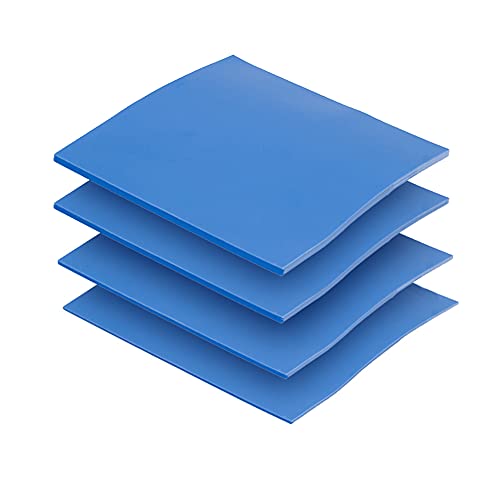 OwlTree 4 Pack Thermal Pad
- Excellent thermal conductivity: Made of thermal silica gel…
- Reliable & Durable: High temperature performance in -40…
- Application: Thermal Pad used in the control board…
| Product | Key specs | |
|---|---|---|
| ARCTIC MX-7 | MX-7 features a performance-optimized, dense, and highly viscous… High cohesion prevents pump-out, dry-out, or bleeding even… MX-7 cannot be spread manually by design | Check price |
| Thermal Paste CPU 1.8g with Toolkit for | BSFF is metal-free and non-conductive, which eliminates any… It is made of carbon microparticles, guaranteeing extremely… BSFF thermal paste Edition formula has excellent component… | Check price |
| OwlTree 4 Pack Thermal Pad | Excellent thermal conductivity: Made of thermal silica gel… Reliable & Durable: High temperature performance in -40… Application: Thermal Pad used in the control board… | Check price |
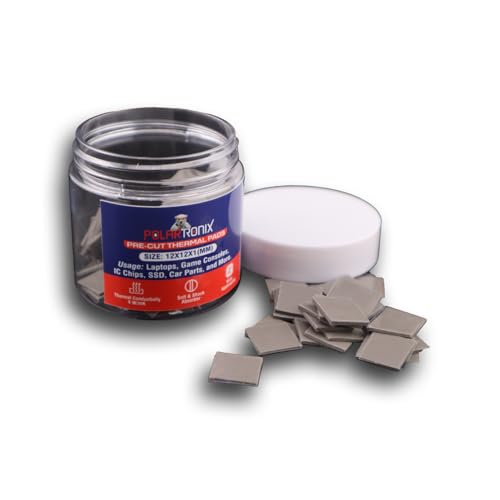 100 Pcs Pre-Cut Thermal Pads for Game 100 Pcs Pre-Cut Thermal Pads for Game | ✅ Perfect Fit Every Time ✅ Easy Installation ✅Application: Thermal Pad used in the control board… | Check price |
As an Amazon Associate we earn from qualifying purchases at no extra cost to you.
Quick Verdict
If you are re-pasting a high-wattage primary CPU or GPU core where direct metal-to-metal contact tolerances are ultra-tight (under 0.1 mm), liquid thermal paste remains the undisputed champion for maximum heat transfer and silent fan curves. However, if you are cooling distributed secondary components like VRAM, MOSFETs, solid-state drives, or refurbishing a game console, thermal pads provide an essential, mess-free solution that fills wider gaps (0.5 mm to 2.0 mm) without pump-out risks. Most modern home gaming setups actually benefit from a hybrid approach: paste on the central silicon die, and pads on the surrounding power delivery and memory modules.
Side by Side
| Feature | Thermal Paste | Thermal Pads |
|---|---|---|
| Comfort & Application | Requires precise dispensing; can be messy on home work surfaces. | Clean, pre-cut or trim-to-size rubbery sheets; zero liquid spill risk. |
| Durability | 2 to 3 years before drying, cracking, or suffering “pump-out”. | 3 to 5+ years; maintains structural flexibility over extended periods. |
| Price Range | $5.00 to $15.00 per tube (1.5g to 8g). | $8.00 to $18.00 per sheet or multi-pack kit. |
| Maintenance | Requires isopropyl alcohol and lint-free wipes for cleanup during repasting. | Pulls off cleanly in one piece; no liquid solvent required. |
| Space & Gap Tolerance | Designed strictly for microscopic gaps (<0.1 mm) under high pressure. | Fills varied gaps from 0.5 mm up to 3.0 mm across uneven surfaces. |
| Look & Cleanliness | Can squeeze out around chip edges if over-applied; gray/silver tint. | Neat, uniform appearance; rectangular shapes stay neatly aligned. |
| Resale & Reusability | Single-use only; must be completely wiped away once cooler is unseated. | Single-installation ideal, but leaves zero permanent residue on hardware. |
| Best For | Direct CPU heat spreaders, primary GPU dies, high-wattage water blocks. | Graphics card VRAM, motherboard VRMs, M.2 SSDs, console internal chips. |
Where Thermal Paste Wins
When maximum heat transfer performance is mandatory, liquid thermal paste outperforms solid pads across central processing dies. Modern gaming processors regularly draw between 65 watts and 253 watts of power under heavy workloads. Because metal heat spreaders and cooler bases possess microscopic imperfections, paste fluidly creeps into those micro-fissures under mounting pressure, displacing trapped air with thermally conductive zinc oxide or aluminum particles.
Because thermal paste creates a razor-thin bond line, heat travels almost instantly from the chip into the heatsink fins. Lower temperatures translate directly into lower fan speeds, which keeps your home gaming room or studio quiet during intense gaming sessions. For users working on high-end desktop builds, large-format paste tubes like the ARCTIC MX-7 (8 g) ($8.59 range) provide enough high-durability material to handle multiple system overhauls without requiring frequent rebuys.
Thermal paste is also far more economical when servicing standard CPU cooler mounts. A compact option such as a Thermal Paste CPU 1.8g tube with included application toolkit ($5.99 range) gives home builders everything needed for a single direct-die or integrated heat spreader application, including spatulas and cleaning wipes, keeping upfront maintenance costs minimal.
Where Thermal Pads Gaming Wins
While paste dominates microscopic gaps, solid thermal pads are engineered to solve geometric height variations across complex circuit boards. A graphics card or game console motherboard features dozens of individual components—such as video memory chips, voltage regulator modules (VRMs), and power chokes—standing at slightly different heights relative to a flat heat sink. Thermal paste cannot bridge these stepped gaps; applying thick layers of paste leads to slumping, air pockets, and severe thermal throttling.
Thermal pads act as soft, heat-conductive cushions. They compress under sink tension to conform precisely to uneven heights while delivering predictable heat transfer rates (typically measured between 3.0 W/mK and 12.0 W/mK). Products like the OwlTree 4 Pack Thermal Pad (100x100mm featuring 0.5mm, 1mm, 1.5mm, and 2mm thicknesses with 6.0 W/mK conductivity for around $11.99) allow custom builders to tailor pad height exactly to their graphics card or SSD cooler clearances.
Pads are also superior for home maintenance cleanliness. Unlike liquid compounds that can stain wood desks, fabrics, or carpets if accidentally dropped, solid silicone pads are clean to handle. For game console restoration projects, specialized multi-packs like 100 Pcs Pre-Cut Thermal Pads for Game Consoles (12x12x1mm sizing around $9.99) allow users to rapidly cover PS5 or Xbox memory chips and MOSFET coils without measuring, cutting, or making a mess on the kitchen table.
Cost Over 5 Years
Evaluating thermal paste vs thermal pads gaming expenses requires looking beyond the initial checkout price to consider total multi-year maintenance cycles:
- Thermal Paste 5-Year Lifecycle: A mid-sized tube ($6.00–$10.00) handles 3 to 6 applications. However, thermal paste gradually dries out due to thermal cycling and physical “pump-out” (where heating and cooling expansion pushes paste out from the center die). Replacing paste every 2 to 3 years requires purchasing isopropyl alcohol (99%) and lint-free microfiber towels ($8.00–$12.00). Total 5-year maintenance cost per home PC averages $15.00 to $25.00.
- Thermal Pads 5-Year Lifecycle: High-quality silicone thermal pads ($10.00–$15.00) resist drying and retain structural elasticity over 4 to 5 years under standard home gaming loads. Because pads do not suffer from liquid pump-out, they rarely require interim service unless you detach the cooler. Total 5-year maintenance cost averages $10.00 to $15.00.
While thermal pads carry a slightly higher upfront cost for multi-thickness variety packs, their set-and-forget nature offers superior cost stability and less ongoing effort for long-term homeowners.
Which One for Your Home
Small Apartment
In tight living quarters, space is at a premium and a gaming PC often doubles as a workstation in a bedroom or open living area. Low fan noise is essential for living harmony. Thermal paste is the preferred pick on your CPU and GPU core to keep operating temperatures low, preventing cooling fans from ramping up to noisy RPMs late at night. Keep a small pre-cut kit of thermal pads handy in your tool drawer for quick SSD upgrades without needing liquid solvents or messy prep work on small apartment desks.
Family with Kids/Pets
When living with children or pets, maintenance projects on high desks or dining tables face constant risk of interruption or knocked-over supplies. A tiny drop of thermal paste on a carpet or upholstered chair can cause tough stains. Solid, pre-cut thermal pads are far safer for maintenance sessions around kids and pets—they produce zero liquid mess, cannot spill, and allow you to quickly service a living room gaming console or family PC during afternoon downtime.
Rental Property
Renters often need portable setups, low-stress gear maintenance, and zero risk of damaging apartment flooring or rented furniture with chemical cleaners like pure isopropyl alcohol. Opt for pre-cut thermal pad packs when refreshing memory banks or portable external drive enclosures. When servicing desktop processor coolers, stick to neat kit options that include non-drip application spatulas to keep chemicals strictly contained within the PC chassis.
Long-Term Home
In a dedicated home office or custom gaming cave with established workbenches, performance optimization is king. Long-term homeowners maintaining custom liquid-cooling loops or high-wattage gaming rigs should utilize both interface mediums. Stock high-yield thermal paste tubes on your workbench for regular biennial CPU/GPU repasting, paired with high-performance silicone thermal pad sheets (ranging from 0.5 mm to 2.0 mm) to maintain flawless contact across high-voltage motherboard components and M.2 storage drives.
FAQ
Can I use thermal pads instead of thermal paste on my gaming CPU?
While specialized ultra-thin graphite or phase-change pads exist for CPUs, standard silicone thermal pads should not replace thermal paste on a modern high-wattage desktop CPU. Standard pads are too thick (typically 0.5 mm or greater), which prevents the cooler from seating close enough to the processor heat spreader. This results in poor heat transfer, instant thermal throttling, and high fan noise.
How often should thermal paste and thermal pads be replaced in a home gaming PC?
Thermal paste should generally be replaced every 2 to 3 years, or whenever you notice a permanent 5°C to 10°C increase in baseline CPU/GPU operating temperatures under similar ambient room conditions. Thermal pads are far more stable and can easily last 4 to 5 years without performance degradation, provided the heatsink remains bolted down in place.
Are pre-cut thermal pads better for gaming consoles like PS5 or Xbox?
Yes, pre-cut thermal pads (such as 12x12x1mm sizes) are ideal for game console restoration. Consoles use numerous small RAM chips and power delivery components scattered around the motherboard. Pre-cut pads eliminate tedious measuring and trimming, allowing for rapid, uniform coverage across all auxiliary chips without risking short circuits or uneven gap pressure.
Does thermal paste bleed or damage home furniture during maintenance?
Thermal paste contains metal oxides or ceramic micro-particles suspended in silicone oils. If spilled on unfinished wood, carpets, or fabric furniture, the oils can sink into porous fibers and leave noticeable grease stains. Always perform computer maintenance over a protective anti-static mat or clean rubber tray placed on your home desk.








