Key takeaways
- The manufacturer’s CPU support list includes your socket.
- The box contains the required mounting hardware, rather than requiring a separately purchased kit.
- The mounting instructions specifically identify your processor platform.
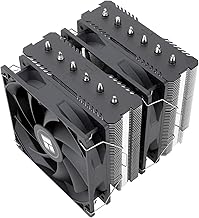
The best Intel CPU coolers are the Thermalright Phantom Spirit 120 SE for value, Noctua NH-D15 G2 for quiet air cooling, and Arctic Liquid Freezer III 240 or 360 for high sustained power—provided the cooler includes the correct LGA1700 or LGA1851 mounting hardware and fits your case.
Quick picks by Intel build type
| Build situation | Recommended cooler | Socket fit to verify | Why it suits the build |
|---|---|---|---|
| Budget Core i5 gaming PC | Thermalright Peerless Assassin 120 SE | LGA1700; LGA1851 support depends on the package | Large dual-tower capacity at a modest price |
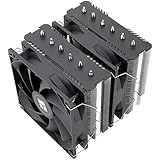
| Core i5 or Core i7 with limited budget | Thermalright Phantom Spirit 120 SE | Confirm the included mounting kit | Seven heat pipes and two 120 mm fans provide strong value |
| Quiet workstation or premium air-cooled PC | Noctua NH-D15 G2 | LGA1700 and LGA1851 mounting support should be checked | Very capable air cooling, excellent documentation, and replaceable fans |
| High sustained multicore workload | Arctic Liquid Freezer III 360 | LGA1700 and LGA1851 support varies by revision and kit | Large radiator gives more thermal headroom than most air coolers |
| Compact case with a 240 mm radiator mount | Arctic Liquid Freezer III 240 | Verify socket bracket and radiator clearance | Useful liquid-cooling capacity without requiring a 360 mm chassis |
Start with the Intel socket, not the cooler brand
Intel LGA1700 is used by 12th-, 13th-, and 14th-generation Core desktop processors. Intel’s newer Core Ultra desktop platform uses LGA1851. The two sockets are physically different, so an LGA1700 cooler is not automatically suitable for LGA1851.
Some coolers use the same hole spacing or offer an updated bracket, but compatibility can depend on the exact retail revision. Before buying, check three things:
- The manufacturer’s CPU support list includes your socket.
- The box contains the required mounting hardware, rather than requiring a separately purchased kit.
- The mounting instructions specifically identify your processor platform.
Do not rely only on a marketplace title saying “Intel compatible.” Cooler listings can remain unchanged while the included mounting hardware changes. This matters especially for older stock and for LGA1851 systems.
Air versus liquid cooling for Intel processors
Choose a dual-tower air cooler when reliability matters most
Dual-tower coolers such as the Peerless Assassin 120 SE, Phantom Spirit 120 SE, NH-D15 G2, and be quiet! Dark Rock 5 use a heatsink, heat pipes, and one or two fans. They have no pump, radiator, or coolant loop to maintain. That makes them a strong choice for gaming PCs, office workstations, and systems that may run for many years.
The main limitation is sustained heat. A well-designed dual-tower cooler can handle a high-end Intel chip, but temperature and fan speed depend heavily on motherboard power limits, case airflow, ambient temperature, and the workload. Intel processors may briefly draw much more power than their advertised base processor power.
Choose a 240 or 360 mm liquid cooler for sustained heavy loads
An all-in-one liquid cooler can move heat from the CPU to a radiator mounted at the top or front of the case. The Arctic Liquid Freezer III 240 and 360 are suitable examples of this class. A 360 mm radiator has three 120 mm fans and generally provides more cooling area than a 240 mm radiator.
Liquid cooling is most useful for long renders, code compilation, simulation, media encoding, or unrestricted high-power Intel processors. It is not automatically faster in games: if the graphics card is the bottleneck, a large liquid cooler may provide little extra frame rate.
Liquid coolers also introduce a pump, more cables, radiator-clearance concerns, and a possible pump failure point. Install the radiator where the tubing is not sharply kinked, and avoid mounting a front radiator with the pump positioned above the highest point of the loop whenever the case layout allows another option.
Match cooler capacity to actual CPU power
Intel’s advertised processor power is not a complete cooler specification. A processor configured with a generous motherboard power limit can produce substantially more heat than its base-power number suggests. Treat the following as practical planning ranges rather than strict TDP ratings:
| Approximate sustained CPU package power | Suitable cooler class | Typical target |
|---|---|---|
| Up to 125 W | Quality single-tower or compact dual-tower air cooler | Core i5 gaming and general use |
| 125–180 W | Large dual-tower air cooler or 240 mm liquid cooler | Core i7 gaming and mixed workloads |
| 180–250 W | Premium dual-tower air cooler or 280/360 mm liquid cooler | High-power Core i7 and Core i9 workloads |
| Above 250 W | 360 mm liquid cooler with good case airflow, or a configured power limit | Short bursts or heavily unrestricted multicore workloads |
A worked power-budget example
Suppose a CPU draws 210 W during a long render, the graphics card draws 320 W, and the motherboard, memory, drives, and fans use about 70 W. The estimated system load is:
210 W + 320 W + 70 W = 600 W
That calculation is primarily for choosing a power supply, but it also explains the cooling requirement: the CPU cooler must continuously remove about 210 W from one small area. If the motherboard allows the processor to use 250 W instead, that is a 40 W increase—roughly 19 percent more CPU heat than the original 210 W workload. A 360 mm radiator or a sensible CPU power limit can therefore matter more than changing thermal paste brands.
Check case clearance before choosing an air cooler
Large air coolers often fail compatibility checks because of physical clearance rather than socket support. Measure the case’s maximum CPU cooler height and compare it with the cooler specification. Leave a few millimetres of practical margin rather than treating the published maximum as a target.
Memory clearance is another issue. Front fans on tall dual-tower coolers may overlap the first memory slots. The fan can sometimes be raised, but doing so increases the total cooler height. Low-profile memory is easier to combine with large air coolers.
For a liquid cooler, check radiator thickness plus fan thickness, not radiator size alone. A 360 mm radiator may require approximately 60 mm of combined radiator-and-fan space, and top mounting can conflict with motherboard heatsinks or tall memory modules. Front mounting may fit more easily, but it can raise the graphics card’s intake temperature.
Installation difficulty and noise trade-offs
Air coolers are usually simpler: install the backplate and mounting bars, apply thermal paste, tighten the heatsink evenly, and connect the fan. Their noise comes from fans only. If a fan fails, replacement is relatively easy.
Liquid coolers require radiator installation, pump and fan connections, cable routing, and careful tubing placement. Set the pump to a fixed moderate or high speed according to the manufacturer’s guidance, then tune radiator fans using CPU temperature. A pump running at a stable speed often avoids the distracting speed changes that can occur when pump control is tied directly to rapid CPU temperature spikes.
For a quiet system, do not select a cooler based only on its maximum cooling claim. A large cooler running at 800–1,000 RPM is usually quieter than a smaller cooler running near its maximum speed. In BIOS, start with a gradual fan curve: approximately 30 percent at 40°C, 50 percent at 70°C, 75 percent at 85°C, and 100 percent at 95°C. Adjust the points after checking your own temperatures and noise tolerance.
Recommended buying decisions
- Core i5, gaming-focused, LGA1700: choose the Peerless Assassin 120 SE or Phantom Spirit 120 SE if the case supports a tall dual-tower cooler.
- Core i7 with long rendering sessions: use the Phantom Spirit 120 SE or NH-D15 G2 for a simpler build, or move to an Arctic Liquid Freezer III 240 or 360 if power limits are high.
- Core i9 or high-power Core Ultra desktop processor: prefer a 360 mm liquid cooler for sustained unrestricted workloads, or set a realistic power limit and use a premium dual-tower air cooler.
- Small case: select a low-profile cooler only after checking its CPU power rating, or use a 240 mm liquid cooler if the chassis supports it.
- Noise-sensitive workstation: favor a large heatsink, slow fans, unobstructed case airflow, and a moderate power limit over a small cooler operating at full speed.
Final verdict
For most Intel gaming builds, the Phantom Spirit 120 SE is the best balance of cooling capacity, installation simplicity, and general market value. The Noctua NH-D15 G2 is the premium air-cooling choice when documentation, acoustics, and long-term serviceability matter more than price. Choose the Arctic Liquid Freezer III 240 or 360 when the processor will sustain high power for extended workloads and the case has the necessary radiator space.
Whichever model you select, socket hardware, power limits, case clearance, and airflow determine the result. Confirm those four details before comparing cooler specifications, and a less expensive cooler that fits correctly can outperform a larger model installed in a restricted case.