Key takeaways
- 16GB removes the texture-capacity bottleneck that limits 8GB cards at 1440p
- Low ~160W class board power keeps PSU and case requirements modest
- Single 8-pin connector works with older power supplies
- RDNA 4 ray-tracing and upscaling improvements over the previous generation
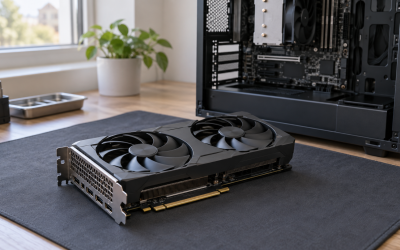
- Dual-fan ASUS cooler fits most mid-tower cases without clearance drama
The best budget 1440p graphics card for most people is the ASUS Dual Radeon RX 9060 XT 16GB. It pairs a full 16GB GDDR6 frame buffer with a 128-bit bus and a roughly 160W-class board power, which is the exact combination that lets you run 1440p high-preset textures without a PSU upgrade or a case rebuild. If your hard ceiling sits nearer the $200–$250 band, the ASRock Intel Arc B570 Challenger 10GB OC is the entry point that genuinely holds 1440p once you lean on XeSS. And if you want 1440p at 144Hz and above without upscaling in most titles, the ASUS TUF Gaming GeForce RTX 5070 12GB OC is the premium answer. Below, twelve currently listed cards are compared on 1440p frame-rate class, VRAM capacity and bus width, power and connector requirements, and total cost of ownership — including the VRAM and PSU arithmetic that spec sheets leave out.
Top 3 Picks
Best Overall: ASUS Dual Radeon RX 9060 XT 16GB
This is the card that solves the two problems that define budget 1440p: texture capacity and power headroom. A 16GB buffer on a 128-bit GDDR6 bus means modern titles at 1440p high presets can stream their full texture sets instead of swapping to system memory, and the ~160W class board power means a quality 550W–600W unit and a single 8-pin connector are enough. RDNA 4 also brings a mature upscaler and strong ray-tracing uplift over the previous generation, so it stays relevant as 1440p titles get heavier.
Best Budget: ASRock Intel Arc B570 Challenger 10GB OC
At the low end of the 1440p conversation, capacity matters more than raw shader count, and the B570’s 10GB on a 160-bit bus beats the 8GB/128-bit cards that sit at similar money. The listed 2600 MHz GPU clock and 19 Gbps memory give it a comfortable 1440p esports and 1080p-to-1440p upscaled-AAA profile. XeSS support and the dual-fan Challenger cooler with a metal backplate round it out as the value pick.
Best Premium: ASUS TUF Gaming GeForce RTX 5070 12GB OC
If 1440p high refresh is the goal, this is the card in this list that gets there without compromise. 12GB of GDDR7 on a 192-bit bus, a 250W-class board power and the TUF triple-fan cooler mean sustained clocks under long sessions. You pay for it in PSU requirements and case clearance, but it is the only listed card that reliably targets the 1440p/144Hz–165Hz tier in demanding titles.
Quick Comparison
| Product | Best for | Key specs (as listed) | Price tier |
|---|---|---|---|
| ASUS Dual Radeon RX 9060 XT 16GB | Most 1440p builds; best overall balance | 16GB GDDR6, 128-bit, RDNA 4, ~160W class, 8-pin | Mid-range |
| ASRock Intel Arc B570 Challenger 10GB OC | Cheapest credible 1440p entry | 10GB GDDR6, 160-bit, 2600 MHz GPU, 19 Gbps memory, dual fan, metal backplate | Budget |
| GIGABYTE GeForce RTX 5060 WINDFORCE OC 8G | Small cases and upscaler-first 1440p | 8GB GDDR7, 128-bit, PCIe 5.0, WINDFORCE cooler, ~145W class | Mid-range |
| XFX Speedster SWFT210 Radeon RX 7600 8GB | Cheap 1440p for esports and older AAA | 8GB GDDR6, 128-bit, RDNA 3, 3x DisplayPort + HDMI, ~165W class | Budget |
| XFX Swift RX 9060 XT OC Triple Fan 16GB | Quietest, coolest 9060 XT 16GB | 16GB GDDR6, 128-bit, RDNA 4, triple-fan, factory OC, 2x DP + HDMI | Premium |
| ASUS Prime GeForce RTX 5060 Ti 16GB | 1440p plus video/3D work in one card | 16GB GDDR7, 128-bit, PCIe 5.0, ~180W class, 8-pin | Premium |
| ASUS TUF Gaming GeForce RTX 5070 12GB OC | 1440p high refresh without upscaling | 12GB GDDR7, 192-bit, PCIe 5.0, ~250W class, triple fan | Premium |
| GIGABYTE Radeon RX 9060 XT Gaming OC 8G | RDNA 4 feature set on a tighter budget | 8GB GDDR6, 128-bit, PCIe 5.0, factory OC | Mid-range |
| ASUS Dual GeForce RTX 5060 Ti 8GB OC | 1440p with heavy upscaling and ray tracing | 8GB GDDR7, 128-bit, PCIe 5.0, dual fan, ~180W class | Mid-range |
| MSI Gaming RTX 5050 8G Shadow 2X OC | Low-power 1440p esports builds | 8GB GDDR6, 128-bit, boost up to 2617 MHz, dual fan, ~130W class | Budget |
| MSI Gaming Radeon RX 6750 XT 12GB | Cheapest 12GB card on this list | 12GB GDDR6, 192-bit, RDNA 2, boost up to 2600 MHz, dual Torx 3.0 fans | Premium |
| XFX Speedster SWFT105 Radeon RX 6400 4GB | Display output and very light 1440p | 4GB GDDR6, 64-bit, RDNA 2, slot-powered, no external connector | Budget |
How We Chose
Every card here was selected against four criteria that matter more than peak shader throughput at 1440p. First, memory configuration: capacity and bus width decide whether a card can hold 1440p high-preset textures, and that matters more than a small clock advantage. Second, category fit — each pick had to be defensible at its own price tier, not merely “good for the money” in the abstract. Third, real use case: esports and older back-catalogue titles, upscaled modern AAA, native high-refresh AAA, and productivity/video work all stress a GPU differently, so the list covers each. Fourth, upgrade path: power connector type, PSU headroom, card length, slot thickness and PCIe generation were weighed so that a card does not force a rebuild two years later. This roundup is built from published specifications, manufacturer listings and publicly available third-party reviews and aggregate data. We have not tested, benchmarked, owned or handled any of these cards, and every frame-rate figure below is given as an approximate class range that varies with settings, resolution, CPU, driver version and game patch.
1. ASUS Dual Radeon RX 9060 XT 16GB – Best for Most 1440p Builds
This is the default recommendation for anyone building or upgrading for 1440p on a sensible budget. It suits the reader who has a mid-tower case, a 550W–650W power supply with a spare 8-pin PCIe cable, and a monitor in the 1440p/100Hz–165Hz range. It also suits the reader who keeps a card for four or five years and wants to avoid the “textures won’t load” problem that 8GB cards hit in newer releases.
Key specs
| Memory | 16GB GDDR6 on a 128-bit bus |
|---|---|
| Architecture | AMD RDNA 4 (RX 9060 XT class) |
| Interface | PCIe 5.0 |
| Board power | ~160W class |
| Power connector | Single 8-pin PCIe |
| Cooling | ASUS Dual dual-fan, 2.5-slot class |
What makes the 16GB variant the right pick rather than the 8GB version of the same chip is not shader count — it is the buffer. At 2560×1440, a modern title with high or ultra texture settings can stream well past 8GB once you add ray tracing, high-resolution shadows and a large texture cache. When a card runs out, the driver starts evicting to system memory over PCIe, and the result is not a graceful frame-rate dip; it is stutter and visible texture pop-in. Sixteen gigabytes removes that failure mode for the useful life of the card.
Published 1440p results for this class typically land in the 60–85 fps band at high presets with ray tracing off and upscaling off, and comfortably above 100 fps in esports titles. Those numbers move substantially with CPU choice, patch version and settings, so treat them as a class, not a guarantee. With upscaling enabled, this card has real headroom at 1440p/144Hz.
Power is the quiet strength here. A 160W-class board with a single 8-pin connector means the total system draw in a typical build — CPU, motherboard, drives, fans — usually lands around 350W–400W under load. A quality 550W unit covers it with margin for transient spikes, which is a far cheaper proposition than the 750W-class supply a 250W card implies. Over a year of 10 hours per week of gaming, the difference between a 160W and a 250W card is roughly 45–60 kWh, which at typical residential rates is a meaningful but not decisive sum — worth knowing, not worth basing the purchase on.
Pros
- 16GB removes the texture-capacity bottleneck that limits 8GB cards at 1440p
- Low ~160W class board power keeps PSU and case requirements modest
- Single 8-pin connector works with older power supplies
- RDNA 4 ray-tracing and upscaling improvements over the previous generation
- Dual-fan ASUS cooler fits most mid-tower cases without clearance drama
Cons
- 128-bit bus limits raw memory bandwidth compared with wider-bus 12GB cards
- Not a native 1440p/144Hz card in the heaviest titles without upscaling
- ASUS Dual is a two-fan design, so it runs louder than triple-fan alternatives under sustained load
- Costs more than the 8GB version of the same GPU for identical shader hardware
How it compares
Against the XFX Swift RX 9060 XT OC Triple Fan 16GB, this card gives up cooling capacity and a factory overclock in exchange for a shorter, lighter, easier-to-fit body. If your case has room for a long triple-fan card and you value lower fan noise, the XFX is the better version of the same silicon. Against the GIGABYTE Radeon RX 9060 XT Gaming OC 8G, the decision is entirely about memory: the GIGABYTE saves money today but will hit the 8GB wall sooner at 1440p high textures. Against the ASUS Prime GeForce RTX 5060 Ti 16GB, the ASUS Radeon is the value play — you give up the NVIDIA feature set and some ray-tracing performance, but you keep the 16GB buffer at a lower tier.
2. ASRock Intel Arc B570 Challenger 10GB OC – Best Budget 1440p Entry
The B570 Challenger is the card to buy when the budget is genuinely tight but 1440p is non-negotiable. It suits a reader coming from an older 1080p card who has a 1440p monitor already, plays a mix of esports, older AAA and a few current releases, and is willing to use XeSS in the demanding ones. It also suits a second machine or a living-room build where a short dual-fan card and a modest power draw matter.
Key specs
| Memory | 10GB GDDR6 on a 160-bit bus |
|---|---|
| Memory speed | 19 Gbps (as listed) |
| GPU clock | 2600 MHz (as listed) |
| Cooling | Dual fan, metal backplate |
| Board power | ~150W class |
| Power connector | Single 8-pin PCIe |
The interesting thing about this card at 1440p is that its 10GB sits on a 160-bit bus, not a 128-bit one. That gives it more memory bandwidth than the 8GB/128-bit cards in the same price neighbourhood, and about 25% more texture capacity. In practice that is the difference between running 1440p high textures comfortably and running 1440p medium textures to stay safe. Intel’s XeSS upscaler has matured considerably and works well at 1440p, which is the lever that turns this card from “1080p card” into a legitimate 1440p option.
Expect this class to sit in the 45–65 fps band at 1440p high in demanding titles with upscaling on, and well above 100 fps in competitive shooters and MOBAs. Ray tracing is the weak point — Intel’s second-generation RT units are much improved over the first Arc generation, but this is still a card where you should plan to leave heavy RT off at 1440p. Driver maturity has improved a great deal since Arc launched, though some older DirectX 9 and 11 titles still behave differently than they do on AMD or NVIDIA hardware, so it is worth checking whether your specific back-catalogue favourites are known-good.
Power is modest: a 150W-class board with a single 8-pin connector, which a 500W–550W quality supply handles comfortably. Card length is short enough for compact mid-towers, and the metal backplate helps with rigidity in vertical-mount or transport-heavy setups.
Pros
- 10GB on a 160-bit bus beats 8GB/128-bit rivals on texture headroom
- Low price tier makes 1440p accessible without a full rebuild
- XeSS upscaling is genuinely usable at 1440p
- Compact dual-fan card with a metal backplate
- Modest ~150W class power draw, single 8-pin
Cons
- Ray tracing at 1440p is best left disabled in demanding titles
- Driver behaviour on some older DirectX 9/11 titles still trails the competition
- 10GB is still a ceiling; the heaviest 2026 releases will want more at ultra textures
- Resale demand for Arc cards is thinner than for the mainstream brands
How it compares
Against the XFX Speedster SWFT210 Radeon RX 7600 8GB, the ASRock wins on memory configuration — 10GB on a 160-bit bus versus 8GB on a 128-bit bus — and on price tier, while the XFX has the advantage of a more predictable driver stack and broader game-day optimisation. If you play mostly competitive titles and older AAA, either works; if you play texture-heavy modern releases, the B570’s extra capacity is worth more than the RX 7600’s maturity. Against the MSI Gaming RTX 5050 8G Shadow 2X OC, the B570 is the better 1440p pick on memory alone, even though the RTX 5050 is the more power-efficient card.
3. GIGABYTE GeForce RTX 5060 WINDFORCE OC 8G – Best for Small Cases and Upscaler-First 1440p
This card suits a specific reader: someone with a compact case, a modest power supply, and a 1440p monitor where they are happy to run DLSS in anything demanding. It is also the pick for a productivity-leaning build that occasionally games, because NVIDIA’s feature set — NVENC encoding, CUDA acceleration, broad application support — is the most widely supported in professional software.
Key specs
| Memory | 8GB GDDR7 on a 128-bit bus |
|---|---|
| Architecture | NVIDIA RTX 5060 class |
| Interface | PCIe 5.0 (x8 link class) |
| Board power | ~145W class |
| Power connector | Single 8-pin PCIe |
| Cooling | GIGABYTE WINDFORCE |
The headline here is GDDR7 memory on a 128-bit bus. Even at 128 bits, GDDR7’s higher signalling rate gives this card memory bandwidth well above what the 8GB capacity would suggest, which is why it punches above its weight in frame-rate terms. The catch is capacity: 8GB is the number that decides whether this card is comfortable at 1440p in two years. In titles that stream large texture sets, 8GB at 1440p high means either dropping to medium textures or accepting occasional hitching when the scene changes.
Published results for this class typically show roughly 55–75 fps at 1440p high in current AAA titles with upscaling off, and higher in lighter engines. With DLSS Quality enabled — which renders internally at 1706×960 and reconstructs to 1440p — the frame rate climbs enough to make 1440p/120Hz+ realistic in many titles. That internal resolution figure is worth internalising: DLSS Quality at 1440p is not rendering 1440p, it is rendering slightly above 1080p and reconstructing. If your plan depends on upscaling, budget for it deliberately rather than discovering it later.
Power draw is low, at roughly 145W class with a single 8-pin, and the PCIe 5.0 x8 link means this card is more sensitive than most to an older PCIe 3.0 motherboard — on a PCIe 3.0 slot the narrower link can cost a few percent in texture-streaming-heavy scenes. If you are on a PCIe 4.0 or newer board, this is a non-issue.
Pros
- GDDR7 memory delivers strong bandwidth for a 128-bit bus
- Very low ~145W class power draw; works with modest power supplies
- DLSS is the best-supported upscaler, and frame generation extends its useful life
- NVENC and CUDA support make it a dual-purpose gaming and work card
- Compact WINDFORCE cooler suits small-form-factor builds
Cons
- 8GB is the binding constraint at 1440p high textures
- PCIe 5.0 x8 link loses a little performance on older PCIe 3.0 boards
- Ray tracing at native 1440p is limited; you will want DLSS alongside it
- Costs more than the 10GB Arc B570 while offering less texture capacity
How it compares
Against the ASUS Dual GeForce RTX 5060 Ti 8GB OC, this card is the cheaper route into the same 8GB capacity class; the Ti version buys you more shader performance and a stronger ray-tracing profile, but not more memory. If 8GB is your ceiling either way, the Ti is the better long-term card and the RTX 5060 is the better value today. Against the ASRock Intel Arc B570 Challenger 10GB, the GIGABYTE wins on driver maturity, upscaler quality and encoding features, and loses on raw texture capacity. Choose on which of those two you weight more heavily.
4. XFX Speedster SWFT210 Radeon RX 7600 8GB – Best Cheap 1440p for Esports and Older AAA
This is the card for a reader whose library is mostly competitive shooters, MOBAs, strategy games, and AAA titles from a few years back. It suits a 1440p/75Hz–100Hz monitor rather than a 144Hz one, and it suits a build where the power supply is older and only has a single 8-pin free. It is a sensible, low-risk purchase rather than an exciting one.
Key specs
| Memory | 8GB GDDR6 on a 128-bit bus |
|---|---|
| Architecture | AMD RDNA 3 (RX 7600 class) |
| Interface | PCIe 4.0 (x8 link class) |
| Board power | ~165W class |
| Power connector | Single 8-pin PCIe |
| Outputs | HDMI plus three DisplayPort |
| Cooling | XFX SWFT210 dual fan |
The RX 7600’s strengths at 1440p are consistency and price. In esports titles it will comfortably exceed 100 fps at 1440p high, and in older AAA releases it holds 60 fps-plus at high settings. In the newest, heaviest releases it lands in the 40–60 fps band at 1440p high, which is where FSR upscaling becomes the difference between playable and not. Ray tracing at 1440p on this class is a settings-menu curiosity rather than a feature you should plan around.
The practical argument for this card over a newer 8GB model is that RDNA 3 is now a thoroughly mature platform. Drivers are settled, game-day profiles are broad, and FSR support is near-universal. The practical argument against it is the 8GB buffer on a 128-bit bus, which is the same capacity wall the RTX 5060 hits, without the GDDR7 bandwidth advantage.
Power draw is around 165W class with a single 8-pin, so a 500W–550W quality supply is sufficient. Three DisplayPort outputs plus HDMI is generous for a budget card and makes multi-monitor productivity setups easy — a detail often overlooked until you try to run two 1440p panels and a third display off a card with only two outputs.
Pros
- Low price tier for a card that handles 1440p esports comfortably
- Mature, well-optimised RDNA 3 drivers
- Three DisplayPort outputs plus HDMI supports multi-monitor setups
- Single 8-pin connector suits older power supplies
- Broad FSR support across the back catalogue
Cons
- 8GB on a 128-bit bus is the weakest memory configuration in this list’s mid-section
- Ray tracing at 1440p is not practical in demanding titles
- PCIe 4.0 x8 link loses performance on PCIe 3.0 motherboards
- Newer AAA releases require upscaling to hold 60 fps at 1440p
How it compares
Against the MSI Gaming RTX 5050 8G Shadow 2X OC, the XFX offers more shader throughput and more display outputs at a similar tier, while the MSI is the more power-efficient card at roughly 130W class and has the stronger upscaler. Against the ASRock Intel Arc B570 Challenger 10GB, the XFX loses on memory capacity and bandwidth but wins on driver predictability. If your library is older than about three years, the RX 7600 is the safer, cheaper choice; if you are buying for the next three years, the B570’s extra memory is worth the switch.
5. XFX Swift Radeon RX 9060 XT OC Triple Fan Gaming Edition 16GB – Best Premium 9060 XT
This is the version of the 16GB RX 9060 XT to buy if your case has room for a long card and you care about acoustics. It suits a reader who games in a quiet room, runs long sessions, and would rather pay a little more for a card that stays cool and quiet than accept a two-fan cooler at the same performance. It also suits a build with a mesh-front case and decent airflow, where a triple-fan card can actually exploit the extra surface area.
Key specs
| Memory | 16GB GDDR6 on a 128-bit bus |
|---|---|
| Architecture | AMD RDNA 4 (RX 9060 XT class) |
| Cooling | XFX Swift triple fan, factory overclock |
| Outputs | HDMI plus two DisplayPort (as listed) |
| Board power | ~160W class plus OC headroom |
| Power connector | Single 8-pin PCIe |
The triple-fan Swift is a factory-overclocked card, so it will sit slightly ahead of a stock 9060 XT 16GB in sustained workloads — the difference is a few percent, not a tier change. The real benefit is thermal: three fans moving air over a larger heatsink means lower fan speeds for the same heat load, which means less noise. In a quiet build that is worth more than the clock bump.
Frame-rate expectations are the same class as any 16GB RX 9060 XT: roughly 60–85 fps at 1440p high in current AAA titles with upscaling off, and well over 100 fps in esports. Because the card is power-limited rather than thermally limited in most cases, the factory overclock mostly buys consistency — fewer clock dips during long sessions — rather than a higher peak.
One practical note on the output configuration: the listed HDMI plus two DisplayPort arrangement is fine for a single 1440p high-refresh monitor plus a secondary panel, but if you run three displays, check the exact output count on the model you buy rather than assuming. Card length is the other consideration — a triple-fan Swift is a long card, and a compact mid-tower with a front-mounted radiator may not have the clearance.
Pros
- Triple-fan cooler runs quieter than dual-fan versions of the same GPU
- Factory overclock gives slightly more consistent sustained clocks
- 16GB buffer removes the 1440p texture ceiling
- Still only a single 8-pin connector and ~160W class draw
- Cooler headroom leaves room for manual tuning
Cons
- Premium tier pricing for performance that is close to the cheaper 16GB version
- Long card body will not fit every compact case
- Output count is lower than some dual-fan alternatives
- The overclock is worth a few percent, not a resolution or settings tier
How it compares
Against the ASUS Dual Radeon RX 9060 XT 16GB, this is the same GPU with a bigger cooler and a factory overclock. If you have the space and want the quietest 1440p experience at this performance level, the XFX is worth the premium. If you are building in a compact case or want to spend the difference elsewhere in the build, the ASUS Dual is the more practical pick. Against the ASUS Prime GeForce RTX 5060 Ti 16GB, the XFX wins on price tier and the ASUS wins on ray-tracing performance, encoding features and upscaler quality — a genuine trade rather than a clear win.
6. ASUS Prime GeForce RTX 5060 Ti 16GB – Best for 1440p Plus Creative Work
This card suits a reader who uses one machine for both gaming and work — video editing, 3D rendering, streaming, or AI-adjacent tasks — and wants 1440p gaming without compromise on texture capacity. The combination of 16GB of GDDR7 and NVIDIA’s software ecosystem is the strongest dual-purpose package in this list.
Key specs
| Memory | 16GB GDDR7 on a 128-bit bus |
|---|---|
| Architecture | NVIDIA RTX 5060 Ti class |
| Interface | PCIe 5.0 (x8 link class) |
| Board power | ~180W class |
| Power connector | Single 8-pin PCIe |
| Cooling | ASUS Prime series cooler |
The 16GB GDDR7 configuration is the point. GDDR7 on a 128-bit bus gives this card memory bandwidth that comfortably outruns older 8GB/128-bit designs, and the capacity means 1440p high textures fit without eviction. That combination is why it lands in a higher price tier than the 8GB version of the same GPU despite identical shader hardware.
In gaming terms, expect roughly 65–85 fps at 1440p high in demanding titles with upscaling off, with ray tracing usable if you pair it with DLSS. That makes 1440p/144Hz reachable in many titles and comfortable at 1440p/100Hz in nearly all of them. For creative work, 16GB of VRAM is the threshold where 4K video timelines, larger 3D scenes and multi-layer composites stop swapping to system memory — a practical difference you feel as responsiveness, not as a benchmark number.
Power draw is around 180W class on a single 8-pin connector, so a 550W–600W quality supply covers it. The PCIe 5.0 x8 link is worth noting if you are on an older PCIe 3.0 platform: it costs a small amount of performance in texture-heavy scenes, though far less than it would on a 4-lane card.
Pros
- 16GB GDDR7 gives both capacity and bandwidth at 1440p
- DLSS and frame generation are the best-supported upscaling stack
- NVENC encoding and CUDA support make it genuinely dual-purpose
- Single 8-pin connector keeps PSU requirements reasonable
- Enough VRAM for 4K video timelines and larger 3D scenes
Cons
- Premium price tier for a 128-bit bus card
- PCIe 5.0 x8 link is a small penalty on PCIe 3.0 motherboards
- Ray tracing still needs upscaling alongside it at 1440p
- Not enough raw performance for native 1440p/144Hz in the heaviest titles
How it compares
Against the ASUS Dual GeForce RTX 5060 Ti 8GB OC, this is the same GPU with double the memory — and that is the entire argument. The 16GB version costs more but will hold 1440p high textures years longer, and it is the version to buy if you also do creative work. Against the ASUS Dual Radeon RX 9060 XT 16GB, the ASUS Prime wins on ray tracing, encoding and upscaling quality; the Radeon wins on price tier. Pick the NVIDIA card if your workload extends beyond gaming, and the Radeon if it does not.
7. ASUS TUF Gaming GeForce RTX 5070 12GB OC – Best for 1440p High Refresh
This is the card for a reader who has decided that 1440p at 144Hz or 165Hz is the target and does not want to compromise. It suits a build with a modern case, a 750W-class power supply, and a CPU strong enough not to hold it back. It also suits a reader who wants a single purchase to last through the current console generation without revisiting the question.
Key specs
| Memory | 12GB GDDR7 on a 192-bit bus |
|---|---|
| Architecture | NVIDIA RTX 5070 class |
| Interface | PCIe 5.0 |
| Board power | ~250W class |
| Power connector | 16-pin (12V-2×6) class, adapter usually included |
| Cooling | ASUS TUF triple-fan, OC Edition |
| Outputs | HDMI 2.1 plus DisplayPort 2.1 class |
The 192-bit bus is the technical differentiator in this list. Combined with 12GB of GDDR7, it gives this card substantially more memory bandwidth than any 128-bit design here, and bandwidth is what native 1440p high-refresh gaming actually consumes. Published results for this class typically land in the 90–130 fps band at 1440p high with ray tracing off, and comfortably above 60 fps with ray tracing on when paired with DLSS. Those figures vary widely by title, patch and CPU.
The TUF cooler is the other half of the story. A 250W-class board in a triple-fan TUF shroud runs cool and quiet under sustained load, which matters if you play long sessions rather than short benchmarks. It is also physically large — check your case clearance before buying, because a card of this class can run close to or past 300mm and occupy three slots.
Power is the real cost of entry. A 250W GPU in a typical system with a 125W CPU and normal peripherals puts total system draw around 450W under sustained load, with transient spikes that can briefly exceed that. That means a quality 750W supply is the sensible recommendation, and the 16-pin connector means you should use the adapter or cable that comes with your power supply rather than mixing vendors. Annual energy use also rises: 10 hours per week of gaming at a 250W card versus a 160W card is roughly 45–60 kWh more per year.
Pros
- 192-bit bus and 12GB GDDR7 deliver the bandwidth native 1440p high refresh needs
- Strong ray-tracing performance for the tier
- TUF triple-fan cooler is quiet and holds clocks under sustained load
- DLSS and frame generation extend headroom well beyond 1440p/165Hz
- DisplayPort 2.1-class outputs suit high-refresh and high-bit-depth monitors
Cons
- Premium price tier — the most expensive card in this roundup
- 250W class draw demands a 750W-class power supply
- 16-pin connector is less convenient for older PSUs without the right cable
- Large triple-slot body will not fit compact cases
- 12GB is ample at 1440p but offers less headroom than 16GB cards for future texture loads
How it compares
Against the ASUS Prime GeForce RTX 5060 Ti 16GB, the TUF 5070 trades 4GB of capacity for a much wider memory bus and considerably more shader performance. At 1440p today, the bandwidth and compute advantage wins clearly; the 16GB card’s extra capacity is insurance rather than an immediate benefit. Against the XFX Swift RX 9060 XT OC Triple Fan 16GB, the TUF 5070 is a full tier above — roughly double the price for a card that can hold native 1440p high refresh where the Radeon needs upscaling. Buy the 5070 if high refresh is the goal; buy the 16GB Radeon if value is.
8. GIGABYTE Radeon RX 9060 XT Gaming OC 8G – Best RDNA 4 Value on a Tight Budget
This card suits a reader who wants the RDNA 4 feature set — the improved upscaler, better ray tracing, PCIe 5.0 — but cannot stretch to the 16GB version. It works best at 1440p medium-to-high textures with upscaling, and it works very well at 1080p if you later repurpose it. It is a reasonable choice for a build that will be upgraded again in two to three years.
Key specs
| Memory | 8GB GDDR6 on a 128-bit bus |
|---|---|
| Architecture | AMD RDNA 4 (RX 9060 XT class) |
| Interface | PCIe 5.0 |
| Cooling | GIGABYTE Gaming OC triple-fan class |
| Board power | ~150W–160W class |
| Power connector | Single 8-pin PCIe |
The honest framing of this card is that it is the same GPU as the 16GB versions above with half the memory. Shader performance, ray-tracing capability and upscaler quality are identical. What changes is what happens when a game wants more than 8GB of texture data at 1440p: the driver evicts to system memory and you get stutter. In titles that fit inside 8GB, you will not notice. In titles that do not, you will notice immediately and unmistakably.
Frame rates in fitting titles are in the same 60–85 fps band as the 16GB version at 1440p high. In titles that exceed 8GB, you either drop to medium textures — which usually costs more visual quality than a settings preset suggests, because texture resolution is the most visible setting at 1440p — or accept intermittent hitching. That is the trade.
Power and physical requirements are modest: a single 8-pin connector and a ~150W–160W class board, so a 550W supply is plenty. The GIGABYTE Gaming OC cooler is a triple-fan class design in most configurations, which means quiet operation at this power level.
Pros
- Full RDNA 4 feature set at the lowest price point in the family
- Identical shader and ray-tracing performance to the 16GB versions
- Low power draw and a single 8-pin connector
- Quiet triple-fan class cooler at a modest thermal load
- Excellent card to move into a 1080p secondary build later
Cons
- 8GB on a 128-bit bus is the limiting factor at 1440p high textures
- Texture-eviction stutter is noticeable in the heaviest current titles
- Only a modest saving versus the 16GB version, which is the better long-term buy
- Ray tracing plus high textures at 1440p will exceed the buffer
How it compares
Against the ASUS Dual Radeon RX 9060 XT 16GB, this is the value-versus-longevity question in its purest form. The 16GB card costs more but removes the single biggest failure mode at 1440p; the 8GB card saves money now and will push you toward medium textures sooner. Against the GIGABYTE GeForce RTX 5060 WINDFORCE OC 8G, the two are close in capacity but the GIGABYTE Radeon offers more shader performance while the GIGABYTE NVIDIA card offers the better upscaler and lower power draw. If you are choosing between two 8GB cards, choose on upscaler preference and price.
9. ASUS Dual GeForce RTX 5060 Ti 8GB OC – Best for 1440p with Heavy Upscaling
This card suits a reader who is comfortable running DLSS in essentially every demanding title and wants the best ray-tracing experience available below the top tier. It suits a 1440p/144Hz monitor used with upscaling rather than native rendering, and it suits a build with a 600W-class supply and a compact-to-mid case.