Key takeaways
- Excellent HERO 25K sensor with accurate, consistent tracking
- Adjustable weight system lets you customize feel and balance
- 11 programmable buttons with onboard memory for profile storage
- Proven ergonomic shape that works well for palm and claw grips
The Logitech G502 Hero remains one of the most recognizable gaming mice on the market, and for good reason. It pairs a refined ergonomic shape with the HERO 25K sensor, delivering pinpoint tracking up to 25,600 DPI without the power draw or cost premium of Logitech’s wireless lineup. Wired via USB, it’s built for gamers who prioritize a reliable, lag-free connection over cable-free convenience.
This mouse suits FPS and MOBA players who want a heavily customizable mouse without stepping up to Lightspeed wireless pricing. It’s also a solid fit for anyone who prefers a slightly heavier, more substantial mouse in hand, thanks to its adjustable weight system.
Our top picks
 Logitech G502 Hero Wired Gaming Mouse
- HERO Gaming Sensor: Next generation HERO mouse sensor…
- 11 programmable buttons and dual mode hyper-fast scroll…
- Adjustable weights: Match your playing style
 Logitech G502 Lightspeed Wireless Gaming Mouse
- PowerPlay wireless charging: Never worry about your battery…
- Light speed wireless gaming mouse: Exclusive Logitech G…
- Hero 25K sensor through a software update from…
 Logitech G502 X Plus Wireless RGB Gaming
- Icon, reinvented: From the legacy of the legendary…
- High-precision tracking: Experience sub-micron accuracy with the HERO…
- Pro-grade connectivity: LIGHTSPEED technology delivers pro-grade responsiveness that…
| Product | Key specs | |
|---|---|---|
| Logitech G502 Hero Wired Gaming Mouse | HERO Gaming Sensor: Next generation HERO mouse sensor… 11 programmable buttons and dual mode hyper-fast scroll… Adjustable weights: Match your playing style | Check price |
| Logitech G502 Lightspeed Wireless Gaming Mouse | PowerPlay wireless charging: Never worry about your battery… Light speed wireless gaming mouse: Exclusive Logitech G… Hero 25K sensor through a software update from… | Check price |
| Logitech G502 X Plus Wireless RGB Gaming | Icon, reinvented: From the legacy of the legendary… High-precision tracking: Experience sub-micron accuracy with the HERO… Pro-grade connectivity: LIGHTSPEED technology delivers pro-grade responsiveness that… | Check price |
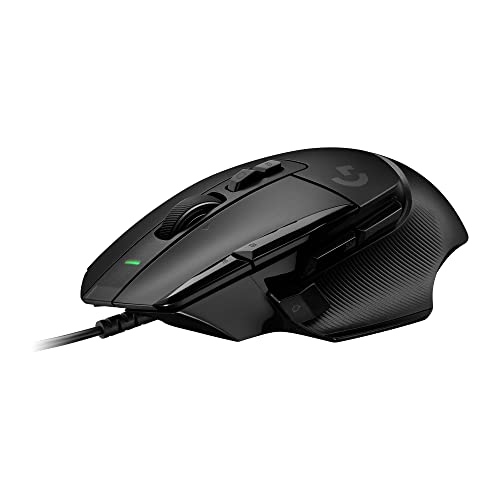 Logitech G502 X Wired Gaming Mouse Logitech G502 X Wired Gaming Mouse | Icon reinvented: From the legacy of Logitech's most… LIGHTFORCE switches: All-new hybrid optical-mechanical switch technology for… HERO 25K gaming sensor: Incredibly precise down to… | Check price |
 Logitech G502 X Lightspeed Wireless Gaming Mouse Logitech G502 X Lightspeed Wireless Gaming Mouse | Icon, reinvented: From the legacy of the legendary… High-precision tracking: Experience sub-micron accuracy with the HERO… Optical speed, tactile feel: LIGHTFORCE hybrid switches combine… | Check price |
 Logitech G305 Lightspeed Wireless Gaming Mouse Logitech G305 Lightspeed Wireless Gaming Mouse | The next-generation optical HERO sensor delivers incredible performance… Ultra-fast LIGHTSPEED wireless technology gives you a lag-free… G305 wireless mouse boasts an incredible 250 hours… | Check price |
 Logitech G502 X Lightspeed Wireless Gaming Mouse Logitech G502 X Lightspeed Wireless Gaming Mouse | Icon, reinvented: From the legacy of the legendary… High-precision tracking: Experience sub-micron accuracy with the HERO… Optical speed, tactile feel: LIGHTFORCE hybrid switches combine… | Check price |
 Razer Basilisk V3 Customizable RGB Wired Ergonomic Razer Basilisk V3 Customizable RGB Wired Ergonomic | PC gaming mouse favored by millions worldwide with… Assign macros and secondary functions across 11 programmable… Speed through content with a scroll wheel that… | Check price |
As an Amazon Associate we earn from qualifying purchases at no extra cost to you.
🎮 Get More From Your Setup — Free
Prime Gaming gives you free PC games every month, in-game loot, and a free Twitch channel sub — plus fast free shipping on all the gear above. New members get a 30-day free trial.
Watch: Logitech G502 Hero Gaming Mouse Review — Video Review
Design & Build
The G502 Hero’s shape hasn’t changed much since its predecessor, and that’s largely a good thing. It’s a right-hand-specific ergonomic design with a pronounced thumb rest and a ring-finger groove that suits palm and claw grip styles better than fingertip grip. The 11 programmable buttons are logically placed, including two DPI-shift buttons within thumb reach and a sniper button that’s easy to find blind mid-match. The five removable 3.6g weights let you fine-tune the mouse from 121g up to 141g, which is a nice touch for players who want a heavier, more planted feel. Build quality is solid, though the primary mouse buttons on units that have seen heavy competitive use are known to develop double-click issues after a year or two of hard use — a known weak point worth being aware of. The braided cable is flexible and low-friction, minimizing drag during fast swipes.
Performance
The HERO 25K sensor is the real star here — it’s accurate, jitter-free, and consistent even at high DPI settings, with zero smoothing or acceleration artifacts. In practice, most gamers will run well below max DPI (800–1600 is common for FPS titles), but headroom is there if you need it. The onboard memory stores up to five profiles, so DPI stages, button mappings, and RGB settings travel with the mouse across PCs without needing Logitech G Hub installed everywhere. The scroll wheel is a standard ratchet design — functional, but it lacks the infinite-scroll toggle found on newer G502 X models. Being wired, there’s zero latency or battery anxiety, which competitive players will appreciate.
Pros & Cons
- Excellent HERO 25K sensor with accurate, consistent tracking
- Adjustable weight system lets you customize feel and balance
- 11 programmable buttons with onboard memory for profile storage
- Proven ergonomic shape that works well for palm and claw grips
- Primary click switches can wear out or double-click after heavy long-term use
- Wired-only design means no freedom of movement compared to wireless siblings
- Standard scroll wheel lacks the infinite-scroll feature on newer models
Alternatives to Consider
If cutting the cord matters, the G502 Lightspeed keeps the same trusted shape and button layout while adding wireless freedom and POWERPLAY charging compatibility. Want the latest internals instead? The G502 X Plus upgrades to optical switches and a lighter chassis with infinite scroll and wireless charging support. For a budget-friendly, ultra-lightweight option, the G305 Lightspeed trades button count and RGB for a featherweight 99g build and remarkable AA-battery longevity.
Frequently Asked Questions
Is the G502 Hero good for competitive gaming?
Yes. The HERO 25K sensor offers pro-level accuracy, and the wired connection eliminates any wireless latency concerns, making it a reliable choice for ranked and competitive play.
Can I use the G502 Hero on Mac?
Yes, it’s compatible with both PC and Mac. Full customization through Logitech G Hub is primarily optimized for Windows, though basic functionality works fine on macOS.
How do the adjustable weights affect gameplay?
The five 3.6g weights let you shift the mouse’s total weight and balance. Lighter setups favor fast flick-shots, while added weight can improve control and reduce overshoot for tracking-heavy aim styles.
Does it work without installing software?
Yes. Basic plug-and-play functionality works out of the box, but you’ll need Logitech G Hub to customize DPI stages, remap buttons, adjust RGB lighting, or save profiles to onboard memory.
Verdict
The G502 Hero earns its long-running popularity by combining a genuinely great sensor, thoughtful ergonomics, and deep customization at a price that undercuts Logitech’s wireless models — making it an easy recommendation for gamers who don’t mind a cable and want proven performance without the premium cost.