
Key takeaways
- Controller connection: each controller should have a working 3.5mm jack; some very old Xbox One controllers may require an officially supported adapter.
- Exact console and edition: Xbox Series X|S / Xbox One compatibility must be stated for the selected headset. Avoid the PC-only USB or PlayStation-only variant of a similar product.
- Voice expectations: confirm the intended game and online mode support two signed-in players and the voice path you need; don’t assume a local private intercom.
- Physical fit: earcup depth, clamping pressure, headband size and microphone placement matter more than marketing driver size for a child or long couch session.
- Cable management: keep analog leads between each player’s headset and controller rather than stretching cables to the TV or across a walkway.
- Price and stock: re-check the final seller, exact color/SKU, return policy, tax and available shipping for your ZIP code. A marketplace Add to cart button is not a stock guarantee.
If you are shopping for best Xbox split screen headsets, start with two comfortable 3.5mm wired headsets and one compatible Xbox controller for each player—not a USB Bluetooth adapter or a promise of separate audio tracks. Two people on one Xbox generally hear the same game mix through supported headset connections; a headset cannot isolate the sounds of each half of the screen. Voice chat with online friends is a separate question, and local headset-to-headset chat is not a feature you should assume. This guide compares seven identifiable US-market headsets, then shows how to verify the exact two-player setup before buying a second pair.
Quick verdict: what to buy for two people on one Xbox
Best all-around pair: Turtle Beach Recon 70 (Xbox-compatible, $39.99 each at Target). A familiar 3.5mm connection, flip-to-mute mic and on-ear volume control make it a practical starting point for two controllers. Target listed the white Xbox-compatible variant as in stock during this review. Buying two at the observed price would cost $79.98 before tax or shipping; that calculation is not a discounted bundle.
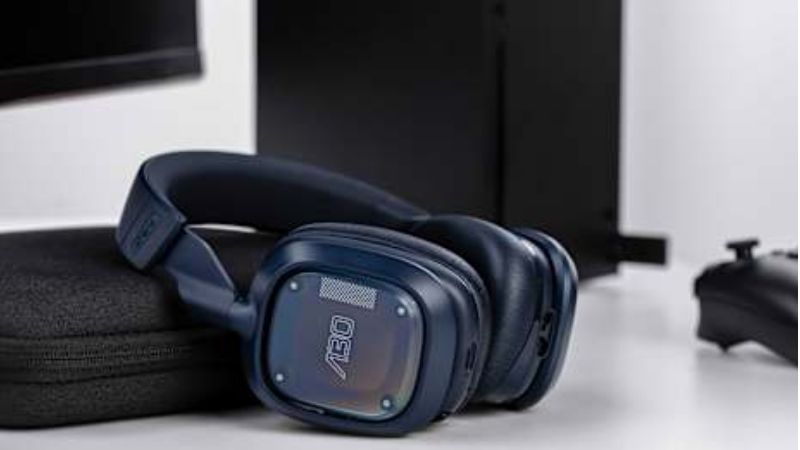
Best lower-price option: Turtle Beach Recon 50X ($27.99 each at Target). Its detachable boom microphone works for people who sometimes want headphones without a visible mic. Two at the observed price would total $55.98 before tax or shipping. Confirm that the precise black/green Xbox variant is still available at checkout.
Best official-Xbox choice: Microsoft Xbox Stereo Headset, model 8LI-00001 ($59.99 at Best Buy). It plugs into the controller with no battery or dongle and has simple on-ear volume and mic controls. The trade-off is paying more for two headsets when the console still supplies a shared game mix.
Best value alternative: Nacon RIG 300 PRO HX ($29.90 at Nacon US). The manufacturer page showed In stock and Add to Cart, with an Xbox-focused wired headset. Stock and checkout prices can change by delivery address.
Do not buy a second headset solely to create two isolated soundtracks or a private intercom between two people seated together. Those are software-routing limitations, not flaws a pricier headset fixes. Before spending, test the game with both signed-in profiles and two inexpensive wired headsets you already own.
Comparison table: seven Xbox headset picks
| Exact product / variant | Connection and best use | Observed US seller price (Oct. 29, 2026 research) | Stock status on viewed page | Main drawback |
|---|---|---|---|---|
| Turtle Beach Recon 70, white Xbox-compatible variant | Wired 3.5mm; straightforward all-around family pair | Target — $39.99 | In stock; checkout by ZIP not tested | Shared console audio; synthetic-leather cushions can feel warm |
| Turtle Beach Recon 50X, black/green | Wired 3.5mm; low-cost two-player purchase | Target — $27.99 | In stock; checkout by ZIP not tested | Simpler construction; mic is removable rather than flip-to-mute |
| Microsoft Xbox Stereo Headset, 8LI-00001 | Wired 3.5mm; official Xbox controls and fit | Best Buy — $59.99 | Add to cart / shipping or pickup shown; local stock varies | Higher two-unit cost; no separate per-player soundtrack |
| Nacon RIG 300 PRO HX, black | Wired 3.5mm; lightweight Xbox-focused option | Nacon US — $29.90 | In stock / Add to Cart | Comfort and sound isolation still need a personal fit check |
| Razer BlackShark V2 X, black RZ04-03240100-R3U1 | Wired 3.5mm; passive isolation and fixed boom mic | Best Buy — $39.99 | Add to cart; location-dependent | 7.1 feature on some PC variants must not be assumed to work on Xbox |
| HyperX CloudX Stinger 2 Core, black 6H9B8AA | Wired 3.5mm CTIA; swiveling mic and light frame | Best Buy — $39.99 | Add to cart on retailer listing; ZIP-specific stock unverified | Watch the exact CloudX Xbox version, not similarly named PC/PS model |
| SteelSeries Arctis Nova 1X, black 61616 | Wired 3.5mm; retractable mic and adjustable fit | Best Buy — $59.99 | Add to cart; marketplace fulfillment and ZIP stock unclear | Xbox console is not a PC; PC-only software EQ options may not carry over |
Price and stock note: These are prices displayed on named US seller pages reviewed on October 29, 2026, not guaranteed checkout totals. Promotions, marketplace sellers, shipping, taxes, availability and selected ZIP code can change. A visible “Add to cart” is weaker evidence than confirmed shipping to your address. Do not treat the table as a real-time inventory feed.
Why split-screen audio works differently from two consoles
Split-screen means two players share one console and one running game instance. The video picture may be divided, but the console normally exposes a shared game-audio mix. The same explosions, music, menu sounds and teammates’ callouts can therefore reach both connected headsets. Wearing separate headphones can reduce noise to the people around you, yet it does not automatically provide left-screen audio only to Player 1 and right-screen audio only to Player 2.
The Xbox accessory guidance explicitly supports headsets connected to each Xbox Wireless Controller’s 3.5mm jack. Older official Xbox guidance likewise says wired 3.5mm accessories continue to work on Xbox Series X|S. However, that verifies the physical headset path; it is not a guarantee that every game will recognize two simultaneous microphones or identical headset audio behavior. Game publishers control their own split-screen modes and in-game voice features.
Turtle Beach support explains that two supported headsets can operate with separate signed-in players on one Xbox, but both listeners receive the same game sound and the local players cannot use the two headsets as a built-in private voice connection to each other. A response from Nacon support describes the same shared-game-audio limitation for dual wireless units. Treat this as an important expectation to test rather than assuming all combinations will behave identically after future system updates.
If your real goal is two independent audio perspectives, the practical route is usually two game instances on separate consoles or devices, provided the game, accounts, licenses and online rules support that arrangement. A Y-splitter on a TV or controller does not invent two independent sound mixes. It also risks microphone and chat-routing problems.
How we selected these headsets
We prioritized a direct, documented 3.5mm headset connection to an Xbox controller, product identity and model-specific specifications, a real US-market listing with a named seller and checked price, simple controls that two couch players can operate without opening menus, and replaceability if one headset is damaged. We also looked for distinctive reasons to choose each design: low cost, official Xbox integration, breathable/lightweight construction, passive isolation, or a stowable microphone.
We did not conduct original audio latency, microphone intelligibility, comfort or durability tests. Driver diameters and microphone marketing language come from manufacturers; they are not independent rankings of sound quality. We excluded generic USB-only PC headsets and ordinary Bluetooth earbuds because Xbox does not treat every such device as a plug-and-play console headset. Even “Xbox compatible” does not mean two-player chat routing is identical across games.
Turtle Beach Recon 70 — best all-around two-headset setup
The Recon 70 is the least complicated starting point for a family that wants two complete headsets rather than a premium single unit. Turtle Beach describes 40mm speakers, a flip-to-mute microphone, a lightweight headband and noise-isolating ear cushions. Target’s inspected white variant explicitly lists Xbox Series X|S, Xbox One and other devices that accept the 3.5mm connection. The page displayed $39.99, “In Stock” and an Add to cart control.
Who should buy: Two players who want comparable controls on both sides of the sofa, quick physical muting and a simple return to TV speaker use when gaming ends. The 3.5mm wiring means no charging rotation, dongle pairing or battery ownership disputes.
Trade-offs: Ear cushions may trap heat for some wearers, and a lightweight headset still requires a fit check for younger players. The mic mute is mechanical but Xbox in-game voice availability depends on the software and player account. Two Recon 70s do not produce two separate sound mixes. Choose the exact Xbox-compatible SKU/color at checkout instead of assuming every similarly named marketplace listing is identical.
Turtle Beach Recon 50X — best low-cost pair
Target’s black/green Recon 50X page listed $27.99 and In Stock. Its 3.5mm plug and removable microphone make it useful when local players spend most of a session listening rather than speaking online. The headset is an entry-level over-ear design with 40mm speakers and analog controls; there is no rechargeable battery to maintain.
Who should buy: A family furnishing two controllers on a strict budget, or someone buying a second headset that will not be used every day. At the two-unit observed price, the pair stays below the price of some premium single headsets.
Trade-offs: The removable mic is convenient for storage but easier to misplace than a permanently attached boom. The build and padding are basic, and none of the product’s budget advantages change game-level voice restrictions. Check whether the local game actually supports the desired players and online chat before buying multiple units.
Microsoft Xbox Stereo Headset — best official accessory
Microsoft’s model 8LI-00001 connects to the controller by 3.5mm and does not require batteries. The official Xbox product page confirms 40mm speakers, a bendable boom microphone, an on-ear volume dial and mic mute switch. Best Buy’s US listing showed $59.99 with ordering options; pickup and shipping depend on location.
Who should buy: Owners who prefer a first-party accessory, familiar physical controls and unambiguous Xbox console compatibility. It is also a convenient baseline for troubleshooting another headset: compare the same controller and game with a known Xbox-designed analog headset.
Trade-offs: Two units at the observed price are $119.98 before taxes, more than two Recon 70s. Spatial audio support does not mean two independent split-screen audio soundtracks. Dolby Atmos or DTS features may require separate licensing, apps or hardware support; Windows Sonic is a platform processing option rather than a headset-exclusive performance guarantee.
Nacon RIG 300 PRO HX — best alternative under $30
The manufacturer lists the black RIG 300 PRO HX on its US store at $29.90 with “In stock” and “Add to Cart.” The model is part of the RIG Xbox-focused wired range. Its design emphasizes low weight and an easy fit rather than heavy electronics or batteries, a sensible direction for a second player who moves around a couch.
Who should buy: Players who want a recognizable Xbox-oriented headset near entry-level pricing and prefer ordering from the hardware maker. Its manufacturer listing provided stronger purchase evidence than a search-result price without a live product page.
Trade-offs: Do not infer superior microphone isolation, spatial positioning or speaker separation from the “PRO” label. Headset comfort is subjective, and the package cannot overcome a game’s local audio limits. Check the final connector and delivery terms before checkout; if the seller changes the region or product variant, re-check the listing.
Razer BlackShark V2 X — best passive isolation for a busy room
The US Best Buy listing for black model RZ04-03240100-R3U1 showed $39.99 and an Add to cart control when reviewed. Razer documents an analog 3.5mm audio-plus-microphone jack, 50mm drivers, a cardioid boom mic, passive over-ear isolation and a headset-side mute control. The analog version works with Xbox controllers; do not substitute its USB-specific sibling.
Who should buy: A local player in a noisier living room who values a closed-ear seal and a physical boom mic more than compact storage. A 1.3-meter cable suits controller use but should not be stretched across a walking path.
Trade-offs: Passive isolation can also make it harder to hear the person sitting next to you. Razer’s virtual 7.1 PC software is not an Xbox feature merely because the headset accepts a 3.5mm jack. A sale label and crossed-out reference price can change rapidly, so the $39.99 observation should not be described as a standing discount.
HyperX CloudX Stinger 2 Core — best simple swivel-mute design
The exact Xbox edition is CloudX Stinger 2 Core, model 6H9B8AA, not the similarly named Cloud Stinger 2 Core PC or PlayStation headset. HyperX specifies an analog 3.5mm four-pole CTIA plug, Xbox Series X|S and Xbox One compatibility, 40mm drivers and a swiveling mute microphone. A US Best Buy listing showed $39.99 with an Add to cart control, while another marketplace listing for the same model reported sold out. That conflict is seller-dependent; check the final seller and shipping option.
Who should buy: People who want the mic to be visibly off when swung upward and don’t need detachable parts. HyperX reports a 275g weight for the Xbox Core model, useful as a manufacturer specification rather than evidence of universal comfort.
Trade-offs: Marketplace stock is inconsistent, and the name invites accidental variant swapping. Verify the model number, Xbox label and four-pole 3.5mm connection on the product page. A mic described as noise-canceling does not automatically suppress a sibling’s voice sitting three feet away.
SteelSeries Arctis Nova 1X — best retractable mic and fit adjustment
The Arctis Nova 1X is a wired Xbox-compatible variant with a retractable ClearCast Gen 2 microphone, adjustable headband and earcup fit. The inspected US Best Buy listing identified model 61616 at $59.99, with Add to cart but marketplace fulfillment and local stock still requiring checkout confirmation. The vendor and retailer list 3.5mm analog console compatibility.
Who should buy: A person who alternates between an Xbox game session and listening on another 3.5mm device, and wants the microphone to disappear into the earcup rather than remain in the way.
Trade-offs: Be precise about the “1X” Xbox suffix. SteelSeries PC customization software, parametric EQ and any claimed noise-reduction figures should not be presented as directly configurable on Xbox unless the manufacturer specifies that console path. This is the most conditional availability entry in our table; if checkout says unavailable, select an in-stock wired alternative instead of waiting solely for this model.
Set up two wired headsets on an Xbox Series X or Series S
Start with a supported split-screen game, two controllers and two separate Xbox player profiles. A pair of headsets does not make a game support split-screen. Halo Support confirms that Halo Infinite competitive multiplayer allows local split-screen with a second Xbox account, while Rocket League Support provides a separate split-screen sign-in flow. Game modes and player-count limits vary.
- Confirm the game supports the mode you want. In Halo Infinite, start a supported multiplayer mode—not campaign split-screen. In Rocket League, use its documented local split-screen entry flow. Check the publisher’s current instructions for any other game.
- Power on both Xbox controllers and assign them to distinct players. Sign Player 2 into a second full Xbox account when the game requires it. Do not assume a guest account supports online features: Halo Infinite and Rocket League both document restrictions.
- Plug one 3.5mm headset into each controller. Make sure the plug is seated fully. Headphones-only cables may pass sound but not microphone input; a headset with a combined four-pole plug is the safer starting point.
- Open the Xbox Guide to check each controller’s listening controls. Press the Xbox button while using the relevant controller and open the Audio & music icon at the bottom of the guide, where the supported volume and headset chat mixer controls appear. Adjust slowly rather than assuming that a missing menu proves a faulty headset.
- Start a local match and listen on both sides. Confirm that both players hear the intended shared game sound. Speak into each headset mic only if your game or Xbox party scenario actually supports that user’s online voice connection. Avoid testing two microphones by trying to talk only to the other person beside you; that is not a valid local intercom test.
- Check an online party separately when relevant. Each person may need their own signed-in account, online permissions and any subscriptions required for that game or service. A game’s voice-chat support and Xbox party behavior are different paths; test the one your family will use.
- Keep a working fallback. If one controller’s jack is faulty, try that headset on the other controller, then try a known working headset on the first controller. If both units pass that swap test, investigate the account/game audio permissions rather than buying another headset.
Expected result: two headsets can receive the same console/game audio when the Xbox and game route it appropriately. If one headset stays silent, the result is not proof that buying a wireless headset will fix it. Return to a single-player test and confirm the controller/headset first.
Troubleshooting two-player headset problems
| Symptom | First low-risk test | What to conclude next |
|---|---|---|
| Player 2 hears nothing | Swap Player 1 and Player 2 headsets without changing accounts; then swap controllers | Failure follows headset = suspect cable/mic mute; follows controller = check jack/firmware; only in a game = check game’s routing |
| Both hear the same footsteps | Compare with TV speakers and read game audio options | Usually shared console output, not headset malfunction; don’t buy a splitter for individualized audio |
| One microphone doesn’t work | Check physical mute; inspect the Xbox Guide audio controls and privacy/game voice settings | Game/account limitations may remain even when the audio plug works |
| Friends online hear only one player | Confirm each account is signed in and allowed to join that game’s voice feature | Individual online voice routing is not guaranteed just by attaching two headsets |
| Echo or feedback | Lower open-air speaker volume, move booms and check party settings | Two mics in the same room may pick up one another; physical headset isolation helps but cannot guarantee elimination |
| USB-only headset has no audio | Test a documented 3.5mm wired pair through the controller | Generic PC USB and Bluetooth headsets should not be assumed Xbox-compatible |
If one option is missing after a console update, use the documented Xbox headset connection guidance and the game publisher’s current support page rather than inventing a new settings label. A headset that works for audio may still be blocked from transmitting voice by account privacy, game design, or party requirements.
How much should you budget for two players?
At the specific prices observed on October 29, 2026, a matching Recon 50X pair totals $55.98, a RIG 300 PRO HX pair totals $59.80, a Recon 70 pair totals $79.98, and an official Xbox Stereo pair totals $119.98. These are simple two-unit product-price calculations: no tax, shipping, coupon, membership discount or controller cost is included. The same seller and variant are used for both copies in each comparison.
For players who already own one compatible 3.5mm headset, the best purchase is often one matching second headset. If you need two new controllers as well, budget for them separately. A pair of inexpensive wired headsets may be a better investment than one high-end wireless unit when the underlying game audio will be shared anyway.
Buying checklist before checkout
- Controller connection: each controller should have a working 3.5mm jack; some very old Xbox One controllers may require an officially supported adapter.
- Exact console and edition: Xbox Series X|S / Xbox One compatibility must be stated for the selected headset. Avoid the PC-only USB or PlayStation-only variant of a similar product.
- Voice expectations: confirm the intended game and online mode support two signed-in players and the voice path you need; don’t assume a local private intercom.
- Physical fit: earcup depth, clamping pressure, headband size and microphone placement matter more than marketing driver size for a child or long couch session.
- Cable management: keep analog leads between each player’s headset and controller rather than stretching cables to the TV or across a walkway.
- Price and stock: re-check the final seller, exact color/SKU, return policy, tax and available shipping for your ZIP code. A marketplace Add to cart button is not a stock guarantee.
Frequently asked questions
Can two people connect two headsets to one Xbox Series X or Series S?
Yes, compatible headsets can be connected to separate controllers, and Xbox accessory guidance supports the controller’s 3.5mm jack. But the game’s audio and voice-chat routing may impose limitations. Start with two wired analog units and a split-screen game that supports two signed-in profiles; then test rather than extrapolating from a single-headset demo.
Does each player hear only their half of the split-screen game?
Not normally. Split-screen divides the picture; it does not create independent audio mixes by default. The manufacturer support examples for two headsets on one Xbox describe the same game audio being heard by both players. Separate consoles or game instances are a different setup with different licensing and account requirements.
Can both local players speak to each other through their microphones?
Do not count on the headset acting as a local intercom. Turtle Beach support says local users on one Xbox cannot use those two headsets to talk privately to one another; they can speak directly across the couch. Voice communication with remote players depends on the game and account configuration.
Do I need two Xbox accounts for split-screen?
For some games, yes. Halo Infinite’s split-screen guidance requires the second player to use another Xbox account, not a guest. Rocket League also specifies full Xbox accounts for the players. Check the game publisher instead of assuming all couch co-op titles have the same account rule.
Is a wireless headset better for split-screen?
Not necessarily. Wireless can reduce the cable at your ear, but introduces headset pairing, charging and model-specific console support. Two 3.5mm wired headsets are easier to troubleshoot and often cost less. A generic Bluetooth or PC USB dongle is not a substitute for licensed Xbox wireless compatibility.
Will a headphone Y-splitter create independent sound or chat?
No. It can copy an existing analog output to two headphones, but it cannot generate independent player audio. Microphone wiring and impedance are additional compatibility concerns. Two headsets connected to two controller jacks are the cleaner starting configuration.
Final thoughts
For most two-player Xbox couches, begin with two Turtle Beach Recon 70 headsets if a balanced budget and easy physical mute matter. Choose Recon 50X when keeping the total under $60 before tax is the priority, or Microsoft Xbox Stereo when official hardware is more important than the lowest pair price. Confirm the game supports split-screen and two accounts, test the headset connections, then order only the missing unit or pair. Stop shopping for more expensive headsets if your unresolved problem is independent audio per screen or a local mic-to-mic intercom—those are not problems headset price alone solves.
