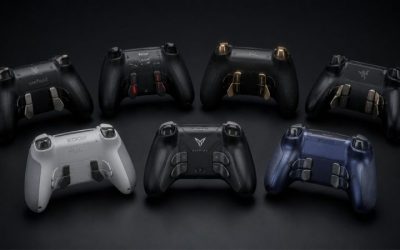
If you prefer both analog sticks on the same horizontal level, these best symmetrical controllers for PC are the four useful designs to compare—not every gamepad that happens to have a balanced outer shell. 8BitDo Pro 2 is the straightforward value pick, Pro 3 improves switchable controls, Sony DualSense suits PlayStation-style habits, and SCUF Envision Pro v2 is the PC-only premium alternative. The central choice is physical stick placement plus your Windows input path. A model advertised as Bluetooth is not automatically a native Windows Bluetooth/X-input controller in every mode.
Symmetrical PC controllers: parallel sticks, Windows input modes, and mapping
For most Windows players who want parallel thumbsticks without a complicated setup, the 8BitDo Pro 2 is the sensible starting point: its physical stick arrangement is familiar, its X-input mode is documented, and its seller offer is relatively inexpensive. Step up to Pro 3 for a better-featured D-pad, included receiver/dock, and programmable inputs, but use 2.4 GHz or USB on Windows. Buy DualSense when Sony-like button spacing is the reason you searched in the first place. SCUF Envision Pro v2 pays off only when its PC-oriented paddles and software mappings will actually be used. For Windows compatibility, look beyond the apparent symmetry of the controller shell. The Pro 2 has a documented X-input path, while Pro 3 offers additional controls that may require the correct USB or 2.4 GHz mode. DualSense brings a familiar parallel-stick shape, but its software behavior changes between games and launchers; do not assume every title reads the same button prompts. SCUF Envision Pro v2 earns its price through Windows-focused remapping only when you will configure those extra inputs. Decide first whether you need plug-and-play gamepad recognition, a preferred D-pad, or extensive mapping rather than buying by face-button layout alone.
At-a-glance comparison
| Product | Relevant feature | USD price / seller / checked | Public status | Main drawback |
|---|---|---|---|---|
| 8BitDo Pro 2 Hall Effect (Black) | Symmetrical sticks | $49.99 · GigaParts · October 29, 2026 | In stock | US MaxGaming category showed the Black variant out of stock despite a cached SKU page claiming stock; use the separate GigaParts selected exact product offer. |
| 8BitDo Pro 3 (G Classic) | Symmetrical sticks | $59.99 · MaxGaming US · October 29, 2026 | In stock (5+ shown) | Its Bluetooth capability on Apple does NOT mean native Windows Bluetooth support; manufacturer lists Windows via 2. |
| Sony DualSense Wireless Controller (White) | Classic symmetric analog layout | $74.99 · Best Buy US · October 29, 2026 | Add to cart shown | Some PC games need Steam Input or game-level DualSense support, and adaptive triggers/haptics are not universal on PC or iPad. |
| SCUF Envision Pro v2 (Breach) | Symmetrical sticks | $179.99 · Best Buy US · October 29, 2026 | Add to cart shown | PC-only product—not PlayStation 5 or Xbox compatible just because of the parallel-stick layout. |
These dollar values are selected U.S. seller offers checked on October 29, 2026, not a price forecast. A visible In stock label or Add to cart option does not prove shipment to your specific ZIP code, and the exact controller edition matters more than the family banner.
Detailed picks and real trade-offs
Best value for classic symmetrical layout — 8BitDo Pro 2 Hall Effect (Black)
Its D-pad sits above the left stick, with the two sticks in a parallel, PlayStation-like row. That simple mechanical arrangement matters more to some muscle memories than stick sensor marketing. Two rear P1/P2 controls and the four-way mode switch are useful extras but do not replace checking the Windows game’s X-input mapping. 8BitDo documents X mode for Windows and D mode for Apple; picking the wrong one can create a device that connects but maps buttons differently.
A buyer playing retro games, 2D platformers and modern PC action games can keep one familiar pad. The Hall joystick specification describes sensing technology, not a guarantee that the controller cannot develop any electrical or mechanical fault. Check the selected Black SKU at the GigaParts retailer because MaxGaming stock signals conflict.
Advantage: inexpensive paired sticks and a genuine PC mode. Limitation: no advanced adaptive trigger platform features, and the black-stock listing depends on the specific seller.
Selected PC-layout offer: GigaParts lists 8BitDo Pro 2 Hall Effect (Black) for $49.99 with status ‘In stock’ (October 29, 2026). Selected model/part: KB0419 / 8BitDo Pro 2 Hall Black. Core compatibility: Symmetrical sticks; D-pad; two rear programmable buttons; Windows X-input over Bluetooth or wired USB; Apple D-mode Bluetooth on iPadOS 16.3+. Source note: US MaxGaming category showed the Black variant out of stock despite a cached SKU page claiming stock; use the separate GigaParts selected exact product offer. Do not equate a listing with ZIP-code shipment.
Best step-up symmetrical controller for Steam PC — 8BitDo Pro 3 (G Classic)
Pro 3 looks similar at a glance, but its tactile D-pad, TMR sticks, swappable ABXY labels, extra shoulder buttons and dock make it a different hardware generation from Pro 2. The included 2.4 GHz receiver is the decisive Windows advantage for users who do not want to configure a generic Bluetooth controller. Use its documented Windows route—USB or supplied dongle—rather than assuming the advertised Bluetooth works identically with Windows.
Players who alternate platformers with modern games may value the D-pad and extra controls more than a claimed sensor upgrade. The included label set can match a Steam/Xbox prompt convention, but only after you arrange and map it correctly. The manufacturer does not claim every feature works on every host.
Advantage: extra inputs and a defined PC receiver. Limitation: extra mode complexity and substantially higher cost than a basic wired controller.
Selected PC-layout offer: MaxGaming US lists 8BitDo Pro 3 (G Classic) for $59.99 with status ‘In stock (5+ shown)’ (October 29, 2026). Selected model/part: RET00855. Core compatibility: Symmetrical sticks; tactile D-pad; TMR sticks; two rear paddle buttons and extra L4/R4; Windows wired USB or supplied 2.4 GHz adapter; Apple Bluetooth requires iPadOS 26+. Source note: Its Bluetooth capability on Apple does NOT mean native Windows Bluetooth support; manufacturer lists Windows via 2.4 GHz or USB.
Best for players already fluent with PlayStation controls — Sony DualSense Wireless Controller (White)
DualSense preserves the familiar symmetric PlayStation stick placement, face-button geometry and touchpad-like top surface. Sony documents Windows connection over Bluetooth or USB, but the strongest game-specific adaptive trigger and haptic features should never be treated as universal PC benefits. Check the game’s Steam store Controller Support panel and its own PC input options before promising anything beyond normal buttons and sticks.
The White retail offer is useful to a PC player who already owns a PS5 or prefers the Sony layout. If a game shows Xbox glyphs after connecting, that does not mean the controller is defective; it may mean the game expects X-input, Steam Input, or a specific software layer. Test the wired path before adding adapters or third-party utilities.
Advantage: recognizable PlayStation spacing. Limitation: PC implementation varies significantly by game, and haptics can depend on USB support.
Selected PC-layout offer: Best Buy US lists Sony DualSense Wireless Controller (White) for $74.99 with status ‘Add to cart shown’ (October 29, 2026). Selected model/part: 1000050328 / SKU 6430163. Core compatibility: Classic symmetric analog layout; USB or Bluetooth on Windows 10/11 and iPadOS 14.5+; game-specific haptics/triggers and USB-only feature limits. Source note: Some PC games need Steam Input or game-level DualSense support, and adaptive triggers/haptics are not universal on PC or iPad.
Best premium symmetrical shell for serious Windows mapping — SCUF Envision Pro v2 (Breach)
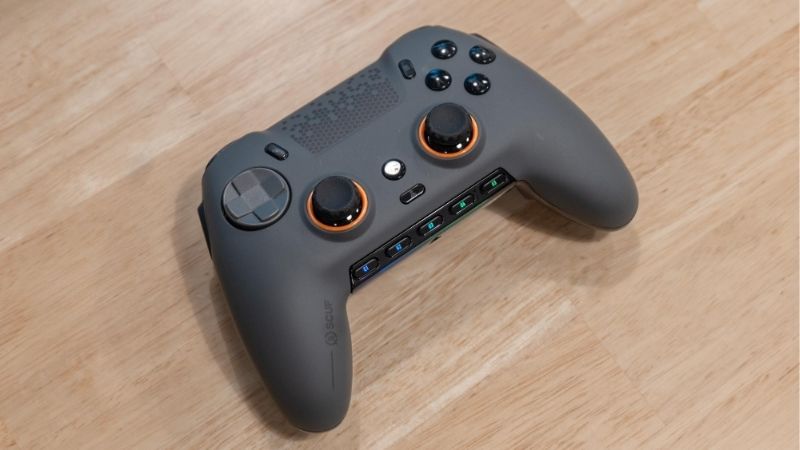
The Envision Pro v2 adds a very different proposition: four rear remappable paddles, G-keys, side SAX controls and iCUE-related configuration. Its analog sticks remain in a parallel layout, so players can retain symmetrical muscle memory while gaining PC-only commands. Those extra controls may help keep both thumbs on sticks in complex games; they are not automatically useful for someone seeking a simple couch controller.
Before buying, consider whether you are happy managing remaps in a Windows utility and a controller designed for PC rather than console cross-play. The exact Breach SKU is sold with a Windows compatibility designation. Do not infer Xbox or PS5 operation from the shape or from SCUF’s other console-oriented controller families.
Advantage: dense PC remapping without moving to asymmetrical sticks. Limitation: price, software learning curve and platform restriction.
Selected PC-layout offer: Best Buy US lists SCUF Envision Pro v2 (Breach) for $179.99 with status ‘Add to cart shown’ (October 29, 2026). Selected model/part: 601-178-04-025-281 / SKU 6632854. Core compatibility: Symmetrical sticks; four remappable rear paddles, two side SAX buttons, five G-keys; Windows-only PC; wireless via CORSAIR Slipstream and iCUE configuration. Source note: PC-only product—not PlayStation 5 or Xbox compatible just because of the parallel-stick layout.
Why symmetrical stick placement changes the buying decision
A symmetrical gamepad places the left and right analog sticks on the same horizontal band. This is not the same as a shell that merely looks mirrored when seen from the front. Most Xbox-style pads put the left stick higher than the right stick; that arrangement can be comfortable but does not answer this exact search. Check photographs of the front face and look specifically at the D-pad position. If the left stick occupies the upper-left position, it is an asymmetrical design even if the vendor calls the body balanced.
The main benefit is consistency with PlayStation and certain retro-style habits. A player who has spent years navigating menus and performing two-thumb moves on a parallel layout may need less adaptation. That is an ergonomic preference, not a proven faster input configuration. No controlled back-to-back hand-fatigue measurement was performed for this article.
Windows connection, game prompts and Steam Input
Treat physical layout and PC protocol as separate checkboxes. DualSense connects via USB or Bluetooth, but support in each game varies. The 8BitDo Pro 2 has a documented Windows X-input mode. The Pro 3 uses its supplied 2.4 GHz dongle or USB for Windows, despite a Bluetooth feature in its product title. SCUF Envision Pro v2 is explicitly Windows-oriented and uses its own software ecosystem. A successful Bluetooth pairing screen alone is not proof that every PC game will expose the right prompts.
For Steam titles, check the store page controller-support label, then in Steam open Settings > Controller to examine detected devices. A title can have native PlayStation support, Steam Input support, both, or neither. If the controls are doubled or swapped, test the game’s native setting before layering a second remapper. A wired USB connection is a useful diagnostic even when wireless is your preferred daily mode.
Physical fit, D-pad and rear-input trade-offs
For a 2D game driven almost entirely by the D-pad, the vertical distance between face buttons and D-pad can matter more than stick sensor type. For twin-stick games, thumb resting angle and grip thickness become more relevant. Owners of small hands should inspect official body dimensions and return policies rather than treating a “symmetrical” label as a fit guarantee. The Pro 2 and Pro 3 differ in mass and control extras; they should not be counted as the same color-only refresh.
A rear paddle can reduce the number of times your right thumb leaves the right stick, but that advantage only exists after you map it to a useful action. Check whether a remap is saved on the controller or requires background software. The SCUF has many more controls, but those controls impose setup time and may be irrelevant in a platformer that uses two face buttons.
Choosing a controller without buying the wrong platform edition
Read the exact manufacturer model and compatibility row. Different SKUs within one brand may target Xbox, Switch, PC, or PlayStation and have incompatible pairing paths. Do not buy a controller because the shape resembles a DualSense unless the retailer’s selected model explicitly supports your Windows hardware. Verify the cable or dongle included in the box, then decide whether you want wired reliability, Bluetooth convenience, or a dedicated 2.4 GHz wireless adapter.
A sensible spending sequence is to try a $50-class pad first if the parallel-stick feel is the main problem. Spend around $60–75 if the additional D-pad, dock or Sony layout will actually change play. Pay for a $180-class Windows controller only when the rear remaps and associated software solve a concrete input workflow; higher price is not evidence of universal comfort.
The most common symmetric-layout purchasing error
A controller can be sold under a “pro” label and still place its left stick high and its right stick low. For this query that is an immediate mismatch, not a minor aesthetic difference. Compare the front photographs of the four selected pads and ignore irrelevant wireless polling advertisements until the layout requirement is met. The DualSense has symmetrical analog locations but should be purchased for ordinary PC input with game-specific features treated as extras. The SCUF is physically symmetrical but Windows-only; buyers hoping to use it on a living-room PlayStation console should remove it from their shortlist. Choosing by product family name rather than the selected edition is the most expensive avoidable mistake.
Physical measurements are a fit check, not a winner chart
8BitDo publishes overall body dimensions and weight for the Pro 2 and Pro 3; these are useful for comparing the volume a controller occupies in a travel bag. They cannot prove hand comfort or thumb reach for any person. A small-handed buyer can check reach from palm to upper face buttons and whether rear buttons touch during a relaxed grip, while a larger-handed buyer may be concerned about where the triggers rest. The next useful step is a hands-on return-window evaluation, not a fabricated numerical comfort score. The same principle applies to battery estimates: official figures are usage conditions, not guaranteed gaming-session results.
A practical two-game evaluation before purchase becomes final
Test one precision game with frequent D-pad taps and one action game requiring both analog sticks. Check whether your right thumb can move from stick to face buttons comfortably, then inspect a left-right analog transition while holding the controller naturally. If one title displays Xbox button glyphs for a DualSense, check Steam Input and that title’s control configuration. If a controller disconnects, try its maker-supported wired path before judging the wireless hardware. Record the exact game versions if you later want to compare configurations; the observations are personal setup checks, not independent standardized product benchmarks.
How to choose and verify a controller
This sequence prioritizes genuine parallel-stick ergonomics and Windows input compatibility over marketing labels. These are personal fit checks, not performance laboratory tests.
- Confirm your game’s controller support: Open the specific game page or game controls menu; identify native controller support and expected face-button glyphs.
- Choose the Windows input route: For Pro 2 select Windows X-input; for Pro 3 use its receiver or USB; for DualSense use USB/Bluetooth; for SCUF follow its Windows-specific setup.
- Test a wired connection first: Move each stick, press D-pad diagonals and verify shoulder buttons in a safe menu. If mapping is odd, change mode before concluding hardware is faulty.
- Decide whether rear buttons are useful: Map exactly one noncritical action and play a familiar segment. Remove that mapping if it causes accidental presses.
- Check total cart and return policy: Reopen the selected US SKU, price, current stock, shipping destination, cable/dongle inclusion and warranty terms before purchase.
How we selected these products
Our PC shortlist first required genuinely parallel analog-stick placement; then it checked four different hardware designs, manufacturer Windows modes and exact selected U.S. offers. Sony PC feature limits and SCUF Windows-only designation matter as much as the shape. No pads were tested in hand or measured in a latency lab.
Direct SKU evidence takes precedence over conflicting category stock. We did not count alternative colors as additional symmetrical gamepads, and separate source URLs remain in the Evidence Log for later editorial fact refresh.
Frequently asked questions
Does symmetrical mean a mirrored outer shell?
No. In this roundup it means the two analog sticks are level with each other, not that the entire enclosure is a perfect mirror.
Do DualSense adaptive triggers work in every PC game?
No. Sony describes feature and connection limits, and game-level support varies. Basic button input is the safer baseline expectation.
Can I connect the 8BitDo Pro 3 to Windows via Bluetooth?
Do not assume so. 8BitDo’s official compatibility table lists Windows connectivity using its 2.4 GHz receiver or USB cable.
Will Hall Effect or TMR sticks completely prevent drift?
They are different sensing technologies, but neither guarantees a lifetime free of all mechanical, calibration or firmware problems.
Final recommendation
For a familiar symmetric pad with the clearest value case, start with the 8BitDo Pro 2 from a verified current seller. Choose Pro 3 if the D-pad, PC dongle and extra inputs justify the upgrade. Pick DualSense for the PlayStation layout you already know, and reserve SCUF Envision Pro v2 for genuinely advanced Windows remapping. The selected U.S. offers are snapshots, not guaranteed nationwide delivery; check the exact model at checkout.
Symmetry versus ambidextrous controls
A symmetrical shell may suit either hand for gripping, but a controller or mouse can still put side buttons or a D-pad in an asymmetric position. If you play left-handed, confirm that the physical controls you actually need are accessible and that the PC game can remap the remaining inputs. A shape that is symmetric on paper is not a promise of equal thumb access.
Before checkout, confirm whether the device connects by Bluetooth, a proprietary 2.4 GHz receiver, USB cable or more than one mode; Windows recognition and Steam Input mappings vary by exact model. Test two games with different control layouts before accepting “universal PC compatibility.”
Symmetrical thumbstick layout still needs a Windows input-mode check
“Symmetrical controller” should describe the relative positions of the left and right analog sticks, not the external shape of the entire shell. A controller may have a familiar PlayStation-style layout and still expose an input mode that a specific Windows game does not recognize by default. Match the controller’s connection mode with the game launcher and verify whether prompts and remapping are handled by native gamepad support or Steam Input.
Before buying, read the exact model revision’s PC compatibility table and confirm whether USB, 2.4 GHz dongle and Bluetooth all offer the same functions. Some products change buttons, gyro support or software configuration by mode. A visible Bluetooth logo is not proof of low input delay, and a wireless dongle in the box is not proof that the game uses XInput without a compatibility layer.
For the buyer test, launch the intended PC game, move each stick through its full range, test triggers separately, then try one menu and one combat scene before changing remapping software. Keep an inexpensive wired model on the shortlist when wireless extras are not essential.
Symmetrical sticks versus platform layout: inspect the actual PC input mode
A PlayStation-style symmetrical-stick layout tells you where the thumbs rest, not which Windows driver profile the game uses. A controller may report XInput in one mode and DirectInput in another, and Steam can remap controls again. Before paying for a higher-spec version, identify whether the games you actually play show Xbox glyphs by default, accept D-pad axes and recognize the triggers as analog inputs.
The 8BitDo Pro 2 and Pro 3 families can look similar in a listing while using different joystick hardware or additional controls. Verify the physical SKU, mode switch and firmware manual rather than attributing every Pro 3 feature to an older Pro 2. If the shoulder buttons and symmetrical sticks are comfortable but the game only accepts Xbox-style prompts, that may be a software-label issue rather than a controller connection failure.
Run a Windows controller tester and check left/right-stick centering, independent triggers and D-pad diagonals. Then open the target game and repeat. This avoids buying a premium controller for a feature the game never recognizes, and distinguishes input-method compatibility from subjective ergonomic preference.
Buyer-specific decision matrix
| Buyer situation | Recommended action | Must-verify requirement |
|---|---|---|
| PlayStation-style thumb position first | Choose by actual stick arrangement | Do not infer XInput support from shell symmetry |
| Steam-only game library | Verify Steam Input profile and native support | Disable double remapping when troubleshooting |
| Older Windows games or emulators | Prefer explicit selectable input modes | Test D-pad, triggers and menu buttons separately |
Symmetrical stick layout still requires a verified PC input mode
An 8BitDo Pro 3 has symmetrical analog-stick placement, but the manufacturer publishes distinct Windows, Apple and Switch transport modes. Its official specifications list Windows over wired USB or the supplied 2.4 GHz adapter; Apple Bluetooth support is a separate route with an iPadOS 26 minimum. A controller with a Bluetooth radio therefore cannot be assumed to expose the expected Windows gamepad mode over Bluetooth. Model name, adapter and chosen host mode matter as much as stick symmetry.
The manufacturer also documents swappable ABXY legends, two rear controls and multiple trigger behaviors. Those are not evidence that game prompts will always match the printed letters. On Windows, verify whether the game uses native XInput support or Steam Input and map one layout at a time; multiple remapping layers can create duplicate inputs. The DualSense likewise requires a game/software compatibility check even if its Bluetooth connection succeeds.
A practical buying trial is to open a Windows controller test panel, test both analog sticks and D-pad, then try one game through its native support path and another through Steam Input. Do not present a controller as fully verified on Windows just because its product page says PC compatible; firmware revisions, PC mode and receiver behavior still matter.
Windows mode and advanced-feature truth table for symmetrical controllers
A symmetrical thumbstick layout describes where the sticks sit, not the protocol used to communicate with Windows. 8BitDo Pro 3’s official compatibility matrix explicitly lists Windows over its included 2.4 GHz receiver or wired USB; Bluetooth on that product is for Switch, SteamOS, Apple and Android. Do not infer Windows Bluetooth support merely from the name “Bluetooth Gamepad.”
8BitDo Pro 2 is a different model: the official Pro 2 page lists Bluetooth and USB-C connectivity, a four-way mode switch and 1000 mAh rechargeable battery. Those are not interchangeable assumptions for Pro 3. PC shoppers should verify the exact product generation, included receiver and required input mode before committing to a specific gaming launcher.
Sony’s US DualSense PC guide confirms that Windows supports both USB and Bluetooth. Supported haptic feedback on PC requires USB, and adaptive-trigger availability is game-specific. A controller being recognized by Steam does not guarantee that every game implements adaptive triggers, haptics, native button icons or audio-jack routing wirelessly.
SCUF support states Envision is Windows 10+ only, requiring iCUE/driver support; it is not a generic alternative for PlayStation, macOS or Linux. If a PC setup depends on a particular remap or analog-trigger feature, confirm it in the actual game and client after installing the documented software—do not infer support from the symmetrical shell.
| Exact product | What is documented | Buyer verification |
|---|---|---|
| 8BitDo Pro 2 | USB-C or Bluetooth per maker | Verify correct X-input mode, stick center and per-game prompts |
| 8BitDo Pro 3 | Windows: wired USB or included 2.4 GHz receiver | Do not promise Windows Bluetooth; verify receiver included |
| Sony DualSense | Windows: USB or Bluetooth | Use USB where a supported game requires wired haptics |
| SCUF Envision Pro v2 | Windows/iCUE ecosystem | Check driver/app availability and chosen mapping profile |
Two-game checkout rehearsal: use a Windows controller test to check both sticks, triggers and D-pad; then play one Steam game and one non-Steam title that you actually own. Record whether the game sees the desired input mode, prompts, rear controls and supported haptics. If either game is essential and requires third-party remapping not disclosed by the seller, do not call the controller plug-and-play for that use.
Evidence limitation: no self-conducted device testing or buyer-address checkout.