Key takeaways
- Choose a mount position. Put the clamp or DS2 base outside the normal mouse sweep and clear of the laptop exhaust path. Check how the screen moves when you tilt or rotate it.
- Fit hardware without forcing it. Tighten the clamp according to the device instructions against a permitted flat surface, or set the freestanding base fully on the desk. Do not create a lever load by attaching only half of a rubber pad to the lip.
- Attach an unloaded boom first. Rotate it through the expected route and ensure it cannot hit a monitor. Keep a flexible USB or XLR cable loop at hinges so the connector does not take the strain.
- Mount the microphone. Use the supported thread adapter or mic clip, tighten only as directed, and add the pop filter. Recheck the total load and position at maximum extension. If the arm droops, return to a shorter position and confirm its supported capacity instead of overtightening blindly.
- Record a short voice sample. Speak normally, type while talking and tap the desk gently. Reposition the mic rather than assuming the arm’s metal construction has removed background noise. A shock mount can help with desk vibration but cannot isolate a microphone from airborne key clicks.
- Test storage mode. Fold or retract the arm to the position you will use every day. Make sure it does not press on a screen, power cable or headphone hook. If it remains intrusive, the arm is not genuinely compact for your particular desk, regardless of the product name.
The best compact boom arms for streaming depend on what “compact” means in your room. RØDE DS2 is a short, freestanding articulated desktop stand; Samson MBA18 provides an 18-inch clamp-mounted arm; Auray MS-DTCL-32 retracts to 18 inches but extends as far as 32; and Gator Frameworks GFWMICBCBM0500 keeps a slim silhouette while spanning a much longer desk. Four U.S. sellers showed these specific items in stock during October 29, 2026 research. Only the first two have clearly short maximum reach; the other two should be considered compact-position or low-obstruction alternatives rather than equally short designs.
Compact streaming boom arms: freestanding bases versus short desk clamps
Best for a no-clamp small desk: RØDE DS2. Its heavy freestanding base means you can move it between desks without reaching under the tabletop. It rises and pivots through a modest space, but the base takes actual desk area and cannot be pushed flush behind every monitor.
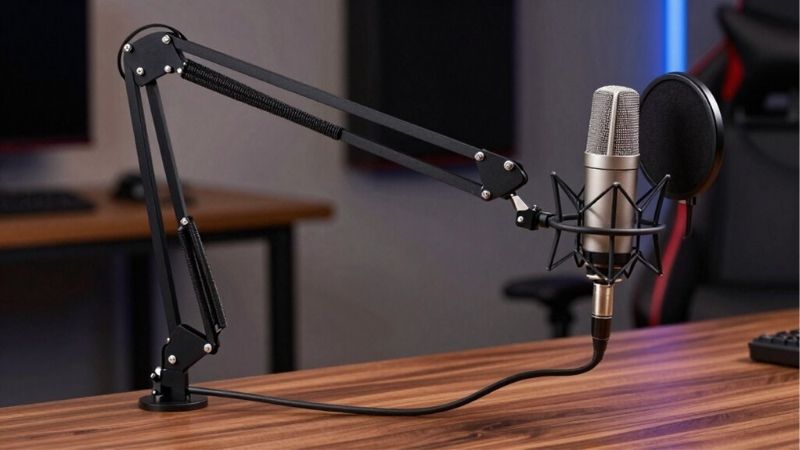
Best for a short clamp-mounted mic position: Samson MBA18. Its published maximum arm reach is 18 inches, so it is a better fit than a 30-inch boom when the microphone sits relatively near the clamp. The trade-off is limited lateral reach and an exposed desk edge requirement.
Best inexpensive retractable boom: Auray MS-DTCL-32. The telescoping section retracts to about 18 inches but stretches to 32 inches. That is helpful on a desk with changing seating locations; it is not proof the entire arm occupies an 18-inch envelope. Best slim-profile alternative for a broad desk: Gator Frameworks GFWMICBCBM0500. Its visual profile is unobtrusive, but its 32.75-inch maximum reach means it is not a short boom for a tiny corner.
Four real U.S. boom-arm options compared
| Exact model | What “compact” means here | Relevant maker/retailer specification | Seller price checked Oct. 29, 2026 | Stock status |
|---|---|---|---|---|
| RØDE DS2 | Freestanding, short desk reach | Heavy base; two pivot points; about 15 inches vertical movement; included thread adapter | $85.00 — Sweetwater; was $99 | In stock |
| Samson MBA18, SAMBA18 | Truly short 18-inch maximum reach | C-clamp up to 2 inches; mic load up to 5 lb; 5/8-27 threading | $24.95 — Sweetwater selected page (older P0 noted $29.99) | In stock |
| Auray MS-DTCL-32 | Retracts shorter when stored | 18–32-inch telescoping section, C-clamp up to 2.3 inches, standard microphone thread | $21.95 — B&H | In stock |
| Gator Frameworks GFWMICBCBM0500 | Thin profile with adjustable multi-section route | Two sections, three adjustment points, about 32.75-inch reach | $57.95 — B&H | In stock |
The listed prices are seller-specific public observations, not guaranteed checkout totals or shipping promises. RØDE’s DS2 was shown as a discounted item, and Samson MBA18 has appeared at different prices across research snapshots. Verify the exact model, new condition, stock and final cart rather than relying on a copied table or buying an accessory with a similar SKU.
RØDE DS2: compact placement without a desk clamp
RØDE DS2 is a desktop studio stand with a solid base and two articulated pivot points. B&H’s current catalog describes a rise of about 15 inches, while Sweetwater’s exact DS2 listing showed a new $85 unit in stock and a 3/8-inch to 5/8-inch thread adapter. That is an attractive arrangement for a rented desk, a thick table where clamps cannot reach, or a shared workspace where the microphone must be removed after every recording.
Put the base on a stable flat surface near the monitor side, not under the laptop’s hot air exhaust. Extend the pivots so the microphone approaches your mouth without crossing your keyboard. The weight of the stand helps balance an appropriate microphone, but do not load it beyond manufacturer limitations or assume a large XLR broadcast mic can sit at the outermost angle safely without counterbalance. Check the mount and center of mass with the intended windscreen and cable installed.
Trade-off: freestanding convenience comes at the cost of tabletop footprint. If a desk is only just large enough for a mousepad and keyboard, a clamp-mounted MBA18 can free more usable surface even though the clamp requires access to the underside. A weighted base can also transmit mechanical desk taps if placed close to a hard-typing hand; no product listing provides a controlled vibration test in your room.
Samson MBA18: short reach with a defined clamp limit
Samson’s official MBA18 page states 18 inches maximum horizontal/vertical reach, a C-clamp with a 2-inch maximum grip, a 5-lb maximum microphone load and 5/8-27 mic clip threading. Sweetwater’s selected MBA18 item showed an in-stock flag and a $24.95 price during this research session. These figures help identify the right setup: a gaming desk where the monitor, chair and mic are relatively close, and where you can mount an arm firmly on a rear or side edge.
The main appeal is the short upper limit. A long arm spanning across a monitor can create unwanted elbow movement and may require parking space behind a secondary screen; the MBA18 reaches less far by design. That makes it easier to plan on a shallow desk, although short reach can also force the mic to remain too far from your mouth if the clamp is placed behind a deep monitor. Measure the actual clamp-to-mouth path rather than just the table width.
Trade-off: a product supporting up to 5 lb does not guarantee any heavy broadcast microphone can be mounted with a supplied clip. Verify the yoke’s thread, clip type and payload including pop filter/cable. The official mount is a 5/8-inch thread, so some microphone accessories may need a 3/8-inch or 1/4-inch adapter. Do not bend the clamp around a built-in drawer rail or thick desktop apron.
Auray MS-DTCL-32: retractable and affordable, not always short
Auray’s MS-DTCL-32 uses a telescoping section which adjusts from approximately 18 to 32 inches. The manufacturer’s retail documentation states a C-clamp for desks up to 2.3 inches thick and variable tilt. B&H showed this exact model at $21.95 and in stock. Its appeal is a low-cost boom that can be retracted while unused and extended to change mic position during a game session.
For a streamer who alternates between keyboard and controller, place the clamp where the boom can reach the current seat without obstructing the display. Retract the telescoping section when moving the microphone back for a controller session; extend only when you really need it. The mic clip is a separate fit question and may need to be purchased for a handheld-style body. The mount’s physical thread and the microphone’s yoke must be compared by size, not assumed from the fact that both are sold in a podcasting category.
Trade-off: when fully extended, this is a long boom and may look conspicuous on camera. Its 18-inch minimum describes one telescoping segment, not a guaranteed complete packing length or minimum occupied area. If the goal is a hard 18-inch maximum arm, choose a genuinely short design such as the MBA18 instead of quietly substituting the Auray.
Gator Frameworks GFWMICBCBM0500: slim visual line across a bigger desk
Gator Frameworks GFWMICBCBM0500 is a two-section desk microphone arm with multiple adjustment points and a C-clamp. Its B&H product page showed $57.95 and an in-stock signal. The retailer’s answered Q&A says the arm measures about 32.75 inches at maximum reach and is not designed to have sections removed to make it shorter. This distinguishes a slim-profile silhouette from genuinely compact dimensions and prevents a common buying mistake.
The Gator suits someone who wants a boom to approach from the desk’s rear edge without towering above monitors. Route its sections around the screen, then swing the microphone to a stable speaking position close enough for normal game chat. Check the total load, mounting fit and desk thickness from the current official specifications or packaging. Avoid assuming every slim-profile arm carries the same heavy dynamic microphone load as a different Gator series.
Trade-off: if your streaming nook is narrow or a wall limits rear movement, the Gator may still have too much physical sweep. You cannot treat its two sections as modular shortening parts. It belongs on the list as a lower-obstruction boom layout for a desk with enough room, not as a direct one-for-one equivalent of an 18-inch arm.
How to measure a compact streaming setup
Start with a rough desk plan. Put the monitor at its real distance from the rear edge and mark where the microphone should be while speaking. Write down the distance from the nearest safe clamp area to the target mouth position. A 15-inch freestanding stand may be sufficient if it sits beside your keyboard, while an 18-inch clamp arm at the rear of a deep table may not reach at all. The relevant dimension is not always the maximum advertised arm reach.
Measure desktop thickness and underside clearance separately. Some desks have a thick-looking top with a narrow internal lip; others include cable baskets or crossbars exactly where the clamp screw needs to close. Place the clamp only on a sturdy, flat area permitted by the desk manufacturer. Do not clamp over an unstable monitor tray or a surface likely to split under concentrated force. If there is no safe clamp area, a properly rated freestanding stand may be better than improvising a mounting hole.
Check the microphone-and-accessory mass, not just the microphone body. Add shock mount, cable, windscreen and any extender. Follow the manufacturer load rating of the specific arm; Samson’s 5-lb specification does not transfer to Auray or Gator simply because the designs look alike. Check whether a 5/8-inch microphone screw, 3/8-inch adapter and mic clip are included for your exact purchase.
Installing the arm without spoiling your game area
- Choose a mount position. Put the clamp or DS2 base outside the normal mouse sweep and clear of the laptop exhaust path. Check how the screen moves when you tilt or rotate it.
- Fit hardware without forcing it. Tighten the clamp according to the device instructions against a permitted flat surface, or set the freestanding base fully on the desk. Do not create a lever load by attaching only half of a rubber pad to the lip.
- Attach an unloaded boom first. Rotate it through the expected route and ensure it cannot hit a monitor. Keep a flexible USB or XLR cable loop at hinges so the connector does not take the strain.
- Mount the microphone. Use the supported thread adapter or mic clip, tighten only as directed, and add the pop filter. Recheck the total load and position at maximum extension. If the arm droops, return to a shorter position and confirm its supported capacity instead of overtightening blindly.
- Record a short voice sample. Speak normally, type while talking and tap the desk gently. Reposition the mic rather than assuming the arm’s metal construction has removed background noise. A shock mount can help with desk vibration but cannot isolate a microphone from airborne key clicks.
- Test storage mode. Fold or retract the arm to the position you will use every day. Make sure it does not press on a screen, power cable or headphone hook. If it remains intrusive, the arm is not genuinely compact for your particular desk, regardless of the product name.
Common buying mistakes
One mistake is treating all four as short arms. Only Samson MBA18 has an expressly 18-inch maximum reach; the RØDE DS2 is a short articulated desktop stand with a distinct base. Auray and Gator have much longer maximum working dimensions. A product that lies low in front of a monitor may still need considerable horizontal space.
A second mistake is forgetting the mounting ecosystem. An XLR microphone with a 5/8-inch female thread can connect differently from a small USB microphone with a 1/4-inch camera-style mount. A threaded adapter is inexpensive, but a poor fit can let a valuable microphone loosen and fall. Check the exact mount mechanism and any manufacturer-specific yoke rather than simply reading “universal” in a retailer title.
A third mistake is equating a heavy arm with quieter speech. The arm’s job is positioning; the microphone and room determine most of the captured sound. An arm can transmit keyboard vibration through its clamp, and a stand can transmit it through its base. Use a test recording and adjust placement before buying another microphone or a more expensive boom.
Compact arm: verified dimensional gate
Samson specifies the MBA18 at 18 inches maximum reach, a C-clamp gripping desks up to 2 inches thick, a 5/8-inch-27 mounting thread and a maximum microphone load of 5 lb. These are manufacturer limits, not a promise that the arm will clear your monitor or survive a particular dynamic-load configuration. Measure desk thickness, underside lip, desired horizontal reach and total mic-plus-shock-mount weight. If the desk has a reinforcing skirt wider than the clamp opening, treat installation as unverified even when the tabletop is thin enough.
Manufacturer documentation: https://www.samsontech.com/products/accessories/microphone-stands/mba18/
Frequently asked questions
Is the RØDE DS2 an actual boom arm?
It is a freestanding articulated desktop studio stand with two pivots. It can place a microphone close to your mouth without a C-clamp, but it is mechanically different from a clamp-mounted scissor boom. Whether it meets your notion of an arm depends on the desired mounting style.
Does the Samson MBA18 fit all microphones?
No. Samson publishes a 5/8-27 mounting thread and a 5-lb supported load, but your microphone may need a compatible clip, yoke or adapter. Confirm the entire attached assembly and connector clearance before mounting.
Can the Auray MS-DTCL-32 really be shorter than 20 inches?
Its telescoping section retracts to roughly 18 inches, but this is not a guarantee of the complete folded system length or maximum reach. It extends as far as 32 inches, so it is not a hard-under-20-inch choice when deployed.
Why does the Gator arm count as compact if it reaches over 32 inches?
Because it offers a slim, low-obstruction desktop route, not because the overall arm is physically short. If a strict maximum length is the purchase requirement, it is not a suitable substitute for an 18-inch boom.
Which design is best for a rented desk?
RØDE DS2 requires no clamp or drilled hole, making it a practical first choice if its base fits safely. A removable clamp like the Samson MBA18 can also be appropriate on an allowed sturdy desk edge. Always follow furniture rules and avoid permanent drilling without permission.
How we selected these arms
We limited the list to four physical U.S.-listed products with exact retail stock evidence reviewed October 29, 2026, then differentiated freestanding, short maximum reach, retractable and slim-profile approaches. Manufacturer documents establish the Samson reach, clamp grip and weight rating; retailer listings record physical design and seller price/availability for the other exact items. We did not measure real payload deflection, vibration, clamp marks or acoustic differences. The comparison is an evidence-grounded buyer guide, not a hands-on product test.
Compact arms: the packing and stability trial
Desk clamps and microphone arms that fold small often compromise reach or load capacity. Measure the space required when deployed and when stored, then compare both against your actual desk. Include shock mount, pop filter and cable weight in the supported load, and check whether the arm stays in place when you adjust a microphone with one hand.
This guide is aimed at compact setup and packing practicality; the low-profile-arm guide is primarily about keeping a boom below the camera sightline. Check the arm’s pole attachment, vertical clearance and desk edge before paying extra for a low camera profile you do not need.
Compact is three measurements: stored footprint, clamp depth and boom sweep
A freestanding RØDE DS2, an 18-inch Samson MBA18 and a retractable clamp-mounted Auray arm solve different space problems. Freestanding arms take desk surface but avoid a clamp; short arms limit microphone movement but may need a very specific mounting edge; retractable arms park small only if the monitor and wall allow the folded elbow to move freely. The product dimensions in the comparison table should be read as installed geometry rather than box-size marketing.
Before selecting a model, set a ruler from your proposed clamp point to your mouth and include the mic body, filter and shock mount in that reach. Place a sheet of paper where the base would rest and move your mouse through the full gaming area. Check desk thickness under the edge, not only the top laminate, and verify that a USB cable has enough slack through every rotation. If a boom blocks the screen or snags a laptop charger, it is not compact in practice.
A short arm with a lighter microphone can be more useful than a heavy large-radius studio arm. But do not assume a short reach can be extended safely with third-party rods or threaded adapters; balance and clamp torque are system properties. The best choice is the least intrusive arm that can reach the mouth without placing the mic next to keyboard noise.
Buyer-specific decision matrix
| Buyer situation | Recommended action | Must-verify requirement |
|---|---|---|
| Desk edge inaccessible | Freestanding DS2 if the footprint fits | Mark the base footprint and check stability |
| Microphone close to a shallow desk edge | Samson MBA18 | Confirm actual mic weight and clamp thickness |
| Need the arm to retract after streaming | Auray retractable design | Verify the parked elbow clears monitor, wall and chair |
Verify the working envelope of a compact arm, not just the folded photo
Desk-clamp range, under-monitor clearance, horizontal reach and combined microphone-plus-shock-mount weight are separate purchase gates. Elgato documents a 740 mm horizontal reach, clamp expansion to 60 mm, 2 kg payload and about 160 mm clearance above the desk for Wave Mic Arm LP. These are useful concrete reference measurements for one product, not a specification that can be transferred to every compact arm.
Trace the arm’s movement as a real desk shape: can it swing behind the screen without contacting a monitor cable, can it come close enough for normal speech, and can it be folded away without crossing the camera frame? Measure both above-desk and below-desk space where the clamp needs to bite. A thick rear cable tray or beveled tabletop may defeat an otherwise acceptable clamp thickness.
A product with a nominal 2 kg capacity is not automatically suitable for any mic weighing less than 2 kg. Include adapters, pop filter, shock mount and cable pull in the mechanical load, and check whether the mic stays in position at the arm’s farthest useful extension.
Final thoughts
Buy RØDE DS2 when a compact freestanding setup matters more than free desk surface. Choose Samson MBA18 for a genuinely short clamp-mounted reach when your desk edge is accessible. Consider Auray MS-DTCL-32 when retractability and price are priorities, or Gator GFWMICBCBM0500 for a lower visual profile across a larger desk. Before ordering, measure the clamp-to-mouth path, check the complete microphone weight and verify that the selected seller still lists the exact SKU in stock. That three-part check is more useful than trusting the word “compact” by itself.
Compact arm clearance checklist
Check the desk-clamp jaw opening, underside crossbar clearance, arm folded footprint and the microphone plus shock-mount mass. A rated load does not guarantee the arm clears a monitor or stays outside the keyboard area. Record the desk thickness and intended boom reach before purchase; do not infer compatibility from a generic C-clamp photo.
Verified load and clamp limits separate compact designs with no guesswork
RØDE’s updated help article states the DS2 can support microphone-and-accessory assemblies under 950 g and compatible with 3/8-inch or 1/4-inch mounting threads. An older DS2 PDF circulating with a 900 g figure is not a reason to invent a new load rating; use the current explicit RØDE help documentation, check the precise product revision, and avoid a borderline load without a safety margin. Because the DS2 is freestanding, a compatible thread does not replace checking where its base will sit on the desk.
Samson publishes a materially different set of limits for the MBA18: maximum reach 18 inches, C-clamp opening 2 inches, 5/8-inch-27 clip thread and maximum supported load 5 lb. The load figures for DS2 and MBA18 are not directly interchangeable: one stand uses a weighted tabletop base while the other transmits force into the desk edge. For a desk with a front lip or underside cable tray, verify that the Samson clamp can seat flat even if the nominal thickness is below 2 inches.
Choose DS2 when avoiding clamps matters and you can reserve base space; choose MBA18 when a short swing from a secure edge clamp better suits the room. Estimate the total mass of microphone, mount and cable, then measure the microphone-to-mouth distance at the intended game posture. The manufacturer numbers do not establish stability in a particular desk arrangement, and no in-house load testing or completed US checkout is claimed.
Compact desk-fit envelope: four materially different mechanical limits
Compactness is a three-dimensional requirement: available surface footprint, maximum arm swing, and whether the clamp clears the underside of the desk. RØDE DS2 is freestanding, so its major trade-off is desk surface; manufacturer guidance sets its supported microphone-plus-accessory assembly under 950 g, with 1/4-inch or 3/8-inch compatible mounting. It does not share the load rating or installation rules of a clamped broadcast arm.
Samson MBA18 is a genuinely short 18-inch reach option, with an official two-inch maximum clamp grip, 5/8-inch-27 mic thread and five-pound microphone limit. Those published values do not guarantee safety on a thick desk with a reinforcing skirt; calculate the clear opening at the exact edge where the clamp would land.
B&H lists the Auray MS-DTCL-32 as an 18-to-32-inch telescoping arm, 2.3-inch maximum clamp range, 5/8-inch-27 thread and seller-listed 2.5-to-5-pound load capacity. That load range needs seller/arm-position verification rather than being reduced to a single unconditional safe number. Its 18-inch retracted length describes the boom section, not the total desk sweep.
Gator’s published GFWMICBCBM0500 specification gives 32.75-inch maximum reach, 2.4-inch desk clamp range, and a 2.2-pound load limit. Its slim profile is visual, not a short reach. A B&H purchaser review reports sag under lighter load, but that is one unverified customer account rather than an independent load test; buyers should test articulation before the return window ends.
| Exact product | What is documented | Buyer verification |
|---|---|---|
| RØDE DS2 | Freestanding; under 950 g assembly | Check base footprint and 1/4-in / 3/8-in mounting |
| Samson MBA18 | 18-in reach; 2-in clamp; 5-lb specified load | Check underside skirt and 5/8-in thread |
| Auray MS-DTCL-32 | 18–32-in boom; 2.3-in clamp; seller load range | Confirm which extension/load combination applies |
| Gator GFWMICBCBM0500 | 32.75-in reach; 2.4-in clamp; 2.2-lb max | Allow wide sweep and test actual static holding position |
Decision rule: measure desk thickness and underside obstructions, then weigh the microphone together with the shock mount, windshield and adapter. Compare the actual total to the published rating with margin, check mic thread/adapters, draw the arm sweep above the keyboard and monitor, and reject a design that cannot hold the intended position during a desk tap or standing-desk adjustment. This is a buyer protocol, not a GeekGamingTricks stability test.
REV20 evidence boundary: manufacturer and US seller/reviewer disclosures; no in-house device testing, verified buyer-ZIP checkout, or independent QC certification.