For best portable mics for gaming laptops, a small capsule is not enough: the microphone must actually stand near your mouth, connect to a laptop’s available port, and pack without loose accessories becoming an everyday problem. RØDE XCM-50, Elgato Wave Neo, Razer Seiren V3 Mini and Samson Satellite cover four practical approaches. Each had a new, in-stock U.S. seller product listing checked on October 29, 2026. None is an integrated gaming headset or a wireless lavalier, and the seller stock indicator is not a confirmed shipping date for every U.S. ZIP code.
Portable laptop microphones: desk footprint, mute controls, and travel setup
Best all-around portable gaming voice setup: Razer Seiren V3 Mini. It has a genuinely small desk footprint, a supplied stand and a convenient touch-mute feature. It is easy to move between a laptop and an external monitor desk, provided your USB cable and port fit. Its condenser capsule will still hear keyboard sound if placed close to the keys instead of your mouth.
Best laptop microphone with more desktop positioning flexibility: Elgato Wave Neo. Its included riser improves mic-to-mouth distance and its 3.5 mm headphone monitoring can simplify voice setup. Best for a streamer already comfortable with RØDE’s software ecosystem: RØDE XCM-50. The provided desktop tripod and USB connection make it a complete starter path, although the mic and support are bulkier in a backpack. Best fold-out stand when travel storage comes first: Samson Satellite. Its built-in legs remove the need to carry a detached base, and its selectable pickup patterns are useful when configured carefully; they are also easy to set incorrectly for solo game chat.
Four complete portable laptop microphone choices
| Exact new model | Included / integrated desk support | Laptop use and connector concern | U.S. price checked Oct. 29, 2026 | U.S. seller stock | Main drawback |
|---|---|---|---|---|---|
| Razer Seiren V3 Mini, black, RZ19-05050100-R3U1 | Included compact desktop stand | USB digital connection; check cable end and laptop port | $59.00 — B&H | In stock | Very short stand can place capsule near key switches |
| Elgato Wave Neo, 10MAI9901 | Supplied base, riser and mount | Supplied USB-C-to-USB-A cable; USB-C-only laptop needs data-rated adapter/cable | $89.99 — B&H selected page; older Q&A-page $64.99 sale | In stock | Riser, cable and base add bag volume |
| RØDE XCM-50 | Desktop tripod and mount per manufacturer package | USB interface; headphone monitoring and RØDE digital options | $109.00 — Sweetwater | In stock | Less pocketable, needs stable tabletop position |
| Samson Satellite, SASAT | Built-in folding legs | USB-C digital interface and furnished cables depending on package revision | $29.99 sale, normally $49.99 — B&H | In stock | Pickup-pattern switch can include more room sound |
These are observations of the named U.S. sellers on the check date. The Wave Neo’s retailer endpoints disagree on whether its discount was active, so do not budget against the lower number without checking the current cart. Samson’s $29.99 was shown as a sale price, not a permanent MSRP. A product being “In stock” on a page does not mean that a new version, other color or desired shipping ZIP is definitely available.
Razer Seiren V3 Mini: compact speech capture for a laptop desk
Razer’s black Seiren V3 Mini has a supercardioid condenser capsule and a tap-to-mute sensor with an indicator. B&H identified the exact North American suffix RZ19-05050100-R3U1 and an in-stock $59 listing. Its short supplied stand is the feature that makes it portable: there is no separate overhead arm to dismantle when moving a laptop between rooms. The mic is a plug-in USB device, so it will not extend a laptop’s battery like a wireless mic; it draws power from the computer.
For a gaming dorm, put the stand beside rather than behind the keyboard and angle the front pickup toward your mouth. A laptop’s cooling fans usually live behind or under the keyboard, so the mic’s position affects the relative fan level. A supercardioid pattern narrows off-axis sensitivity in certain directions but has a rear pickup component. Do not assume that Razer’s marketing language means all keystrokes disappear from Discord.
What to watch: a short desktop base makes the easiest packing solution but can put the grille too far below the mouth. Adding a thick book or a stable desk riser may help, but do not balance the mic on a stack that can tip toward the laptop screen. Use its mute sensor to prevent unexpected voice transmission, not as an automatic momentary push-to-talk control.
Elgato Wave Neo: riser and monitoring for changing desk height
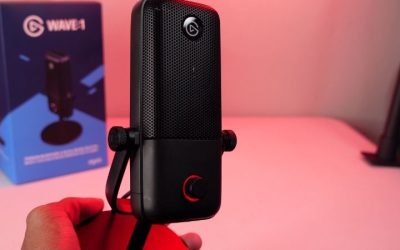
The Wave Neo is a cardioid USB condenser mic with a mount, desktop base and height riser. Elgato’s user manual details an included nylon-braided USB-C-to-USB-A cable, headphone output, tap-to-mute LED and an optional Wave Link application; the hardware works without mandatory software installation in a standard supported configuration. This is a practical choice for a student who sometimes uses a laptop alone and sometimes attaches an external monitor and keyboard.
The riser is not decoration. Moving a mic closer to the mouth can increase the ratio of speech to background noise before aggressive software filtering. Assemble the base and riser with the supplied screws, attach the mic mount, connect the cable to a working computer data port, and select Wave Neo as the audio input in Windows or macOS. Elgato’s instructions also explain that a compatible boom arm can replace the desk mount when you return to a permanent setup.
What to watch: a laptop with only USB-C ports needs a supported data-rated USB-C connection or adapter if the box ships with the listed USB-C-to-A cable. Check current package contents before travel. The B&H selected product page showed $89.99 and in stock while another same-SKU endpoint showed a $64.99 promotion. This is one Wave Neo microphone with conflicting offer snapshots, not two different products.
RØDE XCM-50: better for a streamer who packs a deliberate kit
RØDE positions the XCM-50 as a compact USB condenser gaming and streaming mic with a cardioid pattern and headphone listening. Sweetwater showed the exact XCM50 item at $109 and in stock. The manufacturer describes a swing mount and included tabletop tripod, which means the initial package is a practical computer microphone setup rather than a bare on-camera capsule. Digital processing and routing benefits may depend on installing and configuring the relevant RØDE software and operating system.
Carry the microphone and tripod in a padded compartment and keep its USB lead with the mount. On arrival, unfold the base on a solid part of the desk, keep the microphone away from the laptop’s exhaust vent and use its monitoring path to establish gain before starting a stream. If your hotel desk is very shallow, the tripod may occupy more of the limited keyboard area than the Seiren V3 Mini. A larger body can also be more awkward for a commuter who wants a mic that fits in the same sleeve as a laptop charger.
What to watch: the XCM-50’s software processing is not a reason to promise that keyboard noise, a noisy roommate or fan hum will vanish. If you will only use standard Discord voice chat, judge the complete packed kit and ease of reassembly rather than advanced audio software features you may never configure.
Samson Satellite: the foldaway stand alternative
Samson’s Satellite uses built-in folding legs rather than a loose detached desktop tripod. Its manufacturer lists selectable cardioid, bidirectional and omnidirectional patterns, a headphone listening jack, USB digital connection and included travel accessories; B&H’s exact SASAT page showed a $29.99 sale and in-stock status. Fold-away legs are useful when you move regularly between a dorm desk, shared living-room table and a family member’s spare laptop.
The pattern switch is an advantage only when used intentionally. For one person gaming, begin with cardioid aimed at your mouth. Bidirectional can capture a second player across a table, and omnidirectional can capture more of the room. Neither is the sensible default for someone trying to keep laptop fan and roommate conversations out of game chat. The hardware is not a wireless microphone and does not eliminate the need for a data connection to the laptop.
What to watch: verify which USB connector and cable set is included in the actual retail revision. Samson’s current specifications describe USB-C and various package cables; do not assume the box you receive matches every older catalog photo. Check the folding-leg footprint when fully deployed, because small storage size does not guarantee a small working footprint.
Choose the right travel kit, not only the microphone body
A weekend gaming kit should have one microphone, an appropriate data-rated USB cable, the supplied support or a compatible stable mount, headphones for troubleshooting and a pouch that keeps the grille from rubbing against a charger plug. A USB-A versus USB-C mismatch is a particularly common failure on thin laptops. Check the laptop’s actual ports, not only whether both devices are described as “USB-C.” A USB-C connector on a microphone may be paired with a USB-A cable at the computer end.
A second mistake is buying a camera shotgun mic marketed as portable and assuming it is ready for a gaming laptop. For example, RØDE’s VideoMic GO II can work via the right USB data cable and mount, but a camera-centric base package may not provide the desktop support or compatible computer cable required for a complete gaming-laptop setup. The microphone-only list price must not be treated as the price of a working desk kit. The four compared options were selected because they have a tabletop support method in the identified package.
Setup guide for Windows gaming and Discord
- Assemble the stand first. Place the mic on a stable side of the desk and make sure it cannot fall into the laptop. Use a riser when the microphone would otherwise point into keyboard switches rather than at your mouth.
- Connect a data-capable cable. Plug the microphone into a known-working laptop data port. Avoid charge-only cables and test a direct port before troubleshooting a bus-powered hub. Inspect the device if no microphone appears.
- Choose the recording input. On Windows 11, open Settings > System > Sound > Input and select the connected USB mic. On a Mac, open System Settings > Sound > Input. Speak normally and confirm that the selected device’s meter changes while the built-in laptop mic is not used inadvertently.
- Select it in the communication app. In Discord open User Settings > Voice & Video, pick the same input and run a microphone check. If you stream through OBS, assign the intended microphone under Settings > Audio, or add one Audio Input Capture source rather than duplicating both methods.
- Test the worst travel conditions. Start the laptop cooling fan by playing a game, type while speaking, and make a short recording with your usual headset on. Moving the microphone closer and lower-gaining the input after repositioning can help; gain reduction alone does not change the voice-to-room sound ratio.
- Pack deliberately. Disconnect the cable without pulling the mic socket, fold the stand according to the manufacturer’s directions, store the mic away from hard adapters and repeat the input device check at your next workstation.
What to avoid when comparing portable microphones
Microphone weight alone can be misleading. A 200 g mic with a heavy detached stand and metal counterweight may be less convenient to carry than a 300 g device with fold-out legs. Conversely, a folding mic whose legs extend across the keyboard can be inconvenient on a 60 cm-wide desk. Check the packed versus deployed layout, not just product photography.
Do not use USB microphone volume controls as a substitute for actual headphone monitoring. Software input meters show clipping but not every defect in the monitor path. If a microphone provides a 3.5 mm headphone output, check how its direct-monitor mix works; if it does not, use a local test capture in Discord or OBS. Avoid enabling several simultaneous noise-removal filters without listening for consonant clipping and artificial pumping.
Frequently asked questions
Is a condenser USB mic too sensitive for a gaming laptop fan?
Not by definition. All four are USB condenser designs, and the practical result depends heavily on placement, polar pattern, signal gain and how loudly the laptop runs. The mic near your mouth and away from the exhaust is usually more useful than a blanket claim that a dynamic microphone is automatically required.
Can I use the Elgato Wave Neo without Wave Link software?
Elgato documents plug-and-play operation without mandatory driver/software setup for its core microphone function. Wave Link is an optional path for more sophisticated routing and processing, subject to current OS compatibility.
Is the Samson Satellite a stereo microphone for voice chat?
Samson documents multiple pickup patterns, but a game or chat app can still consume a mono microphone input. Do not infer that choosing bidirectional or omnidirectional makes a voice chat spatial. Use cardioid for a single gamer when room sound is unwanted.
What if my laptop has only USB-C ports?
Check the exact retail cable and use a data-capable USB-C connection or properly rated adapter. Do not assume the supplied USB-C microphone cable terminates in USB-C at both ends. Test the cable before travel.
Does a compact mic automatically beat a built-in laptop microphone?
No universal superiority is established. A dedicated mic lets you position the capsule and monitor it more deliberately, which can improve a real setup, but outcomes depend on noise sources and app configuration. Test your own recorded speech before treating a purchase as necessary.
How we selected these portable microphones
We checked real U.S. seller listings on October 29, 2026, emphasized complete tabletop support, differentiated product models from different colors and seller pages, and cross-checked connection and supplied accessories against maker documentation from Razer, Elgato, RØDE and Samson. No GeekGamingTricks first-party voice test, fan-noise recording, latency comparison or measurement of the full packed kit was available. Recommendations are based on documented fit for different laptop travel routines and explicit trade-offs.
Portable laptop mic: unpack the whole setup
A microphone that fits into a backpack is not necessarily ready for a library desk. Account for the included stand, cable length, laptop USB ports, privacy mute and how a mic can be positioned off-axis from a noisy fan. A short desk stand may put the capsule directly beside the keyboard; an inexpensive folding arm or a compatible small tripod can change the actual performance more than capsule marketing.
Test a short local voice recording while charging the laptop, then unplug AC power and repeat. Listen for electrical interference, fan changes and gain shifts. Verify whether the selected device supplies a USB-C cable or requires an adapter, and inspect seller return rules for a travel kit rather than relying on a category-page stock badge.
Packing and routing audit: choose a microphone you can actually use away from home
The Razer Seiren V3 Mini has a top mute sensor, status light and USB-C connector according to the manufacturer’s July 2026 support page. Its supercardioid capsule is still sensitive to placement: a tiny mic placed behind a noisy laptop keyboard may give the other caller more mechanical noise than a slightly larger microphone set near your mouth. The relevant comparison is not only the diameter of each product. It is the packed size of the microphone, base, windscreen and data cable, plus the desk surface available on arrival.
For a one-cable dorm setup, test the microphone on battery power and while charging the laptop. Select the external USB microphone in Windows Sound input and in Discord or the recording app; an active laptop array microphone can otherwise make a new purchase appear ineffective. Samson explicitly lists three patterns on the Satellite: cardioid, bidirectional and omnidirectional. A solo gamer should start with cardioid, then inspect the pickup position instead of assuming the other patterns reject keyboard noise. The Satellite’s foldout design saves a loose base, but its full 8.6-inch length can be harder to fit in a shallow laptop sleeve than a shorter body.
Budget for the packed configuration rather than the display unit. If the Wave Neo riser and cable cannot fit, the Seiren V3 Mini may be the better day-to-day carry. If local headphone monitoring matters more than volume, compare Wave Neo and Satellite features before accepting the smallest enclosure. Do not infer hardware robustness or background rejection from price: no standardized drop, off-axis keyboard or travel-wear test is presented here.
Buyer-specific decision matrix
| Buyer situation | Recommended action | Must-verify requirement |
|---|---|---|
| Shared dorm desk, little bag space | Seiren V3 Mini, if its short stand places the grille close enough | Try a 20-second voice test with your hands on the keyboard |
| Headphones plugged into the mic for self-monitoring | Wave Neo or Satellite, after checking the model-specific jack | Verify that monitoring is direct and the OS still selects the mic |
| Streamer who carries a deliberate multi-piece kit | RØDE XCM-50 with its complete tripod and proper data cable | List every piece that must return to the bag before buying |
Verification update (October 30, 2026): Maker and independently published source material used for the model-specific distinctions above is recorded with exact URLs and claim boundaries in the revised Evidence Log. This check does not certify live item-level US inventory or a buyer-specific ZIP checkout.
Independent voice tests change the portable-mic ranking
A smaller microphone is not automatically a better mobile voice setup. Tom’s Hardware tested the Elgato Wave Neo and found clear, warm vocals with straightforward USB setup, but also a touch-mute control that was too sensitive and a stand that still felt wobbly. The manufacturer specifies that the Wave Neo weighs about 520 g with the riser or 450 g without it; the full stand is 282 mm high with the riser and 182 mm without. For frequent backpack use, measure the bag compartment as well as the desk footprint, and do not call it a featherweight microphone merely because the capsule is compact.
Elgato’s U.S. quick-start guide says the 3.5 mm jack lets users monitor their computer output, and identifies side-address capture at roughly 3–5 inches from the mic. This is not a promise that connecting any headset will automatically create a latency-free, independently mixed microphone monitor. Test what the connected PC actually sends to the jack. Wave Neo can work without Wave Link, but advanced software routing still depends on OS and setup.
Tom’s Hardware’s separate RØDE XCM-50 review praised natural voice capture and the integral pop filter, while describing occasional failures to detect the microphone over some USB configurations. That is particularly relevant when a gaming laptop has only one shared USB hub: test with the actual hub, charger, webcam, and controller attached before a trip. The reviewer’s experience is not a measured failure rate for all XCM-50 units.
| Travel decision | Evidence-supported pick | What still needs a personal check |
|---|---|---|
| Lightest desk clutter | Razer Seiren V3 Mini; USB-C mic with included compact support and capacitive mute | Keyboard distance, laptop fan noise, actual cable/port, no assumption of a dedicated monitor jack |
| Convenient headphone output | Elgato Wave Neo; 3.5 mm computer-output monitoring and detachable riser | Sensitivity of touch mute; weight and riser fit inside bag |
| Streamer carrying a dedicated USB kit | RØDE XCM-50; independently reviewed vocal capture | USB hub stability and whether the stand makes the travel bag bulky |
| Foldaway base and multiple modes | Samson Satellite; foldable legs, cardioid/bidirectional/omni modes, headphone jack | Switch to cardioid for solo Discord; record laptop fan and room echo before committing |
The five-minute laptop-hotel-room microphone acceptance test
- Set the microphone at mouth height, point the active side correctly and record ten seconds of speech while the laptop fan is idle.
- Launch a game or stress the laptop enough to make the cooling fan audible, then record the same sentence at unchanged input gain.
- Open Discord’s input-device menu and verify the microphone is still selected after plugging in a controller or USB dock.
- Use the headset output you will actually travel with; verify you do not hear a doubled echo from simultaneous hardware/software monitoring.
- Pack the stand, correct cable and any adapter into the same pouch; if a part is missing the microphone is not yet travel-ready.
These are buyer-run verification steps, not testing performed by GeekGamingTricks. The original October 29 U.S. prices remain historical snapshots until the exact selected variant is checked again at the buyer’s ZIP code.
Final thoughts
For the smallest straightforward gaming desk mic, begin with Razer Seiren V3 Mini. Choose Elgato Wave Neo when the included riser and headphone monitor improve your setup. RØDE XCM-50 makes sense when you carry a deliberate streamer kit, while Samson Satellite is worth a look for a fold-out stand and flexible capture patterns. Before purchasing, place your laptop and charger on the target desk, check the actual USB port and verify the new in-stock seller’s final price. A microphone you can reliably position and connect is a better travel choice than one chosen solely from a catalog’s “compact” badge.