Key takeaways
- Identify exact model revision and whether the microphone is new, certified open box, bundle or a different color of the same model.
- Recheck selected U.S. seller product-page price and stock today; shipping to a specific ZIP, taxes, promotions and order limits are not guaranteed by public listings.
- Budget for all cable and mounting hardware rather than treating an XLR-only microphone sticker price as a complete PC setup.
- Distinguish USB data and digital effects from passive analog XLR. Do not assume one model’s buttons or software features function identically through both.
- Record voice during the loudest real-world condition—clicking keys, running fans, game audio or a second person talking—before turning on processing.
- Choose a sensible gain and mouth distance and avoid an arm that blocks your view or transmits desk vibrations.
- Do not infer proprietary Discord/game audio routing, console USB support, phantom-power needs or software compatibility from a generic “gaming” label.
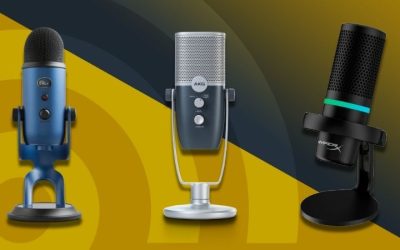
If you are comparing best USB mics with hardware mute, begin with the problem in your actual gaming setup rather than a promise of perfect background-noise removal. Hardware mute can mean a latching microphone switch, a touch-sensitive sensor or a digital mute control on the device. The location and the audio path matter more than a marketplace listing that simply says “mute.” The U.S. prices and public seller stock signals below were reviewed on October 29, 2026; they are not a guarantee that a product will ship to your ZIP code. Geek Gaming Tricks did not physically record or benchmark these microphones.
USB microphones with hardware mute: physical switches and touch controls
Not every microphone with a glowing mute icon behaves the same way. The Samson Q2U uses a physical on/off switch affecting its outputs; AT2040USB and Shure MV7+ expose their own hardware-surface mute methods, and the remaining shortlisted devices have distinct control layouts. A tap-sensitive surface may be convenient during streaming but should not be mistaken for a mechanical disconnect or proof that an application no longer monitors the audio device. If privacy during a shared call matters, check the exact mute state in the operating system and in Discord or OBS. Put the hardware control within easy reach without creating desk vibration when you use it.
Best physical switch for mixed USB/XLR use: Samson Q2U (SAQ2U). Its manufacturer explicitly says the on/off switch acts on both the USB and XLR audio outputs.
Best simple USB dynamic mute: Audio-Technica AT2040USB. The capacitive button has a clear mute indicator and the microphone is suited to close speech.
Best premium digital control: Shure MV7+ Black (MV7+-K). The touch panel and MOTIV settings are helpful during streams, but do not assume they silence analog XLR.
Best budget compact tap control: Razer Seiren V3 Mini Black (RZ19-05050100-R3U1). It offers a top sensor at a comparatively low price with an easy-to-see LED, though it is a sensitive condenser on a small stand.
Comparison: real U.S. microphone offers
| Model and use | Verified hardware/connection | Selected U.S. seller price, Oct. 29, 2026 | Observed stock | Important drawback |
|---|---|---|---|---|
| Samson Q2U (SAQ2U) | Cardioid dynamic; USB and XLR; physical on/off; complete starter kit | $79.99 — B&H Photo | In stock | Verify current USB port revision and desktop-stand placement |
| Audio-Technica AT2040USB | Hypercardioid dynamic; USB-C, low-cut, soft-touch mute, headphone monitor | $159.00 — Sweetwater | In stock | Rear lobe remains audible; requires suitable stand/arm |
| Shure MV7+ Black (MV7+-K) | Cardioid dynamic; USB-C/XLR; USB digital denoiser and touch mute | $299.00 — Sweetwater | In stock | USB controls do not automatically alter passive XLR |
| HyperX QuadCast 2 Black (872V1AA) | USB-C condenser; top tap-to-mute; four pickup patterns; monitoring | $119.99 — HyperX US | In stock | Cardioid setting and placement essential; condenser is not noise-proof |
| Razer Seiren V3 Mini Black (RZ19-05050100-R3U1) | USB-C supercardioid condenser; top tap-to-mute; status indicator | $49.99 — Best Buy | Add to cart (selected item) | No XLR path; small stand may receive keyboard vibrations |
| Elgato Wave:3 MK.2 | USB condenser; top capacitive mute; Wave FX DSP, auto gain | $169.99 — Elgato US | Add to cart; shipping ETA stale | Do not transfer original Wave:3 settings to MK.2; old ETA not a promise |
| MAONO PD300X | Dynamic USB-C/XLR; on-device mute button/smart knob in USB mode | $119.99 — MAONO US | Add to cart; stock quantity unclear | Maker says controls and LEDs INACTIVE in analog XLR mode |
Detailed recommendations and buying trade-offs
Samson Q2U (SAQ2U): why it belongs here
For the specific requirement of a dependable on-device switch, Samson Q2U earns priority because the manufacturer explicitly states that its on/off control affects both USB and XLR. It is not merely a software icon.
Its latching switch stays in its position until changed, unlike hold-to-talk. The included basic stand, clip and cables also make it an unusually complete $79.99 starter setup; verify the current USB connector revision.
For reliable on-air control, test Samson Q2U (SAQ2U) with the target Windows or macOS input as well as the specific OBS or chat capture device. A physical indicator and the software input meter can disagree if the application uses a different audio source.
Audio-Technica AT2040USB: why it belongs here
Audio-Technica AT2040USB has a capacitive mute button with a visible LED state and a direct USB-C recording path. Its dynamic capsule and headphone monitor are convenient for a single-PC gaming desk.
Its mute is a USB electronics function, not proof of a physical XLR cut-off: this microphone has no XLR output. A stable arm matters because its metal body is substantial, and on-desk tapping can enter the stand.
For reliable on-air control, test Audio-Technica AT2040USB with the target Windows or macOS input as well as the specific OBS or chat capture device. A physical indicator and the software input meter can disagree if the application uses a different audio source.
Shure MV7+ Black (MV7+-K): why it belongs here
Shure MV7+ offers digital touch mute with MOTIV Mix integration and an LED strip. A streamer can make mute state obvious and tune digital audio without routing every gesture through Discord.
The control should be tested on the intended path. The available manufacturer guidance supports USB digital behavior but does not establish that touching the sensor cuts a passive XLR input. For XLR live mute, use the mixer/interface control if necessary.
For reliable on-air control, test Shure MV7+ Black (MV7+-K) with the target Windows or macOS input as well as the specific OBS or chat capture device. A physical indicator and the software input meter can disagree if the application uses a different audio source.
HyperX QuadCast 2 Black (872V1AA): why it belongs here
HyperX QuadCast 2 Black is a distinct condenser alternative with a top tap-to-mute sensor, onboard dial, four selectable patterns and an included stand/shock mount. The maker’s US store displayed the selected black SKU in stock at $119.99.
Set cardioid for one gamer; switching to omnidirectional or stereo deliberately changes what the room hears. A sensitive condenser on the desk may pick up more typing, but this article ranks mute convenience separately from room-noise rejection.
For reliable on-air control, test HyperX QuadCast 2 Black (872V1AA) with the target Windows or macOS input as well as the specific OBS or chat capture device. A physical indicator and the software input meter can disagree if the application uses a different audio source.
Razer Seiren V3 Mini Black (RZ19-05050100-R3U1): why it belongs here
The Razer Seiren V3 Mini has an easily reached touch sensor and status indicator in a small desk package, at a Best Buy Add to cart offer of $49.99. Official Razer support identifies its model family as RZ19-0505.
Its supercardioid condenser element is not a noise-elimination guarantee, and the included desk base can transmit bumps. No XLR backup or built-in headphone monitoring should be imagined from its small size.
For reliable on-air control, test Razer Seiren V3 Mini Black (RZ19-05050100-R3U1) with the target Windows or macOS input as well as the specific OBS or chat capture device. A physical indicator and the software input meter can disagree if the application uses a different audio source.
Elgato Wave:3 MK.2: why it belongs here
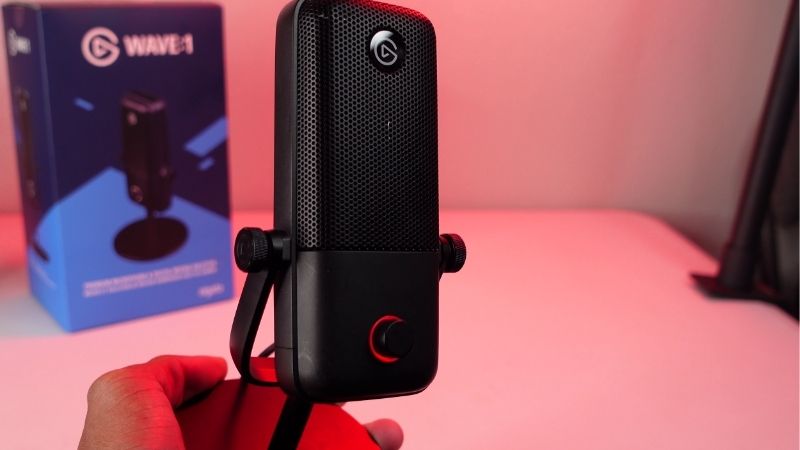
Elgato Wave:3 MK.2 offers a top touch-mute control, Wave FX DSP and a multifunction dial. Elgato’s maker product page lists $169.99 with Add to cart, although displayed historical delivery dates cannot substantiate current ZIP fulfillment.
This is the MK.2 hardware, not the earlier Wave:3 generation. Test its actual control, status ring and host firmware before using it for mission-critical on-air muting. Treat stock as cart-visible, not confirmed available quantity.
For reliable on-air control, test Elgato Wave:3 MK.2 with the target Windows or macOS input as well as the specific OBS or chat capture device. A physical indicator and the software input meter can disagree if the application uses a different audio source.
MAONO PD300X: why it belongs here
MAONO PD300X is another hybrid dynamic mic with an onboard mute control and USB software workflow at a maker-listed $119.99 Add to cart. Its chosen value is the ability to route USB now and XLR later.
The limitation is unusually important here: MAONO’s own FAQ says the buttons and indicator are inactive when using analog XLR. This means a feature that qualifies it for a USB mute roundup does not transfer to XLR.
For reliable on-air control, test MAONO PD300X with the target Windows or macOS input as well as the specific OBS or chat capture device. A physical indicator and the software input meter can disagree if the application uses a different audio source.
What “hardware mute” means on a USB microphone
A true physical or on-device control lets you stop the microphone path without hunting for a Discord or Windows button. That does not always mean a mechanical analog cut-off. Samson’s Q2U has a latching on/off switch controlling both its USB and analog XLR output. The AT2040USB, HyperX QuadCast 2 and Razer Seiren V3 Mini use touch-style mute input that depends on the active USB electronics. A digital touch panel may update the mic’s LED while the operating system still displays its own mute state separately. To verify, perform a recording test of the exact output you use. A mute button is also not equivalent to a momentary push-to-talk switch that transmits only while held.
Button type, position and accidental activation
A top-of-body tap target is fast to reach but may be struck while adjusting a stand or moving a pop filter. A side touch strip can be more protected from overhead collisions but sometimes benefits from a software lock setting. A mechanical switch is tactile and does not depend on the same gesture detection as a touch sensor. Before buying, check whether the selected model gives obvious visual feedback and whether the LED can be distracting on a dark desk. The practical test is not how luxurious the interface looks: it is whether a viewer can hear any sound after you activate the control in the actual application.
The important analog-versus-digital exception
Hybrid USB/XLR models have different signal paths. Shure documents USB-side MOTIV processing, and MAONO’s PD300X FAQ explicitly says its knobs and LEDs are disabled in XLR mode. A generic claim such as “the mic has a mute button” is therefore insufficient for streaming from an XLR interface. If your microphone feeds a mixer through XLR, test the exact analog output before depending on on-body mute. Conversely, the Samson Q2U maker explicitly specifies that its physical on/off switch controls both outputs. Do not apply that unusual guarantee to every microphone with the same two connectors.
Set up a reliable on-air mute check
Connect the microphone via its specified USB data cable, select the exact microphone input in Windows Settings > System > Sound > Input and in OBS or Discord, and make a short test recording. Speak normally, activate the on-device mute and continue speaking. Watch the app’s input meter and then listen to the playback; neither a red LED nor an icon by itself proves the captured path is silent. If a mic has several firmware modes or a host app, test again after reboot. Keep a secondary application-level mute hotkey available if the physical sensor fails, and do not assume a hardware mute will change every remote software UI at once.
Control convenience versus voice quality
A premium condenser is not automatically more intelligible than a budget dynamic capsule in a reflective or busy room. The HyperX QuadCast 2 offers several pickup patterns, so selecting cardioid before streaming is a meaningful action; omnidirectional mode can invite more room sound. The Seiren V3 Mini uses a supercardioid pattern but remains sensitive to keyboard noise if placed close to the keys. The Shure and Audio-Technica dynamics support close speaking with a directional mic and simple access to mute. Compare the audio that actually reaches your chat and stream, not a general “broadcast quality” badge.
What to spend money on first
If you already have a desktop headset, start by choosing a mic with a clearly documented mute function at the price and geometry you can support. The Samson kit includes a basic stand and cables, while a mic-only model may need a boom or desk stand. Spend extra for software routing only if you will use it; a physical switch can solve the ordinary privacy problem without complex apps. For two-computer routing, USB capture needs deliberate assignment to the game or stream PC—buying a touch-mute mic alone does not create a dual-PC audio mixer.
Buyer checklist before ordering
- Identify exact model revision and whether the microphone is new, certified open box, bundle or a different color of the same model.
- Recheck selected U.S. seller product-page price and stock today; shipping to a specific ZIP, taxes, promotions and order limits are not guaranteed by public listings.
- Budget for all cable and mounting hardware rather than treating an XLR-only microphone sticker price as a complete PC setup.
- Distinguish USB data and digital effects from passive analog XLR. Do not assume one model’s buttons or software features function identically through both.
- Record voice during the loudest real-world condition—clicking keys, running fans, game audio or a second person talking—before turning on processing.
- Choose a sensible gain and mouth distance and avoid an arm that blocks your view or transmits desk vibrations.
- Do not infer proprietary Discord/game audio routing, console USB support, phantom-power needs or software compatibility from a generic “gaming” label.
Frequently asked questions
Does a touch-to-mute sensor count as hardware mute?
It is an on-device control, but usually digital rather than a mechanical interruption of analog output. Verify the actual captured USB feed.
Does the Shure MV7+ mute button silence XLR?
The available evidence supports its USB digital controls; it does not establish that a passive XLR output is cut by the touch surface.
Is the Samson Q2U a push-to-talk microphone?
No. It has a latching on/off switch, not an automatically momentary hold-to-transmit control.
Does the HyperX QuadCast 2 need a software app to mute?
The manufacturer documents an onboard tap-to-mute sensor; the app is used for additional customization, not as the only mute location.
Why does MAONO PD300X lose controls in XLR mode?
MAONO says its USB signal path controls internal electronics, while its analog XLR path uses an external interface, disabling the onboard knobs and LEDs in that mode.
How we selected these microphones
Hardware mute: verify what actually goes silent
A physical-looking touch control is not necessarily a hard disconnect. Test the headset or microphone with its mute engaged while recording in your game or OBS, then watch the input meter and listen to the saved file. Check whether mute affects USB, XLR and monitoring outputs identically on a hybrid microphone; many manufacturer claims describe only one connection mode.
For shared gaming setups, inspect indicator visibility, control placement and accidental activation risk. A front-facing tap pad can be quick but easy to brush; a rear switch may prevent accidental presses but be harder to reach. Treat firmware/software mute mapping separately from a guaranteed hardware-level cut, and do not label a mute button as push-to-talk.
Hardware mute safety check: two outputs may not mute together
Samson explicitly states that the Q2U’s on/off switch controls both USB and XLR outputs. This is an important exception to the common but incorrect assumption that any illuminated mute control on a hybrid USB/XLR microphone also silences the passive analog output. Shure’s older MV7 documentation says its XLR output is not affected by software settings. For the MV7+, the exact analog mute behavior still needs confirmation in the selected signal path rather than borrowing a feature from the older MV7.
A stream operator should test mute as a security behavior, not just a light. Route one short recording through the USB device and another through the XLR interface when both are in use. Toggle the physical on-device control and check the incoming level meter on each channel; do not rely on a mute icon that changes only one app. With a capacitive sensor, also confirm that brushing the stand or adjusting the gain does not accidentally reopen the mic.
If software scenes switch audio input devices during a stream, save an explicit fallback muted scene and verify that newly connected hardware does not become the default live source. The best pick for privacy is the model that actually gates the used signal chain, not the one with the most prominent red LED.
Buyer-specific decision matrix
| Buyer situation | Recommended action | Must-verify requirement |
|---|---|---|
| One microphone routed over both USB and XLR | Q2U only after verifying the exact current hardware revision | Samson says its physical switch acts on both outputs |
| USB-only desk with touch control | AT2040USB or Seiren V3 Mini | Inspect indicator and behavior after reconnecting USB |
| Hybrid XLR/USB stream interface | MV7+ only after a dual-path mute test | Do not assume USB touch mute gates the passive XLR channel |
Verification update (October 30, 2026): Maker and independently published source material used for the model-specific distinctions above is recorded with exact URLs and claim boundaries in the revised Evidence Log. This check does not certify live item-level US inventory or a buyer-specific ZIP checkout.
Final thoughts
Choose the documented control behavior you actually require. The Samson switch is clearly specified for both analog and USB outputs; AT2040USB and QuadCast 2 offer accessible USB touch mute; premium controls only matter if you can verify that your live capture path is the one being muted. Confirm the exact current item page price and availability before you pay.
Test what the mute actually disables before calling it hardware privacy
Samson states that the physical on/off switch on the Q2U controls both USB and XLR output. This is an unusually concrete routing claim, and it must not be transferred to other hybrid microphones. Razer identifies the Seiren V3 Chroma as having a multifunction tap-to-mute sensor; its support page describes long press, double tap and triple tap functions. These inputs are touch gestures, not the same as a latching mechanical audio-path disconnection. A muted LED or on-screen mute icon by itself does not demonstrate that every alternate recording route is silent.
Laptop Mag tested the Seiren V3 Chroma and reported accidental gestures while learning the timing of the touch controls. The relevant buyer trade-off is accidental activation during a stream, not a fictitious measurement that a touch mute leaks audio. A streamer who must protect live meetings should record the mic in a separate app, toggle the mic mute and inspect the resulting audio, then repeat for any second route such as XLR, loopback or a routed virtual input. Where an output or interface is independently live, do not assume a single button controls it.
These checks support choosing a convenient and documented mute control, not claiming an untested hardwired privacy kill switch. Compare the exact SKU, user manual and status indication before paying; software updates or remapping can alter what a multifunction touch gesture does.
Three different mute architectures: an on/off switch is not a touch sensor
The term hardware mute describes the location of a control, not necessarily an electrical disconnect. Samson explicitly says the Q2U on/off switch controls both its USB and XLR audio outputs. That makes it the clearest documented choice in this set for a streamer who sometimes changes from direct USB to an XLR interface.
Razer identifies the Seiren V3 Mini (RZ19-0505) with a touch mute sensor and status indicator; a tap is a device control, not a mechanically locking disconnect. Elgato’s Wave:3 MK.2 quick-start likewise documents touching the top and watching the LED ring change state. Neither indicator alone demonstrates that another input path or an OBS scene has stopped receiving the microphone.
The MAONO PD300X illustrates why dual-output labels can be hazardous: the maker says controls and illuminated functions work in USB mode, while built-in knobs/buttons become inactive when XLR is driving an external interface. Shure’s MV7+ offers touch-panel mute and an app Mute Lock that stops accidental state changes; this is operational convenience, not proof that every possible analog signal is muted.
A source or application can also add its own mute layer. OBS audio-mixer mute, a conferencing application mute, and the mic’s device control can disagree. For private or sensitive conversations, verify the end-to-end recording at the actual destination or unplug/disconnect the signal path; do not rely on icon color alone.
| Exact product | What is documented | Buyer verification |
|---|---|---|
| Samson Q2U | Physical on/off switch | Maker explicitly says USB and XLR both affected |
| Razer Seiren V3 Mini / Elgato Wave:3 MK.2 | Top touch control | Watch device LEDs, then inspect actual captured waveform |
| MAONO PD300X | Built-in controls in USB path | Do not expect button or knob to function on XLR path |
| Shure MV7+ | Touch-panel control plus app Mute Lock | Check selected output and record test to verify silence |
A two-track safety rehearsal: record the selected microphone in Windows or OBS, activate its mute, and observe the recorded waveform—not just the UI meter. If an XLR connection is also present, repeat via that interface. Use a second listening device or private test recording to check the transmitted result. This does not substitute for a manufacturer-certified physical disconnect.
Evidence limitation: no self-conducted device testing or buyer-address checkout.