The best audio mixers for dual PC streaming are not necessarily mixers with two identical computer ports. The RØDECaster Duo and Roland BRIDGE CAST X are the direct dual-USB approaches; Yamaha’s AG08 can incorporate a second gaming PC through analog inputs; and Mackie’s DLZ Creator uses audio-over-network technology to reach a second computer. All four have documented two-computer signal paths and U.S. merchant pages showing stock as of October 29, 2026. Those paths have different complexity, equipment requirements and failure points. Do not buy the Yamaha or Mackie on the assumption that both computers connect through native USB audio ports.
Dual-PC audio mixers: USB routing, independent mixes, and feedback risks
Best overall for two USB-connected computers: RØDECaster Duo. RØDE gives you two USB-C audio interfaces and physical faders in a compact podcast/streaming desk. It is appropriate when a gaming PC and a streaming PC must both have audio paths through the mixer. Its full routing options require reading the maker’s USB and mix-minus guidance; plugging in two cables does not automatically prevent feedback or duplicate voices.
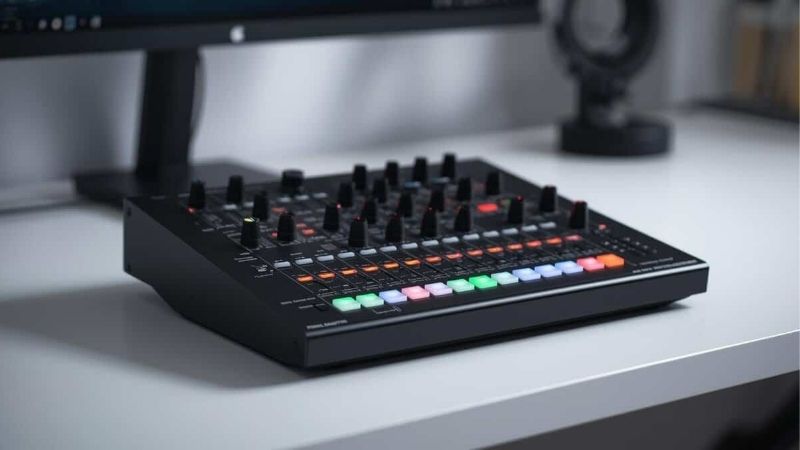
Best for combining dual-PC audio with HDMI video capture: Roland BRIDGE CAST X. The maker publishes a two-computer connection procedure with USB I for the gaming PC, USB II for the streaming PC and HDMI as part of the capture path. Its driver, power and USB/video limits matter. Best for an analog second-PC path: Yamaha AG08. It has one USB computer audio connection plus stereo analog inputs; it is not a dual-host USB mixer. Best if your network/OBS workflow already uses NDI: Mackie DLZ Creator. It can route audio via the LAN, but you must configure the same network and NDI-capable software.
Four dual-PC mixer workflows compared
| Exact device | Second-computer audio route | What makes it useful | Price (U.S. seller, Oct. 29, 2026) | Seller stock status | What to budget/check |
|---|---|---|---|---|---|
| RØDECaster Duo, black | Two maker-documented USB-C interfaces | Compact physical faders, processing and separate USB paths | $499.00 — Sweetwater | In stock | Per-app USB routing and mix-minus; cables and microphone |
| Roland BRIDGE CAST X, BRIDGECSTX | Gaming PC via USB I, streaming PC via USB II; HDMI path | Audio mixer plus compatible video capture routing | $549.99 — B&H selected page; category later showed $469.99 | In stock | Correct dedicated driver, power adapter, HDMI mode and cables |
| Yamaha AG08, black, AG08B | One PC on USB-C, second PC on stereo analog line input | Dedicated faders, multiple stereo sources, DSP | $499.99 — Sweetwater | In stock; listing noted one left | Second PC analog output/cable or interface; avoid ground loops |
| Mackie DLZ Creator, 12-channel | Second PC through NDI on network, with OBS/NDI tools | Networkable audio with nine physical faders and touchscreen | $799.99 — B&H | In stock at B&H; Mackie maker backordered; Sweetwater seller pages conflict | Router/network, Ethernet, software version, NDI monitoring and audio return |
Stock and price precision: these are observed public listings from the named sellers on October 29, 2026, not checkout confirmations for a particular ZIP code. Mackie’s own store was showing backorder while B&H showed its product in stock. Sweetwater’s indexed Mackie page also showed conflicting availability across snapshots. Purchase from the seller and exact condition shown in the comparison, and refresh its page before paying. Roland’s selected B&H product page showed $549.99 while a retailer category showed $469.99; the lower category price is not automatically the current cart price for the exact unit.
What dual-PC routing actually has to accomplish
There are usually at least four independent signals: the gaming PC’s game audio, the local microphone, voice chat from teammates and the program audio going into the streaming PC’s OBS scene. A usable rig lets the streamer monitor all the required signals while excluding loops. Sending the streaming PC’s own program monitor back into the same program feed creates echo. Sending microphone audio to two destinations can create two slightly delayed voices when OBS also captures an unrelated webcam microphone.
Two USB computer connections simplify the physical topology but do not eliminate the need to select the correct host audio devices. Analog line inputs are often easy to troubleshoot but may need a clean output from the gaming PC and attention to hum. Network audio provides flexible placement but adds router, firewall, discovery and plugin dependencies. The term “dual PC mixer” in this guide describes a documented working method rather than an assumption that all four devices expose the same host interfaces.
RØDECaster Duo: direct two-computer audio mixing
The RØDECaster Duo gives a gaming/streaming desk two dedicated USB-C interfaces, two microphone preamps, four physical faders and programmable controls. Sweetwater’s selected new, black unit showed $499 and an in-stock indicator. Its core advantage is the ability to connect two computers to the same integrated audio production unit while retaining hardware controls for a microphone and selected source groups. It is more compact than a wide multichannel console, although it still consumes desk space near the keyboard.
A practical build would connect the microphone to a compatible input, connect gaming PC USB audio to one host connector and streaming PC USB audio to the other, then set routing so the microphone, game and desired voice channels are heard by the stream without feeding the outgoing stream mix back into the game-chat input. Consult RØDE’s routing reference for the specific firmware and USB mix available, and verify which USB device name each PC exposes. Do not assume separate audio channels behave identically in Windows and macOS or that the entire signal path is plug-and-play.
Trade-off: even with two dedicated computer audio interfaces, video capture remains a separate problem. RØDECaster Duo is an audio production mixer; it does not replace an HDMI capture card merely because it has two USB paths. Buyers paying for a dual-PC streaming rig must budget for video capture or a suitable network-video alternative as well.
Roland BRIDGE CAST X: dual PCs with a video-oriented layout
Roland’s official support document explicitly describes two computers: connect the gaming computer to USB I, the streaming computer to USB II and use HDMI for the relevant video signal. Install Roland’s dedicated BRIDGE CAST X driver and software on the supported PC setup, supply the required power and connect the intended gaming monitor/capture hardware before stream configuration. The B&H item BRIDGECSTX was listed as in stock. Its dedicated gaming/streaming mix approach suits a desk where microphone, game and video routing are planned together rather than added as isolated accessories.
Because HDMI versions and format limits matter for PC monitors and capture output, check the exact supported resolution/frame-rate combination on the manufacturer’s current specification, not a generic claim that the unit can capture every high-refresh gaming display. A player using a 240 Hz or variable-refresh monitor must test its full gaming and capture pathway against Roland’s stated pass-through and USB capture conditions. Do not promise that the box can preserve every gaming display feature while recording independently at another frame rate.
Trade-off: this is more complex than a plain two-USB audio desk, and the manufacturer asks for specific connection steps and a driver. The product page price conflicts with a more recent category listing; treat both as snapshots and verify the cart’s selected new condition before ordering.
Yamaha AG08: analog second PC, not dual USB-C hosts
Yamaha’s official AG08 specifications show one USB-C audio host connection, multiple stereo line inputs and controllable streaming destinations. Its analog stereo CH3/4, CH5/6 and TRRS/other physical pathways are not a second independent computer USB audio interface. Sweetwater listed the AG08 Black for $499.99 and in stock when checked. It can suit a creator who already knows how to carry the second PC’s analog playback into the desk and who values physical faders for other sources such as music and voice.
A straightforward plan is to connect the streaming PC to AG08’s USB audio interface, use a line-level audio output from the gaming PC into one of the AG08’s suitable stereo LINE inputs and choose LINE rather than USB for the corresponding channel on the mixer. Yamaha’s FAQ documents how its LINE/USB source switches determine whether the channel listens to the physical line input or the USB host. Then select the AG08 stream output in OBS on the streaming PC. If game voice chat must hear the local mic, plan a deliberate return path to the gaming PC; the analog game-audio lead does not itself provide a microphone return.
Trade-off: analog cables can introduce electrical hum if powered computers have different grounding, and some laptops have no line-level output. An adapter or small audio interface may be required, adding cost. Set line levels carefully; a headphone output at maximum volume is not automatically an appropriate fixed line output. Buy AG08 for the routing/fader flexibility, not because a retail headline implies two native USB hosts.
Mackie DLZ Creator: a real NDI network option
Mackie’s DLZ Creator is a full-size digital creator console with physical faders, a touchscreen and an NDI-capable networking workflow. The manufacturer documents sending and receiving NDI audio through the Ethernet connection, and its support site has an OBS/NDI setup guide. A B&H exact DLZ Creator listing showed a new unit available at $799.99; Mackie’s own store said backordered. Those separate seller statuses should both be preserved rather than pretending the manufacturer itself had stock.
For the two-PC path, put the mixer and relevant streaming computer on the same reliable router/switch network, install the manufacturer-recommended NDI toolchain and choose the intended audio sources in OBS. Mackie’s guide specifically warns that its Ethernet connection is not simply a direct Ethernet cable plugged into a computer; it expects the network infrastructure described in its manual. Verify firewall/discovery, fixed sample-rate settings and monitoring before using this route in a paid stream. A network cable can transport audio, but it cannot substitute for understanding audio direction or the return path.
Trade-off: the network method has additional software and router dependencies and is not appropriate for a buyer who specifically requires two USB-C host ports with no additional setup. It is a strong conditional choice for an existing NDI workflow, not the default purchase for someone who wants a simple two-cable installation.
Build the audio map before connecting anything
- List every origin and destination. Write down gaming PC game audio, gaming voice chat, microphone, stream alert/music audio, headphone monitor and OBS program output. Draw one arrow for each path and label any returns.
- Choose the primary stream host. With Roland or RØDE, assign the streaming computer to the correct manufacturer-designated host port. With Yamaha, use USB for the streaming computer and a suitable analog line input for the gaming machine. With Mackie, use the required Ethernet/NDI plan. Do not follow a generic “USB 1/USB 2” instruction for a product that has only one host.
- Install only the supported vendor driver or software. Follow the latest official manufacturer setup guide for the selected model and operating system. Confirm that both computers enumerate the expected audio devices before adding OBS sources.
- Start with microphone plus game only. In OBS on the streaming PC, add the intended audio input and monitor its meter while speaking. Mute other sources temporarily so you can distinguish duplicate routes. Watch for clipping and double capture before adding alerts or music.
- Set chat routes deliberately. Check game chat transmit device and the stream’s receive/mix path separately. A microphone that reaches OBS does not automatically reach the gaming PC’s Discord client. Prevent OBS monitoring from feeding back into itself.
- Test with headphones and a local recording. Speak, fire a game sound, listen to a teammate and trigger a stream alert while recording a short local clip. Test whether the alert reaches the audience but not the outgoing voice-chat microphone. If echoes appear, mute one return path at a time until the loop disappears.
- Document and save the configuration. Keep a photo of physical cable routing and a screenshot of each app’s selected devices. After a Windows or firmware update, compare device names and channel assignments before starting a live broadcast.
Costs and compatibility traps to check before buying
The mixer purchase is only one part of a dual-PC station. A gaming PC may need an HDMI capture card, a powered hub or dedicated line output. An XLR microphone requires the correct cable and potentially a shock mount. Headphones should connect where the monitor bus you want can be heard. A streamer’s actual desk can become less tidy with a network router, AC adapters, audio cables and a capture card even if the mixer itself appears compact.
A second trap is mixing categories. Elgato Wave XLR Pro can be considered an audio interface with dual-PC routing, but it does not provide the same set of physical faders as the dedicated mixer desks compared here. Likewise, RØDE Streamer X is a capture/audio interface rather than a conventional multi-fader production mixer. These may be better purchases for particular users, but they should not be quietly counted as if every product has identical control hardware.
Software ownership matters as well. The two Roland USB host routes depend on the BRIDGE CAST X model and its driver. Mackie’s NDI workflow depends on a compatible network and app. Yamaha’s USB-C port is one digital interface with multiple channels, not two independently wired hosts. Confirm operating-system and software support from the vendor rather than assuming a PC utility exists for every platform or version.
Frequently asked questions
Can I connect two gaming PCs to the RØDECaster Duo with USB cables?
Its manufacturer and retailer document two USB audio interfaces, making this a sensible direct dual-computer audio choice. You still need to configure the routing and chat returns; two physical USB connections do not guarantee that all audio sources land in the desired mix automatically.
Does the Yamaha AG08 support two USB-connected PCs?
No. The published AG08 interface description identifies one USB connection for computer audio. A second PC can contribute via the appropriate analog LINE input or another separately engineered route, and that path requires the right cables or interface.
Can the Mackie DLZ Creator operate without a router in a two-PC NDI setup?
Follow Mackie’s official network diagram. Its documentation describes connecting to a router or switch network and specifically cautions against treating the Ethernet port as a direct one-cable PC connection. NDI software and app setup are additional requirements.
Is the Roland BRIDGE CAST X also an HDMI capture card?
It integrates HDMI/video-related routing and USB streaming functions subject to manufacturer limitations. Match the exact gaming display resolution, refresh mode and capture output requirements before purchase; do not assume every monitor feature is preserved.
What happens if both PCs hear the microphone twice?
You probably have duplicate software capture or an unwanted return path. In OBS, mute one source at a time while speaking and inspect the meters. Check whether Discord on the gaming PC is listening to the intended hardware mix rather than a monitoring loop. Save the stable route once each signal is counted exactly once.
How we selected these mixers
We required distinct, actual U.S.-listed mixer models with a manufacturer-described method of handling two computers, and excluded non-fader audio interfaces from the four primary comparison rows. Price and stock are tied to selected B&H or Sweetwater seller pages reviewed October 29, 2026; Mackie’s conflicting manufacturer stock and Roland’s two retail prices remain disclosed. We did not carry out head-to-head latency, noise, loopback stability or video-capture tests. The verdicts are use-case assessments derived from documented routing options, not first-person benchmark results.
A two-PC mixer needs a signal-routing map
Draw the gaming PC, streaming PC, headphones, microphone and capture card on paper before purchasing a mixer. For every arrow, specify analog TRS, balanced XLR, USB audio or digital transfer. A device advertising dual USB does not necessarily expose a separate independent microphone feed and mix-minus to both computers. Monitor latency and feedback loops are more important than the number of buttons.
Test routing with each PC muted in turn. Confirm the audience hears only the intended mic and game audio, and that voice chat does not echo from the stream output back into the game PC. Build a fallback path for when one USB host disconnects. Do not treat an NDI/software solution, an analog mixer and a dual-USB interface as plug-compatible replacements.
Four dual-computer signal paths, now verified by port role
RØDECaster Duo is not two identical USB audio ports. RØDE’s product specifications identify USB 1 as the multichannel interface, with an additional chat device, while USB 2 is a stereo secondary interface with mix-minus. RØDE’s Duo recording instructions explicitly state that USB 2 and USB Chat cannot become multitrack outputs. This gives buyers an important routing rule: put the recording/multitrack computer on USB 1 and the other host on USB 2 unless a deliberate workflow calls for the reverse. Both USB interfaces can handle mix-minus, but owners must still confirm exactly what signal returns to each PC.
Roland BRIDGE CAST X is more than an audio mixer, but its HDMI output is bounded. Roland’s dual-PC walkthrough maps game PC to USB I, stream PC to USB II, and HDMI IN 1 from the game machine; the STREAM device is then selected in OBS on the streaming PC. For HDMI capture over USB II, Roland specifies input signals at 1080p/60 Hz or 2160p/60 Hz. A gamer running a different display format must verify supported passthrough and capture behavior before assuming the monitor signal will appear in OBS. Roland also requires its driver/app and appropriate external power; HDMI capture is not implied by an audio-only USB cable.
Yamaha AG08 is a single-USB-host plus analog-source solution. Yamaha U.S. specifications show one USB-C host interface with four stereo USB playback inputs, as well as separate analog line and headset inputs. The channel LINE/USB switches choose an analog or USB input for each stereo strip; they do not turn the mixer into two simultaneous USB audio interfaces. For a second gaming PC, identify the actual analog output and its cable, monitor ground-loop noise, and include that source in the intended streaming bus.
Mackie DLZ Creator’s second-PC path is through NDI, not a second USB host. Mackie documents NDI support and an OBS setup workflow. NDI requires correct LAN discovery and a working plugin/software arrangement: if the second PC cannot see the source in OBS, a microphone connected to the mixer may still work locally while the intended network stream is absent. Do not imply that connecting two USB cables alone will configure a DLZ dual-PC broadcast.
| Mixer | Second computer’s supported route | Acceptance test before paying |
|---|---|---|
| RØDECaster Duo | USB 2 stereo secondary; USB 1 recording/multitrack | Record game audio and chat separately, then confirm no duplicated voice in the final mix |
| Roland BRIDGE CAST X | USB I game / USB II stream, plus supported HDMI input for video | Check actual game resolution/frame rate and OBS STREAM/VIDEO source separately |
| Yamaha AG08 | One USB computer plus analog second-PC input | Confirm analog channel reaches STREAMING OUT and does not loop back into chat |
| Mackie DLZ Creator | USB computer and second route over NDI on network | Confirm OBS plugin and network discovery on both PCs before buying |
Prevent the two most expensive routing mistakes
- Echo loop: send a spoken test to the game-PC voice app while listening to the stream-PC OBS recording. If each spoken word doubles, inspect mix-minus, monitor sends and duplicated capture sources.
- Missing gameplay: record gameplay with microphone muted. If stream PC receives voice but not the game bus, the second PC signal is routed to a monitor-only channel, the HDMI format is incompatible, or the NDI source is not configured.
- Incorrect purchase assumption: decide whether you need dual USB audio, analog second-PC input, NDI, or HDMI capture. A mixer that supports one of these does not automatically support the others.
These checks specify a repeatable commissioning procedure, not an in-house hands-on validation. Previously observed U.S. seller offers remain time-stamped historical snapshots; selected-unit checkout and real buyer-ZIP delivery were not completed.
Final thoughts
Start with RØDECaster Duo when you want a true dual-USB audio-production mixer and a compact fader desk. Pick Roland BRIDGE CAST X when the specific two-computer HDMI/audio workflow is central. Consider Yamaha AG08 if routing a second PC through analog line inputs is acceptable, or Mackie DLZ Creator if your existing OBS setup already uses NDI. Before paying, draw the actual audio map, verify the precise new in-stock seller offer and check the extra cables and software you will need. Choosing the signal route first prevents a costly mixer purchase that does not match your computers.