Our Top Picks
 Alienware Ultrawide Curved Gaming Monitor 38 Inch22.82 x 35.23 x 11.56 inches17.49 poundsCheck on Amazon
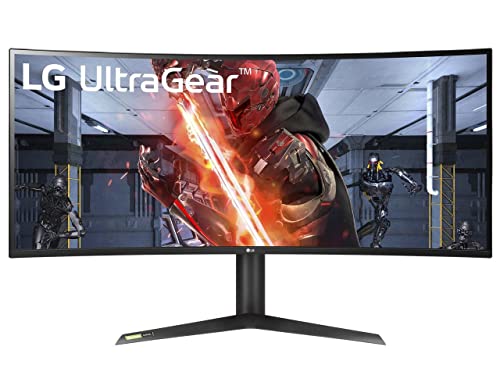 LG 38GL950G-B Ultragear Gaming Monitor 38" 21:9 Curved11.3 x 35.3 x 17.4 inches22.1 poundsCheck on Amazon
As an Amazon Associate we earn from qualifying purchases.
A 38 inch monitor sits in a useful gap that many buyers miss. It is wider and taller than a common 34 inch ultrawide, so games feel more enveloping and a timeline, spreadsheet or chat window has more room to breathe. At the same time, it is easier to drive and easier to fit on a desk than a very large super ultrawide. For a player who also works at the same desk, that balance is the whole appeal.
There is an important naming detail to understand before you compare models. Almost every monitor sold in this class uses a panel with a 37.5 inch viewable diagonal. Brands market that panel size as a 38 inch class display, and Amazon listings title these models as 38 inch monitors. This guide follows the listing size, because that is how the products are sold, and it states the real 37.5 inch diagonal in each product section so there is no confusion about what you are actually getting.
All four monitors in this guide share the same core format: a curved 21:9 screen with 3840 x 1600 resolution, often called QHD+ or WQHD+. That resolution gives you more vertical space than a 3440 x 1440 ultrawide, which helps with text, editing tools and strategy games where the interface takes up the lower part of the screen. The differences that matter are refresh behaviour, sync technology, USB-C power, hub features and stand design.
Disclosure: This article contains affiliate links. If you buy through a link on this page, the site may earn a commission at no extra cost to you.
Quick Picks
- Best for a modern gaming and work desk: LG 38WR85QC-W — The newest design in this group, with a built-in KVM switch, USB-C with power delivery, and both G-SYNC compatibility and FreeSync Premium Pro.
- Best for one-cable laptop docking: LG 38WN95C-W — Thunderbolt connectivity, strong USB-C power delivery and a clean white and silver finish for a desk that switches between a gaming PC and a laptop.
- Best for NVIDIA-focused gaming: Alienware AW3821DW — A hardware G-SYNC Ultimate module, DisplayHDR 600 and Alienware styling, lighting and cable layout aimed at a dedicated gaming setup.
- Best for a classic UltraGear gaming setup: LG 38GL950G-B — An earlier UltraGear flagship with a hardware G-SYNC module, fast Nano IPS response and an overclock path above its base refresh rate on compatible hardware.
1. LG 38WR85QC-W — Best for a Modern Gaming and Work Desk

The LG 38WR85QC-W is the most current take on the 38 inch format in this guide. Its listing describes a 38 inch curved UltraWide monitor, and the panel underneath is the familiar 37.5 inch viewable diagonal used across this class. The curve is 2300R, which is gentle rather than dramatic. It wraps the edges slightly into your peripheral vision without bending straight lines as much as a tighter curve can.
For gaming, it combines a Nano IPS panel at 144Hz and a 1ms grey-to-grey response time in the listing specification with NVIDIA G-SYNC compatibility and AMD FreeSync Premium Pro, plus VESA DisplayHDR 600 for brighter HDR highlights than basic HDR designs.
For work, this model separates itself with its hub and switching features. USB Type-C carries video and data and provides power delivery rated at 90W in the listing, which is enough for many thin laptops under normal office loads. A built-in KVM switch lets a keyboard and mouse connected to the monitor move between two computers, which is valuable if a work laptop and a gaming tower share the same desk. The stand offers tilt, height and swivel adjustment, and the white finish suits a lighter desk setup.
Key specs
- Listed size: 38 inches; actual viewable diagonal: 37.5 inches
- Resolution: 3840 x 1600, 21:9, curved 2300R
- Panel: Nano IPS, 144Hz, 1ms grey-to-grey in listing specification
- Sync: NVIDIA G-SYNC compatible, AMD FreeSync Premium Pro
- HDR: VESA DisplayHDR 600
- Connections: HDMI, DisplayPort, USB Type-C with 90W power delivery in listing, USB hub, built-in KVM
- Stand: tilt, height and swivel
Pros
- Newest feature set in this group, including built-in KVM switching
- USB-C power delivery is strong enough for many work laptops
- Works with variable refresh from both NVIDIA and AMD graphics cards
- DisplayHDR 600 is a step above entry-level HDR labelling
Cons
- No hardware G-SYNC module, which some dedicated NVIDIA users still prefer
- White finish and stand design will not suit every gaming setup
- USB-C power may still be short for a large gaming laptop under heavy load
View the LG 38WR85QC-W on Amazon
2. LG 38WN95C-W — Best for One-Cable Laptop Docking

The LG 38WN95C-W has been a reference point in this size class for several years, and its appeal is easy to explain. The Amazon listing titles it as a 38 inch monitor, built again on a 37.5 inch viewable panel, with a curved Nano IPS screen, 3840 x 1600 resolution and a 144Hz refresh rate. Where it stands out is connectivity for laptop owners, led by Thunderbolt.
Gaming support is still strong. The listing names NVIDIA G-SYNC and AMD FreeSync support, a 1ms response time and the same QHD+ resolution as the other models here. It does not use a hardware G-SYNC module in the way the Alienware and the older UltraGear model in this guide do, so its variable refresh range and behaviour depend on compatibility mode. For most players using a modern graphics card over DisplayPort, that is a normal and workable arrangement.
Key specs
- Listed size: 38 inches; actual viewable diagonal: 37.5 inches
- Resolution: 3840 x 1600, 21:9, curved
- Panel: Nano IPS, 144Hz, 1ms response time in listing specification
- Sync: NVIDIA G-SYNC and AMD FreeSync support named in listing
- HDR: HDR support in listing specification
- Connections: Thunderbolt, HDMI, DisplayPort, USB hub
- Stand: tilt, height and swivel
Pros
- Thunderbolt docking makes one-cable laptop use simple and tidy
- Same large QHD+ canvas and 144Hz refresh as the gaming models here
- Clean office-friendly design in white and silver
- Good fit for a mixed desk with a laptop and a gaming PC
Cons
- Older design than the 38WR85QC-W, with a less complete KVM story
- No hardware G-SYNC module for dedicated NVIDIA setups
- Thunderbolt benefits are wasted if none of your computers use it
View the LG 38WN95C-W on Amazon
3. Alienware AW3821DW — Best for NVIDIA-Focused Gaming
The Alienware AW3821DW is the gaming specialist in this group. Its Amazon listing describes a 38 inch ultrawide curved gaming monitor, and Dell’s own specification for the model gives a 37.5 inch diagonal, in line with every other panel in this guide. The resolution is 3840 x 1600, the curve is 2300R, and the panel is Nano IPS with a 144Hz refresh rate.
What sets the AW3821DW apart is NVIDIA G-SYNC Ultimate, which means a hardware G-SYNC module inside the monitor rather than compatibility mode alone. For an NVIDIA owner who plays a wide range of titles at fluctuating frame rates, that module is the main reason to choose this model over the LG options. It is paired with VESA DisplayHDR 600, a wide colour gamut specification and a 1ms grey-to-grey response time in the extreme mode described in Dell’s specification.
Key specs
- Listed size: 38 inches; actual viewable diagonal: 37.5 inches
- Resolution: 3840 x 1600, 21:9, curved 2300R
- Panel: Nano IPS, 144Hz over DisplayPort, 1ms grey-to-grey in extreme mode in manufacturer specification
- Sync: NVIDIA G-SYNC Ultimate with hardware module
- HDR: VESA DisplayHDR 600
- Connections: DisplayPort 1.4, two HDMI ports, USB 3.2 hub, headphone jack, audio line-out
- Mount and stand: 100 x 100 mm VESA, height, tilt and swivel adjustment
Pros
- Hardware G-SYNC Ultimate module for NVIDIA variable refresh
- Strong gaming design with lighting and good cable management
- Generous USB hub for gaming peripherals
- DisplayHDR 600 and wide colour gamut specification
Cons
- No USB-C docking or laptop charging, unlike the LG models here
- Full refresh rate needs DisplayPort; HDMI is more limited on this generation
- Gaming styling will not blend into a plain office setup
View the Alienware AW3821DW on Amazon
4. LG 38GL950G-B — Best for a Classic UltraGear Gaming Setup
The LG 38GL950G-B is the oldest design in this guide and the model that helped define the category. Its Amazon listing describes a 38 inch UltraGear gaming monitor with a standing screen display size of 38 inches; the underlying panel is, again, a 37.5 inch viewable diagonal. It pairs a curved Nano IPS screen and 3840 x 1600 resolution with a hardware NVIDIA G-SYNC module.
Because this is an earlier generation, its limits are about modern desk features rather than the panel itself. There is no USB-C video and charging connection for a one-cable laptop setup, and its HDR support sits at a lower level than the DisplayHDR 600 models above. Availability also needs care with a model of this age: check the exact listing title, model code and seller on the product page before ordering, and confirm you are looking at the 38GL950G-B rather than a smaller UltraGear with a similar name.
Key specs
- Listed size: 38 inches; actual viewable diagonal: 37.5 inches
- Resolution: 3840 x 1600, 21:9, curved
- Panel: Nano IPS, 144Hz with overclock path in listing specification, 1ms response time
- Sync: NVIDIA G-SYNC with hardware module
- HDR: HDR support in listing specification, below the DisplayHDR 600 models in this guide
- Connections: HDMI, DisplayPort, USB hub
- Design: black UltraGear finish with rear sphere lighting
Pros
- Hardware G-SYNC module, like the Alienware, for NVIDIA setups
- Fast Nano IPS specification that defined this size class
- Conventional black gaming design with ambient rear lighting
- Same QHD+ resolution and vertical space as the newer models
Cons
- No USB-C docking or laptop power delivery
- Older generation, so check the exact listing and seller carefully
- HDR specification is a step below the DisplayHDR 600 picks here
View the LG 38GL950G-B on Amazon
How to Choose the Best 38 Inch Monitor
Start with the real size. Every model here is sold as a 38 inch monitor and built on a 37.5 inch viewable panel. That is normal for this class and not a reason to reject a model, but it is a reason to ignore any listing that mixes in 34 inch, 40 inch or 49 inch screens under a 38 inch search. Those are different formats with different desk footprints and pixel layouts.
Check that your graphics card can drive 3840 x 1600. This resolution has noticeably more pixels than 3440 x 1440. A card that feels comfortable on a 34 inch ultrawide will work harder here, especially at 144Hz. If you play demanding games, plan your settings around the resolution first and treat the top refresh rate as headroom for lighter titles, older games and variable refresh smoothness.
Match the sync technology to your graphics card. The Alienware AW3821DW and LG 38GL950G-B use hardware G-SYNC modules aimed at NVIDIA cards. The LG 38WR85QC-W supports G-SYNC compatibility and FreeSync Premium Pro, which suits a desk that might change graphics card family later. The LG 38WN95C-W sits between those positions, with sync support named in its listing and a stronger focus on docking.
Decide whether USB-C is a core feature or a bonus. If a laptop joins your desk daily, Thunderbolt on the 38WN95C-W or USB-C with 90W power delivery and KVM on the 38WR85QC-W will save real friction every day. If your monitor will only ever connect to a gaming tower, those features matter less and a gaming-focused model makes more sense.
Measure your desk before you order. A 38 inch class ultrawide is roughly 35 inches wide on its stand and needs depth for the curved screen and stand foot. Leave room for speakers or a monitor arm, and check the VESA pattern if you plan to mount the screen. The Alienware lists a 100 x 100 mm pattern; confirm the pattern and arm weight limit for whichever model you choose.
FAQs
Is a 38 inch monitor actually 38 inches?
The monitors in this guide are sold and listed as 38 inch models, and they use panels with a 37.5 inch viewable diagonal. That is the standard panel behind this entire size class, shared by LG and Alienware models alike. The practical experience is the same across all of them, so compare them against each other rather than expecting one brand to have a larger panel.
Is 38 inches better than 34 inches for gaming?
It is larger in both directions, and the 3840 x 1600 resolution adds vertical space that a 34 inch 3440 x 1440 screen does not have. That helps with interfaces, multitasking and immersion. The trade-off is cost and graphics load: your graphics card has more pixels to drive, so frame rates will be lower than on the smaller format at the same settings.
Can a console use a 38 inch ultrawide properly?
Consoles generally output a 16:9 picture, so on a 21:9 ultrawide you will usually see side bars or a stretched image depending on the mode you select. These monitors are designed first for PC use. If console play is your main activity, a 16:9 screen is usually the simpler choice, and the ultrawide should be bought for your PC gaming and work.
Do I need DisplayPort for 144Hz at 3840 x 1600?
In most cases, yes. On this generation of monitors, DisplayPort is the connection that delivers the full resolution and refresh combination for PC gaming. HDMI limits vary by model and are often lower. Check the port specification on the exact listing for the model you choose and use the cable type the manufacturer specifies.
Which 38 inch monitor is best for working from home?
For a laptop-centred desk, the LG 38WN95C-W with Thunderbolt docking and the LG 38WR85QC-W with USB-C power delivery and a built-in KVM are the two natural picks. Between them, choose the 38WR85QC-W if you switch a keyboard and mouse between two computers, and the 38WN95C-W if Thunderbolt docking is your priority.
Conclusion
The 38 inch class is small, and that is what makes choosing manageable. All four monitors here share the same 37.5 inch viewable panel size sold as 38 inches, the same 3840 x 1600 resolution and a 144Hz foundation, so your decision comes down to features around that panel. Pick the LG 38WR85QC-W for the most complete modern desk with KVM and USB-C, the LG 38WN95C-W for Thunderbolt laptop docking, the Alienware AW3821DW for a hardware G-SYNC Ultimate gaming setup, or the LG 38GL950G-B for a classic black UltraGear design with a hardware G-SYNC module. Whichever model you choose, confirm the exact model code, listed size and seller on the Amazon product page before ordering, because similar UltraGear and ultrawide names cover several different screen sizes.
FAQ
Is a 38 inch monitor actually 38 inches?
Is 38 inches better than 34 inches for gaming?
Can a console use a 38 inch ultrawide properly?
Do I need DisplayPort for 144Hz at 3840 x 1600?
Which 38 inch monitor is best for working from home?
More from Amazon
Programs that pair well with the guide above. Offers and eligibility are set by Amazon and may change.
Free shipping on eligible items, Prime Video and more. Eligible new members can start with a free trial.
Start a Prime free trialAd-free music streaming. Eligible new subscribers can start with a free trial.
Try Music Unlimited freeA Prime membership for ages 18-24 with a trial period. Eligibility is set by Amazon.
See Prime for Young AdultsAudiobooks and podcasts to listen to on the go. Eligible new members can start with a free trial.
Try Audible freeAs an Amazon Associate we earn from qualifying purchases.