Our Top Picks
 FLEXISPOT EN2 55"x28" Electric Standing Desk with Clamp55x28"28 x 55 x 28 inches99 poundsCheck on Amazon
 Tribesigns 63 Inch Executive Desk with File CabinetLarge31.5 x 63 x 29.53 inches57.32 poundsCheck on Amazon
Two or three monitors change what a desk must do. A single screen fits almost anywhere, but a second or third screen needs width, depth and a frame that stays steady when arms clamp on and cables run underneath. The wrong desk leaves screens crowded, the keyboard pushed forward and wires tangled behind the legs. The right one gives each monitor a stable place, room for a laptop beside them and a clear path for cables from screen to outlet.
This guide looks at home office desks, not gaming desks, and covers people who work from home with two or three monitors: remote workers, analysts, writers and anyone who keeps documents, calls and spreadsheets open at once. Each desk below was picked from names and specs on its Amazon page, with size, load capacity and cable features checked against the listing.
Quick Picks
As an Amazon Associate we earn from qualifying purchases
| Product | Best for | Key spec from title |
|---|---|---|
| SHW Mission 55-Inch | Two monitors in a spare room | 55-inch rectangular top |
| SHW L-Shape 55×60 | Corner setups with two work zones | L-shaped top with 3 grommets |
| FLEXISPOT 55×24 Electric | Sit-stand work with two monitors | 154-pound capacity, 4 presets |
| FLEXISPOT EN2 55×28 | Three monitors on a seam-free top | Whole-piece 55 by 28-inch top |
| Tribesigns 63-Inch Executive | Three monitors plus file storage | 63-inch L-shaped top, file cabinet |
How to Choose
Measure for Two or Three Monitors First
Two 27-inch monitors side by side need about 48 inches of width, and a third screen or a laptop beside them pushes that past 55 inches. Measure the screens you own, including bezels and stands, before choosing a width. A 55-inch desk fits two large monitors with a laptop; a 60-inch or wider desk fits three. Leave space at each end for speakers or a notebook. Width alone is not enough, since a desk that is wide but shallow forces screens close to your eyes and leaves no room for a keyboard.
Depth Matters as Much as Width
Depth decides how far screens sit from your eyes and whether a monitor arm has room to clamp. A 24-inch deep desk works for two monitors on stands, but arms that swing and tilt need more room behind the screens. A 28-inch or deeper top gives arms space to fold and leaves the keyboard in front without crowding. Deep tops also keep cables behind the screens instead of draped over the front edge. If your monitors are large or you use an arm with a long reach, choose depth first and width second.
Check the Frame Before the Finish
A desk for multiple monitors carries more weight than a writing desk: screens, arms, a laptop, a dock and a tower add up fast. Check the load capacity on the listing and compare it with your gear. Steel frames with crossbars resist wobble better than thin legs, and a thick top resists sag where an arm clamps. L-shaped desks spread load across two wings, but the corner joint is the weak point, so keep heavy gear near the legs. A desk that flexes under load will wobble every time you type.
Plan Cable Routing and Power
Three monitors mean three power cables plus display cables, a dock and chargers. Desks with grommets or a cable tray hide that bundle under the top, while desks without them need clips or a tray added underneath. A clamp-on power strip on the back edge keeps plugs within reach and shortens cable runs. Count the outlets your setup needs before buying, and check that the strip or tray sits where cables naturally fall. Tidy routing is not cosmetic: loose cables snag, pull connectors and make cleaning harder.
The 5 Best Options
SHW Mission 55-Inch Home Office Desk
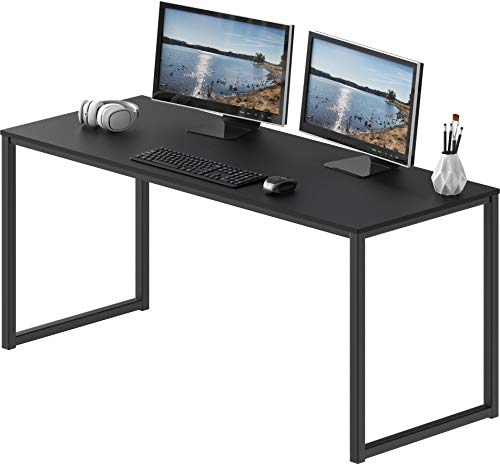
The SHW Mission is a plain rectangular desk that does the basics well. Its 55-inch top leaves room for two monitors side by side with a keyboard in front, and the 24-inch depth keeps screens at a comfortable distance without pushing the keyboard off the front edge. A heavy-duty steel frame holds the top steady, and the 1.5-inch top resists flex when a monitor arm clamps on. Anti-slip pads under the legs keep the desk from sliding on hard floors, and the water-resistant, scratch-resistant surface handles coffee cups and daily use. There is no drawer and no cable grommet, so cable control falls to clips or a tray added underneath.
Specs
- 55 x 24 x 28 inches, rectangular
- 1.5-inch thick engineered wood top
- Alloy steel frame
- Water-resistant and scratch-resistant surface
- Anti-slip pads under each leg
- No drawer; assembly required
Best for: two-monitor setups in a spare room or small office.
Watch out for: no built-in cable grommet, so plan a cable tray or clips for monitor and laptop cords.
ASIN: B089DKV9MQ
SHW L-Shape 55×60 Corner Office Desk
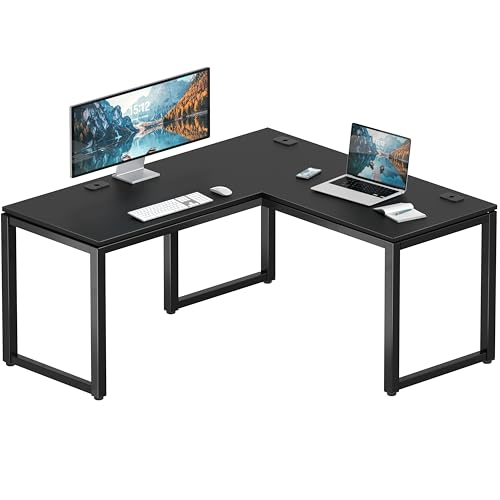
The SHW L-shape turns a corner into a two-zone workspace. One wing holds two monitors while the other takes a laptop, documents or a printer. The 55 by 60-inch top gives more surface than any rectangular desk in this guide, and three built-in grommets route cables down behind each work zone. A commercial-grade steel frame carries the top, and the listing caps the load at 100 pounds, so heavy monitor arms and a tower belong near the legs rather than the middle of a span. The top is 0.75 inches thick, thinner than the Mission, and the desk should be anchored to the wall for stability.
Specs
- 55 x 60 x 28 inches, L-shape
- Three built-in cable grommets
- Commercial-grade alloy steel frame
- 0.75-inch engineered wood top
- 100-pound maximum weight recommendation
- Wall anchoring recommended
Best for: corner offices where two monitors sit on one wing and a laptop or paperwork on the other.
Watch out for: the 100-pound limit and thin top mean heavy arms and towers should sit close to the legs.
ASIN: B0BJNNF81W
FLEXISPOT 55×24 Electric Standing Desk

The FLEXISPOT 55×24 adds height adjustment to a home office desk. The electric frame moves the top from 28.9 to 46.5 inches, so the same desk works for sitting and standing, and four memory presets return it to saved heights with one touch. The 154-pound capacity covers two monitors on arms, a laptop and the usual accessories. The motor runs under 50 decibels, quiet enough for calls while the desk moves. The trade-off is the spliced two-piece desktop, which leaves a seam across the middle, and the 24-inch depth, which is the shallowest in this guide. Measure arm reach before ordering.
Specs
- 55 x 24 inches, height 28.9 to 46.5 inches
- Electric height adjustment with 4 memory presets
- 154-pound load capacity
- Motor under 50 decibels
- Spliced two-piece desktop
- Alloy steel frame
Best for: people who alternate sitting and standing during long workdays.
Watch out for: the spliced top leaves a visible seam, and the 24-inch depth is tight for deep monitor arms.
ASIN: B0CBK11DT9
FLEXISPOT EN2 55×28 Whole-Piece Standing Desk
The EN2 fixes the two weak points of the smaller FLEXISPOT. Its whole-piece desktop measures 55 by 28 inches with no center seam, and the extra four inches of depth give monitor arms room to clamp without crowding the keyboard. The electric frame runs from 28.1 to 45.7 inches with four memory presets, and the 176-pound capacity handles three monitors, a tower and accessories. A clamp-on power strip with three outlets and two USB ports sits on the back edge, so monitors and chargers plug in at the desk. The desk ships in two boxes that may arrive on different days, and assembly may need an electric drill.
Specs
- 55 x 28 inches, whole-piece 1-inch top
- Height range 28.1 to 45.7 inches
- 176-pound load capacity
- Clamp power strip with 3 outlets and 2 USB ports
- 4 memory presets, 6-button controller
- 5-year warranty on frame and motor, 2-year on electronics
Best for: three-monitor setups where depth and a clean, seam-free surface matter.
Watch out for: two-box delivery that may arrive on separate days, and assembly may need a drill.
ASIN: B07Y254SRR
Tribesigns 63-Inch Executive L-Shaped Desk
The Tribesigns executive desk is the largest surface in this guide and the only one with built-in file storage. The 63 by 31.5-inch L-shaped top holds three monitors with room left for writing, and the 31.5-inch depth gives arms and stands a solid base. A lateral file cabinet with two full-extension file drawers and locking doors stores hanging files, while open shelves hold books and office supplies. The E0-grade particle board top sits on metal legs with adjustable foot pads. The listing gives two load figures, 500 pounds in the description and 350 pounds in the details, so treat the lower figure as the limit. Assembly takes two people.
Specs
- 63 x 31.5 x 29.5 inches, L-shape
- 2 file drawers with full-extension slides, locking cabinet
- E0-grade particle board top, metal legs
- 0.75-inch top, reversible layout
- Scratch-resistant finish
- Assembly by two people
Best for: home offices that need three monitors plus file storage in one station.
Watch out for: the listing lists two different load limits, so plan around the lower 350-pound figure.
ASIN: B0CS9KGS3J
Which One Fits Your Situation
You Work With Two Monitors in a Spare Room
The SHW Mission 55-Inch fits this setup. Its rectangular top holds two monitors with a keyboard in front, the steel frame stays steady, and the plain design suits a spare room without dominating it. Add a cable tray underneath, since the desk has no grommet.
You Run Three Monitors and a Laptop
The Tribesigns 63-inch executive desk is the pick here. The L-shaped top gives three monitors a home with space left for a laptop, and the file cabinet stores the paperwork that piles up beside them. The deep top also suits monitor arms.
You Want to Stand Part of the Day
The FLEXISPOT EN2 55×28 suits standing work. Its whole-piece top has no seam, the 28-inch depth fits arms, and four memory presets switch between sitting and standing heights. The clamp power strip keeps monitor plugs at the desk without reaching for a wall outlet.
You Work in a Corner
The SHW L-shape 55×60 turns an unused corner into a two-zone desk, with one wing for monitors and the other for a laptop or printer, and three grommets keep cables tidy in each zone. The wide top still leaves room for a notebook and a coffee cup beside the keyboard.
Common Mistakes
- Buying a desk by width alone and forgetting depth, so monitor arms have nowhere to clamp.
- Loading a thin top with heavy arms in the middle of a span instead of near the legs.
- Skipping cable routing, then living with a tangle of power and display cables behind the desk.
- Choosing a desk that fits two monitors when a third screen or laptop arrives a month later.
- Forgetting to measure the room, the door and the stairs, so a 63-inch desk cannot reach the office.
Frequently Asked Questions
How wide should a desk be for two monitors?
Two 27-inch monitors need about 48 inches of width with stands, and a laptop beside them pushes the need past 55 inches. A 55-inch desk is a safe starting point for two monitors, while three monitors or a laptop alongside them call for 60 inches or more.
Can a 24-inch deep desk hold two monitors?
Yes, if the monitors sit on their stands. Monitor arms that swing, tilt and fold need more room behind the screens, so a 28-inch or deeper top is a safer choice when arms are part of the setup and you want a comfortable typing position.
Do monitor arms work on any desk top?
No. Arms clamp best on tops at least 0.75 inches thick with a solid edge, and the clamp needs a clear edge without a modesty panel or drawer in the way. Check the top thickness and the frame layout on the listing before ordering an arm.
Is an L-shaped desk better than a straight desk for three monitors?
An L-shape gives three monitors more room by splitting them across two wings, and it keeps a laptop or paperwork on the second wing. A straight desk needs 60 inches or more for the same setup, so the L-shape suits corners and rooms where a long straight desk will not fit.
FAQ
How wide should a desk be for two monitors?
Can a 24-inch deep desk hold two monitors?
Do monitor arms work on any desk top?
Is an L-shaped desk better than a straight desk for three monitors?
More from Amazon
Programs that pair well with the guide above. Offers and eligibility are set by Amazon and may change.
Free shipping on eligible items, Prime Video and more. Eligible new members can start with a free trial.
Start a Prime free trialAd-free music streaming. Eligible new subscribers can start with a free trial.
Try Music Unlimited freeA Prime membership for ages 18-24 with a trial period. Eligibility is set by Amazon.
See Prime for Young AdultsAudiobooks and podcasts to listen to on the go. Eligible new members can start with a free trial.
Try Audible freeAs an Amazon Associate we earn from qualifying purchases.